Dash-to-panel: Clock location is inconsistent with Openweather installed
When I have Openweather installed and first change the "Clock location" to Natural the clock is positioned left of the indicators and app icons but to the right of the Openweather icon/text like so:
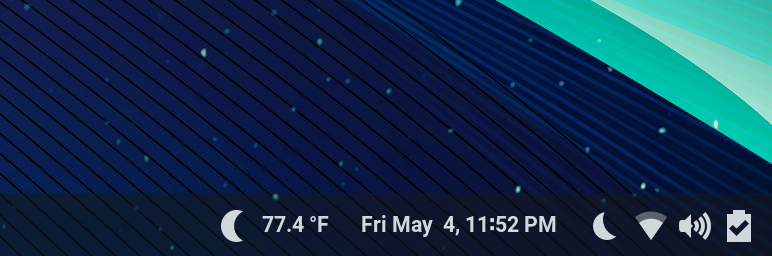
However, after rebooting or logging out and back in the clock shows up to the left of the Openweather icon/text like so:
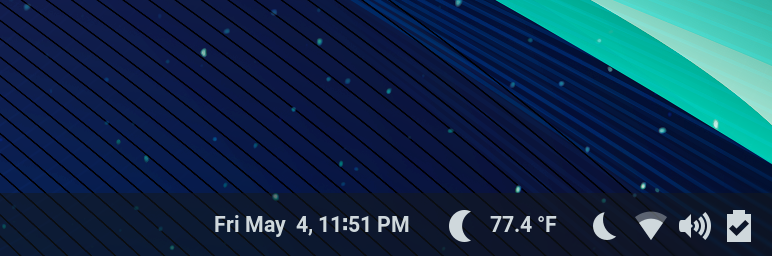
I prefer the first way and would like to see a way to configure the position to always be consistently one way or the other.
 PHLAK
PHLAK
All 17 comments
Hey @PHLAK, could you please try the new clock location setting on branch "natural-clock-location" and see if it corresponds to what you had in mind? Thanks!
 charlesg99
on 20 May 2018
charlesg99
on 20 May 2018
@charlesg99 That seems to work, thanks!
PHLAK
on 22 May 2018
Thanks for the feedback, it is now on master.
charlesg99
on 22 May 2018
I think we need to, at least, improve the labeling with regard to clock position options, as the word "Natural" was intended to indicate that the extension wouldn't position the clock, though I don't think this is very obvious at all and has caused frequent confusion.
Some background -
The clock position is inconsistent with OpenWeather even without dash-to-panel - sometimes the weather appears to the left and other times to the right.
The meaning of the "Natural" clock position was that the position of the clock in between other elements wasn't changed by dash-to-panel. But, dash-to-panel shifts the entire _centerBox container of elements over toward the right, so even with the Natural position, the clock ends up getting shifted (though it's position within _centerBox is left to fate).
But, I've observed this has been a point of confusion frequently, as I don't think anyone really understood the use of the word "Natural", and most users probably don't even think about the concept of the panel elements being grouped into left/center/right containers.
We've also got outstanding request #60 to allow moving the clock back to the center. The implementation isn't too difficult but the wording in the settings becomes very confusing when trying to describe the existing behavior of moving the _centerBox to the right and being able to enable/disable that. Still, I think it is a worthwhile setting as I've always thought it was a good goal to allow the user to get back to stock GNOME through some combo of config settings, allowing them to only use the features of dash-to-panel that they preferred.
So I thought something along the lines of "Shift all center panel elements to the right" toggle, with some sort of option(s) below to define the box it appears in and (optionally) fix the position within that box. But, I'm not sure how to present this in a simple way without forcing an explanation of the inner workings of the gnome panel on casual users.
And, maybe we don't need the Natural setting at all? My fear was that some other extension would fight with dash-to-panel over positioning and Natural would allow the user to relinquish control the that other extension, but I'm not sure this is a realistic concern.
There's also the existing feature for moving the application launchers into the center, and I'm not sure if there's any additional concerns about how these two may interact.
I hope this wall-of-text makes some sort of sense.. Any ideas/thoughts?
 jderose9
on 22 May 2018
jderose9
on 22 May 2018
Hey Jason, thanks for your input. You are right that "natural" doesn't affect the normal clock's position when gnome shell first starts, but in the case that PHLAK mentions (when a user has the clock location set to something other than "natural" and then changes it to "natural"), the clock is simply added back to the centerbox, which causes it to be positioned after previously added status icons. Normally the clock is added and then the status icons, that's why its position wasn't consistent. So, essentially, "natural left" is what "natural" was, except that it consistently puts the clock first in the centerbox.
Another thing is that it is hard to know for sure where the clock would "naturally" end up, since extensions like openweather can specify at which position to insert their status icon... So, depending on which extension the user has installed, the clock location can vary among the status icons and I don't see a way to revert to the clock's intended position if it wasn't in the centerbox initially (aside from restarting gnome shell).
Maybe we could rename the 2 "natural" options to "left of status icons" and "right of status icons"? I personally don't think we should worry too much about other extensions trying to position the clock as well, especially if we provide many options.
What do you think? I'll look at conflicts when the launchers are in the center box as well.
Thanks!
charlesg99
on 22 May 2018
@charlesg99 I'm not sure I understand "left/right of status icons". Are status "icons" different than status "menu" (the other choices in the dropdown)?
jderose9
on 22 May 2018
Sorry I mean the "status area"... this is where the extensions "PanelMenu.Button" (like the openweather one) are added using the "Main.panel.addToStatusArea" function. Thanks
charlesg99
on 22 May 2018
It looks like that function takes left/center/right parameter so I guess they are calling _leftBox,_centerBox,&_rightBox the status areas? That's still fairly confusing compared to the Network/Volume/Power menu button which is referred to as the status menu.
Do you think if we provide a toggle above the clock position that says like "Shift panel's center box to the right?" then it will make sense if the clock position dropdown below has the options "Center box - Left side"/"Center box - Right side" but they aren't actually appearing in the center when the shifting toggle is on? Maybe we could briefly highlight the status area as they change the settings that affect it to help disambiguate what's going on.
Or maybe "Natural" really is the best choice after all :)
jderose9
on 23 May 2018
What if you call the _centerBox the Clock Container in the interface with left / center / right options and have a separate option for Clock Float to set the position of the clock within the container. You could also add some help text (like you do in other options, example below) to these options to explain the difference.

PHLAK
on 23 May 2018
I think I would keep only one dropdown menu with all of the clock's location options. As Jason said, it might be confusing to users to refer to the left/center/right boxes, since the center box ends up on the right side of the panel by default. I would try to give more options based on identifiable panel features (like the status menu). Here are my ideas:
Left of taskbar
Right of taskbar
Left of panel's buttons (current "Natural - left")
Right of panel's buttons (current "Natural - right")
Left of status menu
Right of status menu
Ultimately, I believe that, even though users don't completely understand the nomenclature, they will try all options until they find one that suits their needs :)
Thanks!
charlesg99
on 25 May 2018
The new options have been added to master, please let me know if you think they are adequate. Thanks
charlesg99
on 5 Jun 2018
I have to say, the options available are not intuitive at all. However, like you said, people will just try every option until they get what they want. That being said, I still wish I understood what the options meant by their names.
PHLAK
on 5 Jun 2018
Thanks for the feedback, PHLAK. Can you think of alternative option names? I'm using the "correct" terms as far as gnome-shell goes, simply because I can't think of any other way to refer to these GUI elements. How would you name the "taskbar" (app icons), the "panel buttons" (openweather like buttons) and the "status menu" (icon group containing the power button)?
charlesg99
on 5 Jun 2018
The best I could think of for now:
- Taskbar (app icons)
- Taskbar is okay, maybe "App Taskbar" or even "App Favorites" or "Favorites" to match the "Add to Favorites" phrasing used within Gnome already.
- Pannel Buttons (OpenWeather like buttons)
- This is the most difficult one to find a good name for. I'm not sure what all can go here or what it's actual purpose is. Perhaps just calling it "Extras Panel" or "Plugins Panel" could work.
- Status Menu (icon group w/ power button)
- What about "System Menu" or "System Indicators" or just "Indicators"
These are all just suggestions and I'm not completely sold on any of them in particular but maybe they'll help you come up with something better.
PHLAK
on 5 Jun 2018
Hey PHLAK, I changed the option names again based on your ideas. I kept "taskbar" as I think it fits better in this context since the taskbar is composed of both the favorites and the running applications. Please let me know if the nomenclature makes more sense to you. Thanks
charlesg99
on 8 Jun 2018
Awesome @charlesg99, this is definitely an improvement in my opinion. Thanks for working with me on this.
PHLAK
on 8 Jun 2018
I like it! I was thinking "Taskbar" referred to the entire contents of the panel and "dash" referred to the collection of application launchers, however we use "Taskbar position" to refer to the application launchers in the "Taskbar position" setting so being consistent is a good thing.
I tested this having NATURAL for location-clock in dconf and it falls back to the default without blowing up, so I think we are good with regards to backward-compatibility with that option now removed.
I just now realized that a lot of whitespace exists at the rightside of the app launcher scrollview. Not a biggie but might worth us investigating at a later point.

jderose9
on 8 Jun 2018
Related issues
 ningacoding
·
6Comments
ningacoding
·
6Comments
 Steps65
·
5Comments
Steps65
·
5Comments
 dobkeratops
·
4Comments
dobkeratops
·
4Comments
 RomanShumikhin
·
3Comments
RomanShumikhin
·
3Comments
 BetaConnector
·
5Comments
BetaConnector
·
5Comments
Most helpful comment
Hey PHLAK, I changed the option names again based on your ideas. I kept "taskbar" as I think it fits better in this context since the taskbar is composed of both the favorites and the running applications. Please let me know if the nomenclature makes more sense to you. Thanks