Dash-to-panel: Add Intellihide behavior to panel
https://youtu.be/KBPtrzfvMNY
Compatibility with 'Hide topbar'
 deikatsuo
All 24 comments
I thought that I had tested this and it was working, but I just tried and I guess not. This behavior may make sense to pull in as part of this extension since it will need to account for the bottom positioning of the bar and sync with the preview window state. (I'm updating your title, hope you don't mind)
 jderose9
on 30 Jan 2017
jderose9
on 30 Jan 2017
Is there any ETA on this feature yet? Auto/inteli-hide is the only feature currently missing that I really desire.
 PHLAK
on 11 Apr 2017
PHLAK
on 11 Apr 2017
@PHLAK I'll be working on multi-monitor support next and I don't think anyone else is working on it, so not really... If someone wants to take a crack at it I'll be happy to help get them started.
jderose9
on 11 Apr 2017
@jderose9 Hey. I'll try to take a stab at this. Brilliant extension and this feature would make it infinitely better. But I also have zero experience with GNOME extensions, so don't hold your breath ;)
Edit: I'm not working on this. However, I'd love to see this implemented :)
 adtac
on 14 Apr 2017
adtac
on 14 Apr 2017
This feature would be really really really awesome!
 emielmolenaar
on 14 Sep 2017
emielmolenaar
on 14 Sep 2017
yes! Please add auto hide functionality!
 vivaeltopo
on 14 Sep 2017
vivaeltopo
on 14 Sep 2017
Is it this simple?
I have no experience in writing Gnome extensions, but I write Javascript kind of daily. If the code above should do the trick somehow (I can imagine some tweaks are needed) I am willing to try to fix this in some spare time :smiley:
emielmolenaar
on 15 Sep 2017
@emielmolenaar I think it will be more complicated, but if you already know javascript I think you should give it a shot :)
The extension you linked removes the top bar permanently, while we need to show it again when the user navigates their mouse towards the edge of the screen. The behavior should mostly be in dash-to-dock already, so mostly you will need to show/hide the gnome main panel rather than the dock.
https://github.com/micheleg/dash-to-dock/blob/master/intellihide.js
The main thing I was worried about was possibly having the panel snap close when you navigated into the window preview popup, but I believe this feature was now added to dash-to-dock by @franglais125 so this might be handled already.
The similarly named Hide-Top-Bar also uses the dash-to-dock intellihide code and applies it to the main panel. You can check out that code or maybe just fix whatever bug is occurring in that extension:
https://github.com/mlutfy/hidetopbar
jderose9
on 15 Sep 2017
Thanks for replying, jderose9! Actually, https://github.com/mlutfy/hidetopbar works pretty well. I'll keep it around for a few days, let's see how it holds :smiley:
emielmolenaar
on 18 Sep 2017
Please develop auto-hide in top and in bottom position as native option of Dash to panel, the new users that we lost unity in 17.10 we need this option to have a perfect extension. If you develop you will have more users.
 Nebrit
on 12 Oct 2017
Nebrit
on 12 Oct 2017
That would be great! Currently using HideTopBar for now.
But if i'm using the DTP with the panel at the bottom, the HTB thinks that the panel on top and reveals only when the mouse touches the top edge. Then it requires an enable-disable to work correctly... until the next reboot.
 jasiralavi
on 22 Oct 2017
jasiralavi
on 22 Oct 2017
Definitely would love to see this feature, it would make this pretty much feature complete from my perspective. I too use HideTopBar but it does occasionally think the bar is still stuck to the top of the screen.
 daledavies
on 4 Nov 2017
daledavies
on 4 Nov 2017
I'll give it a shot! Somebody already working on this?
 charlesg99
on 4 Mar 2018
charlesg99
on 4 Mar 2018
I'm looking for some feedback as to which settings would be relevant. Here is what I have working so far:
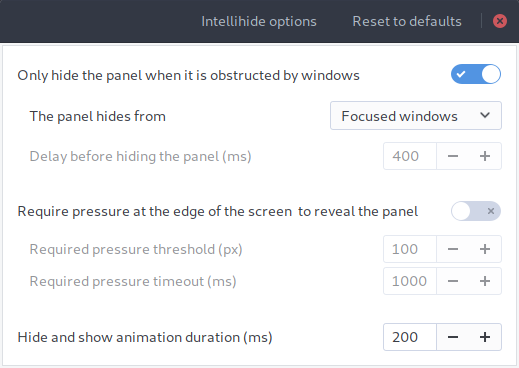
The panel can hide from Focused windows, All windows and Maximised windows.
Any thoughts?
charlesg99
on 9 Mar 2018
That's great :). Here is some feedback, based on the dash-to-dock settings:
- What about full screen apps? I.e. Say I push
F11on Firefox and want to access the panel. - Perhaps an option for pressure to show? I.e. how much do I need to push on the screen border for the panel to show.
 franglais125
on 9 Mar 2018
franglais125
on 9 Mar 2018
Hey @franglais125, thanks for your input. I will add an option to allow the reveal of the panel when apps are full screen, very good idea. As for the pressure to show, I don't understand as I already included some settings for this (my description might need some tweaking). Could you please elaborate on what you would add?
charlesg99
on 9 Mar 2018
Re-salut @charlesg99 ! Sorry for the confusion, I was in fact quite tired when I wrote the last message.
Indeed, you have already included the pressure settings. I can't believe I missed that!
Full-screen is then the only suggestion remaining from my side.
franglais125
on 12 Mar 2018
Round of applause for @charlesg99 ! Seems to be working well for me. If anyone would like to help with testing the latest master, that would be great.
jderose9
on 15 Mar 2018
Awesome work. Did not find any problems with 3.28
vivaeltopo
on 15 Mar 2018
The problem I have with the Hide Top Bar are the following 2:
it makes the peeking window feature practically unusable, since the preview thumbnails disappear as soon as you move on them (i.e. out of the top bar) I cannot find any settings to mitigate that.
it requires to restart the shell after a suspend, because the bar hides itself after a fraction of a second it appeared (i.e. doesn't stay visible)
 ddnexus
on 1 May 2018
ddnexus
on 1 May 2018
@ddnexus This is why the Intellihide feature was developped. It's not released yet, but will soon be.
 SolarLiner
on 2 May 2018
SolarLiner
on 2 May 2018
I didn't know that! (I should have read this thread better). Great! I cannot wait to try it. Is it available in any branch to try?
ddnexus
on 2 May 2018
I believe it is available on the master branch; simply not released to GNOME Shell Extensions.
 nunocastromartins
on 2 May 2018
nunocastromartins
on 2 May 2018
Yeah! After I wrote the post I realized it, and it is installed now It works! Thanks!
ddnexus
on 2 May 2018
Related issues
 ErwinBaeyens
·
5Comments
ErwinBaeyens
·
5Comments
 ktamp
·
5Comments
ktamp
·
5Comments
 Rawleenc
·
6Comments
Rawleenc
·
6Comments
 MicleBrick
·
6Comments
MicleBrick
·
6Comments
 Pointedstick
·
6Comments
Pointedstick
·
6Comments
Most helpful comment
I'm looking for some feedback as to which settings would be relevant. Here is what I have working so far:
The panel can hide from Focused windows, All windows and Maximised windows.
Any thoughts?