Dash-to-panel: Show panel in all monitors
Hi, It would be great if there was a setting to choose whether to show the panel in all monitors. The same setting could also give the option to show the panel in a specific monitor. Right now the panel only appears on the primary monitor.
Thanks.
 el-psycho
All 77 comments
I'm definitely not opposed to having this capability but the implementation isn't trivial. The gnome-shell doesn't support this easily. You can see there is an existing extension, Multi-Monitors Add On, but it clones the contents and all event handlers into a new panel and every possible change that any other extension could make to the main panel has to be predicted. Still, the best route may be to collaborate with them on getting the two extensions to work together.
The easiest work-around is to use Dash-to-Dock and setting the dock on a different monitor than dash-to-panel. That will only give you application access on two monitors, though.
 jderose9
on 17 Jan 2017
jderose9
on 17 Jan 2017
Hi @jderose9, first of all great extension. Just what I was looking for. But like @el-psycho mentioned it multi monitor support would be a dot on the i. Personally I am working as a SW developer and I am more than willing to assist you on this in any way I can. br
 mpbits
on 20 Jan 2017
mpbits
on 20 Jan 2017
@mpbits Contributions would be great, for sure! Pull requests are definitely welcome. My thought for a first step was to first determine why Multi-Monitors Add On is not compatible and see whether it could be resolved by altering either that extension or this one, as they are already a lot further down the path than starting from scratch.
jderose9
on 20 Jan 2017
My personal preference, if I was able to make a wish and have it come true, would be to be able to have the same panel appear in all monitors, and choose which panel displays notifications. All the panels would be the same otherwise.
Thanks for this great extension!
el-psycho
on 22 Jan 2017
@jderose9 I implemented multi-monitor functionality for dash-to-dock, although it isn't merged. You can check it out in case you are interested: https://github.com/franglais125/dash-to-dock/tree/multi_monitor
 franglais125
on 26 Jan 2017
franglais125
on 26 Jan 2017
Another +1 for this as I work on three monitors at work all day.
I can also vouch for the work @franglais125 referenced above. I've been using it for quite some time successfully.
Great extension. Thank you.
 jonnjonzzn
on 27 Jan 2017
jonnjonzzn
on 27 Jan 2017
@franglais125 In dash-to-dock you can instantiate multiple docks, and all the code manipulating the dock is self-contained in the extension. On the other hand, dash-to-panel needs to maintain compatibility with lots of other extensions that are all manipulating the shell-instantied top bar - dumping widgets into it, connecting to events, etc, and all that stuff needs to be cloned and proxied to a new panel (which is I believe what Multi-monitor add-on tries to do).
jderose9
on 27 Jan 2017
@jderose9 Totally understand... I haven't gone through your code in-depth, I suggested that branch just in case.
In dash-to-dock I also had to handle some corner-cases of some instances, so perhaps it can be adapted, although I highly doubt it is as straightforward as the hotkeys thing was.
With the limited reading I did, I guess we would need to instantiate "taskbar" many times? Just being curious!
franglais125
on 27 Jan 2017
@franglais125 "taskbar" is basically the entire inner contents of the dock from dash-to-panel. But here it's only a single widget in the leftBox of the main panel. You could instantiate that multiple times and add it to a fresh empty panel on the secondary monitors but you would end up with the "Show Apps" button and application launchers only - any widgets such as the clock or gno-menu or top icons plus etc would not be duplicated to the secondary monitor.
jderose9
on 28 Jan 2017
@jderose9 I'm really no one to say the implementation of this feature is in fact trivial, that much I understand. But have you looked plain-old window-list by gcampax? Unfortunately I cannot provide a link at the moment - it would seem the extension that comes with Ubuntu Gnome 16.10 is newer than the one in the repository and has a "show-on-all-monitors" option (if you want, I could put it on github and, of course, give all credits).
I'm more of a back-end web dev and don't have any experience with extensions, but the code base seems very compact in comparison with Multi-Monitors and others. Please let me know what you think and if there's anything I could do to help. I really think that multi-monitor support is the only thing that's keeping dash-to-panel from being absolutely perfect.
 mjohnson8165
on 16 Feb 2017
mjohnson8165
on 16 Feb 2017
@jderose9 The "Show Apps" icon and application launchers are the main functionality I would like to see in multi-monitor panels, support for widgets would be a bonus. Would it be possible to introduce the basic functionality you described, as a starting point or even just on its own? I can get similar results using dash to dock or other docks, but the appearance/behaviour isn't consistent, and in the case of additional dock applications its a bit excessive for the basic functionality I desire. Any sort of feature like this in dash to panel would be fantastic.
 Tomha
on 3 Mar 2017
Tomha
on 3 Mar 2017
Any update on this?
 Drakota
on 5 Apr 2017
Drakota
on 5 Apr 2017
I was playing with Multi-Monitor addon and it adds additional panels which I was able to add a new instance of the dash to. So basically as a proof-of-concept things look good. That said, there is a lot of work to do.
Here's the TODO list:
(Minimal work for initial release)
- Pull in/adapt code from Multi-monitor add-on that creates additional topbar panels on each monitor. Probably need to refactor places that access the primary panel directly and tidy a bunch of stuff up.
- Add additional instances of the dash into the new panels.
- Wire up minimal set of applicable config settings (panel height, font sizes, etc) to handle multiple panels.
- Figure out what needs to happen when Isolate Workspaces is on and the secondary monitors are using their own workspace.
- Have "Show Apps" button open apps on monitor it was clicked on (currently always opens to primary monitor).
- Create a config setting to show/hide the panel on secondary monitors.
(Longer term)
- Create new instances of gnome built-in panel buttons if they are enabled. Activities, appMenu, clock, status menu, etc. I was able to add a 2nd clock without issue but adding a 2nd instance of the status menu to a new panel causes an exception.
- Possibly duplicate the workspaces slideout on the overview on additional monitors as Multi-Monitor add-on does. (Multi-monitor add-on is incompatible with workspaces-to-dock so that's an extra consideration here)
I'm sure there will be other issues discovered along the way. I don't have much time to work on this in the near term but I am hoping that if I can get say 1 & 2 completed that someone else would be able to chip in some time on some of the smaller items.
jderose9
on 5 Apr 2017
Id love this feature also 👍
Would love to know if there may be any opportunity in the future for it please
 i286
on 31 Aug 2017
i286
on 31 Aug 2017
I cloud spend some time to start implementing this feature, because I'd love to see the panel on multiple monitors. I have never developed a gnome extension though. @jderose9 can you please provide some information how you develop the extension and how you do debugging?
 smueller18
on 19 Sep 2017
smueller18
on 19 Sep 2017
Need it too :)
 n0v3xx
on 20 Sep 2017
n0v3xx
on 20 Sep 2017
@smueller18 Check out #58 and let me know what questions you still have - I'll be happy to answer. Thank you!
jderose9
on 20 Sep 2017
Ok, thanks for the link. I checked the Looking Glass and the logging, but using only this tools and the missing documentation it's way more difficult than I thought.
smueller18
on 20 Sep 2017
Might I ask if there are any updates happening to this? I am really excited for this feature :+1:
 xF4m3
on 5 Nov 2017
xF4m3
on 5 Nov 2017
+1 for this. I would also love this feature.
 justpie
on 14 Feb 2018
justpie
on 14 Feb 2018
Any updates? I would love to see this feature!
 githubuser441
on 20 Feb 2018
githubuser441
on 20 Feb 2018
I absolutely love this extension but this is a real dealbreaker. Is there atleast a way to hide the icons from applications running on an different screen?
Multi Monitor Panel would be perfect.
 eifelmicha
on 25 Mar 2018
eifelmicha
on 25 Mar 2018
any update?
 JianwenLi-GS
on 4 May 2018
JianwenLi-GS
on 4 May 2018
What is the status of this?
 joca-bt
on 7 May 2018
joca-bt
on 7 May 2018
I guess the current status is this: https://github.com/home-sweet-gnome/dash-to-panel/issues/35#issuecomment-291893729
The best way we (who would love to get this implemented) can help is find somebody who can do the implementation. I'd be willing to donate some euros/dollars if there was a crowdfunding for this feature! :)
 mzeis
on 11 May 2018
mzeis
on 11 May 2018
Nothing new to report, but this is coming. It affects many existing features of the panel though, and may require work with other extension authors to help maintain compatibility, so it's going to be a slow process. Thanks for your patience :)
jderose9
on 12 May 2018
@jderose9 If this is something you can develop in another branch, I'd be happy to help test. Thank you.
 miztroh-zz
on 6 Jun 2018
miztroh-zz
on 6 Jun 2018
Could you use Clutter.Clone perhaps? I.e., clone the panel across monitors, and when the user puts one of them into focus just swap the real panel with the fake one. That would need minimal code.
 zagortenay333
on 7 Jun 2018
zagortenay333
on 7 Jun 2018
Hi,
Couldn't you use the same way Dash to Dock use the multi monitor implementation ?
 nathan30
on 12 Jun 2018
nathan30
on 12 Jun 2018
Would really love for this to get implemented.
 SimonLammer
on 27 Jun 2018
SimonLammer
on 27 Jun 2018
Just to note: not only having easy mouse-access to running applications is important, but also it is important for notifications (as well as clock + runtime-updated tray icons e.g. of messengers + alt-tab dialogue) to popup where user's attention is (at minimum - to be on the cursor where mouse is). I do not mind option "all that on all displays" as a substitute to "follow mouse". As well as being able to stick that to right or left rather than to top/bottom. It all is just a plain usability (in configurations that are just slightly more complex than a single-monitor-single-language-user-case).
All that seems to lay on so on the surface that I'm just so surprised current Gnome3 doesn't support that... (along with other staff like output-sound-to-speakers-and-then-change-volume-having-headset-still-connected in gnome3, and some general things like inability for 10+ years in general Linux to push upstream the ctrl+shift-language-changeshortcut-not-to-interfere-with-ctrl+shift+something-app-shortcuts patch). That is my second attempt to switch from Unity to Gnome3 and I feel it gradually fails again due to above-mentioned reasons.
 rinnnn
on 27 Jul 2018
rinnnn
on 27 Jul 2018
Any updates?
Now,i look at the time must turn my head :joy:
 rockagen
on 31 Jul 2018
rockagen
on 31 Jul 2018
Looking forward to see multi-monitor support! :)
Just started using Gnome after years of using Unity, and I really miss this.
 vooxo
on 29 Aug 2018
vooxo
on 29 Aug 2018
Some apps cannot be dragged and dropped once they have been maximized on secondary monitor. You have to minimize them first (from the primary monitor) and then drag.
Yeah, I am also looking forward for the multi-monitor support! :)
 Ivan-Parushev
on 6 Sep 2018
Ivan-Parushev
on 6 Sep 2018
Very interested in this feature. Let us know what we can do to help! (testing? etc)
 egee-irl
on 22 Sep 2018
egee-irl
on 22 Sep 2018
Thanks for being patient, everyone! @charlesg99 and I have been working on this feature and are excited to share it. Feedback is appreciated.
It is in the branch called feature-multimon
Commands to install it are as follows:
git clone https://github.com/home-sweet-gnome/dash-to-panel.git
cd dash-to-panel
git checkout feature-multimon
make install
Then Alt-F2 -> 'r' to restart GNOME (doesn't work on Wayland) or disable/re-enable the extension to load the changes.
jderose9
on 9 Oct 2018
@jderose9 Cant wait to check it out, I'm so excited that this feature is being worked on!
SimonLammer
on 9 Oct 2018
@jderose9, firstly thank you for this work!
Just installed it. Quick feedback - is it possible to make it configurable in such way that:
- On main monitor we see 'favorite' apps and apps that are running on this monitor
- On 2nd monitor we see only apps that are running on this monitor. Without favorite apps
?
 oryol
on 9 Oct 2018
oryol
on 9 Oct 2018
@oryol A setting for the favorites was just added to the feature-multimon branch, let us know it that works for you. Also added a setting to display the status menu (system indicators). Thanks for the feedback!
 charlesg99
on 10 Oct 2018
charlesg99
on 10 Oct 2018
Thanks for being patient, everyone! @charlesg99 and I have been working on this feature and are excited to share it. Feedback is appreciated.
It is in the branch called
feature-multimonCommands to install it are as follows:
git clone https://github.com/home-sweet-gnome/dash-to-panel.git
cd dash-to-panel
git checkout feature-multimon
make install
Then Alt-F2 -> 'r' to restart GNOME (doesn't work on Wayland) or disable/re-enable the extension to load the changes.
Wow, thanks a lot ! But on Ubuntu 18.04.1 I just don't see it on my second screen :/ Any ideas why ?
nathan30
on 10 Oct 2018
@charlesg99, thank you for update. But by some reason it doesn't work for me.
If I checkout and install code from this commit: https://github.com/home-sweet-gnome/dash-to-panel/commit/581498064a002e9fa962aa8032f622ca2d2cdb82
It works fine (but there is no setting for favorites of course).
Any subsequent commit - just don't display panel at all (may be it crashes somewhere, didn't investigate where logs for it are located)
oryol
on 10 Oct 2018
And I can see settings dialog. It includes checkbox for favorites.
oryol
on 10 Oct 2018
This is a feature I really wanted.
I use Ubuntu 18.04. However, when I install this version, an exclamation mark appears next to the dash-to-panel (gnome-tweak-tool) and I will not be able to use it.
Is there a version restriction?
P.S. : I use gnome shell version 3.28
 khpark0203
on 10 Oct 2018
khpark0203
on 10 Oct 2018
A fix for ubuntu was added to feature-multimon. Please pull/install again. Thanks!
charlesg99
on 10 Oct 2018
A fix for ubuntu was added to feature-multimon. Please pull/install again. Thanks!
Perfect, works great :)
I notice a huge lag when I move a window to the second screen, when "isolate screen" is on. Sometime I have to switch workspace to see the windows on the correct screen. I don't know if I'm clear enough :/
nathan30
on 10 Oct 2018
Very nice feature....I feel gratitude you.
And.. I have a question.
When window and panel meet or overlap, in primary monitor panel's color change gray.
But secondary monitor panel's color don't change.
Are you planning to fix this?...
Thank you.
khpark0203
on 10 Oct 2018
I'm having the same issue as @khpark0203 with 'exclamation mark appears next to the dash-to-panel (gnome-tweak-tool) '
Ubuntu 16.04.5 LTS
GNOME Shell 3.20.4
justpie
on 10 Oct 2018
When window and panel meet or overlap, in primary monitor panel's color change gray.
But secondary monitor panel's color don't change.
Are you planning to fix this?...
Yes, we will be adding new transparency options that will address this.
jderose9
on 10 Oct 2018
A fix for ubuntu was added to feature-multimon. Please pull/install again. Thanks!
Thanks @charlesg99 !
jderose9
on 10 Oct 2018
A fix for ubuntu was added to feature-multimon. Please pull/install again. Thanks!
Perfect, works great :)
I notice a huge lag when I move a window to the second screen, when "isolate screen" is on. Sometime I have to switch workspace to see the windows on the correct screen. I don't know if I'm clear enough :/
@nathan30 On ubuntu, even when dash-to-panel isn't enabled, I notice the same lag when moving a window across monitors and the workspaces don't span displays (option in tweak tools). Could you confirm this? Thanks!
charlesg99
on 10 Oct 2018
Thanks @jderose9 and @charlesg99 !
Is it too difficult or out of scope of this issue to have an option for the panel on each monitor only highlight active windows on that monitor? For example, my favorites would show up on all panels, but Chrome would only show as active on the panel on the monitor that Chrome is on. Then I might know that my terminal icon on my left monitor's panel has my SSH sessions, and my terminal icon on my right monitor's panel has my local sessions or something else. This is the last thing I'm missing from KDE, but I'm glad to at least have multi-monitor support.
 toddjames
on 11 Oct 2018
toddjames
on 11 Oct 2018
I'm on Ubuntu 16.04, GNOME Shell 3.18.5, I install extension following https://github.com/home-sweet-gnome/dash-to-panel/issues/35#issuecomment-428471206, but it error when loading.

 NothingCtrl
on 11 Oct 2018
NothingCtrl
on 11 Oct 2018
For example, my favorites would show up on all panels, but Chrome would only show as active on the panel on the monitor that Chrome is on.
Hey toddjames, this is already possible with the current settings. Let us know if this is what you had in mind. Thanks!
charlesg99
on 11 Oct 2018
A fix for ubuntu was added to feature-multimon. Please pull/install again. Thanks!
Perfect, works great :)
I notice a huge lag when I move a window to the second screen, when "isolate screen" is on. Sometime I have to switch workspace to see the windows on the correct screen. I don't know if I'm clear enough :/@nathan30 On ubuntu, even when dash-to-panel isn't enabled, I notice the same lag when moving a window across monitors and the workspaces don't span displays (option in tweak tools). Could you confirm this? Thanks!
When I'm using dash to dock, the move of a windows across monitors is instantly :/
nathan30
on 11 Oct 2018
@nathan30 Thanks a lot for developing this feature, works great on my ubuntu installation altho there is one slight problem: When combined with the no title bar extension I can't un-maximize windows on the second monitor the way i can on the primary one (by dragging down from the top panel). #491
Also, I don't notice any lag when moving windows across monitors whatsoever.
SimonLammer
on 11 Oct 2018
@nathan30 Just noticed another incompatibility: With the dynamic top bar extension (without windows open) the top bar on the main monitor is fully transparent while the one on the second monitor stays dark.
SimonLammer
on 11 Oct 2018
Extension is working on my home computer (ubuntu 18.04), just a note that the transparency sometimes not.
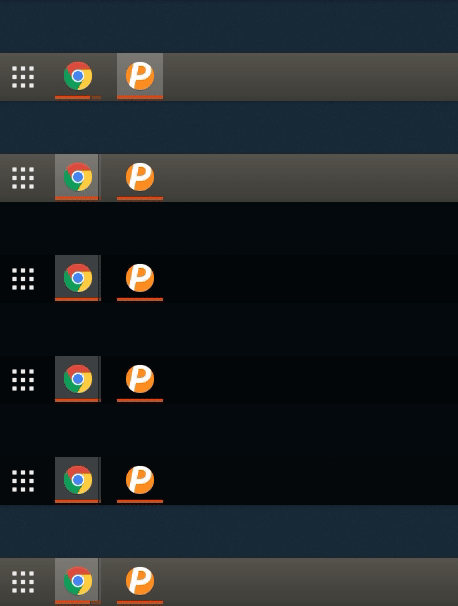
NothingCtrl
on 11 Oct 2018
I'm on Ubuntu 16.04, GNOME Shell 3.18.5, I install extension following #35 (comment), but it error when loading.
@NothingCtrl A fix for older gnome-shell versions was added, could you please try again on you 3.18.5 system? Thanks!
charlesg99
on 11 Oct 2018
Latest push fixed my issue earlier. Thank you!
justpie
on 11 Oct 2018
@charlesg99
Hey toddjames, this is already possible with the current settings. Let us know if this is what you had in mind. Thanks!
This is perfect, I didn't check for this option. This is amazing, thanks again for the hard work on this!
toddjames
on 12 Oct 2018
Hi, thanks for working on this feature. Very awesome.
Something minor that I noticed, maybe it's just in my case, the panel is always transparent on secondary display even when windows are maximized. Does this happen for anyone else?
 abiosoft
on 14 Oct 2018
abiosoft
on 14 Oct 2018
@abiosoft it was like that for me too a few restarts ago. Right now it stays dark (even when no windows are maximized).
SimonLammer
on 14 Oct 2018
Thank you for the feedback, I just added the initial dynamic transparency to the panels, it should take care of the opacity of the secondary panel. Please let us know if you have some problems with this new feature. Thanks!
charlesg99
on 14 Oct 2018
@charlesg99 I can confirm the transparency works perfectly fine for me now. All I have to do was to tweak the settings to my taste.
Thanks.
abiosoft
on 14 Oct 2018
I'm on Ubuntu 16.04, GNOME Shell 3.18.5, I install extension following #35 (comment), but it error when loading.
@NothingCtrl A fix for older gnome-shell versions was added, could you please try again on you 3.18.5 system? Thanks!
I pull latest commit 4ceb0fc2d9240f203a310bb72a6fea3c83cae3c7. It's working perfectly on Ubuntu 16.04. Thanks you.
NothingCtrl
on 15 Oct 2018
Hi, this feature was merged to master. Please open a new issue if you encounter problems with it. Thanks everybody!
charlesg99
on 19 Oct 2018
Is a release planned soon? or should I install from master?
 kunicmarko20
on 30 Oct 2018
kunicmarko20
on 30 Oct 2018
Hey @kunicmarko20, depends on what you call soon :) There is still some testing and translation to be done before the release so we're not there yet. Please install from master and report any issue you encounter, that way you help us with the testing :+1:
Thanks!
charlesg99
on 30 Oct 2018
Thank you for a fast reply.
kunicmarko20
on 30 Oct 2018
I see my status bars apps/icons (slack icon, jetbrains toolbox, etc.) only on the main screen status bar, is that expected or should I open an issue? (or maybe I am missing something)
kunicmarko20
on 31 Oct 2018
@kunicmarko20 That typically means an error occurred when disabling the panel. Are you able to turn the extension on and off in Tweak Tool without issue?
jderose9
on 31 Oct 2018
Yes, I am able to do that. Should that help? Since indicators are still only on one status bar.
kunicmarko20
on 31 Oct 2018
Hey @kunicmarko20, yes it is expected behavior as dash to panel isn't responsible for bringing the status icons over to the main panel. You probably have another extension for this, like TopIcons Plus or AppIndicator. Those external extensions aren't aware of our secondary panels. Thanks!
charlesg99
on 31 Oct 2018
Thank you, great work!
kunicmarko20
on 31 Oct 2018
Hello, first of all thank you! I am loving this multi-monitor feature!
I have stumbled upon what i believe to be a bug. Seems that Dash to panel with multi-monitor has issues when you Log out while Show applications is displayed. After logging back in my Dash to Panel automatically sometimes shows the "Show AppMenu button" even tho it is not enabled. Or even fails to load on my primary monitor (i have a laptop which has a secondary display and a primary external monitor). This does not happen when i log out when the Show Applications is not displayed... in that case it behaves like it should and there are no issues.
https://imgur.com/a/e2i9yNS
Anyways this is not a typical use case for me so I am very satisfied with what you are working on and thank you again! Loving it a lot. Cheers.
 Cariffo
on 10 Nov 2018
Cariffo
on 10 Nov 2018
Hello @Cariffo, are you using the latest development version? We recently corrected an issue #492 that resembled what you're describing, could it be related? If not, could you please open a new issue? Thanks!
charlesg99
on 10 Nov 2018
Actual master (version 17) works perfectly on Ubuntu 18.04. :-) Thanks a lot for this feature!
 jvleminc
on 10 Jan 2019
jvleminc
on 10 Jan 2019
Related issues
 bmccorm2
·
5Comments
bmccorm2
·
5Comments
 LeeGDavis
·
6Comments
LeeGDavis
·
6Comments
 andrewgazelka
·
6Comments
andrewgazelka
·
6Comments
 ktamp
·
5Comments
ktamp
·
5Comments
 ningacoding
·
6Comments
ningacoding
·
6Comments
Most helpful comment
Nothing new to report, but this is coming. It affects many existing features of the panel though, and may require work with other extension authors to help maintain compatibility, so it's going to be a slow process. Thanks for your patience :)