Dart-code: Extremely bad typing performance
Describe the bug
Typing is very laggy and jittery.
To Reproduce
Steps to reproduce the behavior:
- Create a new dart file or open existing one
- Start typing
- See top gif
Expected behavior
Typing is fast and smooth. See bottom gif
Screenshots
Dart file:
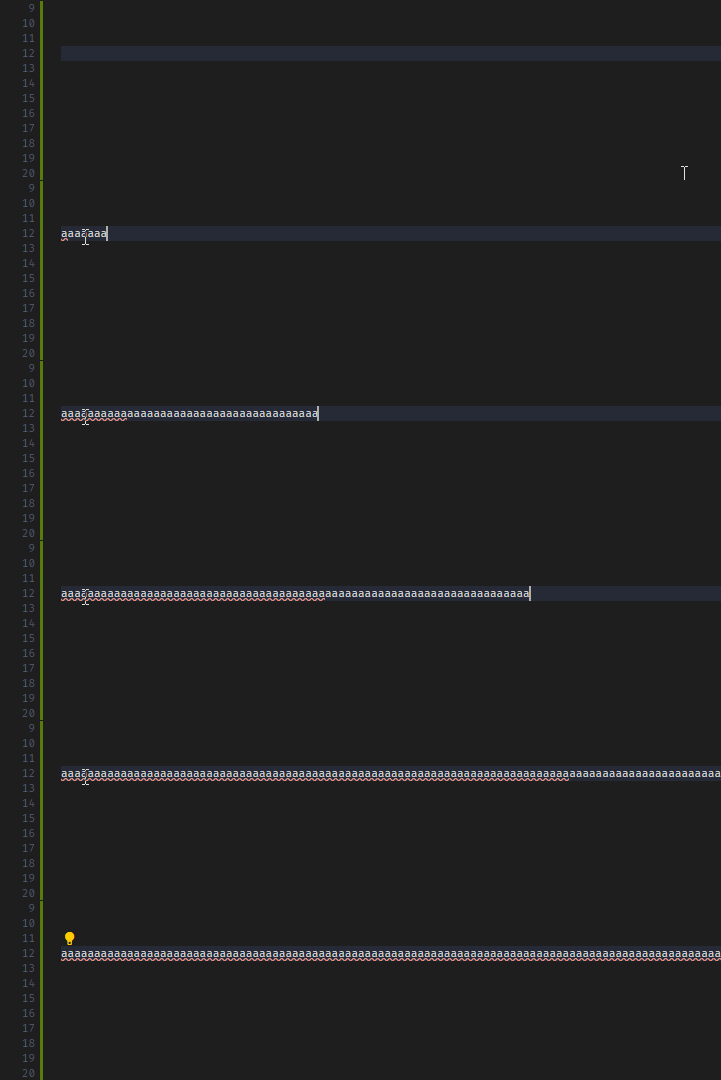
Any other file:

Versions (please complete the following information):
- VS Code version: 1.50.1
- Dart extension version: v3.15.1, Flutter extension disabled
- Dart/Flutter SDK version:
Flutter 1.24.0-2.0.pre.77 • channel master • https://github.com/flutter/flutter.git
Framework • revision 4a3e2a1af5 (4 days ago) • 2020-10-19 15:05:46 -0700
Engine • revision d03b759d04
Tools • Dart 2.11.0 (build 2.11.0-229.0.dev)
Windows 10 x64 2004
 RomanKornev
All 5 comments
Do you happen to have the Vim extension installed, or another that might be intercepting keypresses?
This is likely to be the same issue as https://github.com/Dart-Code/Dart-Code/issues/1800, which is caused by some extensions (like Vim) having to send keypresses through the extension host, where they fight for a single thread with all other extensions (see https://github.com/microsoft/vscode/issues/75627).
Enabling the LSP preview (the dart.previewLsp setting) should significantly improve things, as it moves a lot of the work out of the extension host process (where it's no longer sharing a single thread with all other extensions). You'll need to reload VS Code after enabling it for it to take effect.
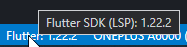
If you still see the issue with the LSP preview enabled (you can tell you're on LSP by hovering over the Dart/Flutter version number in the status bar and checking it says "LSP" in the tooltip) and/or don't have any extensions that should be intercepting keypresses, please let me know!
 DanTup
on 25 Oct 2020
DanTup
on 25 Oct 2020
The only extensions that are enabled are Dart and Flutter. I do not have Vim extension installed.
I set "dart.previewLsp": true, but it has no effect on typing performance.
I found the problem: It's the Problems bar. It updates on every key press. If I switch to Output, for example, then performance becomes manageable.
RomanKornev
on 26 Oct 2020
If these are the only extensions and it only occurs when the Problems view is visible, this sounds like a performance issue in VS Code (specifically in the Problems view). Can you file an issue at https://github.com/microsoft/vscode (and be sure to note you don't have any extensions that handle typing, and that it doesn't occur when the Problems view is not visible) and post a link back here?
Thanks!
DanTup
on 26 Oct 2020
I filed an issue, but I really don't think it's a problem with VSCode.
Instead of sending an update to Problems tab every time the user presses a button, a simple fix would be to limit the number of updates sent per unit of time.
RomanKornev
on 26 Oct 2020
Instead of sending an update to Problems tab every time the user presses a button, a simple fix would be to limit the number of updates sent per unit of time.
I don't think that's the ideal solution. The issue here is that updating a specific part of VS Code's UI seems be be expensive. The language server/diagnostic data is used by many editors and in many places by each (for example VS Code also uses the data to draw the squiggles in the editor and the Problems count/badge - which seem to have no problem with the frequency).
It feels wrong to throttle the updates for all editors in all UI components to account for a single slow component in a single editor. If that component is using a lot of CPU and blocking the UI thread then it should be responsible for throttling the rate at which it updates itself. VS Code already does a lot of debouncing of updates for this reason so I don't think here is any different.
I'll keep an eye on that VS Code issue to see what the response is. If there's no interest in fixing it there, we can revisit it here - but I honestly think they'd also prefer to fix it there.
Thanks!
DanTup
on 26 Oct 2020
Related issues
 kinex
·
3Comments
DanTup
·
4Comments
kinex
·
3Comments
DanTup
·
4Comments
 e200
·
3Comments
e200
·
3Comments
 ifredom
·
3Comments
ifredom
·
3Comments
 FeimiSzy
·
4Comments
FeimiSzy
·
4Comments
Most helpful comment
Do you happen to have the Vim extension installed, or another that might be intercepting keypresses?
This is likely to be the same issue as https://github.com/Dart-Code/Dart-Code/issues/1800, which is caused by some extensions (like Vim) having to send keypresses through the extension host, where they fight for a single thread with all other extensions (see https://github.com/microsoft/vscode/issues/75627).
Enabling the LSP preview (the
dart.previewLspsetting) should significantly improve things, as it moves a lot of the work out of the extension host process (where it's no longer sharing a single thread with all other extensions). You'll need to reload VS Code after enabling it for it to take effect.If you still see the issue with the LSP preview enabled (you can tell you're on LSP by hovering over the Dart/Flutter version number in the status bar and checking it says "LSP" in the tooltip) and/or don't have any extensions that should be intercepting keypresses, please let me know!