Dart-code: VSCode, Flutter, Code Completion - Bracket Problem.
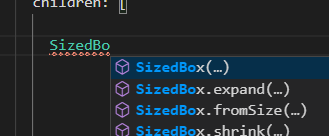
When i type some widget and ctrl+space, I choose the one with brackets. But it doesn't write in brackets.
It is big problem for me. It wasnt like that before.

Flutter: 1.22.5
VS Code Version: 1.52.1 (user setup)
Date: 2020-12-16T16:34:46.910Z
Electron: 9.3.5
Chrome: 83.0.4103.122
Node.js: 12.14.1
V8: 8.3.110.13-electron.0
OS: Windows_NT x64 10.0.19041
 CaferPoyrazoglu
All 4 comments
Are you using the LSP Preview? If so, this was only added recently and needs to be enabled with the dart.completeFunctionCalls setting. There's some info about this in the release notes here:
https://dartcode.org/releases/v3-17/#lsp-complete-function-calls
Please let me know if this doesn't solve the issue!
 DanTup
on 30 Dec 2020
DanTup
on 30 Dec 2020
Hi,
Thanks for helping.
Recently I have the same issue, which is auto-complete doesn't work in vs code.
When I type a function like List.generate the parameters placeholder used to show, but now it doesn't show.
I have dart.completeFunctionCalls enabled and dart.enableCompletionCommitCharacters disabled
Flutter: 1.22.1-0.0.pre.1
VS Code Version: 1.52.1
Flutter Extension Version: 3.18.0
Dart Extension Version: 3.18.0
OS: macOS Catalina 10.15.4
 AhmedAbouelkher
on 31 Dec 2020
AhmedAbouelkher
on 31 Dec 2020
Hi again,
Problem was in my settings.json.
I edited file like this. Now everything is fine.
{
    "dart.completeFunctionCalls": true,
    "dart.enableCompletionCommitCharacters": false,
    "editor.formatOnSave": true,
}
CaferPoyrazoglu
on 31 Dec 2020
Hi,
Thanks for helping.
Recently I have the same issue, which is auto-complete doesn't work in vs code.
When I type a function likeList.generatethe parameters placeholder used to show, but now it doesn't show.I have
dart.completeFunctionCallsenabled anddart.enableCompletionCommitCharactersdisabledFlutter: 1.22.1-0.0.pre.1
VS Code Version: 1.52.1
Flutter Extension Version: 3.18.0
Dart Extension Version: 3.18.0
OS: macOS Catalina 10.15.4
Same here.
Flutter: 1.22.5
版本: 1.52.1 (user setup)
提交: ea3859d4ba2f3e577a159bc91e3074c5d85c0523
日期: 2020-12-16T16:34:46.910Z
Electron: 9.3.5
Chrome: 83.0.4103.122
Node.js: 12.14.1
V8: 8.3.110.13-electron.0
OS: Windows_NT x64 10.0.19041
 cenumi
on 31 Dec 2020
cenumi
on 31 Dec 2020
Related issues
 shamrin
·
5Comments
shamrin
·
5Comments
 ifredom
·
3Comments
ifredom
·
3Comments
 atreeon
·
5Comments
DanTup
·
3Comments
atreeon
·
5Comments
DanTup
·
3Comments
 partounian
·
4Comments
partounian
·
4Comments