Dart-code: Keybinding code fixes don't work
It would be very useful to have "fix all" command for linter rules. For example I have now ~400 warnings in my project for prefer_single_quotes. There is already a quick fix command "Convert to single quoted string" but it is too big task to fix all those issues one by one. I would like to fix all the warnings with a single command.
 kinex
kinex
All 21 comments
Yep, this would definitely be nice. It would need support from the SDK to do efficiently and there's an open issue at https://github.com/dart-lang/sdk/issues/37228.
In the meantime, in case you hadn't already noticed - you can invoke fixes from the Problems window which might be slightly faster if you do need to apply a lot (I appreciate it's still tedious though!):

I'll close this as the work is in the SDK above. If the server gets support, we'll make sure it works here (including wiring up to the source.fixAll command in VS Code). Thanks!
 DanTup
on 17 Dec 2019
DanTup
on 17 Dec 2019
OK! I hadn't noticed this menu in the Problems window, good to know that! That is very useful in many cases. This prefer_single_quotes issue I was planning to fix with a Python script.
I have often difficulties in determining if a specific issue or a feature request is related to VS Code (Dart Code), Dart SDK or something else. And I failed this time too. My idea was that as VS Code (Dart Code) seems to know the list of Problems (as they are shown in the Problems window), it should be able to loop them and apply a specific fix to all of them.
kinex
on 17 Dec 2019
I have often difficulties in determining if a specific issue or a feature request is related to VS Code (Dart Code), Dart SDK or something else.
That's very understandable, the line can be a bit blurry (for example some of the things you see in the quick-fix drop-down are synthetic and generated by the VS code extension). If in doubt, just raise things here - I'm happy to triage them and can sometimes provide additional context that would improve a bug report in the SDK/Flutter repos.
Thanks!
DanTup
on 17 Dec 2019
@DanTup I could select multiple fixes through problem window (CMD + a) or (SHIFT + click), and invoke fix menu (cmd +.), but it only applies to one item. as a workaround, is there a way to handle applying fix on all selected items at vscode level.
Also, I was wondering if I can apply the fix if use "apply": "first" setting, instead of prompting. Tried like this, but get error '''no code action for refactor.convert.toDoubleQuotedString available" . How to properly use it?
    {
        "key": "ctrl+.",
        "command": "editor.action.codeAction",
        "args": {
          "kind": "refactor.convert.toDoubleQuotedString",
          "apply": "first"
        }
    }
ref:
https://dartcode.org/docs/refactorings-and-code-fixes/
https://code.visualstudio.com/updates/v1_20#_keybindings-for-quick-fixes-and-code-actions
 bsr203
on 9 Apr 2020
bsr203
on 9 Apr 2020
as a workaround, is there a way to handle applying fix on all selected items at vscode level.
I don't know of a way. Applying multiple fixes is complicated because applying the first may invalidate the second (for example it might change the offsets where the other fix would be applied).
Also, I was wondering if I can apply the fix if use "apply": "first" setting, instead of prompting. Tried like this, but get error '''no code action for refactor.convert.toDoubleQuotedString available" . How to properly use it?
I copied your keybinding and then pressed Ctrl+. on test the code final a = 'test'; and it immediately replaced the quotes with doubles without prompting, so as far as I can tell this should work fine.


DanTup
on 13 Apr 2020
Thasnks @DanTup as always with your detailed response. I will check why it didn't work for me . Cheers
bsr203
on 13 Apr 2020
Quick Qn: Where is this refactor toDoubleQuotedString comes from. I can't see it in this repo, or vscode. Analysis server has a method, and not sure how it is mapped.
For me.
{
        "key": "ctrl+.",
        "command": "editor.action.codeAction",
        "args": {
          "kind": "refactor.convert.toDoubleQuotedString",
          "apply": "first"
        }
    }
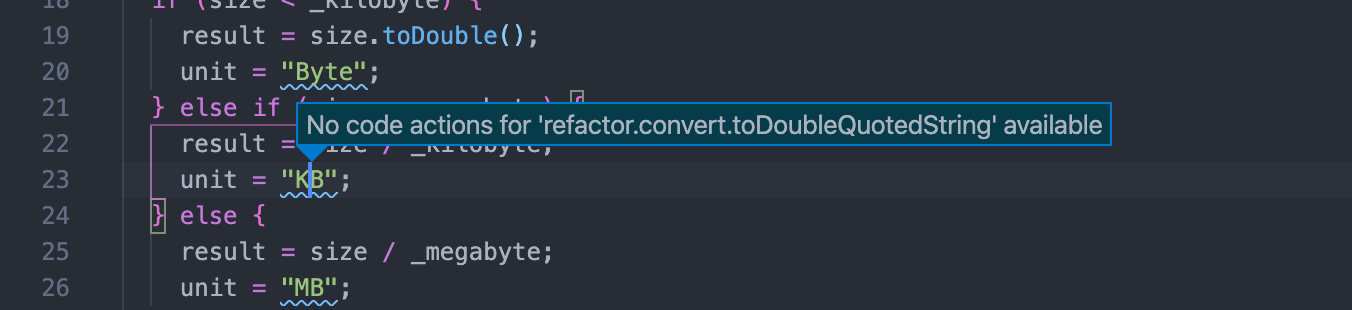
I use Dart and Flutter plugin ver 3.9.1
bsr203
on 13 Apr 2020
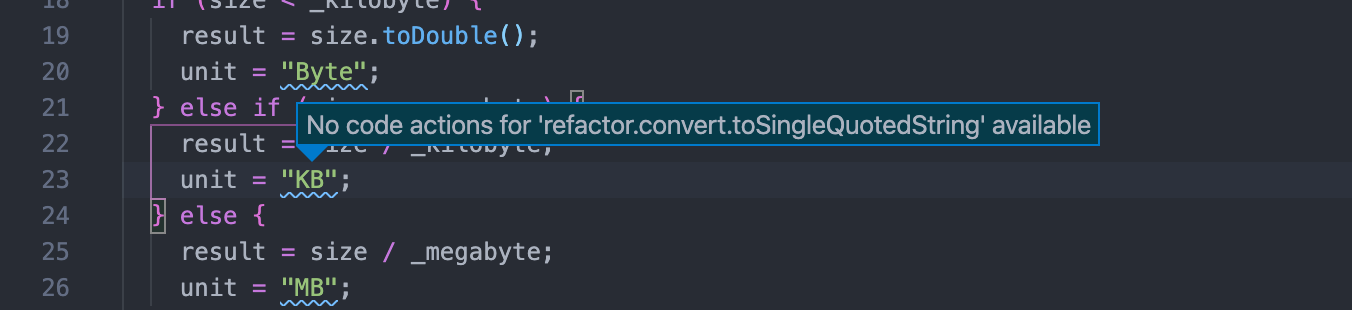
@bsr203 in your screenshot the string already has double quotes, so the toDoubleQuotedString fix won't be available. Did you mean toSingleQuotedString?
These fixes come from the analyzer, so they live in the SDK:
However we change the prefix slightly to make it match VS Code's CodeAction kinds better. There's a full list at https://dartcode.org/docs/refactorings-and-code-fixes/ (though it's possible it doesn't include any recent fixes).
Hope this helps!
DanTup
on 13 Apr 2020
Thanks for catching the mistake. Still not working it for me. Figure it out sometime later. thanks again.
bsr203
on 13 Apr 2020
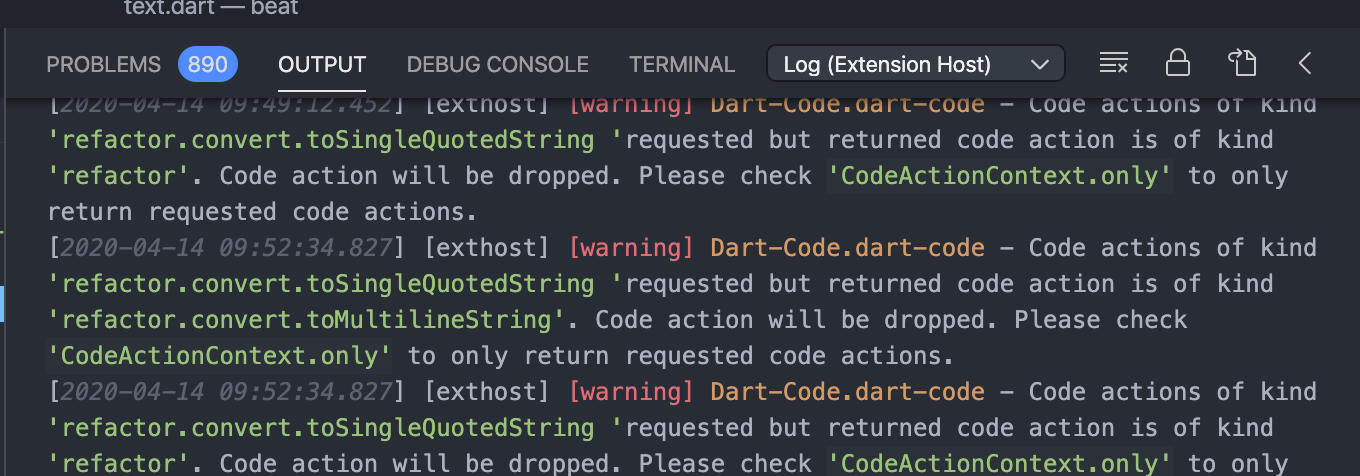
Just a heads up. I see the extension log
[2020-04-14 09:47:45.587] [exthost] [warning] Dart-Code.dart-code - Code actions of kind 'refactor.convert.toSingleQuotedString 'requested but returned code action is of kind 'refactor'. Code action will be dropped. Please check 'CodeActionContext.only' to only return requested code actions.
I have multiple code actions, and need to figure out is there a way to apply first one.
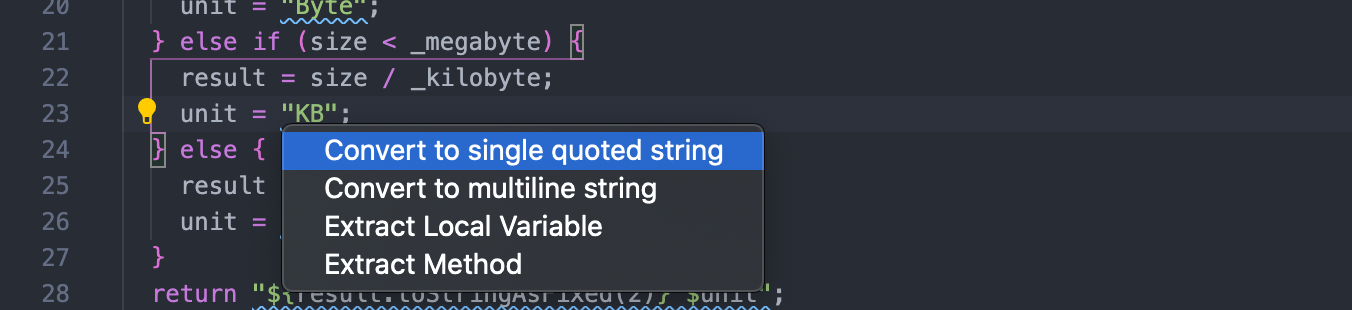
Edit: Do you know how to set 'CodeActionContext.only', so only toSingleQuotedString is requested . I tried "preferred": true, but didn't work.
bsr203
on 14 Apr 2020
I can't repro the warning you're seeing (either in the dev tools or when running from source) - where did you see it? Are you on the latest version of the extension?
DanTup
on 14 Apr 2020
I can repro your issue now, and I don't understand why I couldn't yesterday - it seems like it should never have worked 🤔
DanTup
on 14 Apr 2020
Ok, I figured this out. Doing toDoubleQuotedString works, but toStringleQuotedString does not, and the reason is that one comes as an "assist" and the other as a "fix", and the two code paths aren't the same (only one sets the ID correctly).
Working on a fix!
DanTup
on 14 Apr 2020
Ok, I tracked this down. There are two "Convert to Single Quotes" actions, an assist:
And a fix:
When the lint is enable so that this is an error, we only get the fix (the code that adds the assist skips it because the fix is there), and that doesn't have an ID so it isn't key-bindable.
@bwilkerson do you have any thoughts on adding IDs to fixes (similar to assists)? I think it could be added to the definition above, and then set the change.id here similar to how it is with assists.
DanTup
on 14 Apr 2020
Just to answer you above, I see the warning while trying Ctrl+. in my code at Output -> extension host log.
bsr203
on 14 Apr 2020
@bsr203 thanks, I can repro that now - I'll fix that (it won't change the functionality though, as VS Code was already dropping the unwanted actions).
DanTup
on 14 Apr 2020
I don't have an objections to adding ids to fixes (which technically means changing the name that they already have to conform to the dot style we use for assists and possibly renaming the field).
I've forgotten, though: how are those ids used by the client? Are they opaque? Do they impact the UX? (I noticed that there are at least two assists whose IDs don't conform to the pattern we agreed on.)
 bwilkerson
on 14 Apr 2020
bwilkerson
on 14 Apr 2020
The IDs can be used by users to apply keybindings for specific fixes (or groups of fixes). For example if you create a binding for "refactor.flutter" then when you press it, you'll get a quick-fix menu filtered to all those with IDs that start "refactor.flutter" (you can also choose whether ti automatically apply the first one, the only one, or always show the list).
We tweak the prefixes from the server to match the ones that VS Code uses internally (because there are places in the UI that already filter to these, eg. only QuickFixes in the Problems pane, and only Refactor's in the refactor menu):
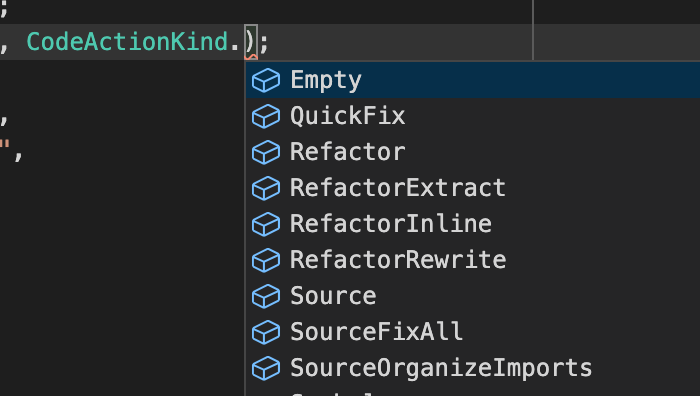
There's a page on the Dart-Code site listing the IDs (though it might need updating):
https://dartcode.org/docs/refactorings-and-code-fixes/
To slightly confuse things, we put Assists into the Refactor type and Fixes into the Fixes type. This adds a complication if you want to bind "convertToSingleQuotes" because the ID could either be a QuickFix or a Refactor depending on whether you have the lint enabled. I'm not sure that's avoidable though - I think people would just need to keybind the correct one based on whether they tend to have the lint enabled.
DanTup
on 14 Apr 2020
Also looks like we can now contribute a list of actions to VS Code so there's code-completion on the IDs for keybindings:

DanTup
on 14 Apr 2020
I've pushed a change to the analysis server that adds IDs for fixes in addition to assists. I've also tweaked Dart-Code to pass these through. This means you'll need both a new Dart-Code and a new Dart SDK before you can keybind all fixes and assists.
I've also got a branch that will add the refactor/fix IDs to the code completion (when you're editing the keybindings JSON file) but I need some clarification from VS Code before merging it (it's not clear if it's supposed to be used yet, as it generates false warnings and the VS Code issue hasn't been closed). I'll merge that in if/when it becomes safe to do so.
DanTup
on 20 Apr 2020
Thank you so much for the update.
Thank you for being so approachable and your effort to support us.
Cheers
bsr203
on 20 Apr 2020
Related issues
 lukepighetti
·
4Comments
lukepighetti
·
4Comments
 mccadi
·
3Comments
mccadi
·
3Comments
 shamrin
·
5Comments
DanTup
·
4Comments
shamrin
·
5Comments
DanTup
·
4Comments
 CaferPoyrazoglu
·
4Comments
CaferPoyrazoglu
·
4Comments