Dart-code: Dart doesn't respect user VSCode tab/indent spacing on "format document"
Original post: https://groups.google.com/forum/#!topic/flutter-dev/TxdQmK0pj5M
"I've tracked it down specifically to the Dart extension, as when it's enabled it overrides any settings I have. Tried EditorConfig and everything else I can imagine.
Others have had this issue, but none that are specifically Dart, so none of the solutions I've found fix this.
Anyone know where to look to figure this out?"
 AshSimmonds
All 17 comments
Can you clarify the issue you're seeing? Are you saying that Dart Code is changing your indent settings back away from tabs, of that when you Format Document (including with formatOnSave) that it ignores this and always uses spaces?
The first would be a bug, but I've just tested and can't reproduce - if I set the indent to tabs then it seems to work fine. However the second is by design - Dart Code uses the standard Dart formatter which only supports spaces - if you'd like to see an alternative formatter please 👍 https://github.com/Dart-Code/Dart-Code/issues/914 (no guarantees it'll happen, but the 👍's on that issue will hopefully give an idea of demand).
Also related: #960.
 DanTup
on 16 Jun 2018
DanTup
on 16 Jun 2018
Oh, also worth noting that we do set the defaults; so if you're trying to set them yourself, you'll need to set it for the dart language in your user settings:
"[dart]": {
    "editor.tabSize": 4,
    "editor.insertSpaces": false,
    "editor.detectIndentation": false
}
It always uses 2 spaces no matter what you set in VSCode.
Doesn't matter what you put in user settings, dart files ignore it and just use 2 spaces.
This only happens when the Dart extension is enabled.
AshSimmonds
on 16 Jun 2018
@AshSimmonds I tested with the settings above and also setting using the status bar but couldn't reproduce this. Can you provide some specific info on what you're set up or how you're setting it and where you're seeing it use spaces?
I presume you're on a recent version of the extension? A very old version did force space indenting as you opened a file simply because it was the only way to control it at the time.

DanTup
on 16 Jun 2018
Hmm, maybe the title is misleading - I mean on "format code" execution, not physically pressing tab. Sorry if that changes everything.
I can record a demo if needed - but notice in your screenshot you're using tabs, I have mine set to change tabs to spaces, and I want 4 spaces, not 2.
I reformat my code pretty frequently so I can just get on with writing it, in the mean time I'm using a macro to reformat the reformat - but you get how onerous this can be.
I'm using latest of everything - have just uninstalled and reinstalled pretty much everything to check.
AshSimmonds
on 16 Jun 2018
And I must have been drunk when I posted my reply earlier, as I completely missed your link to #914 - sorry about that.
Closing this, thanks for your help.
AshSimmonds
on 16 Jun 2018
Aha, gotcha. Yeah, sadly we just don't have a formatter that works with tabs. A lot of the functionality in Dart Code is backed by the analysis server which ships inside the SDK - it does all the code parsing (this allows it to be accurate for the version of the SDK you're using, and be shared by all editors). Unfortunately that service only supports the dart_style formatter.
I'm actually a tab-user myself - I've just come to live with spaces for Dart while there's no easy alternative. I actually still get confused about when we're supposed to use 2spaces vs 4spaces and with auto-formatting turned off for the Flutter repo I'm probably doing that wrong frequently!
DanTup
on 16 Jun 2018
Hehe, yeah. Thanks for your help.
AshSimmonds
on 16 Jun 2018
This is a really annoying issue.
Thanks DanTup for the help.
 wamry
on 21 Aug 2018
wamry
on 21 Aug 2018
https://github.com/Dart-Code/Dart-Code/issues/1015#issuecomment-397763102
Works for me @DanTup +1
 hardy12994
on 21 Feb 2019
hardy12994
on 21 Feb 2019
Make sure to edit the [dart] config and not the generic vscode config!
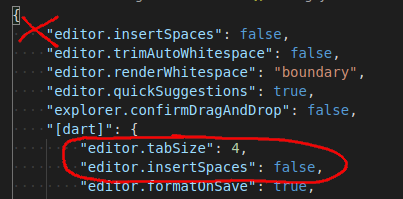
Otherwise, it seems to work!
 nathanfranke
on 23 Jul 2020
nathanfranke
on 23 Jul 2020
When doing format on save, it undoes the tabSize 4 and goes back to 2, even though it respects it while typing as far as I can tell.
 JohnGalt1717
on 4 Jan 2021
JohnGalt1717
on 4 Jan 2021
When doing format on save, it undoes the tabSize 4 and goes back to 2
This is expected - the formatter only supports spaces. If you want to use tabs, you'll need to turn off the formatter (you can do this using by adding "dart.enableSdkFormatter": false to your VS Code user settings).
DanTup
on 6 Jan 2021
@DanTup Yuk.
JohnGalt1717
on 6 Jan 2021
@DanTup To expound on that, here's why:
The reason why Tab are preferred for us is because a tab can be represented on the screen however you wish. It means "indent". Using editorConfig or vs code's settings, every developer can just specify how they want an "indent" to show up. I don't have to force my devs to use X number of spaces for indent, they can use whatever they wish while still having compliant code.
Hence forcing spaces is not cool because every dev has to use whatever I set it to, instead of whatever they feel comfortable with and if they change it or override it, their code will look different than everyone else's and we'll have checkin fights that are only different because of the number of spaces.
JohnGalt1717
on 6 Jan 2021
@JohnGalt1717 I very much understand the desire for tabs - I'm a tab person myself. Formatting is not handled by the VS Code extension, it's done by the language server - so formatting here is restricted by what the server supports (which is only dart_style).
There's an open issue about supporting something customisable (https://github.com/Dart-Code/Dart-Code/issues/914). The decision not to work on it is not because it's not desired, but because time is finite and there have so far always been other things that appear to deliver more value.
I've offered some pointers in that issue if anyone wants to create an alternative formatter that could be shipped as a VS Code extension (and I've ensured it would place nice with the Dart extension). I'm sorry this isn't the answer you'd like, but I hope you understand.
DanTup
on 6 Jan 2021
Took me some time to find this problem. It would be great to configure vscode to use a 4 spaces long tab width...
 Wdestroier
on 12 May 2021
Wdestroier
on 12 May 2021
Related issues
 rgb1380
·
3Comments
rgb1380
·
3Comments
 atreeon
·
5Comments
atreeon
·
5Comments
 agmcleod
·
3Comments
agmcleod
·
3Comments
 e200
·
3Comments
e200
·
3Comments
 Matt-Gleich
·
4Comments
Matt-Gleich
·
4Comments
Most helpful comment
Oh, also worth noting that we do set the defaults; so if you're trying to set them yourself, you'll need to set it for the
dartlanguage in your user settings: