Dart-code: Support running and debugging flutter applications
This is a general issue for supporting using this plugin for Flutter developments (flutter.io). In broad strokes, support might look like:
- [x] a preference for where the flutter sdk lives
- [x] starting a copy of the flutter daemon if the user is working on a flutter project
- [x] showing the connected mobile devices in the status line (we get this info from the flutter daemon)
- [x] creating a new flutter launch configuration type
- [x] talking over the daemon protocol to start and stop flutter apps on devices
- [x] on app start, when a service protocol port becomes available, start a debug connection with the app
TODO
- [x] fix debugging/stepping
- [x] allow user to select device if multiple devices connected
- [x] implement hot reload
- [x] fix debug restarting (fixed in Code https://github.com/Microsoft/vscode/issues/28175)
- [x] tidy up debug argments (move to class, make strongly typed)
- [x] remove all flutter-related things from Dart debugger and just add in the subclass
- [x] remove support for
portand always usewsUri
 devoncarew
All 49 comments
@devoncarew I've created a flutter branch (and pushed a change that sets the version to -flutter), feel free to send PRs there for now.
I'm a little unfamiliar with actually using Flutter (I know a bit about what it's code is like, but less about the toolchain etc.); does any of this stuff vary depending on platform (both host and target) other than the lack of Windows support? (eg. do we need to launch things differently for iOS/Android, or on Mac vs Linux)? It's very unlikely I'll end up with an iOS device or a Mac, but I have Android and will probably be able to sort some sort of Linux out for testing.
 DanTup
on 24 Oct 2016
DanTup
on 24 Oct 2016
No, most of the host and target differences are abstracted out by the CLI tool. It was designed so that it could encapsulate much of that complexity so higher level tools - like IDEs - wouldn't have to know about the differences between launching on an iOS device/simulator/android device/emulator.
devoncarew
on 25 Oct 2016
yeah - cant stand intelliJ.. Big +1
Will be happy to beta test
 joeblew99
on 20 Nov 2016
joeblew99
on 20 Nov 2016
What's the status of supporting flutter applications now?
 drager
on 1 Mar 2017
drager
on 1 Mar 2017
I don't think there's been any progress on this. One thing that complicates it is that Flutter hasn't been working on Windows (this makes it hard for me to work on, and would also prefer not to ship different features for different platforms).
It sounds like Windows support for Flutter has been making good progress recently, though I don't know how soon I'll have time to look at it so can't make any promises (though it's possible @devoncarew may be planning to start on this).
DanTup
on 1 Mar 2017
Just wanted to pop in and say that Windows support for Flutter has been made available as of a few days ago, if that was any hold-up. I know it's unreasonable to expect someone to switch OSes to develop something out of good will.
 Skylled
on 20 Mar 2017
Skylled
on 20 Mar 2017
Thanks! I was aware of this (and it was a factor in me doing anything on this) but I haven't had any time to check it out yet.
That said; I think web support is more important than Flutter for now, so when I do have time (which is increasingly hard to find lately) it'll probably be spent there first.
DanTup
on 21 Mar 2017
I had a quick go at this tonight; I was able to get some basic debugging working:

Haven't pushed any code yet as I didn't get time to tidy it up, but I'll probably get more time next weekend.
Pressing F5 now runs flutter run for flutter projects with the equiv debugging args for flutter. It's a bit slow starting/deploying but if hot reload works well that might not be an issue.
One thing that is an issue is #82 / #99. Currently because we just route stdout to the debug output and you can't interact with the process, you can't press h or q for reload or quit. I think now is the time to ditch the stdout routing and just launch into the embedded terminal. I have some working code for this rotting on a branch which can probably be tidied up and used. It does mean randomly generating a port number ourselves then passing it to Dart/Flutter because we don't be able to read stdout when launching in terminals (external terminals, at least; maybe we don't need to support that).
DanTup
on 19 May 2017
Re-reading @devoncarew's comments I realise running flutter run might not be the best way.. maybe we should be using this. This would give us much more control over what's going on rather than forcing the user to interact with the process in a terminal window.
DanTup
on 19 May 2017
Yup, you'll probably be better off using the daemon mode - it'll give you more explicit control over the launched app.
I don't think you'll need to do terminal input into the process. Since this bug was opened, we've updated flutter run to support the daemon commands directly. Try running with flutter run --machine. You'll get events from the running app out as json to stdout, and can send in commands (like reload / restart) to the process.
If you can hijack that restart button, that would be a great way to send in a hot reload event...
devoncarew
on 19 May 2017
Yeah, probably don't need the terminal thing if using the daemon (though I'd still like to do it, I don't like that we don't support any app that reads from stdin!). If the daemon is running on the Code side (before a debugging session starts) then probably when a debugging session starts I could send a hot reload (if there are changes) and then the restart (Shift + F5) should work well.
I haven't done anything more than Hello World so far, so I don't know a lot about the workflow; I'll need to play around a little more when I find time! :-)
DanTup
on 19 May 2017
Had a quick go at wiring up the daemon and added a status bar that shows the name of the connected device (or count, in the case of multiple):

It was fairly painless (I extracted a lot of the code out of the analyzer service since they're mostly the same) however.. implementing all the types is going to be rather tedious and error prone. @devoncarew is there any possibility of a machine-readable format for the API so we can code-gen everything? I could scrape the wiki but it could end up being a bit fragile.
This work is on the flutter branch, though I'll probably merge and ship small parts before it's all done so people can get some benefit (and give feedback) with the caveat that I need to know that running the daemon doesn't interfere with command line invocations the user might do (eg. it's not locking devices, files or anything).
DanTup
on 20 May 2017
Looks great!
Some other helpful code might be here: https://github.com/flutter/flutter-intellij/blob/master/src/io/flutter/sdk/FlutterSdk.java#L128 - those are the flags we pass in during a run. In particular, --start-paused lets you set breakpoints before the app starts.
@devoncarew is there any possibility of a machine-readable format for the API so we can code-gen everything? I could scrape the wiki but it could end up being a bit fragile.
I've code-gen'd from markdown before. This page (https://github.com/flutter/flutter/wiki/The-flutter-daemon-mode) may need to be a bit more regular to support that. If you were interested in converting it into a more structured md format to better support parsing (or json or xml), I'd support that.
with the caveat that I need to know that running the daemon doesn't interfere with command line invocations the user might do (eg. it's not locking devices, files or anything).
It does acquire a lock over modifications to the flutter tools cache. If you look in lis/src/commands/daemon.dart, Cache.releaseLockEarly(), you can see where it releases it. It can also trigger long downloads of the toolchain (see flutter precache) if it's the first command to run. Both of these should be looked at - flutter daemon needs less of the toolchain available than other commands do.
devoncarew
on 20 May 2017
In particular, --start-paused lets you set breakpoints before the app starts.
Yeah, I had that in my debugging prototype (the flag names don't match the Dart VM ones just to be awkward ;-)) though I've started switching to the daemon now so I it'll be a little different.
Btw - Is IntelliJ not using the daemon? Are any other IDEs?
If you were interested in converting it into a more structured md format to better support parsing (or json or xml), I'd support that.
I might take a look once I've got some basics working (easier to code-gen once I have some example classes). Currently some of the stuff (like properties of responses) are just in-line in text which makes it slightly trickier (esp. to add useful comments in the output).
It does acquire a lock over modifications to the flutter tools cache
Good to know! I'll hold off merging until there's something more useful then (F5 to launch/debug at least!).
Starting the daemon while not debugging added a complication I hadn't thought about - the debug adapter doesn't have access to the daemon and needs the wsUri for debugging! Luckily there's a startSession command so I'm hoping we can hold up launching the debugger until the debugPort call comes back and then launch into debugging passing it in. I'm halfway through coding it; might get some time to finish it tomorrow.
DanTup
on 20 May 2017
Both IntelliJ and the older Atom integration are using the daemon. IntelliJ uses the daemon directly for device notifications (and again via flutter run --machine).
devoncarew
on 21 May 2017
Ah, I was confused by it running flutter run --machine and not flutter daemon. I can't find any info on what this is (either on Google or in this repo), are there any docs? Are they the same? Or does one communicate with the other or something?
DanTup
on 22 May 2017
Found this but still not completely sure whether this is hosting a daemon or connecting to it or something else!
DanTup
on 22 May 2017
Yup, that's it. When using flutter run --machine you communicate w/ it the same as w/ the daemon. You get an event when the app starts, and you can use that app id to request a hot reload. It is admittedly not well documented :)
IntelliJ makes use of flutter daemon for device notification, and flutter run --machine for app launching. Same protocol, but different entry-points for the different use cases.
devoncarew
on 23 May 2017
I'm still kinda confused :D Is flutter run --machine just a subset of the daemon? Is there any reason for me to use it vs the daemon? If IntellJ already runs the daemon, why doesn't it use it for launching?
(Sorry for all the questions; just want to make sure I do the best thing and without info I'm kinda blind!)
DanTup
on 23 May 2017
We added daemon mode support to flutter run - and switched IntelliJ over to it - because of some internal use cases around bazel support (using bazel to build flutter apps). We made the external launching code consistent, for fewer code paths to maintain. You can use the normal flutter daemon to launch apps (not flutter run --machine), but my sense is that you'll be better off long-term building on flutter run --machine, as that's what IntelliJ does, and that path will be well supported :)
No worries about the questions, happy to answer!
devoncarew
on 23 May 2017
I think I'm even more confused now! ;(
It seems like I need to use flutter daemon to get device notifications (I can't call flutter run --machine at project load because that will try and run the app). Calling flutter run --machine later will result in two flutter processes (which seems to me like it's asking for trouble, esp. given the mention of locking things)?
I had a quick search in https://github.com/dart-atom/atom-flutter but couldn't find any mentions of machine or daemon (at least, via GH search). Is there any public code for an integration that might be useful for me to browse?
DanTup
on 23 May 2017
This guy: https://github.com/flutter/flutter-intellij/tree/master/src/io/flutter/run is the best example for an implementation. Sounds like the wiki (https://github.com/flutter/flutter/wiki/The-flutter-daemon-mode) needs to be beefed up a bit for implementers - I'll make a note to add some context and additional docs to it.
This has some repeats of above, but just for clarity:
flutter daemon is what IDEs should be running at startup - and for the life of the app - to get device notifications. It uses the json protocol described in the wiki.
flutter run --machine is what IDEs should execute when running an app. It communicates over a subset of the protocol, and can be used for things like sending in app reloads, and getting some events back from apps.
So, generally, you will have n + 1 instances of flutter_tools running, where n is the number of simultaneous running apps.
which seems to me like it's asking for trouble, esp. given the mention of locking things
flutter only locks the cache when first starting up - when it might mutate the cache directory. Most flutter commands release the lock very early in their lifecycle.
devoncarew
on 24 May 2017
Cool; that really helps :-)
Is it typical for flutter devs to run on multiple devices at the same time? Trying to decide how best to manage devices; I was going to let you select a single device from the status bar as the one to run on, but not sure if it makes more sense to have them toggleable so you can run on multiple? (might make debugging confusing though; hitting multiple breakpoints from multiple processes!)
DanTup
on 24 May 2017
Right now, very typical to just run on one device at a time. There's a use case for designers to see the results on more than one device at a time however; or, at least to be able to easily preview what it would look like on different OSes and aspect ratios. So multiple devices might be something to consider for the future; it would introduce a lot of complexities.
devoncarew
on 24 May 2017
@devoncarew After much playing around; I think using flutter daemon for running would work much better for me here. Is it reasonable to ask for it to be maintained long-term? I tried to implement using flutter run but I think it's a bit weird for a few reasons..
The IDE process is running the daemon and has full access to the UI and the user. If we want to add a button in the toolbar that sends a Hot Reload command, it's trivial. If the daemon sends alerts for the user, we can show toasts, easy. So my original plan was to run the app via the daemon when debugging starts; wait for the event with the port, then launch the debugger and pass that port through (then just attached to Observatory as the Dart debugger does). I think this would all work great (with the possible exception of catching when debug ends, to terminate).
Because you said flutter run --machine would be better, I figured I'd just call that in place of dart xxx.dart in the debugger. So when the user hits F5, pass through all the info, launch the flutter process, grab the Observatory port and attach as normal. Sounded fine!
However, now the debugger is running an STDIO service. The current Dart Debugger does not currently do anything like this, it just takes STDOUT and sends it to the users output window. There's no way of sending STDIN. Also, getting commands from the UI (main Code process) over to the debugger (in another process), eg. to Hot Reload seems complicated.
So, I think using the daemon will actually work out better; but I don't want to go with that if it might go away or isn't recommended. I don't know enough about how other IDEs are structured to know whether Code is just weird here, or if other IDEs are handling this and maybe it's not as bad as I think?
DanTup
on 26 May 2017
Of course there is the possibility of running flutter run --machine back in the main process and then doing what my original plan was; but it feels weird to be managing two flutter processes to do very similar things :(
DanTup
on 26 May 2017
Sorry for the delay! We had a long weekend over here :)
However, now the debugger is running an STDIO service. The current Dart Debugger does not currently do anything like this, it just takes STDOUT and sends it to the users output window. There's no way of sending STDIN. Also, getting commands from the UI (main Code process) over to the debugger (in another process), eg. to Hot Reload seems complicated.
Just so we're on the same page:
- flutter run --machine passes all user output to stdout - this should work for you
- the user should not have to send stdin into the flutter run process - it's different from flutter run from the terminal. Are you saying that you can't pass json commands to the flutter run process via stdin?
- you should be able to connect to the observatory port as normal once you get the 'port available' event
devoncarew
on 30 May 2017
@devoncarew Say I want to send a "hot reload" command from a button/command in the IDE - there's no communication (AFAIK) between the main Code instance and the debug adapter (which runs in another instance) once debugging?
If the launch was done from within the main Code process (using the daemon), I could interact and do things like hot reload, and have the debugger just handle the Observatory part of it?
So on the surface, it seems to me that it's better to keep launching inside the Code process before launching the debugger; however you've more familiar with Flutter and also created the debug implementation here so you may have a better understanding/idea than me!
DanTup
on 30 May 2017
Say I want to send a "hot reload" command from a button/command in the IDE - there's no communication (AFAIK) between the main Code instance and the debug adapter (which runs in another instance) once debugging?
OK, that sounds familiar - I remember some of the limitations re: sending the debug process info (like initial settings).
Not to bike shed on the implementation on this too much, but have you thought about implementing reload via the 'request restart' property? https://github.com/Microsoft/vscode-debugadapter-node/blob/master/protocol/src/debugProtocol.ts#L309 From reading it, I think that will send an event to the debug adapter when the restart button / keybinding is hit.
Perhaps a VC would help here? Happy to set one up if you'd like.
devoncarew
on 1 Jun 2017
@devoncarew
Perhaps a VC would help here? Happy to set one up if you'd like.
I'm available in about an hour (for around an hour or so) though tied up tomorrow evening and all weekend with various things (otherwise, I should have some time in evenings next week).
Not to bike shed on the implementation on this too much, but have you thought about implementing reload via the 'request restart' property?
I expect this would work, but I was thinking that there's only one restart event, but there may be multiple events we might want to send (eg. if we want to do a "full restart", we can't do that using this). Now, we could say a standard restart does a hot reload and stopping and starting does a real restart, but I can still see some drawbacks:
- We're limited to only being able to do hot reload via the restart, if
flutter run --machineever gets any additional functionality, we're unable to implement it (note: I'm making a big assumption here that we can't just send our own made up commands to the debugger - if we can, this whole problem may go away; but the docs around this are rather limited) - If we wanted to hot reload from our own events (lets say whenever the user saves - I don't know if that's a good idea, but it's just an example) we may not be able to do it
I don't feel strongly about this, but I want to avoid painting myself into a corner (either by using flutter daemon and then it losing the ability to launch, or by using flutter run --machine and then not being able to build some features) so I'm just thinking out loud.
I'm gonna have a quick dig through some code and see if there's any way to pass a custom request through to the debugger; I think that might solve all problems!
DanTup
on 1 Jun 2017
@devoncarew Ok, managed to find these:
https://github.com/Microsoft/vscode/issues/15656
https://github.com/Microsoft/vscode/commit/108a117bd2768cf2db6140a04c77cee59348fdae
Looks like we can send custom commands through to the debug adapter; so I think this gives us the best of everything.. We can use flutter run --machine in the debug adapter, and if we want to pass custom commands (eg. if we wanted a restart to be a real restart, but another hotkey/toolbar button to hot reload) it should be simple.
DanTup
on 1 Jun 2017
Sounds great! We will be better off having most tooling integrations (IntelliJ, VSCode) on the same path. Happy to answer any other q's going forward. There will be some trickier areas around preserving breakpoints during a hot reload, and possibly other stuff (definitely q's for after a steel thread :) ).
devoncarew
on 1 Jun 2017
I've tidied up what I'd started and pushed to the flutter branch (I've removed the flutter-launch-wip branch). The basics are working, though there's something wonky with debugging/stepping atm though I'm out of time today. There's a FlutterRun class which builds on the StdIoService that's used for Analyzer+FlutterDaemon, though currently there's a bunch of hacks that need tidying up. I'm gonna start adding the outstanding items to the top of this issue.
Restarting debug sessions is also currently broken (I'm awaiting a response from MS, I don't understand why it doesn't work; could be a Code bug) and there's no hot reload (though that's pretty trivial to add now).
DanTup
on 7 Jun 2017
Ok, think we're getting there. Debugger restart is fixed by MS so should be in next Code update. Did a bunch of tidying up and implemented Hot Reload today (it may need to change though, seems less reliable than I thought, so hooking it up to the Restart button in Code might be a bit misleading).
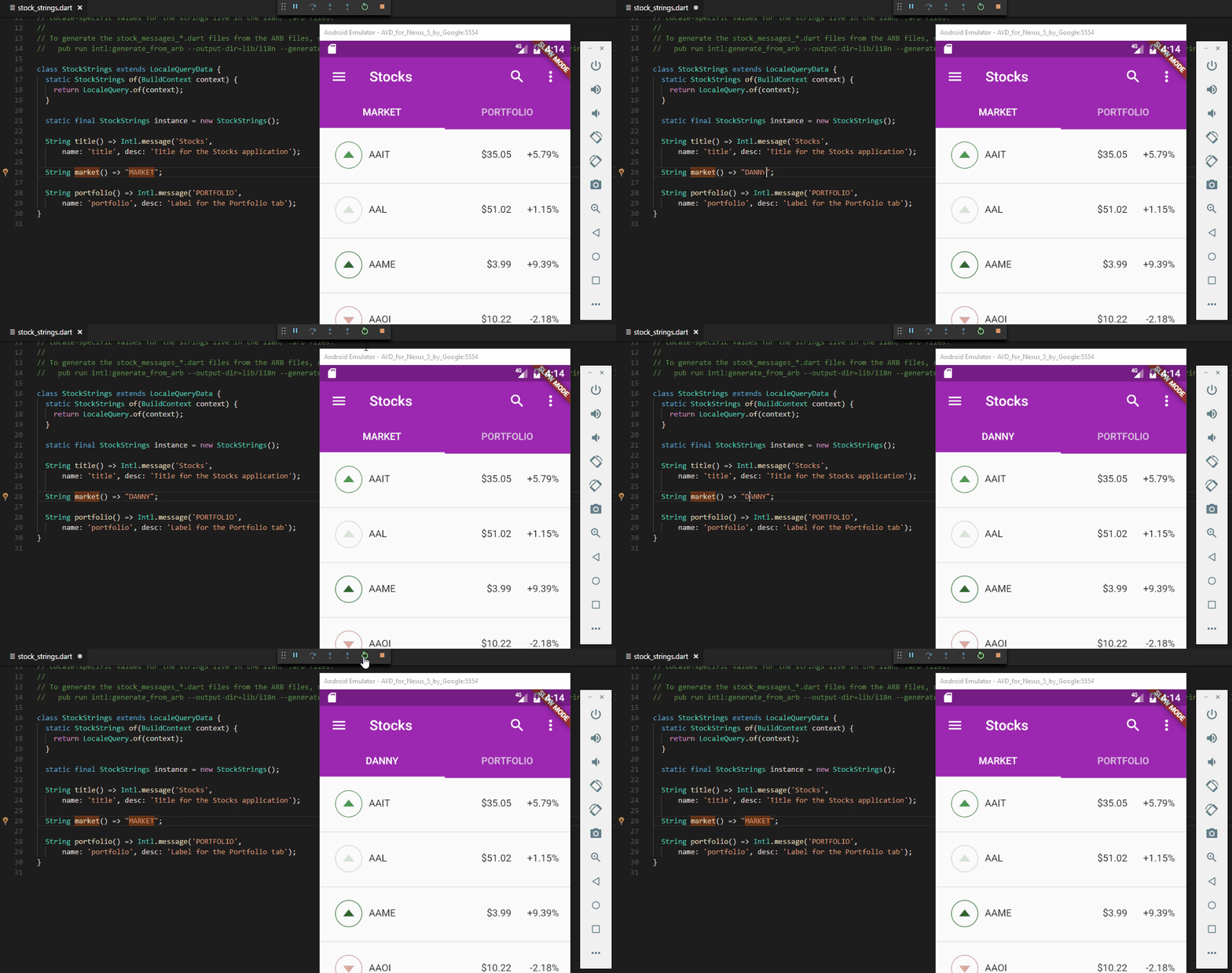
The only real block now is that I can't get the debugger to step properly (see https://github.com/flutter/flutter/issues/10615). I'd also like to add a device-selector so people don't need to launch/terminate/connect/disconnect devices.
If I can get that debugging issue sorted, I'll be interested in having a few people test before releasing (running the example apps is about the limit of the testing I can do).
DanTup
on 10 Jun 2017
@devoncarew Would it be a silly thing to do to send a hot reload on every file save? :D
DanTup
on 10 Jun 2017
I know the Corona SDK simulator runs like that. Seems like a decent feature, but definitely one that should be able to be optioned out.
Skylled
on 10 Jun 2017
Seems that hitting Restart in Code (Ctrl+Shift+F5) saves all files anyway, so maybe not worthwhile - if the user wants a one-button-save-and-hot-reload, they already have one.
DanTup
on 10 Jun 2017
Ok, device selection works correctly now. If there are multiple devices connected you can click the device name in the status bar to switch between devices. When new devices are connected, they're set as the active device by default.
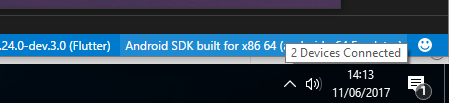
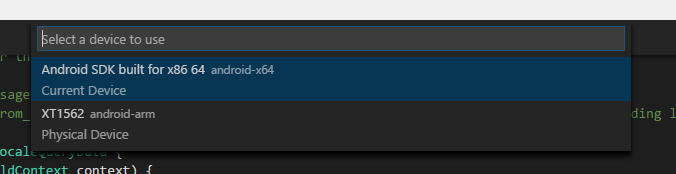
Just gotta fix the debug stepping and then I'll build a beta for anyone interested in testing :-)
DanTup
on 11 Jun 2017
See #318 for a pre-release version of this functionality for testing.
DanTup
on 13 Jun 2017
May have a fix for the debugging issue (#332). If I can get some time to test this today I'll create a new beta release with the fix for more testing. Hopefully then there's only fairly minor things to fix before releasing for real (some of this might get delayed for a v1.4.3 to address some debugging issue in 1.25 SDK though).
DanTup
on 23 Jun 2017
Ok, there's a new beta3 release attached here:
https://github.com/Dart-Code/Dart-Code/releases/tag/v1.5.0-beta.flutter
You may need to uninstall the previous version before installing this. It's the same as the previous version except it has a fix for the debug stepping issue (the problem was that we were connecting to the debugger too early - which strangely allows it to work for a few seconds and then it stops).
Please test it out and let me know if it resolves all the debugging issues you had.
DanTup
on 23 Jun 2017
I've uploaded a new beta version (beta4):
https://github.com/Dart-Code/Dart-Code/releases/tag/v1.5.0-beta.flutter
Please uninstall the previous beta and try this one; it will hopefully resolve issues with breakpoints not being hit after a hot reload (note: there is a race condition caused by https://github.com/flutter/flutter/issues/10934 which needs fixing in the SDK).
Let me know if you hit any issues; I've only been able to test on Windows.
DanTup
on 5 Jul 2017
The main work here is complete and will ship in the next release (v2.0), hopefully next week. There are a few other related cases I hope to resolve in the v2.0 milestone first.
DanTup
on 6 Jul 2017
@/all I've pushed a final flutter beta (beta5) here:
https://github.com/Dart-Code/Dart-Code/releases/tag/v1.5.0-beta.flutter5
I believe this is basically feature complete and will be shipped as v2.0 in the next week or so (maybe with some fixes, depending on feedback). If you're able to try this out, please let me know how it works (and on what platform).
In addition to fixes in previous betas there have been some other minor tweaks:
- #319 - Hide trailing commas in code completion
- #329 - Ensure debugger terminates when app installs fail
- Analysis server version shown alongside SDK version in status bar
- #340 - When running with
Ctrl+F5don't connect debugger - #327 - Set
FLUTTER_HOSTenv var for Flutter tools telemetary - #328 - Include Dart vs Flutter tag in analytics
DanTup
on 7 Jul 2017
I'm planning on pushing Dart Code v2 out tomorrow evening (~26 hours from now). I should have some time on Thurs/Fri to push out an update if it does happen to have issues and I can fix them.
Thanks everyone that helped test and provided feedback; it's great to (finally) publish this!
DanTup
on 10 Jul 2017
ICYMI, Dart Code v2 is available in the marketplace. Be sure to uninstall any beta version and restart Code before installing (Code doesn't properly consider vsix and marketplace extensions as the same).
DanTup
on 14 Jul 2017
I noticed in the stats there are still some people using the Flutter beta version of Dart Code! :/
In older versions of Dart Code, vsix extensions didn't upgrade cleanly when the marketplace version was newer. If you installed a beta version of Dart Code and don't think you've seen any updates recently, please try uninstalling the extension, restart Code, check whether it still appears installed (and if so, uninstall again and restart Code again) and then install again from the marketplace!
DanTup
on 29 Dec 2017
I think it makes sense to be able to run on all devices.
Usually, I have at least one device from Android and one from iOS which I want to hot reload at once and expect consistency between the two platforms.
Would really be awesome to be able to do that just with cmd+s!
 jhandguy
on 23 Mar 2018
jhandguy
on 23 Mar 2018
@jhandguy I've opened #728 (I thought there was already an issue but can't find it); subscribe there for updates!
DanTup
on 23 Mar 2018
Related issues
 ifredom
·
3Comments
ifredom
·
3Comments
 mayorbyrne
·
5Comments
mayorbyrne
·
5Comments
 awfin
·
3Comments
awfin
·
3Comments
 shamrin
·
5Comments
shamrin
·
5Comments
 jascodes
·
4Comments
jascodes
·
4Comments
Most helpful comment
@jhandguy I've opened #728 (I thought there was already an issue but can't find it); subscribe there for updates!