Darktable: Export does not work in v3.2.1 on Windows 10 Home.
After updating to version 3.2.1 on Windows 10 Home, exporting to disk does not work.
To Reproduce
- Install darktable version 3.2.1 as upgrade or as new installation on Windows 10 Home.
- Set "target storage" to "file on disk"
- Set "on conflict" to either "overwrite" or "create unique filename"
- Select an image to export.
- Try to use any valid absolute path, any valid named variable, any valid directory separator ( /, \\ ), or use browser to select a valid destination for you.
- Try to export the selected image.
- Export always fails with error message of: can not export to file 'your valid Windows path and filename here'! (text inside single quotes is a valid, accessible, path and filename on the device running darktable, of course)
Expected behavior
- Selected image should be exported.
Screenshots
- N/A
Platform (please complete the following information):
- Darktable Version: 3.2.1
- OS: Windows 10 Home, 64-bit, Version 10.0.18363 Build 18363
- OpenCL activated
- Intel(R) HD Graphics 5500, Driver Version 20.19.15.4703
Additional context
- Export worked without any issues in previous versions of darktable.
- After a complete uninstall (deleting files and directories in \AppData\Local\ too), and installing v3.0.2, export is working again. It is definitely a problem in v3.2.1.
 wpkc
wpkc
All 13 comments
Its works for me on Windows 10 version 2004.
 Appli-SaintRenan
on 19 Aug 2020
Appli-SaintRenan
on 19 Aug 2020
I just did an uninstall of v3.2.1, and then installed v3.0.2. Export is working again.
Export is definitely broken in v3.2.1 on Windows 10 Home, 64-bit, Version 10.0.18363 Build 18363.
wpkc
on 20 Aug 2020
Do you have antivirus? it looks like duplicate of #5975
if still you have problem, try running darktable with -d imageio (read recommendations in referenced issue please)
 johnny-bit
on 20 Aug 2020
johnny-bit
on 20 Aug 2020
Thanks for your help. Here is what I have found.
- I do use Avast AntiVirus.
- Disabling Avast AntiVirus allows images to be saved.
- Unlike the author of #5975 adding an exception for the darktable executable, or the entire darktable directory, or the directory the images are being saved to does not allow images to be saved.
- Running darktable with
-d imageiodoes not allow images to be saved.
It seems that there is some new behavior in darktable's export that is triggering Avast no matter what.
I will file a report with Avast. But what has changed that could be causing this?
wpkc
on 20 Aug 2020
-d imageio should produce a log of error. can avast be run in "verbose"
mode to show why it would block darktable? there have been no change to way
how darktable stores images on disk.
czw., 20 sie 2020 o 00:52 wpkc notifications@github.com napisał(a):
Thanks for your help. Here is what I have found.
- I do use Avast AntiVirus.
- Disabling Avast AntiVirus allows images to be saved.
- Unlike the author of #5975
https://github.com/darktable-org/darktable/issues/5975 adding an
exception for the darktable executable, or the entire darktable directory,
or the directory the images are being saved to does not allow images
to be saved.- Running darktable with -d imageio does not allow images to be
saved.It seems that there is some new behavior in darktable's export that is
triggering Avast no matter what.I will file a report with Avast. But what has changed that could be
causing this?—
You are receiving this because you commented.
Reply to this email directly, view it on GitHub
https://github.com/darktable-org/darktable/issues/6027#issuecomment-676790495,
or unsubscribe
https://github.com/notifications/unsubscribe-auth/ACRRKFMEF3RSXCKKDZP6AIDSBRJTTANCNFSM4QFLRUKQ
.
--
Pozdrawiam,
Hubert Kowalski
johnny-bit
on 20 Aug 2020
This could be way off but when I installed darktable 3.2.1 windows complained about the lack of signature on the executable.
Maybe Avast is blocking unsigned binaries from writing to disk
 jmg-duarte
on 20 Aug 2020
jmg-duarte
on 20 Aug 2020
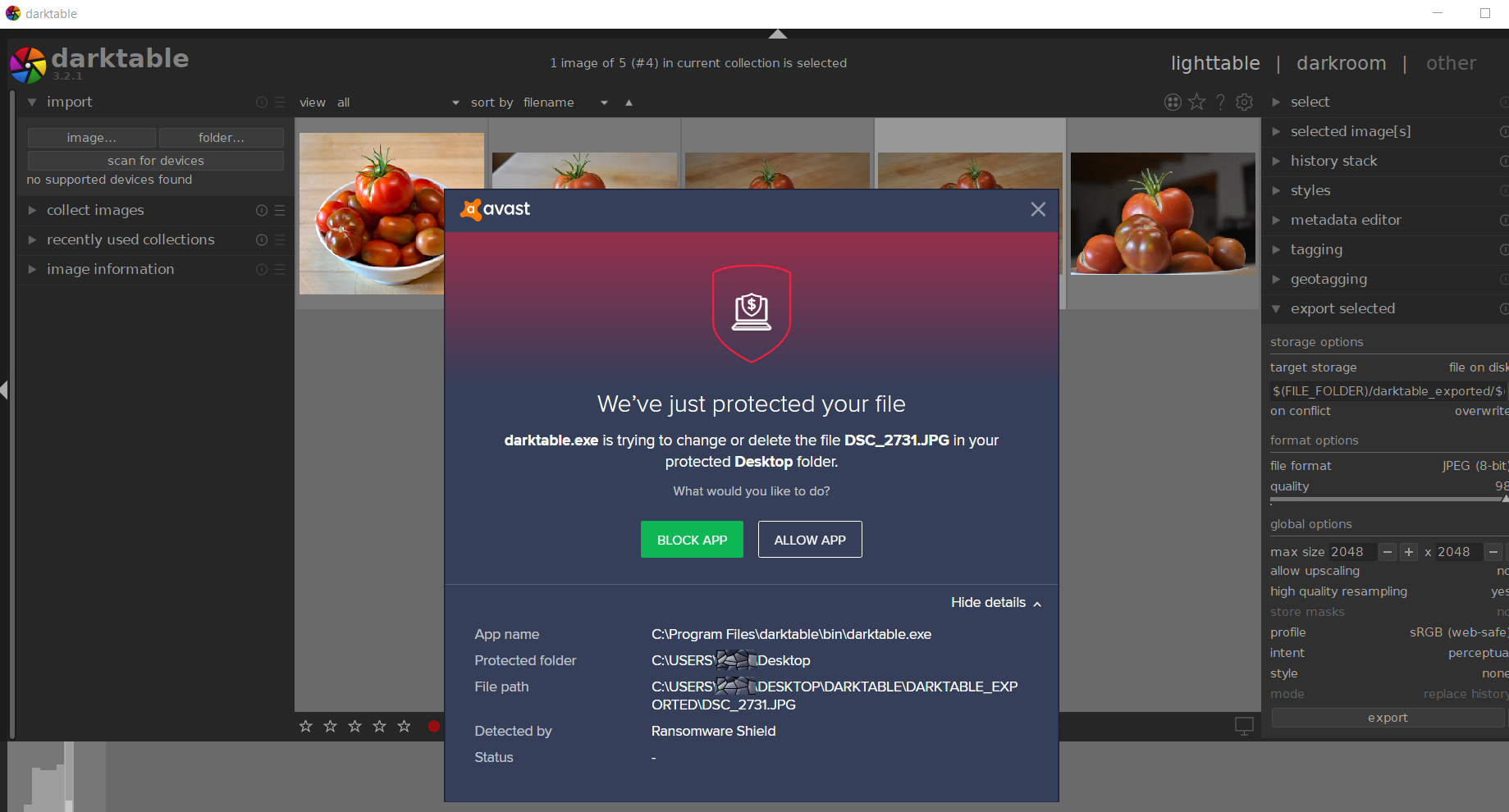
I forgot that I had Avast in "Silent Mode." It was blocking the export of images without showing an alert. I turned off Silent Mode and was given an alert when trying to export. I was able to unblock the action of writing to disk from the alert, so it is working for now.
The interesting thing is that it triggered Avast's "RansomWare Shield." I have sent all the relevant info to Avast, and they are working on it. The support guys at Avast seemed unaware of what darktable was; so it is possible there was no exception built-in to Avast for earlier versions of darktable (or the support guys simply don't know Avast to that level of detail). If there were no previous exceptions for darktable, I would assume that means something has changed with the export library since v3.0.2 that is triggering their ransomware protection.
wpkc
on 20 Aug 2020
Maybe it's caused by the fact that darktable first writes the file without EXIF data and then embeds the EXIF into that file (if I'm not mistaken). That second action may look suspect to antivirus, because usually files are written once. Though it hasn't changed in 3.2.1, so why this protection wasn't triggered before is anyone's guess.
 parafin
on 20 Aug 2020
parafin
on 20 Aug 2020
The Ransomware Shield is pretty specific. It is not detecting viruses in general, but a very specific type of malware that encrypts files so they can be held for ransom. That is just weird, since the exported image is a valid JPEG file.
Avast is pretty fast about these things, so I would not be surprised if it is fixed within 24 hours, and changes sent out to everyone through their streaming updates system.
wpkc
on 20 Aug 2020
We'll need to add antivirus problems to FAQ 😄 but it's not darktable's
fault ultimately 😃
czw., 20 sie 2020, 20:29 użytkownik wpkc notifications@github.com napisał:
The Ransomware Shield is pretty specific. It is not detecting viruses in
general, but a very specific type of malware that encrypts files so they
can be held for ransom. That is just weird, since the exported image is a
valid JPEG file.Avast is pretty fast about these things, so I would not be surprised if it
is fixed within 24 hours, and changes sent out to everyone through their
streaming updates system.—
You are receiving this because you commented.
Reply to this email directly, view it on GitHub
https://github.com/darktable-org/darktable/issues/6027#issuecomment-677826876,
or unsubscribe
https://github.com/notifications/unsubscribe-auth/ACRRKFKYDZMDZXB2RYPQFS3SBVTQRANCNFSM4QFLRUKQ
.
johnny-bit
on 20 Aug 2020
Antivirus are probably the worst virus around, it makes your computer slow, serves almost nothing, broke many softwares... I suppose it makes their creator lot of money :)
 TurboGit
on 20 Aug 2020
TurboGit
on 20 Aug 2020
Antivirus are probably the worst virus around, it makes your computer slow, serves almost nothing, broke many softwares... I suppose it makes their creator lot of money :)
First thing I do when I clean the laptop of my father in law is remove his antiviruses he installed willingly and those that installed stealthy... then I go clean the actual trash. IMO, W10's native anti-vir that comes built-in is enough for most users.
 maboleth
on 21 Aug 2020
maboleth
on 21 Aug 2020
@wpkc , so as this is not a darktable issue but one with your anti-virus, consider closing this issue.
 ptilopteri
on 21 Aug 2020
ptilopteri
on 21 Aug 2020
Related issues
 sboukortt
·
3Comments
sboukortt
·
3Comments
 jpellegrini
·
3Comments
jpellegrini
·
3Comments
 lovesegfault
·
3Comments
lovesegfault
·
3Comments
 schwerdf
·
4Comments
schwerdf
·
4Comments
 Nilvus
·
5Comments
Nilvus
·
5Comments
Most helpful comment
Antivirus are probably the worst virus around, it makes your computer slow, serves almost nothing, broke many softwares... I suppose it makes their creator lot of money :)