Darktable: Tool Tips are frequently in an awkward and interferring position expecially over the histogram.
Tool Tips are frequently in an awkward and interferring position expecially over the histogram.
Please provide a way to control their display, either by length of time or toggling on/off, ...
openSUSE Tumbleweed 20200609
NVIDIA GF106 [GeForce GTS 450], 390.132
darktable 3.1.0+2050~g02678f4d9
OpenCL on
i7 12-core 36GB
 ptilopteri
All 65 comments
Another option might be moving the display further above/below/left/right of the mouse pointer.
ptilopteri
on 10 Jun 2020
Have a look at #5321 :-/ (smiley refers to the topic)
 AxelG-DE
on 10 Jun 2020
AxelG-DE
on 10 Jun 2020
@AxelG-DE yes, I asked about 2 weeks ago on the mail list how to disable tooltips and got no response.
Amazing that a simple, prevelent and obnoxious feature like tooltips cannot be better controlled.
ptilopteri
on 10 Jun 2020
It's more of gtk/gtk-api issue tho... i wonder if there's a gtk bug for this somewhere...
 johnny-bit
on 10 Jun 2020
johnny-bit
on 11 Jun 2020
johnny-bit
on 10 Jun 2020
johnny-bit
on 11 Jun 2020
I can confirm that adding "tooltip { opacity: 0; }" to ~/.config/gtk-3.0/gtk.css
will stop the display of tooltips. Unfortunately it disables display of tooltips
on your entire gtk system, not just dt.
ptilopteri
on 12 Jun 2020
@ptilopteri does this not work if you put it in the darktable CSS? If it did you could just add this to the CSS tweaks section of preferences. Edit: it does work - there's your solution then!
 elstoc
on 12 Jun 2020
elstoc
on 12 Jun 2020
I know is not a dt issue. Still wonder anybody has a better solution than just totally discard the tooltips. E.g. can they be delayed by 2sec?
AxelG-DE
on 12 Jun 2020
You may be able to use one of the transition or animation css properties: see https://developer.gnome.org/gtk3/stable/chap-css-properties.html sections 11 and 12
elstoc
on 12 Jun 2020
I've played around with this and I don't believe duration can be controlled within gtk.
elstoc
on 12 Jun 2020
@ptilopteri does this not work if you put it in the darktable CSS? If it did you could just add this to the CSS tweaks section of preferences. Edit: it does work - there's your solution then!
@elstoc it did not on my test :(
ptilopteri
on 12 Jun 2020
Works for me @ptilopteri. Just to be sure, did you definitely tick the tick-box (modify selected theme with CSS tweaks below) and save the tweaks (click on the 'save theme tweaks' button)? Worth trying a restart too (though it shouldn't be required).
elstoc
on 12 Jun 2020
@elstoc yes to both points but will try again immediately.
added:
tooltip { opacity: 0; }
to "General" below /* Enter CSS theme tweaks here */
mouse clicked on "save theme tweeks", tested.
restarted dt and again tested.
both failed to hide tooltips over histogram or any other location I tried.
ptilopteri
on 12 Jun 2020
I tried this:
tooltip {
  opacity: 0.0;
  background: transparent;
}
and it works. background:transparent is needed otherwise you'd get rather... unpleasant (or i get) weird shape instead off tooltip.
johnny-bit
on 12 Jun 2020
@ptilopteri could you add a screenshot of your preferences window, general tab
elstoc
on 12 Jun 2020
this is how it should look like:
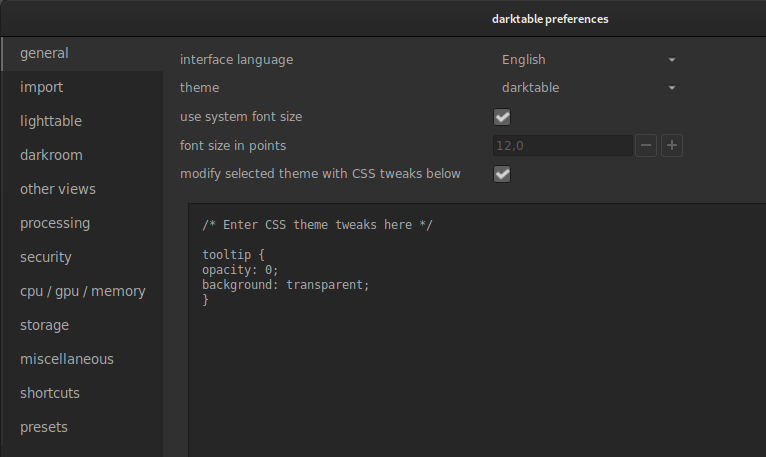
johnny-bit
on 12 Jun 2020
no, I had a single line, changing
now:
/* Enter CSS theme tweaks here */
tooltip {
opacity: 0;
background: transparent;
}
@elstoc @johnny-bit , no, that does not work for me either.
and can provide screen shot but mirrors @johnny-bit's profided.
tks
ptilopteri
on 12 Jun 2020
save settings, make sure checkbox is checked. restart darktable. what do
you see? btw: how to do screenshot of tooltip?
pt., 12 cze 2020 o 13:48 ptilopteri notifications@github.com napisał(a):
no, I had a single line, changing
now:
/* Enter CSS theme tweaks here */tooltip {
opacity: 0;
background: transparent;
}@elstoc https://github.com/elstoc @johnny-bit
https://github.com/johnny-bit , no, that does not work for me either.and can provide screen shot but mirrors @johnny-bit
https://github.com/johnny-bit's profided.tks
—
You are receiving this because you were mentioned.
Reply to this email directly, view it on GitHub
https://github.com/darktable-org/darktable/issues/5382#issuecomment-643228625,
or unsubscribe
https://github.com/notifications/unsubscribe-auth/ACRRKFJVWCU22IYWEKNPTPLRWIIX7ANCNFSM4N2K7LSA
.
--
Pozdrawiam,
Hubert Kowalski
johnny-bit
on 12 Jun 2020
@johnny-bit I did restart after being sure to save change
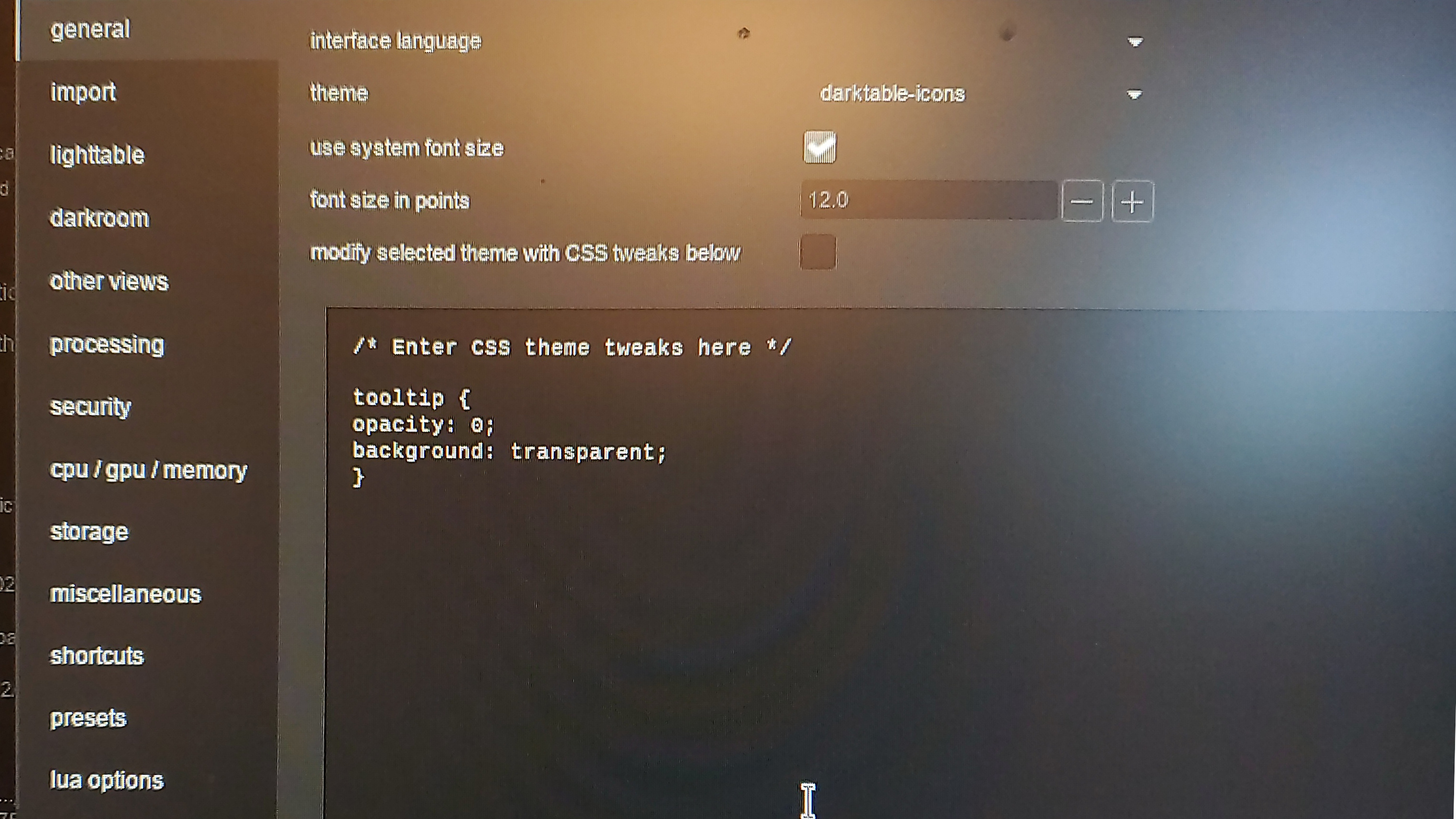
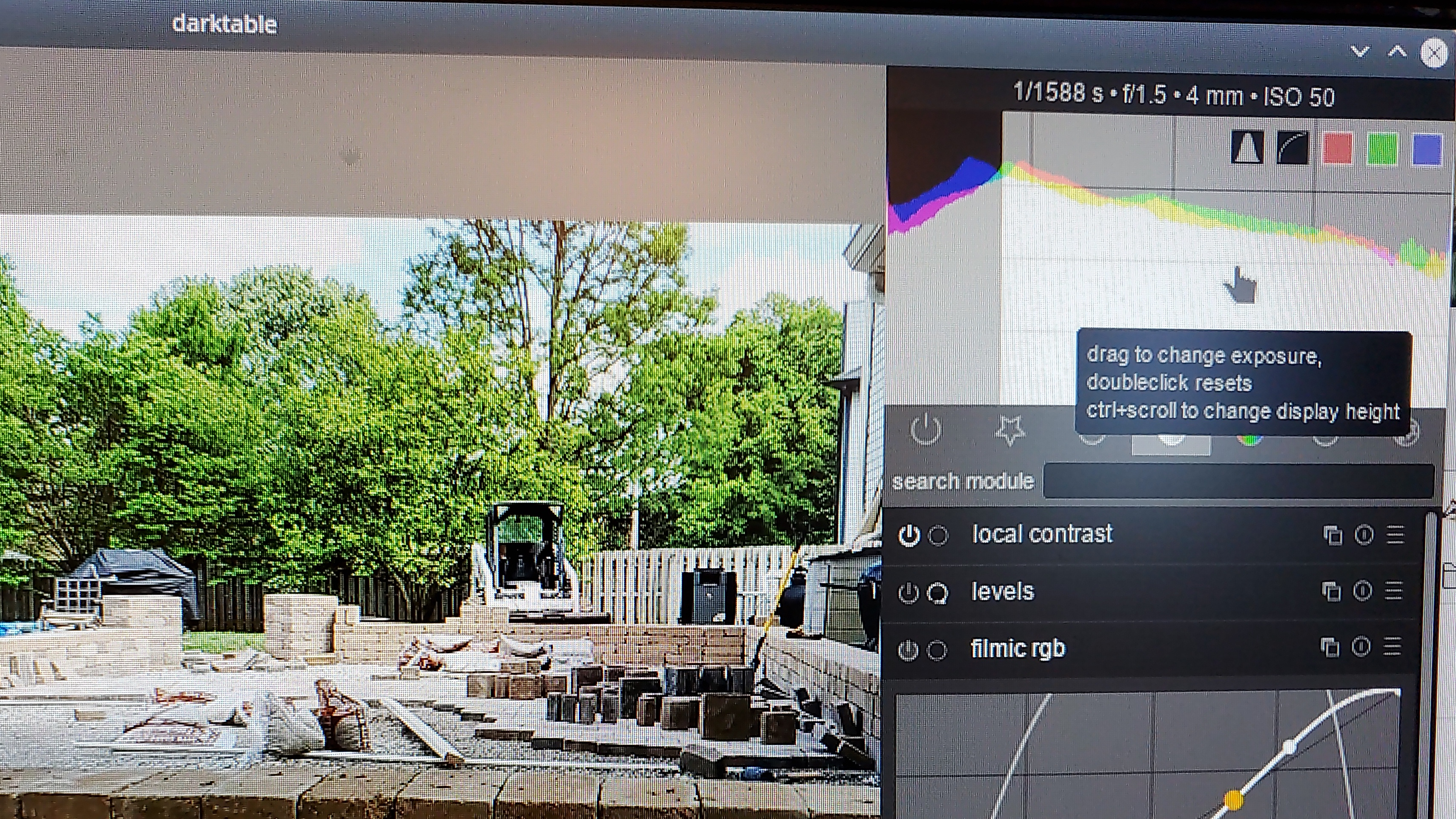
ptilopteri
on 12 Jun 2020
@ptilopteri you need to tick the box above the CSS entry for it to work. Thought that might be the issue.
elstoc
on 12 Jun 2020
@elstoc ahhhhh, ok that works. But also leads to another question.
Why isn't the "save theme tweaks" sufficient. Brings to mine the "do you
really want to do this" constant reminder from microsoft.
ptilopteri
on 12 Jun 2020
@elstoc
one or the other should suffice
ptilopteri
on 12 Jun 2020
Because if we're investigating issues, we need a quick way to switch off your changes without you having to delete the contents of your file.
elstoc
on 12 Jun 2020
Also you might want to do that if a darktable update breaks your CSS (as some recent ones have for mine)
elstoc
on 12 Jun 2020
Later I wanna experiment with those...
https://stackoverflow.com/questions/57646404/css-transition-delay-when-fading-in-but-no-delay-when-fading-out
AxelG-DE
on 12 Jun 2020
Later I wanna experiment with those...
It'd be great if some of those pure-CSS tricks work but I'm not convinced they will. I've had a look at the gtk source code and I can't find anything that reads the timeout from CSS. Hope I'm wrong though.
elstoc
on 12 Jun 2020
Change the position with padding: might also help
I will play...
(still in gym)
AxelG-DE
on 12 Jun 2020
@elstoc so I should not close this issue???
ptilopteri
on 12 Jun 2020
I doubt there will be a code fix to resolve this issue, as I don't think it's possible to change the position or delay for tooltips programatically. So the likely resolution (if any) will just be a recommendation as to CSS you can use to override the behaviour. Might be worth leaving it open for a bit just in case anyone can find some CSS that works.
elstoc
on 12 Jun 2020
If would be good to add that as a tip in user's wiki if you want to?
pt., 12 cze 2020 o 14:39 elstoc notifications@github.com napisał(a):
I doubt there will be a code fix to resolve this issue, as I don't think
it's possible to change the position or delay for tooltips programatically.
So the likely resolution (if any) will just be a recommendation as to CSS
you can use to override the behaviour. Might be worth leaving it open for a
bit just in case anyone can find some CSS that works.—
You are receiving this because you were mentioned.
Reply to this email directly, view it on GitHub
https://github.com/darktable-org/darktable/issues/5382#issuecomment-643248831,
or unsubscribe
https://github.com/notifications/unsubscribe-auth/ACRRKFI6TZHLNFVWY6BKCFLRWIOX5ANCNFSM4N2K7LSA
.
--
Pozdrawiam,
Hubert Kowalski
johnny-bit
on 12 Jun 2020
Change the position with padding: might also help
Margin/padding will not be useful. This issue is not possible to fix with CSS (I've made some tries). We could maybe find a better compromise but not a really fix. About padding/margins, just check that same tooltip could have a different position around the cursor depending on screen/cursor place, etc. It's really and totally a Gtk Issue.
Delay indeed doesn't seems to work correctly on tooltips. Anyway, I will see and try to find if something better could be possible. Don't wait or even search for a complete CSS fix. It would be time lost.
2 reasons:
- Gtk really deal bad with tooltip
- Gtk is not compatible will all CSS options and some don't work each time. To conclude: Gtk only have a partial (even if it's quite important) CSS support
 Nilvus
on 12 Jun 2020
Nilvus
on 12 Jun 2020
@Nilvus: thank you for looking into this really annoying topic :-)
@johnny-bit: for me the CSS-tweak also does not work, even though I have it exactly like you. After some trials I will stop here, as I realized, with low competency, you can actually mess a lot :-) and hope for the best from Nilvus
AxelG-DE
on 12 Jun 2020
@Nilvus: thank you for looking into this really annoying topic :-)
and hope for the best from Nilvus
Don't hope too much here. It's one of the worst part of Gtk CSS possibilities here, so not sure to find something better...
Nilvus
on 12 Jun 2020
I have made a lot of tests and search on the web too. I'm now near about 99% sure that transition do not work on tooltip. And probably just because, no state effect could be set. To set a transition, you need to set a first state and then a second one. The transition will be between them. So, for example, adding a transition to a hover effect, so you set the item then item:hover effect and add a transition parameter.
There's nothing applied when testing hover, active, checked, ::after or ::before states for example on tooltip.
I've also check some Gtk themes, see on Firefox (that use also Gtk), VLC or some other things, and all have permanent tooltips. I also see that some time ago Gtk had a gtk timeout delay for tooltips to add on Gtk code, but now deprecated since a very long time...
So nothing as a timeout is possible with Gtk at this time for tooltips. So, or you have them or you disable them.
Anyway, with the opacity setting, I think I find something that could be better (but hard compromise between having tooltip readable and see a little what's behind the tooltip). So what do you think of having a little semi-transparent background?
I could propose a PR to test what I found, I think, to be a good compromise. Waiting for your feedback.
Nilvus
on 12 Jun 2020
So what do you think of having a little semi-transparent background?
It's worth experimenting with. However a lot of what's beneath the tooltip will also be text, so you might not be able to make it very transparent, without making it hard to read.
elstoc
on 12 Jun 2020
So what do you think of having a little semi-transparent background?
It's worth experimenting with. However a lot of what's beneath the tooltip will also be text, so you might not be able to make it very transparent, without making it hard to read.
Totally agree, and be sure that transparency is very limited for that exact reason.
Nilvus
on 12 Jun 2020
Hey @AxelG-DE I found (or I think I found) your holly grail! Working tooltip, that doesn't cover "computed EV". try placing this in your css tricks:
/* Enter CSS theme tweaks here */

tooltip *
{
  background-color: transparent;
}

tooltip.background
{
  opacity: 0.95;
  padding-top: 1px;
  margin-top: 1px;
  background-color: transparent;
  border: none;
}

tooltip label
{
  margin-top: 5px;
  padding: 2px;
  opacity: 1;
  color: @tooltip_fg_color;
  background-color: rgba(0,0,0,1);
  border: 1px solid shade(@tooltip_bg_color, 1.5);
}
that gives it just about enough spacing for tooltip to be still associable with element and not to be very obstructive :)
johnny-bit
on 12 Jun 2020
Not convinced about the colour but I definitely like the tooltip being further away from the mouse like that.
elstoc
on 12 Jun 2020
@johnny-bit
I like this, but altered
opacity: 0.95 to 0.65
and
maggin-top: 5px to 30px
tks
ptilopteri
on 12 Jun 2020
This is just a find, have fun wit hit ;)
johnny-bit
on 12 Jun 2020
Yesterday after gym I was dead and today visiting a friend. So will play with this tomorrow, I guess :-)
AxelG-DE
on 13 Jun 2020
@johnny-bit
I like this, but altered
opacity: 0.95 to 0.65
and
maggin-top: 5px to 30pxtks
This not move the tooltip but tooltip label. tooltip can't be moved. But this visually make the feeling that tooltip is moved. You could tweak that with preferences editor box. 30px is too much for a default setting, as 0.65 opacity is too less for same thing.
Nilvus
on 13 Jun 2020
something has helped, this shows much better separation
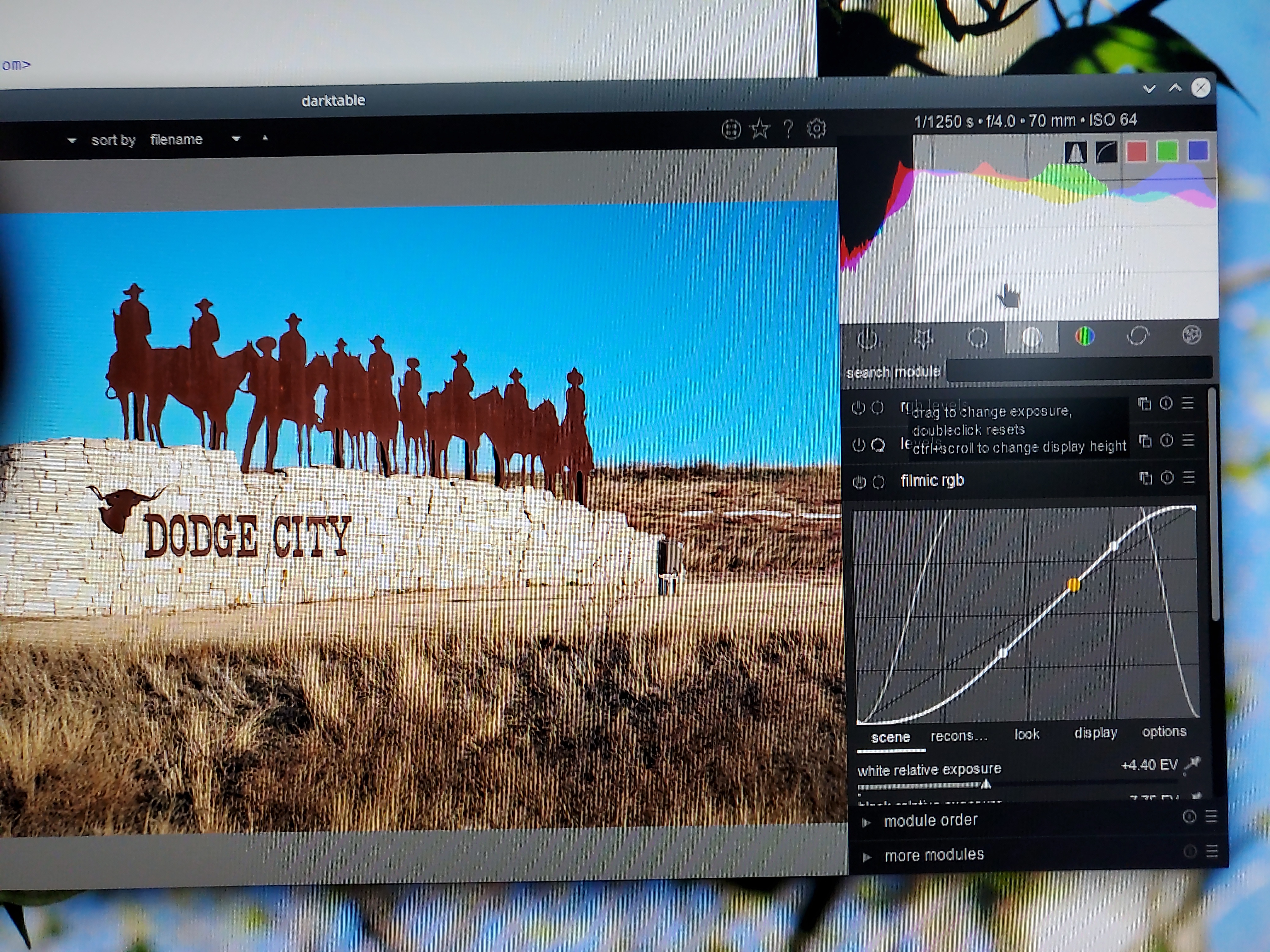
ptilopteri
on 13 Jun 2020
@ptilopteri : if it's good for you that way, it's a good thing. But for most users, that will be disturbing and not really readable I think.
Nilvus
on 13 Jun 2020
Tooltips are good for unknown or seldom utilized but just in the way for known or familiar items. If I really need explanation, I can take the time to make adjustments necessary for better vision if I desire.
Tooltips can be quite obnoxious at times.
ptilopteri
on 13 Jun 2020
that's the GTK problem, not in dt. Tooltips are great UX tool as little
hints etc but lack of powerfull configurbility and per module / item config
without modifying all modules with tons of gtk code (or creating
bauhaus-like dedicated tooltip that works around all donwsides of gtk
tooltip api) :/
tbh - i'd leave "default" behaviour of tooltips as it is an relegate
hiding, positioning and tricks to user's css tricks.
sob., 13 cze 2020 o 20:53 ptilopteri notifications@github.com napisał(a):
Tooltips are good for unknown or seldom utilized but just in the way for
known or familiar items. If I really need explanation, I can take the time
to make adjustments necessary for better vision if I desire.Tooltips can be quite obnoxious at times.
—
You are receiving this because you were mentioned.
Reply to this email directly, view it on GitHub
https://github.com/darktable-org/darktable/issues/5382#issuecomment-643663209,
or unsubscribe
https://github.com/notifications/unsubscribe-auth/ACRRKFI6UEZ72KE356J4UBDRWPDLNANCNFSM4N2K7LSA
.
--
Pozdrawiam,
Hubert Kowalski
johnny-bit
on 13 Jun 2020
One alternative to remove all tooltip if this is desired is to wrap all tooltip creation into a specific dt routine and actually register the tooltip when a pref is set to TRUE.
 TurboGit
on 13 Jun 2020
TurboGit
on 13 Jun 2020
One alternative to remove all tooltip if this is desired is to wrap all tooltip creation into a specific dt routine and actually register the tooltip when a pref is set to TRUE.
That would be a really good thing (for 3.2 if possible ; 3.4 will be good too of course). Or why not also set a keyboard shortcut to enable/disable tooltip easily and when we want, without opening preferences. Tooltips are mainly useful when we learn darktable (or a new modules, new features).
Nilvus
on 13 Jun 2020
Tooltips are mainly useful when we learn darktable (or a new modules, new features).
Yes! Or rarely used functions...
AxelG-DE
on 13 Jun 2020
One alternative to remove all tooltip if this is desired is to wrap all tooltip creation into a specific dt routine and actually register the tooltip when a pref is set to TRUE.
Given that tooltip display (i.e. show/hide) can be entirely defined with CSS it shouldn't be too much trouble to use preferences to add small snippets of CSS to the theme. So we could have a boolean preference to choose whether to display tooltips and, if selected, the theme loader would just append tooltip {opacity: 0; background: transparent;} to the CSS before loading the theme.
elstoc
on 13 Jun 2020
preferable would be the ability to toggle visibility via a key combination.
ptilopteri
on 13 Jun 2020
@elstoc : Your solution is even better as in my case I would need to restart as all tooltip are set at initialization in gui_init(). So yes a CSS snippet to hide tooltip could be a better candidate for this.
TurboGit
on 13 Jun 2020
But all this is too much for 3.2 anyway.
TurboGit
on 13 Jun 2020
preferable would be the ability to toggle visibility via a key combination
We could do that too. The only limitation would be that there might be a visual blip because darktable might have to reload the whole theme. But the code change would be really quite small (set a preference then run the theme loader function).
elstoc
on 13 Jun 2020
the "blip" would be much better than the current state. Even as a "temporary" solution.
ptilopteri
on 13 Jun 2020
preferable would be the ability to toggle visibility via a key combination
We could do that too. The only limitation would be that there might be a visual blip because darktable might have to reload the whole theme. But the code change would be really quite small (set a preference then run the theme loader function).
A small visual blip so. Why not.
But we need to be careful that's this work great without restart in 2 ways. Actually, adding CSS tweak to hide works great but if I remove it on CSS editor in preferences, the tooltip are not seen correctly (only a black background without any text shown). Only restarting darktable make tooltip shown again correctly.
Nilvus
on 13 Jun 2020
Only restarting darktable make tooltip shown again correctly
Unfortunately, when I tried implementing via a keyboard shortcut this turned out to be the case, even though the shortcut reloaded the entire theme again. Tooltips can be hidden with a shortcut but can only be unhidden with a restart. I suspect it might be a gtk issue (again!).
So I've tried implementing it with a preference setting. Give it a try if you like in #5462.
elstoc
on 13 Jun 2020
Strike that. As long as you explicitly specify opacity in the main theme (darktable.css) the keyboard shortcut works fine. #5462 now updated. And no blip. It just works™.
elstoc
on 14 Jun 2020
Hey @AxelG-DE I found (or I think I found) your holly grail! Working tooltip, that doesn't cover "computed EV". try placing this in your css tricks:
I know partially it is a little obsolete, however, want to state, fwiw:
Those fixes in _"modify selected theme withCSS tweaks below"_, they never work for me. Either no effect or weird...
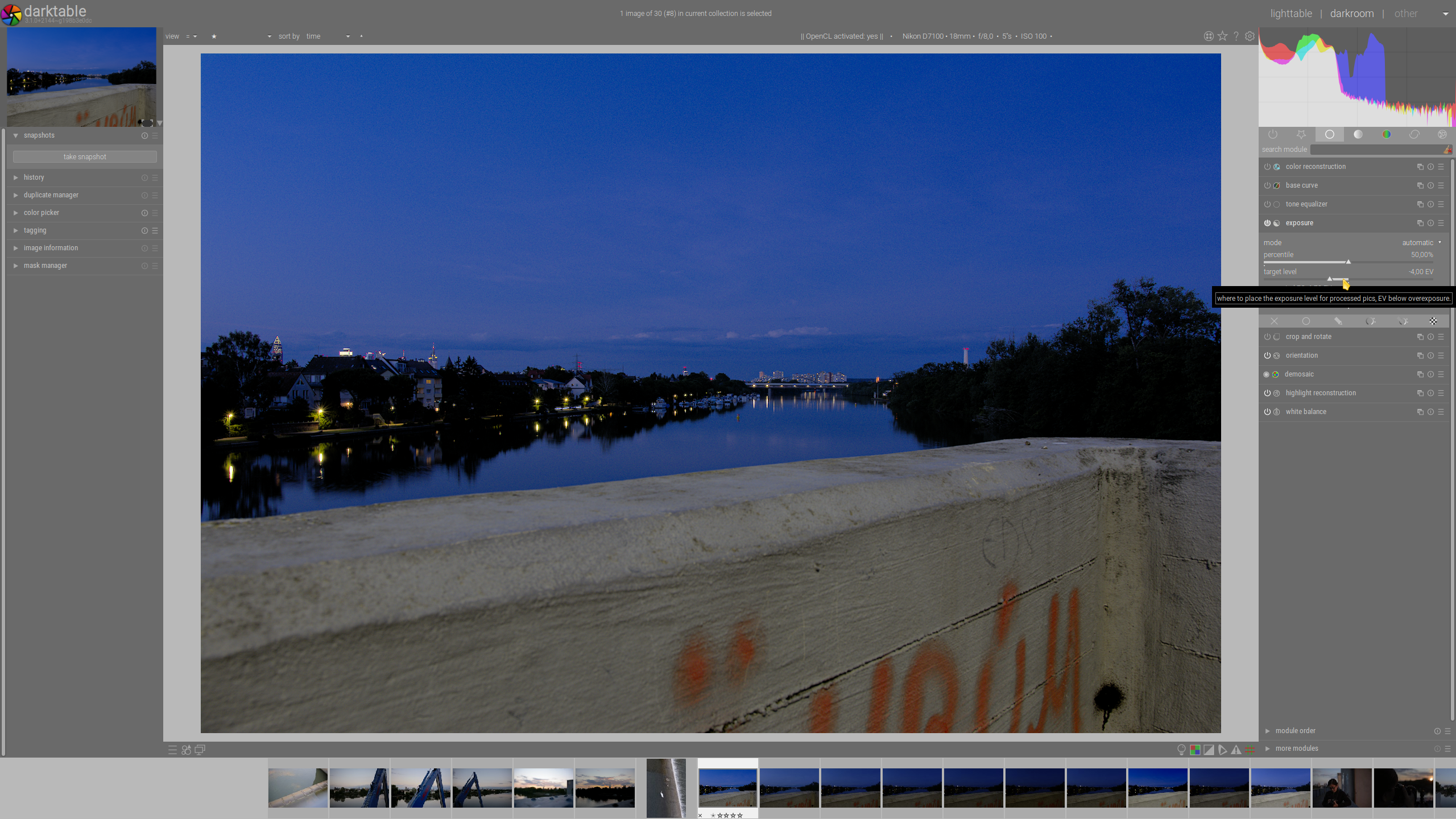
AxelG-DE
on 14 Jun 2020
@AxelG-DE: something is applied, so that means that exactly what CSS you propose (tweak AND css theme behind) is applied. So that's only something missing or something added that do not have to be there for what you want.
Here, you have a not wanted background around label border. So something like adding background-color: transparent in tooltip * or tooltip.background (or both).
Nilvus
on 14 Jun 2020
@Nilvus thanks for your swift reply and sorry for my limited compenteces...
So something like adding background-color: transparent in tooltip * or tooltip.background (or both).
actually they are alreedy bot applied per tweak from johnny-bit above. I just don't figure the interferences. The first snippet from johnny-bit also did not work for me, while the current master (+2144) does show some (to week for my taste) opacity...
AxelG-DE
on 14 Jun 2020
I will repeat my comment from #5438 - you need to test opacity on the system without compositing - tooltips might not get hidden with that trick there.
 parafin
on 14 Jun 2020
parafin
on 14 Jun 2020
@parafin you are correct: opacity and tooltip show/hide only work with compositing switched on.
elstoc
on 14 Jun 2020
I would say that you have to go the way @TurboGit proposed and not CSS.
parafin
on 14 Jun 2020
I suppose it depends on whether you think it's worth that effort or whether (even if just as a short term solution) you add the feature (for tooltip show/hide) and make sure it's only applied if compositing is detected.
elstoc
on 14 Jun 2020
Related issues
 schwerdf
·
4Comments
johnny-bit
·
5Comments
schwerdf
·
4Comments
johnny-bit
·
5Comments
 Egocentrix
·
5Comments
elstoc
·
4Comments
Egocentrix
·
5Comments
elstoc
·
4Comments
 lapineige
·
4Comments
lapineige
·
4Comments
Most helpful comment
Given that tooltip display (i.e. show/hide) can be entirely defined with CSS it shouldn't be too much trouble to use preferences to add small snippets of CSS to the theme. So we could have a boolean preference to choose whether to display tooltips and, if selected, the theme loader would just append
tooltip {opacity: 0; background: transparent;}to the CSS before loading the theme.