Darktable: down sampling crop&rotate issue
Describe the bug
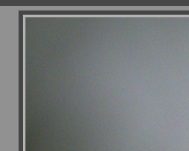
When down sampling is activated (more visible with 1/4) the crop area cannot be set on top-left corner.
To Reproduce
- Make sure downsampling is set to 1/4 (restart dt)
- Go to darkroom
- Activate crop&rotate
- Try moving the top-left corner
- See error, cannot move close
Expected behavior
It should be possible to set the crop area to contain the whole image.
Screenshots
Platform (please complete the following information):
- Darktable Version: master
- OS: GNU/Debian
 TurboGit
All 27 comments
@GrahamByrnes : Another one for you I suppose.
TurboGit
on 4 Jun 2020
Hummm...
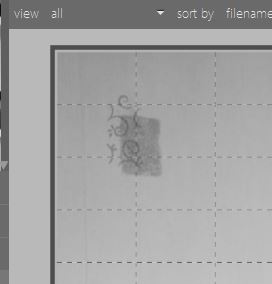
I can get pretty close to the corner... I'm supposing that in the limit, I won't be able to split the last 4 pixels that have been merged in the preview.
Maybe I'm not understanding? Feeling viral again, so this option is higher than usual :-(
 GrahamByrnes
on 4 Jun 2020
GrahamByrnes
on 4 Jun 2020
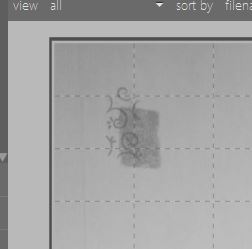
Here's my bestest attempt... I'm using a two day old master dirtied by me allowing last-duplicate deletion, I'll need to grab the latest version.
GrahamByrnes
on 4 Jun 2020
Same with current master... ???
GrahamByrnes
on 4 Jun 2020
Yes, same with master and this does not happen if the down-sampling option is set to original (1.0).
TurboGit
on 4 Jun 2020
So I'm still not seeing the problem, sorry. The image width passed when using 1/4 is about 335px, which means a tiny bit more than 1mm on my screen. So the smallest achievable step should be about 1mm, which seems to be what I see.
Or are you say that you can't get to the full image? I don't have an issue with that: there is just a slight coarsening of the step size.
Maybe I'm missing the point?
GrahamByrnes
on 4 Jun 2020
Yes, I'm saying that I can't get the to full image. I have always a part of the image cropped on top-left.
Sorry if this wasn't clear.
TurboGit
on 4 Jun 2020
Oh... it's always more complicated when I'm looking for something that isn't there!
The screenshots above were the best I could do without getting to full screen... which was always possible.
I've been making a movie
https://www.dropbox.com/s/vp6d28grvqx94z7/Captures.zip?dl=0
Unfortunately this only captures the primary window so you'll have to take my word that one is at 1/1 and the other at 1/4. But I seem to be able to get right to the edge.
HiDPI? OpenCL? I don't have either... Linux issue? Strange. Your file is some kind of raw?
GrahamByrnes
on 4 Jun 2020
It looks like on you 17:04:20 mp4 you have a border on the right. The crop area does not seem to be enclosing the whole image.
I don't have HiDPI. I have OpenCL (but those guides are not OpenCL related, I have checked without to be sure anyway, same issue). I'm on Linux. Yes a RAW. I have tried on 3 of them (CR2, DNG, NEF), same issue. I can reproduce with the src/tests/integration/images/mire1.cr2 for example.
Not clear on your video, but you need to restart dt after setting the downsampling to 1/4.
TurboGit
on 4 Jun 2020
Some more information. It seems that the area is indeed going to top-left of image but using a veru bright one now I see that there is a background (where the image should be displayed) and this is not aligned with the image.
On the top-left:
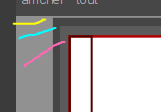
yellow : area outside the crop area which is dimmed
cyan : the image background - should be fully aligned with the image
magenta : the crop handle, can go "almost" to cyan.
And on top right:
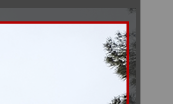
We see the image overflow the background area.
TurboGit
on 4 Jun 2020
So it looks like possible rounding issues to me. It makes cropping with down-sampling not easy and quite misleading. Hope you'll be able to reproduce on your side.
TurboGit
on 4 Jun 2020
That gives me some ideas...
From one point of view there is an obvious issue, if I activate crop & rotate there is a black frame-line on the top & left borders which is not there on the right and bottom. It's still there in the 1/1 view, but much finer. If it has to be there (why?) it should be clearly outside the image, not stamping on the outer pixel column.
Second thing is that scrolling in the image after zooming appears to be broken. The only way I can zoom to the extreme LH edge of the image is to keep the pointer just outside the image. Is that expected? If I click in the image, I lose the little cross-hair icon and get a small pop-up telling me the image is 6016 x 4000px.
Third thing: exporting a full tiff after dragging the crop handles fully out gives me an image which is 6015 x 4000. For the same procedure at 1:1 (or without activating crop & rotate) I get the extra pixel.
So yeah, it shouldn't be this hard, and a change to the preview pipe should not affect the full pipe and hence the output dimensions, if I understand.
@jenshannoschwalm, do you have any thoughts on this, having played with missing pixels these last days?
You know, this reminds me of one of my first issues on this site: setting a pseudo-Cartier-Bresson black frame line without a border, in the central image there was a mis-aligned black over-white part of the frame line. It varied with the scaling and it wasn't an issue in the exported image so I stopped worrying. Makes me wonder if the resolution of the border of the image is compatible with the image.
Except for the lost column, the above applies at whatever the scaling.
GrahamByrnes
on 4 Jun 2020
Issue confirmed on my lenovo T450s with onCPU openCL activated
 AxelG-DE
on 4 Jun 2020
AxelG-DE
on 4 Jun 2020
It seems to depend on the screen scale: there is an interplay of the black border, a grey inner-border, and the reaction to the pointer position. These change in size as the window is made slightly larger or smaller by dropping away from full screen.
As you go from the left handle to the corner handle, what was grey becomes black and a bit of image is covered up.
GrahamByrnes
on 4 Jun 2020
do you have any thoughts on this, having played with missing pixels these last days?
Looking in the export stuff has the debug option -d imageio now, it will tell you the size of the pipeline which should be what you selected via the crop margins.
I also think the mouse-position --> crop-pos conversion or vice versa is wrong. Probably the left margin needs to be rounded to lower and right margin to higher ...
 jenshannoschwalm
on 4 Jun 2020
jenshannoschwalm
on 4 Jun 2020
I'm thinking there might be two issues, but I playing with the handles etc has got to be the first... and that might fix the export one too.
We shall see ...
GrahamByrnes
on 4 Jun 2020
"(&-"'à(-ç!! :-(
It's random... mostly top and left, sometimes top, left and right, just then had left, fat right, medium top. Just by cycling through on/off/active with the c&r module.
With 1/1, it's almost always just a thin trace... but not always.
Still no bottom.
GrahamByrnes
on 4 Jun 2020
Progress?
The image size is 6016 x 4000, however it opens in C&R at 6029 x 4000... and once it's ready for cropping, it is possible to slide the central image left or right to take up that slack (but nothing else).
Fully left and it's all symmetric, fully right and we see the problem of asymmetric borders.
Putting in some debug statements, one can see
in post expose, width=1361, height=886, backbuf wd=***335,00***, backbuf ht=223,00
L2569 clipping, g->clip_w=  1,00, g->clip_h=  1,00, crop area left=  0,00, top=  0,00,
cwidth=***335,75***, cheight=223,00, x2=300,77, y2=  0,00
It's not what you always see... cwidth varies from 334.92 to 335.75, sometimes it gets 335.0, but 335.75 is the favourite.
Now cwidth is defined by
const float cwidth = g->clip_w * wd;
where g->clip_w is defined by a call to a non-existent entry in darktablerc and so carries its initial value (from where?) of 1.0f,
Meanwhile,wd should be 335.00...
And:
snprintf(dimensions, sizeof(dimensions), "%.0f x %.0f",
     (float)procw * g->clip_w, (float)proch * g->clip_h);
Ah...
L2569 clipping, g->clip_w=1,00224, g->clip_h=1,00000,
And this is the ratio of 6029.49 / 6016.
GrahamByrnes
on 5 Jun 2020
@TurboGit It may be worth keeping this open: I think I have an idea for the underlying problem.
There is a part of clipping.c that attempts to impose the chosen aspect ratio exactly, ie to double resolation (see eg clipping.c L +/- 1494).
Except that if you are looking at an image based on integer width & height, this isn't straightforward. My camera shoots at 1.504:1, and with preview_downsampling=1/4, dt propagates previews, on my screen, at 335x222. There is an iterative fitting process I've only just discovered, but it doen't appear to take into account integer arithmetic... it appears to create some extra space to allow for 336x222, but there is no data, so...
I'll need to think about this a little. If we say we want an aspect ratio of 3:2 or 5:4, do we want that to be exact? What if it isn't possible given the sensor?
GrahamByrnes
on 7 Jun 2020
Also... if I set "original", dt does thousands of iterations insisting that 6016/4000 become 1.5056, then a few lines from the bottom:
clipping L1488, iwd=6016, iht=4000, aspect=1,505605
clipping L1488, iwd=6016, iht=4000, aspect=1,505605
clipping L1488, iwd=6016, iht=4000, aspect=1,505605
clipping L1488, iwd=6016, iht=4000, aspect=0,664185
clipping L1488, iwd=6016, iht=4000, aspect=0,664185
So where did 1.5056 come from? No idea... the exif data says the image size is 6080x4032 which gives the Pentax spec of 24.51MPx, but then the ratio is 1.5079...
GrahamByrnes
on 7 Jun 2020
The exif data will tell the sensor size, you must subtract the margins given by rawspeed.
jenshannoschwalm
on 7 Jun 2020
In fact it comes from a function that estimates the ratio by comparison of the piece size with a list of standard aspect ratios. There isn't an entry for "original", maybe there should be??
@aurelienpierre I have a vague recollection that you did something about estimating aspect ratios, was this your work? Comments in either way if interested?
GrahamByrnes
on 7 Jun 2020
The stuff around lines 1622 to 1714 is mine indeed, but it specifically tries to find the closest rational number as the fraction of 2 integers. It is used only if you input a real ratio (like 1.5), not in the case you input directly the 3:2.
 aurelienpierre
on 7 Jun 2020
aurelienpierre
on 7 Jun 2020
Yes, I think your code works perfectly, but somehow something goes wrong with "original"... the only way I can get the original aspect ratio is to set "freehand". I think it's in the following function.
Also, there is an issue with the C&R ui: I just had an experience where the crop function refused to work, then I moved to another image and it was immediately operating there. Since one was portrait and the other landscape, the effect was pretty obvious, and ctrl-z didn't work. History compression did.
GrahamByrnes
on 7 Jun 2020
So maybe it would be a matter of using integer rationals everywhere, instead of rounding floats to integers multiple times ?
aurelienpierre
on 7 Jun 2020
I think it could be simpler, by just making a special case for "original" and setting p->ratio_d & p->ratio_n to the exact values.
What it does for fixed aspect ratios is fine, although maybe some education is necessary for those who think their camera is really shooting 1.5 (or etc). It's just that setting "original" shouldn't try to change things (it resets my 6016x4000 to 6016x3996). The fact that it does might be behind the issue of the center-port box suddenly getting too big for the image, and the cropping issue that @TurboGit had, which sent me down this rabbit hole.
GrahamByrnes
on 7 Jun 2020
Related issues
 Nilvus
·
5Comments
GrahamByrnes
·
3Comments
Nilvus
·
5Comments
GrahamByrnes
·
3Comments
 schwerdf
·
4Comments
schwerdf
·
4Comments
 trougnouf
·
5Comments
trougnouf
·
5Comments
 lovesegfault
·
3Comments
lovesegfault
·
3Comments