Darktable: No automatic RAW+JPEG grouping
Describe the bug
Couples of RAW+JPEG are not grouped when importing them in Darktable 3.0.
The grouping behavior was also wonky in Darktable 2.6 (images were sometimes grouped, sometimes not).
I use a Canon 550D, if that's useful.
To Reproduce
- Insert SD card containing RAW+JPEG images
- Click on "Mass Storage Camera > Import from camera"
- Select all images
- Click "Import"
Expected behavior
Couples of images with the same name (e.g. IMG_1234.CR2 and IMG_1234.JPG) should be imported as a single group.
Screenshots
During import:
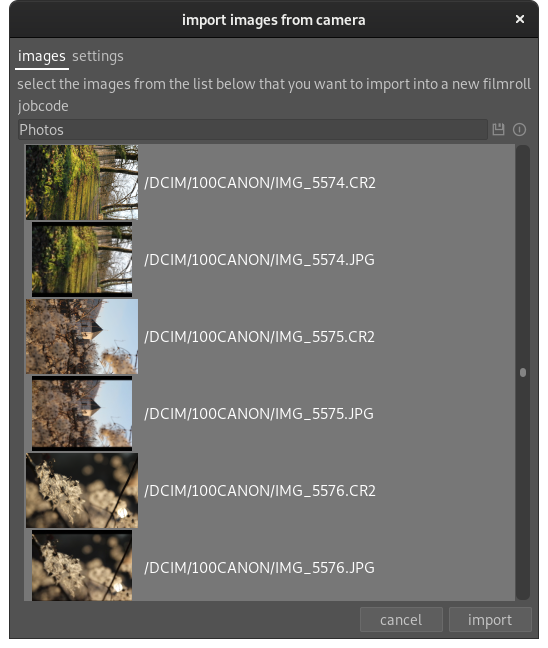
Grouping enabled in lighttable, no group shown:

Platform (please complete the following information):
- Darktable Version: 3.0
- OS: Arch Linux
- OpenCL active
- GPU: Intel HD Graphics 530 (Skylake GT2)
 fxthomas
All 6 comments
For automatic grouping dt requires the filenames to be the same except the extension. I think the default sets this to a job number. You should have a look into the options ...
 jenshannoschwalm
on 10 Feb 2020
jenshannoschwalm
on 10 Feb 2020
This issue did not get any activity in the past 30 days and will be closed in 365 days if no update occurs. Please check if the master branch has fixed it and report again or close the issue.
![github-actions[bot] picture](https://avatars2.githubusercontent.com/in/15368?v=4&s=40) github-actions[bot]
on 11 Mar 2020
github-actions[bot]
on 11 Mar 2020
@TurboGit and @aurelienpierre i'd like your opinion about this issue.
The situation is pretty clear: While importing the filename is not always kept as is was on the medium/camera, so when looking in the database for other files with the same filename-minus-extension for automatic grouping it fails.
I see two ways to tackle this.
- To test for grouping we should look for all files with the same film_id to have the same exif original_filename, this would have a heavy performance penalty.
- Also keep original filename in the database and check for that.
For both situations we would have to accept, not all images have that exif data available.
Any other idea? Or just close this as "can't be fixed"
jenshannoschwalm
on 21 Mar 2020
@fxthomas i guess this is fixed now, please close issue if you are happy with current master.
jenshannoschwalm
on 12 May 2020
Thank you so much, let me try to compile that and I'll give it a go!
fxthomas
on 12 May 2020
It's working nicely if I select the "keep original filename" option in the settings (I guess that's the intended behavior). Thank you!
fxthomas
on 17 May 2020
Related issues
 Egocentrix
·
5Comments
Egocentrix
·
5Comments
 schwerdf
·
4Comments
schwerdf
·
4Comments
 bapBardas
·
6Comments
bapBardas
·
6Comments
 elstoc
·
4Comments
elstoc
·
4Comments
 Praveen-Rai
·
5Comments
Praveen-Rai
·
5Comments