Darktable: Importing not working in DT 3.0
Hello,
After the update from 2.6 to 3.0 i cannot import images via cable from my Olympus E-M 10 Mark II. The images are "imported" but corrupted. The focal length is f/0.0 and no preview is available. I only have raws to import.They can be previewed with the "import images from camera" gui.

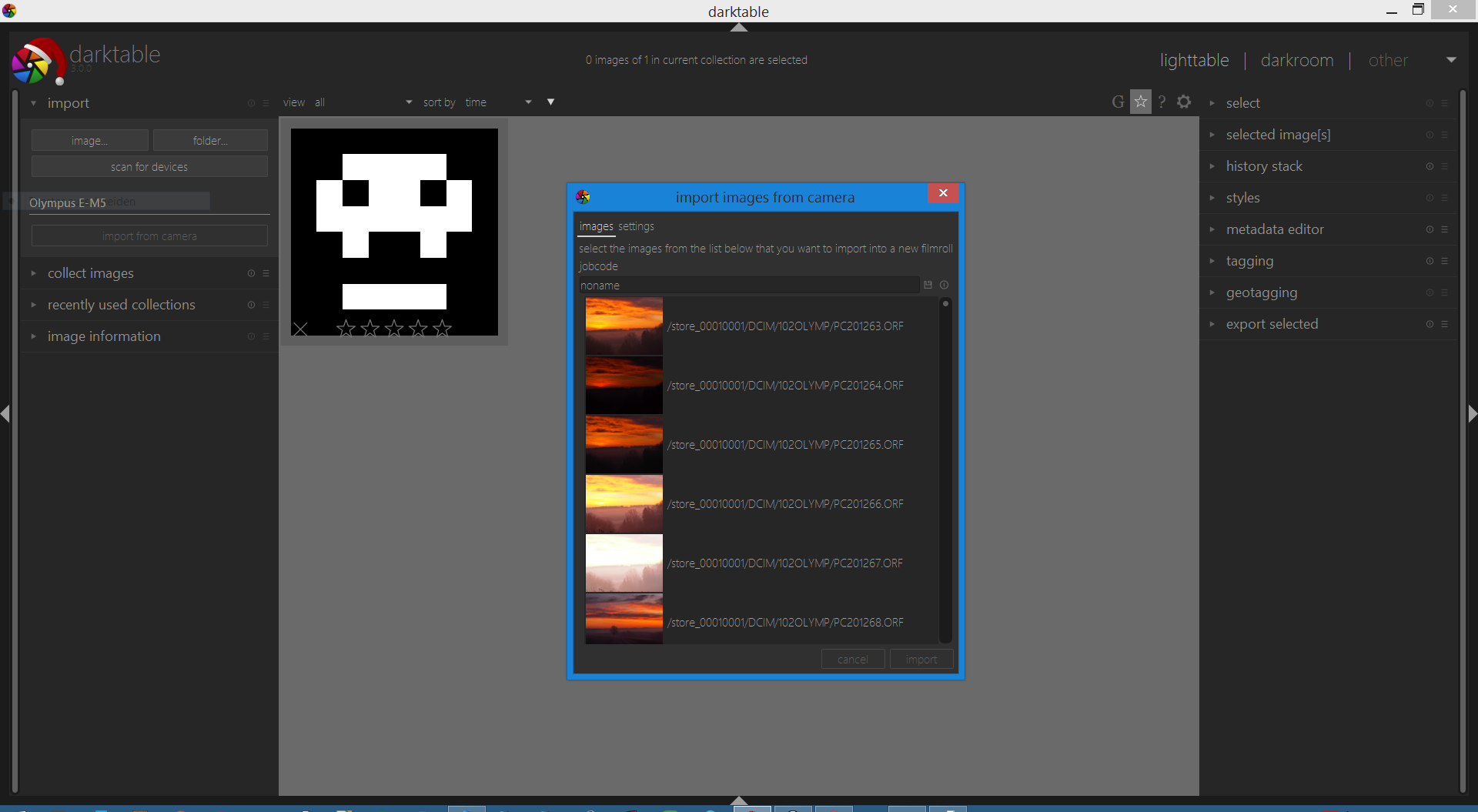

The files are not readable by other tools after importing. The files are not corrupted on the sdcard.
Thanks for the wonderful DT and hopefully for a quick solution :)
Platform (please complete the following information):
- Darktable Version: [3.00]
- OS: [Windows 8.1]
- OpenCL activated
- HD5500 and geforce 940m
 muenznej
All 23 comments
What happens if you import the files after copying themn manually to your disc? Just to reduce the process chain, where errors might occur
 MStraeten
on 29 Dec 2019
MStraeten
on 29 Dec 2019
importing via the direct camera connection is the only problem. I copied all files to a folder manually and imported that folder which worked out fine.
muenznej
on 29 Dec 2019
I can confirm this issue. While direct wire importing worked in Darktable 2.6 it doesn't work anymore in version 3.0. Manually copying the pictures to the hard drive and importing them as a folder still works normally.
In the import dialog Darktable is able to see all pictures. After pressing import Darktable processes all of the selected pictures but every single one is corrupted and displayed as a skull and don't have any correct meta data. Closing and reopening Darktable automatically removes all images but one from the set.
All files and the corresponding *.xmp files are created on the hard drive and the file sizes _looks_ normal.
When trying to open the image with Krita I get: File format cannot be parsed.
When trying to open the image with Darktable I get the following lines in the log:
~~~
version: darktable 3.0.0
start: 2020:01:01 16:52:44
[dt_pthread_create] info: bumping pthread's stacksize from 0 to 262144
[duplicate lines …]
[dt_pthread_create] info: bumping pthread's stacksize from 0 to 262144
[rawspeed] (2020.01.01_0002.NEF) virtual std::unique_ptr
Magick: Unrecognized image format () [No such file or directory].
[dt_imageio_large_thumbnail GM] thumbnail not found?
[temperature] failed to read camera white balance information from 2020.01.01_0002.NEF'!
allocation failed???
[temperature] failed to read camera white balance information from2020.01.01_0002.NEF'!
allocation failed???
end: 2020:01:01 16:52:54
~~~
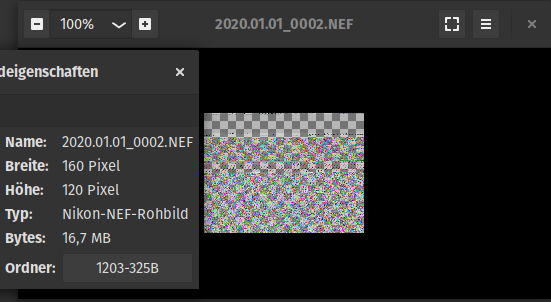
Opening the image with the default Gnome picture viewer displays a distorted 160x120 17MB file:
- Darktable 3.0.0
- Windows 10
- Nikon D3500 through WinUSB
- Radeon Vega 8 and GeForce GT 710
 Lucki
on 1 Jan 2020
Lucki
on 1 Jan 2020
A bit more information gathered through testing:
- The problem was introduced between 2.6.2 and 2.6.3
- I was able to build this on windows beginning with commit 37cba11 which also was unable to import the images correctly.
- Unsurprisingly I wasn't able to build anything before that since the commit fixed some build problems.
So here's a short timeline:
2.6.2 (download, no issue) … 37cba11 (own build, has the issue) … 2.6.3 (download, has the issue)
Things I've also tried without success and maybe did wrong:
- Check out
release-2.6.2andcherry-pick 37cba11- Builds fine but still has the issue. - Try to downgrade several packages to be able to build the older releases again. Couldn't get
cmaketo work here because probably a whole lot more packages depend on newer gcc9.
Lucki
on 30 Jan 2020
This issue did not get any activity in the past 30 days and will be closed in 7 days if no update occurs. Please check if the master branch has fixed it since then.
![github-actions[bot] picture](https://avatars2.githubusercontent.com/in/15368?v=4&s=40) github-actions[bot]
on 1 Mar 2020
github-actions[bot]
on 1 Mar 2020
Activity
Lucki
on 1 Mar 2020
- How big are the files copied over by darktable and how big are they supposed to be? (
ls -lwill tell you) - What does
file corrupted_file.raw(with the actual filename of course) tell you? - Do you see any related output when starting darktable from a terminal and then try to copy files from the camera?
 houz
on 16 Mar 2020
houz
on 16 Mar 2020
~
$ ls -l
-rw-r--r-- 1 lucki lucki 17148553 16. Mär 2020 corrupted_import.NEF
-rw-r--r-- 1 lucki lucki 17129543 16. Mär 2020 original_image.NEF
~
~
$ file corrupted_import.NEF original_image.NEF
corrupted_import.NEF: TIFF image data, little-endian, direntries=28, height=120, bps=352, compression=none, PhotometricIntepretation=RGB, manufacturer=, model=, orientation=upper-left, width=160
original_image.NEF: TIFF image data, little-endian, direntries=28, height=120, bps=352, compression=none, PhotometricIntepretation=RGB, manufacturer=NIKON CORPORATION, model=NIKON D3500, orientation=upper-left, width=160
~
I get the following lines after closing Darktable in the Msys2 terminal, they're not printed live in the terminal:
~
$ /opt/darktable/bin/darktable.exe
[rawspeed] (20200316_0001.NEF) virtual std::unique_ptr
[dt_pthread_create] info: bumping pthread's stacksize from 0 to 2097152
[dt_pthread_create] info: bumping pthread's stacksize from 0 to 2097152
[dt_pthread_create] info: bumping pthread's stacksize from 0 to 2097152
[dt_pthread_create] info: bumping pthread's stacksize from 0 to 2097152
[dt_pthread_create] info: bumping pthread's stacksize from 0 to 2097152
[dt_pthread_create] info: bumping pthread's stacksize from 0 to 2097152
[dt_pthread_create] info: bumping pthread's stacksize from 0 to 2097152
[dt_pthread_create] info: bumping pthread's stacksize from 0 to 2097152
[dt_pthread_create] info: bumping pthread's stacksize from 0 to 2097152
[dt_pthread_create] info: bumping pthread's stacksize from 0 to 2097152
[dt_pthread_create] info: bumping pthread's stacksize from 0 to 2097152
[dt_pthread_create] info: bumping pthread's stacksize from 0 to 2097152
[import_session] Using filename 20200316_0001.NEF.
Magick: Unrecognized image format () [No such file or directory].
[dt_imageio_large_thumbnail GM] thumbnail not found?
allocation failed???
~
Lucki
on 16 Mar 2020
Hello
I am new to Darktable and have only recently looked at importing my files from the camera to the file structure on my harddrive.
It seems that I am also getting the same problem of the file importing, being correctly renamed and copied to the correct place, but then the file is corrupt and not usable. This also seems to be a problem in tether mode. The camera connects fine, but the downloaded image is corrupt.
I have tried the import with digiKam and that works fine.
Is there a solution to this problem?
Thanx very much
My setup is:
Darktable 3.0.2
Windows 10
Nikon D5600
WinUSB
 hanosteyn
on 23 Apr 2020
hanosteyn
on 23 Apr 2020
While using an old (20181211) Msys2 installation I can build the current master without problems by making sure I'm not updating the database with y.
The resulting build of Darktable has the import working.
I've used the other up-to-date Msys2 installation to also build the current master.
The resulting build of Darktable has the import corrupted.
To test which file is causing the failing import I've copied one file at a time into the working build from the failing build and stopped at the first file with which Darktable is unable to import the image correctly. While with some files Darktable wasn't able to start anymore (libdarktable.dll, libexiv2.dll) I have found that replacing libglib-2.0-0.dll is causing a previously working Darktable build to fail the import.
Unfortunately I'm unable to test this the other way around. By replacing the file in the new build environment with the file build in the old building environment Darktable is unable to start.
Lucki
on 13 May 2020
This issue did not get any activity in the past 30 days and will be closed in 365 days if no update occurs. Please check if the master branch has fixed it and report again or close the issue.
github-actions[bot]
on 13 Jun 2020
I have the same problem (Darktable 3.0.2 on Windows 10). I had to use Zadig to install the WinUSB driver to get Darktable to recognize the camera - out of the box installation did not work. It now recognizes the camera and import runs, but imported image is corrupt (cannot open the imported jpg from file system in other programs). Images on SD card are OK, and can be opened in other programs.
 fstokke
on 25 Jun 2020
fstokke
on 25 Jun 2020
Same issue here. Darktable 3.0.2 on Windows 10 with Nikon D800. Like fstokke mentioned, direct SD import works fine.
 nate911
on 12 Jul 2020
nate911
on 12 Jul 2020
Now with 3.2.1 released I thought it would be easy to recompile and get the new version but no, there was a commit in between my last comment and the release of 3.2.1 which triggers a compiler bug on the old gcc. Luckily it worked by just updating gcc and it still has the import working. So here's a step-by-step guide because this was probably my last compilation of darktable:
- Instead of the current Msys2 release install an older version like (20181211) from here: http://repo.msys2.org/distrib/x86_64/
- Follow the installation guide A) and install all dependencies but make sure you're not gonna update the package database by using
yin combination withpacman. This ensures you're getting all the packages from the time the package database was at (2018). - optional: use
git checkout release-3.2.1 && git submodule updateto build at a release instead of the current development version - Make sure you have all dependencies by now, the
cmakecommands will tell you if something is missing. - When you're at the point of running
cmakeafter cloning we have to update gcc in order to be able to build successfully - We need new keys:
curl -O http://repo.msys2.org/msys/x86_64/msys2-keyring-r21.b39fb11-1-any.pkg.tar.xzcurl -O http://repo.msys2.org/msys/x86_64/msys2-keyring-r21.b39fb11-1-any.pkg.tar.xz.sigpacman -U msys2-keyring-r21.b39fb11-1-any.pkg.tar.xz
- Update the database
pacman -Sy - Update gcc and it's dependencies:
pacman -S mingw-w64-x86_64-gcc mingw-w64-x86_64-[…](there are six in total) - Now proceed with the
cmakecommands in the installation guide
Following the steps above I'm able to get a recent Darktable with the import working. But considering the hassle and the lacking support from the developers I won't build any further daktable releases.
Here's the installer, I hope it works for you don't use it:
https://github.com/Lucki/darktable/releases/download/release-3.2.1/darktable-3.2.1-win64.exe~~
Some advises:
- The tooltips in the lighttable cause hell of a flickering so turn them off at the star in the top right
- Make sure the import works before updating to further releases
Lucki
on 11 Aug 2020
why not contribute to the project as a maintainer for windows? It’s not fair to blame the developers since most - if not all - of them don’t use Windows for development. So they even cant reproduce windows specific bugs especially when these are originated in the msys/mingw environment.
MStraeten
on 11 Aug 2020
Following the steps above I'm able to get a recent Darktable with the import working. But considering the hassle and the lacking support from the developers I won't build any further daktable releases.
If all devs were thinking alike darktable won't even exists. But this kind of thinking seems common from Windows devs, that's why the Windows support came so late. Remember there is a single Windows devs that talked to us to maintain this port. And actually Peter is looking for help, so maybe you can contact him and team together?
 TurboGit
on 11 Aug 2020
TurboGit
on 11 Aug 2020
Now there's suddenly activity…
why not contribute to the project as a maintainer for windows? It’s not fair to blame the developers since most - if not all - of them don’t use Windows for development.
Because I'm neither a developer nor using windows. All I've done is building the recent release with a two year old system - the last known working state - on machine that's not even mine. That's not maintaining, that's a workaround.
I've answered all questions from maintainers, I've tried around myself and provided a step-by-step guide on how to achieve the same workaround. That's as far as I can go without any feedback or questions from the maintainers. (One dev answered here because I pinged in IRC - and a bot tried to close this two times because of "no activity")
Following the steps above I'm able to get a recent Darktable with the import working. But considering the hassle and the lacking support from the developers I won't build any further daktable releases.
If all devs were thinking alike darktable won't even exists. But this kind of thinking seems common from Windows devs, that's why the Windows support came so late.
I am no windows dev, not even a dev. I've set the whole build environment up on a foreign pc. That's why I don't want to do this on further releases, dunno why other windows dev think alike, I always thought windows devs have own windows PCs…
Peter is looking for help, so maybe you can contact him and team together?
If I actually would have a windows system and knowledge about windows in any way yes, but I don't have them. I've just followed the build instructions and even corrected some of them.
Lucki
on 11 Aug 2020
Don't use the Darktable I've provided above in a productive environment. It seems to corrupt the file system on importing so using this is will result on data loss.
Lucki
on 20 Aug 2020
This bug stopped my workflow with Darktable, corrupt images from camera import. Was hoping to replace Lightroom with Darktable but it seems this bug is not getting fixed.
 yzoned
on 25 Sep 2020
yzoned
on 25 Sep 2020
upgrade darktable to 3.2.1 or master from git and see if it helps
 ptilopteri
on 25 Sep 2020
ptilopteri
on 25 Sep 2020
Hello again,
just wanted to report, that this issue is still present and also happens with a Canon 5D mark ii.
With that camera its really a pain, since i cannot really import images after using the zadig device driver. The problem is identical to that of my olympus camera: all files are corrupt.
Since that camera supports tethering I can also say that everything but file transfer works fine. So camera control is correctly working, but the image is not imported correctly.
In this current form i cannot use the tethering which is a bit sad. I ll try to rewind the drivers until maybe the issue will be resolved. Since this is almost a year now since I reported it i am a bit sad tbh :(
P.S.: I am on darktable 3.2.1
muenznej
on 5 Oct 2020
oh thanks i ll give it a try and report back :D
@jenshannoschwalm
Can someone competent provide a windows built exe for me pls :sweat_smile:
muenznej
on 26 Oct 2020
Hello again,
just wanted to report, that this issue is still present and also happens with a Canon 5D mark ii.With that camera its really a pain, since i cannot really import images after using the zadig device driver. The problem is identical to that of my olympus camera: all files are corrupt.
Since that camera supports tethering I can also say that everything but file transfer works fine. So camera control is correctly working, but the image is not imported correctly.
In this current form i cannot use the tethering which is a bit sad. I ll try to rewind the drivers until maybe the issue will be resolved. Since this is almost a year now since I reported it i am a bit sad tbh :(
P.S.: I am on darktable 3.2.1
I have the exact same problems with a Canon 5D. I can use a card reader to get my images but the loss of tethered shooting is a pain as darktable was the only software that would work with the 5D
 ogloke
on 2 Nov 2020
ogloke
on 2 Nov 2020
Related issues
 jade-nl
·
3Comments
jade-nl
·
3Comments
 johnny-bit
·
5Comments
johnny-bit
·
5Comments
 jpellegrini
·
3Comments
jpellegrini
·
3Comments
 Nilvus
·
5Comments
Nilvus
·
5Comments
 Egocentrix
·
5Comments
Egocentrix
·
5Comments