Darktable: OpenCL / Local Contrast / Local Laplacian - issue with AMD/ROCM: 'amplified effect'
This is an issue reported in redmine 1 year ago, didn't get any traction, bringing it here since bug reporting seems to have moved and it may be found by other people affected.
This issue affects Darktable when used with AMD-based GPUs, OpenCL and the ROCM opensource driver which is the currently supported OpenCL driver for all new AMD discrete and integrated GPUs. It's been proven to affect both Polaris and Vega GPUs.
This issue does not happen with the legacy closed-source amdgpu-pro OpenCL driver (that many still use).
Original issue: https://redmine.darktable.org/issues/12423
Describe the bug
The result of applying Local Contrast > Local Laplacian is totally different with OpenCL "on" and OpenCL "off", for the exact same settings of the module. The more % of Detail is set, the more striking is the difference.
This issue does NOT happen for Local Contrast > Bilateral Grid, it is specific to Local Laplacian. When I select Bilateral Grid, the result is the same regardless of whether OpenCL is enabled or not.
It looks like the Local Contrast > Local Laplacian OpenCL implementation has a problem. See the attached JPG snapshots, taken with the exact same settings of the model, one with OpenCL "on" and one with OpenCL "off". Basically LocalContrast+LocalLaplacian is unusable (and destroys the image) when OpenCL is on.
It looks like with OpenCL enabled, the "Detail" effect of the Local Contrast Filter is like grossly amplified.
Example:
Local Contrast + Local Laplacian, OpenCL = "off"
Local Contrast + Local Laplacian, OpenCL = "on"

No other other OpenCL kernel from darktable has problems with the official ROCM driver from AMD in my setup (I have been using ROCM OpenCL with darktable for 1.5 years now, meaning thousands of pictures developed, using profiled denoise, filmic, retouch, basecurve, etc etc).
My workaround in order to keep OpenCL "on" has been to remove the LocalLaplacian kernel.
sudo mv /usr/share/darktable/kernels/locallaplacian.cl /usr/share/darktable/kernels/locallaplacian.cl.temporarilyRemovedDueToROCM
The issue happens with both current stable and github master (Darktable 3.0RC2), the issue was first found on DT 2.4 / Ubuntu 18.10, stock Kernel 4.18, and rocm-opencl 1.6 from AMD. It has been reproducible 100% of the time since then, with DT 2.6, and now DT3.0, and dozens of ROCM releases (all the way to the current 2.10, kernel 5.3)
There are no errors at all shown in the logs by darktable when compiling the kernel and when using it:
0.280302 [opencl_init] compiling program `locallaplacian.cl' ..
0.280608 [opencl_load_program] loaded cached binary program from file `/home/ariel/.cache/darktable/cached_kernels_for_gfx803/locallaplacian.cl.bin'
0.280611 [opencl_load_program] successfully loaded program from `/usr/share/darktable/kernels/locallaplacian.cl'
0.281739 [opencl_build_program] successfully built program
0.281746 [opencl_build_program] BUILD STATUS: 0
While it is possible that the bug is in the ROCM driver (since the same OCL kernel works in nvidia and in the old amdgpu-pro driver), in order to have a rocm developer engaged we need some more details on what is wrong with the driver; we have this ROCM bug opened with them:
https://github.com/RadeonOpenCompute/ROCm/issues/704
however no detail = no action.
It is also possible that some peculiarity of the locallaplacian DT OCL kernel code is triggering the problem - hopefully the problem could alternatively be worked around via refactoring Darktable's Local Laplacian OpenCL code
Platform (please complete the following information):
- OS: Ubuntu 19.10
- OpenCL activated
- GPU: AMD RX-560; Driver: rocm-opencl 2.10
Same issue reported with AMD Vega 56
 arigit
All 57 comments
I think this is similar to #3460 and #3418
Note that I have an Nvidia GPU, sometimes it is also an issue without OpenCL
 blitzgneisserin
on 15 Dec 2019
blitzgneisserin
on 15 Dec 2019
This issue though is 100% reproducible and specific to the ROCM open source OpenCL driver from AMD. It doesn't happen when using the closed-source OpenCL driver that's still around (although not for much longer since AMD is shifted all development effort to open source) and it doesn't happen when using bilateral grid for local contrast. There is something in the locallaplacian kernel from DT that triggers this problem. All other openCL kernels are fine.
arigit
on 15 Dec 2019
@arigit Did you read my bug reports carefully? Did you check what happens when you hide the side panels and the thumbnails with the tab key? I think it is the same thing and 100% reproducible. Maybe it does not happen with the closed source AMD driver but with Intel and Nvidia it does. Anyway it is strange that it does not happen when you hide the side panels and above all the thumbnails. I think the original code was written by hanatos. I don't know why he is so quiet. He could at least say that he has the intention to fix this eventually.
blitzgneisserin
on 15 Dec 2019
@blitzgneisserin I did. Here's a sample I just took:
Open CL off, Local Contrast off
OpenCL off, Local Contrast (local laplacian) on, panels on:
OpenCL off, Local Contrast on, panels off (turned off by hitting "tab")
OpenCL on, Local Contrast on, panels on
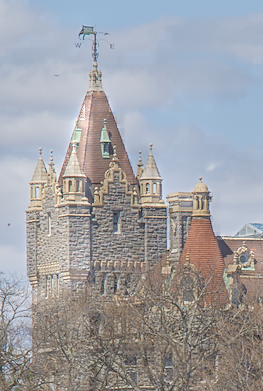
OpenCL on, Local Contrast on, panels off
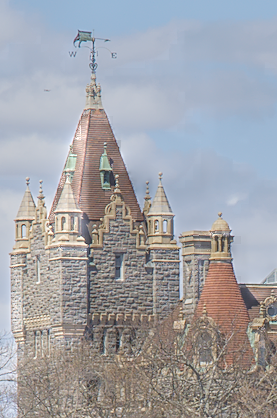
In my case the panel state does not seem to make a difference. Turning OpenCL on makes LocalLaplacian destroy the image.
arigit
on 15 Dec 2019
Ok. Although the result looks a bit different I suspect that the reason for this behavior is the same thing. @arigit Did you try to "replace" local contrast by the equalizer (preset clarity)? How does it behave?
blitzgneisserin
on 16 Dec 2019
Could you try my patch by compiling my https://github.com/aurelienpierre/darktable/tree/fix-locallaplacian-padding branch ?
 aurelienpierre
on 16 Dec 2019
aurelienpierre
on 16 Dec 2019
Also
I think the original code was written by hanatos. I don't know why he is so quiet. He could at least say that he has the intention to fix this eventually.
Hanatos has a full time job and 2 kids under 5 years.
aurelienpierre
on 16 Dec 2019
@aurelienpierre thanks a bunch for jumping in!
I'm trying to build your branch on ubuntu 19.10.
The build errors-out in the cmake checking part.
I installed all dependencies like so:
sudo apt build-dep darktable
and also: llvm-dev
The error:
```...
-- Found intltool-merge
-- Found desktop-file-validate
CMake Error at /usr/lib/llvm-9/lib/cmake/llvm/LLVMExports.cmake:1323 (message):
The imported target "yaml-bench" references the file
"/usr/lib/llvm-9/bin/yaml-bench"
but this file does not exist. Possible reasons include:
The file was deleted, renamed, or moved to another location.
An install or uninstall procedure did not complete successfully.
The installation package was faulty and contained
"/usr/lib/llvm-9/lib/cmake/llvm/LLVMExports.cmake"
but not all the files it references.
Call Stack (most recent call first):
/usr/lib/llvm-9/cmake/LLVMConfig.cmake:245 (include)
CMakeLists.txt:273 (find_package)
CMakeLists.txt:281 (find_llvm)
-- Configuring incomplete, errors occurred!
```
I've been googling to find a solution to this but no luck. Any hint on what could be wrong in my build environment?
arigit
on 16 Dec 2019
Sorry for my earlier comment.
blitzgneisserin
on 16 Dec 2019
@aurelienpierre given that @blitzgneisserin issue got fixed, if your patch could get merged into DT master, I will be able to find a binary package in OBS (the opensuse build service) since it will automatically be built in a few hours time - and then test it
arigit
on 16 Dec 2019
@arigit no, I am sorry, it is not fixed. I just forgot to switch on OpenCL. I just realized on the 3rd check.
blitzgneisserin
on 16 Dec 2019
@arigit I compiled it according to the instructions on darktable.org. That works.
blitzgneisserin
on 16 Dec 2019
So the results are still off ?
aurelienpierre
on 16 Dec 2019
@blitzgneisserin
There seems to be an llv environment issue on my end. How did you install the dependencies - which llvm-dev version did you install? I tried -9 and -8 and both fail with the same error
arigit
on 16 Dec 2019
@aurelienpierre I could finally get your branch to build.
For the record, I needed to remove all traces of llvm-9 and -8, and install -6. And also install clang-6.0
There is some other problem with LocalLaplacian in your branch. The good thing is that with or without OpenCL the resulting image is the same with this branch. The bad thing is that in both cases the image gets strange artifacts.
Here's the test image, clouds, 100% zoom, OpenCL ON, LocalContrast OFF

LocalContrast with Bilateral grid, default parameter values

Local Contrast with Local Laplacian, OpenCL ON, default parameter values

And the same with LocalLaplacian + OpenCL off

It looks like LocalLaplacian is broken in this branch. Interestingly though there is no more difference between OpenCL on vs. off
arigit
on 16 Dec 2019
I did not notice anything strange about local laplacian (but perhaps I was not careful enough). At first or third sight, everything behaved exactly as before. Well but then I have different hardware.
blitzgneisserin
on 16 Dec 2019
I retested the same with current Master.
With OpenCL off, the locallaplacian artifacts never appear, regardless of level of zoom etc. With OpenCL on, the artifacts in the cloud appear almost always when I activate the module. On rare occasions they do not show, however as soon as I change the zoom level in the darkroom, the artifacts pop up. 100% of the time.
arigit
on 16 Dec 2019
Well, having both versions of the code behaving the same seems a small improvement: we know it's not specific to hardware or drivers issues.
@arigit could you send your XMP + raw please ? I don't reproduce your issues.
aurelienpierre
on 16 Dec 2019
@aurelienpierre I uploaded the the NEF & xmp here: https://github.com/arigit/Misc-Temp
my environment: ubuntu 19.10 / amdgpu (open source, default driver from ubuntu's repos), rocm-opencl (from the AMD repo); GPU: RX560
arigit
on 16 Dec 2019
I think we are on for some fun, I'm not able to reproduce the bug, either on exports or in darkroom, OpenCL or not…
Could you backup your ~/.config/darktable/darktablerc and delete it, then test again ?
Also, do you see the same problem in exported files ?
aurelienpierre
on 16 Dec 2019
Tested reinstalling your branch, then removing darktablerc.
With OpenCL ON, same issue, e.g. with 100% zoom
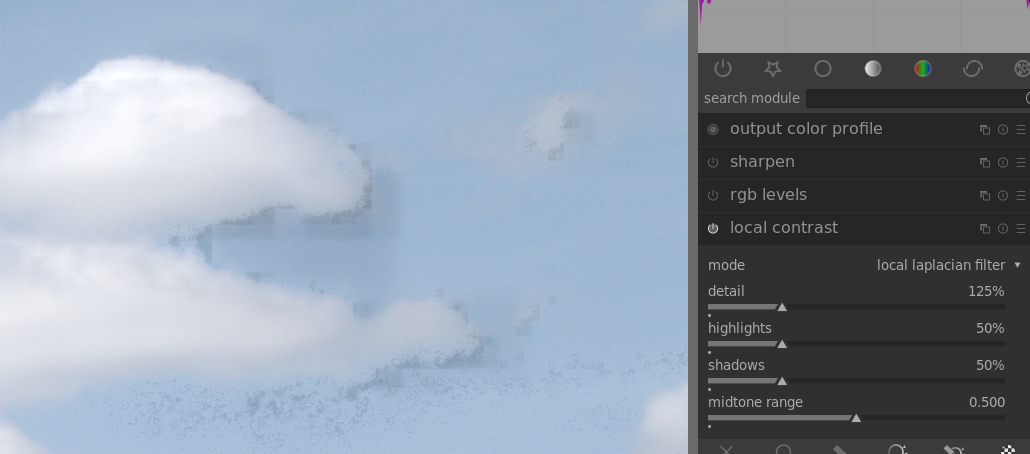
Now what I noticed is that if I turn OpenCL off the issue persists, however if I restart darktable keeping OpenCL off, the issue is gone.
So turning off OpenCL and restarting darktable gives me this:
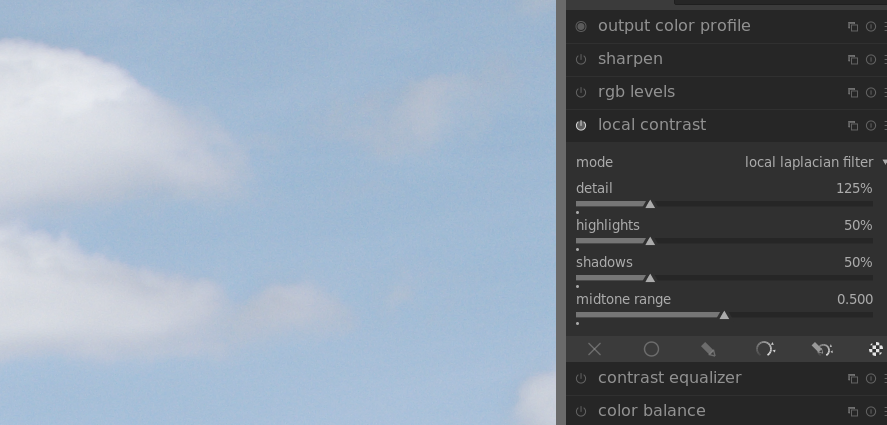
Bottom line for some reason with your branch after turning off OpenCL in the GUI, it seems I need to restart darktable for openCL to be really off. Once I do that, the problem is gone as before. I tested this many times and results are consistent. With the master branch, turning on or off opencl seems to take effect immediately (there are no changes after restarting darktable)
arigit
on 16 Dec 2019
Bottom line for some reason with your branch after turning off OpenCL in the GUI, it seems I need to restart darktable for openCL to be really off
That has always been the case: you need to restart the soft if you enable or disable OpenCL. And I have not changed anything related to that in the pull request. Please run darktable -d perf -d opencl and check for the CPU/GPU-related messages.
So that would mean the CPU code is ok. Back to step one.
aurelienpierre
on 16 Dec 2019
I have the exact same issue with an AMD Vega56 and Rocm (for over a year).
The following raw image has the default modules + local contrast enabled (with detail set to 200%):
CPU on left and OpenCL on right (note the image has been cropped and resized a bit with Gimp).
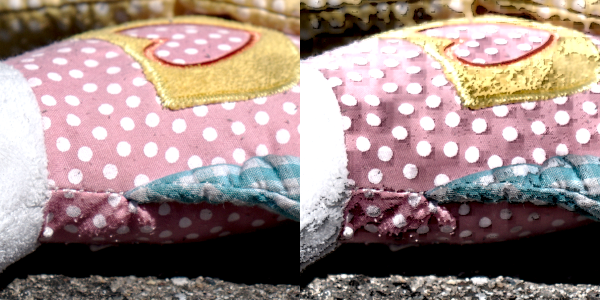
Increasing the detail makes the artifacts more prominent. The thing that is interesting is that you can see small squares popping up.
Almost a year ago I tried to investigate this issue by comparing the compiled kernels of Rocm vs Amdpro drivers but had no luck there (IL/ISA code looks completely different). Then I modified the locallaplaciancl.c to dump all the used buffers before and after each kernel. The output of kernel_pad_input, kernel_process_curve and kernel_gauss_reduce looked very similar for rocm and amdpro on all levels. The output pyramid after kernel_laplacian_assemble showed differences on all levels. At the coarsest the output of rocm was a little bit more bright and for each finer step the brightness increased and with visible square artifacts.
Assembled output pyramid fine to coarse (left: AmdPro, right: Rocm):
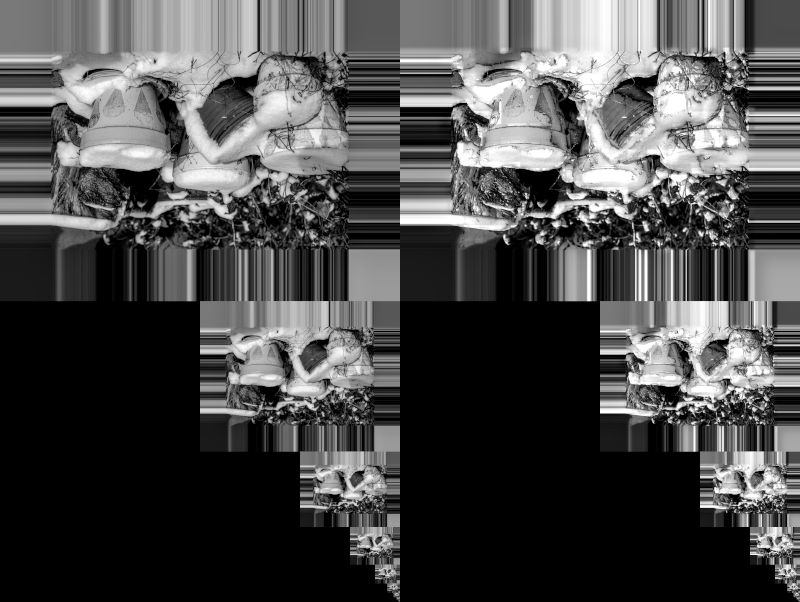
Using different compiler options had no effect on the pyramid. For one release of rocm the issue seemed resolved when I disabled optimizations (-O0). But then in the release after that de compilations started to fail (undefined symbols in basic.cl).
 RvRijsselt
on 16 Dec 2019
RvRijsselt
on 16 Dec 2019
So it seems that It's driver-related after all. The output of the laplacian pyramid is very helpful.
aurelienpierre
on 16 Dec 2019
I guess we should open a bug for ROCm -> https://github.com/RadeonOpenCompute/ROCm-OpenCL-Runtime
@RvRijsselt could you open one with your findings?
 cryptomilk
on 17 Dec 2019
cryptomilk
on 17 Dec 2019
Could you please test https://github.com/darktable-org/darktable/pull/3797 ?
aurelienpierre
on 17 Dec 2019
Issue at ROCm: https://github.com/RadeonOpenCompute/ROCm/issues/704
I have tested your two branches with the excellent darktable-xmp cpu gpu test from @groutr.
fix-locallaplacian-padding branch:
DSC9811.ARW: 0.0009502997280367543 0.070556640625 (edit 11)
DSC9811.ARW: 0.1267542015638321 0.5222320556640625 (edit 12)

opencl-no-native branch:
DSC9811.ARW: 0.00095031128019758 0.070556640625 (edit 11)
DSC9811.ARW: 0.12675419952232914 0.5222320556640625 (edit 12)
(edit 12) is the Local contrast with detail set to 200%. The numbers are higher because there is a noticeable difference between the cpu and gpu output.
There is no native call in the laplacian_assemble kernel so that patch has no effect on this issue.
RvRijsselt
on 17 Dec 2019
Are you sure it's le laplacian_assemble which is responsible ? this rather looks like a different tone curve.
aurelienpierre
on 17 Dec 2019
I am pretty sure it is in the assemble kernel because that is how i created the pyramid picture that showed the difference between rocm and amdpro.
Before the kernel_laplacian_assemble I dumped all the inputs and made sure that they were equal. Then did the same for the output and created the picture you see above.
[edit]
Small note for myself and others with this issue, I just managed to install both ROCm and AMDGpuPro at the same time using: https://gist.github.com/tuxutku/79daa2edca131c1525a136b650cdbe0a (be sure to skip the sudo'ed part).
With the following export I can start Darktable with the correctly working pro driver:
(dt) rene@Zoldr:~/Dev/darktable-xmp$ export LD_LIBRARY_PATH=opencl-amd_aur_ubuntu/pkgdir/usr/lib/
(dt) rene@Zoldr:~/Dev/darktable-xmp$ python test_cpu_gpu.py DSC9811.ARW testout --xmp DSC9811.ARW.xmp --keep
DSC9811.ARW: 0.00576787017350213 0.041259765625

(dt) rene@Zoldr:~/Dev/darktable-xmp$ export LD_LIBRARY_PATH=
(dt) rene@Zoldr:~/Dev/darktable-xmp$ python test_cpu_gpu.py DSC9811.ARW testout --xmp DSC9811.ARW.xmp --keep
DSC9811.ARW: 0.1267542015638321 0.5222320556640625
I just checked the in and outputs again of the laplacian_assemble kernel. I simply used Gimp for visually checking if the images are the same.
Of the input images:
dev_padded (input image) looks the same,
dev_processed[0 to 5][0 to 10] all look the same ,
dev_output[10] looks the same,
dev_output[0 to 9] are different: in amdpro all images are black; in rocm they contain noise or vertical stripes. This should not be a problem as these are output buffers (right?).
For the output images of the kernel I also included the cpu algorithm. Here AmdPro and CPU look the same and ROCm shows noticeable artifacts on the finer levels. Here is a composite of the coarsest levels:
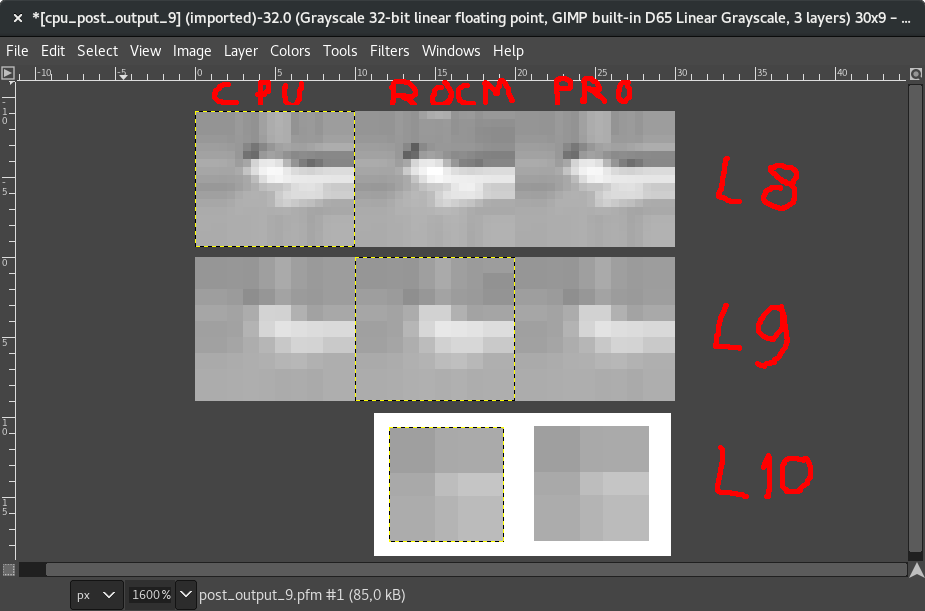
I think this proves that the inputs of the kernels on both drivers are the same. The coarsest (L9, 10x9 pixels) output of ROCm seems to introduce some darker patch in the top right area. This then affects all finer levels and results in block like artifacts.
Any ideas on how to continue?
RvRijsselt
on 18 Dec 2019
This issue did not get any activity in the past 30 days and will be automatically closed in 7 days if no update occurs. Please check if the master branch has fixed it since then.
![github-actions[bot] picture](https://avatars2.githubusercontent.com/in/15368?v=4&s=40) github-actions[bot]
on 18 Jan 2020
github-actions[bot]
on 18 Jan 2020
FWIW the issue persists in the current dev branch
arigit
on 18 Jan 2020
Maybe we should report the issue to https://github.com/RadeonOpenCompute/ROCm-OpenCL-Runtime/issues
cryptomilk
on 18 Jan 2020
@cryptomilk it is reported - https://github.com/RadeonOpenCompute/ROCm/issues/704
however this seems to be an issue only triggered/impacting darktable.It's been there for a long time (ROCM has gone through many releases since this issue started) and no other opencl/ROCM users seem to be affected for some reason. I guess ROCM devs will need the darktable community to tell them what kind of brokenness exists in rocm-opencl that produces this annoying problem, so they can become aware, reproduce it and fix it
arigit
on 18 Jan 2020
I'm not sure if the OpenCL developers saw it, that's why I suggested to maybe directly report it to the OpenCL Runtime project.
cryptomilk
on 18 Jan 2020
The problem is we have absolutely no clue. The same code works on 3 over 4 OpenCL drivers.
aurelienpierre
on 18 Jan 2020
@cryptomilk I opened a new issue
https://github.com/RadeonOpenCompute/ROCm-OpenCL-Runtime/issues/103
I am asking rocm devs for guidance on how to troubleshoot this. After all anybody that invested in AMD GPU hardware for photo editing (as I did myself) is at a disadvantage vs. going with another gpu vendor.
arigit
on 18 Jan 2020
Could someone write a minimal reproducer for AMD? When we could also compile with different options and see if one of them is the culprit. See https://github.com/RadeonOpenCompute/ROCm-OpenCL-Runtime/issues/103#issuecomment-578798895
cryptomilk
on 27 Jan 2020
Can someone test the following on other AMD / NVidia cards:
https://github.com/RvRijsselt/dt-test_locallaplaciancl
I reused as much as possible code from darktable. Input image is just 10x10 pixels counting from 0 to 99 and probably very invalid inputs for detail, highlights, etc. But at least for me the numeric results are clearly different when using AMDPro and ROCm drivers. Disabling optimizations also solves the differences for ROCm. I am hoping that other hardware gives the exact same result as the AMDPro driver.
RvRijsselt
on 4 Feb 2020
Can someone test the following on other AMD / NVidia cards:
https://github.com/RvRijsselt/dt-test_locallaplaciancl
I reused as much as possible code from darktable. Input image is just 10x10 pixels counting from 0 to 99 and probably very invalid inputs for detail, highlights, etc. But at least for me the numeric results are clearly different when using AMDPro and ROCm drivers. Disabling optimizations also solves the differences for ROCm. I am hoping that other hardware gives the exact same result as the AMDPro driver.
This is on AMD RX560, ROCM 2.9 on ubuntu 19.10
./testlocallaplaciancl
Darktable local laplacian test
  Device: gfx803
  Hardware version: OpenCL 1.2
  Software version: 2982.0 (HSA1.1,LC)
  OpenCL C version: OpenCL C 2.0
  Build options:
Output data:
-4.23  -2.96  -1.72  -0.49  00.74  01.95  03.17  04.40  05.66  06.96
08.94  10.17  11.34  12.48  13.61  14.76  15.92  17.11  18.32  19.54
20.65  21.56  22.45  23.53  24.74  26.01  27.73  29.52  31.32  33.11
34.79  35.49  36.21  37.64  39.43  41.21  42.99  44.76  46.48  48.11
43.30  43.18  43.28  44.72  45.72  47.21  48.66  50.07  51.43  52.72
56.16  56.95  57.77  59.27  55.61  56.98  58.31  59.58  60.84  62.36
62.03  63.89  65.69  67.57  67.93  69.51  71.00  72.40  73.76  75.14
76.31  77.58  78.68  79.58  80.40  75.01  76.54  77.95  79.35  80.83
82.24  83.48  84.48  85.25  88.11  88.92  89.58  90.09  90.57  91.17
89.76  89.63  89.22  88.76  95.15  94.76  94.31  93.83  93.44  93.29
Done

/darktable/dt-test_locallaplaciancl-master$ ./testlocallaplaciancl -O0
Darktable local laplacian test
  Device: gfx803
  Hardware version: OpenCL 1.2
  Software version: 2982.0 (HSA1.1,LC)
  OpenCL C version: OpenCL C 2.0
  Build options: -O0
Output data:
-4.23  -2.96  -1.72  -0.49  00.73  01.93  03.12  04.32  05.54  06.82
08.94  10.17  11.34  12.48  13.59  14.68  15.74  16.79  17.85  18.96
20.11  21.23  22.33  23.43  24.53  25.65  26.75  27.82  28.90  30.01
30.39  31.49  32.54  33.57  34.58  35.59  36.59  37.60  38.63  39.74
39.91  41.08  42.22  43.31  44.37  45.40  46.40  47.39  48.41  49.47
49.59  50.68  51.72  52.74  53.74  54.74  55.74  56.76  57.84  58.99
59.32  60.47  61.54  62.56  63.55  64.53  65.49  66.45  67.45  68.52
69.20  70.30  71.37  72.41  73.45  74.50  75.56  76.60  77.66  78.76
79.90  81.02  82.09  83.12  84.12  85.13  86.14  87.18  88.26  89.41
91.97  93.23  94.46  95.67  96.86  98.02  99.18  100.33  101.51  102.73
Done


/opt/rocm/opencl/bin/x86_64/clinfo
Number of platforms:                 1
  Platform Profile:              FULL_PROFILE
  Platform Version:              OpenCL 2.1 AMD-APP (2982.0)
  Platform Name:                 AMD Accelerated Parallel Processing
  Platform Vendor:               Advanced Micro Devices, Inc.
  Platform Extensions:               cl_khr_icd cl_amd_event_callback cl_amd_offline_devices


  Platform Name:                 AMD Accelerated Parallel Processing
Number of devices:               1
  Device Type:                   CL_DEVICE_TYPE_GPU
  Vendor ID:                     1002h
  Board name:                    Baffin [Radeon RX 550 640SP / RX 560/560X]
  Device Topology:               PCI[ B#2, D#0, F#0 ]
  Max compute units:                 16
  Max work items dimensions:             3
    Max work items[0]:               1024
    Max work items[1]:               1024
    Max work items[2]:               1024
  Max work group size:               256
  Preferred vector width char:           4
  Preferred vector width short:          2
  Preferred vector width int:            1
  Preferred vector width long:           1
  Preferred vector width float:          1
  Preferred vector width double:         1
  Native vector width char:          4
  Native vector width short:             2
  Native vector width int:           1
  Native vector width long:          1
  Native vector width float:             1
  Native vector width double:            1
  Max clock frequency:               1224Mhz
  Address bits:                  64
  Max memory allocation:             3650722201
  Image support:                 Yes
  Max number of images read arguments:       128
  Max number of images write arguments:      8
  Max image 2D width:                16384
  Max image 2D height:               16384
  Max image 3D width:                2048
  Max image 3D height:               2048
  Max image 3D depth:                2048
  Max samplers within kernel:            26623
  Max size of kernel argument:           1024
  Alignment (bits) of base address:      1024
  Minimum alignment (bytes) for any datatype:    128
  Single precision floating point capability
    Denorms:                     No
    Quiet NaNs:                  Yes
    Round to nearest even:           Yes
    Round to zero:               Yes
    Round to +ve and infinity:           Yes
    IEEE754-2008 fused multiply-add:         Yes
  Cache type:                    Read/Write
  Cache line size:               64
  Cache size:                    16384
  Global memory size:                4294967296
  Constant buffer size:              3650722201
  Max number of constant args:           8
  Local memory type:                 Scratchpad
  Local memory size:                 65536
  Max pipe arguments:                16
  Max pipe active reservations:          16
  Max pipe packet size:              3650722201
  Max global variable size:          3650722201
  Max global variable preferred total size:  4294967296
  Max read/write image args:             64
  Max on device events:              1024
  Queue on device max size:          8388608
  Max on device queues:              1
  Queue on device preferred size:        262144
  SVM capabilities:
    Coarse grain buffer:             Yes
    Fine grain buffer:               Yes
    Fine grain system:               No
    Atomics:                     No
  Preferred platform atomic alignment:       0
  Preferred global atomic alignment:         0
  Preferred local atomic alignment:      0
  Kernel Preferred work group size multiple:     64
  Error correction support:          0
  Unified memory for Host and Device:        0
  Profiling timer resolution:            1
  Device endianess:              Little
  Available:                     Yes
  Compiler available:                Yes
  Execution capabilities:
    Execute OpenCL kernels:          Yes
    Execute native function:             No
  Queue on Host properties:
    Out-of-Order:                No
    Profiling :                  Yes
  Queue on Device properties:
    Out-of-Order:                Yes
    Profiling :                  Yes
  Platform ID:                   0x7fd8d9f10d30
  Name:                      gfx803
  Vendor:                    Advanced Micro Devices, Inc.
  Device OpenCL C version:           OpenCL C 2.0
  Driver version:                2982.0 (HSA1.1,LC)
  Profile:                   FULL_PROFILE
  Version:                   OpenCL 1.2
  Extensions:                    cl_khr_fp64 cl_khr_global_int32_base_atomics cl_khr_global_int32_extended_atomics cl_khr_local_int32_base_atomics cl_khr_local_int32_extended_atomics cl_khr_int64_base_atomics cl_khr_int64_extended_atomics cl_khr_3d_image_writes cl_khr_byte_addressable_store cl_khr_fp16 cl_khr_gl_sharing cl_amd_device_attribute_query cl_amd_media_ops cl_amd_media_ops2 cl_khr_image2d_from_buffer cl_khr_subgroups cl_khr_depth_images cl_amd_copy_buffer_p2p cl_amd_assembly_program
Can someone with an Intel or Nvidia gpu run the test program?
I want to know if the output of the optimized and non-optimized runs is similar to what we see with AMD.
RvRijsselt
on 9 Feb 2020
On my notebook with an Intel Corporation UHD Graphics 620 and Neo OpenCL:
./testlocallaplaciancl "-cl-unsafe-math-optimizations -cl-fast-relaxed-math"
Darktable local laplacian test
  Device: Intel(R) Gen9 HD Graphics NEO
  Hardware version: OpenCL 2.1 NEO
  Software version: 20.05.15524
  OpenCL C version: OpenCL C 2.0
  Build options: -cl-unsafe-math-optimizations -cl-fast-relaxed-math
Output data:
-4.23  -2.96  -1.72  -0.49  00.73  01.93  03.12  04.32  05.54  06.82
08.94  10.17  11.34  12.48  13.59  14.68  15.74  16.79  17.85  18.96
20.11  21.23  22.33  23.43  24.53  25.65  26.75  27.82  28.90  30.01
30.39  31.49  32.54  33.57  34.58  35.59  36.59  37.60  38.63  39.74
39.91  41.08  42.22  43.31  44.37  45.40  46.40  47.39  48.41  49.47
49.59  50.68  51.72  52.74  53.74  54.74  55.74  56.76  57.84  58.99
59.32  60.47  61.54  62.56  63.55  64.53  65.49  66.45  67.45  68.52
69.20  70.30  71.37  72.41  73.45  74.50  75.56  76.60  77.66  78.76
79.90  81.02  82.09  83.12  84.12  85.13  86.14  87.18  88.26  89.41
91.97  93.23  94.46  95.67  96.86  98.02  99.18  100.33  101.51  102.73
Done
./testlocallaplaciancl
Darktable local laplacian test
  Device: Intel(R) Gen9 HD Graphics NEO
  Hardware version: OpenCL 2.1 NEO
  Software version: 20.05.15524
  OpenCL C version: OpenCL C 2.0
  Build options:
Output data:
-4.23  -2.96  -1.72  -0.49  00.73  01.93  03.12  04.32  05.54  06.82
08.94  10.17  11.34  12.48  13.59  14.68  15.74  16.79  17.85  18.96
20.11  21.23  22.33  23.43  24.53  25.65  26.75  27.82  28.90  30.01
30.39  31.49  32.54  33.57  34.58  35.59  36.59  37.60  38.63  39.74
39.91  41.08  42.22  43.31  44.37  45.40  46.40  47.39  48.41  49.47
49.59  50.68  51.72  52.74  53.74  54.74  55.74  56.76  57.84  58.99
59.32  60.47  61.54  62.56  63.55  64.53  65.49  66.45  67.45  68.52
69.20  70.30  71.37  72.41  73.45  74.50  75.56  76.60  77.66  78.76
79.90  81.02  82.09  83.12  84.12  85.13  86.14  87.18  88.26  89.41
91.97  93.23  94.46  95.67  96.86  98.02  99.18  100.33  101.51  102.73
Done
Here are results on macOS 10.15.2 with an even older Intel GPU:
Darktable local laplacian test
  Device: HD Graphics 5000
  Hardware version: OpenCL 1.2
  Software version: 1.2(Nov 22 2019 18:23:19)
  OpenCL C version: OpenCL C 1.2
  Build options:
Output data:
-4.23  -2.96  -1.72  -0.49  00.73  01.93  03.12  04.32  05.54  06.82
08.94  10.17  11.34  12.48  13.59  14.68  15.74  16.79  17.85  18.96
20.11  21.23  22.33  23.43  24.53  25.65  26.75  27.82  28.90  30.01
30.39  31.49  32.54  33.57  34.58  35.59  36.59  37.60  38.63  39.74
39.91  41.08  42.22  43.31  44.37  45.40  46.40  47.39  48.41  49.47
49.59  50.68  51.72  52.74  53.74  54.74  55.74  56.76  57.84  58.99
59.32  60.47  61.54  62.56  63.55  64.53  65.49  66.45  67.45  68.52
69.20  70.30  71.37  72.41  73.45  74.50  75.56  76.60  77.66  78.76
79.90  81.02  82.09  83.12  84.12  85.13  86.14  87.18  88.26  89.41
91.97  93.23  94.46  95.67  96.86  98.02  99.18  100.33  101.51  102.73
Done
It seems like you've put together an excellent test program!
 acowley
on 10 Feb 2020
acowley
on 10 Feb 2020
Can someone with an Intel or Nvidia gpu run the test program?
I want to know if the output of the optimized and non-optimized runs is similar to what we see with AMD.
I tried to build the test tool on MacOS (MBP/2018 - Intel Iris / 655 - darktable/opencl runs fine on this machine) but run into the following errors when running make
make
cc -DCL_USE_DEPRECATED_OPENCL_1_1_APIS=1 -DCL_USE_DEPRECATED_OPENCL_1_2_APIS=1    testlocallaplaciancl.c locallaplaciancl.c  -lOpenCL -o testlocallaplaciancl
testlocallaplaciancl.c:71:19: error: use of undeclared identifier 'CL_INVALID_PIPE_SIZE'
    CL_ERR_TO_STR(CL_INVALID_PIPE_SIZE);
                  ^
testlocallaplaciancl.c:72:19: error: use of undeclared identifier 'CL_INVALID_DEVICE_QUEUE'
    CL_ERR_TO_STR(CL_INVALID_DEVICE_QUEUE);
I did tweak the include line in both .c files but the error persists
#include <OpenCL/cl.h>
@arigit comment out the lines mentioning CL_INVALID_PIPE_SIZE and CL_INVALID_DEVICE_QUEUE. Change the include to <OpenCL/opencl.h>. In testlocallaplaciancl.c, change the clGetDeviceIDs line to err = clGetDeviceIDs(platform, CL_DEVICE_TYPE_GPU, 1, &device, NULL);, and delete the WithProperties phrase from the line cl_command_queue queue = clCreateCommandQueueWithProperties(ctx, device, 0, &err); so that it is a call to clCreateCommandQueue.
acowley
on 10 Feb 2020
@acowley thanks! it no longer errors out like before but still fails:
dt-test_locallaplaciancl-master$ make
cc -DCL_USE_DEPRECATED_OPENCL_1_1_APIS=1 -DCL_USE_DEPRECATED_OPENCL_1_2_APIS=1    testlocallaplaciancl.c locallaplaciancl.c  -lOpenCL -o testlocallaplaciancl
locallaplaciancl.c:128:16: warning: 'clCreateImage2D' is deprecated: first deprecated in macOS 10.8 [-Wdeprecated-declarations]
  cl_mem dev = clCreateImage2D(ctx, CL_MEM_READ_WRITE, &fmt, width, height, 0, NULL, &err);
               ^
/Library/Developer/CommandLineTools/SDKs/MacOSX.sdk/System/Library/Frameworks/OpenCL.framework/Headers/cl.h:1170:1: note:
      'clCreateImage2D' has been explicitly marked deprecated here
clCreateImage2D(cl_context              /* context */,
^
1 warning generated.
ld: library not found for -lOpenCL
clang: error: linker command failed with exit code 1 (use -v to see invocation)
make: *** [testlocallaplaciancl] Error 1
Looks like -lOpenCL is specific to linux. I changed "-lOpenCL" in the make file with "-framework OpenCL" and it worked.
Here's the output:
$ ./testlocallaplaciancl
Darktable local laplacian test
  Device: Intel(R) Iris(TM) Plus Graphics 655
  Hardware version: OpenCL 1.2
  Software version: 1.2(Jan 17 2020 22:29:16)
  OpenCL C version: OpenCL C 1.2
  Build options:
Output data:
-4.23  -2.96  -1.72  -0.49  00.73  01.93  03.12  04.32  05.54  06.82
08.94  10.17  11.34  12.48  13.59  14.68  15.74  16.79  17.85  18.96
20.11  21.23  22.33  23.43  24.53  25.65  26.75  27.82  28.90  30.01
30.39  31.49  32.54  33.57  34.58  35.59  36.59  37.60  38.63  39.74
39.91  41.08  42.22  43.31  44.37  45.40  46.40  47.39  48.41  49.47
49.59  50.68  51.72  52.74  53.74  54.74  55.74  56.76  57.84  58.99
59.32  60.47  61.54  62.56  63.55  64.53  65.49  66.45  67.45  68.52
69.20  70.30  71.37  72.41  73.45  74.50  75.56  76.60  77.66  78.76
79.90  81.02  82.09  83.12  84.12  85.13  86.14  87.18  88.26  89.41
91.97  93.23  94.46  95.67  96.86  98.02  99.18  100.33  101.51  102.73
Done

$ ./testlocallaplaciancl "-cl-unsafe-math-optimizations -cl-fast-relaxed-math"
Darktable local laplacian test
  Device: Intel(R) Iris(TM) Plus Graphics 655
  Hardware version: OpenCL 1.2
  Software version: 1.2(Jan 17 2020 22:29:16)
  OpenCL C version: OpenCL C 1.2
  Build options: -cl-unsafe-math-optimizations -cl-fast-relaxed-math
Output data:
-4.23  -2.96  -1.72  -0.49  00.73  01.93  03.12  04.32  05.54  06.82
08.94  10.17  11.34  12.48  13.59  14.68  15.74  16.79  17.85  18.96
20.11  21.23  22.33  23.43  24.53  25.65  26.75  27.82  28.90  30.01
30.39  31.49  32.54  33.57  34.58  35.59  36.59  37.60  38.63  39.74
39.91  41.08  42.22  43.31  44.37  45.40  46.40  47.39  48.41  49.47
49.59  50.68  51.72  52.74  53.74  54.74  55.74  56.76  57.84  58.99
59.32  60.47  61.54  62.56  63.55  64.53  65.49  66.45  67.45  68.52
69.20  70.30  71.37  72.41  73.45  74.50  75.56  76.60  77.66  78.76
79.90  81.02  82.09  83.12  84.12  85.13  86.14  87.18  88.26  89.41
91.97  93.23  94.46  95.67  96.86  98.02  99.18  100.33  101.51  102.73
Done
@RvRijsselt & darktable team, here's the feedback from AMD, and their ask:
I think I may not have explained properly what I was wanting. It looks to me like dt_local_laplacian_cl will launch 20 kernels or more. Offhand, I'm guessing that laplacian_assemble is the problematic one. Would it be possible for you to verify that my guess is correct and chop down the test code to just launch that kernel (or whatever the problematic one is) a single time and dump out the results and indicate the incorrect pixels?
the ask is a little beyond my league but he seems to be requesting to test each of the functions/kernels defined inside locallaplacian.cl , with and without the optimization, starting with laplacian_assemble
arigit
on 12 Feb 2020
They should now have everything they need to invest the issue further. It looks like the RocM (or LLVM?) optimizer does some strange things with the switch statement in the locallaplacian kernel and starts getting results from incorrect input images.
One solution could be to change the switch statement in darktable but that would still leave the same issue in their driver for others to find. In case someone wants to try here is the code you have to put over the switch statement:
  float r;
  r = select(r, laplacian(buf_g0_l1, buf_g0_l0, x, y, i, j, pw, ph) * (1.0f-a) + laplacian(buf_g1_l1, buf_g1_l0, x, y, i, j, pw, ph) * a, lo == 0);
  r = select(r, laplacian(buf_g1_l1, buf_g1_l0, x, y, i, j, pw, ph) * (1.0f-a) + laplacian(buf_g2_l1, buf_g2_l0, x, y, i, j, pw, ph) * a, lo == 1);
  r = select(r, laplacian(buf_g2_l1, buf_g2_l0, x, y, i, j, pw, ph) * (1.0f-a) + laplacian(buf_g3_l1, buf_g3_l0, x, y, i, j, pw, ph) * a, lo == 2);
  r = select(r, laplacian(buf_g3_l1, buf_g3_l0, x, y, i, j, pw, ph) * (1.0f-a) + laplacian(buf_g4_l1, buf_g4_l0, x, y, i, j, pw, ph) * a, lo == 3);
  r = select(r, laplacian(buf_g4_l1, buf_g4_l0, x, y, i, j, pw, ph) * (1.0f-a) + laplacian(buf_g5_l1, buf_g5_l0, x, y, i, j, pw, ph) * a, lo >= 4);
  pixel.x += r;
  //pixel.x += l0 * (1.0f-a) + l1 * a;
It is probably best to wait a bit for the proper solution in Rocm though.
RvRijsselt
on 18 Feb 2020
Still waiting on AMDs response ...
cryptomilk
on 19 Mar 2020
Just ran into this issue. Are there any workarounds?
 hatsunearu
on 30 Jun 2020
hatsunearu
on 30 Jun 2020
Workaround that I used in the past:
Install proprietary AMDGPU-PRO drivers. This stopped working after I upgraded to Ubuntu 20.04, did not check the latest drivers yet.
Delete or rename /usr/share/darktable/kernels/locallaplacian.cl
A brute force way to disable OpenCL for this module only. My CPU is quite slow so I did not like this.
My current workaround:
Replace /usr/share/darktable/kernels/locallaplacian.cl with
https://raw.githubusercontent.com/RvRijsselt/darktable/58a0acb7588da244ee59df487f619bd99799990d/data/kernels/locallaplacian.cl
On my pc I verified that the results are 100% matching the CPU. Did not dare to create a pull request for this change because I do not know what the effect is on other PCs and GPUs.
New workaround proposed by the AMD guys:
Start darktable with an extra environment option.
AMD_OCL_BUILD_OPTIONS_APPEND="-Wb,-simplifycfg-sink-common=0" darktable
I checked this and it seems to work. I do not know however if it impacts other opencl kernels. It might be necessary to clear the cached kernels in ~/.cache/darktable/cached_kernels_for_* the first time you do this.
RvRijsselt
on 3 Jul 2020
Very cool, thanks. I'm not sure what the procedure is for validating that new opencl code. Maybe crowdsource an integration test?
Or put some ifdefs around it?
edit: the last WAR works for me :D
hatsunearu
on 3 Jul 2020
Did not dare to create a pull request for this change because I do not know what the effect is on other PCs and GPUs.
The vendor ID is passed to the build options, so you could make this part vendor-dependent via #ifdef. Your patch is working fine for me (RX 5600 XT here) and I suppose that fixing it now with that workaround is better than having a broken kernel in the next release or having to wait for AMD to fix it eventually in their compiler.
 matze
on 28 Jul 2020
matze
on 28 Jul 2020
Did not dare to create a pull request for this change because I do not know what the effect is on other PCs and GPUs.
The vendor ID is passed to the build options, so you could make this part vendor-dependent via
#ifdef.
That's not true. But you can do the same in runtime.
 parafin
on 28 Jul 2020
parafin
on 28 Jul 2020
That's not true. But you can do the same in runtime.
Okay, not the vendor ID but the vendor name according to this and that. That should still be enough to compile the kernel differently for AMD. Sounds better to me than doing a run-time check each time the kernel is called.
matze
on 28 Jul 2020
Ah, you meant the opencl code fix, I thought you were talking about passing compile flags. Then indeed it can be done using #ifdef.
parafin
on 28 Jul 2020
Yes, like this branch. @RvRijsselt do you want to open a PR?
matze
on 28 Jul 2020
Related issues
 elstoc
·
4Comments
elstoc
·
4Comments
 GrahamByrnes
·
3Comments
GrahamByrnes
·
3Comments
 trougnouf
·
5Comments
trougnouf
·
5Comments
 Praveen-Rai
·
5Comments
Praveen-Rai
·
5Comments
 sboukortt
·
3Comments
sboukortt
·
3Comments
Most helpful comment
Workaround that I used in the past:
Install proprietary AMDGPU-PRO drivers. This stopped working after I upgraded to Ubuntu 20.04, did not check the latest drivers yet.
Delete or rename
/usr/share/darktable/kernels/locallaplacian.clA brute force way to disable OpenCL for this module only. My CPU is quite slow so I did not like this.
My current workaround:
Replace
/usr/share/darktable/kernels/locallaplacian.clwithhttps://raw.githubusercontent.com/RvRijsselt/darktable/58a0acb7588da244ee59df487f619bd99799990d/data/kernels/locallaplacian.cl
On my pc I verified that the results are 100% matching the CPU. Did not dare to create a pull request for this change because I do not know what the effect is on other PCs and GPUs.
New workaround proposed by the AMD guys:
Start darktable with an extra environment option.
AMD_OCL_BUILD_OPTIONS_APPEND="-Wb,-simplifycfg-sink-common=0" darktableI checked this and it seems to work. I do not know however if it impacts other opencl kernels. It might be necessary to clear the cached kernels in
~/.cache/darktable/cached_kernels_for_*the first time you do this.