Darktable: Add hotkey for photo rating
The Problem
I often have to sort out a lot of RAW photos, throw the most of them out and only export the best ones. The best workflow I found so far is using darkroom, viewing only those photos that aren't rejected, navigating through them with PgDn and PgUp and clicking on Reject on the bad photos. But I really hate to use the mouse and I'd love to be able to discard photos using the keyboard. Similarly I'd love to rate photos with stars using the keyboard
Possible Solution
However there aren't any available hotkeys for rating and rejecting photos. It would be awesome if this could be added to the application. There don't have to be any assigned keys by default, just give the user the option to assign them.
Additional Context
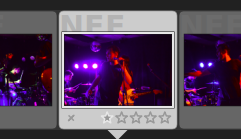
Buttons for rejecting and rating the photos using mouse. This can be found in the bottom panel of the darkroom layout.
.
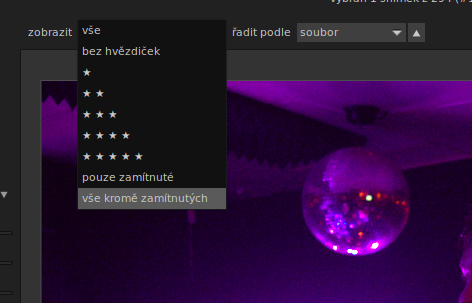
The option to view only photos that aren't rejected. It can be found above the large photo view in the darkroom layout.
.
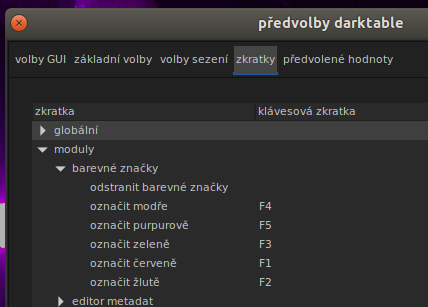
In the hotkey preferences, there are options to add colored labels to the photos, but there aren't any options to set the photo rating.
 m93a
m93a
All 7 comments
Have you tried 1,2,3 etc keys?
 Benja1972
on 9 Jun 2019
Benja1972
on 9 Jun 2019
Reading the manual is always a great thing before posting an issue. Sorry to say that this way but if you read the manual, you will see that shortcut already exists (that's also available on darkroom). Filmstrip on darkroom is related to lighttable so shortcuts used on it to change image options are available on darkroom filmstrip.
See that to know which shortcuts to use and close this issue : https://darktable.gitlab.io/doc/en/star_ratings_and_color_labels.html. Thanks.
 Nilvus
on 9 Jun 2019
Nilvus
on 9 Jun 2019
Cool, I'm glad to hear I can already achieve what I wanted. However can those hotkeys be modified? I don't see the corresponding options anywhere (not even i the lightroom subsection).
I understand that reading the manual used to be the first thing to do when one installed a new program, but nowadays having to read a manual is mostly a result of bad UX.
If the hotkeys are present in the shortcut options menu, could their subsection be named any better, so that people can find it? And if they aren't, could they be added?
m93a
on 9 Jun 2019
Yes you can modify them. In Hotkey settings get to:
- 'modules' -> 'filmstrip'
- 'views' -> 'lighttable'
Values are 'rate0' to 'rate5' and 'rate reject'
 pphotography
on 9 Jun 2019
pphotography
on 9 Jun 2019
I understand that reading the manual used to be the first thing to do when one installed a new program, but nowadays having to read a manual is mostly a result of bad UX.
Are you serious ? That's right on simple software but not on complex software like darktable. Even software like Lightroom or Photoshop have manuals and books and magazines and videos tutorials... All complex software (here I mean software that make possible to make complex things).
If the hotkeys _are presethat's rightnt_ in the shortcut options menu, could their subsection be named any better, so that people can find it? And if they aren't, could they be added?
Here I agree with you, shortcuts section is a thing to improve. Remember that darktable is an open source software so all users to help improving it. For example, you could propose a feature request for that with a mockup (what hierarchical list you think could be better or even an image or, if you know coding, propose a PR to change that).
Nilvus
on 9 Jun 2019
Are you serious? That's right on simple software but not on complex software like darktable. Even software like Lightroom or Photoshop have manuals and books and magazines and videos tutorials... All complex software (here I mean software that make possible to make complex things).
Well hotkeys aren't a complex thing at all and they can be done right. Having to see the manual because of hotkeys really is just an excuse for bad UX. An example of hotkeys done right is the Command pallete in Visual Studio Code. (So called “Commands” are searchable without opening Preferences, each command can be assigned a hotkey and if it has one, it is shown in the search.)
Darktable is an open source software so all users to help improving it. For example, you could propose a feature request for that with a mockup (what hierarchical list you think could be better or even an image or, if you know coding, propose a PR to change that).
I know and I hope I'll find time to do that eventually. Filing issues is just my first attempt at getting involved in darktable and seeing whether it is still in active development and has an active community 😉. Right now I don't have much time because of uni, but during the summer holiday I'd love to help out with darktable.
m93a
on 9 Jun 2019
Well hotkeys aren't a complex thing at all and they can be done right. Having to see the manual because of hotkeys really is just an excuse for bad UX. An example of hotkeys done right is the Command pallete in Visual Studio Code. (So called “Commands” are searchable without opening Preferences, each command can be assigned a hotkey and if it has one, it is shown in the search.)
Don't make confusion here. I was reacting here about your sentence saying that reading a manual means a bad UX. You doesn't seems to talk on that sentence only about hotkeys. And a complex software like darktable is needs to read about software to discover all its possibilities and how making the best use of it. By reading it, knowing these basics shortcuts are known !
That's your 2nd point who point the problem about hotkeys on UX. And here, as I said you're right about that.
I know and I hope I'll find time to do that eventually. Filing issues is just my first attempt at getting involved in darktable and seeing whether it is still in active development and has an active community wink. Right now I don't have much time because of uni, but during the summer holiday I'd love to help out with darktable.
Filling issues to help darktable improve is great. Though, being sure to know the most it's possible the part of software you want to post an issue is the better way to post the most pertinent issue possible.
To help you with that, I want also to precise you two important things :
- on a issue, think about precise which version of darktable you use
- feel free if you can to test the master version as it already have many many improvements since darktable 2.6.2 like a quite new great UI for example (anyway prefs shortcuts section remains to improve).
Nilvus
on 9 Jun 2019
Related issues
 GrahamByrnes
·
3Comments
GrahamByrnes
·
3Comments
 lapineige
·
4Comments
lapineige
·
4Comments
 jpellegrini
·
3Comments
pphotography
·
3Comments
jpellegrini
·
3Comments
pphotography
·
3Comments
 mjut
·
5Comments
mjut
·
5Comments