Darktable: Exported jpeg is darker
Hi there,
All of the exported jpeg were way darker than it shows on Darktable.
It all looks fine on Darktable but when I exported it to jpeg, all the images were darker.
Thanks for any help!
 gigatt5
All 21 comments
Windows ? OpenCL ?
 aurelienpierre
on 23 Feb 2019
aurelienpierre
on 23 Feb 2019
Thanks for the reply!
I'm using Windows 7 64 bit, with
Sapphire Radeon R7 240 2GB DDR3 HDMI/DVI-D/VGA Graphics Card, and Intel Core 2 Quad Q9650 3 GHz 12 MB Cache Quad-Core CPU Processor.
Thank you!
Get Outlook for iOShttps://aka.ms/o0ukef
From: Aurélien PIERRE notifications@github.com
Sent: Friday, February 22, 2019 10:28 PM
To: darktable-org/darktable
Cc: gigatt5; Author
Subject: Re: [darktable-org/darktable] Exported jpeg is darker (#2126)
Windows ? OpenCL ?
—
You are receiving this because you authored the thread.
Reply to this email directly, view it on GitHubhttps://github.com/darktable-org/darktable/issues/2126#issuecomment-466621956, or mute the threadhttps://github.com/notifications/unsubscribe-auth/AtsAtj0Vvo2D76CvQtKDog5DL3325cP9ks5vQN-PgaJpZM4bNjLa.
gigatt5
on 23 Feb 2019
I have the same issue with darktable 2:2.6.3 on archlinux.
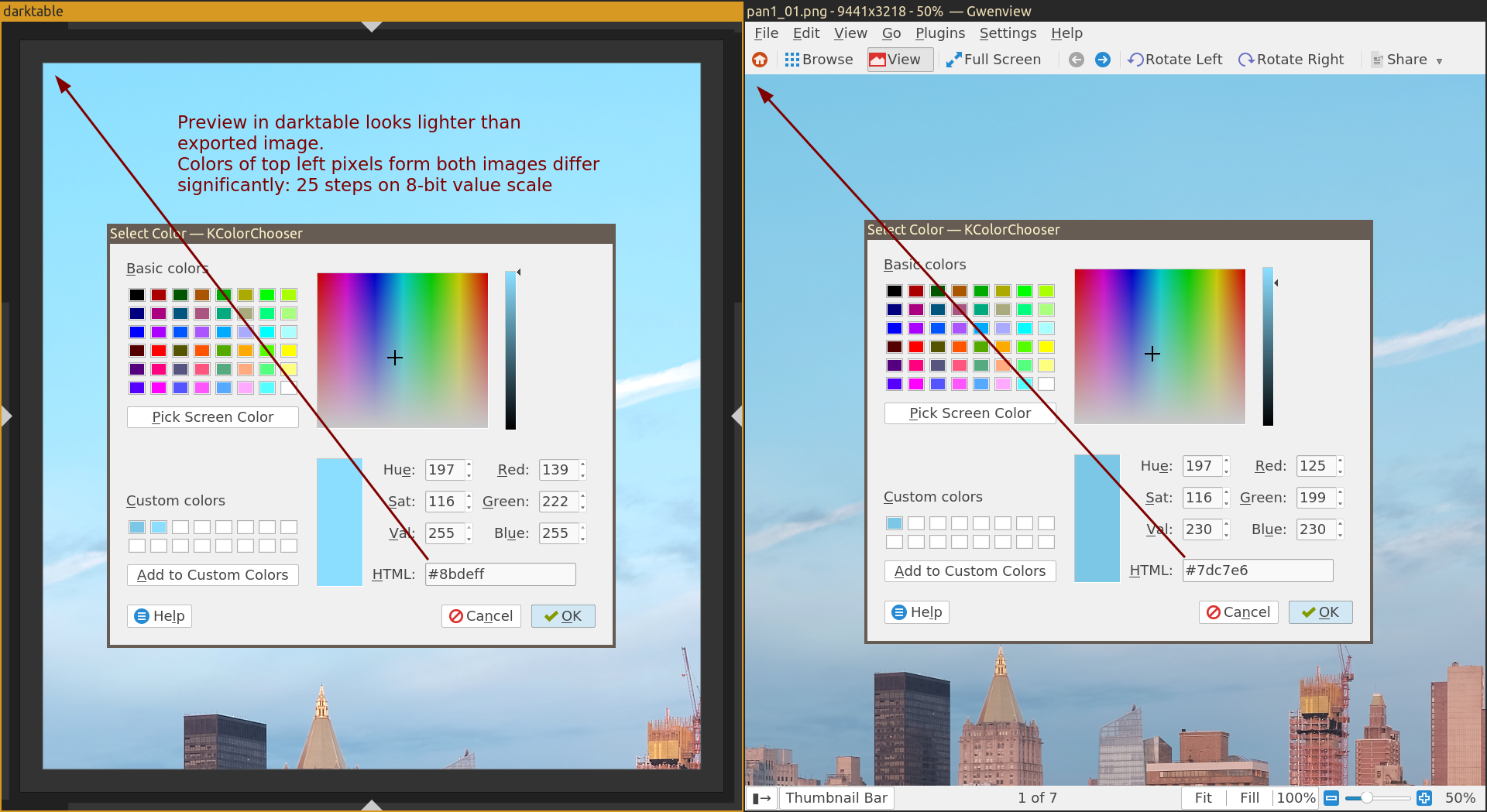
In this case source image is 8-bit per channel TIF file with sRGB profile.
Output format and bit depth seem to not impact the result. On screenshot it's 8-bit PNG, but I tried different bit depth, TIF and JPEG. So I'd say it's not exactly about JPEGs.
My pipeline:
- sharpen
- levels
- color zones
- equalizer
- global tonemap
- gradual density
- crop and rotate
- orientation
Please let me know what other info can be useful on this bug.
Thanks
 edio
on 30 Nov 2019
edio
on 30 Nov 2019
global tonemap is your culprit. It adjusts the white level depending on the maximum pixel value in the picture, and this value changes if you interpolate the pixels while resizing.
aurelienpierre
on 30 Nov 2019
@aurelienpierre, thanks for a quick response!
I tried disabling global tonemap, but it doesn't seem to help. Resulting image is still darker.
I made a screenshot of the darktable preview, scaled exported jpeg down to match the screenshot of the preview, and blended both in a difference mode.
If it was only about white level, I'd expect to get grey dark field in the result. But it is not. Of course, some artifacts on contrast elements are expected due to differences in scaling algorithms and inacuriasies in scaling, but the difference is much more pronounced, than I expected to see.
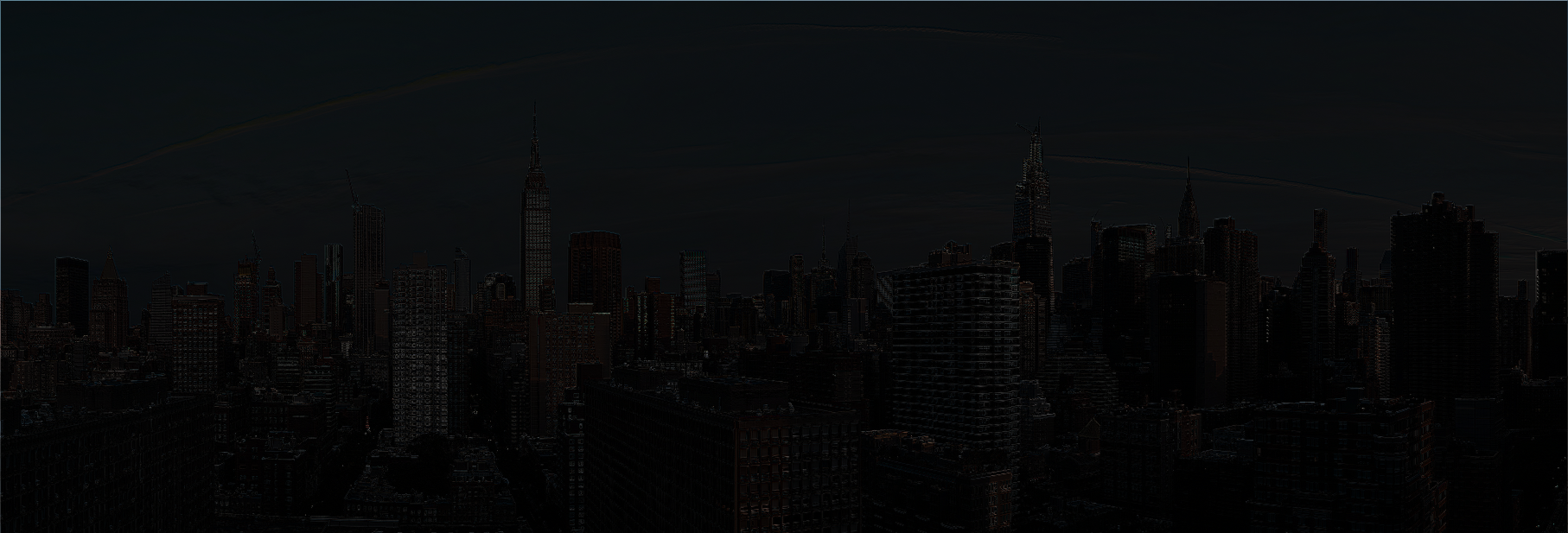
Do you know, what may be the issue here?
edio
on 30 Nov 2019
Have you checked the colour profiles used in both apps ? What happens if you set both to sRGB and remove the display colour profile ?
aurelienpierre
on 30 Nov 2019
@aurelienpierre, I am afraid, I will need some help here.
I did not set up any colour profiles for X. I am using custom minimal environment based on i3 and parts of KDE, so I doubt I have any colour profiles enabled.
I can only tell, that when I export the image, I tried setting colour profile to sRGB and it seems to be default anyway.
Could you point me to an instruction, how to check active colour profile in darktable? What image viewer would you suggest to use for a predictable result?
(I am sorry, I'm a bit farther than I'd want to be from the topic of colour profiles)
edio
on 30 Nov 2019
(I am sorry, I'm a bit farther than I'd want to be from the topic of colour profiles)
If you open the exported file also in darktable instead of gwenview, it should eliminate display profile issues from the comparison.
 junkyardsparkle
on 30 Nov 2019
junkyardsparkle
on 30 Nov 2019
@junkyardsparkle, thanks, didn't think of this option.
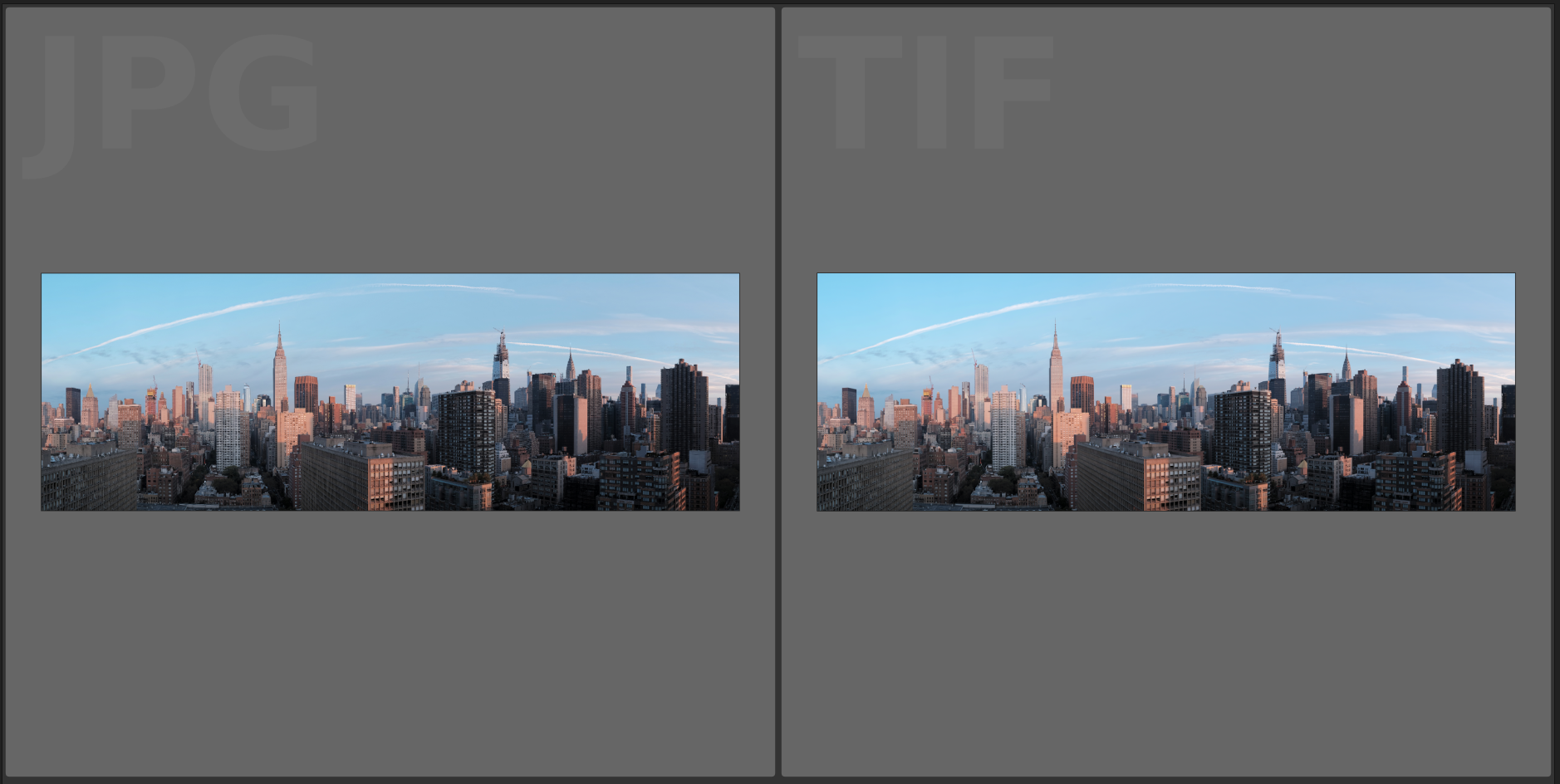
I tried that, and the exported image upon opening in darktable looks darker:
edio
on 1 Dec 2019
@junkyardsparkle, @aurelienpierre
I think I tracked down the culprit, it is the _levels_ module with _automatic_ mode enabled.
When I disable it, pictures look identical or the difference, if any, is not perceptible (even with the _global tonemap_ enabled).
This, I guess, fits explanations offered above: _automatic_ mode, I'd assume, tries to expand the spectrum of the image, but the end points of the spectrum are impacted by scaling and interpolation a lot.
Thank you for your help in figuring this out.
As a follow up question: is there a way to know, when exported result may differ from the preview? Is it possible to maybe make darktable to issue some sort of a warning?
If it is not possible now, do you think it would be a reasonable feature request?
edio
on 2 Dec 2019
The inherent issue with auto stuff is… it depends on the input, which changes slightly when your picture is resized (when you downscale, you tend to average pixels so the contrast is slightly reduced… every algo that relies on that contrast will be affected by size).
aurelienpierre
on 2 Dec 2019
As a follow up question: is there a way to know, when exported result may differ from the preview?
Enabling the "do high quality resampling during export " option (which has been moved to the export module for 3.0) should make this less of an issue, although maybe not a non-issue for some modules depending on tiling etc, I guess.
junkyardsparkle
on 2 Dec 2019
actually, preview is resized already, so high quality resampled export might still differ from preview, unless you manage to match the resolutions.
aurelienpierre
on 2 Dec 2019
@junkyardsparkle
Enabling the "do high quality resampling during export " option (which has been moved to the export module for 3.0) should make this less of an issue
I believe, I tried this option and it didn't help.
I may be missing something, but as far as I understand, the issue in my case is that _automatic levels_ were operating on a preview (effectively, a downscaled version of the input image). Downscaled input means, that its peak values are averaged with their neighbours and thus absolute maximum value of the entire image is reduced. For example, all FF values are lost during downscaling, and now absolute maximum is, say, E6. So _automatic levels_ operating on a preview will calculate that adjustment is necessary.
However during export all those FF values are intact, and _automatic levels_ will result in no adjustment to values.
Hence, frankly speaking, I do not see, how High quality resampling during export can help here.
edio
on 2 Dec 2019
actually, preview is resized already, so high quality resampled export might still differ from preview, unless you manage to match the resolutions.
Good point, I guess I'm usually thinking about this in terms of modules like profiled denoise, where the concern is that the output match the 1:1 pixel-peeping preview. :-)
I didn't even know the auto-levels was dynamic this way (not sure I ever used it), I thought only the automatic mode in the exposure module did this (so that it can be used for deflickering, etc). Does this mean the effect changes as you change the preview zoom, too?
junkyardsparkle
on 2 Dec 2019
Darn - I've been hit by this in DT 3.0 (probably in earier too - I hadn't had chance to see it), see https://www.reddit.com/r/DarkTable/comments/ek0lue/exported_image_much_darker_than_preview/
I don't think I've used any module in "automatic" mode. All I've used is filmic rgb, rgb curves, tone equalizer, lens correction and denoise (profiled). Linux + no OpenCL.
 johnny-bit
on 4 Jan 2020
johnny-bit
on 4 Jan 2020
@johnny-bit, I guess the issue is filmic rgb module. It allows you setting white and black luminance levels of the scene. However absolute white and black levels of the preview are less extreme than they are on the full-size picture. Thus, I'd assume, filmic rgb on average renders pictures with displaced black and white points (towards less contrast).
Right now I too have similar issue. I spent 3 days developing a collection of pictures. I used filmic rgb for it is very convenient. But almost entire film roll was rendered incorrectly (slightly differs from preview, mostly in shadows, but it is noticeable) UPDATE: nevermind, I am actually less sure now it is caused by filmic rgb. Perhaps, this time it was the issue with colorspaces convertion indeed
@aurelienpierre, @junkyardsparkle any chance darktable developers can reconsider technical decisions that make modules produce inconsistent outputs? This behavior, although techincally reasonable, is counter intuitive and makes darktable look unreliable.
Would it be possible for modules, for example, to remember their internal state they ended up with on preview, and apply the same state when rendering the final picture?
OTOH, I don't have experience with other RAW editors (I have only used DT). Maybe my expectations are unreasonably set and such behavior is what most users need. Let me know if that's the case :D
edio
on 5 Jan 2020
OK, so @aurelienpierre gave me some ideas in that reddit thread and it's more complex than just auto mode in some module.
Here are some tips I've managed to come up with:
- When exporting always check that you have high quality enabled and no style is being applied during export (at least on checking stage!)
- Generally, all photo editors should be color managed and darktable is very good in this regard. Problem arises when your environment isn't good. In my case
darktable-cmstestreturned info that my env not only wasn't color managed, it's so bad that darktable's flying blind and so am I. I don't know what's going on with my system regarding colord, but I have dual display, monitors aren't compatible with each other color-wise (one is old & bad, 2nd is new and good), none of them is calibrated. So 1st step - check your color profiles and make dead sure that they are ok/working. - Regarding checking images, developing them etc - always develop using recommended gray theme (no dark themes!) and check them in darktable after export. That lowers possibility os mismatched profile between darktable and image viewer.
- If you managed to catch darktable doing export way darker than what it shows in the preview: that's your starting point. Now try to reliably replicate it in your environment (step 1: reboot your computer just to be sure), making sure to check all the modules througout the pipe so from fully developed down to undeveloped raw and check every export on the way.
- Once you reliably reproduce issue - try OpenCL/no OpenCL. If you've got differences, make note of it.
So - once having caught proper issue, managing to replicate it etc, now it's time to fill issue along with raw file and xmp files and all reporting :)
I jumped the gun on this and the issue is my monitor setup and lack of calibration means that any development is shooting in the dark and hoping for the best.
johnny-bit
on 6 Jan 2020
@johnny-bit could you please update your comment with the link to the reddit thread you've mentioned?
edio
on 6 Jan 2020
@johnny-bit could you please update your comment with the link to the reddit thread you've mentioned?
I've already mentioned it: https://www.reddit.com/r/DarkTable/comments/ek0lue/exported_image_much_darker_than_preview/
also @aurelienpierre suggested to avoid Wayland until it has proper color management in core and use X session for photoediting.
johnny-bit
on 6 Jan 2020
This issue did not get any activity in the past 30 days and will be closed in 7 days if no update occurs. Please check if the master branch has fixed it since then.
![github-actions[bot] picture](https://avatars2.githubusercontent.com/in/15368?v=4&s=40) github-actions[bot]
on 11 Feb 2020
github-actions[bot]
on 11 Feb 2020
Related issues
 lapineige
·
4Comments
lapineige
·
4Comments
 Praveen-Rai
·
5Comments
Praveen-Rai
·
5Comments
 GrahamByrnes
·
3Comments
GrahamByrnes
·
3Comments
 elstoc
·
4Comments
elstoc
·
4Comments
 schwerdf
·
4Comments
schwerdf
·
4Comments
Most helpful comment
actually, preview is resized already, so high quality resampled export might still differ from preview, unless you manage to match the resolutions.