Darkreader: Some garbled images in Dynamic theme
This is happening at https://tweakers.net/, a popular technology site in The Netherlands and Belgium.
In the header the account kind of icons become garbled. In the news overview, some items get a weird background behind the text. There are possibly other issues, but I suspect they share the same root cause. These issues appear to do with icons only, not pictures within article content.
Example before:

After:

Current workaround is to use the Filter+ theme.
I'm using Firefox 65 & the latest Dark Reader addon from the Mozilla repo.
 thany
thany
All 3 comments
Here is another example, for google docs equation toolbar:
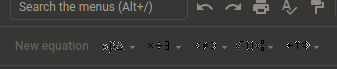
With Filter or Filter+ modes this doesn't happen.
 memeplex
on 12 May 2019
memeplex
on 12 May 2019
On Tweakers, this seems to be the case because Dark Reader applies the wrong image set.
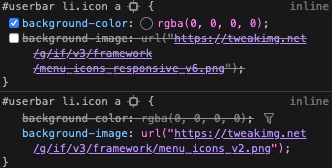
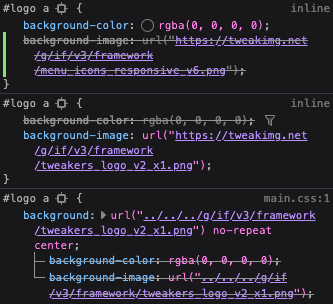
Disabling the top one, so the responsive one, fixes the issue for me. The logo is even worse, as it picks a totally unrelated image:
 Yoshi2889
on 3 Mar 2020
Yoshi2889
on 3 Mar 2020
Hi Medetweakers ;)
It has been fixed in the latest version of darkreader!
Regards,
Gusted
 Gusted
on 21 May 2020
Gusted
on 21 May 2020
Related issues
 wviana
·
3Comments
wviana
·
3Comments
 marcelpaulo
·
3Comments
marcelpaulo
·
3Comments
 ghost
·
4Comments
ghost
·
4Comments
 FireMasterK
·
3Comments
FireMasterK
·
3Comments
 BubiBalboa
·
3Comments
BubiBalboa
·
3Comments
Most helpful comment
Hi Medetweakers ;)
It has been fixed in the latest version of darkreader!
Regards,
Gusted