Darknet: YOLOv4-tiny released: 40.2% AP50, 371 FPS (GTX 1080 Ti), 1770 FPS tkDNN/TensorRT
Discussion: https://www.reddit.com/r/MachineLearning/comments/hu7lyt/p_yolov4tiny_speed_1770_fps_tensorrtbatch4/
Full structure: https://lutzroeder.github.io/netron/?url=https%3A%2F%2Fraw.githubusercontent.com%2FAlexeyAB%2Fdarknet%2Fmaster%2Fcfg%2Fyolov4-tiny.cfg
YOLOv4-tiny released: 40.2% AP50, 371 FPS (GTX 1080 Ti) / 330 FPS (RTX 2070)
1770 FPS - on GPU RTX 2080Ti - (416x416, fp16, batch=4) tkDNN/TensorRT https://github.com/ceccocats/tkDNN/issues/59#issuecomment-652269964
1353 FPS - on GPU RTX 2080Ti - (416x416, fp16, batch=4) OpenCV 4.4.0 (including: transfering CPU->GPU and GPU->CPU) (excluding: nms, pre/post-processing) https://github.com/AlexeyAB/darknet/issues/6067#issuecomment-656604015
39 FPS- 25ms latency - on Jetson Nano - (416x416, fp16, batch=1) tkDNN/TensorRT https://github.com/ceccocats/tkDNN/issues/59#issuecomment-652157334290 FPS- 3.5ms latency - on Jetson AGX - (416x416, fp16, batch=1) tkDNN/TensorRT https://github.com/ceccocats/tkDNN/issues/59#issuecomment-65215733442 FPS- on CPU Core i7 7700HQ (4 Cores / 8 Logical Cores) - (416x416, fp16, batch=1) OpenCV 4.4.0 (compiled with OpenVINO backend) https://github.com/AlexeyAB/darknet/issues/6067#issuecomment-65669352920 FPSon CPU ARM Kirin 990 - Smartphone Huawei P40 https://github.com/AlexeyAB/darknet/issues/6091#issuecomment-651502121 - Tencent/NCNN library https://github.com/Tencent/ncnn120 FPSon nVidia Jetson AGX Xavier - MAX_N - Darknet framework371FPS on GPU GTX 1080 Ti - Darknet framework
- cfg: https://raw.githubusercontent.com/AlexeyAB/darknet/master/cfg/yolov4-tiny.cfg
- weights: https://github.com/AlexeyAB/darknet/releases/download/darknet_yolo_v4_pre/yolov4-tiny.weights
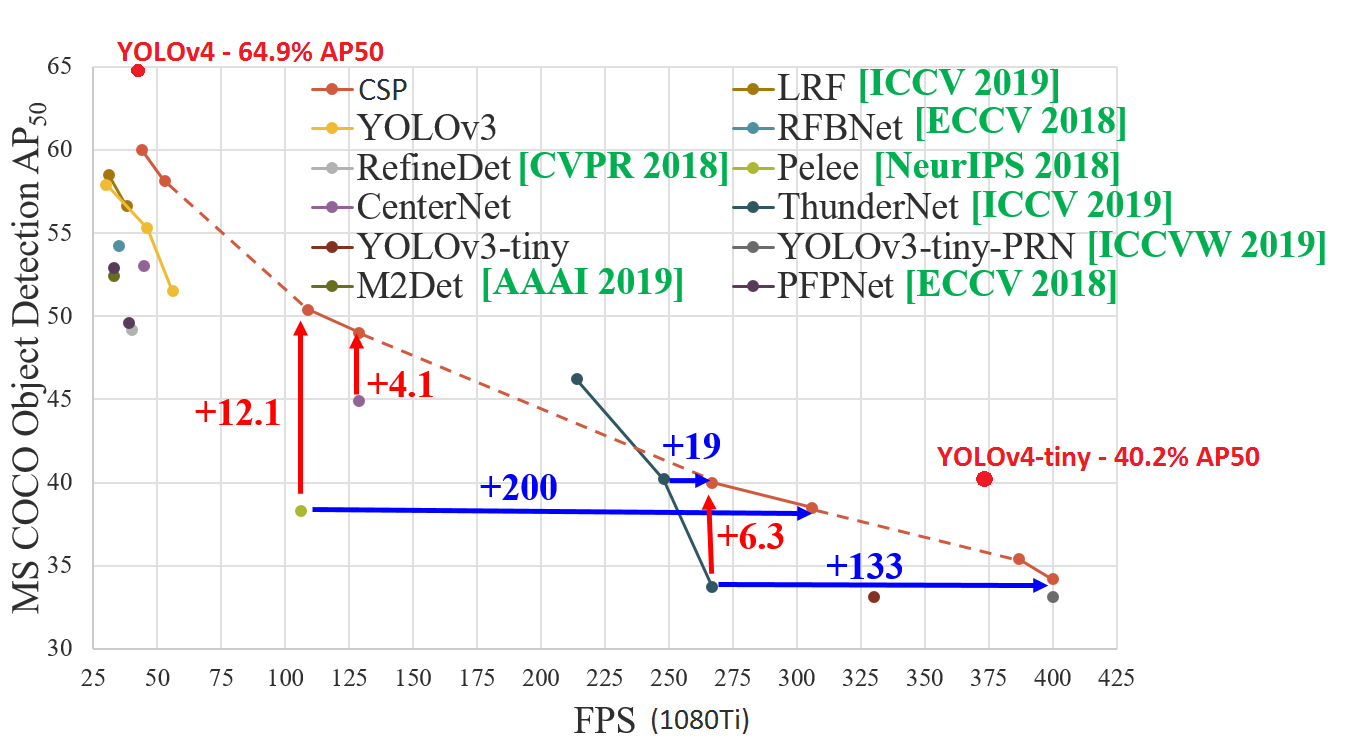
| source | yolov3-tiny (800x800) | yolov4-tiny (800x800) |
|---|---|---|
|  |
|  |
|  |
|
 AlexeyAB
All 119 comments
@AlexeyAB Really great work!
For training, same partial weights as old tiny Yolo i.e. the first 15 layers yolov4-tiny.conv.15?
 laclouis5
on 25 Jun 2020
laclouis5
on 25 Jun 2020
@laclouis5
Use this pre-trained file for trainint yolov4-tiny.cfg: https://github.com/AlexeyAB/darknet/releases/download/darknet_yolo_v4_pre/yolov4-tiny.conv.29
How to train yolov4-tiny.cfg: https://github.com/AlexeyAB/darknet#how-to-train-tiny-yolo-to-detect-your-custom-objects
AlexeyAB
on 25 Jun 2020
Hi @alexeab,
Does OpenCV DNN module supports YoloV4-tiny? Thanks
 muhammad-maaz-confiz
on 25 Jun 2020
muhammad-maaz-confiz
on 25 Jun 2020
We are waiting for the implementation of the YOLOv4-tiny in libraries:
- OpenCV: https://github.com/opencv/opencv/issues/17666
- tkDNN/TensorRT: https://github.com/ceccocats/tkDNN/issues/59
AlexeyAB
on 25 Jun 2020
Hi @alexeab,
Does OpenCV DNN module supports YoloV4-tiny? Thanks
OpenCV implemented it in their master branch in 6 days for Yolov4. This looks like a more trivial change required so here's hoping it will be live in a few days.
 ark-
on 25 Jun 2020
ark-
on 25 Jun 2020
@AlexeyAB v. exciting. are you planning to release a paper on it? Would love to read some details about how it works. Is it a novel backbone or one of the existing CSPs? Do you have any numbers on the performance of the backbone as a classifier?
 LukeAI
on 26 Jun 2020
LukeAI
on 26 Jun 2020
@LukeAI
There is used
resize=1.5instead ofrandom=1, that you suggested, congrats! https://github.com/AlexeyAB/darknet/issues/3830CSP: There is used groups for [route] layer for CSP - EFM: http://openaccess.thecvf.com/content_CVPRW_2020/papers/w28/Wang_CSPNet_A_New_Backbone_That_Can_Enhance_Learning_Capability_of_CVPRW_2020_paper.pdf
Initially it was done for MixNet: https://github.com/AlexeyAB/darknet/issues/4203#issuecomment-551047590There is used CIoU-loss with optimal normalizers (as in YOLOv4)
scale_x_y parameter (as in YOLOv4)
AlexeyAB
on 26 Jun 2020
@AlexeyAB Can you explain why the last yolo layer uses masks starting from 1, not 0?
 DoriHp
on 26 Jun 2020
DoriHp
on 26 Jun 2020
confirmed. performance is WOW.
https://youtu.be/TWteusBINIw
offline test (without connecting to the stream)
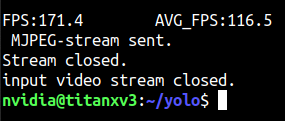
 CSTEZCAN
on 26 Jun 2020
CSTEZCAN
on 26 Jun 2020
@CSTEZCAN Hi,
What FPS can you get by using such command without mjpeg_port?
darknet.exe detector demo cfg/coco.data cfg/yolov4-tiny.cfg yolov4-tiny.weights -i 0 -thresh 0.25 -ext_output test.mp4 -dont_show
On GPU RTX 2070, CPU Core i7 6700K
I get 230 FPS by using command:
darknet.exe detector demo cfg/coco.data cfg/yolov4-tiny.cfg yolov4-tiny.weights -ext_output test.mp4 -dont_show
in both cases (1) NMS is commented and (2) NMS isn't commentedI get 330 FPS by using command - it doesn't read videofile:
darknet.exe detector demo cfg/coco.data cfg/yolov4-tiny.cfg yolov4-tiny.weights -ext_output test.mp4 -dont_show -benchmark
So the bottleneck is OpenCV: (1)cv::VideoCaptureVideo Capturing from file/camera and (2)cv::imshow / cv::wait_keyShowing video on the screen / sending by TCP/IP-mjpeg_port 8090flag
AlexeyAB
on 26 Jun 2020
@DoriHp Just to compare with Yolov3-tiny where were used the same masks, it seems tiny models don't detect well small objects anyway.
AlexeyAB
on 26 Jun 2020
I saw yolov3-tiny_3l.cfg with 3 yolo layers. So due to what you said, the last yolo layers has no use?
DoriHp
on 26 Jun 2020
To detect small objects you must also use 3-yolo-layers in yolov4-tiny.
AlexeyAB
on 26 Jun 2020
@AlexeyAB Hello Alexey! this is your "Piano Concerto No. 2 Op. 18". I have infinite respect for your work.
My results as follows;
nvidia-smi -pl 125 watts titan x pascal
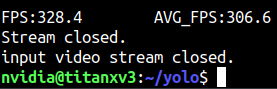
nvidia-smi -pl 250 watts titan x pascal

Will be running tests on Jetson Nano, TX2 and Xavier later..
CSTEZCAN
on 26 Jun 2020
@CSTEZCAN Thanks! I think yolov4-tiny can work with 500 - 1000 FPS by using OpenCV or tkDNN/TensorRT when it will be implemented in these libraries.
AlexeyAB
on 26 Jun 2020
@AlexeyAB I have no doubt. The only weird thing I noticed is, it uses CPU relatively more during training compared to YOLOv4. The recommended system must start from Ryzen 3500 and above for an optimal performance (if you are creating such recommended setup list) :)
CSTEZCAN
on 26 Jun 2020
@AlexeyAB good job ! great work !
 choochtech
on 26 Jun 2020
choochtech
on 26 Jun 2020
@AlexeyAB
Nvidia Jetson AGX Xavier can do (all avg_fps)
MAX_N : 120.5
15W: 36.0
30W ALL: 68.9
30W 2core: 28.9

Training on tiny takes around 2 hours for a single class model for 5000 batches (which is usually enough) on xavier
it is just great!
CSTEZCAN
on 27 Jun 2020
@AlexeyAB you truly outdone yourself, I am impressed. The OpenCV/tensort rt will be a game changer.
@CSTEZCAN post the nano results, along with testing cpu-only mode results.
 ghost
on 27 Jun 2020
ghost
on 27 Jun 2020
@CSTEZCAN what jetpack version are you using ? And are you training networks on the Xavier too?
 marvision-ai
on 27 Jun 2020
marvision-ai
on 27 Jun 2020
On training on yolov4-tiny, I met nan, and when adversarial_lr=1 attention=1, I saw a pure black picture
The default learning_rate is too large, I set it to learning_rate=0.001 to only ease the time when nan appears
 1027663760
on 27 Jun 2020
1027663760
on 27 Jun 2020
@AlexeyAB you truly outdone yourself, I am impressed. The OpenCV/tensort rt will be a game changer.
Thanks so much for @WongKinYiu
AlexeyAB
on 27 Jun 2020
@deepseek nano has some problems, maybe about ram. edit2: nano can do max_N:16fps, 5W:10.2fps.
@mbufi I've trained 1 model on it, at 30 watts mode, it can train models without any problems. edit1: it is an old jetpack from last year, probably 4.2 or 4.3.
CSTEZCAN
on 27 Jun 2020
There is a small question - there is no implementation in cv2 yet - what is the easiest way to run the model on the CPU (in the application) without a large number of dependencies?
question of the century :)
CSTEZCAN
on 27 Jun 2020
There is a small question - there is no implementation in cv2 yet - what is the easiest way to run the model on the CPU (in the application) without a large number of dependencies?
can you not run with darknet, compiled without CUDA?
LukeAI
on 27 Jun 2020
@CSTEZCAN what resolution images are you training and running inference on with the Xavier?
I'd love to see an example cfg file that supports that performance you are showing.
Thanks for testing everything! Super helpful.
marvision-ai
on 27 Jun 2020
@CSTEZCAN what resolution images are you training and running inference on with the Xavier?
I'd love to see an example cfg file that supports that performance you are showing.
nothing especially changed on the yolov4-tiny.cfg (except class number and filters) so training & inferencing resolutions are same. https://raw.githubusercontent.com/AlexeyAB/darknet/master/cfg/yolov4-tiny.cfg
CSTEZCAN
on 27 Jun 2020
@AlexeyAB Hello Alexey!
[route]
layers=-1
groups=2
group_id=1
What does it mean?
 zbyuan
on 27 Jun 2020
zbyuan
on 27 Jun 2020
@zbyuan Read: https://github.com/opencv/opencv/issues/17666
AlexeyAB
on 27 Jun 2020
@CSTEZCAN okay cool. And for the video you are passing it, what's the resolution of the frames before resizing them? How are the detections of small objects? (especially if the algorithm is resizing it to smaller before putting it through the network.) This is great information you are providing.
Dude come on, I don't know your data, I don't know your label quality. You have to test them "yourself"
CSTEZCAN
on 27 Jun 2020
@CSTEZCAN great thanks!
marvision-ai
on 27 Jun 2020
mac mini perf test.
https://www.youtube.com/watch?v=0ZrfTglY4SI
CSTEZCAN
on 28 Jun 2020
Hi,What is the score that the yolo4-tiny tested in voc2007 and trained in voc2007+2012.
 wwzh2015
on 28 Jun 2020
wwzh2015
on 28 Jun 2020
why there are no spp layers selected in yolo4-tiny? @AlexeyAB
 piaomiaoju
on 28 Jun 2020
piaomiaoju
on 28 Jun 2020
@piaomiaoju @WongKinYiu
Yes, maybe we can try to use small SPP: yolov4-tiny-spp.cfg.txt
### SPP

[maxpool]
size=3
stride=1

[route]
layers=-2

[maxpool]
size=5
stride=1

[route]
layers=-1,-3,-4
@piaomiaoju @WongKinYiu
Yes, maybe we can try to use small SPP: yolov4-tiny-spp.cfg.txt### SPP [maxpool] size=3 stride=1 [route] layers=-2 [maxpool] size=5 stride=1 [route] layers=-1,-3,-4share an example cfg small SPP + 3 layers of yolo. To detect small objects
 Anafeyka
on 28 Jun 2020
Anafeyka
on 28 Jun 2020
To detect small objects you must also use 3-yolo-layers in yolov4-tiny.
great works!
do you have plan for 3-yolo-layers in yolov4-tiny?
thanks!
 goodtogood
on 29 Jun 2020
goodtogood
on 29 Jun 2020
@AlexeyAB .. nice... well done.. yolov4-tiny is in the goldielocks zone... not too slow and just the right mAP.
You can also use the other yolov4 bag of tricks to get a slightly better mAP
 javier-box
on 29 Jun 2020
javier-box
on 29 Jun 2020
To detect small objects you must also use 3-yolo-layers in yolov4-tiny.
great works!
do you have plan for 3-yolo-layers in yolov4-tiny?
thanks!
Want to know , too!
 www7890
on 30 Jun 2020
www7890
on 30 Jun 2020
Exciting news. Thanks for the good work @AlexeyAB
 tobyglei
on 30 Jun 2020
tobyglei
on 30 Jun 2020
@CSTEZCAN Thanks! I think yolov4-tiny can work with 500 - 1000 FPS by using OpenCV or tkDNN/TensorRT when it will be implemented in these libraries.
Using tkDNN fresh yolov4-tiny impl, tested on Jetson Nano with JetPack 4.4, TensorRT v7.1, 416 input size
For FP32, profile results:
Time stats:
Min: 37.3371 ms
Max: 122.952 ms
Avg: 38.0922 ms 26.2521 FPS
For FP16, profile results:
Time stats:
Min: 24.5687 ms
Max: 90.5088 ms
Avg: 25.5292 ms 39.1709 FPS
 JasonDoingGreat
on 1 Jul 2020
JasonDoingGreat
on 1 Jul 2020
[route]
layers=-1
groups=2
group_id=1
if we don't slice the layer here, i think there are no accuracy degradation, but very little size added.
piaomiaoju
on 1 Jul 2020
degrade
what‘s mean?
wwzh2015
on 1 Jul 2020
RTX 2080Ti (CUDA 10.2, TensorRT 7.0.0, Cudnn 7.6.5, tkDNN); for yolo4tiny 416x416, on 1200 images of size 416x416: https://github.com/ceccocats/tkDNN/issues/59#issuecomment-652269964
- yolo4tiny (416x416, fp16, batch=1) - 1.24ms latency - 790 FPS
- yolo4tiny (416x416, fp16, batch=4) - 0.56ms latency - 1770 FPS
- yolo4tiny (416x416, int8, batch=4) - 0.47ms latency - 2100 FPS
AlexeyAB
on 1 Jul 2020
@CSTEZCAN Thanks! I think yolov4-tiny can work with 500 - 1000 FPS by using OpenCV or tkDNN/TensorRT when it will be implemented in these libraries.
I was very mistaken, here 2000 FPS, not 1000 FPS
AlexeyAB
on 1 Jul 2020
Jetson AGX (CUDA 10.2, TensorRT 7.0.0, Cudnn 7.6.5, tkDNN); for yolo4tiny 416x416, on 1200 images of size 416x416: https://github.com/ceccocats/tkDNN/issues/59#issuecomment-652420971
- yolo4tiny (416x416, fp16, batch=1) - 290 FPS
- yolo4tiny (416x416, fp16, batch=4) - 380 FPS
- yolo4tiny (416x416, int8, batch=4) - 430 FPS
AlexeyAB
on 1 Jul 2020
Mayday, Mayday!!
@CSTEZCAN Confirm the fps math, does it check? because Alex might have changed the GAME.
@AlexeyAB How is this even possible??! were you able to main the accuracy? tell me everything.
ghost
on 1 Jul 2020
@CSTEZCAN Thanks! I think yolov4-tiny can work with 500 - 1000 FPS by using OpenCV or tkDNN/TensorRT when it will be implemented in these libraries.
I was very mistaken, here 2000 FPS, not 1000 FPS
I really don't know what to say @AlexeyAB you've rocked this planet & probably beyond :) Lets work on totally unsupervised classification & detection next time for mars rovers :)
CSTEZCAN
on 1 Jul 2020
Mayday, Mayday!!
@CSTEZCAN Confirm the fps math, does it check? because Alex might have changed the GAME.
@AlexeyAB How is this even possible??!
I don't have tkDNN setup on Xavier and I don't have RTX GPU to check INT8, FP16 to reach those numbers... but the source is trustworthy. If they say it works, it works.
CSTEZCAN
on 1 Jul 2020
Darknet isn't optimized for inference on CPU (even with AVX=1 OPENMP=1).
Use https://github.com/Tencent/ncnn for testing on CPU (Desktop, Laptop, Smartphones) or wait for the implementation of yolov4-tiny in the OpenCV library https://github.com/opencv/opencv/issues/17666
AlexeyAB
on 1 Jul 2020
I know that Alex is telling the truth.
Can you test on my system? i want to see this
you can install it from here; https://github.com/ceccocats/tkDNN
and use models described above with COCO images from COCO dataset website..
CSTEZCAN
on 1 Jul 2020
To detect small objects you must also use 3-yolo-layers in yolov4-tiny.
Hello, can you please share the cfg file for this?
 vinorth05
on 2 Jul 2020
vinorth05
on 2 Jul 2020
Hi guys!
How this compares to yolo_v3_tiny_pan3_aa_ae_mixup_scale_giou.cfg model in speed/accuracy?
 spinlud
on 3 Jul 2020
spinlud
on 3 Jul 2020
To detect small objects you must also use 3-yolo-layers in yolov4-tiny.
I think a 3-yolo-layers yolov4-tiny would be a game changer for my application. If someone can make the change and retrain in the COCO dataset, I would appreciate it very much.
 marcusbrito
on 3 Jul 2020
marcusbrito
on 3 Jul 2020
Comparison of accuracy of Yolov3-tiny (width=800 height=800) vs Yolov4-tiny (width=800 height=800)
| source | yolov3-tiny (800x800) | yolov4-tiny (800x800) |
|---|---|---|
| | | |
AlexeyAB
on 5 Jul 2020
Great work @AlexeyAB !
choochtech
on 6 Jul 2020
Comparison of accuracy of Yolov3-tiny (width=800 height=800) vs Yolov4-tiny (width=800 height=800)
source yolov3-tiny (800x800) yolov4-tiny (800x800)

Hi, Can you share the class Dataset?
wwzh2015
on 6 Jul 2020
@wwzh2015 This is the default yolov4-tiny model that is trained on http://mscoco.org/ dataset (just set width=800 height=800 in cfg-files): https://github.com/AlexeyAB/darknet#pre-trained-models
AlexeyAB
on 6 Jul 2020
Opencv 4.4.0 can load this model in your thought?
Now it failed to build.
Thank you.
 rchglev
on 6 Jul 2020
rchglev
on 6 Jul 2020
This is amazing, but it fails to detect small objects. My use case only has small objects (about 10 - 30 pixels). Should I regenerate anchors or use a third yolo layer? If the latter, how can I change the cfg file to add a third layer? Thanks!
 kermado
on 6 Jul 2020
kermado
on 6 Jul 2020
This is amazing, but it fails to detect small objects. My use case only has small objects (about 10 - 30 pixels). Should I regenerate anchors or use a third yolo layer? If the latter, how can I change the cfg file to add a third layer? Thanks!
I think use a third yolo layer that is exactly.
wwzh2015
on 7 Jul 2020
Comparison of accuracy of Yolov3-tiny (width=800 height=800) vs Yolov4-tiny (width=800 height=800)
source yolov3-tiny (800x800) yolov4-tiny (800x800)
@AlexeyAB world-class! in coming years it will only improve.
 awaisbajwaml
on 7 Jul 2020
awaisbajwaml
on 7 Jul 2020
371 FPS on GPU GTX 1080 Ti - Darknet framework
Is the input resulation 419*416 can perform 371 FPS on GPU GTX 1080 Ti?
 ZZQ-sanmenxia
on 9 Jul 2020
ZZQ-sanmenxia
on 9 Jul 2020
OpenCV uses cuDNN and does not support TensorRT. OpenCV will be slower on low-end devices as convolutions become a bigger bottleneck where TensorRT based solutions will outperform cuDNN based solutions. The CUDA backend in OpenCV is just six months old. So be sure to check again in the future.
Prefer tkDNN if your device is not a high-end GPU. Use tkDNN if you need INT8 precision. On high-end device, if tiny performance gains matter a lot, try both OpenCV and tkDNN.
You can extract much higher FPS on low-end devices using a pipeline with detection, tracking, etc. You can find an outdated example here.
CUDA version: 10.2
cuDNN version: 7.6.5
Benchmark Code: https://gist.github.com/YashasSamaga/48bdb167303e10f4d07b754888ddbdcf
YOLOv4
Performance
Numbers in the tables indicate FPS.
Device: RTX 2080 Ti
Input Size | OCV CUDA FP32 (batch = 1) | OCV CUDA FP32 (batch = 4) | OCV CUDA FP16 (batch = 1) | OCV CUDA FP16 (batch = 4)
---------- | ------------------------- | ------------------------- | ------------------------- | -------------------------
320 x 320 | 137 | 208 | 183 | 430
416 x 416 | 106 | 148 | 159 | 294
512 x 512 | 95 | 121 | 138 | 216
608 x 608 | 60 | 72 | 115 | 149
Device: GTX 1080 Ti
Input Size | OCV CUDA FP32 (batch = 1) | OCV CUDA FP32 (batch = 4)
---------- | ------------------------- | -------------------------
320 x 320 | 87 | 177
416 x 416 | 75 | 116
512 x 512 | 64 | 87
608 x 608 | 48 | 58
stats for batch = 1 on RTX 2080 Ti
YOLO v4 608x608
[CUDA FP32]
    init >> 454.679ms
    inference >> min = 16.485ms, max = 16.921ms, mean = 16.6191ms, stddev = 0.0808131ms
[CUDA FP16]
    init >> 300.069ms
    inference >> min = 8.651ms, max = 8.683ms, mean = 8.66774ms, stddev = 0.00478416ms

YOLO v4 512x512
[CUDA FP32]
    init >> 406.6ms
    inference >> min = 10.374ms, max = 11.83ms, mean = 10.4926ms, stddev = 0.143843ms
[CUDA FP16]
    init >> 275.52ms
    inference >> min = 7.192ms, max = 8.503ms, mean = 7.22117ms, stddev = 0.128906ms

YOLO v4 416x416
[CUDA FP32]
    init >> 367.613ms
    inference >> min = 9.316ms, max = 11.175ms, mean = 9.41672ms, stddev = 0.181294ms
[CUDA FP16]
    init >> 372.56ms
    inference >> min = 6.282ms, max = 6.31ms, mean = 6.29363ms, stddev = 0.00552427ms

YOLO v4 320x320
[CUDA FP32]
    init >> 334.725ms
    inference >> min = 7.251ms, max = 7.374ms, mean = 7.28856ms, stddev = 0.0288375ms
[CUDA FP16]
    init >> 341.046ms
    inference >> min = 5.424ms, max = 8.38ms, mean = 5.46248ms, stddev = 0.293226ms
stats for batch = 4 on RTX 2080 Ti
YOLO v4 608x608
[CUDA FP32]
    init >> 766.004ms
    inference >> min = 54.923ms, max = 55.624ms, mean = 55.3088ms, stddev = 0.115878ms
[CUDA FP16]
    init >> 637.243ms
    inference >> min = 26.779ms, max = 27.024ms, mean = 26.8849ms, stddev = 0.0541266ms

YOLO v4 512x512
[CUDA FP32]
    init >> 612.49ms
    inference >> min = 32.767ms, max = 33.538ms, mean = 33.0728ms, stddev = 0.166096ms
[CUDA FP16]
    init >> 477.195ms
    inference >> min = 18.458ms, max = 18.646ms, mean = 18.5382ms, stddev = 0.0484753ms

YOLO v4 416x416
[CUDA FP32]
    init >> 513.95ms
    inference >> min = 26.658ms, max = 27.231ms, mean = 26.8539ms, stddev = 0.132812ms
[CUDA FP16]
    init >> 500.416ms
    inference >> min = 13.607ms, max = 13.644ms, mean = 13.6244ms, stddev = 0.00956832ms

YOLO v4 320x320
[CUDA FP32]
    init >> 420.021ms
    inference >> min = 19.025ms, max = 19.451ms, mean = 19.2406ms, stddev = 0.075745ms
[CUDA FP16]
    init >> 310.825ms
    inference >> min = 9.307ms, max = 9.356ms, mean = 9.32954ms, stddev = 0.0113886ms
stats for batch = 1 on GTX 1080 Ti
YOLO v4 608x608
[CUDA FP32]
    init >> 448.645ms
    inference >> min = 20.607ms, max = 21.236ms, mean = 20.815ms, stddev = 0.145216ms

YOLO v4 512x512
[CUDA FP32]
    init >> 400.154ms
    inference >> min = 15.615ms, max = 18.014ms, mean = 15.7292ms, stddev = 0.258522ms

YOLO v4 416x416
[CUDA FP32]
    init >> 362.689ms
    inference >> min = 13.141ms, max = 15.595ms, mean = 13.246ms, stddev = 0.25ms

YOLO v4 320x320
[CUDA FP32]
    init >> 332.818ms
    inference >> min = 11.404ms, max = 11.838ms, mean = 11.5086ms, stddev = 0.107688ms
stats for batch = 4 on GTX 1080 Ti
YOLO v4 608x608
[CUDA FP32]
    init >> 754.766ms
    inference >> min = 68.059ms, max = 70.152ms, mean = 69.2089ms, stddev = 0.466139ms

YOLO v4 512x512
[CUDA FP32]
    init >> 616.897ms
    inference >> min = 45.413ms, max = 46.848ms, mean = 46.0973ms, stddev = 0.310541ms

YOLO v4 416x416
[CUDA FP32]
    init >> 505.867ms
    inference >> min = 33.985ms, max = 34.727ms, mean = 34.4462ms, stddev = 0.152694ms

YOLO v4 320x320
[CUDA FP32]
    init >> 412.886ms
    inference >> min = 22.386ms, max = 23.136ms, mean = 22.5925ms, stddev = 0.133614ms
Accuracy
Calculated using the dataset and list from How to evaluate accuracy and speed of YOLOv4
Code: https://gist.github.com/YashasSamaga/077a1d69c48e4cdb9957d167b7000b98
Note: thresh=0.001 was added to all [yolo] blocks in yolov4.cfg
Device: RTX 2080 Ti
Darknet FP32
overall performance
 Average Precision  (AP) @[ IoU=0.50:0.95 | area=   all | maxDets=100 ] = 0.435
 Average Precision  (AP) @[ IoU=0.50      | area=   all | maxDets=100 ] = 0.657
 Average Precision  (AP) @[ IoU=0.75      | area=   all | maxDets=100 ] = 0.473
 Average Precision  (AP) @[ IoU=0.50:0.95 | area= small | maxDets=100 ] = 0.267
 Average Precision  (AP) @[ IoU=0.50:0.95 | area=medium | maxDets=100 ] = 0.467
 Average Precision  (AP) @[ IoU=0.50:0.95 | area= large | maxDets=100 ] = 0.533
 Average Recall     (AR) @[ IoU=0.50:0.95 | area=   all | maxDets=  1 ] = 0.342
 Average Recall     (AR) @[ IoU=0.50:0.95 | area=   all | maxDets= 10 ] = 0.549
 Average Recall     (AR) @[ IoU=0.50:0.95 | area=   all | maxDets=100 ] = 0.580
 Average Recall     (AR) @[ IoU=0.50:0.95 | area= small | maxDets=100 ] = 0.403
 Average Recall     (AR) @[ IoU=0.50:0.95 | area=medium | maxDets=100 ] = 0.617
 Average Recall     (AR) @[ IoU=0.50:0.95 | area= large | maxDets=100 ] = 0.713
OCV CUDA FP32
overall performance
 Average Precision  (AP) @[ IoU=0.50:0.95 | area=   all | maxDets=100 ] = 0.436
 Average Precision  (AP) @[ IoU=0.50      | area=   all | maxDets=100 ] = 0.657
 Average Precision  (AP) @[ IoU=0.75      | area=   all | maxDets=100 ] = 0.474
 Average Precision  (AP) @[ IoU=0.50:0.95 | area= small | maxDets=100 ] = 0.267
 Average Precision  (AP) @[ IoU=0.50:0.95 | area=medium | maxDets=100 ] = 0.467
 Average Precision  (AP) @[ IoU=0.50:0.95 | area= large | maxDets=100 ] = 0.533
 Average Recall     (AR) @[ IoU=0.50:0.95 | area=   all | maxDets=  1 ] = 0.342
 Average Recall     (AR) @[ IoU=0.50:0.95 | area=   all | maxDets= 10 ] = 0.549
 Average Recall     (AR) @[ IoU=0.50:0.95 | area=   all | maxDets=100 ] = 0.580
 Average Recall     (AR) @[ IoU=0.50:0.95 | area= small | maxDets=100 ] = 0.405
 Average Recall     (AR) @[ IoU=0.50:0.95 | area=medium | maxDets=100 ] = 0.617
 Average Recall     (AR) @[ IoU=0.50:0.95 | area= large | maxDets=100 ] = 0.715
OCV CUDA FP16
overall performance
 Average Precision  (AP) @[ IoU=0.50:0.95 | area=   all | maxDets=100 ] = 0.435
 Average Precision  (AP) @[ IoU=0.50      | area=   all | maxDets=100 ] = 0.657
 Average Precision  (AP) @[ IoU=0.75      | area=   all | maxDets=100 ] = 0.474
 Average Precision  (AP) @[ IoU=0.50:0.95 | area= small | maxDets=100 ] = 0.267
 Average Precision  (AP) @[ IoU=0.50:0.95 | area=medium | maxDets=100 ] = 0.467
 Average Precision  (AP) @[ IoU=0.50:0.95 | area= large | maxDets=100 ] = 0.532
 Average Recall     (AR) @[ IoU=0.50:0.95 | area=   all | maxDets=  1 ] = 0.342
 Average Recall     (AR) @[ IoU=0.50:0.95 | area=   all | maxDets= 10 ] = 0.549
 Average Recall     (AR) @[ IoU=0.50:0.95 | area=   all | maxDets=100 ] = 0.580
 Average Recall     (AR) @[ IoU=0.50:0.95 | area= small | maxDets=100 ] = 0.404
 Average Recall     (AR) @[ IoU=0.50:0.95 | area=medium | maxDets=100 ] = 0.617
 Average Recall     (AR) @[ IoU=0.50:0.95 | area= large | maxDets=100 ] = 0.714
 ```

</details>

# YOLOv4 Tiny

Numbers in the tables indicate FPS.

**Device:** RTX 2080 Ti

Input Size | OCV CUDA FP32 (batch = 1) | OCV CUDA FP32 (batch = 4) | OCV CUDA FP16 (batch = 1) | OCV CUDA FP16 (batch = 4)
---------- | ------------------------- | ------------------------- | ------------------------- | -------------------------
416 x 416  | 754                       | 973                       | 773                       | 1353

**Device:** GTX 1080 Ti

Input Size | OCV CUDA FP32 (batch = 1) | OCV CUDA FP32 (batch = 4)
---------- | ------------------------- | -------------------------
416 x 416  | 557                       | 792

<details>
<summary>stats for batch = 1 on RTX 2080 Ti</summary>
YOLO v4 Tiny
[CUDA FP32]
init >> 22.774ms
inference >> min = 1.316ms, max = 1.333ms, mean = 1.32554ms, stddev = 0.0030688ms
[CUDA FP16]
init >> 24.165ms
inference >> min = 1.286ms, max = 1.305ms, mean = 1.29334ms, stddev = 0.00341797ms
</details>

<details>
<summary>stats for batch = 4 on RTX 2080 Ti</summary>
YOLO v4 Tiny
[CUDA FP32]
init >> 30.706ms
inference >> min = 4.101ms, max = 4.135ms, mean = 4.11251ms, stddev = 0.00458048ms
[CUDA FP16]
init >> 30.023ms
inference >> min = 2.951ms, max = 2.965ms, mean = 2.95713ms, stddev = 0.00218366ms
</details>

<details>
<summary>stats for batch = 1 on GTX 1080 Ti</summary>
YOLO v4 Tiny
[CUDA FP32]
init >> 29.717ms
inference >> min = 1.782ms, max = 1.824ms, mean = 1.79643ms, stddev = 0.00887007ms
</details>

<details>
<summary>stats for batch = 4 on GTX 1080 Ti</summary>
YOLO v4 Tiny
[CUDA FP32]
init >> 41.984ms
inference >> min = 5.027ms, max = 5.509ms, mean = 5.05131ms, stddev = 0.0477418ms
```
GPU-CPU data transfer and comparing with tkDNN
Timings reported by tkDNN do not include the time spent in transferring data between CPU and GPU. If I have understood correctly, tkDNN allows you to manually manage the transfer process. You can overlap the data transfer process with inference and hide the data transfer costs completely. Therefore, you can achieve the performance that tkDNN reports even if you have/need data on CPU.
Timings reported in this post include the transfer time which makes a significant chunk of the inference time. OpenCV doesn't allow you to control the data transfer process nor does it allow you to provide cv::cuda::GpuMat as input. Hence, you won't be able to easily hide the data transfer time. You can mitigate it partially or fully by using multiple cv::dnn::Net objects. Using multiple cv::dnn::Net objects also has the additional benefit of keeping the GPU busy always (i.e. you will reduce GPU idle time
between two inference workloads).
OpenCV partially mitigates the data transfer cost if your network has multiple outputs. The GPU to CPU transfer of output begins immediately when the output becomes available. YOLOv4 608x608 has three output blobs and they take 0.5ms, 0.3ms and 0.04ms for data transfer on RTX 2080 Ti (input transfer takes 0.36ms more). OpenCV begins transferring the 0.5ms output while the GPU is busy computing the 0.4ms and 0.04ms outputs. This way OpenCV completely hides the transfer cost of 0.5ms output and 0.36ms output. Overall, only the transfer of input from CPU to GPU and the transfer of the last output from GPU to CPU is visible in the benchmarks (which together are still significant). This mitigation strategy doesn't work well with YOLOv4 Tiny. OpenCV computes the smaller output blobs first and then the largest output blob. Hence, the gains from this mitigation strategy aren't as high as YOLOv4. It's possible to hack around with the order of the layers in yolov4-tiny.cfg and somehow trick the importer to schedule the layers such that the largest output blob is computed first.
If you're interested, here are the extra data transfer costs that were incurred. To calculate the inference only FPS, you have to deduct this from the mean inference time reported and then calculate the FPS.
GTX 1080 Ti excess for YOLOv4 608x608 (batch = 1): 0.4ms (0.36ms input + 0.04ms last output)
GTX 1080 Ti excess for YOLOv4Tiny 416x416 (batch = 1): 0.22ms (0.17ms input + 0.055ms last output)
RTX 2080 Ti excess for YOLOv4 608x608 (batch = 1): 0.4ms (0.36ms input + 0.04ms last output)
RTX 2080 Ti excess for YOLOv4 608x608 (batch = 4): 1.65ms (1.52ms input + 0.12ms last output)
RTX 2080 Ti excess for YOLOv4Tiny 416x416 (batch = 1): 0.23ms (0.17ms input + 0.05ms last output)
RTX 2080 Ti excess for YOLOv4Tiny 416x416 (batch = 4): 0.93ms (0.72ms input + 0.2ms last output)
For example, for YOLOv4 Tiny on RTX 2080 Ti: 2.957ms - 0.93ms = 2.027ms which is 0.507ms per batch item (1972 FPS).
It's not very meaningful to do this procedure. The data transfer cost becomes negligible as you use low-end devices (the computation takes most of the time).
 YashasSamaga
on 10 Jul 2020
YashasSamaga
on 10 Jul 2020
This is what you can expect in the upcoming OpenCV 4.4 release.
CUDA version: 10.2
cuDNN version: 7.6.5Benchmark Code: https://gist.github.com/YashasSamaga/48bdb167303e10f4d07b754888ddbdcf
YOLOv4
Performance
Device: RTX 2080 Ti
Input Size OCV CUDA FP32 (batch = 1) OCV CUDA FP32 (batch = 4) OCV CUDA FP16 (batch = 1) OCV CUDA FP16 (batch = 4)
320 x 320 137 208 183 430
416 x 416 106 148 159 294
512 x 512 95 121 138 216
608 x 608 60 72 115 149
Device: GTX 1080 TiInput Size OCV CUDA FP32 (batch = 1) OCV CUDA FP32 (batch = 4)
320 x 320 87 177
416 x 416 75 116
512 x 512 64 87
608 x 608 48 58
stats for batch = 1 on RTX 2080 Ti
stats for batch = 4 on RTX 2080 Ti
stats for batch = 1 on GTX 1080 Ti
stats for batch = 4 on GTX 1080 TiAccuracy
Calculated using the dataset and list from How to evaluate accuracy and speed of YOLOv4
Code: https://gist.github.com/YashasSamaga/077a1d69c48e4cdb9957d167b7000b98
Note:
thresh=0.001was added to all[yolo]blocks inyolov4.cfgDevice: RTX 2080 Ti
Darknet FP32
OCV CUDA FP32
OCV CUDA FP16YOLOv4 Tiny
Device: RTX 2080 Ti
Input Size OCV CUDA FP32 (batch = 1) OCV CUDA FP32 (batch = 4) OCV CUDA FP16 (batch = 1) OCV CUDA FP16 (batch = 4)
416 x 416 754 973 773 1353
Device: GTX 1080 TiInput Size OCV CUDA FP32 (batch = 1) OCV CUDA FP32 (batch = 4)
416 x 416 557 792
stats for batch = 1 on RTX 2080 Ti
stats for batch = 4 on RTX 2080 Ti
stats for batch = 1 on GTX 1080 Ti
stats for batch = 4 on GTX 1080 TiGPU-CPU data transfer and comparing with tkDNN
Timings reported by tkDNN do not include the time spent in transferring data between CPU and GPU. If I have understood correctly, tkDNN allows you to manually manage the transfer process. You can overlap the data transfer process with inference and hide the data transfer costs completely. Therefore, you can achieve the performance that tkDNN reports even if you have/need data on CPU.
Timings reported in this post include the transfer time which makes a significant chunk of the inference time. OpenCV doesn't allow you to control the data transfer process nor does it allow you to provide
cv::cuda::GpuMatas input. Hence, you won't be able to easily hide the data transfer time. You can mitigate it partially or fully by using multiplecv::dnn::Netobjects. Using multiplecv::dnn::Netobjects also has the additional benefit of keeping the GPU busy always (i.e. you will reduce GPU idle time
between two inference workloads).OpenCV partially mitigates the data transfer cost if your network has multiple outputs. The GPU to CPU transfer of output begins immediately when the output becomes available. YOLOv4 608x608 has three output blobs and they take 0.5ms, 0.3ms and 0.04ms for data transfer on RTX 2080 Ti (input transfer takes 0.36ms more). OpenCV begins transferring the 0.5ms output while the GPU is busy computing the 0.4ms and 0.04ms outputs. This way OpenCV completely hides the transfer cost of 0.5ms output and 0.36ms output. Overall, only the transfer of input from CPU to GPU and the transfer of the last output from GPU to CPU is visible in the benchmarks (which together are still significant). This mitigation strategy doesn't work well with YOLOv4 Tiny. OpenCV computes the smaller output blobs first and then the largest output blob. Hence, the gains from this mitigation strategy aren't as high as YOLOv4. It's possible to hack around with the order of the layers in
yolov4-tiny.cfgand somehow trick the importer to schedule the layers such that the largest output blob is computed first.If you're interested, here are the extra data transfer costs that were incurred. To calculate the inference only FPS, you have to deduct this from the mean inference time reported and then calculate the FPS.
GTX 1080 Ti excess for YOLOv4 608x608 (batch = 1): 0.4ms (0.36ms input + 0.04ms last output)
GTX 1080 Ti excess for YOLOv4Tiny 416x416 (batch = 1): 0.22ms (0.17ms input + 0.055ms last output)RTX 1080 Ti excess for YOLOv4 608x608 (batch = 1): 0.4ms (0.36ms input + 0.04ms last output)
RTX 1080 Ti excess for YOLOv4 608x608 (batch = 4): 1.65ms (1.52ms input + 0.12ms last output)
RTX 1080 Ti excess for YOLOv4Tiny 416x416 (batch = 1): 0.23ms (0.17ms input + 0.05ms last output)
RTX 1080 Ti excess for YOLOv4Tiny 416x416 (batch = 4): 0.93ms (0.72ms input + 0.2ms last output)For example, for YOLOv4 Tiny on RTX 2080 Ti:
2.957ms - 0.93ms = 2.027mswhich is0.507msper batch item (1972 FPS).It's not very meaningful to do this procedure. The data transfer cost becomes negligible as you use low-end devices (the computation takes most of the time).
Thank you for the great post. Any comments or benchmarks while running inference on CPU with IE Backend? Thanks
 mmaaz60
on 10 Jul 2020
mmaaz60
on 10 Jul 2020
@YashasSamaga Geat!
It seems that OpenCV is now faster than tkDNN-TensorRT for yolov4.cfg in the most cases even with the cost of data transmission!
Can you test, what AVG_FPS do you get for YOLOv4-tiny 416x416 on RTX 2080Ti with flag -benchmark and wait 10 seconds?
AlexeyAB
on 10 Jul 2020
@mmaaz60
7700HQ, GTX 1050 Mobile
CUDA 10.2, cuDNN 7.6.5 (CUDA timings in detailed stats collapsible)
MKL 2020.1.217
OpenVINO 2020.3.194
OCV CPU (batch = 1) | OCV CPU (batch = 4) | OCV IE CPU (batch = 1) | OCV IE CPU (batch = 4)
--------------------| ---------------------- | ---------------------- | ----------------------
28 | 26 | 42 | 39
detailed stats for batch = 1
YOLO v4
[OCV CPU]
        init >> 991.24ms
        inference >> min = 644.96ms, max = 729.546ms, mean = 681.779ms, stddev = 14.5892ms
OpenCV(ocl4dnn): consider to specify kernel configuration cache directory
                 via OPENCV_OCL4DNN_CONFIG_PATH parameter.
[OCV OpenCL]
        init >> 4756.8ms
        inference >> min = 717.424ms, max = 729.811ms, mean = 722.888ms, stddev = 2.72144ms
[OCV OpenCL FP16]
        init >> 4399.15ms
        inference >> min = 642.341ms, max = 650.567ms, mean = 645.951ms, stddev = 1.47902ms
[IE CPU]
        init >> 3188.47ms
        inference >> min = 764.854ms, max = 801.476ms, mean = 774.116ms, stddev = 6.2149ms
permute_161 is CPU
permute_150 is CPU
permute_139 is CPU
[IE OpenCL]
        init >> 81394.1ms
        inference >> min = 840.67ms, max = 863.344ms, mean = 850.657ms, stddev = 4.33734ms
permute_161 is CPU
permute_150 is CPU
permute_139 is CPU
[IE OpenCL FP16]
        init >> 90492ms
        inference >> min = 584.408ms, max = 606.073ms, mean = 599.357ms, stddev = 3.60988ms
[CUDA FP32]
        init >> 318.422ms
        inference >> min = 93.828ms, max = 94.906ms, mean = 94.3823ms, stddev = 0.235932ms


YOLO v4 Tiny
[OCV CPU]
        init >> 49.777ms
        inference >> min = 33.964ms, max = 41.39ms, mean = 35.2225ms, stddev = 1.12457ms
[OCV OpenCL]
        init >> 333.55ms
        inference >> min = 31.188ms, max = 33.465ms, mean = 31.8098ms, stddev = 0.269842ms
[OCV OpenCL FP16]
        init >> 359.553ms
        inference >> min = 33.403ms, max = 34.931ms, mean = 33.9486ms, stddev = 0.373696ms
[IE CPU]
        init >> 194.137ms
        inference >> min = 22.768ms, max = 33.13ms, mean = 23.7671ms, stddev = 0.99034ms
permute_30 is CPU
permute_37 is CPU
[IE OpenCL]
        init >> 9606.9ms
        inference >> min = 56.085ms, max = 58.207ms, mean = 56.9763ms, stddev = 0.489639ms
permute_30 is CPU
permute_37 is CPU
[IE OpenCL FP16]
        init >> 10028.5ms
        inference >> min = 47.272ms, max = 49.925ms, mean = 48.2162ms, stddev = 0.517044ms
[CUDA FP32]
        init >> 32.134ms
        inference >> min = 6.317ms, max = 6.486ms, mean = 6.38243ms, stddev = 0.0328566ms
detailed stats for batch = 4
YOLO v4 Tiny
[OCV CPU]
        init >> 154.099ms
        inference >> min = 144.885ms, max = 162.957ms, mean = 150.885ms, stddev = 2.49257ms
[IE CPU]
        init >> 366.507ms
        inference >> min = 101.042ms, max = 113.067ms, mean = 102.515ms, stddev = 1.63638ms
[CUDA FP32]
        init >> 54.44ms
        inference >> min = 20.667ms, max = 22.001ms, mean = 20.8692ms, stddev = 0.271758ms
@AlexeyAB
./darknet detector demo cfg/coco.data cfg/yolov4-tiny.cfg yolov4-tiny.weights test.mp4 -benchmark
GPU=1
CUDNN=1
CUDNN_HALF=1
OPENCV=1
gives 443 AVG FPS on RTX 2080 Ti after ~20s
(including: nms, pre/post-processing, transfering CPU->GPU and GPU->CPU)
NMS/pre/post-processing is not included in the timings I reported. CPU->GPU, inference and GPU->CPU is included.
YashasSamaga
on 10 Jul 2020
@AlexeyAB I think the tkDNN timings in darknet readme is outdated. The new tkDNN timings beats OpenCV in most cases but OpenCV seems to outperform tkDNN with the data transfer correction.
If someone has their input already on GPU and require outputs on GPU, tkDNN will beat OpenCV. If the input is on CPU and outputs are required on CPU, OpenCV will likely beat tkDNN.
YashasSamaga
on 10 Jul 2020
@YashasSamaga
Thanks, I fixed it.
Did somebody try to implement NMS and/or pre-processing (resizing/converting RGB->float) on GPU for OpenCV / tkDNN-TRT?
What will be faster?
- inference for all 3 x [yolo] layer, NMS on GPU, data-transfer GPU->CPU
- inference [yolo]_1, GPU->CPU, inference [yolo]_2, GPU->CPU, inference [yolo]_3, GPU->CPU, NMS on CPU
Why do you get lower FPS for batch=4 (39 FPS) than for batch=1 (42 FPS) ? Or is it actually 39 x 4 = 156 FPS?
OCV CPU (batch = 1) | OCV CPU (batch = 4) | OCV IE CPU (batch = 1) | OCV IE CPU (batch = 4)
--------------------| ---------------------- | ---------------------- | ----------------------
28 | 26 | 42 | 39
- What FPS do you get for on Darknet and your CPU for yolov4.cfg and yolov4-tiny.cfg?
./darknet detector demo cfg/coco.data cfg/yolov4-tiny.cfg yolov4-tiny.weights test.mp4 -benchmark
GPU=0
CUDNN=0
CUDNN_HALF=0
OPENCV=1
OPENMP=1
AVX=1
7700HQ
608 x 608 input for YOLOv4
416 x 416 input for YOLOv4 Tiny
Numbers in the table indicate FPS.
Model | Darknet | OCV CPU (batch = 1) | OCV IE (batch = 1) | OCV CPU (batch = 4) | OCV IE (batch = 4)
------------------ | ---------- | ----------------------------- | -------------------------- | ----------------------------- | --------------------------
YOLOv4 | 0.2 | 1.4 | 1.0 | 1.36 | 1.16
YOLOv4Tiny | 3.4 | 28 | 43 | 25.6 | 40.4
So batch = 4 is again slower. Or batch = 1 is wrongly fast. Or the way I benchmark is not correct for CPU workloads.
Darknet configuration
GPU=0
CUDNN=0
CUDNN_HALF=0
OPENCV=1
AVX=1
OPENMP=1
 GPU isn't used
 Used AVX
 Used FMA & AVX2
 OpenCV version: 4.4.0
stats for batch = 1
YOLO v4
[OCV CPU]
        init >> 1157.03ms
        inference >> min = 692.25ms, max = 721.211ms, mean = 706.168ms, stddev = 7.08872ms
[IE CPU]
        init >> 3536.66ms
        inference >> min = 890.889ms, max = 986.282ms, mean = 965.575ms, stddev = 18.8663ms
[CUDA FP32]
        init >> 400.976ms
        inference >> min = 93.714ms, max = 94.648ms, mean = 94.2087ms, stddev = 0.214239ms


YOLO v4 Tiny
[OCV CPU]
        init >> 52.138ms
        inference >> min = 34.405ms, max = 51.909ms, mean = 35.7253ms, stddev = 3.06929ms
[IE CPU]
        init >> 197.124ms
        inference >> min = 22.969ms, max = 24.368ms, mean = 23.3028ms, stddev = 0.275993ms
[CUDA FP32]
        init >> 30.454ms
        inference >> min = 6.32ms, max = 6.43ms, mean = 6.36987ms, stddev = 0.0295561ms
stats for batch = 4
YOLO v4
[OCV CPU]
        init >> 3150.34ms
        inference >> min = 2909.84ms, max = 2975.12ms, mean = 2933.99ms, stddev = 17.1756ms
[IE CPU]
        init >> 6583.96ms
        inference >> min = 3405.3ms, max = 3482.47ms, mean = 3452.57ms, stddev = 15.9687ms
[CUDA FP32]
        init >> 833.885ms
        inference >> min = 352.486ms, max = 357.206ms, mean = 354.321ms, stddev = 1.34339ms

YOLO v4 Tiny
[OCV CPU]
        init >> 154.536ms
        inference >> min = 140.077ms, max = 203.018ms, mean = 156.076ms, stddev = 18.0619ms
[IE CPU]
        init >> 362.521ms
        inference >> min = 98.315ms, max = 105.527ms, mean = 99.7235ms, stddev = 1.27514ms
[CUDA FP32]
        init >> 52.426ms
        inference >> min = 20.757ms, max = 23.366ms, mean = 21.356ms, stddev = 0.679238ms
@YashasSamaga Thanks!
YOLOv4Tiny | 3.4 FPS (Darknet)
So you get 2x slower FPS
- on
Core i7 7700HQ (2.8/3.8 GHz turbo boost, 8HT cores) Mobile- 3.4 FPS https://ark.intel.com/content/www/ru/ru/ark/products/97185/intel-core-i7-7700hq-processor-6m-cache-up-to-3-80-ghz.html
- than I on
Core i7 6700K (4.0/4.2 GHz turbo boost, 8HT cores) Desktop- 6.1 FPS https://ark.intel.com/content/www/ru/ru/ark/products/88195/intel-core-i7-6700k-processor-8m-cache-up-to-4-20-ghz.html
Did you close all other applications (web-browser, ...) when test it with -benchmark flag?
AlexeyAB
on 11 Jul 2020
Did you close all other applications (web-browser, ...) when test it with -benchmark flag?
Yes. Darknet is using ~780% of the CPU (read it off the top command).
Benchmarking on CPUs is always confusing. I have seen FPS double by using a different BLAS library in my projects. I have also seen FPS triple moving from 7700HQ to 7700K!
YashasSamaga
on 11 Jul 2020
Comparison of Yolo4-tiny, Yolo4-tiny3l, Yolo4-tiny3l-spp. Custom dataset
https://www.youtube.com/watch?v=RtEogGr3aW8&feature
https://www.youtube.com/watch?v=hpjh_SEXtm0
Anafeyka
on 16 Jul 2020
@Anafeyka Could you share your
Yolo4-tiny3l-sppcfg? Your results are very good.
Anafeyka
on 16 Jul 2020
@Anafeyka Could you share your
Yolo4-tiny3l-sppcfg? Your results are very good.
Thanks @Anafeyka,
What is the speed comparison of Yolov4-tiny vs Yolov4-tiny3l & Yolov4-tiny3l-spp?
mmaaz60
on 16 Jul 2020
@Anafeyka Could you share your
Yolo4-tiny3l-sppcfg? Your results are very good.Thanks @Anafeyka,
What is the speed comparison of Yolov4-tiny vs Yolov4-tiny3l & Yolov4-tiny3l-spp?
I can't check the speed on a lot of equipment right now
But I can give you all the weights.
https://drive.google.com/file/d/1aSFz5X9OkK8ZeDJoeTc-NrXw4ojf53t6/view?usp=sharing
Anafeyka
on 16 Jul 2020
@Anafeyka Could you share your
Yolo4-tiny3l-sppcfg? Your results are very good.
Could you please also share the one of yolo4 tiny 3l please?
vinorth05
on 16 Jul 2020
@Anafeyka Не могли бы вы поделиться своим
Yolo4-tiny3l-sppCFG? Ваши результаты очень хорошие.Не могли бы вы также поделиться с Yolo4 Tiny 3l, пожалуйста?
1 https://github.com/AlexeyAB/darknet/tree/master/cfg
2 All cfg + weights https://drive.google.com/file/d/1aSFz5X9OkK8ZeDJoeTc-NrXw4ojf53t6/view?usp=sharing
Anafeyka
on 16 Jul 2020
Discussion: https://www.reddit.com/r/MachineLearning/comments/hu7lyt/p_yolov4tiny_speed_1770_fps_tensorrtbatch4/
AlexeyAB
on 19 Jul 2020
OpenCV 4.4.0 is realeasd, it supports YOLOv4 and YOLOv4-tiny: https://github.com/opencv/opencv/wiki/ChangeLog#version440
All OpenCV releases: https://opencv.org/releases/
Discussion: https://github.com/AlexeyAB/darknet/issues/6284
AlexeyAB
on 20 Jul 2020
was the conclusion that opencv is faster than tkdnn for yolov4 / yolov4-tiny?
LukeAI
on 21 Jul 2020
was the conclusion that opencv is faster than tkdnn for yolov4 / yolov4-tiny?
There is no boolean answer to this. It depends on the device. tkDNN Is likely faster on all low-end devices. You might have to test both frameworks on high-end devices. The location (CPU or GPU) of your input and output might also make a difference.
YashasSamaga
on 21 Jul 2020
@Anafeyka did you use the https://github.com/AlexeyAB/darknet/releases/download/darknet_yolo_v4_pre/yolov4-tiny.conv.29 weights when you trained Yolo4-tiny3l and Yolo4-tiny3l-spp for faces ? great work !
choochtech
on 22 Jul 2020
@Anafeyka did you use the https://github.com/AlexeyAB/darknet/releases/download/darknet_yolo_v4_pre/yolov4-tiny.conv.29 weights when you trained Yolo4-tiny3l and Yolo4-tiny3l-spp for faces ? great work !
No
darknet.exe detector train custom/hf_obj.data custom/yolov4-tiny_3l.cfg -map
Anafeyka
on 22 Jul 2020
was the conclusion that opencv is faster than tkdnn for yolov4 / yolov4-tiny?
There is no boolean answer to this. It depends on the device. tkDNN Is likely faster on all low-end devices. You might have to test both frameworks on high-end devices. The location (CPU or GPU) of your input and output might also make a difference.
@LukeAI @YashasSamaga , I have been testing OpenCV vs. TKDNN on Jetson Xavier.
It seems like TKDNN is a bit faster than OpenCV...But it's licensing causes minor problems if you want to use it for commercial purposes.
As Yashas mentioned, I do not know if TKDNN includes the preprocessing/NMS/postprocessing in their overall timing.
marvision-ai
on 22 Jul 2020
@Anafeyka did you use the https://github.com/AlexeyAB/darknet/releases/download/darknet_yolo_v4_pre/yolov4-tiny.conv.29 weights when you trained Yolo4-tiny3l and Yolo4-tiny3l-spp for faces ? great work !
No
darknet.exe detector train custom/hf_obj.data custom/yolov4-tiny_3l.cfg -map
Thanks @Anafeyka
choochtech
on 22 Jul 2020
was the conclusion that opencv is faster than tkdnn for yolov4 / yolov4-tiny?
There is no boolean answer to this. It depends on the device. tkDNN Is likely faster on all low-end devices. You might have to test both frameworks on high-end devices. The location (CPU or GPU) of your input and output might also make a difference.
@LukeAI @YashasSamaga , I have been testing OpenCV vs. TKDNN on Jetson Xavier.
It seems like TKDNN is a bit faster than OpenCV...But it's licensing causes minor problems if you want to use it for commercial purposes.
you mean the GPL?

LukeAI
on 23 Jul 2020
was the conclusion that opencv is faster than tkdnn for yolov4 / yolov4-tiny?
There is no boolean answer to this. It depends on the device. tkDNN Is likely faster on all low-end devices. You might have to test both frameworks on high-end devices. The location (CPU or GPU) of your input and output might also make a difference.
@LukeAI @YashasSamaga , I have been testing OpenCV vs. TKDNN on Jetson Xavier.
It seems like TKDNN is a bit faster than OpenCV...But it's licensing causes minor problems if you want to use it for commercial purposes.you mean the GPL?
Yes, I have read a few comments in different threads where people had to go the opencv route to avoid that license. Again, that's not my case but I guess some industries/companies do not accept GPL in their products?
marvision-ai
on 23 Jul 2020
@Anafeyka Did you try to convert your model to tensorrt ?
 alexanderfrey
on 28 Jul 2020
alexanderfrey
on 28 Jul 2020
@Anafeyka Did you try to convert your model to tensorrt ?
Nope!
Anafeyka
on 29 Jul 2020
@Anafeyka Do you know if its possible to start training my own tiny-spp by starting with your trained weights instead of the tiny-yolov4 ones?
 xaerincl
on 1 Aug 2020
xaerincl
on 1 Aug 2020
@xaerincl Bad idea. I used a specially corrupted set of training data with incorrect labels.
Anafeyka
on 3 Aug 2020
How is Top -1 accuracy the yolo4-tiny backbone in ImageNet and the AP more than pelee-ssd in coco?
wwzh2015
on 3 Aug 2020
@AlexeyAB Hi,
Can we use random=1 in y-v4-tiny? and should we use num_of_clusters = 6 for calc_anchors?
Thanks
 zpmmehrdad
on 3 Aug 2020
zpmmehrdad
on 3 Aug 2020
@zpmmehrdad 1 Yes. 2 Yes.
Anafeyka
on 3 Aug 2020
@AlexeyAB thanks for v4_tiny. I want to ask about the model architecture of tiny v4. As yolov4 has backbone of cspdraknet53, Yolov3 has backbone of darknet53 and yolov3_tiny has backbone of darknet53_tiny. Similarly what is the backbone of tiny_v4. I am going to convert tiny yolov4 weights to keras h5 format, so I want to clear this thing before.. Thank U so much.
 sharoseali
on 10 Aug 2020
sharoseali
on 10 Aug 2020
- yolov3 - darknet53.cfg
- yolov3-tiny - darknet.cfg
- yolov4 - csdarknet53-omega.cfg
- yolov4 - darkv4.cfg
AlexeyAB
on 10 Aug 2020
- yolov3 - darknet53.cfg
- yolov3-tiny - darknet.cfg
- yolov4 - csdarknet53-omega.cfg
- yolov4 - darkv4.cfg
Thanks @AlexeyAB but you mentioned darkv4.cfg .. its not in cfg folder of this repo. I know we have yolov4_tiny.cfg. I was just looking for backbone code for tiny_yolov4, like in this repository. I have to add backbone code. For example for darknet53_tiny the author write backbone in python as follows:
def darknet53_tiny(input_data):
    input_data = common.convolutional(input_data, (3, 3, 3, 16))
    input_data = tf.keras.layers.MaxPool2D(2, 2, 'same')(input_data)
    input_data = common.convolutional(input_data, (3, 3, 16, 32))
    input_data = tf.keras.layers.MaxPool2D(2, 2, 'same')(input_data)
    input_data = common.convolutional(input_data, (3, 3, 32, 64))
    input_data = tf.keras.layers.MaxPool2D(2, 2, 'same')(input_data)
    input_data = common.convolutional(input_data, (3, 3, 64, 128))
    input_data = tf.keras.layers.MaxPool2D(2, 2, 'same')(input_data)
    input_data = common.convolutional(input_data, (3, 3, 128, 256))
    route_1 = input_data
    input_data = tf.keras.layers.MaxPool2D(2, 2, 'same')(input_data)
    input_data = common.convolutional(input_data, (3, 3, 256, 512))
    input_data = tf.keras.layers.MaxPool2D(2, 1, 'same')(input_data)
    input_data = common.convolutional(input_data, (3, 3, 512, 1024))
    return route_1, input_data
and model defination like:
def YOLOv3_tiny(input_layer, NUM_CLASS):
    route_1, conv = backbone.darknet53_tiny(input_layer)

    conv = common.convolutional(conv, (1, 1, 1024, 256))

    conv_lobj_branch = common.convolutional(conv, (3, 3, 256, 512))
    conv_lbbox = common.convolutional(conv_lobj_branch, (1, 1, 512, 3 * (NUM_CLASS + 5)), activate=False, bn=False)

    conv = common.convolutional(conv, (1, 1, 256, 128))
    conv = common.upsample(conv)
    conv = tf.concat([conv, route_1], axis=-1)

    conv_mobj_branch = common.convolutional(conv, (3, 3, 128, 256))
    conv_mbbox = common.convolutional(conv_mobj_branch, (1, 1, 256, 3 * (NUM_CLASS + 5)), activate=False, bn=False)

    return [conv_mbbox, conv_lbbox]
I want to write same code for tiny YOLO_v4. Any help or suggestion......
sharoseali
on 11 Aug 2020
Look at this: https://github.com/hunglc007/tensorflow-yolov4-tflite/blob/master/core/backbone.py#L107-L147
AlexeyAB
on 11 Aug 2020
@AlexeyAB 我用官方的yolov4-tiny.weights 和yolov4-tiny.cfg、
模型参数416*416,在RTX2080TI测试dog.jpg图片的时间约20ms,测试时间很慢,怎么和您测试时间差别这么大。求解答
 wuzhenxin1989
on 22 Aug 2020
wuzhenxin1989
on 22 Aug 2020
@wuzhenxin1989
- Run detection several times (first detection is slow due to GPU initialization)
- Show screenshot.
AlexeyAB
on 22 Aug 2020
Hi,
I'm running yolov4 and yolov4-tiny on a rtx2080ti and i9 in python program with opencv dnn
Is it normal that I have 166 FPS in tiny and 55fps with yolov4 ?
I'm using opencv dnn with cuda_fp16 target and detectModel object (+ do nms and get in list the result)
My question is : is the performance I get is normal on a rtx2080ti ?
 KyloEntro
on 26 Aug 2020
KyloEntro
on 26 Aug 2020
Is it normal that I have 166 FPS in tiny and 55fps with yolov4?
What is the input image size?
Can you try measuring the FPS with this?
YashasSamaga
on 26 Aug 2020
Hi, thank you for the YOLOv4-tiny release, @AlexeyAB! It's a very great job!
I am working on the project that must work on NVIDIA Jetson Nano to detect persons in real-time and I have two questions:
I chose YOLOv4-tiny, because I was comparing it with MobileNetV2-SSD, SqueezeNet and ThunderNet (lightweight detectors). I found the following COCO results: 40.2 AP50 for YOLOv4-tiny, 22.1-22.2 AP for MobileNetV2-SSD and 33.7-40.3-46.2 AP50 (262-473-1300 MFLOPs) for ThunderNet. For SqueezeNet I didn't find AP. Is YOLO the best choice among these detectors for my task (real-time persons detection on Jetson Nano)?
I was reading that I can run YOLOv4-tiny with: darknet framework (16 FPS), tkDNN/TensorRT library (39 FPS), OpenCV and Tencent-NCNN. I want to perform transfer learning for my task: train the network on images from pedestrian datasets like Caltech Pedestrian Dataset. Do I need to leverage darknet framework for training (transfer learning) and tkDNN/TensorRT or OpenCV for inference? Am I able to train YOLOv4-tiny only with darknet framework or I can do it with OpenCV too (tkDNN/TensorRT is only for inference)?
Thank you in advance!
 KyryloAntoshyn
on 26 Aug 2020
KyryloAntoshyn
on 26 Aug 2020
Hi,
- Yes, yolov4-tiny is a Top-1 lightweight object detector in terms Speed & Accuracy.
- You can do transfer-learning by using Darknet, and then use these cfg/weights files in tkDNN or OpenCV to run inference on Jetson Nano with ~40 FPS
AlexeyAB
on 26 Aug 2020
Hi,
- Yes, yolov4-tiny is a Top-1 lightweight object detector in terms Speed & Accuracy.
- You can do transfer-learning by using Darknet, and then use these cfg/weights files in tkDNN or OpenCV to run inference on Jetson Nano with ~40 FPS
Thank you so much for your time and help!
KyryloAntoshyn
on 26 Aug 2020
Hi, @AlexeyAB , thanks for your great job.
I want to convert yolov4-tiny.weights to caffemodel. But there are some errors.
$ python darknet2caffe.py cfg/yolov4-tiny.cfg weights/yolov4-tiny.weights prototxt/yolov4-tiny.prototxt caffemodel/yolov4-tiny.caffemodel
$Traceback (most recent call last):
File "darknet2caffe.py", line 521, in
darknet2caffe(cfgfile, weightfile, protofile, caffemodel)
File "darknet2caffe.py", line 63, in darknet2caffe
start = load_conv_bn2caffe(buf, start, params[conv_layer_name], params[bn_layer_name], params[scale_layer_name])
File "darknet2caffe.py", line 152, in load_conv_bn2caffe
conv_param[0].data[...] = np.reshape(buf[start:start+conv_weight.size], conv_weight.shape); start = start + conv_weight.size
File "<__array_function__ internals>", line 6, in reshape
File "/home/ling/.local/lib/python3.5/site-packages/numpy/core/fromnumeric.py", line 301, in reshape
return _wrapfunc(a, 'reshape', newshape, order=order)
File "/home/ling/.local/lib/python3.5/site-packages/numpy/core/fromnumeric.py", line 61, in _wrapfunc
return bound(args, *kwds)
ValueError: cannot reshape array of size 756735 into shape (256,384,3,3)
When I change "buf = np.fromfile(fp, dtype = np.float32)" to "buf = np.fromfile(fp, dtype = np.float16)" in darknet2caffe.py, this error is disappear. Is it correct?
Sincerely.
 forestguan
on 9 Sep 2020
forestguan
on 9 Sep 2020
Tested on Xavier NX, with 720p video, fps was around 5 to 8.
Width and height in cfg file changed to 320.
Is this normal?
How to make it go faster?
thanks
 richardgohth
on 10 Sep 2020
richardgohth
on 10 Sep 2020
Hi, firstly, thanks for the wonderful implementation!
Can I use the weights and cfg of YOLOV4-tiny for any Darknet model (i.e. model for full-size YOLOV3)?
If not can you suggest the best model to chuck the weights in?
Thanks
 ajaykumaar
on 13 Sep 2020
ajaykumaar
on 13 Sep 2020
Hi, firstly, thanks for the wonderful implementation!
Can I use the weights and cfg of YOLOV4-tiny for any Darknet model (i.e. model for full-size YOLOV3)?
If not can you suggest the best model to chuck the weights in?Thanks
You cannot. What is it that you want to do?
LukeAI
on 13 Sep 2020
Hi, firstly, thanks for the wonderful implementation!
Can I use the weights and cfg of YOLOV4-tiny for any Darknet model (i.e. model for full-size YOLOV3)?
If not can you suggest the best model to chuck the weights in?
ThanksYou cannot. What is it that you want to do?
Hi, thanks for the quick reply.
I want to build an object detector with YOLOV4-tiny and I used the weights and config file for the same from this repo.
To load the weights into a model, I used the darknet which was built for YOLOV3 from another repo and I got the input size mismatch error. So which model should I use to load the the weights from this repo?
ajaykumaar
on 13 Sep 2020
Hi, firstly, thanks for the wonderful implementation!
Can I use the weights and cfg of YOLOV4-tiny for any Darknet model (i.e. model for full-size YOLOV3)?
If not can you suggest the best model to chuck the weights in?
ThanksYou cannot. What is it that you want to do?
Hi, thanks for the quick reply.
I want to build an object detector with YOLOV4-tiny and I used the weights and config file for the same from this repo.
To load the weights into a model, I used the darknet which was built for YOLOV3 from another repo and I got the input size mismatch error. So which model should I use to load the the weights from this repo?
what do you mean? use the weights alexeyab has provided.
LukeAI
on 13 Sep 2020
The issue is that I used alexeyab weights and cfg files like below...
config_path='config/yolov4-tiny.cfg'
weights_path='yolov4-tiny.weights'
model=Darknet(config_path,img_size=416)
model.load_weights(weights_path)
But I get the runtime error: shape [256,384,3,3] is invalid input of size 756735.
and the Darknet() was from this repo
How do I resolve this?
ajaykumaar
on 13 Sep 2020
The issue is that I used alexeyab weights and cfg files like below...
config_path='config/yolov4-tiny.cfg'
weights_path='yolov4-tiny.weights'
model=Darknet(config_path,img_size=416)
model.load_weights(weights_path)But I get the runtime error: shape [256,384,3,3] is invalid input of size 756735.
and the Darknet() was from this repoHow do I resolve this?
I don't know, why don't you ask on that repo? I don't think you'll get an answer about a different repo here.
LukeAI
on 14 Sep 2020
I have a question a few questions that I wrote in this issue: https://github.com/AlexeyAB/darknet/issues/6548 but had not resolution. Please see below:
I am in the process of detecting 4 types small objects. I have been going through all the extra steps to increase performance.
I calculated these custom achors: anchors = 9, 11, 17, 17, 15, 65, 31, 34, 41, 61, 44,121, 88, 74, 99,123, 180,144
_Custom anchors_
Only if you are an expert in neural detection networks - recalculate anchors for your dataset for width and height from cfg-file: darknet.exe detector calc_anchors data/obj.data -num_of_clusters 9 -width 416 -height 416 then set the same 9 anchors in each of 3 [yolo]-layers in your cfg-file. But you should change indexes of anchors masks= for each [yolo]-layer, so for YOLOv4 the 1st-[yolo]-layer has anchors smaller than 30x30, 2nd smaller than 60x60, 3rd remaining, and vice versa for YOLOv3. Also you should change the filters=(classes + 5)*
before each [yolo]-layer. If many of the calculated anchors do not fit under the appropriate layers - then just try using all the default anchors.
I took what you said, and applied it as such to my .cfg but I am not getting much of an increase (1%) performance compared to the original anchors.
Here is my .cfg portion: I changed the filters=(classes + 5)*<number of mask> and I made sure to go based on the largest achors in the first layer, and the smallest anchors in the last.
[convolutional]
size=1
stride=1
pad=1
filters=36
activation=linear

[yolo]
mask = 5,6,7,8
anchors = 9, 11,  17, 17,  15, 65,  31, 34,  41, 61,  44,121,  88, 74,  99,123, 180,144
classes=4
num=9
jitter=.3
scale_x_y = 1.05
cls_normalizer=1.0
iou_normalizer=0.07
iou_loss=ciou
ignore_thresh = .7
truth_thresh = 1
random=1
resize=1.5
nms_kind=greedynms
beta_nms=0.6

[route]
layers = -4

[convolutional]
batch_normalize=1
filters=128
size=1
stride=1
pad=1
activation=leaky

[upsample]
stride=2

[route]
layers = -1, 23

[convolutional]
batch_normalize=1
filters=256
size=3
stride=1
pad=1
activation=leaky

[convolutional]
size=1
stride=1
pad=1
filters=27
activation=linear

[yolo]
mask = 2,3,4
anchors = 9, 11,  17, 17,  15, 65,  31, 34,  41, 61,  44,121,  88, 74,  99,123, 180,144
classes=4
num=9
jitter=.3
scale_x_y = 1.05
cls_normalizer=1.0
iou_normalizer=0.07
iou_loss=ciou
ignore_thresh = .7
truth_thresh = 1
random=1
resize=1.5
nms_kind=greedynms
beta_nms=0.6


[route]
layers = -3

[convolutional]
batch_normalize=1
filters=64
size=1
stride=1
pad=1
activation=leaky

[upsample]
stride=2

[route]
layers = -1, 15

[convolutional]
batch_normalize=1
filters=128
size=3
stride=1
pad=1
activation=leaky

[convolutional]
size=1
stride=1
pad=1
filters=18
activation=linear

[yolo]
mask = 0,1
anchors = 9, 11,  17, 17,  15, 65,  31, 34,  41, 61,  44,121,  88, 74,  99,123, 180,144
classes=4
num=9
jitter=.3
scale_x_y = 1.05
cls_normalizer=1.0
iou_normalizer=0.07
iou_loss=ciou
ignore_thresh = .7
truth_thresh = 1
random=1
resize=1.5
nms_kind=greedynms
beta_nms=0.6
3 Questions:
1. The mAP barely improves. Is there something I did not implement correctly?
2. Is there a reason we are detecting the largest anchors first ( >60x60) --> (>30x30) --> (<30x30) ? I read somewhere that this order does not matter.
3. In the case of the ( 9, 11) anchor, should I just ignore that (too small) and just have the last layer show mask = 1 ?
I also want to implement the following suggestions:
for training for small objects (smaller than 16x16 after the image is resized to 416x416) - set layers = 23 instead of https://github.com/AlexeyAB/darknet/blob/6f718c257815a984253346bba8fb7aa756c55090/cfg/yolov4.cfg#L895
set stride=4 instead of https://github.com/AlexeyAB/darknet/blob/6f718c257815a984253346bba8fb7aa756c55090/cfg/yolov4.cfg#L892
set stride=4 instead of https://github.com/AlexeyAB/darknet/blob/6f718c257815a984253346bba8fb7aa756c55090/cfg/yolov4.cfg#L989
Is there a way to do this on the yolov4-tiny models? Or is this specific to yolo-v4 only?
marvision-ai
on 15 Sep 2020
Hey @AlexeyAB !!
I would like to get a suggestion from you regrading the choice of Object Detector:
SSDMobileNetv2 and Yolov4-tiny in terms of speed and accuracy/mAP for a mobile application. Please help !! Thanks !!
 re-shubhamturai
on 2 Oct 2020
re-shubhamturai
on 2 Oct 2020
Hey @AlexeyAB !!
I would like to get a suggestion from you regrading the choice of Object Detector:
SSDMobileNetv2 and Yolov4-tiny in terms of speed and accuracy/mAP for a mobile application. Please help !! Thanks !!
SSDMobileNetv2 is lower
wwzh2015
on 4 Oct 2020
@wwzh2015 : Can you please share this comparison?
 SilverWaveGL
on 4 Oct 2020
SilverWaveGL
on 4 Oct 2020
@AlexeyAB
Excuse me, could you help me to explain what groups = 2, group_id = 1 means? And did you refer to any papers on this?
 lisifann
on 10 Nov 2020
lisifann
on 10 Nov 2020
Related issues
 louisondumont
·
3Comments
louisondumont
·
3Comments
 Jacky3213
·
3Comments
Jacky3213
·
3Comments
 Greta-A
·
3Comments
Greta-A
·
3Comments
 bit-scientist
·
3Comments
bit-scientist
·
3Comments
 kebundsc
·
3Comments
kebundsc
·
3Comments
Most helpful comment
@laclouis5
Use this pre-trained file for trainint
yolov4-tiny.cfg: https://github.com/AlexeyAB/darknet/releases/download/darknet_yolo_v4_pre/yolov4-tiny.conv.29How to train yolov4-tiny.cfg: https://github.com/AlexeyAB/darknet#how-to-train-tiny-yolo-to-detect-your-custom-objects