While training data I've checked on GPU-Z and gpu load always at 0%.
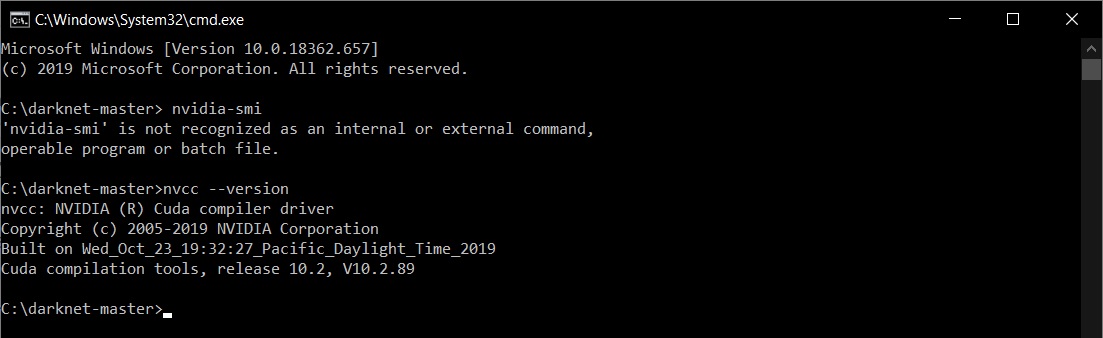
I've tried command 'nvidia-smi' and this is the resulted
'nvidia-smi' is not recognized as an internal or external command,
operable program or batch file.
But when I checked on cuda compiler everything seems normal.
Any thought on this problems?
 MindSightTH
All 24 comments
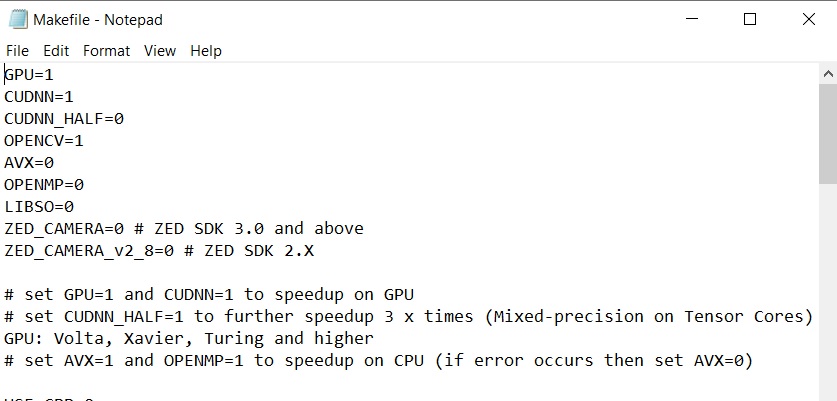
What are the first 10 lines of Makefile? Is GPU enabled?
 stephanecharette
on 23 Feb 2020
stephanecharette
on 23 Feb 2020
@stephanecharette Thanks for very quick reply. Yes it is GPU =1.
MindSightTH
on 23 Feb 2020
Next question is what kind of hardware are you using? And when you start training, what does darknet log to the console? You should see messages similar to this at the very top:
 CUDA-version: 10020 (10020), cuDNN: 7.6.4, CUDNN_HALF=1, GPU count: 1
 OpenCV version: 3.2.0
 compute_capability = 750, cudnn_half = 1
Lastly, what command are you using to train?
stephanecharette
on 23 Feb 2020

MindSightTH
on 23 Feb 2020
@stephanecharette GPU = GTX1050 on laptop . Training command ' darknet detector train data/obj.data data/yolov3-custom.cfg darknet53.conv.74'
And this is the very top log when I enter the training command

MindSightTH
on 23 Feb 2020
The makefile you posted above shows AVX is turned off. But the output of the command in the previous message shows Darknet is using AVX.
Note that AVX is only used when Darknet is using the CPU. It is not used when GPU is available.
Something here doesn't look right in what you've posted, but we've reached the limit of what I can do to help. I'll hand it off to @AlexeyAB or anyone else more knowledgeable.
stephanecharette
on 23 Feb 2020
do
make clean
make
 AlexeyAB
on 23 Feb 2020
AlexeyAB
on 23 Feb 2020
@stephanecharette Appreciate your help. These problems is killing me I'm trying to fix it for 2 days.
MindSightTH
on 24 Feb 2020
do
make clean
make
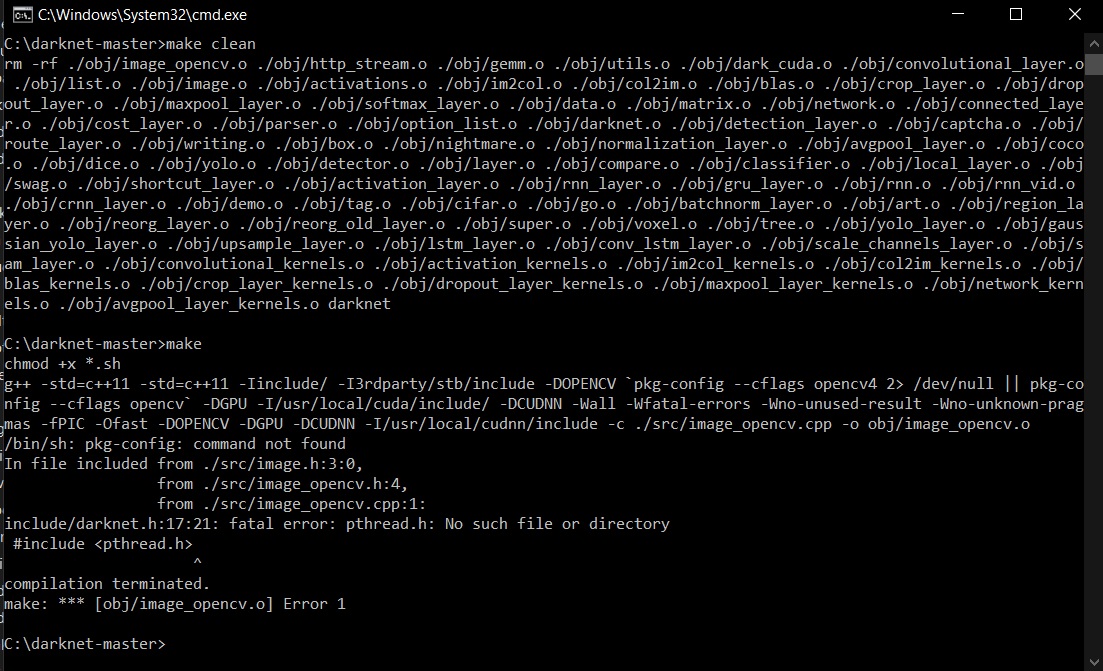
I'm working on Window, not sure 'make' is working properly.
I tired it this is the log to console.
MindSightTH
on 24 Feb 2020
How did you build it before if you cannot build it now?
stephanecharette
on 24 Feb 2020
@AlexeyAB And when I try to rebuild with .'\build.ps1' I'm not sure it's an error or not
' Added missing env variable CUDA_TOOLKIT_ROOT_DIR' is this the message showing an error?

MindSightTH
on 24 Feb 2020
How did you build it before if you cannot build it now?
@stephanecharette I builded it with vcpkg with '\build.ps1' command.
MindSightTH
on 24 Feb 2020
Darknet suffers from a few too-many-different-ways-to-build. The Makefile requires make. CMakeLists.txt requires cmake. And vcpkg uses something completely different, with their own "ports" file. Looks like the default when building with vcpkg is to use CPU-only. Looking at the files in ...\vcpkgports\darknet*, I don't see exactly how to tell it to enable GPU=1 or any other flag.
Can someone familiar with using vcpkg to build darknet in Windows comment on the process?
stephanecharette
on 24 Feb 2020
@stephanecharette I checked in 'portfile.cmake' file in vcpkg-masterports\darknet
there's a line define to set cuda and cudnn on
"# enable CUDA inside DARKNET
set(ENABLE_CUDA OFF)
if("cuda" IN_LIST FEATURES)
set(ENABLE_CUDA ON)
endif()"
"# enable CUDNN inside DARKNET (which depends on the "cuda" feature by design)
set(ENABLE_CUDNN OFF)
if("cudnn" IN_LIST FEATURES)
set(ENABLE_CUDNN ON)
endif()"
I'm really confused right now.
This is portfile.cmake file, I saved it as .txt for easy tolooking into.
portfile.cmake.txt
MindSightTH
on 24 Feb 2020
Problem solved!!!- I'm not sure which step did the fixed to this problem
- I reinstalled CUDA and CUDNN maybe I've installed them in wrong order.(visual studio2017 after them)
- Deleted other version of CUDA.
- Add CUDNN into system environment. Variable name = 'CUDNN' , variable value = 'installed path'.
- Add 'CUDA_TOOLKIT_ROOT_DIR' into system environment. Variable name = 'CUDNN', variable value = 'installed path\NVIDIA GPU Computing Toolkit\CUDA\v10.2.
- Rebuild from powershell with command '.\build.ps1'.
@stephanecharette @AlexeyAB I'm really appreciated your help for taking your time to looked into my problem.
Thank you.
MindSightTH
on 24 Feb 2020
Problem solved!!!- I'm not sure which step did the fixed to this problem
- I reinstalled CUDA and CUDNN maybe I've installed them in wrong order.(visual studio2017 after them)
- Deleted other version of CUDA.
- Add CUDNN into system environment. Variable name = 'CUDNN' , variable value = 'installed path'.
- Add 'CUDA_TOOLKIT_ROOT_DIR' into system environment. Variable name = 'CUDNN', variable value = 'installed path\NVIDIA GPU Computing Toolkit\CUDA\v10.2.
- Rebuild from powershell with command '.\build.ps1'.
@stephanecharette @AlexeyAB I'm really appreciated your help for taking your time to looked into my problem.
Thank you.
Did you use vcpkg to build? What is your custom training output on console/cmd? Is your training process using GPU?
 jubaer-ad
on 29 Feb 2020
jubaer-ad
on 29 Feb 2020
If anybody help me at #4934, it would be great.
jubaer-ad
on 29 Feb 2020
- Add CUDNN into system environment. Variable name = 'CUDNN' , variable value = 'installed path'.
- Add 'CUDA_TOOLKIT_ROOT_DIR' into system environment. Variable name = 'CUDNN', variable value = 'installed path\NVIDIA GPU Computing Toolkit\CUDA\v10.2.
Can you please provide the mentioned variables and their respective values?
jubaer-ad
on 29 Feb 2020
Darknet suffers from a few too-many-different-ways-to-build.
I agree.
In any case, I wrote the CMakeLists.txt for darknet and the portfile.cmake for Vcpkg. Please ask me if you have any question. Note that Vcpkg usage is two-fold: it can be used to build darknet dependencies only, or it can be used to build also darknet itself. Vcpkg is cmake-based, so it "recycles" the CMakeLists.txt of this project to understand how to build it.
@jubaer-ad can you post, in a new issue (this one is closed) the log of a fresh build of darknet (the output of ./build.ps1)? Maybe also the CMakeCache.txt file from the build_win_release folder might be interesting
 cenit
on 29 Feb 2020
cenit
on 29 Feb 2020
In any case, I wrote the CMakeLists.txt for darknet and the portfile.cmake for Vcpkg. Please ask me if you have any question.
Oh! Yes I do. I was asking on the vcpkg slack channel the other day. When using vcpkg to build darknet on windows, how does it know if we want to build for CPU, GPU, or GPU+CUDNN? And is there a way to turn on/off the LIBSO=<0|1> variable so it builds the library version as well?
stephanecharette
on 29 Feb 2020
This is off-topic, but I will reply anyway:
In Vcpkg there is the feature concept. If you write
./vcpkg install darknet
it will install darknet "default", which is equivalent to darknet[core], which means no special feature: darknet CPU only
Then you have these features available (look at the CONTROL file):
Feature: cuda
Build-Depends: cuda
Description: Build darknet with support for CUDA
Feature: cudnn
Build-Depends: darknet[cuda], cudnn
Description: Build darknet with support for CUDNN
Feature: opencv-base
Build-Depends: opencv[ffmpeg]
Description: Build darknet with support for OpenCV
Feature: opencv-cuda
Build-Depends: opencv[ffmpeg], opencv[cuda]
Description: Build darknet with support for a CUDA-enabled OpenCV
Feature: opencv3-base
Build-Depends: opencv3[ffmpeg]
Description: Build darknet with support for OpenCV3
Feature: opencv3-cuda
Build-Depends: opencv3[ffmpeg], opencv3[cuda]
Description: Build darknet with support for a CUDA-enabled OpenCV3
Feature: weights
Description: Download pre-built weights for test
Feature: weights-train
Description: Download pre-built weights for training
Feature: full
Build-Depends: darknet[opencv-cuda], darknet[cudnn], darknet[weights], darknet[weights-train]
Description: Build darknet fully-featured
So for example on my workstation I use
./vcpkg install darknet[full]
if you want only darknet "cuda enabled", you can use
./vcpkg install darknet[cuda]
If you want a cuda+cudnn build, use
./vcpkg install darknet[cuda,cudnn]
If you want an opencv-enabled darknet, you can choose between "normal" opencv or "cuda-enabled" opencv
./vcpkg install darknet[opencv-base] OR ./vcpkg install darknet[opencv-cuda]
Usually you might want weights, both the yolov2/3 or the ones for your training. Maybe you want both
./vcpkg install darknet[weights,weights-train]
Remember that you can combine features, so for example you might want to write many of them, comma separated (no white spaces!)
./vcpkg install darknet[cuda,cudnn,weights,opencv-base]
After that, you will always find both the executable and the library. There is no way to disable any of them in vcpkg by design.
Library will be in installed/<your-triplet>/lib/
Headers will be in installed/<your-triplet>/include/darknet
cmake configs will be in installed/<your-triplet>/share/darknet
DLLs (on windows) will be in installed/<your-triplet>/bin
Executable (and weights!) will be in installed/<your-triplet>/tools/darknet
Edit: versions on vcpkg are “frozen”, which means you get an update every time I (or another person that might want to help) prepare a new release there.
If you want to build the latest commit of darknet and still use the vcpkg infrastructure, you have to add a --head at the end of the vcpkg install command
cenit
on 29 Feb 2020
This is off-topic, but I will reply anyway:
This is definitely not off topic! This should be pinned or added to the darknet readme so people know how to do it. Thank you for all that information.
stephanecharette
on 1 Mar 2020
@jubaer-ad Sorry for very late reply I didn't check on this issue at all and got none of notification.
Have you found a solution to your problem yet?
MindSightTH
on 14 Mar 2020
@jubaer-ad Sorry for very late reply I didn't check on this issue at all and got none of notification.
Have you found a solution to your problem yet?
Yeah. I got the solutions for that and many more new problems and solutions for that too. Btw, thanks for replying.
jubaer-ad
on 15 Mar 2020
Related issues
 Yumin-Sun-00
·
3Comments
Yumin-Sun-00
·
3Comments
 HanSeYeong
·
3Comments
HanSeYeong
·
3Comments
 zihaozhang9
·
3Comments
zihaozhang9
·
3Comments
 PROGRAMMINGENGINEER-NIKI
·
3Comments
PROGRAMMINGENGINEER-NIKI
·
3Comments
 Mididou
·
3Comments
Mididou
·
3Comments
Most helpful comment
This is off-topic, but I will reply anyway:
In Vcpkg there is the feature concept. If you write
it will install darknet "default", which is equivalent to darknet[core], which means no special feature: darknet CPU only
Then you have these features available (look at the CONTROL file):
Feature: cuda
Build-Depends: cuda
Description: Build darknet with support for CUDA
Feature: cudnn
Build-Depends: darknet[cuda], cudnn
Description: Build darknet with support for CUDNN
Feature: opencv-base
Build-Depends: opencv[ffmpeg]
Description: Build darknet with support for OpenCV
Feature: opencv-cuda
Build-Depends: opencv[ffmpeg], opencv[cuda]
Description: Build darknet with support for a CUDA-enabled OpenCV
Feature: opencv3-base
Build-Depends: opencv3[ffmpeg]
Description: Build darknet with support for OpenCV3
Feature: opencv3-cuda
Build-Depends: opencv3[ffmpeg], opencv3[cuda]
Description: Build darknet with support for a CUDA-enabled OpenCV3
Feature: weights
Description: Download pre-built weights for test
Feature: weights-train
Description: Download pre-built weights for training
Feature: full
Build-Depends: darknet[opencv-cuda], darknet[cudnn], darknet[weights], darknet[weights-train]
Description: Build darknet fully-featured
So for example on my workstation I use
if you want only darknet "cuda enabled", you can use
If you want a cuda+cudnn build, use
If you want an opencv-enabled darknet, you can choose between "normal" opencv or "cuda-enabled" opencv
Usually you might want weights, both the yolov2/3 or the ones for your training. Maybe you want both
Remember that you can combine features, so for example you might want to write many of them, comma separated (no white spaces!)
After that, you will always find both the executable and the library. There is no way to disable any of them in vcpkg by design.
Library will be in
installed/<your-triplet>/lib/Headers will be in
installed/<your-triplet>/include/darknetcmake configs will be in
installed/<your-triplet>/share/darknetDLLs (on windows) will be in
installed/<your-triplet>/binExecutable (and weights!) will be in
installed/<your-triplet>/tools/darknetEdit: versions on vcpkg are “frozen”, which means you get an update every time I (or another person that might want to help) prepare a new release there.
If you want to build the latest commit of darknet and still use the vcpkg infrastructure, you have to add a
--headat the end of the vcpkg install command