Darknet: Assisted Excitation of Activations ~+2.2 AP@[.5, .95]
Assisted Excitation of Activations paper just released
Our technique helps YOLOv2 improve by3.8%mAPand YOLOv3 by2.2%mAP on MSCOCO, without any lossof speed.
 alemelis
All 34 comments
@alemelis Hi, Thanks!
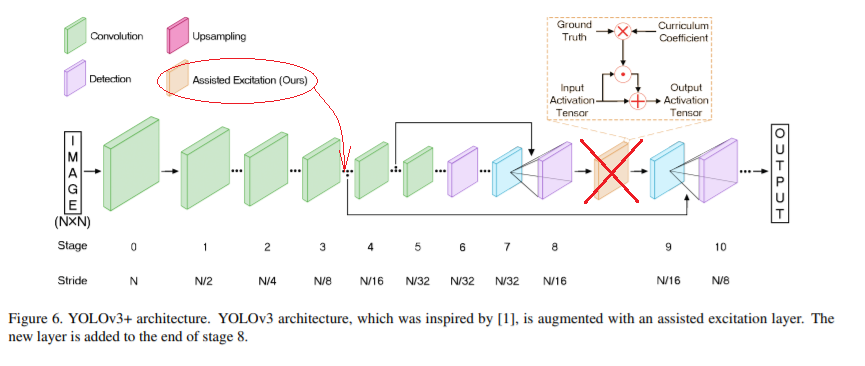
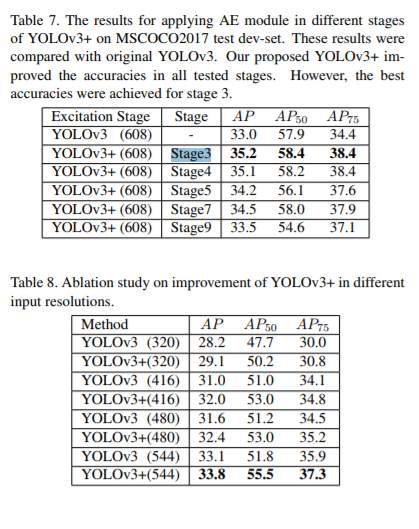
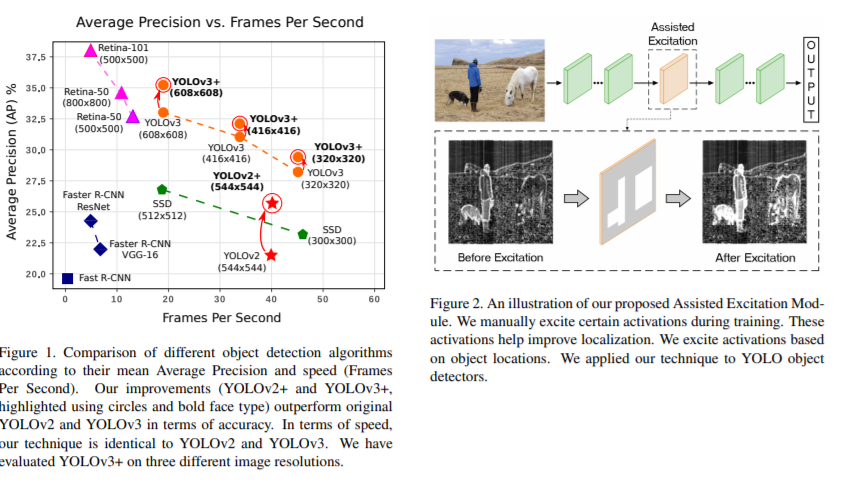
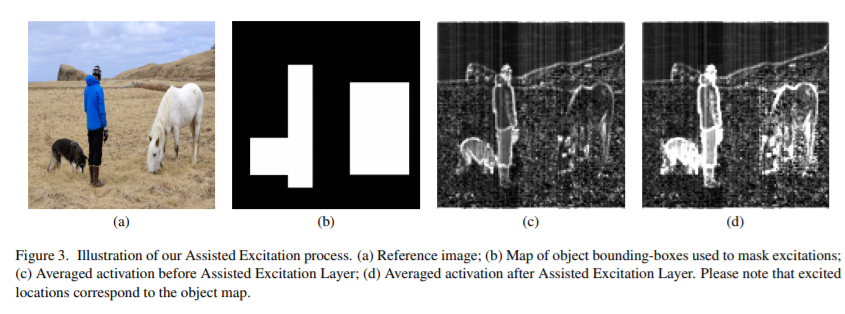
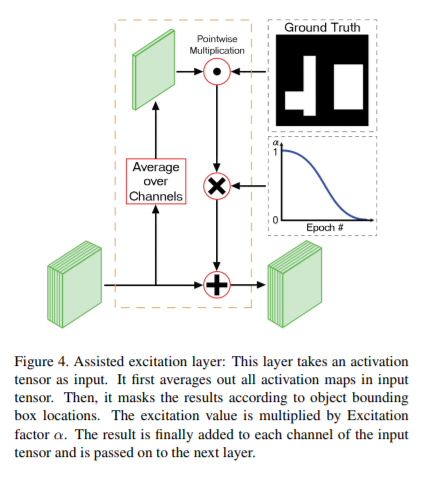
Do you have link to the source code?
Or do you know what do they do during backpropagation? There it is only stated that they are doing something that has an impact ...
What happens during back-propagation?
Our Assisted Excitation module has an effect on backpropagation. Since AE amplifies certain activations, the effect of the receptive field gets amplified as well. Therefore, Positive examples and mislocalized examples will have a higher effect on training (in contrast to easy negative examples that will have lower effect). This is similar to the idea behind Focal Loss. The authors show that increasing focus on positive and hard negative examples improves accuracy.
 AlexeyAB
on 28 Jun 2019
AlexeyAB
on 28 Jun 2019
Hi there, nope, I couldn't find the repo or any part of the code.
The paper is indeed not clear 100% on what happens during backprop. From what I understood, the idea is close to _masking_ during the forward pass. Then the backward pass is as always.
alemelis
on 1 Jul 2019
@alemelis Hi,
https://arxiv.org/pdf/1906.05388v1.pdf
α is excitation factor that depends on epoch number t.
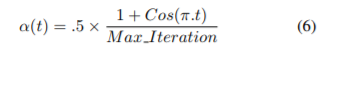
This formula is very strange. This does not match this function graph.
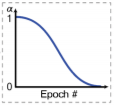
Since we can train several epoch, then alpha will range from 1 to 0 and back to 1 many times.
Also, there is said that t is actually t / Max_iteration: https://zhuanlan.zhihu.com/p/72887931
需要重点说明的的是那个t (当前epoch),.t其实是t/Max_Iteration,而Fig2中的那个显然是没有除分母的。
So I think actually
alpha = (1 + cos(Pi * cur_iteration / max_iteration)) / 2
And I will use: https://github.com/AlexeyAB/darknet/blob/c1f184249e996d7248e40cffee138a11cdd89ae0/src/convolutional_layer.c#L1106
If you know how to contact the authors of this article, please ask them about the exact alpha formula.
AlexeyAB
on 8 Aug 2019
@AlexeyAB yes, I agree (and Wolfram does too)
paper formula is not like the one in the paper figure

this is to get the plot like in the paper figure

so I guess there's a typo in the paper, I'll try to contact the authors
alemelis
on 8 Aug 2019
@alemelis Hi,
I implemented Assisted Excitation of Activations during training on GPU.
So you can add assisted_excitation=1 param to any [convolutional] layer and train it:
[convolutional]
...
assisted_excitation=1
I'll try to contact the authors
Did you contact the authors?
AlexeyAB
on 3 Sep 2019
I'll try to contact the authors
Did you contact the authors?
yes I did but I haven't got any reply yet...
Did you also tested the assisted excitation during training? can you confirm their results?
alemelis
on 3 Sep 2019
@alemelis I am testing it right now but with small dataset, I try to find the best place for assisted_excitation=1, the best alpha and I try to test it together with antialiasing params.
So I didn't get results yet.
AlexeyAB
on 3 Sep 2019
assisted_excitation=1 seems can only work with setting random=0 of yolo layers
 WongKinYiu
on 21 Sep 2019
WongKinYiu
on 21 Sep 2019
@WongKinYiu
Currently yes. I will fix it.
Did you test assisted_excitation=1 on some model on MS COCO, does it give any mAP improvement?
AlexeyAB
on 21 Sep 2019
@AlexeyAB
Not yet, becuz my models are training with random=1.
If I set random=0 and assisted_excitation=1, it can not make sure which one get benefit.
I will try assisted_excitation=1 after it is fixed.
Also, if swish activation function can work with random=1 is better.
If there is no updating in these days, maybe I will try to modify the code to make assisted_excitation=1 work with random=1 after ICIP.
Currently, I am training a darknet-based model with antialiasing=1.
I will share you the result, cfg, and weight file after finish training.
(update: https://github.com/AlexeyAB/darknet/issues/3672#issuecomment-533883993)
WongKinYiu
on 21 Sep 2019
How can I test AE? I'm a little confused as to where to put it in the cfg. I know that the paper says layer 3 but does that correspond to the third [convolutional] in the .cfg ?
 LukeAI
on 29 Sep 2019
LukeAI
on 29 Sep 2019
@LukeAI Set assisted_excitation=1 in the [convolutional] layer where layer size is width/8 and height/8
AlexeyAB
on 29 Sep 2019
ah ok - sorry if I'm being slow but what is layer size and how can I calculate it? I'm generally training at w=736 h=416 and testing at 800 * 448
LukeAI
on 30 Sep 2019
@LukeAI Run training or detection and you will see size of each layer, like 732 x 416
AlexeyAB
on 30 Sep 2019
so my network is training at 736 x 614 so I'm looking for the layer with an input of 92 x 52
There are quite a few layers with 92 x 52 x * should I add assisted_excitation=1 to just the first one? ie. no. 13?
   layer   filters  size/strd(dil)      input                output                                                                                                                                         [62/576]
   0 conv     32       3 x 3/ 1    736 x 416 x   3 ->  736 x 416 x  32 0.529 BF
   1 conv     64       3 x 3/ 2    736 x 416 x  32 ->  368 x 208 x  64 2.822 BF
   2 conv     32       1 x 1/ 1    368 x 208 x  64 ->  368 x 208 x  32 0.314 BF
   3 conv     64       3 x 3/ 1    368 x 208 x  32 ->  368 x 208 x  64 2.822 BF
   4 Shortcut Layer: 1
   5 conv    128       3 x 3/ 2    368 x 208 x  64 ->  184 x 104 x 128 2.822 BF
   6 conv     64       1 x 1/ 1    184 x 104 x 128 ->  184 x 104 x  64 0.314 BF
   7 conv    128       3 x 3/ 1    184 x 104 x  64 ->  184 x 104 x 128 2.822 BF
   8 Shortcut Layer: 5
   9 conv     64       1 x 1/ 1    184 x 104 x 128 ->  184 x 104 x  64 0.314 BF
  10 conv    128       3 x 3/ 1    184 x 104 x  64 ->  184 x 104 x 128 2.822 BF
  11 Shortcut Layer: 8
  12 conv    256       3 x 3/ 2    184 x 104 x 128 ->   92 x  52 x 256 2.822 BF
  13 conv    128       1 x 1/ 1     92 x  52 x 256 ->   92 x  52 x 128 0.314 BF
  14 conv    256       3 x 3/ 1     92 x  52 x 128 ->   92 x  52 x 256 2.822 BF
  15 Shortcut Layer: 12
  16 conv    128       1 x 1/ 1     92 x  52 x 256 ->   92 x  52 x 128 0.314 BF
  17 conv    256       3 x 3/ 1     92 x  52 x 128 ->   92 x  52 x 256 2.822 BF
  18 Shortcut Layer: 15
  19 conv    128       1 x 1/ 1     92 x  52 x 256 ->   92 x  52 x 128 0.314 BF
  20 conv    256       3 x 3/ 1     92 x  52 x 128 ->   92 x  52 x 256 2.822 BF
  21 Shortcut Layer: 18
  22 conv    128       1 x 1/ 1     92 x  52 x 256 ->   92 x  52 x 128 0.314 BF
  23 conv    256       3 x 3/ 1     92 x  52 x 128 ->   92 x  52 x 256 2.822 BF
  24 Shortcut Layer: 21
  25 conv    128       1 x 1/ 1     92 x  52 x 256 ->   92 x  52 x 128 0.314 BF
  26 conv    256       3 x 3/ 1     92 x  52 x 128 ->   92 x  52 x 256 2.822 BF
  27 Shortcut Layer: 24
  28 conv    128       1 x 1/ 1     92 x  52 x 256 ->   92 x  52 x 128 0.314 BF
  29 conv    256       3 x 3/ 1     92 x  52 x 128 ->   92 x  52 x 256 2.822 BF
  30 Shortcut Layer: 27
  31 conv    128       1 x 1/ 1     92 x  52 x 256 ->   92 x  52 x 128 0.314 BF
  32 conv    256       3 x 3/ 1     92 x  52 x 128 ->   92 x  52 x 256 2.822 BF
  33 Shortcut Layer: 30
  34 conv    128       1 x 1/ 1     92 x  52 x 256 ->   92 x  52 x 128 0.314 BF
  35 conv    256       3 x 3/ 1     92 x  52 x 128 ->   92 x  52 x 256 2.822 BF
  36 Shortcut Layer: 33
  37 conv    512       3 x 3/ 2     92 x  52 x 256 ->   46 x  26 x 512 2.822 BF
  38 conv    256       1 x 1/ 1     46 x  26 x 512 ->   46 x  26 x 256 0.314 BF
  39 conv    512       3 x 3/ 1     46 x  26 x 256 ->   46 x  26 x 512 2.822 BF
  40 Shortcut Layer: 37
  41 conv    256       1 x 1/ 1     46 x  26 x 512 ->   46 x  26 x 256 0.314 BF
  42 conv    512       3 x 3/ 1     46 x  26 x 256 ->   46 x  26 x 512 2.822 BF
  43 Shortcut Layer: 40
  44 conv    256       1 x 1/ 1     46 x  26 x 512 ->   46 x  26 x 256 0.314 BF
  45 conv    512       3 x 3/ 1     46 x  26 x 256 ->   46 x  26 x 512 2.822 BF
  46 Shortcut Layer: 43
  47 conv    256       1 x 1/ 1     46 x  26 x 512 ->   46 x  26 x 256 0.314 BF
  48 conv    512       3 x 3/ 1     46 x  26 x 256 ->   46 x  26 x 512 2.822 BF
  49 Shortcut Layer: 46
  50 conv    256       1 x 1/ 1     46 x  26 x 512 ->   46 x  26 x 256 0.314 BF
  51 conv    512       3 x 3/ 1     46 x  26 x 256 ->   46 x  26 x 512 2.822 BF
  52 Shortcut Layer: 49
  53 conv    256       1 x 1/ 1     46 x  26 x 512 ->   46 x  26 x 256 0.314 BF
  54 conv    512       3 x 3/ 1     46 x  26 x 256 ->   46 x  26 x 512 2.822 BF
  55 Shortcut Layer: 52
  56 conv    256       1 x 1/ 1     46 x  26 x 512 ->   46 x  26 x 256 0.314 BF
  57 conv    512       3 x 3/ 1     46 x  26 x 256 ->   46 x  26 x 512 2.822 BF
....
@LukeAI
You can add assisted_excitation=1 to any one of these layers, include Shortcut layer:
  13 conv    128       1 x 1/ 1     92 x  52 x 256 ->   92 x  52 x 128 0.314 BF
  14 conv    256       3 x 3/ 1     92 x  52 x 128 ->   92 x  52 x 256 2.822 BF
  15 Shortcut Layer: 12
  16 conv    128       1 x 1/ 1     92 x  52 x 256 ->   92 x  52 x 128 0.314 BF
  17 conv    256       3 x 3/ 1     92 x  52 x 128 ->   92 x  52 x 256 2.822 BF
  18 Shortcut Layer: 15
  19 conv    128       1 x 1/ 1     92 x  52 x 256 ->   92 x  52 x 128 0.314 BF
  20 conv    256       3 x 3/ 1     92 x  52 x 128 ->   92 x  52 x 256 2.822 BF
  21 Shortcut Layer: 18
  22 conv    128       1 x 1/ 1     92 x  52 x 256 ->   92 x  52 x 128 0.314 BF
  23 conv    256       3 x 3/ 1     92 x  52 x 128 ->   92 x  52 x 256 2.822 BF
  24 Shortcut Layer: 21
  25 conv    128       1 x 1/ 1     92 x  52 x 256 ->   92 x  52 x 128 0.314 BF
  26 conv    256       3 x 3/ 1     92 x  52 x 128 ->   92 x  52 x 256 2.822 BF
  27 Shortcut Layer: 24
  28 conv    128       1 x 1/ 1     92 x  52 x 256 ->   92 x  52 x 128 0.314 BF
  29 conv    256       3 x 3/ 1     92 x  52 x 128 ->   92 x  52 x 256 2.822 BF
  30 Shortcut Layer: 27
  31 conv    128       1 x 1/ 1     92 x  52 x 256 ->   92 x  52 x 128 0.314 BF
  32 conv    256       3 x 3/ 1     92 x  52 x 128 ->   92 x  52 x 256 2.822 BF
  33 Shortcut Layer: 30
  34 conv    128       1 x 1/ 1     92 x  52 x 256 ->   92 x  52 x 128 0.314 BF
  35 conv    256       3 x 3/ 1     92 x  52 x 128 ->   92 x  52 x 256 2.822 BF
  36 Shortcut Layer: 33
I added AE to layer 13, this is what's happened so far.
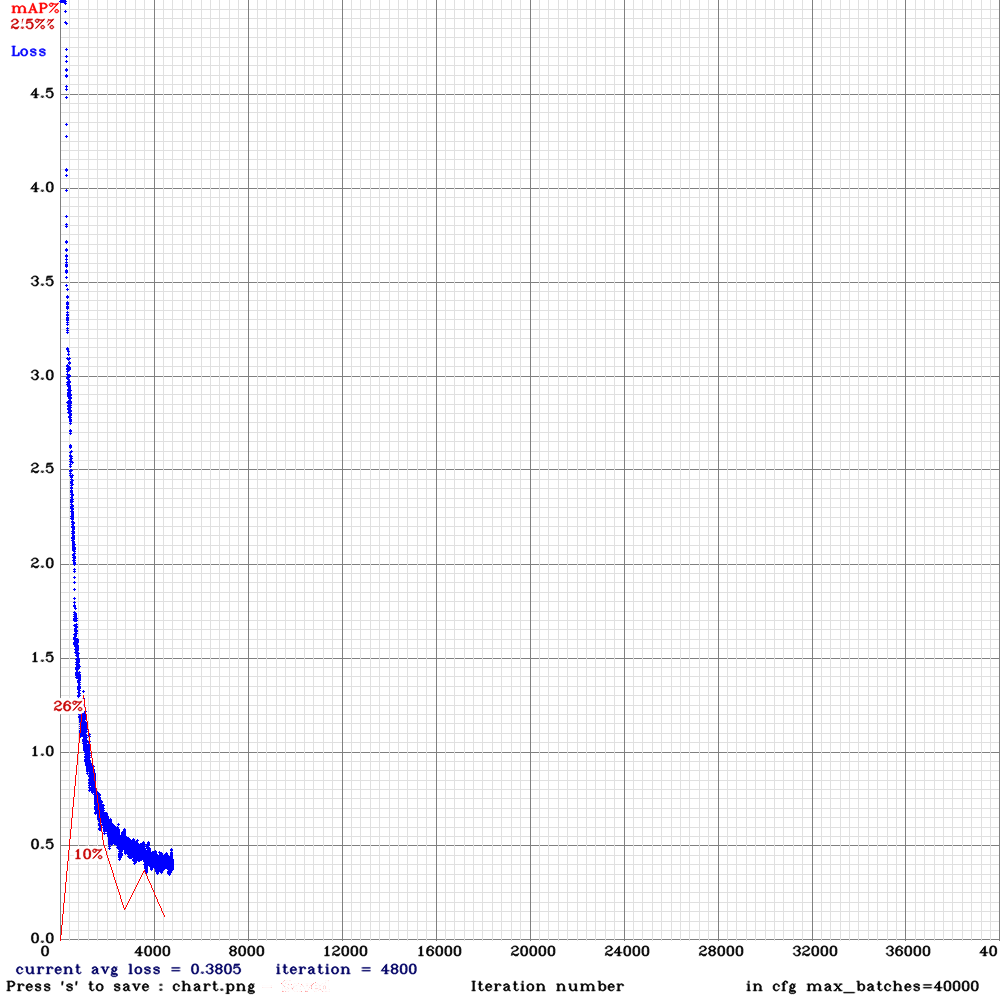
without AE, it quickly converged and plateaued around 65% AP
I was using yolov3spp with scale and swish additions.
LukeAI
on 1 Oct 2019
@LukeAI
Try to train from the begining with assisted_excitation=10000
AlexeyAB
on 1 Oct 2019
Have tried doing so - result was almost the same - 25.19 % at 1000 batches collapsing down to 2.5% at 1800 batches
LukeAI
on 2 Oct 2019
This is normal, if you set assisted_excitation=10000 then mAP should be lower before 10000 iterations and higher after 10000 iterations.
AlexeyAB
on 2 Oct 2019
I inserted ae=10000 in layer 13 - the result was a decrease in AP from 71% to 69%
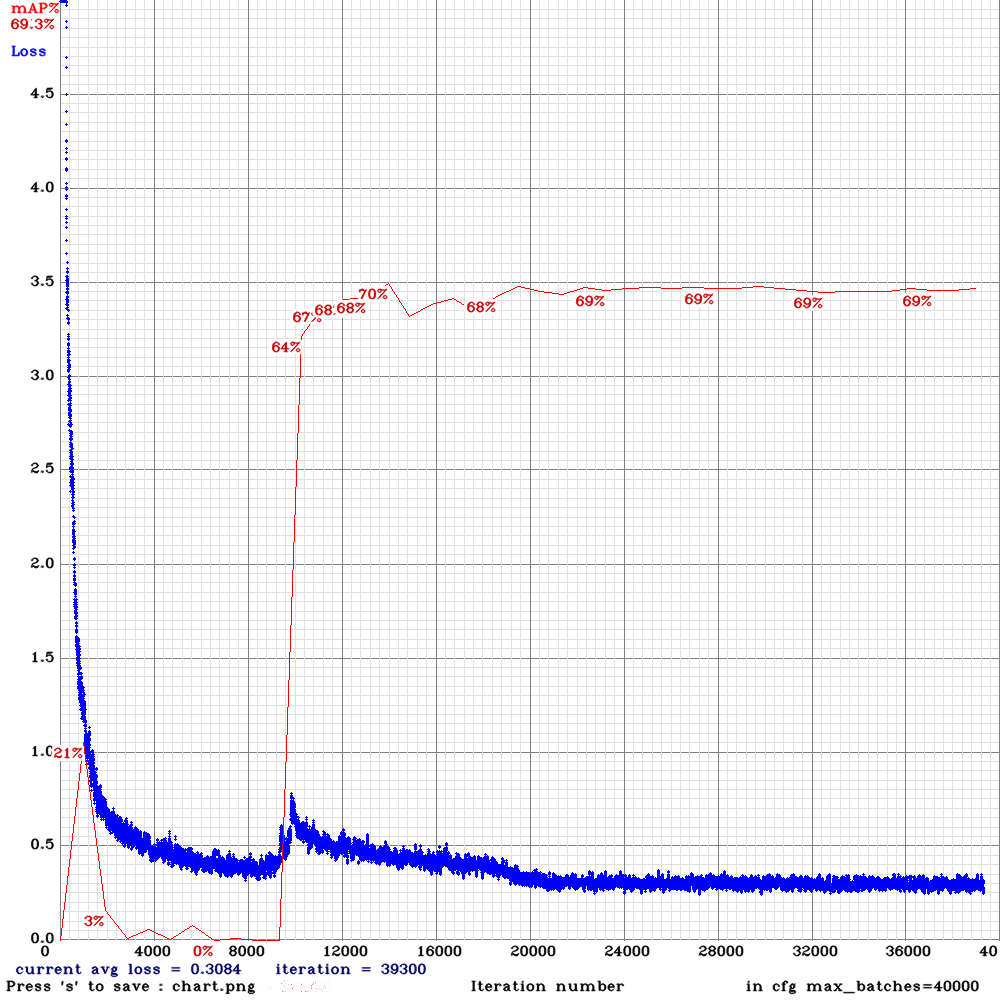
(Unfortunately I've accidentally lost the control chart without ae=10000)
LukeAI
on 7 Oct 2019
https://github.com/AlexeyAB/darknet/issues/3417#issuecomment-539124635
Same on COCO.
WongKinYiu
on 8 Oct 2019
@LukeAI @WongKinYiu
May be we should use
alpha = (1 + cos(3.141592 * iteration_num / state.net.max_batches)) / 2;in these 2 places:Or may be we should use something like this
output[xy + size*(c + channels*b)] += output[xy + size*(c + channels*b)]*alpha * gt_gpu[i] * a_avg_gpu[i];
here https://github.com/AlexeyAB/darknet/blob/e24c96dc8bfe151c9c39684c34345f7981b3a08e/src/convolutional_kernels.cu#L936
Sometimes the final code doesn't correspond to the paper in details, so may be they do something different.
Also:
https://github.com/AlexeyAB/darknet/issues/3417#issuecomment-519295233
AlexeyAB
on 8 Oct 2019
@LukeAI
I temporary changed Assisted Excitation, so you can try new AS version from this repo.
It educes background activations rather than enhancing objects activations
AlexeyAB
on 21 Oct 2019
@AlexeyAB
training yolo_v3_tiny_pan3_aa_ae_mixup_scale_giou(no_sgdr) using temporary repo now.
will get the result after back from iccv.
WongKinYiu
on 24 Oct 2019
@AlexeyAB
got nan https://github.com/AlexeyAB/darknet/issues/3417#issuecomment-545907275 :(
should i use the repo committed 11 hours ago?
WongKinYiu
on 30 Oct 2019
@WongKinYiu
Yes. Try to use the latest repo.
AlexeyAB
on 30 Oct 2019
old repo:
| AP | AP50 | AP75 |
| :-: | :-: | :-: |
| 18.8 | 36.8 | 17.5 |
new repo:
| AP | AP50 | AP75 |
| :-: | :-: | :-: |
| 18.6 | 36.6 | 17.2 |
seems same
https://github.com/AlexeyAB/darknet/issues/3708#issuecomment-532070211
WongKinYiu
on 8 Nov 2019
@WongKinYiu Thanks! So it doesn' improve the mAP, at least on tiny models.
AlexeyAB
on 8 Nov 2019
i have not tested on big models, but maybe yes.
WongKinYiu
on 9 Nov 2019
@AlexeyAB
with:
| AP | AP50 | AP75 |
| :-: | :-: | :-: |
| 14.4 | 32.8 | 10.5 |
without:
| AP | AP50 | AP75 |
| :-: | :-: | :-: |
| 14.2 | 32.6 | 10.3 |
almost same.
WongKinYiu
on 18 Dec 2019
@WongKinYiu Thanks! Those. maybe there is very little improvement or maybe just fluctuations.
AlexeyAB
on 18 Dec 2019
I'm afraid those are simply fluctuations
alemelis
on 18 Dec 2019
Related issues
 PROGRAMMINGENGINEER-NIKI
·
3Comments
PROGRAMMINGENGINEER-NIKI
·
3Comments
 HanSeYeong
·
3Comments
HanSeYeong
·
3Comments
 qianyunw
·
3Comments
qianyunw
·
3Comments
 shootingliu
·
3Comments
shootingliu
·
3Comments
 hemp110
·
3Comments
hemp110
·
3Comments
Most helpful comment
@alemelis Hi,
I implemented Assisted Excitation of Activations during training on GPU.
So you can add
assisted_excitation=1param to any[convolutional]layer and train it: