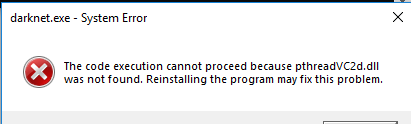
I have built it on Windows using VCPKG. Build was successful with zero errors, however I get this error when I try to train the network with this command (_detector train cfg/voc.data cfg/yolov3-voc.cfg darknet53.conv.74_). I have followed all steps for training successfully as well.
Please guide me how to solve this error. Thanks
 naufil601
All 13 comments
Have the same issue. I also got errors for the .dlls below after pthreadVC2:
opencv_highgui343d.dll
opencv_videoio343d.dll
opencv_imgcodecs343d.dll
 brklkc
on 18 Mar 2019
brklkc
on 18 Mar 2019
@brklkc I was getting those errors as well. I built it again and suddenly those errors were gone. Though I'm not sure how
naufil601
on 18 Mar 2019
@naufil601 If you figure out what helped to resolve the issue, would really appreciate to hear it!
brklkc
on 18 Mar 2019
I am encountering the same issue after building with vcpkg on windows 10.
I also had the error fatal error LNK1104: cannot open file described in https://github.com/AlexeyAB/darknet/issues/2615#issuecomment-473989089 happen for the same reasons while building with build.ps1 but darknet.exe was generated.
 fvnky
on 19 Mar 2019
fvnky
on 19 Mar 2019
@brklkc @fvnky I have resolved dll error somehow.
Just copy paste the dlls from (.../build_win_debug/Debug) to the directory where you have "darknet.exe".
Also adjust the paths in cfg files for training.
naufil601
on 20 Mar 2019
yes, the DLL are not copy-pasted from the build folder (build_*) to the install folder (the root folder of the project), when using "dynamic" vcpkg triplets, like the "x64-windows" one. We could move to "x64-windows-static" which does not depend on any external library, but that has other problems and it is usually not a best practice, for licensing and other reasons, to force it on everyone.
This dll problem is unfortunately by design for the toolchain. Technically the run folder should be the "build_*" folder, but the "install" phase which we decided to apply copies the executables and the library in the final destination, without considering dependencies.
We can discuss it better together and I can try to propose a fix based on feedback if it is considered important. In the very latest commit revision a modification is already landed, which copies manually the dlls from the build folder to the root folder, but maybe it is not enough. Just let me know :)
 cenit
on 20 Mar 2019
cenit
on 20 Mar 2019
@cenit Hi,
I was trying to train on GPU but was encountering a few errors. So I deleted the directory and started again with the fresh git. I'm again stuck with dlls error and this time the dlls it is looking for, are different from the ones before 😄
I think we should fix it once for all
naufil601
on 26 Mar 2019
please let me know which dlls the executable was looking for that were not copied
cenit
on 26 Mar 2019
other dlls it required were present in "build_win_release" folder
npcc64_100.dll
nppial64_100.dll
nppidei64_100.dll
nppif64_100.dll
naufil601
on 26 Mar 2019
as I told you, the build toolchain is made to run in the build_*_* folders, with proper dlls copied there. Running from the root folder is not something that is easily done, but for special configuration (Release for example, not Debug for sure) we can manage to manually copy dlls. I am trying to understand where the Copy-Item *.dll .. failed in your latest case...
cenit
on 26 Mar 2019
Im building the project using _build.ps1_ script.
Following "How to compile on Windows (using vcpkg)" from instructions. The build did not have any errors in it. However there were 68 warnings I got while building through script
naufil601
on 26 Mar 2019
Yes the source code contains some imperfect lines which create some warnings. Nothing to really worry about, and not related to your problem.
I can try to create a PR to fix them in the near future, they are not a priority for me for now (even if I agree with you that they are an annoyance and something that can distract from the real problem)
cenit
on 26 Mar 2019
Great. Thanks a lot for help 👍
naufil601
on 26 Mar 2019
Related issues
 Cipusha
·
3Comments
Cipusha
·
3Comments
 kebundsc
·
3Comments
kebundsc
·
3Comments
 qianyunw
·
3Comments
qianyunw
·
3Comments
 off99555
·
3Comments
off99555
·
3Comments
 yongcong1415
·
3Comments
yongcong1415
·
3Comments
Most helpful comment
yes, the DLL are not copy-pasted from the build folder (build_*) to the install folder (the root folder of the project), when using "dynamic" vcpkg triplets, like the "x64-windows" one. We could move to "x64-windows-static" which does not depend on any external library, but that has other problems and it is usually not a best practice, for licensing and other reasons, to force it on everyone.
This dll problem is unfortunately by design for the toolchain. Technically the run folder should be the "build_*" folder, but the "install" phase which we decided to apply copies the executables and the library in the final destination, without considering dependencies.
We can discuss it better together and I can try to propose a fix based on feedback if it is considered important. In the very latest commit revision a modification is already landed, which copies manually the dlls from the build folder to the root folder, but maybe it is not enough. Just let me know :)