Darknet: Failing to install OpenCV in Windows Powershell
I have Windows Sever 2016 Standard, and I am following your Windows darknet installation guide. I installed vcpkg, and made sure things were working by running vcpkg install opengl, which ran just fine. I added the VCPKG_ROOT and VCPKG_DEFAULT_TRIPLET environment variables.
When I tried installing OpenCV in the Powershell, I got the following error:
Elapsed time for package cuda:x64-windows: 6.398 s
Starting package 10/10: opencv:x64-windows
Building package opencv[core,cuda,eigen,flann,jpeg,opengl,
-- Downloading https://github.com/opencv/opencv/archive/3.
-- Extracting source E:/Projects/TEXT DETECTION/vcpkg-mast
-- Applying patch E:/Projects/TEXT DETECTION/vcpkg-master/
-- Applying patch E:/Projects/TEXT DETECTION/vcpkg-master/
-- Applying patch E:/Projects/TEXT DETECTION/vcpkg-master/
-- Applying patch E:/Projects/TEXT DETECTION/vcpkg-master/
-- Applying patch E:/Projects/TEXT DETECTION/vcpkg-master/
-- Using source at E:/Projects/TEXT DETECTION/vcpkg-master
-- Configuring x64-windows
-- Building x64-windows-dbg
CMake Error at scripts/cmake/vcpkg_build_cmake.cmake:175 (
    Command failed: C:/Program Files/CMake/bin/cmake.exe;-
    Working Directory: E:/Projects/TEXT DETECTION/vcpkg-ma
    See logs for more information:
      E:\Projects\TEXT DETECTION\vcpkg-master\buildtrees\o

Call Stack (most recent call first):
  scripts/cmake/vcpkg_install_cmake.cmake:24 (vcpkg_build_
  ports/opencv/portfile.cmake:317 (vcpkg_install_cmake)
  scripts/ports.cmake:71 (include)
The error log has the following message:
The log file contains the following error message:
   Creating library lib\opencv_cudev343d.lib and object lib\opencv_cudev343d.exp
[7/576] cmd.exe /C "cd /D "E:\Projects\TEXT DETECTION\vcpkg-master\buildtrees\opencv\x64-windows-dbg\modules\core" && "C:\Program Files\CMake\bin\cmake.exe" -DMODULE_NAME=core "-DCL_DIR=E:/Projects/TEXT DETECTION/vcpkg-master/buildtrees/opencv/src/3.4.3-701a6234df/modules/core/src/opencl" "-DOUTPUT=E:/Projects/TEXT DETECTION/vcpkg-master/buildtrees/opencv/x64-windows-dbg/modules/core/opencl_kernels_core.cpp" -P "E:/Projects/TEXT DETECTION/vcpkg-master/buildtrees/opencv/src/3.4.3-701a6234df/cmake/cl2cpp.cmake""
[8/576] cmd.exe /C "cd /D "E:\Projects\TEXT DETECTION\vcpkg-master\buildtrees\opencv\x64-windows-dbg\modules\core\CMakeFiles\cuda_compile.dir\src\cuda" && "C:\Program Files\CMake\bin\cmake.exe" -E make_directory "E:/Projects/TEXT DETECTION/vcpkg-master/buildtrees/opencv/x64-windows-dbg/modules/core/CMakeFiles/cuda_compile.dir/src/cuda/." && "C:\Program Files\CMake\bin\cmake.exe" -D verbose:BOOL=OFF -D build_configuration:STRING=Debug -D "generated_file:STRING=E:/Projects/TEXT DETECTION/vcpkg-master/buildtrees/opencv/x64-windows-dbg/modules/core/CMakeFiles/cuda_compile.dir/src/cuda/./cuda_compile_generated_gpu_mat.cu.obj" -D "generated_cubin_file:STRING=E:/Projects/TEXT DETECTION/vcpkg-master/buildtrees/opencv/x64-windows-dbg/modules/core/CMakeFiles/cuda_compile.dir/src/cuda/./cuda_compile_generated_gpu_mat.cu.obj.cubin.txt" -P "E:/Projects/TEXT DETECTION/vcpkg-master/buildtrees/opencv/x64-windows-dbg/modules/core/CMakeFiles/cuda_compile.dir/src/cuda/cuda_compile_generated_gpu_mat.cu.obj.cmake""
FAILED: modules/core/CMakeFiles/cuda_compile.dir/src/cuda/cuda_compile_generated_gpu_mat.cu.obj
cmd.exe /C "cd /D "E:\Projects\TEXT DETECTION\vcpkg-master\buildtrees\opencv\x64-windows-dbg\modules\core\CMakeFiles\cuda_compile.dir\src\cuda" && "C:\Program Files\CMake\bin\cmake.exe" -E make_directory "E:/Projects/TEXT DETECTION/vcpkg-master/buildtrees/opencv/x64-windows-dbg/modules/core/CMakeFiles/cuda_compile.dir/src/cuda/." && "C:\Program Files\CMake\bin\cmake.exe" -D verbose:BOOL=OFF -D build_configuration:STRING=Debug -D "generated_file:STRING=E:/Projects/TEXT DETECTION/vcpkg-master/buildtrees/opencv/x64-windows-dbg/modules/core/CMakeFiles/cuda_compile.dir/src/cuda/./cuda_compile_generated_gpu_mat.cu.obj" -D "generated_cubin_file:STRING=E:/Projects/TEXT DETECTION/vcpkg-master/buildtrees/opencv/x64-windows-dbg/modules/core/CMakeFiles/cuda_compile.dir/src/cuda/./cuda_compile_generated_gpu_mat.cu.obj.cubin.txt" -P "E:/Projects/TEXT DETECTION/vcpkg-master/buildtrees/opencv/x64-windows-dbg/modules/core/CMakeFiles/cuda_compile.dir/src/cuda/cuda_compile_generated_gpu_mat.cu.obj.cmake""
gpu_mat.cu
c:\program files\nvidia gpu computing toolkit\cuda\v9.0\include\crt/host_config.h(133): fatal error C1189: #error:  -- unsupported Microsoft Visual Studio version! Only the versions 2012, 2013, 2015 and 2017 are supported!
CMake Error at cuda_compile_generated_gpu_mat.cu.obj.cmake:206 (message):
  Error generating E:/Projects/TEXT
  DETECTION/vcpkg-master/buildtrees/opencv/x64-windows-dbg/modules/core/CMakeFiles/cuda_compile.dir/src/cuda/./cuda_compile_generated_gpu_mat.cu.obj


ninja: build stopped: subcommand failed.
I wonder if there is a way to resolve this. Thanks!
 mrxiaohe
All 16 comments
@mrxiaohe Hi,
c:\program files\nvidia gpu computing toolkit\cuda\v9.0\include\crt/host_config.h(133): fatal error C1189: #error: -- unsupported Microsoft Visual Studio version! Only the versions 2012, 2013, 2015 and 2017 are supported!
What Microsoft Visual Studio version do you use?
 AlexeyAB
on 12 Mar 2019
AlexeyAB
on 12 Mar 2019
I actually don't use Visual Studio, but I have the 2017 version installed on the server. It came with the server already installed, but doesn't actually have a license, which is why I don't use it. I am not sure if that is the problem?
mrxiaohe
on 12 Mar 2019
Yes, this is the problem. You should install MSVS 2017 with C++, for example MSVS 2017 Community that is free: https://visualstudio.microsoft.com/thank-you-downloading-visual-studio/?sku=Community&rel=15#
AlexeyAB
on 12 Mar 2019
I downloaded and installed MSVS 2017 with C++.
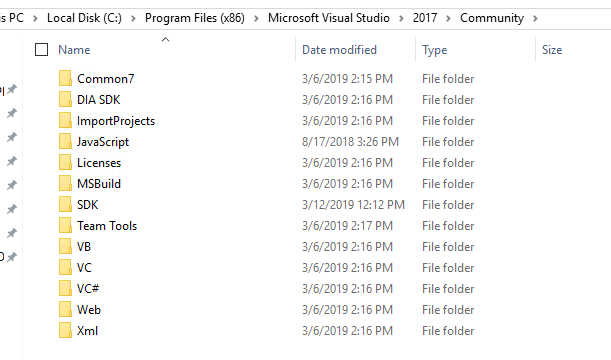
when I tried compiling opencv[cuda] I got the same error. The full error log is below:
mrxiaohe
on 13 Mar 2019
unfortunately VS 2017 is compatible only with CUDA 10. If you want to use CUDA 9 you must install VS 2015 (the free community version is perfect). Please also remove VS2017 in case you want to downgrade VS. Otherwise just install CUDA 10 and you should fix the problems
 cenit
on 14 Mar 2019
cenit
on 14 Mar 2019
Hi @AlexeyAB I have similar problem (but not same), I did all the instruction to compile in Windows, after I input .\vcpkg install pthreads opencv[cuda] the installation stuck at Building x64-windows-dbg , and after 1 hour waiting it showed error? Full trace :
PS C:\vcpkg> .\vcpkg install pthreads opencv[cuda]
The following packages are already installed:
    pthreads[core]:x64-windows
The following packages will be built and installed:
    opencv[core,cuda,eigen,flann,jpeg,opengl,png,tiff]:x64-windows
Starting package 1/2: pthreads:x64-windows
Package pthreads:x64-windows is already installed
Elapsed time for package pthreads:x64-windows: 522.5 us
Starting package 2/2: opencv:x64-windows
Building package opencv[core,cuda,eigen,flann,jpeg,opengl,png,tiff]:x64-windows...
-- Using cached C:/vcpkg/downloads/opencv-opencv-3.4.3.tar.gz
-- Using source at C:/vcpkg/buildtrees/opencv/src/3.4.3-701a6234df
-- Configuring x64-windows
-- Building x64-windows-dbg
PS C:\vcpkg> .\vcpkg install pthreads opencv[cuda]
The following packages are already installed:
    pthreads[core]:x64-windows
The following packages will be built and installed:
    opencv[core,cuda,eigen,flann,jpeg,opengl,png,tiff]:x64-windows
Starting package 1/2: pthreads:x64-windows
Package pthreads:x64-windows is already installed
Elapsed time for package pthreads:x64-windows: 522.5 us
Starting package 2/2: opencv:x64-windows
Building package opencv[core,cuda,eigen,flann,jpeg,opengl,png,tiff]:x64-windows...
-- Using cached C:/vcpkg/downloads/opencv-opencv-3.4.3.tar.gz
-- Using source at C:/vcpkg/buildtrees/opencv/src/3.4.3-701a6234df
-- Configuring x64-windows
-- Building x64-windows-dbg
CMake Error at scripts/cmake/vcpkg_build_cmake.cmake:175 (message):
    Command failed: C:/vcpkg/downloads/tools/cmake-3.12.4-windows/cmake-3.12.4-win32-x86/bin/cmake.exe;--build;.;--config;Debug;--target;install;--;-v;-j1
    Working Directory: C:/vcpkg/buildtrees/opencv/x64-windows-dbg
    See logs for more information:
      C:\vcpkg\buildtrees\opencv\install-x64-windows-dbg-out.log
      C:\vcpkg\buildtrees\opencv\install-x64-windows-dbg-err.log

Call Stack (most recent call first):
  scripts/cmake/vcpkg_install_cmake.cmake:24 (vcpkg_build_cmake)
  ports/opencv/portfile.cmake:323 (vcpkg_install_cmake)
  scripts/ports.cmake:71 (include)


Error: Building package opencv:x64-windows failed with: BUILD_FAILED
Please ensure you're using the latest portfiles with `.\vcpkg update`, then
submit an issue at https://github.com/Microsoft/vcpkg/issues including:
  Package: opencv:x64-windows
  Vcpkg version: 2018.11.23-nohash

Additionally, attach any relevant sections from the log files above.
 ivder
on 19 Mar 2019
ivder
on 19 Mar 2019
It is possible that it's not stuck. OpenCV with cuda support is very slow to build. On my laptop, it takes more than two hours...
To check the progress, just go into C:/vcpkg/buildtrees/opencv/install-x64-windows-dbg-out.log and see the build output. There are thousands of files to be built and the log should refresh every few seconds to describe progress
cenit
on 19 Mar 2019
@cenit Yes, after 1 hour it throws the error I've posted above
ivder
on 19 Mar 2019
could you please post the content of C:\vcpkg\buildtrees\opencv\install-x64-windows-dbg-out.log and C:\vcpkg\buildtrees\opencv\install-x64-windows-dbg-err.log (this last one may be mepty)? Otherwise it's very difficult to understand the problem
cenit
on 19 Mar 2019
@AlexeyAB , @cenit
Hey guys,
got this error while installing Yolo with vcpgk.
I run .\vcpkg install pthreads opencv[cuda,ffmpeg]
Using MSVS 2017.
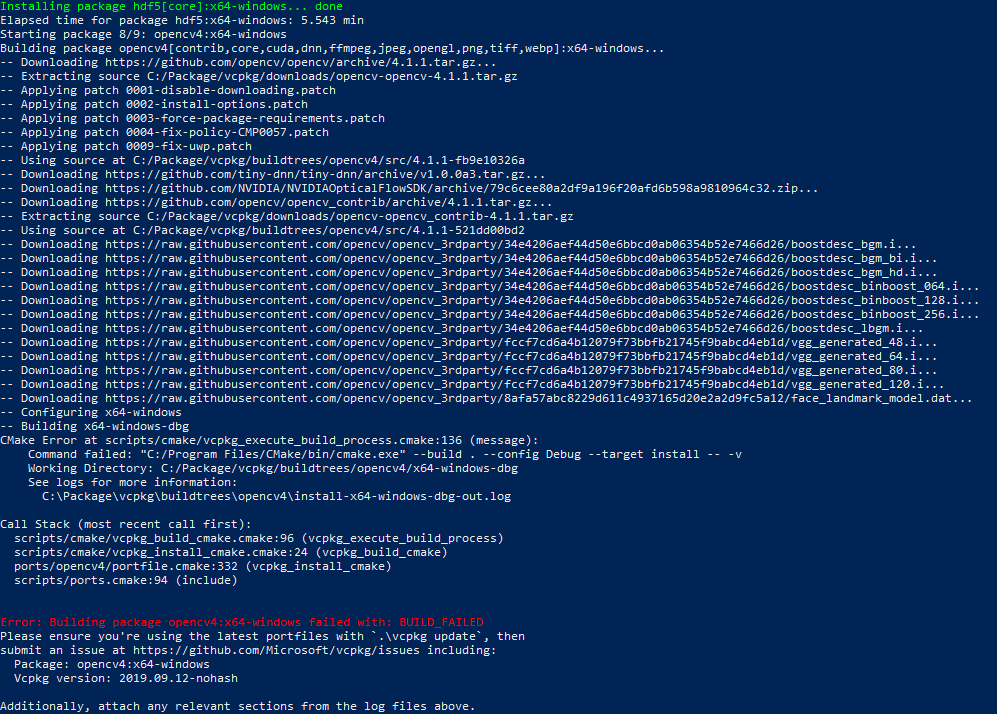
install-x64-windows-dbg-out.log
your help is much appreciated!
Ole
 megaschluck
on 16 Nov 2019
megaschluck
on 16 Nov 2019
your problem is nvcc error : 'cicc' died with status 0xC0000005 (ACCESS_VIOLATION) (line 16878 of your log)
Can you tell your CUDA version and Visual Studio version? Please try to update both to latest release, if possible
cenit
on 16 Nov 2019
Thank you for your quick help.
CUDA: 10.1
Visual Studio: 15.9.17
megaschluck
on 16 Nov 2019
hard disk space and ram available? Just to understand your problem. It might be also related to GPU driver. In any case, it's a nvidia compiler + MSVC issue, not a darknet one, so try change that combination if possible to try to fix the error
cenit
on 16 Nov 2019
Thanks a lot @cenit .
I was about to give up on this method as it seems to be frozen. But the install-x64-windows-dbg-out.log is updating to a completion goal of 1131. Huge help man.
 jubaer-ad
on 26 Feb 2020
jubaer-ad
on 26 Feb 2020
building darknet with opencv-cuda is VERY slow and time consuming. Patience will be your best ally. Keep strong 🤣
cenit
on 26 Feb 2020
@cenit Can you please check this #4926
jubaer-ad
on 26 Feb 2020
Related issues
 zihaozhang9
·
3Comments
zihaozhang9
·
3Comments
 louisondumont
·
3Comments
louisondumont
·
3Comments
 bit-scientist
·
3Comments
bit-scientist
·
3Comments
 Jacky3213
·
3Comments
Jacky3213
·
3Comments
 off99555
·
3Comments
off99555
·
3Comments