I got 2 questions.
- What exactly does 'subdivision' do? I know batch/subdivision is memory consumption but not quite sure what subdivision do exactly
- Trying to use 4 GPUs (1080ti) how much can i increase batch size and subdivision to?
Currently using batch:64 subdivision:32 with single 1080ti GPU
 abeyang00
All 15 comments
Darknet processes N images at a time. N = mini_batch = batch / subdivision
The more subdivision, the less GPU memory is used, but the slower the training goes.
Set subdivision so large that there is no CUDA out of memory error.
 AlexeyAB
on 18 May 2018
AlexeyAB
on 18 May 2018
@AlexeyAB , you mean set subdivision so 'small' right? or did u mean set batch so large?
And does batch and division have to be power of 2? or can they just be random numbers
abeyang00
on 18 May 2018
@AlexeyAB
So if batch is 64
and subdivision is 1
64 images will be processed in one batch ? this should be faster ?
Also, what is the upper limit for batch ?
 ashuezy
on 18 May 2018
ashuezy
on 18 May 2018
@ashuezy
So if batch is 64
and subdivision is 164 images will be processed in one batch ? this should be faster ?
Yes.
Upper limit - size of GPU-memory.
AlexeyAB
on 18 May 2018
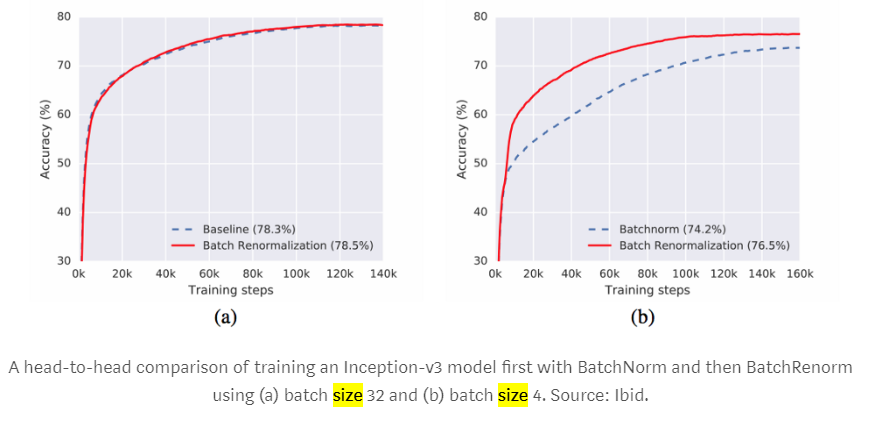
Also big batch can give you better accuracy: https://medium.com/luminovo/a-refresher-on-batch-re-normalization-5e0a1e902960
https://arxiv.org/pdf/1702.03275.pdf
When the minibatch size is large and its elements are i.i.d. samples
from the training distribution, this difference is small,
and can in fact aid generalization.
For small minibatches, the estimates of the mean and
variance become less accurate. These inaccuracies are
compounded with depth, and reduce the quality of resulting
models. Moreover, as each example is used to
compute the variance used in its own normalization, the
normalization operation is less well approximated by an
affine transform, which is what is used in inference.
AlexeyAB
on 18 May 2018
@abeyang00
@AlexeyAB , you mean set subdivision so 'small' right? or did u mean set batch so large?
Set batch=64
And you can set any subdivision=, the lower - the better, but if it doesn't lead to Out of memory error.
And does batch and division have to be power of 2? or can they just be random numbers
Should be batch % subdivision = 0
AlexeyAB
on 18 May 2018
@AlexeyAB, Just a question from the manual where it was noted that - "run training with multigpu (up to 4 GPUs): darknet.exe detector train data/voc.data cfg/yolov3-voc.cfg /backup/yolov3-voc_1000.weights -gpus 0,1,2,3"
Understood that this is for training. I was wondering if there is any such command that we can use to leverage multi-GPU during inferring / prediction as well to increase the FPS (for YOLOv3 and / or YOLOv2)? Thanks for your help!
 kmsravindra
on 19 May 2018
kmsravindra
on 19 May 2018
@kmsravindra No, currently you can't use multi-GPU to increase FPS detection on the one videostream.
In the real-time systems the latency is more important than FPS, so it doesn't make sense to use multi-GPU for one videostream:
If we will alternate frames to 0,1,2,3 GPU#, then it will increase FPS, but willn't decrease latency (ms)
If we will divide feature map to process it on the different GPUs, then slow synchronization between GPUs after each layer will remove all the advantage of multu-GPU.
AlexeyAB
on 19 May 2018
@AlexeyAB,
I was of understanding something like the below in the context of my question -
incoming frame 1 --> Send to GPU1 --> predict bb for frame1 --> draw bb
incoming frame 2 --> Send to GPU2 --> predict bb for frame2 --> draw bb
incoming frame 3 --> Send to GPU3 --> predict bb for frame3 --> draw bb
Then stitch the output frames in time.
Comparing this to a single GPU :
incoming frame 1 --> Send to GPU1 --> predict bb for frame1 --> draw bb
incoming frame 2 --> send and read from buffer till GPU1 is available --> predict bb for frame2 --> draw bb
incoming frame 3 --> send and read from buffer till GPU1 is available --> predict bb for frame3 --> draw bb
Given your response on latency, my understanding is that if the single GPU is able to predict at a speed greater than or equal to incoming FPS rate, then it would not induce latency.
However, my assumption was that if the GPU was not able to keep up the pace with incoming FPS. So having multiple GPU's as I depicted above might bring the output FPS closer to the incoming one with few milliseconds of latency that is probably un-noticeable? OR maybe it gives the same latency as single GPU?
kmsravindra
on 19 May 2018
@kmsravindra
incoming frame 1 --> Send to GPU1 --> predict bb for frame1 --> draw bb
incoming frame 2 --> Send to GPU1 --> wait till frame1 processing finishes --> predict bb for frame2 --> draw bb
incoming frame 3 --> Send to GPU1 --> wait till frame2 processing finishes --> predict bb for frame3 --> draw bb
In case when we use rtsp/http video-stream:
If you use
./darknet detecto demo- then yes, until it accumulates 5-20 FPS in the buffer, but after that OpenCV VideoCapture will drop old frames from the bufferif we use
./uselibwith darknet.so/dll - then frame2 will be droped if frame1 isn't processed yet at this time, i.e. frame2 will be showed but willn't be used for detection: https://github.com/AlexeyAB/darknet/blob/master/src/yolo_console_dll.cpp
AlexeyAB
on 19 May 2018
@AlexeyAB , Thanks for your response.
Then it looks like ./darknet detect demo is more suitable option for me.
Depending on what you mentioned, then ./uselib option might show a flicker of bounding boxes on the output video.
If flicker is not desirable, then I think you are suggesting that I better get a GPU that could keep up the pace with the incoming FPS.
kmsravindra
on 19 May 2018
@kmsravindra
Depending on what you mentioned, then ./uselib option might show a flicker of bounding boxes on the output video.
There is no flicker of bounding boxes:
- or the same bounded boxes will be showed on the frame2
- or bounded boxes will be moved using object-tracking (optical flow)
AlexeyAB
on 19 May 2018
@AlexeyAB ,
There is no flicker of bounding boxes:
- or the same bounded boxes will be showed on the frame2
- or bounded boxes will be moved using object-tracking (optical flow)
That means, can I pass this as a parameter to which option to choose from out of the two?
kmsravindra
on 17 Jul 2018
@AlexeyAB, There is something called SLI, maybe that you are aware of ( link below)
https://en.wikipedia.org/wiki/Scalable_Link_Interface
I was wondering if we could use this during real time inference connecting two GTX1080-Ti so that we can be at near real time on 1920 x 1080 incoming HD. Please suggest. Thanks!
kmsravindra
on 4 Oct 2018
@kmsravindra SLI isn't related to CUDA, so we can try to use GPUDirect 2.0 P2P, but it was slow for parallelizing single inference across two GPUs.
Early SLI connection (1 GB/sec) can't be used for CUDA. It can be used for 3D-rendering only, but it is very slow and give 2x fake FPS (or +~10% true FPS).
For CUDA can be used GPUDirect 2.0 P2P (14 GB/sec) that uses PCI Express 3.0 16x. But since nVidia doesn't use it inside cuDNN-library - I can make a conclusion, that GPUDirect 2.0 (P2P PCIe 3.0 16x) isn't fast enough.
The newest SLI (100 GB/sec) in the top-GPUs of Turing architecture GeForce RTX 2080 or 2080Ti uses nvLink that is 50x times faster than previous SLI. https://www.guru3d.com/articles-pages/geforce-rtx-2080-ti-founders-review,5.html But as I understand, nvLink is used in the CUDA GPUDirect 2.0 too for these modern GPUs 2080/2080Ti, so we can just use GPUDirect 2.0 (not SLI) on CUDA. I don't have these card yet, so I can't say about it.
AlexeyAB
on 4 Oct 2018
Related issues
 louisondumont
·
3Comments
louisondumont
·
3Comments
 zihaozhang9
·
3Comments
zihaozhang9
·
3Comments
 PROGRAMMINGENGINEER-NIKI
·
3Comments
PROGRAMMINGENGINEER-NIKI
·
3Comments
 jasleen137
·
3Comments
jasleen137
·
3Comments
 shootingliu
·
3Comments
shootingliu
·
3Comments