I am training on my own dataset and I keep getting the error: "annot load image" for the .jpg files I want to train on and Couldn't open file for the .txt files for the bounding box info. I was following the advice of a similar question here. I added the images and labels folders putting the .jpg in images and the .txt in labels. I still get the same errors though and have tried both yolo2 and yolo3.
my obj.data file is called phallusia.data, location is darknet/data/phallusia.data and the contents are
classes= 1
train = data/train.txt
valid = data/test.txt
names = data/phallusia.names
backup = backup/
my train.txt location is darknet/data/train.txt, the contents are
data/phallusia/images/v1scene00001.jpg
data/phallusia/images/v1scene00051.jpg
data/phallusia/images/v1scene00101.jpg
my test.txt location is darknet/data/test.txt, the contents are
data/phallusia/images/v4scene03051.jpg
data/phallusia/images/v4scene03101.jpg
data/phallusia/images/v4scene03151.jpg
my cfg/yolo-phallusia.cfg contains,
[net]
batch=64
subdivisions=8
height=416
width=416
channels=3
momentum=0.9
decay=0.0005
angle=0
saturation = 1.5
exposure = 1.5
hue=.1

learning_rate=0.0001
max_batches = 45000
policy=steps
steps=100,25000,35000
scales=10,.1,.1

[convolutional]
batch_normalize=1
filters=32
size=3
stride=1
pad=1
activation=leaky

[maxpool]
size=2
stride=2

[convolutional]
batch_normalize=1
filters=64
size=3
stride=1
pad=1
activation=leaky

[maxpool]
size=2
stride=2

[convolutional]
batch_normalize=1
filters=128
size=3
stride=1
pad=1
activation=leaky

[convolutional]
batch_normalize=1
filters=64
size=1
stride=1
pad=1
activation=leaky

[convolutional]
batch_normalize=1
filters=128
size=3
stride=1
pad=1
activation=leaky

[maxpool]
size=2
stride=2

[convolutional]
batch_normalize=1
filters=256
size=3
stride=1
pad=1
activation=leaky

[convolutional]
batch_normalize=1
filters=128
size=1
stride=1
pad=1
activation=leaky

[convolutional]
batch_normalize=1
filters=256
size=3
stride=1
pad=1
activation=leaky

[maxpool]
size=2
stride=2

[convolutional]
batch_normalize=1
filters=512
size=3
stride=1
pad=1
activation=leaky

[convolutional]
batch_normalize=1
filters=256
size=1
stride=1
pad=1
activation=leaky

[convolutional]
batch_normalize=1
filters=512
size=3
stride=1
pad=1
activation=leaky

[convolutional]
batch_normalize=1
filters=256
size=1
stride=1
pad=1
activation=leaky

[convolutional]
batch_normalize=1
filters=512
size=3
stride=1
pad=1
activation=leaky

[maxpool]
size=2
stride=2

[convolutional]
batch_normalize=1
filters=1024
size=3
stride=1
pad=1
activation=leaky

[convolutional]
batch_normalize=1
filters=512
size=1
stride=1
pad=1
activation=leaky

[convolutional]
batch_normalize=1
filters=1024
size=3
stride=1
pad=1
activation=leaky

[convolutional]
batch_normalize=1
filters=512
size=1
stride=1
pad=1
activation=leaky

[convolutional]
batch_normalize=1
filters=1024
size=3
stride=1
pad=1
activation=leaky


#######

[convolutional]
batch_normalize=1
size=3
stride=1
pad=1
filters=1024
activation=leaky

[convolutional]
batch_normalize=1
size=3
stride=1
pad=1
filters=1024
activation=leaky

[route]
layers=-9

[reorg]
stride=2

[route]
layers=-1,-3

[convolutional]
batch_normalize=1
size=3
stride=1
pad=1
filters=1024
activation=leaky

[convolutional]
size=1
stride=1
pad=1
filters=30
activation=linear

[region]
anchors = 1.08,1.19,  3.42,4.41,  6.63,11.38,  9.42,5.11,  16.62,10.52
bias_match=1
classes=1
coords=4
num=5
softmax=1
jitter=.2
rescore=1

object_scale=5
noobject_scale=1
class_scale=1
coord_scale=1

absolute=1
thresh = .6
random=0
the path for darkent is
/home/chemistry/Patricks Work/v3/darknet, should I move it to home directory?
the path for data folder is
/home/chemistry/Patricks Work/v3/darknet/data
Path to images is
/home/chemistry/Patricks Work/v3/darknet/data/phallusia/images
path to labels is
/home/chemistry/Patricks Work/v3/darknet/data/phallusia/labels
did I put the folders in the right areas?
Hopefully this is enough info to figure out what I am doing wrong.
 pjryan513
All 56 comments
Did you try with absolute paths to every file?
 TheMikeyR
on 4 Apr 2018
TheMikeyR
on 4 Apr 2018
I am getting the "annot load image " issue as well:
"annot load image "/Users/Jason/darknet/data/nfpa/pos-43.jpg
What should the folder hierarchy be for training images and their corresponding labels? In other words, where should the labels be located relative to the images, and what should be the name of the folder?
 BasketJace
on 5 Apr 2018
BasketJace
on 5 Apr 2018
@jmcmahon994 Hierarchy:
Data Directory
-> images
--> image0.png
--> image1.png
--> imageN.png
-> labels
--> labels0.txt
--> labels1.txt
--> labelsN.txt
In other words labels folder should be located next to the image folder in the same directory named "labels".
Your issue seems to be that darknet can't load your image though, so either something is wrong with your path or your image, try to convert it to png and see if it helps.
TheMikeyR
on 5 Apr 2018
I am facing the same issue of
"annot load image "/home/vca_ann/CNN/ANPR_CNN_1/dataset/voc_1/VOCdevkit/VOC2007/images/pos-255.png
Couldn't open file: /home/vca_ann/CNN/ANPR_CNN_1/dataset/voc_1/VOCdevkit/VOC2007/labels/pos-255.txt
@TheMikeyR As suggested by you, I converted all the .jpg images to .png images, but still getting this error.
My object file
classes= 1
train  = /home/vca_ann/CNN/ANPR_CNN_1/dataset/voc_1/train.txt
valid  = /home/vca_ann/CNN/ANPR_CNN_1/dataset/voc_1/2007_test.txt
names = data/obj.names
backup = backup/
I tried giving both absolute and relative (to detector executable) paths of images in train.txt and 2007_test.txt files, but still getting above error.
"annot load image "../../dataset/voc_1/VOCdevkit/VOC2007/images/pos-150.png
Couldn't open file: ../../dataset/voc_1/VOCdevkit/VOC2007/labels/pos-150.txt
 rpratesh
on 5 Apr 2018
rpratesh
on 5 Apr 2018
@TheMikeyR
Thanks for your help. The training has begun.
I moved the images into an 'images' folder, and the labels into a 'labels' folder as you described. Then in the parent folder I placed the .data, .cfg, and .names files, plus the train.txt and test.txt files that the .data file points to. I did not need to convert the images to png.
@pratesh
Does placing all the files in the following structure help? It worked for me.


BasketJace
on 5 Apr 2018
@jmcmahon994
Can u also show how your test.txt and train.txt files look like.
And, in your nfpa.data file, shouldn't it be names = NFPA/nfpa.names instead of names = NFPA/obj.names
rpratesh
on 5 Apr 2018
@pratesh
in your nfpa.data file, shouldn't it be names = NFPA/nfpa.names instead of names = NFPA/obj.names
Ah you're right, thanks for pointing out my mistake! This has actually left me confused, given that I had mistakenly entered names = NFPA/obj.names instead of names = NFPA/nfpa.names in the _nfpa.data_ file, why was the training able to run?
In _yolov2-tiny-voc.cfg_ and _nfpa.data_ I set classes=1 and the _nfpa.names_ file correspondingly contained one object, NFPA. However since I entered names = NFPA/obj.names (which doesn't exist) in the _nfpa.data_ file, what was the training actually using for its names, given that it was running?
My _test.txt_ and _train.txt_ look as follows:

BasketJace
on 5 Apr 2018
@jmcmahon994 some default coco.data or voc.data file which is hardcoded into the codebase if I remember correct
@pratesh I don't know why it's not working for you, it seems like your .data file is correct as well as the absolute paths, so if you can take the path it links out and open the file, then it should also be accessible, maybe some permission issues?
TheMikeyR
on 6 Apr 2018
@TheMikeyR
Ah I see, thanks!
You wouldn't happen to know of any way to check that the training has loaded the correct .names file, instead of the one specified in the default .data file hardcoded into the codebase?
I've now entered the correct path for the names file, 'names = NFPA/nfpa.names', but am just concerned it may not actually have found the .names file I specified for some reason (just as the images weren't being found previously, although in that case it gave an error message).
BasketJace
on 6 Apr 2018
I'm not 100% sure about this, but I believe it trains without file.names. The framework knows from the network config (the last filter layer) and classes parameter tells about how many classes there are (they are counting from 0-N) and the last filter is designed to give out the prediction and bounding box for each class (0-N). The file.names is just a file to give each detection a name instead of a number. So you shouldn't care much about the file.names regarding training.
If you do a detection and it spits out wrong class name for the detection it is probably due to file.names being wrong, you might have said line 0 is a person, but in the labels it is actually a bear. That way it detects bear correctly but labels it a person which is wrong.
I'm not sure if you can follow me, please tell if you want me to explain it better.
TheMikeyR
on 6 Apr 2018
@pratesh
I had the same issue "annot load image" and it didn't work for me to change directory structure.
But this solved my problem, so you should try it.
I changed the train.txt and test.txt format to UTF-8.
 ryokomy
on 6 Apr 2018
ryokomy
on 6 Apr 2018
@ryokomy
Seems to be an issue with train.txt and test.txt files. I've recreated them on my own and it worked.
The default text files from
https://timebutt.github.io/content/other/NFPA_dataset.zip
seems to have some problem
rpratesh
on 6 Apr 2018
Good to know, thanks for sharing @ryokomy !
TheMikeyR
on 6 Apr 2018
@TheMikeyR
Thanks for the explanation, I understand what you're saying.
@ryokomy
Thank you, I think you're right that this is to do with train.txt and test.txt files, rather than the directory structure. When I changed the directory structure I also recreated the train.txt and test.txt files using a script to reflect the new location of the images. Recreating the train.txt and test.txt is probably what solved the problem for me, rather than changing the directory structure.
BasketJace
on 6 Apr 2018
The first thing you should check is that you have permission to edit/read the files necessary.
The solution of changing the files to include the absolute path worked on Mac for me. However, it did not solve the issue on Windows.
On Windows, I was running into the same error and the issue turned out to be the end of line sequences. Make sure that the end of line sequences are "/n" and not "/r/n". In a text editor (like visual studio code) make sure you have LF and not CRLF and also that the file format is UTF8.
Side Note: I also switched to this version of dark net https://github.com/pengdada/darknet-win-linux as it worked better on Linux.
 snadgauda
on 2 Jul 2018
snadgauda
on 2 Jul 2018
@jmcmahon994
Hi! I am curious what the nfpa.names file contains? Thank you!
 kylynf
on 3 Jul 2018
kylynf
on 3 Jul 2018
@kylynf
The nfpa.names file contains one line:
NFPA
This is the name given to the object class that YOLO has been trained to detect. YOLO has only been trained to detect one type of object in this case, the NFPA diamond symbol, and so the .names file only contains one entry - "NFPA".

_The above image is from this tutorial._
I hope this helps. Let me know if you want me to explain anything else!
BasketJace
on 4 Jul 2018
@jmcmahon994
Thank you for your help. I just guessed what was in there and put the name of my class: fish so my nfpa.names contains: 'fish' and it is successfully training so thank you!
Another question: Approximately how long should it take to train? I am using about 390 images with one class. I do not have a GPU but I have openCV installed
kylynf
on 4 Jul 2018
@kylynf
How is your training coming along?
I don't have any accurate measurements but I found that the training was considerably faster using the GPU. Without the GPU the training was too slow to be feasible, taking around 5 minutes to complete one iteration of training. On the other hand, with the GPU I was able to start the training in the evening and by the following morning several thousand training iterations would have completed.
After every 100 training iterations a .backup weights file is saved to the backup folder specified in the .data file. You can run the training for as many iterations as is needed for the .backup weights file to produce accurate object detections in testing. You can resume the training from where you left off by passing the most recently saved .backup weights file to the training command:
./darknet detector train NFPA/nfpa.data NFPA/nfpa.cfg [weights].backup
_Note: I did not have openCV installed myself so am not sure how this would affect the training times!_
BasketJace
on 4 Jul 2018
Hi ho,
I had same issue. The best way to solve it is to create files outside of Windows. I created train and test on ubuntu and everything is running smoothly
 zboinek
on 5 Jul 2018
zboinek
on 5 Jul 2018
@jmcmahon994
The other day I left my computer alone to train for about 7 hours to train then stopped it. As far as I can tell nothing is happening. I found the backup file but there was no data in it. So this morning I have started up training again and am hoping to get some weights out of this? I'm not sure what I am doing wrong. Did I just not let it train for long enough? I expected at least something in the backup folder. Any advice?
kylynf
on 5 Jul 2018
@kylynf
I'm very sorry for the late reply. A .backup weights file should appear in the backup folder after 100 training iterations. Could you show me the output in the terminal after training for some time?
BasketJace
on 16 Jul 2018
I'm AFK by now but basically it goes like this
Around 12-16 lines of different network resolution effects and count of objects detected and then
Iterration number and error. For me on 40 core CPU one iterration takes around 10 mins
zboinek
on 16 Jul 2018
@zboinek
@kylynf
Here is an extract of my training output. It took about 5 minutes to perform 154 iterations.
I compiled YOLO with GPU=1 set in the makefile. To do this I first had to install the CUDA Toolkit. My GPU is the NVIDIA GeForce GTX 1060 (which is CUDA compatible).
A .backup file and .weights file were saved to the backup folder after 100 iterations. These are both the same weights. After another 100 iterations the .backup file will be updated and another .weights file is created.
jason@Jason-Ubuntu:~/darknet$ ./darknet detector train NFPA/nfpa.data NFPA/yolov2-tiny-voc.cfg darknet19_448.conv.23
yolov2-tiny-voc
layer     filters    size              input                output
    0 conv     16  3 x 3 / 1   416 x 416 x   3   ->   416 x 416 x  16  0.150 BFLOPs
    1 max          2 x 2 / 2   416 x 416 x  16   ->   208 x 208 x  16
    2 conv     32  3 x 3 / 1   208 x 208 x  16   ->   208 x 208 x  32  0.399 BFLOPs
    3 max          2 x 2 / 2   208 x 208 x  32   ->   104 x 104 x  32
    4 conv     64  3 x 3 / 1   104 x 104 x  32   ->   104 x 104 x  64  0.399 BFLOPs
    5 max          2 x 2 / 2   104 x 104 x  64   ->    52 x  52 x  64
    6 conv    128  3 x 3 / 1    52 x  52 x  64   ->    52 x  52 x 128  0.399 BFLOPs
    7 max          2 x 2 / 2    52 x  52 x 128   ->    26 x  26 x 128
    8 conv    256  3 x 3 / 1    26 x  26 x 128   ->    26 x  26 x 256  0.399 BFLOPs
    9 max          2 x 2 / 2    26 x  26 x 256   ->    13 x  13 x 256
   10 conv    512  3 x 3 / 1    13 x  13 x 256   ->    13 x  13 x 512  0.399 BFLOPs
   11 max          2 x 2 / 1    13 x  13 x 512   ->    13 x  13 x 512
   12 conv   1024  3 x 3 / 1    13 x  13 x 512   ->    13 x  13 x1024  1.595 BFLOPs
   13 conv   1024  3 x 3 / 1    13 x  13 x1024   ->    13 x  13 x1024  3.190 BFLOPs
   14 conv     30  1 x 1 / 1    13 x  13 x1024   ->    13 x  13 x  30  0.010 BFLOPs
   15 detection
mask_scale: Using default '1.000000'
Loading weights from darknet19_448.conv.23...Done!
Learning Rate: 0.001, Momentum: 0.9, Decay: 0.0005
Resizing
384
Loaded: 0.000034 seconds
Region Avg IOU: 0.591076, Class: 1.000000, Obj: 0.499727, No Obj: 0.500027, Avg Recall: 0.800000,  count: 10
Region Avg IOU: 0.342480, Class: 1.000000, Obj: 0.499824, No Obj: 0.500030, Avg Recall: 0.500000,  count: 8
Region Avg IOU: 0.398422, Class: 1.000000, Obj: 0.499315, No Obj: 0.500029, Avg Recall: 0.428571,  count: 14
Region Avg IOU: 0.301751, Class: 1.000000, Obj: 0.499156, No Obj: 0.500028, Avg Recall: 0.400000,  count: 10
Region Avg IOU: 0.422285, Class: 1.000000, Obj: 0.499392, No Obj: 0.500029, Avg Recall: 0.500000,  count: 8
Region Avg IOU: 0.234298, Class: 1.000000, Obj: 0.499153, No Obj: 0.500028, Avg Recall: 0.178571,  count: 28
Region Avg IOU: 0.379142, Class: 1.000000, Obj: 0.499205, No Obj: 0.500026, Avg Recall: 0.400000,  count: 10
Region Avg IOU: 0.221257, Class: 1.000000, Obj: 0.499537, No Obj: 0.500027, Avg Recall: 0.250000,  count: 8
1: 196.524750, 196.524750 avg, 0.001000 rate, 1.498131 seconds, 64 images
Loaded: 0.000041 seconds
Region Avg IOU: 0.443352, Class: 1.000000, Obj: 0.495614, No Obj: 0.495432, Avg Recall: 0.625000,  count: 8
Region Avg IOU: 0.540963, Class: 1.000000, Obj: 0.495293, No Obj: 0.495435, Avg Recall: 0.875000,  count: 8
Region Avg IOU: 0.356452, Class: 1.000000, Obj: 0.495300, No Obj: 0.495434, Avg Recall: 0.555556,  count: 9
Region Avg IOU: 0.544373, Class: 1.000000, Obj: 0.495129, No Obj: 0.495431, Avg Recall: 0.818182,  count: 11
Region Avg IOU: 0.315706, Class: 1.000000, Obj: 0.494998, No Obj: 0.495432, Avg Recall: 0.444444,  count: 9
Region Avg IOU: 0.358486, Class: 1.000000, Obj: 0.494840, No Obj: 0.495434, Avg Recall: 0.500000,  count: 8
Region Avg IOU: 0.453712, Class: 1.000000, Obj: 0.495120, No Obj: 0.495432, Avg Recall: 0.500000,  count: 8
Region Avg IOU: 0.468369, Class: 1.000000, Obj: 0.494803, No Obj: 0.495434, Avg Recall: 0.500000,  count: 14
2: 185.430191, 195.415298 avg, 0.001000 rate, 1.092638 seconds, 128 images
Loaded: 0.000033 seconds
Region Avg IOU: 0.369313, Class: 1.000000, Obj: 0.485858, No Obj: 0.486759, Avg Recall: 0.500000,  count: 8
Region Avg IOU: 0.366365, Class: 1.000000, Obj: 0.486704, No Obj: 0.486759, Avg Recall: 0.500000,  count: 8
Region Avg IOU: 0.400188, Class: 1.000000, Obj: 0.486290, No Obj: 0.486759, Avg Recall: 0.444444,  count: 9
Region Avg IOU: 0.241825, Class: 1.000000, Obj: 0.485891, No Obj: 0.486763, Avg Recall: 0.222222,  count: 9
Region Avg IOU: 0.431668, Class: 1.000000, Obj: 0.486198, No Obj: 0.486757, Avg Recall: 0.500000,  count: 12
Region Avg IOU: 0.544339, Class: 1.000000, Obj: 0.486478, No Obj: 0.486759, Avg Recall: 0.857143,  count: 7
Region Avg IOU: 0.487178, Class: 1.000000, Obj: 0.486183, No Obj: 0.486758, Avg Recall: 0.600000,  count: 10
Region Avg IOU: 0.427375, Class: 1.000000, Obj: 0.486401, No Obj: 0.486760, Avg Recall: 0.625000,  count: 8
3: 181.007828, 193.974548 avg, 0.001000 rate, 1.135743 seconds, 192 images


...


Loaded: 0.000040 seconds
Region Avg IOU: 0.521117, Class: 1.000000, Obj: 0.016137, No Obj: 0.016265, Avg Recall: 0.750000,  count: 8
Region Avg IOU: 0.445559, Class: 1.000000, Obj: 0.016181, No Obj: 0.016267, Avg Recall: 0.555556,  count: 9
Region Avg IOU: 0.405584, Class: 1.000000, Obj: 0.016051, No Obj: 0.016259, Avg Recall: 0.555556,  count: 9
Region Avg IOU: 0.638974, Class: 1.000000, Obj: 0.016379, No Obj: 0.016254, Avg Recall: 0.875000,  count: 8
Region Avg IOU: 0.280449, Class: 1.000000, Obj: 0.016420, No Obj: 0.016266, Avg Recall: 0.111111,  count: 18
Region Avg IOU: 0.400591, Class: 1.000000, Obj: 0.016070, No Obj: 0.016266, Avg Recall: 0.555556,  count: 9
Region Avg IOU: 0.547657, Class: 1.000000, Obj: 0.016353, No Obj: 0.016258, Avg Recall: 0.750000,  count: 8
Region Avg IOU: 0.371884, Class: 1.000000, Obj: 0.016042, No Obj: 0.016262, Avg Recall: 0.500000,  count: 8
100: 10.851920, 13.160944 avg, 0.001000 rate, 1.618434 seconds, 6400 images
Saving weights to NFPA/backup/yolov2-tiny-voc.backup
Saving weights to NFPA/backup/yolov2-tiny-voc_100.weights


...


Loaded: 0.000043 seconds
Region Avg IOU: 0.403313, Class: 1.000000, Obj: 0.014164, No Obj: 0.014287, Avg Recall: 0.400000,  count: 10
Region Avg IOU: 0.360459, Class: 1.000000, Obj: 0.014621, No Obj: 0.014292, Avg Recall: 0.333333,  count: 12
Region Avg IOU: 0.367700, Class: 1.000000, Obj: 0.013823, No Obj: 0.014286, Avg Recall: 0.500000,  count: 8
Region Avg IOU: 0.405575, Class: 1.000000, Obj: 0.013849, No Obj: 0.014278, Avg Recall: 0.375000,  count: 8
Region Avg IOU: 0.436118, Class: 1.000000, Obj: 0.013024, No Obj: 0.014293, Avg Recall: 0.555556,  count: 9
Region Avg IOU: 0.485750, Class: 1.000000, Obj: 0.014712, No Obj: 0.014294, Avg Recall: 0.642857,  count: 14
Region Avg IOU: 0.316758, Class: 1.000000, Obj: 0.013006, No Obj: 0.014288, Avg Recall: 0.375000,  count: 8
Region Avg IOU: 0.420868, Class: 1.000000, Obj: 0.012581, No Obj: 0.014285, Avg Recall: 0.500000,  count: 10
153: 10.040620, 11.442871 avg, 0.001000 rate, 1.591577 seconds, 9792 images
Loaded: 0.000037 seconds
Region Avg IOU: 0.386361, Class: 1.000000, Obj: 0.013367, No Obj: 0.014264, Avg Recall: 0.444444,  count: 9
Region Avg IOU: 0.461056, Class: 1.000000, Obj: 0.012953, No Obj: 0.014272, Avg Recall: 0.500000,  count: 10
Region Avg IOU: 0.294480, Class: 1.000000, Obj: 0.014540, No Obj: 0.014262, Avg Recall: 0.181818,  count: 33
Region Avg IOU: 0.366687, Class: 1.000000, Obj: 0.013329, No Obj: 0.014265, Avg Recall: 0.555556,  count: 9
Region Avg IOU: 0.216087, Class: 1.000000, Obj: 0.013347, No Obj: 0.014260, Avg Recall: 0.153846,  count: 13
Region Avg IOU: 0.279263, Class: 1.000000, Obj: 0.013682, No Obj: 0.014256, Avg Recall: 0.250000,  count: 8
Region Avg IOU: 0.477770, Class: 1.000000, Obj: 0.014243, No Obj: 0.014266, Avg Recall: 0.625000,  count: 8
Region Avg IOU: 0.378830, Class: 1.000000, Obj: 0.013621, No Obj: 0.014266, Avg Recall: 0.444444,  count: 9
154: 11.001608, 11.398745 avg, 0.001000 rate, 1.569078 seconds, 9856 images

@jmcmahon994
Thank you so so so much for your help! My boss helped me to install a GPU and things ran 500x faster than without one. Saved me days of headache. I was able to successfully identify my fish! You have been a tremendous help throughout all of this and I can't thank you enough.
kylynf
on 19 Jul 2018
@ryokomy can you please tell me the name of the fish dataset ?
 ahsan856jalal
on 20 Jul 2018
ahsan856jalal
on 20 Jul 2018
I have followed same structure but i get this error: Cant open label file
 romass12
on 20 Jul 2018
romass12
on 20 Jul 2018
Show us your cfg file and files structure. Probably u set it wrong
zboinek
on 20 Jul 2018
yolo-obj.cfg
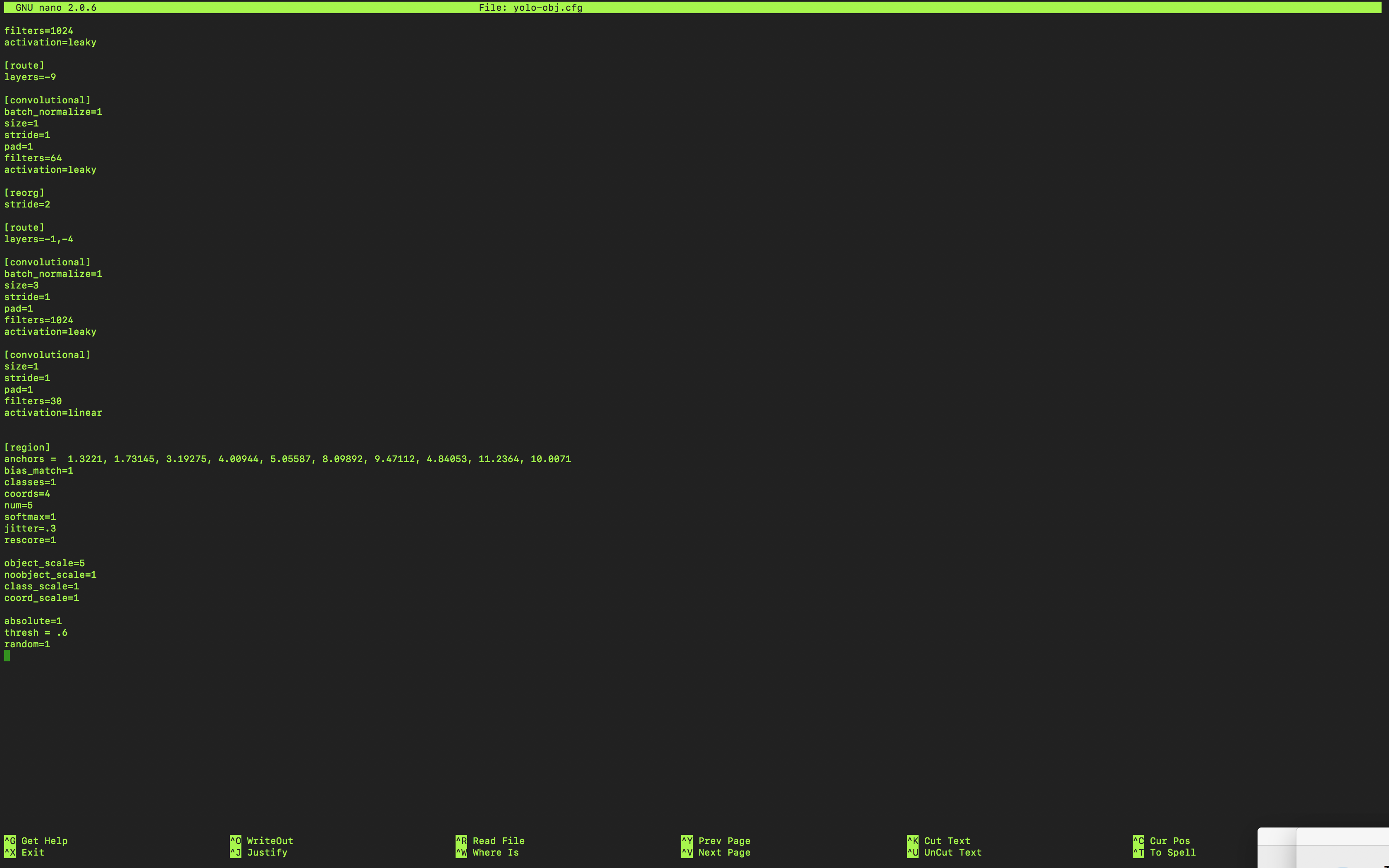

romass12
on 21 Jul 2018
File structure: i have subfolder "folder_name" inside darknet folder. in that images,labels,train.txt,test.txt and cfg and data files

I get "cant open label files.."
When I check encoding of labels files, it ASCII text format

romass12
on 21 Jul 2018
Anyone?
romass12
on 21 Jul 2018
@romass12
The best advice I can offer you is to read the cfg file steps from this repository: https://github.com/AlexeyAB/darknet
This process takes a while and it is important to be patient because you will hit walls. I used "steps to train your own yolo detector" from three different git hubs because some things worked for me and some didn't. This is a trial and error process.
As far as your can't open files error I would think it is because you missed an absolute path somewhere.
Also important to note that my labels and images were in the same folder. Not sure if this makes a difference but my training worked.
This is a screenshot of my linux layout.

The command I used to start training involved a lot of absolute paths. Something like this from the darknet folder:
./darknet detector train /workspace/share/intern/5fish/obj.names /workspace/share/intern/5fish/yolo-obj.cfg /workspace/share/intern/5fish/darknet53.conv.74
Then after my weights saved (I set it to save every 100 iterations in the backup folder) I used this command to get the picture I posted earlier:
./darknet detector test /workspace/share/intern/5fish/obj.names /workspace/share/intern/5fish/yolo-obj.cfg /workspace/share/intern/5fish/backup/yolo-obj_900.weights /workspace/share/intern/training_images/0250.jpg -thresh 0.5
I hope this helps you!
kylynf
on 21 Jul 2018
@ahsan856jalal
I think you're talking to me because that's my fish picture but I created my own dataset from pictures online and trained on my own. Sorry!
kylynf
on 21 Jul 2018
Thank you so much @kylynf !! I had followed multiple blogs it said labels to be in different "labels" folder and images in "images" folder
romass12
on 21 Jul 2018
@romass12
Totally understand. I made the same mistake when I first started. Took me three weeks of consecutive 8 hour days to finally get some weights.
Also If I wasn't clear start at the "How to train (to detect your custom objects)" of AlexeyAB's git hub that I linked above.
Let me know if you need more help!
kylynf
on 21 Jul 2018
Awesome @kylynf and do you know why learning rate is 0 although set it to 0.0001
romass12
on 21 Jul 2018
@romass12
So I'm not entirely sure but from my crash course on Coursera on Machine Learning, the curve is never supposed to hit zero. As close to zero as possible but never reach it.

I found this image online and basically you want your algorithm to learn without being over or underfitted.
Maybe someone else can provide a better answer but this is my understanding.
kylynf
on 21 Jul 2018
ALL,
I am acctually working for the first time with yolo and I am really descovering it . I want to use it to train my own dataset GTSRB German Traffic Signe dataset. I have 43 classes(39k training image) and when I started, This is what I get? what shall I do
I tried to change to make some changes for the yolo.cfg but it still wrong answers?
anyone can help please


 Fnajjar
on 7 Aug 2018
Fnajjar
on 7 Aug 2018
Don't use the pre-trained weights if you have all new data. Omit the weight
filename and it will create one.
Do you have the images marked in your training set? If not, you should mark
them using Yolo_mark. Hopefully you have that already, because if you
don't, it will be a lot of busywork for 39k images.
On Tue, Aug 7, 2018 at 7:48 AM Fnajjar notifications@github.com wrote:
ALL,
I am acctually working for the first time with yolo and I am really
descovering it . I want to use it to train my own dataset GTSRB German
Traffic Signe dataset. I have 43 classes(39k training image) and when I
started, This is what I get? what shall I doI tried to change to make some changes for the yolo.cfg but it still wrong
answers?
anyone can help please[image: yolo_file]
https://user-images.githubusercontent.com/38285230/43783267-96e60c7c-9a61-11e8-89b4-1e1c7dbe8fe6.png[image: yolo_train]
https://user-images.githubusercontent.com/38285230/43783060-10c18590-9a61-11e8-92ec-6bfc8023bcdb.png—
You are receiving this because you are subscribed to this thread.
Reply to this email directly, view it on GitHub
https://github.com/pjreddie/darknet/issues/611#issuecomment-411083094,
or mute the thread
https://github.com/notifications/unsubscribe-auth/ARocJRTInIjKL_Fp4Xvtx6B-08PQF3jcks5uOaixgaJpZM4TCneq
.>
Peter Quinn
(415) 794-2264 (cell)
 PeterQuinn925
on 7 Aug 2018
PeterQuinn925
on 7 Aug 2018
Yes I already used the yolo_mark. and it created the val and train .text
I Omitted the weight file and make some changes in the .cfg file like the height=256
width=256 and the filter (classes + coords+ 1)*num, anachors, random
well, I've got more numbers than before but still wrong answer what shall I modify?
any suggestion?

Fnajjar
on 7 Aug 2018
post your cfg file. I don't know if I can help, I'm a novice at this as well, but someone here probably can.
PeterQuinn925
on 7 Aug 2018
@Fnajjar you can check if you did your labels correct with https://github.com/AlexeyAB/Yolo_mark it seems like some of the labelling have gone wrong.
TheMikeyR
on 8 Aug 2018
@PeterQuinn925 thank you so much, so here below you find my config file
I have 43 classes and I generated the .data file, the mark for the .txt file for the train and val
but I don't know exactly about the parameters of the cfg file, I tried to change some.
any ideas! thanks


Fnajjar
on 8 Aug 2018
It was acctually a mark problem. so I did it from the scratch. And this time I have this result do you think it's trained well? from the begining I have count always =8 (sometimes 7) and in the end I have (avrg recall =1)
thank you


Fnajjar
on 13 Aug 2018
@Fnajjar
Because your avg loss is decreasing over iterations I'd say it's trained. Did you test it?
Also wanted to note that when I was training I read somewhere that the images needed to be in jpg format.. not sure if this makes a difference
kylynf
on 14 Aug 2018
@kylynf Well for that training I didn't get good result actually when i tested it, it diden't detect well the road sign (for my case) nore recognise them, So I did constitute another dataset of 100 image with different format like jpg and jpeg
It have been running for too days and only 200 iteration, It is really slow but the test of the first iterations seems prettier than before.
Eventhough, sometimes I can't detect all the images, I have this answer ( Not compiled with OpenCV, saving to predictions.png instead) and nothing appears in the predictions.png.
I was wondering if the number of the images in the dataset have an impact in the performance of the training.


Fnajjar
on 16 Aug 2018
I have this problem also. Finally I use python generate the .txt file and use strip() function.Then problem have solved.
 futureZG
on 15 Sep 2018
futureZG
on 15 Sep 2018
@pratesh
I had the same issue "annot load image" and it didn't work for me to change directory structure.
But this solved my problem, so you should try it.
I changed the train.txt and test.txt format to UTF-8.
Thank you, this works miraculously
 sythanhho
on 27 Mar 2019
sythanhho
on 27 Mar 2019
I am getting the same issue Cannot load image "./darknet/dataset/z1.jpg" STB Reason: can't fopen Please help me with this @antnh6 @sachindesh @TheMikeyR @pjryan513 @BasketJace @jesuisthanos @futureZG @Fnajjar @kylynf @PeterQuinn925 @ahsan856jalal @romass12 @zboinek @BasketJace @Broham
 Mps24-7uk
on 5 Apr 2019
Mps24-7uk
on 5 Apr 2019
i have same issue:
images *.jpg convert into *.png format.
Fixed.
 faisalshahbaz
on 25 Apr 2019
faisalshahbaz
on 25 Apr 2019
For my case is related to two files train.txt and test.txt. Each line in this file has no spaces at the beginning of the line. Now it worked.
 kimdinhthaibk
on 28 Jul 2019
kimdinhthaibk
on 28 Jul 2019
The fix proposed by @rpratesh in his post is most certainly related to the fact that Windows uses different EOL (End Of Line) characters than Linux. The data file from the original post comes from a tutorial by timebutt who uses Windows (as he specifies in the tutorial). Hence his train.txt and test.txt files use the Windows style of EOL.
This is visible when viewing the files with an hexadecimal file reader
me@machine:data/nfpa$ xxd train_good.txt | head
00000000: 6461 7461 2f6e 6670 612f 696d 6167 6573  data/nfpa/images
00000010: 2f70 6f73 2d31 2e6a 7067 0a64 6174 612f  /pos-1.jpg.data/
00000020: 6e66 7061 2f69 6d61 6765 732f 706f 732d  nfpa/images/pos-

me@machine:data/nfpa$ xxd train_timebutt.txt | head
00000000: 6461 7461 2f6e 6670 612f 696d 6167 6573  data/nfpa/images
00000010: 2f70 6f73 2d31 2e6a 7067 0d0a 6461 7461  /pos-1.jpg..data
00000020: 2f6e 6670 612f 696d 6167 6573 2f70 6f73  /nfpa/images/pos
Note how the 0a byte changes into 0d0a.
Similar issue was reported in Axeley's darknet issues.
 GLorieul
on 27 Sep 2019
GLorieul
on 27 Sep 2019

I encounter "cannot load image" issue with cygwin. I have solved this issue with Windows command line (DOS) with the following procedure mentioned at the following link. https://github.com/AlexeyAB/darknet/tree/47c7af1cea5bbdedf1184963355e6418cb8b1b4f#how-to-train-pascal-voc-data
 snowuyl
on 9 Jan 2020
snowuyl
on 9 Jan 2020
@ryokomy
Seems to be an issue with train.txt and test.txt files. I've recreated them on my own and it worked.
The default text files from
https://timebutt.github.io/content/other/NFPA_dataset.zip
seems to have some problem
I's encountering same issue. Read your post and re-created train.txt and included image paths manually which miraculously worked.. :)
 devb2020
on 14 Apr 2020
devb2020
on 14 Apr 2020
i have same issue:
images *.jpg convert into *.png format.
Fixed.
Finally, I found that these pics I rename their extension names cannot be loaded. I must save as a new .jpg by using picture editing tools, and they will be loaded sucessfully.
Before you change the extension name, you must know the data encoding formats of different pics are different, such as png, jpg, gif....
 Tomorrowfee
on 24 May 2020
Tomorrowfee
on 24 May 2020
Kendi veri kümem üzerinde eğitim alıyorum ve sürekli olarak şu hatayı alıyorum: Eğitim yapmak istediğim .jpg dosyaları için "resim yükle" ve sınırlayıcı kutu bilgisi için .txt dosyaları için dosya açılamadı . Burada benzer bir sorunun tavsiyesine uyuyordum . .Jpg'yi resimlere ve .txt'yi etiketlere koyarak resim ve etiket klasörlerini ekledim. Yine de aynı hataları alıyorum ve hem yolo2 hem de yolo3'ü denedim.
obj.data dosyam phallusia.data , konum darknet / data / phallusia.data ve içeriği
classes= 1
train = data/train.txt
valid = data/test.txt
names = data/phallusia.names
backup = backup/
train.txt konumum darknet / data / train.txt , içerikler
data/phallusia/images/v1scene00001.jpg
data/phallusia/images/v1scene00051.jpg
data/phallusia/images/v1scene00101.jpg
test.txt konumum darknet / data / test.txt , içerikler
data/phallusia/images/v4scene03051.jpg
data/phallusia/images/v4scene03101.jpg
data/phallusia/images/v4scene03151.jpg
cfg / yolo-phallusia.cfg dosyam şunları içerir:
[net]
batch=64
subdivisions=8
height=416
width=416
channels=3
momentum=0.9
decay=0.0005
angle=0
saturation = 1.5
exposure = 1.5
hue=.1

learning_rate=0.0001
max_batches = 45000
policy=steps
steps=100,25000,35000
scales=10,.1,.1

[convolutional]
batch_normalize=1
filters=32
size=3
stride=1
pad=1
activation=leaky

[maxpool]
size=2
stride=2

[convolutional]
batch_normalize=1
filters=64
size=3
stride=1
pad=1
activation=leaky

[maxpool]
size=2
stride=2

[convolutional]
batch_normalize=1
filters=128
size=3
stride=1
pad=1
activation=leaky

[convolutional]
batch_normalize=1
filters=64
size=1
stride=1
pad=1
activation=leaky

[convolutional]
batch_normalize=1
filters=128
size=3
stride=1
pad=1
activation=leaky

[maxpool]
size=2
stride=2

[convolutional]
batch_normalize=1
filters=256
size=3
stride=1
pad=1
activation=leaky

[convolutional]
batch_normalize=1
filters=128
size=1
stride=1
pad=1
activation=leaky

[convolutional]
batch_normalize=1
filters=256
size=3
stride=1
pad=1
activation=leaky

[maxpool]
size=2
stride=2

[convolutional]
batch_normalize=1
filters=512
size=3
stride=1
pad=1
activation=leaky

[convolutional]
batch_normalize=1
filters=256
size=1
stride=1
pad=1
activation=leaky

[convolutional]
batch_normalize=1
filters=512
size=3
stride=1
pad=1
activation=leaky

[convolutional]
batch_normalize=1
filters=256
size=1
stride=1
pad=1
activation=leaky

[convolutional]
batch_normalize=1
filters=512
size=3
stride=1
pad=1
activation=leaky

[maxpool]
size=2
stride=2

[convolutional]
batch_normalize=1
filters=1024
size=3
stride=1
pad=1
activation=leaky

[convolutional]
batch_normalize=1
filters=512
size=1
stride=1
pad=1
activation=leaky

[convolutional]
batch_normalize=1
filters=1024
size=3
stride=1
pad=1
activation=leaky

[convolutional]
batch_normalize=1
filters=512
size=1
stride=1
pad=1
activation=leaky

[convolutional]
batch_normalize=1
filters=1024
size=3
stride=1
pad=1
activation=leaky


#######

[convolutional]
batch_normalize=1
size=3
stride=1
pad=1
filters=1024
activation=leaky

[convolutional]
batch_normalize=1
size=3
stride=1
pad=1
filters=1024
activation=leaky

[route]
layers=-9

[reorg]
stride=2

[route]
layers=-1,-3

[convolutional]
batch_normalize=1
size=3
stride=1
pad=1
filters=1024
activation=leaky

[convolutional]
size=1
stride=1
pad=1
filters=30
activation=linear

[region]
anchors = 1.08,1.19,  3.42,4.41,  6.63,11.38,  9.42,5.11,  16.62,10.52
bias_match=1
classes=1
coords=4
num=5
softmax=1
jitter=.2
rescore=1

object_scale=5
noobject_scale=1
class_scale=1
coord_scale=1

absolute=1
thresh = .6
random=0
darkent yolu
/ home / chemistry / Patricks Work / v3 / darknet , onu ana dizine taşımalı mıyım?
olduğu klasör veriler için yol
ev / kimya / Patricks İş / v3 / Darknet / veri /
görüntülere Yoludur
/ home / kimya / Patricks İş / v3 / Darknet / veri / phallusia / images
etiketlere yoludur
/ home / kimya / Patricks Work / v3 / darknet / data / phallusia / labels
klasörleri doğru alanlara yerleştirdim mi?Umarım bu, neyi yanlış yaptığımı anlamak için yeterli bilgidir.
I am having the same problem now. If the problem is solved, can you share the solution with me, thank you. Healthy days.
 AliPANPALLI
on 15 Dec 2020
AliPANPALLI
on 15 Dec 2020
Related issues
 MaverickLoneshark
·
3Comments
MaverickLoneshark
·
3Comments
 TheHidden1
·
3Comments
TheHidden1
·
3Comments
 gpsmit
·
3Comments
gpsmit
·
3Comments
 ghost
·
4Comments
ghost
·
4Comments
 arianaa30
·
3Comments
arianaa30
·
3Comments
Most helpful comment
@pratesh
I had the same issue "annot load image" and it didn't work for me to change directory structure.
But this solved my problem, so you should try it.
I changed the train.txt and test.txt format to UTF-8.