When I test on consistent medical images, although some images are very similar to each other, their detection results are different. I set thresh 0.5.
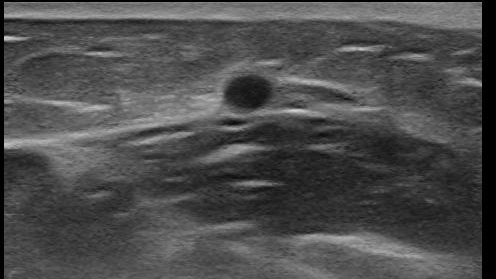
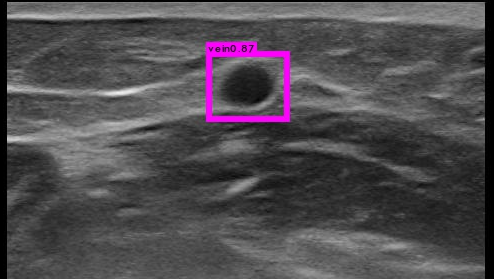
What can I do to deal with this phenomenon? Thank you.
 123liluky
All 13 comments
Hi,
- How many images and classes do you use for training?
- How many iterations did you train?
- Is your .cfg-file based on
yolo-voc.2.0.cfgor on other? - Can this object be detected on the 1-st image, if
thresh=0.1?
As far as I can see, the main difference in these images is that the objects are slightly different in size and shape. So you can tune cfg-file to train with more invariance (size, shape, aspect-ratio) - you can try a few tips:
- Set
random=1for training - will train on different resolutions: https://github.com/AlexeyAB/darknet/blob/993e3a38aab390625a1ac2b425c75883bbc684fe/cfg/yolo-voc.2.0.cfg#L244 - Set
jitter=.3for training - will train on parts of images with different: size, scale and aspect-ratio: https://github.com/AlexeyAB/darknet/blob/993e3a38aab390625a1ac2b425c75883bbc684fe/cfg/yolo-voc.2.0.cfg#L234 - Try to train more iterations
 AlexeyAB
on 30 Jan 2018
AlexeyAB
on 30 Jan 2018
Thank you for your suggestions. I trained 25000 iterations on 2087 images for one class which looks like a circle. When I tried thresh=0.1 on 28 similar images, objects in 17 images can be detected while objects in 11 images can not be detected.
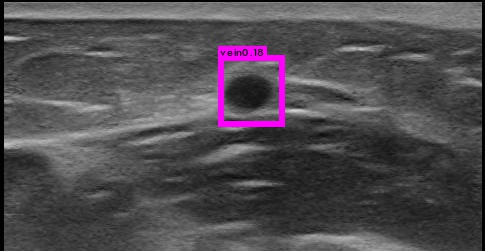
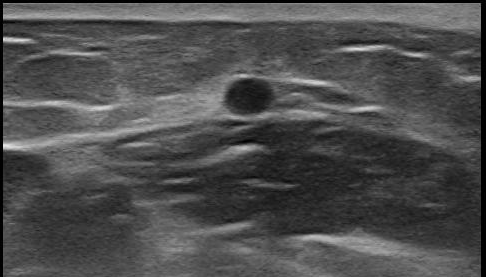
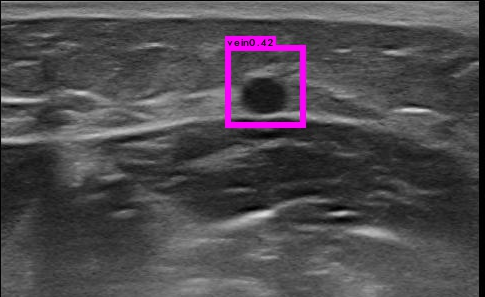
Should I 1、add more small anchors or 2、revise network with output 26×26×30 but this will result in training without pretrained parameters? Thank you.
I chose tiny-yolo-voc.cfg:
[net]
batch=64
subdivisions=16
width=416
height=416
channels=3
momentum=0.9
decay=0.0005
angle=0
saturation = 1.5
exposure = 1.5
hue=.1
learning_rate=0.001
max_batches = 40200
policy=steps
steps=-1,100,20000,30000
scales=.1,10,.1,.1
[convolutional]
batch_normalize=1
filters=16
size=3
stride=1
pad=1
activation=leaky
[maxpool]
size=2
stride=2
[convolutional]
batch_normalize=1
filters=32
size=3
stride=1
pad=1
activation=leaky
[maxpool]
size=2
stride=2
[convolutional]
batch_normalize=1
filters=64
size=3
stride=1
pad=1
activation=leaky
[maxpool]
size=2
stride=2
[convolutional]
batch_normalize=1
filters=128
size=3
stride=1
pad=1
activation=leaky
[maxpool]
size=2
stride=2
[convolutional]
batch_normalize=1
filters=256
size=3
stride=1
pad=1
activation=leaky
[maxpool]
size=2
stride=2
[convolutional]
batch_normalize=1
filters=512
size=3
stride=1
pad=1
activation=leaky
[maxpool]
size=2
stride=1
[convolutional]
batch_normalize=1
filters=1024
size=3
stride=1
pad=1
activation=leaky
#
[convolutional]
batch_normalize=1
size=3
stride=1
pad=1
filters=1024
activation=leaky
[convolutional]
size=1
stride=1
pad=1
filters=30
activation=linear
[region]
anchors = 1.08,1.19, 3.42,4.41, 6.63,11.38, 9.42,5.11, 16.62,10.52
bias_match=1
classes=1
coords=4
num=5
softmax=1
jitter=.2
rescore=1
object_scale=5
noobject_scale=1
class_scale=1
coord_scale=1
absolute=1
thresh = .6
random=0
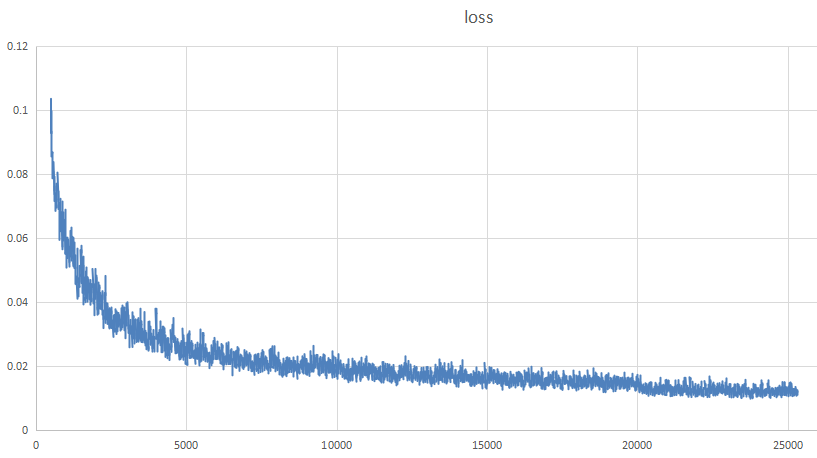
Loss function is:
123liluky
on 31 Jan 2018
- "Should I 1、add more small anchors" - Yes, you can try to change your anchors to smaller values
"2、revise network with output 26×26×30 but this will result in training without pretrained parameters?" - it depends on how will you do this. But as I see there is no need to increase the final feature map, so you can keep it at 13x13x30. Also if you use tiny-yolo, then in the most cases you should train without pre-trained weights
darknet19_448.conv.23.Do all your images have the same resolution?
- Do all your objects have size about 50x40?
- Did you check your training dataset using this utility? https://github.com/AlexeyAB/Yolo_mark
Try to use this cfg-file with pre-trained weights darknet19_448.conv.23:
[net]
batch=64
subdivisions=16
height=416
width=416
channels=3
momentum=0.9
decay=0.0005
angle=0
saturation = 1.5
exposure = 1.5
hue=.1

learning_rate=0.0001
max_batches = 25000
policy=steps
steps=100,7000,15000
scales=10,.1,.1

[convolutional]
batch_normalize=1
filters=32
size=3
stride=1
pad=1
activation=leaky

[maxpool]
size=2
stride=2

[convolutional]
batch_normalize=1
filters=64
size=3
stride=1
pad=1
activation=leaky

[maxpool]
size=2
stride=2

[convolutional]
batch_normalize=1
filters=128
size=3
stride=1
pad=1
activation=leaky

[convolutional]
batch_normalize=1
filters=64
size=1
stride=1
pad=1
activation=leaky

[convolutional]
batch_normalize=1
filters=128
size=3
stride=1
pad=1
activation=leaky

[maxpool]
size=2
stride=2

[convolutional]
batch_normalize=1
filters=256
size=3
stride=1
pad=1
activation=leaky

[convolutional]
batch_normalize=1
filters=128
size=1
stride=1
pad=1
activation=leaky

[convolutional]
batch_normalize=1
filters=256
size=3
stride=1
pad=1
activation=leaky

[maxpool]
size=2
stride=2

[convolutional]
batch_normalize=1
filters=512
size=3
stride=1
pad=1
activation=leaky

[convolutional]
batch_normalize=1
filters=256
size=1
stride=1
pad=1
activation=leaky

[convolutional]
batch_normalize=1
filters=512
size=3
stride=1
pad=1
activation=leaky

[convolutional]
batch_normalize=1
filters=256
size=1
stride=1
pad=1
activation=leaky

[convolutional]
batch_normalize=1
filters=512
size=3
stride=1
pad=1
activation=leaky

[maxpool]
size=2
stride=2

[convolutional]
batch_normalize=1
filters=1024
size=3
stride=1
pad=1
activation=leaky

[convolutional]
batch_normalize=1
filters=512
size=1
stride=1
pad=1
activation=leaky

[convolutional]
batch_normalize=1
filters=1024
size=3
stride=1
pad=1
activation=leaky

[convolutional]
batch_normalize=1
filters=512
size=1
stride=1
pad=1
activation=leaky

[convolutional]
batch_normalize=1
filters=1024
size=3
stride=1
pad=1
activation=leaky

[convolutional]
size=1
stride=1
pad=1
filters=30
activation=linear

[region]
anchors =  0.5,0.5, 1.0,1.0, 2.0,2.0, 3.0,3.0, 4.0,4.0
bias_match=1
classes=1
coords=4
num=5
softmax=1
jitter=.3
rescore=1

object_scale=5
noobject_scale=1
class_scale=1
coord_scale=1

absolute=1
thresh = .6
random=0
Thank you very much for your answer.
- I trained with "darknet.exe detector train data/obj.data cfg/tiny-yolo-obj.cfg darknet19_448.conv.23". Is darknet19_448.conv.23 suitable for tiny-yolo?
- My images are all 640*512.
- I have checked my labelling in both train and test images.
- I am wondering if steps and scales in cfg should be changed at the same time with max_batches. I am lack of experience.
- I think objects in my application are easier than natural images, so maybe tiny-yolo is enough. Can I think so?
- I have tried yolo-obj.cfg before, but the performance is similar to tiny-yolo. Finally I chose tiny-yolo.
123liluky
on 1 Feb 2018
In general, no,
darknet19_448.conv.23isn't suitable for tiny-yolo. You should train without darknet19_448.conv.23So you should train with
random=1Ok
Yes. If you want to train about 25000 iterations, then set
max_batches=25000, and setstepsless than 25000. Wheresteps- is a checkpoint of iterations, wherelearning_ratewill be multiplied byscalesProbably yes, you can use tiny-yolo. But you should change
- set
stepsto values less than 25000. - set
random=1 - set small anchors
- set
AlexeyAB
on 1 Feb 2018
I will have a try. darknet19_448.conv.23 isn't suitable for tiny-yolo. Then why did the project go correctly when I used darknet19_448.conv.23 for tiny-yolo?
123liluky
on 2 Feb 2018
There is no check for the correctness of the weights-file in the Darknet. So any weights-file is used only as raw binary file.
- For the
yolo-voc.2.0.cfgthe darknet19_448.conv.23 is used as well trained weights file for the first 23 layers. - For the
tiny-yolo-voc.cfgthe darknet19_448.conv.23 is used as initial random values.
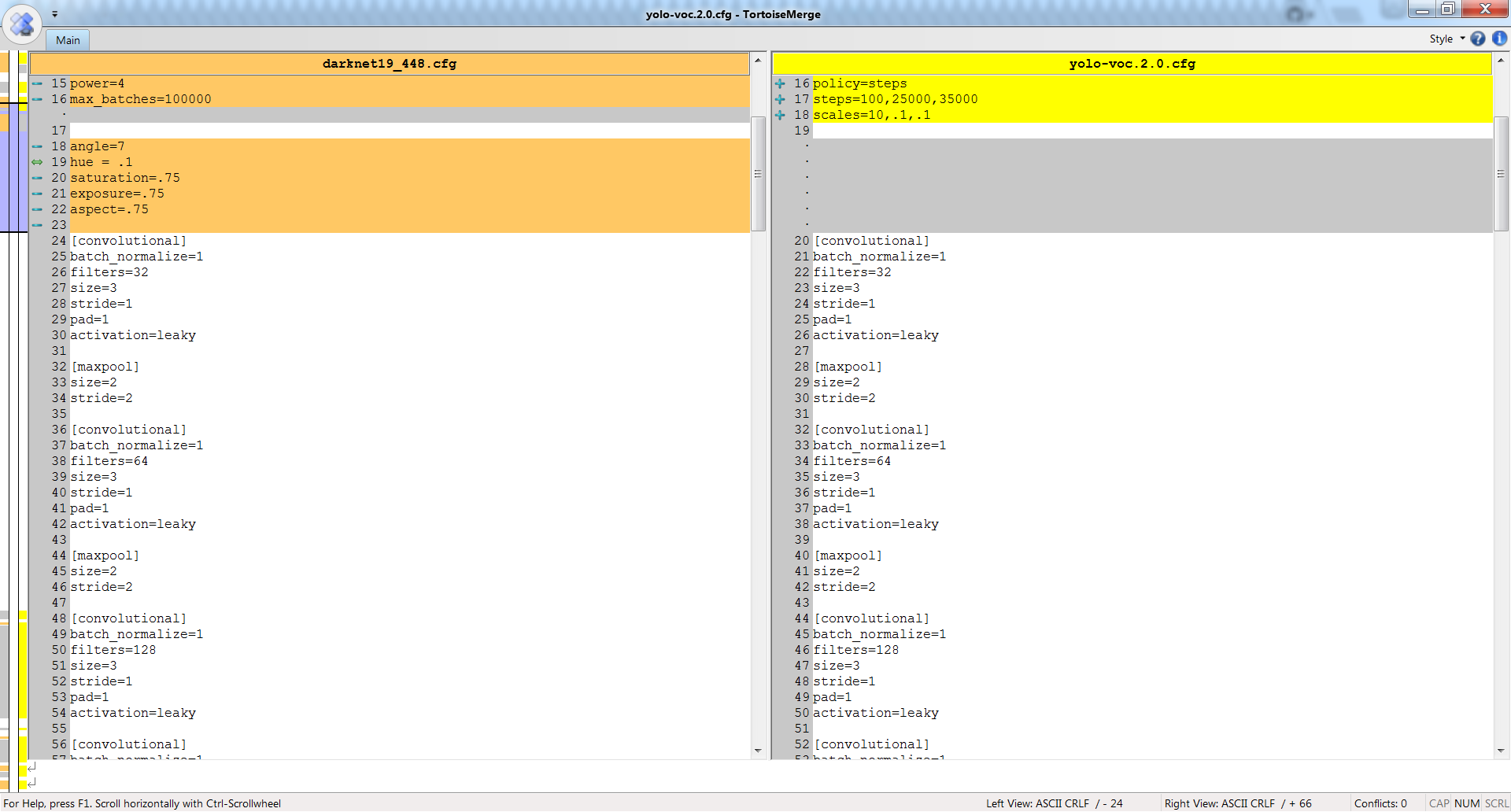
If you compare yolo-voc.2.0.cfg and darknet19_448.cfg neural networks, then you can see that they are the same in the first 23 layers - so darknet19_448.conv.23 is suitable for yolo-voc.2.0.cfg:
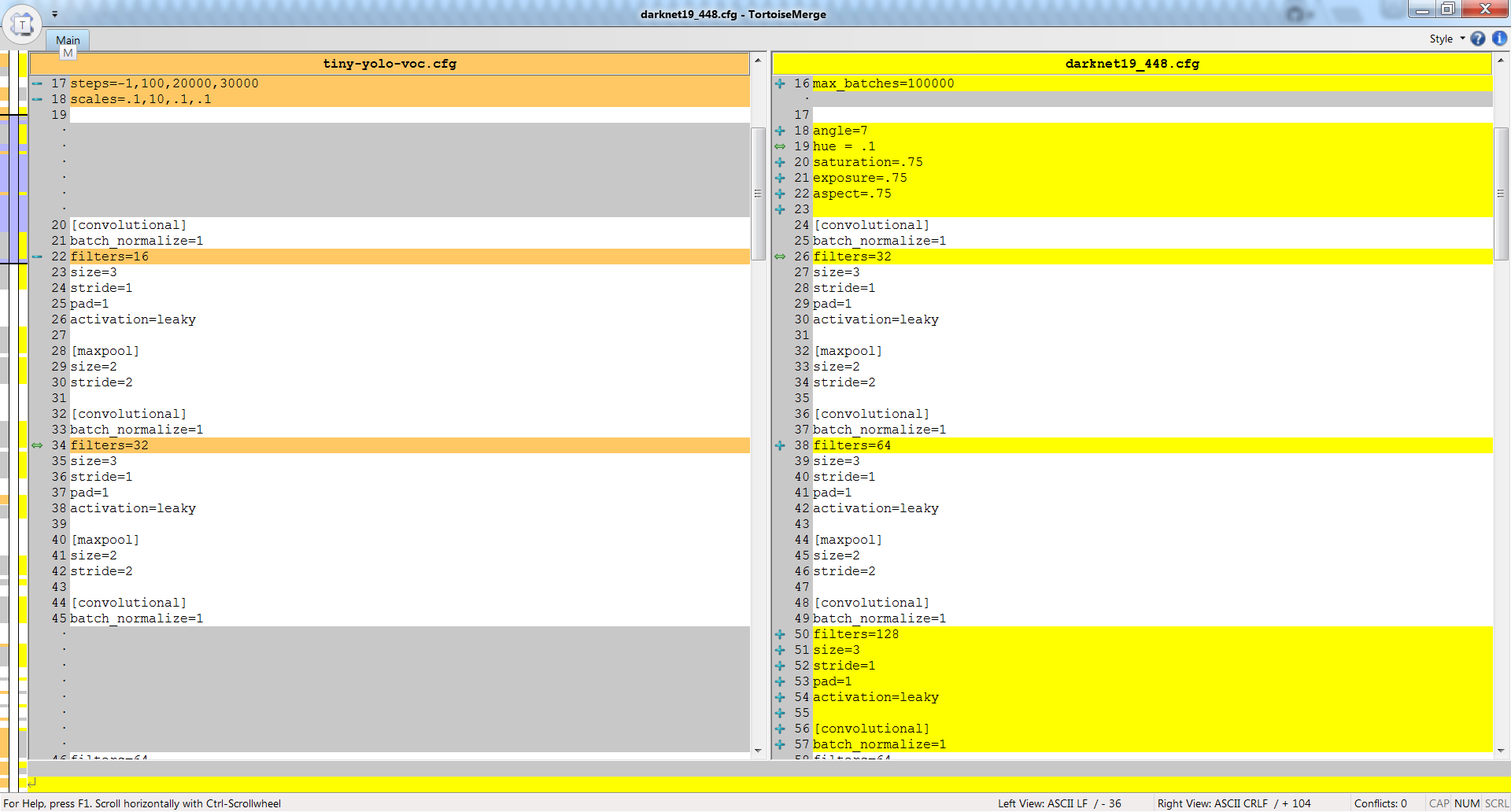
But if you compare tiny-yolo-voc.cfg and darknet19_448.cfg neural networks, then you can see that they are different - so darknet19_448.conv.23 isn't suitable for tiny-yolo-voc.cfg:
AlexeyAB
on 2 Feb 2018
@AlexeyAB which weight file do you recommend to use with tiny-yolo-voc.2.0.cfg ? I've been using the darknet19_448.conv.23 for all my trainings with both yolo.cfg yolo-voc.cfg, tiny-yolo.cfg and tiny-yolo-voc.cfg and I guess the initial weight file is what makes my results inconsistent.
 TheMikeyR
on 5 Feb 2018
TheMikeyR
on 5 Feb 2018
@TheMikeyR
- You can just get weights from first 13 convolutional layers from default model tiny-yolo-voc.weights:
darknet.exe partial tiny-yolo-voc.cfg tiny-yolo-voc.weights tiny-yolo-voc.conv.13 13
And train using this weights:darknet.exe detector train data/my.data tiny-yolo-my.cfg tiny-yolo-voc.conv.13
- Or you can train your model that based on tiny-yolo without pre-trained weights:
darknet.exe detector train data/my.data tiny-yolo-my.cfg
- In this case, weights will be filled by random values: https://github.com/AlexeyAB/darknet/blob/64aa0180bb74e84a75958b3da0061a9f5615729d/src/convolutional_layer.c#L207-L208
- Scales will be filled by 1: https://github.com/AlexeyAB/darknet/blob/64aa0180bb74e84a75958b3da0061a9f5615729d/src/convolutional_layer.c#L237
AlexeyAB
on 5 Feb 2018
@123liluky I also recommend you for gray-scale images to set in your cfg-file:
saturation = 0
exposure = 1.5
hue=0
@AlexeyAB I've generated new anchors for my cfg based on my custom dataset (5 anchors), when using a partial tiny-yolo-voc.weights darknet.exe partial tiny-yolo-voc.cfg tiny-yolo-voc.weights tiny-yolo-voc.conv.13 13 the loss raise insanely quickly and after 7 iterations it goes into -nan, when using no weights it does the same.
When using the darknet19_448.conv.23 it works and the loss decrease nearly every iteration and it can train for more than 30k iterations (not that it helps the loss much).
Any reasons for this?
Information:
Using pjreddies fork
Downloaded these weights tiny-yolo-voc.weights
Anchors generated from this script
tiny-yolo-voc.cfg copied and modified anchors and resolution. The anchors have been generated for 608x608, but I've also tried to go back to 416x416 with anchors generated for those. It goes to -nan after few iterations with partial weights and also no weights. Works fine when using darknet19_448.conv.23.
When I train with darknet19_448.conv.23 works and after 30k iterations I've stopped and analysed the detections, it have some issues regarding objects of same class close to each other. I have experiemented with increasing the anchors to 10, but didn't really see any improvement regarding detecting people close to each other. (I guess more experimenting is needed).
[net]
batch=64
subdivisions=2
width=608
height=608
channels=3
momentum=0.9
decay=0.0005
angle=0
saturation = 1.5
exposure = 1.5
hue=.1

learning_rate=0.001
max_batches = 40200
policy=steps
steps=-1,100,20000,30000
scales=.1,10,.1,.1

[convolutional]
batch_normalize=1
filters=16
size=3
stride=1
pad=1
activation=leaky

[maxpool]
size=2
stride=2

[convolutional]
batch_normalize=1
filters=32
size=3
stride=1
pad=1
activation=leaky

[maxpool]
size=2
stride=2

[convolutional]
batch_normalize=1
filters=64
size=3
stride=1
pad=1
activation=leaky

[maxpool]
size=2
stride=2

[convolutional]
batch_normalize=1
filters=128
size=3
stride=1
pad=1
activation=leaky

[maxpool]
size=2
stride=2

[convolutional]
batch_normalize=1
filters=256
size=3
stride=1
pad=1
activation=leaky

[maxpool]
size=2
stride=2

[convolutional]
batch_normalize=1
filters=512
size=3
stride=1
pad=1
activation=leaky

[maxpool]
size=2
stride=1

[convolutional]
batch_normalize=1
filters=1024
size=3
stride=1
pad=1
activation=leaky

###########

[convolutional]
batch_normalize=1
size=3
stride=1
pad=1
filters=1024
activation=leaky

[convolutional]
size=1
stride=1
pad=1
filters=30
activation=linear

[region]
anchors = 0.69,1.12, 0.80,1.44, 1.02,1.68, 1.08,1.15, 1.55,1.52
bias_match=1
classes=1
coords=4
num=5
softmax=1
jitter=.2
rescore=1

object_scale=5
noobject_scale=1
class_scale=1
coord_scale=1

absolute=1
thresh = .6
random=0
@TheMikeyR This is strange, that model based on tiny-yolo-voc.cfg can be trained fine with darknet19_448.conv.23 and can't be trained with tiny-yolo-voc.conv.13.
- Try to use this learning rate params:
learning_rate=0.0001
max_batches = 45000
policy=steps
steps=100,1000,5000
scales=10,.1,.1
- Or update code from this repo and try this params:
learning_rate=0.001
burn_in=1000
max_batches = 45000
policy=steps
steps=2000,5000
scales=.1,.1
@AlexeyAB Okay, using your fork fixed my issue, didn't change anything other than this fork, it is slowly decaying loss every iteration instead of increasing exponentially into -nan. I will use your fork from now on and see if I get better results, sorry for wasting your time.
I really appreciate your time and help in this community!
TheMikeyR
on 7 Feb 2018
Related issues
 HanSeYeong
·
3Comments
HanSeYeong
·
3Comments
 bit-scientist
·
3Comments
bit-scientist
·
3Comments
 siddharth2395
·
3Comments
siddharth2395
·
3Comments
 Jacky3213
·
3Comments
Jacky3213
·
3Comments
 off99555
·
3Comments
off99555
·
3Comments
Most helpful comment
@TheMikeyR
darknet.exe partial tiny-yolo-voc.cfg tiny-yolo-voc.weights tiny-yolo-voc.conv.13 13And train using this weights:
darknet.exe detector train data/my.data tiny-yolo-my.cfg tiny-yolo-voc.conv.13darknet.exe detector train data/my.data tiny-yolo-my.cfg