Darkflow: No module named cy_yolo_findboxes
when I run test , like ./flow --model jason/yolo2_voc2007_2017.cfg --load jason/yolo-voc.weights --test sample_img/
shows:
Traceback (most recent call last):
  File "./flow", line 4, in <module>
    from darkflow.cli import cliHandler
  File "/home/jason/code/darkflow/darkflow/cli.py", line 3, in <module>
    from darkflow.net.build import TFNet
  File "/home/jason/code/darkflow/darkflow/net/build.py", line 7, in <module>
    from .framework import create_framework
  File "/home/jason/code/darkflow/darkflow/net/framework.py", line 1, in <module>
    from . import yolo
  File "/home/jason/code/darkflow/darkflow/net/yolo/__init__.py", line 2, in <module>
    from . import predict
  File "/home/jason/code/darkflow/darkflow/net/yolo/predict.py", line 6, in <module>
    from darkflow.cython_utils.cy_yolo_findboxes import yolo_box_constructor
ImportError: No module named cy_yolo_findboxes
there has cy_yolo_findboxes.pyx file in cython_utils directory.
how to sovle? thanks
 myBestLove
All 23 comments
Have you built the Cython extensions using one of the three methods outlined here?
 abagshaw
on 23 May 2017
abagshaw
on 23 May 2017
I only use 'pip install .'
do I need to executed 'python3 setup.py build_ext --inplace' ?
myBestLove
on 23 May 2017
Can you try using flow instead of ./flow
abagshaw
on 23 May 2017
the same problem .
and my cython_utils directory like this
---->cython_utils
---->cy_yolo2_findboxes.pyx
---->__init__.py
---->nms.pxd
---->cy_yolo_findboxes.pyx
---->__init__.pyc
---->nms.pyx
is OK?
myBestLove
on 23 May 2017
If you install using pip install . I don't think the Cython extensions will be built in the same folder - they will be build somewhere else. Try running pip uninstall darkflow then run python3 setup.py build_ext --inplace and try the ./flow command again.
abagshaw
on 23 May 2017
ok
I find that if using pip install ., Cython extensions will be built in the /usr/local/lib/python2.7/dist-packages/darkflow.
myBestLove
on 23 May 2017
@myBestLove I'm having the same issue, using Python 3.5. I tried @abagshaw suggestion but didn't work for me. Can you share how did you solve it? This is a screenshot of my error:

 ilopezfr
on 3 Jun 2017
ilopezfr
on 3 Jun 2017
@ilopezfr Can you try using flow instead of ./flow and see if that changes anything?
abagshaw
on 3 Jun 2017
@abagshaw I did my installation using python3 setup.py build_ext --inplace so it doesn't recognize the command flow.
Did you install it globally with pip install . ? Would that chance anything?
Thanks!
ilopezfr
on 4 Jun 2017
@ilopezfr It may be that just building the Cython extensions in place doesn't work with the import paths (I'll look into that). For now can you try doing pip install .
abagshaw
on 4 Jun 2017
@abagshaw Thanks! It actually fixed it when installing it globally.
ilopezfr
on 6 Jun 2017
For what it's worth, I am using python 2.7 and was having the same issue. I initially used sudo pip install . to install and had the cy_yolo_findboxes error when using the provided python script to import the darkflow module(s). I uninstalled darkflow using "sudo pip uninstall darkflow", then reinstalled using:
python setup.py build_ext --inplace
(note: not python3 as described  above).
I now can run the command line demo using:
./flow --model cfg/yolo.cfg --load bin/yolo.weights --demo camera --gpu 1.0
and I can use the python interface as well in python2.7:
from darkflow.net.build import TFNet
import cv2
I'm running ubuntu 16.04, python2.7, CUDA installed. Separate issue, but for whatever reason, the command line demo runs at <1fps.
EDIT: I hadn't activated my virtual environment with GPU-enabled TensorFlow. The demo now runs at 7fps.
 Chambana
on 20 Aug 2017
Chambana
on 20 Aug 2017
Hey,
I had the same issue with the imports from cython code not using fully qualified names. The solution is simply not using "darkflow" as the name for the root folder in the project.
 hoardboard
on 11 Jan 2018
hoardboard
on 11 Jan 2018
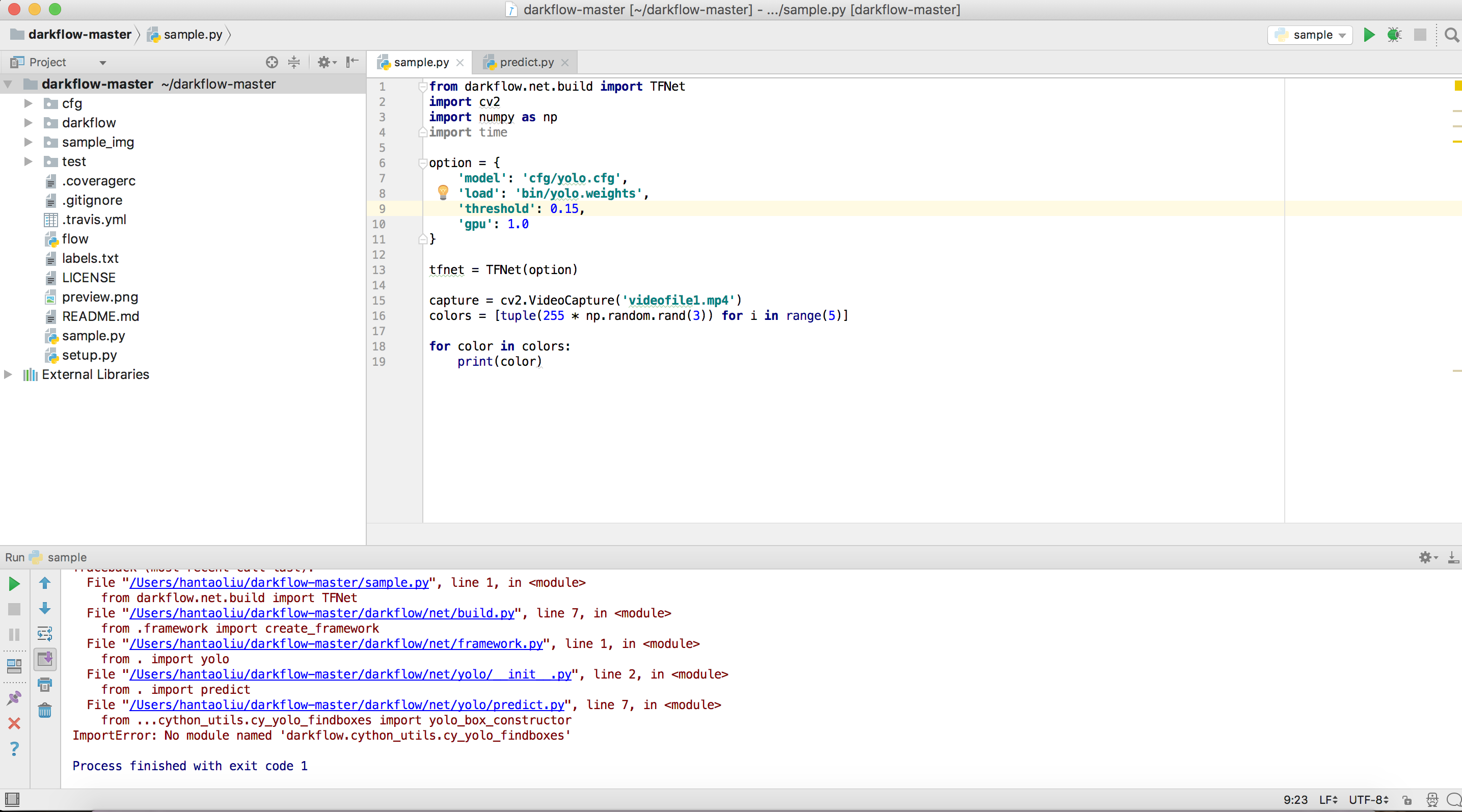
I am trying to run codes that I wrote on PyCharm, and I ran into same issue.
Any help will be appreciated
 liuhantao9
on 26 Jan 2018
liuhantao9
on 26 Jan 2018
@ilopezfr same errors.... i am also faced using in ubuntu can you help me to overcome this problem with your experience...
 karthickn210
on 11 Apr 2018
karthickn210
on 11 Apr 2018
cd darkflow/
python setup.py build_ext --inplace
pip install -e .
Works for me (ubuntu16.04, python3.5)
 ashokpant
on 19 Apr 2018
ashokpant
on 19 Apr 2018
./flow didn't work for me, but python flow ... worked!
 BaptisteAmato
on 15 May 2018
BaptisteAmato
on 15 May 2018
after doing all the steps listed,
- in your conda environment [Either base (if you did not set a virtual environment), OR the virtual environment that you dedicated darkyolo for]
- go the directory where dark-flow master is located
- Run 'python3 setup.py build_ext --inplace' again
OR
'python setup.py build_ext --inplace' (Depending on your set up)
I was using python 3.5.6 in my anaconda virtual environment and after i built it again, it worked.
After it works
run 'python flow -h' to check after installation.
 Haosam
on 11 Oct 2018
Haosam
on 11 Oct 2018
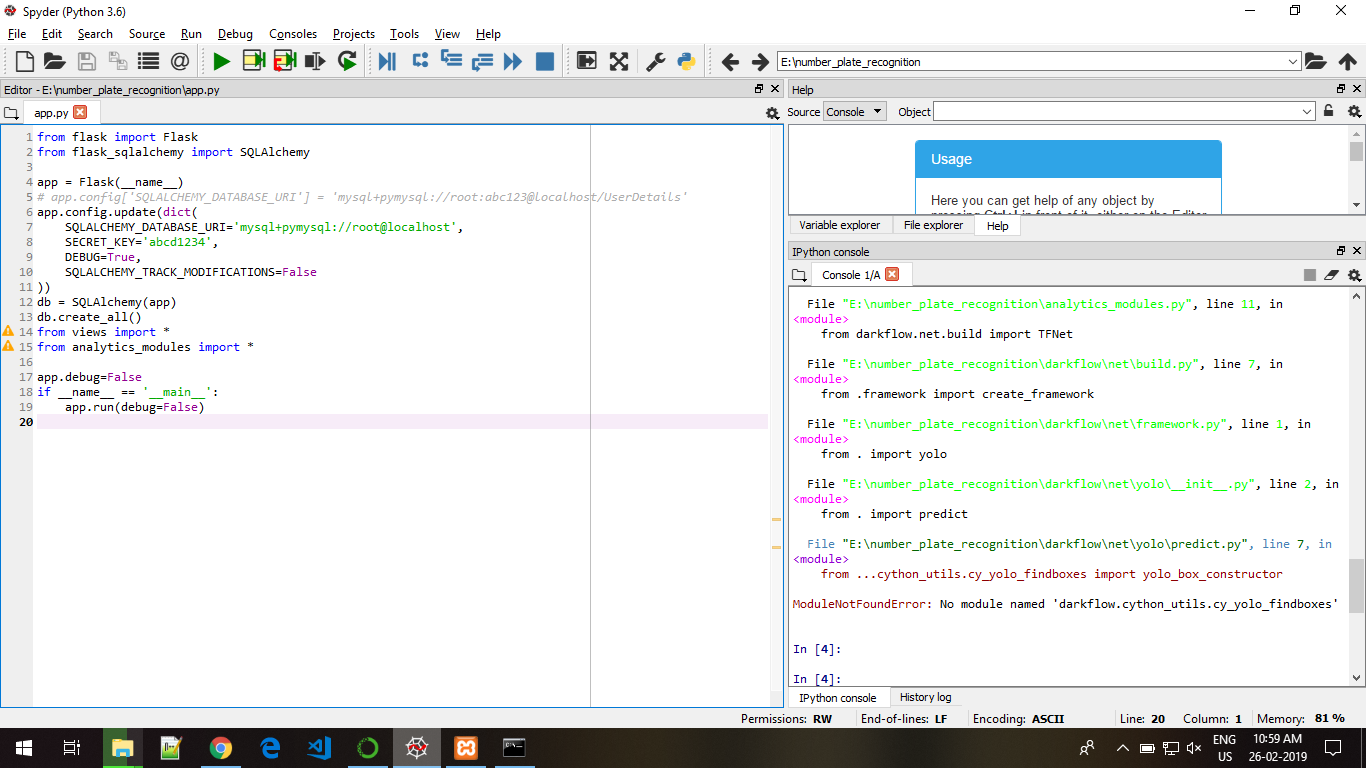
i got the same problem but instead ImportError: No module named cy_yolo_findboxes
i got ImportError: No module named cv2
what should i install?
i already do pip install opencv and from here too https://www.lfd.uci.edu/~gohlke/pythonlibs/
 GigsyKami
on 22 Feb 2019
GigsyKami
on 22 Feb 2019
Hi GipsyKami. Are you using Conda or the regular python3 for this?
I am assuming you used conda.
There were some issues for me when I installed the packages to link to each other. Somehow for my system, conda installed packages and pip installed packages did not work together. My recommendation when working on yolo for python, is to install all packages on pip.
So, either remove all the conda packages on the conda environment, or just build a new conda environment and pip install the required packages.
As for opencv, it is slightly more complicated than pip install opencv
I followed this installation guide. You can look at it
OpenCV Installation
Haosam
on 24 Feb 2019
 akashsahu410
on 26 Feb 2019
akashsahu410
on 26 Feb 2019
the same problem .
and my cython_utils directory like this
---->cython_utils
---->cy_yolo2_findboxes.pyx
---->init.py
---->nms.pxd
---->cy_yolo_findboxes.pyx
---->init.pyc
---->nms.pyx
is OK?
akashsahu410
on 26 Feb 2019
@akashsahu410 Have you tried this?
./flow didn't work for me, but
python flow ...worked!
 Wanderish
on 21 Apr 2019
Wanderish
on 21 Apr 2019
Related issues
 ShawnDing1994
·
4Comments
ShawnDing1994
·
4Comments
 LeeroyHannigan
·
4Comments
LeeroyHannigan
·
4Comments
 humanova
·
4Comments
humanova
·
4Comments
 1NNcoder
·
3Comments
1NNcoder
·
3Comments
 wonny2001
·
4Comments
wonny2001
·
4Comments
Most helpful comment
If you install using
pip install .I don't think the Cython extensions will be built in the same folder - they will be build somewhere else. Try runningpip uninstall darkflowthen runpython3 setup.py build_ext --inplaceand try the./flowcommand again.