Cypress-file-upload: [Bug] How to upload to Angular's ngx-dropzone
Current behavior:
Hi!
I'm trying to use the provided examples to upload a file via drag n' drop to Angular's ngx-dropzone:
    const fileName = 'import-contacts-short.csv';

    cy.fixture(fileName).then(fileContent => {
      cy.get('[data-testid="dropzone"]').upload(
        { fileContent, fileName, mimeType: 'text/csv' },
        { subjectType: 'drag-n-drop' },
      );
    });
But I'm facing the following error:

This suggests that I should be passing a FileList, as .item is a property of this class, but I can't, since it is a readonly constructor. If ngx-dropzone is meant to be supported, is there any workaround to this?
Thanks in advance.
Desired behavior:
upload should support sending files via a FileList
 thiagobrez
All 8 comments
Hi @thiagobrez
Thanks for submitting the issue!
Seems it should work naturally..
Which element has this data-testid="dropzone" attribute?
Can you please specify cypress and cypress-file-upload versions?
Let's fix this and possibly make a recipe with that plugin.
 abramenal
on 10 Dec 2019
abramenal
on 10 Dec 2019
Hey @abramenal, thanks for the quick response!
The test id is on the dropzone itself:
<ngx-dropzone (change)="onSelect($event)" [multiple]="false" accept=".csv" data-testid="dropzone">
      ...
</ngx-dropzone>
Package versions are as following:
  "devDependencies": {
    "cypress": "^3.6.0",
    "cypress-file-upload": "^3.5.0"
  }
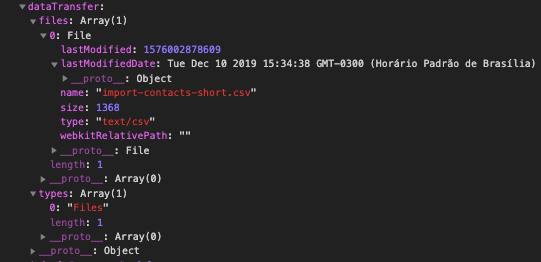
Also, I've set a breakpoint on the drop event and saw that the dataTransfer object looks different between cypress-file-upload run and actually dropping the file.
Real file drop:

cypress-file-upload drop:
thiagobrez
on 10 Dec 2019
@thiagobrez okay, now I see the problem! Perfect investigation! 👍
I recall my investigation about that API, as per MDN FileList object is read-only, however we can utilize DataTransfer API which uses it internally.
abramenal
on 10 Dec 2019
@all-contributors add @thiagobrez for bug
abramenal
on 10 Dec 2019
@abramenal
I've put up a pull request to add @thiagobrez! :tada:
![allcontributors[bot] picture](https://avatars.githubusercontent.com/in/23186?v=4&s=40) allcontributors[bot]
on 10 Dec 2019
allcontributors[bot]
on 10 Dec 2019
@thiagobrez can you please test this in v3.5.1?
abramenal
on 10 Dec 2019
Wow, perfect! Just tested and it is working as intended.
@abramenal Thanks again for the package and quick response.
thiagobrez
on 10 Dec 2019
@thiagobrez thank you for the feedback and detailed investigation!
And welcome to the contributors list 🥂
abramenal
on 10 Dec 2019
Related issues
 philjones88
·
4Comments
philjones88
·
4Comments
 harrison9149
·
7Comments
harrison9149
·
7Comments
 JaydenNavarro-at
·
5Comments
JaydenNavarro-at
·
5Comments
 sandra-ouadghiri
·
3Comments
sandra-ouadghiri
·
3Comments
 warpech
·
4Comments
warpech
·
4Comments