Cxbx-reloaded: CXBX unresponsive to keyboard input
So i am new to CXBX... Downloaded it today, and tried to run Read Dead Revolver.. Started emulation and everything was going fine.. I watched the whole intro and then the games says "PRESS START".. I went to keymapping and mapped START to ENTER..... The key was successfully mapped as prompted by CXBX.

I applied the changes went back to game... Pressed enter but nothing happened..... The games was fine because the "PRESS START" was continuously blinking with some animation..... I tried mapping different keys but none of them responded.... PLEASE HELP.
I am running the latest release version...
And Windows 10 Home x64 Build 1809
 MirzaTaimoorBaig
All 5 comments
Be sure to go to Settings > Config Xbox Controller Mappings and switch Xbox Port 0 to DirectInput Port 0:

After doing that restart the game and your changes should be applied. DirectInput handles older joysticks and keyboard input, so by switching that to port 0 (the first controller port) it should allow you to control the game.
 CakeLancelot
on 29 Jan 2019
CakeLancelot
on 29 Jan 2019
Be sure to go to Settings > Config Xbox Controller Mappings and switch Xbox Port 0 to DirectInput Port 0:
After doing that restart the game and your changes should be applied. DirectInput handles older joysticks and keyboard input, so by switching that to port 0 (the first controller port) it should allow you to control the game.
Thanks for the reply! It worked... BUT now i have this :(
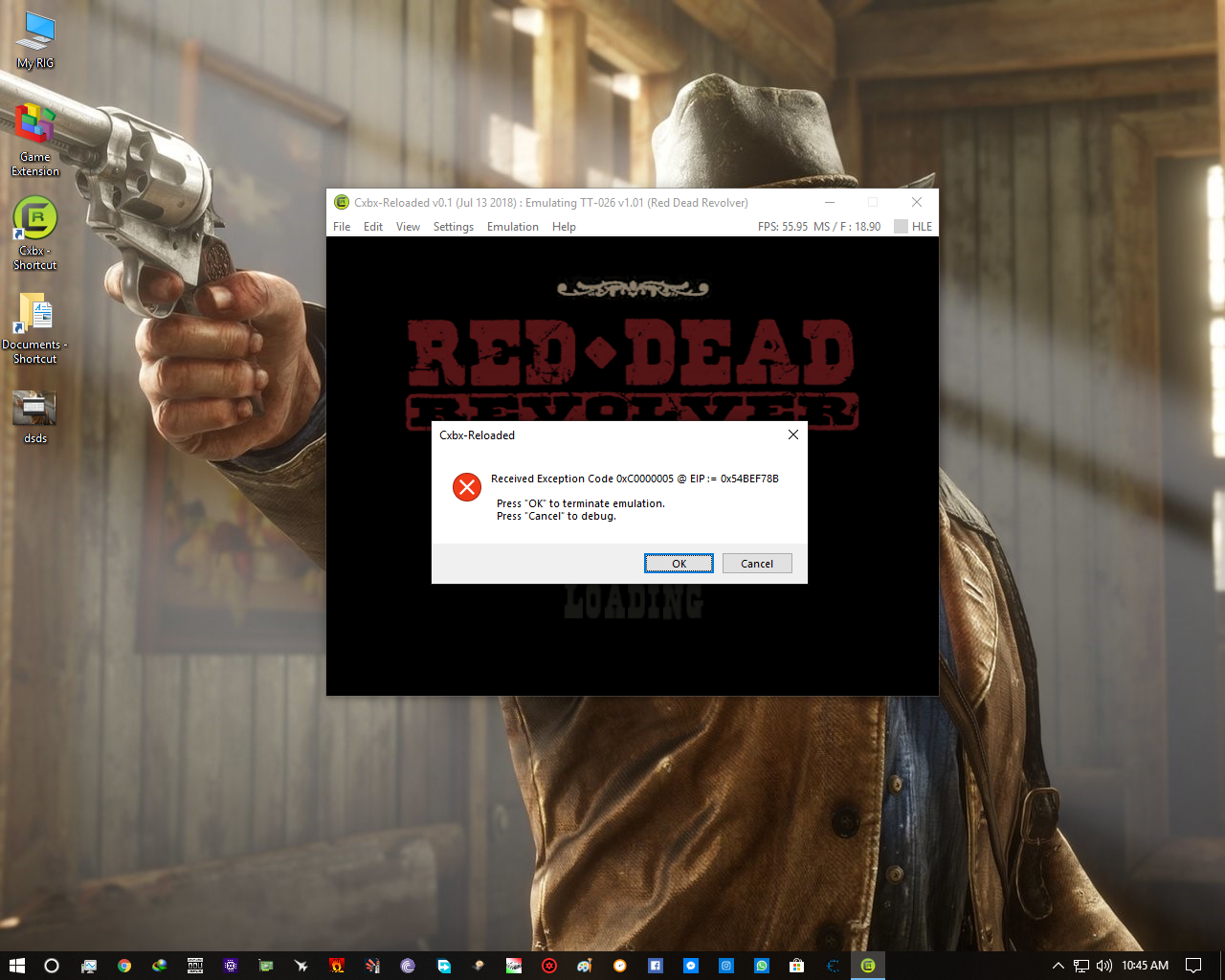
Everytime i restart the emulator, the error changes.. For example, At first i got this: Recieved Exception Code 0xC0000005 @ EIP := 0x54BEF78B........ I tried restarting the emulator and then i got this, Recieved Exception Code 0xC0000005 @ EIP := 0x749DF78B.......... Every time it changes :(
MirzaTaimoorBaig
on 29 Jan 2019
Be sure to go to Settings > Config Xbox Controller Mappings and switch Xbox Port 0 to DirectInput Port 0:
After doing that restart the game and your changes should be applied. DirectInput handles older joysticks and keyboard input, so by switching that to port 0 (the first controller port) it should allow you to control the game.
If i try debugger... I get this:

MirzaTaimoorBaig
on 29 Jan 2019
Try using a newer version of the emulator first: The build you are using is 7 months old, which is a long time in terms of emulator development
 LukeUsher
on 29 Jan 2019
LukeUsher
on 29 Jan 2019
The original problem was "solved", this issue can be closed. The second problem doesn't have a solution yet and is game specific (should be reported to the compatibility tracker here https://github.com/Cxbx-Reloaded/game-compatibility/issues/795)
 literalmente-game
on 29 Jan 2019
literalmente-game
on 29 Jan 2019
Related issues
 AzurikRiseOfPerathia
·
18Comments
AzurikRiseOfPerathia
·
18Comments
 RadWolfie
·
26Comments
RadWolfie
·
26Comments
 PatrickvL
·
31Comments
PatrickvL
·
31Comments
 furrya
·
23Comments
furrya
·
23Comments
 escape209
·
23Comments
escape209
·
23Comments
Most helpful comment
The original problem was "solved", this issue can be closed. The second problem doesn't have a solution yet and is game specific (should be reported to the compatibility tracker here https://github.com/Cxbx-Reloaded/game-compatibility/issues/795)