Cwa-app-ios: Compatibility issues on iOS 14.2 (b3)
On iOS 14.2 beta 3 there’s an error message as soon as you open up cwa. EN Code: 2. I hope this can be fixed asap.
Edit: it seems like every time I open cwa, it tries to fetch the keys but it doesn’t succeed. There are entries in the exposure checks in settings matching the times I opened cwa (5min ago, 7min ago, 9min ago etc.), but there are no “new files”.
Internal Tracking ID: EXPOSUREAPP-3272
 Mihahn
All 87 comments
@Mihahn
Could you provide a Screenshot and the App Version here please?
 Ein-Tim
on 14 Oct 2020
Ein-Tim
on 14 Oct 2020
Same here.
1.3.2(0)
 ftonat
on 14 Oct 2020
ftonat
on 14 Oct 2020

ftonat
on 14 Oct 2020
According to Apple documentation, this error means bad parameters.
(sounds not so good, IMO)
Please check the ENF log if the check was done.
Edit: I just read again your report. This error seems indeed to block the check.
@thomasaugsten @svengabr
 ndegendogo
on 14 Oct 2020
ndegendogo
on 14 Oct 2020
@ndegendogo
I can't reproduce this Issue directly after Installing the Beta 3...
Everything works normal so hopefully/maybe this is only an Edge Case Error... Will report back if something changes, maybe @thomasaugsten would like to take a look at this?
Ein-Tim
on 14 Oct 2020
I see this too. Initially getting the error mentioned above.
By now the error has changed to "Fehler 13: Ihre Risiko-Ermittlung für den heutigen Tag wurde bereits durchgeführt. [...]"
This is obviously false, the app still shows the last update before installing b3 as the last update timestamp. The exposure check log shows 0 new files for every check since then.
 jkreileder
on 14 Oct 2020
jkreileder
on 14 Oct 2020
@jkreileder I recommend that you are patient till tomorrow....
ndegendogo
on 14 Oct 2020
ooops .... it is late today. I just wrote a completely unrelated statement here - it was meant for a different thread.
I have deleted it now. Sorry for the confusion.
ndegendogo
on 14 Oct 2020
hopefully/maybe this is only a Edge Case Error
@Ein-Tim hopefully, yes ...
ndegendogo
on 14 Oct 2020
@Mihan @ftonat @jkreileder which iOS version were you running before you upgraded to this beta?
And cwa was running under that older version as expected?
ndegendogo
on 14 Oct 2020
@ndegendogo 14.2 beta 2. Worked flawlessly.
jkreileder
on 14 Oct 2020
Can also reproduce this error after updating from iOS 14.2 Beta 2 to Beta 3. It worked fine on b2 previously.
 TheJulianJES
on 14 Oct 2020
TheJulianJES
on 14 Oct 2020
Can also reproduce this error after updating from iOS 14.2 Beta 2 to Beta 3. It worked fine on b2 previously.
Same here
 trispo
on 14 Oct 2020
trispo
on 14 Oct 2020
Went from iOS 14.2 b2 to b3
B2: cwa worked as expected
B3: error above occurred
ftonat
on 14 Oct 2020
@mihan @ftonat @jkreileder which iOS version were you running before you upgraded to this beta?
And cwa was running under that older version as expected?
Can also reproduce this error after updating from iOS 14.2 Beta 2 to Beta 3. It worked fine on b2 previously.
Same here!
Mihahn
on 14 Oct 2020
Same problem here after upgrading from 14.2 Beta 2 to 14.2 Beta 3. I uninstalled CWA and reinstalled it. Now it appears to be working again.
 fsmeets
on 14 Oct 2020
fsmeets
on 14 Oct 2020
Same problem here after upgrading from 14.2 Beta 2 to 14.2 Beta 3. I uninstalled CWA and reinstalled it. Now it appears to be working again.
Same here, no error after reinstalling. But until now there's an unknown risk (old checks remain in Apple's Exposure Checks but there hasn't been a check since reinstalling the app, so I can't confirm everything's up and running again).
Mihahn
on 14 Oct 2020
Same problem here with app version 1.3.2 (0) after having updated to iOS 14.2 Beta 3.
I also noticed that clicking the "Mehr erfahren" button in the shown alert has no action. The alert window simply closes, as it does when selecting "OK".
Having opened the app a couple time for testing this, the message of the alert has now changed to "Fehler 13: Ihre Risiko-Ermittlung für den heutigen Tag wurde bereits durchgeführt. …"
 cmittendorf
on 15 Oct 2020
cmittendorf
on 15 Oct 2020
@cmittendorf just for the record: which was your previous iOS version before this update?
clicking the "Mehr erfahren" button in the shown alert has no action
With such an error code ( 2 meaning bad params) there are not so many options what a user could do. Except reporting back to the project maintainers or the technical hotline... (and, you are right, this could be the advice here).
to "Fehler 13: Ihre Risiko-Ermittlung für den heutigen Tag wurde bereits durchgeführt. …"
with this error code you should be patient till tomorrow ...
You could try the procedure that helped other users here: delete and reinstall the app.
I would be curious to learn if it is sufficient for error 2 to kick the app out of background processing (swipe) and restart. (For error 13 I don't expect so). But I understand if you don't want to try this experiment because it means an extra day of delay.
ndegendogo
on 15 Oct 2020
@ndegendogo The previous iOS version was 14.2 Beta 2. And I will simply be patient and wait till tomorrow …
cmittendorf
on 15 Oct 2020
@ndegendogo Killing the app (or restarting the iPhone) didn't have an effect on error 2 and 13.
I'm now back at error 2 and the app complains about no update in 48 hours.
Error 13 might have been caused by opening the app too many times yesterday.
ENF log shows one entry from background activity (all others are from opening the app) last night with 0 new files.
jkreileder
on 15 Oct 2020
Hey everyone,
I have created a Jira ticket EXPOSUREAPP-3018 for this issue so that the developers are notified.
Thanks again for your input!
Best regards,
ABB
Corona-Warn-App Open Source Team
 abro1i
on 15 Oct 2020
abro1i
on 15 Oct 2020
It is possible that there has been a change between the release of the developer beta and the public beta (released early hours today DE time) but I am not seeing the same error. App opens fine with no errors (iPhone 11, iOS 14.2 Public Beta 3)
 davidm2781
on 15 Oct 2020
davidm2781
on 15 Oct 2020
@davidm2781 the build number of developer beta 3 is 18B5072f. You can check the build number of the public beta in Settings/General/About, click on Software Version once to reveal the build number.
jkreileder
on 15 Oct 2020
can confirm 14.2 B3 (Developer BETA build 18b5072f) CWA Start results in Error EN Code: 2.
CWA on B2 Dev Beta worked fine.
 GSTEFKA
on 15 Oct 2020
GSTEFKA
on 15 Oct 2020
May be related to the deprecation of the following constant value in Beta 3: https://developer.apple.com/documentation/exposurenotification/endayssinceonsetofsymptomsunknown
ENCommon.h:
_Added_ #def ENStringify
_Added_ #def ENStringifyExpansion
_Modified_ ENDaysSinceOnsetOfSymptomsUnknown
| Availability | Deprecation Message
-- | -- | --
From | Available | none
To | Deprecated | Server must provide keys with days_since_onset_of_symptoms set.
 tens0rfl0w
on 15 Oct 2020
tens0rfl0w
on 15 Oct 2020
I had the same issue after upgrading to 14.2 b3. So uninstalled the app and reinstalled it. However my collected data are gone. The app shows "unknown risk"...due to the lack collected data
 zopyx
on 15 Oct 2020
zopyx
on 15 Oct 2020
I had the same issue after upgrading to 14.2 b3. So uninstalled the app and reinstalled it. However my collected data are gone. The app shows "unknown risk"...due to the lack collected data
Same here! Why is cwa unable to use the collected data which is still stored on the iPhone after reinstalling the app? Is this technically not possible or just not implemented yet?
Anyway, this has to be fixed until the official release of 14.2 and reinstalling shouldn't be the "official fix / workaround". If people have to reinstall cwa after updating to 14.2, many users will be lost I guess – this would be a serious problem!
Mihahn
on 15 Oct 2020
Same problem here after upgrading from 14.2 Beta 2 to 14.2 Beta 3. I uninstalled CWA and reinstalled it. Now it appears to be working again.
Same here, no error after reinstalling. But until now there's an unknown risk (old checks remain in Apple's Exposure Checks but there hasn't been a check since reinstalling the app, so I can't confirm everything's up and running again).
Uninstalling is deleting the 14 days history..,
 Alexcirlan
on 15 Oct 2020
Alexcirlan
on 15 Oct 2020
@zopyx @Mihahn Reinstalling the app should not fix the mentioned issue, as this is a hard coded misconfiguration that happens when writing a file to the EN framework and is not caused by any corrupted user data.
The reason why the app seems to work after reinstalling it is, that the EN framework is only accessed 24 hours after the installation of the app. So the error should happen again after 24 hours when the app starts calling the EN framework again.
tens0rfl0w
on 15 Oct 2020
The developers were able to reproduce the issue on our test devices and there is an ongoing internal discussion.
Thank you very much for your feedback!
Once we have more information we will keep you updated.
 svengabr
on 15 Oct 2020
svengabr
on 15 Oct 2020
Uninstalling is deleting the 14 days history..,
It is for cwa, but the data is still there in the settings app... so my question was if (in a future release) cwa could support importing the (older) data from the settings app?
@zopyx @Mihahn Reinstalling the app should not fix the mentioned issue, as this is a hard coded misconfiguration that happens when writing a file to the EN framework and is not caused by any corrupted user data.
The reason why the app seems to work after reinstalling it is, that the EN framework is only accessed 24 hours after the installation of the app. So the error should happen again after 24 hours when the app starts calling the EN framework again.
Yup, when I reinstalled we didn't know it was a hard coded misconfiguration so I thought it could solve the problem. But others shouldn't reinstall to keep their data and just wait for an app update I guess!
Mihahn
on 15 Oct 2020
iOS 14.2B3 is not working with the CWA. We are in discussion with Apple to solve the issue. Until a new release you have to go back to iOS 14.0.1
 thomasaugsten
on 15 Oct 2020
thomasaugsten
on 15 Oct 2020
@zopyx @Mihahn @Alexcirlan
Since the saving of your contacts is done by the ENF, and you didn't deinstall the ENF 😉, but only the CWA, the recorded contacts are still there and all your recorded contacts will be checked with the new Data the App downloads (if it downloads new Data 😅).
The CWA will show "Unbekanntes Risiko" (respectively not the correct number of active days) because it was deinstalled and this data is saved by the App and not by the ENF (and you deleted the Data by deinstalling the App). But, as said above, (if the Issue gets solved) everything should work normally but its not shown correctly.
Here the FAQ Entry explaining what happens (and what not) when you deinstall the App: https://www.coronawarn.app/de/faq/?search=Deinstallieren#delete_random_ids
Ein-Tim
on 15 Oct 2020
Related PR: #1359
Ein-Tim
on 16 Oct 2020
The behavior will be solved with the iOS 14.2 GM. It will not fixed with future CWA releases. Please downgrade to iOS 14.1
thomasaugsten
on 16 Oct 2020
Hi @ all.
have anybody a fix for this issue (en code 2)?
Thx
 Maik176
on 19 Oct 2020
Maik176
on 19 Oct 2020
Reproducing the same issue for a week now on 14.2 Beta 3.
Does this mean the app is not tracking and would thus miss out on high risk encounters currently? 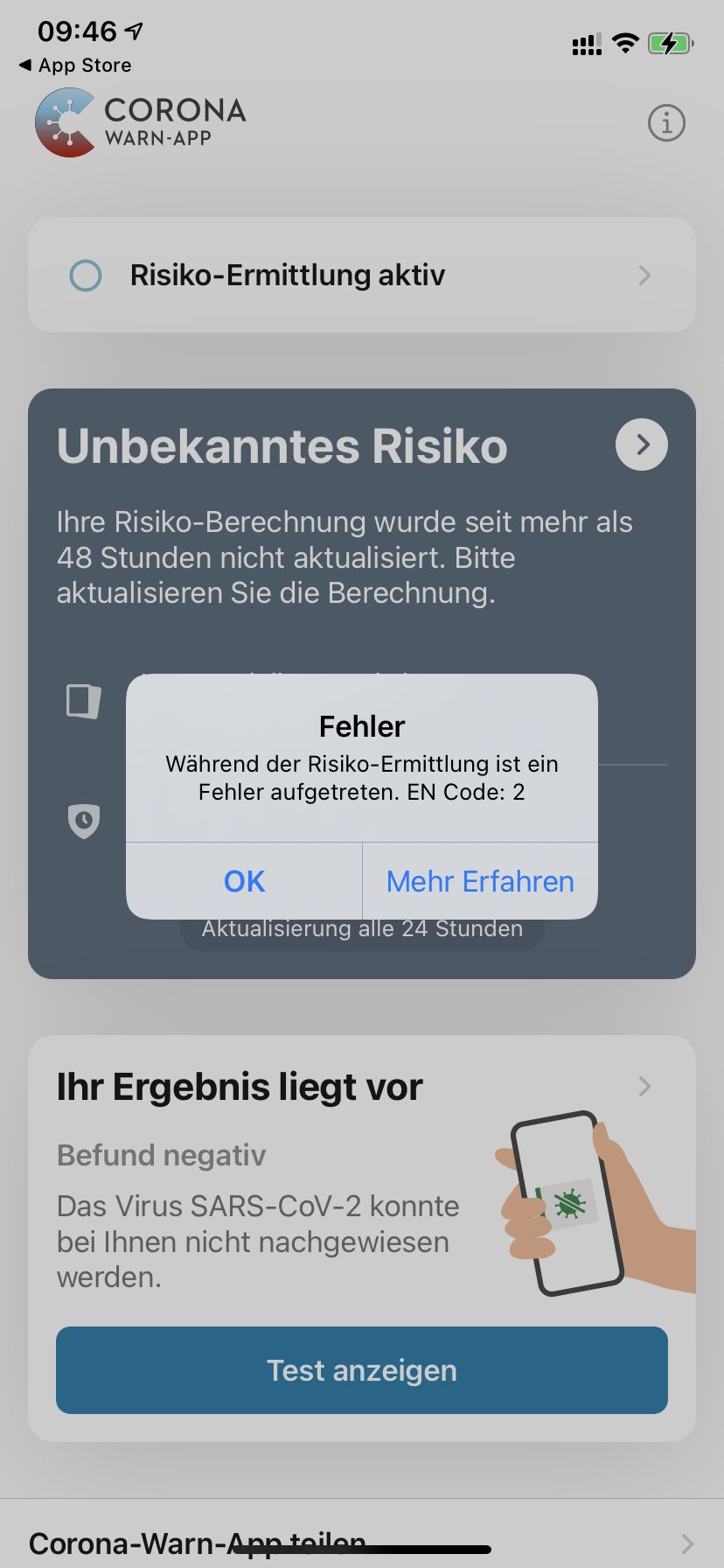
 dragoncode
on 19 Oct 2020
dragoncode
on 19 Oct 2020
With iOS 14,2 PB3 an CWA Ver. 1.5.0 from today, the error is still present.
 BirgerKlaus
on 19 Oct 2020
BirgerKlaus
on 19 Oct 2020
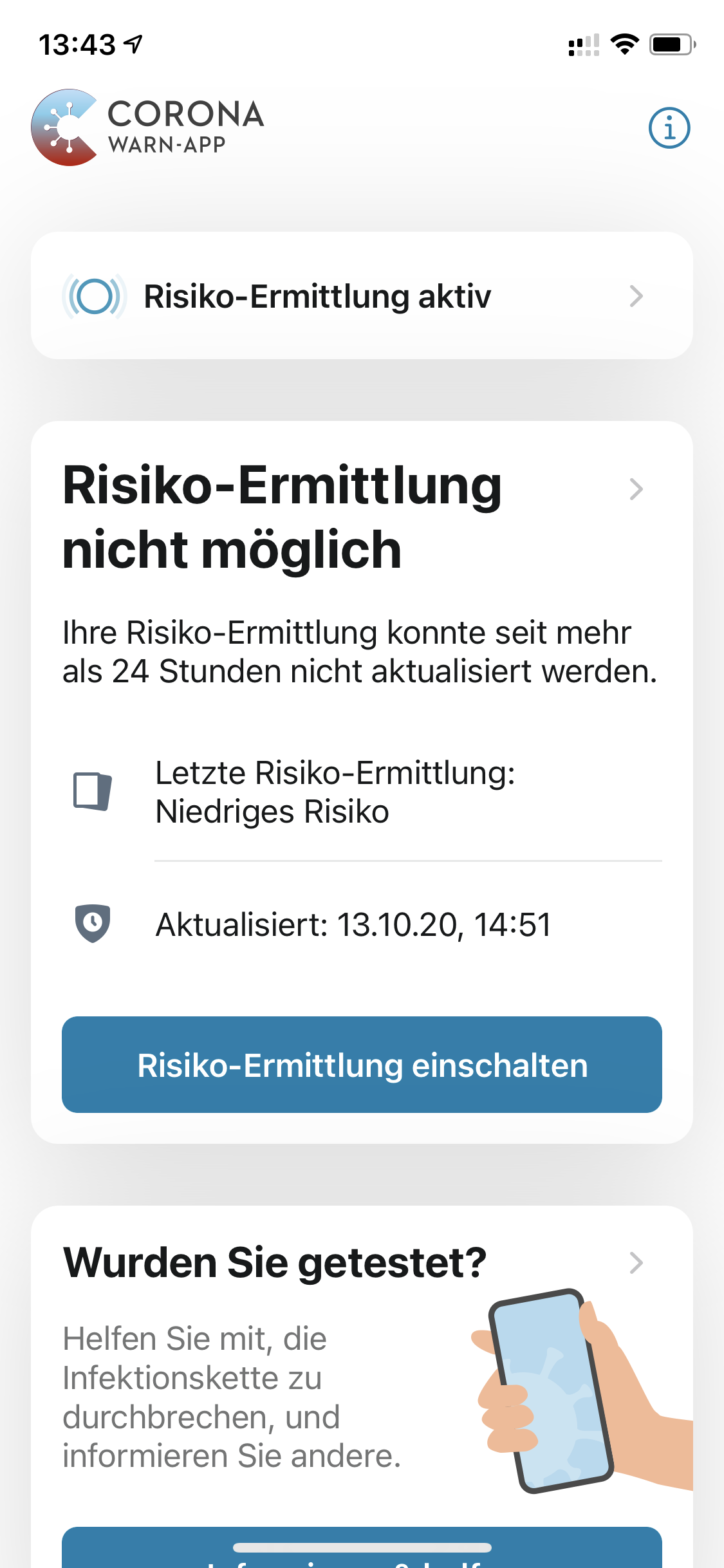
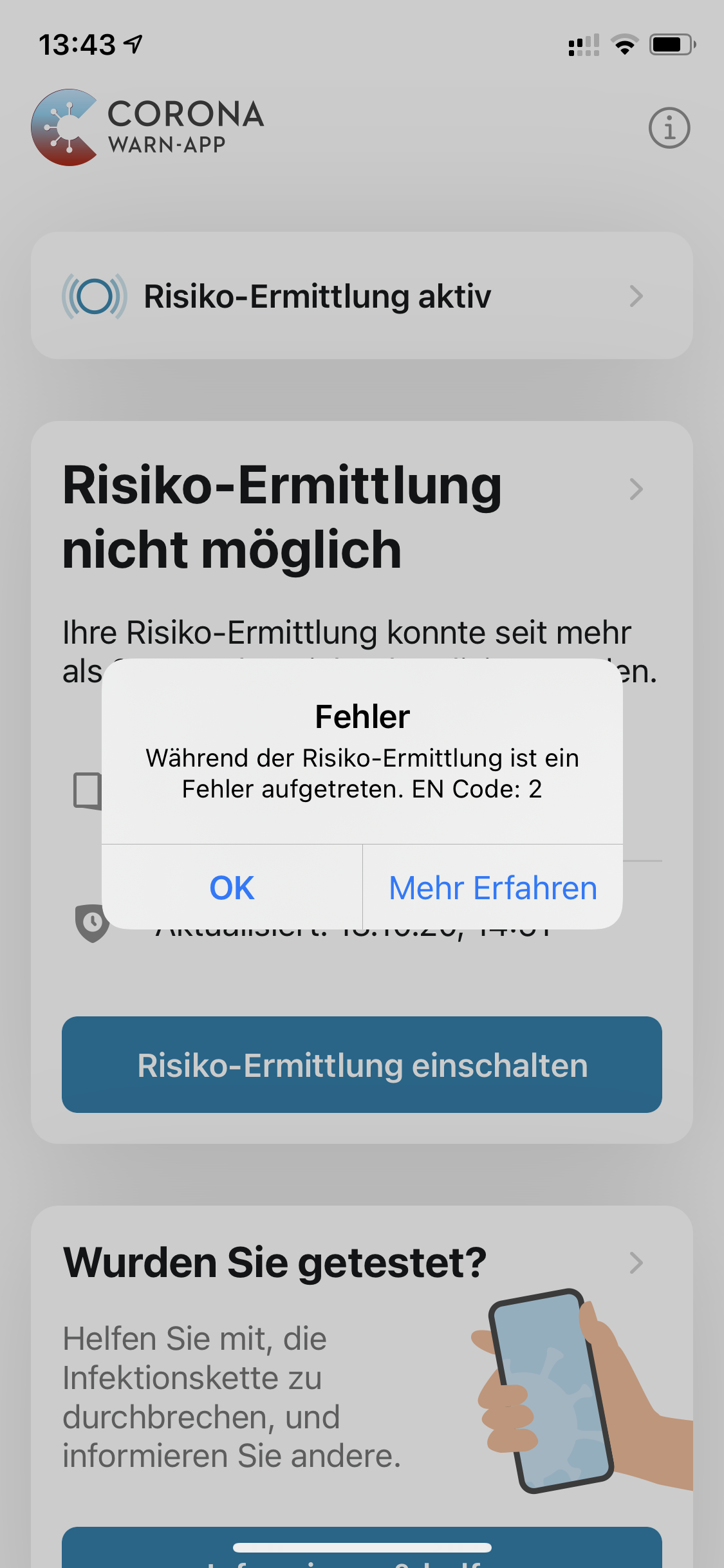
Still getting error Messages on CWA 1.5.0 on iOS 14.2 B3 (18B5072f)
 burnziii
on 19 Oct 2020
burnziii
on 19 Oct 2020
Same here. iOS 14.2 PB3 and CWA 1.5.0 the issue is still present.
 Holotier
on 19 Oct 2020
Holotier
on 19 Oct 2020
The PR #1359 is merged into the rc/1.5.1 branch, so it is to be expected that it's not yet solved in 1.5.0 😉
 sin-azucar
on 19 Oct 2020
sin-azucar
on 19 Oct 2020
If #1359 will solve this problem, it is currently planed for version 1.5.1.
@thomasaugsten is #1359 fixing the Issue or is this only on Apples side?
Ein-Tim
on 19 Oct 2020
If #1359 will solve this problem, it is currently planed for version 1.5.1.
@thomasaugsten is #1359 fixing the Issue or is this only on Apples side?
Any idea when 1.5.1 will be available? As the numbers are rising in Germany I'm thinking of downgrading to 14.0.1 if it takes another few weeks until 1.5.1 is available.
Mihahn
on 19 Oct 2020
In my case the app doesn't work anymore since 14.09. due to the bug. On 23.09. there are the new iPhones with which you start at 0 again anyway. So reinstalling the app is not even worth it.
 endanger
on 19 Oct 2020
endanger
on 19 Oct 2020
FYI: Apple Radar number 70404886 was filed for this issue.
 franklouwers
on 19 Oct 2020
franklouwers
on 19 Oct 2020
Could anybody here check if this Error also occurs on other Apps using the ENF (f.e.: Immuni, SwissCovid, etc) when running them on iOS 14.2 Beta 3. This would be nice to know, thanks!
Ein-Tim
on 19 Oct 2020
Same problem here with app version 1.3.2 (0) after having updated to iOS 14.2 Beta 3.
 F95andy
on 19 Oct 2020
F95andy
on 19 Oct 2020
Could anybody here check if this Error also occurs on other Apps using the ENF (f.e.: Immuni, SwissCovid, etc) when running them on iOS 14.2 Beta 3. This would be nice to know, thanks!
Yes, Immuni (italian app) seams working fine. And i hope it shares correctly for the moment
 Skyweek
on 20 Oct 2020
Skyweek
on 20 Oct 2020
If #1359 will solve this problem, it is currently planed for version 1.5.1.
@thomasaugsten is #1359 fixing the Issue or is this only on Apples side?Any idea when 1.5.1 will be available? As the numbers are rising in Germany I'm thinking of downgrading to 14.0.1 if it takes another few weeks until 1.5.1 is available.
1.5.0 is out since yesterday. Wish the fix will also come available soon!
Any news about a date?
 matthiasvogt
on 20 Oct 2020
matthiasvogt
on 20 Oct 2020
Feels really bad not being able to use the Corona App in these times :( Please release the fix as soon as possible. I can't even downgrade because it's a work phone that doesn't allow being plugged into my computer.
 Xploder
on 20 Oct 2020
Xploder
on 20 Oct 2020
Could anybody here check if this Error also occurs on other Apps using the ENF (f.e.: Immuni, SwissCovid, etc) when running them on iOS 14.2 Beta 3. This would be nice to know, thanks!
Yes, Immuni (italian app) seams working fine. And i hope it shares correctly for the moment
I guess installing is not enough, you have to wait at least 24 hours so the ENAPI is used for the first time?
GSTEFKA
on 20 Oct 2020
I have latest Swiss App on my iPhone 12 ProMax and iOS Beta 14.2 beta 3. The Swiss app is exchanging keys with the server. I do see updated entries in the ENF Settings, but the difference is, that I do get for each past day one entry as it was in Germany in the past and the German App is providing an consolidated log, but this is not working as of today.
 RalphRichter
on 20 Oct 2020
RalphRichter
on 20 Oct 2020
FYI: Apple Radar number 70404886 was filed for this issue.
When SwissCovid works on 14.2 DB3 AND the issue is still a successfully filed bug at apple, what does that mean?
Is it not just a missed deprecation announcement due to the changes between 14.0B4 and 14.2 B3?
- 14.0b4 Removed ENTemporaryExposureKey.daysSinceOnsetOfSymptoms
- 14.0b4 Removed ENTemporaryExposureKey.diagnosisReportType
- 14.0b4Added ENDaysSinceOnsetOfSymptomsUnknown
- 14.0b4 Modified ENExposureConfiguration.infectiousnessForDaysSinceOnsetOfSymptoms
- 14.2b3 Added #def ENStringify
- 14.2b3 Added #def ENStringifyExpansion
- 14.2b3 Modified ENDaysSinceOnsetOfSymptomsUnknown
Its close to Christmas, isn't it? so here is my wish list to make the live of apple beta users easier in the future:
- This bug is confusing and maybe some of the knowledgeable folks here can shed some light on it. why it broke.
- a (semi-public) CWA testflight would be great to test 1.5.1 now and make use of the community feedback
- the same resilient code that works in SwissCovid/Immuni to provide basic functionality even if specifics in the api changes
- a developer option in the cwa app to switch between (future) API Versions, change behavior of specific enhancements, etc.
GSTEFKA
on 20 Oct 2020
thomasaugsten
on 20 Oct 2020
I have a question on this topic:
Even though I have the problem described here, is it still possible to get test results via the app?
 rygos
on 20 Oct 2020
rygos
on 20 Oct 2020
@rygos Yes this is possible with 14.2 Beta3
thomasaugsten
on 20 Oct 2020
~Update:~
~Quoting @svengabr's comment from here:~
~>iOS 14.2 Beta 3 caused the app to no longer function. Despite Apple said they will fix this before they release golden master, SAP will fix the issue in their code to be prepared for the worst case. This will be part of 1.5.1 Hotfix~
~So this problem will be solved with 1.5.1~
~There is no launch date for 1.5.1 yet.~
Edit:
See this comment
Ein-Tim
on 20 Oct 2020
Because CWA is using different parameters than the other apps and at the moment it make no sense to change the parameter for a beta version. This is the reason we will wait for the final iOS 14.2 and why we will not fix this from our side at the moment.
thomasaugsten
on 20 Oct 2020
@thomasaugsten do I understand this correctly that there has been a change of plans? B/c @svengabr told us just a few hours ago that a hotfix from CWA's side would be forthcoming with CWA 1.5.1 😕.
 daimpi
on 20 Oct 2020
daimpi
on 20 Oct 2020
This fix in 1.5.1 will only reset the file cache correctly when we change the parameter. But parameter change is not necessary for stable iOS versions
thomasaugsten
on 20 Oct 2020
Okay @thomasaugsten
So the App also won't work after updating to 1.5.1 if you are on iOS 14.2 Beta 3?
Ein-Tim
on 20 Oct 2020
This is correct.
thomasaugsten
on 20 Oct 2020
@thomasaugsten thanks for the clarification 🙂
daimpi
on 20 Oct 2020
just updated to iOS 14.2 B4 and for me CWA working again. (With CWA 1.5.0)
 Blade4fame
on 20 Oct 2020
Blade4fame
on 20 Oct 2020
Keys are exchanged again. Full Log is visible in ENF Settings :-) iOS 14.2 B4 (18B5083a)
RalphRichter
on 20 Oct 2020
Is that version already available, I don't see it in the software updates yet on my phone...
 sebastiancomsa
on 21 Oct 2020
sebastiancomsa
on 21 Oct 2020
Is that version already available, I don't see it in the software updates yet on my phone...
Yes it is – until now it's developers only. But public beta should be released shortly after...
I still have a question: When beta 4 fixes the issue, will it download the exchanged keys of the last week since the app stopped working? Or was the whole background key exchange process broken and it'll start after updating to 14.2 beta 4 again? If that's the case, I assume that all contacts from the past 7 days weren't recorded?
Mihahn
on 21 Oct 2020
@Mihahn
I think the ENF didn't stop record your contacts so the App will download new Files and everything will work normal again (and all Encounters - also these in the last 7 days) are shown.
Ein-Tim
on 21 Oct 2020
@Mihahn - just my 2 ct on your question ...
We have to distinguish two functions here:
1) sending BLE beacons and recording the received beacons (RPI). This task is performed in iOS (component: ENF - exposure notification framework) permanently in the background. I don't expect that this function is affected by a call from the cwa app to this API with params that are not supported in your iOS version. However, the final statement on this should come from Apple.
2) download keys (TEK) from the server and request a matching and risk calculation with the recorded RPI. This task is performed by a background task in cwa; and your (legitimate!) question is now, what is the impact of your gap of several days.
a) downloading the daily keys: I assume this part was not even interrupted on your side. But in any case: cwa will download all missing keys of the past two weeks that are not already cached locally.
b) matching the keys: cwa performs the API call to ENF with a list of 14 files, corresponding to the last 2 weeks. So it will catch up on any "postponed" matching.
c) the background task, triggered daily: well, there are indeed reports of users that the background task sometimes stops working (see #916 and #1227). If this happens, open the app, it usually restarts the cwa background task.
And, finally: you can see the hash values of the key files for matching in the iOS settings ("Begegnungsmitteilungen") or in the json file export. And "somewhere in the internet" there is a list of the hashes of all key files published so far, so you can verify yourself that you did not miss any (I have to search the link again ...)
@daimpi iirc it was you who knows this link?
ndegendogo
on 21 Oct 2020
iOS 14.2 B4 did fix the original issue mentioned in the issue description so this Issue will be closed. The linked Jira issue is also marked as resolved.
You can continue the discussion here if you like but please open a new issue if there are any follow up topics.
Thank you for your understanding!
Best regards,
SG
Corona-Warn-App Open Source Team
svengabr
on 21 Oct 2020
@Mihahn - just my 2 ct on your question ...
Thank you – this is good news! I guess (a) wasn't working properly, as I got new entries in ENF every time I opened up the (broken) CWA app, but there weren't any "new files" downloaded. But as you said, with b4 it's up and running again and yesterday evening 14 new files were downloaded and I'm good to go. So thanks again for the information 👍
Mihahn
on 21 Oct 2020
but there weren't any "new files" downloaded
Yes, ENF log is written by iOS. They don't know about cwa downloading the key files from the server. They are logging the files on which they perform the match.
It seems that error 2 aborted this API call very early, before the matching procedure.
ndegendogo
on 21 Oct 2020
@ndegendogo
Here is the link you were searching for: https://ctt.pfstr.de/json/filehashes.json
Ein-Tim
on 21 Oct 2020
This is promising. My iPhone 7 is still stuck at 14.2 B3 and did not receive an update push, yet.
 depate
on 21 Oct 2020
depate
on 21 Oct 2020
@depate
I think you are using the Public Beta, iOS 14.2 Beta 4 has only been released to the Developer Betas at the moment
Ein-Tim
on 21 Oct 2020
You're correct. I missed that comment.
(Nice, linking to the actual issue comment is broken for me)
However, thanks for pointing that out for me again.
depate
on 21 Oct 2020
I get this message after upgrading vom iOS 14.2b3 -> b4
The message makes little sense. It says "2 days effective within the last 2 weeks" but it has recordings of events from at least 8 days earlier.

zopyx
on 21 Oct 2020
@zopyx
The message makes little sense. It says "2 days effective within the last 2 weeks" but it has recordings of events from at least 8 days earlier.
This is fine in principle: the counter for the number of active days is something which CWA stores and this number can be easily changed if e.g. CWA data is reset. The important thing are the keys though and those are not stored in CWA but inside the Apple Exposure Notification Framework (ENF).
Did you have any ENF app (e.g. CWA) active 8 days ago? If so: the message should be fine.
daimpi
on 21 Oct 2020
@zopyx
The message makes little sense. It says "2 days effective within the last 2 weeks" but it has recordings of events from at least 8 days earlier.
This is fine in principle: the counter for the number of active days is something which CWA stores and this number can be easily changed if e.g. CWA data is reset. The important thing are the keys though and those are not stored in CWA but inside the Apple Exposure Notification Framework (ENF).
Did you have any ENF app (e.g. CWA) active 8 days ago? If so: the message should be fine.
I am aware that this only a display/presentation issue. I've been running CWA all time across all 14.2 betas. Then the incompatibility with beta 3 popped up. At some point last week, I reinstalled the app and CWA with beta 4 give me this warning above..I am aware how to read it. It might be misleading to others...
zopyx
on 21 Oct 2020
I am aware how to read it. It might be misleading to others...
Ah ok sry I misunderstood your point then. Yes this is indeed confusing. There are lots of issues which concern this display of "active days", imho it would make sense to just drop it and be done with it (other ENF apps also don't have this): https://github.com/corona-warn-app/cwa-wishlist/issues/102
Feel free to upvote 🙂.
daimpi
on 21 Oct 2020
@depate and all:
Apple now released iOS 14.2 Beta 4 via Public Beta too
Ein-Tim
on 21 Oct 2020
Instant information, great!
matthiasvogt
on 21 Oct 2020
Just got the push for iOS 14.2 b4 and the app works again. The only interesting thing is that now it says I have 4 low risk encounters and the day before it stopped working I had 3. Is this right?
sebastiancomsa
on 21 Oct 2020
@sebastiancomsa
Yes this is pretty sure right because Error 2 just stopped the App from downloading new DKs (Diagnosis Keys) from the Server but not the scanning and tracing of your contacts. Now the App downloaded all DKs of the last 14 days and so _noticed_ that there was antother encounter.
For more and detailed Information see @ndegendogo's comment here: https://github.com/corona-warn-app/cwa-app-ios/issues/1339#issuecomment-713371139
Ein-Tim
on 21 Oct 2020
i had the same exact issue. it is resolved in ios 14.2 beta 4 (now available for developers & beta testers, Germany)
 cucemil
on 22 Oct 2020
cucemil
on 22 Oct 2020
iOS 14.2 Public Beta 4 solved the issue inside the app.
Exposure logging now seems to work like it should be.
 julianYaman
on 22 Oct 2020
julianYaman
on 22 Oct 2020
Related issues
 Hermann12
·
3Comments
Hermann12
·
3Comments
 Applaus-Klaus
·
3Comments
Applaus-Klaus
·
3Comments
 mss1010
·
3Comments
mss1010
·
3Comments
 wandoliver
·
3Comments
Ein-Tim
·
3Comments
wandoliver
·
3Comments
Ein-Tim
·
3Comments
Most helpful comment
The developers were able to reproduce the issue on our test devices and there is an ongoing internal discussion.
Thank you very much for your feedback!
Once we have more information we will keep you updated.