Cwa-app-ios: App shows wrong „Aktualisiert“ Time, because of this the Update Time is <24h
Avoid duplicates
- [ ] Bug is not mentioned in the FAQ
- [ ] Bug is not already reported in another issue
Describe the bug
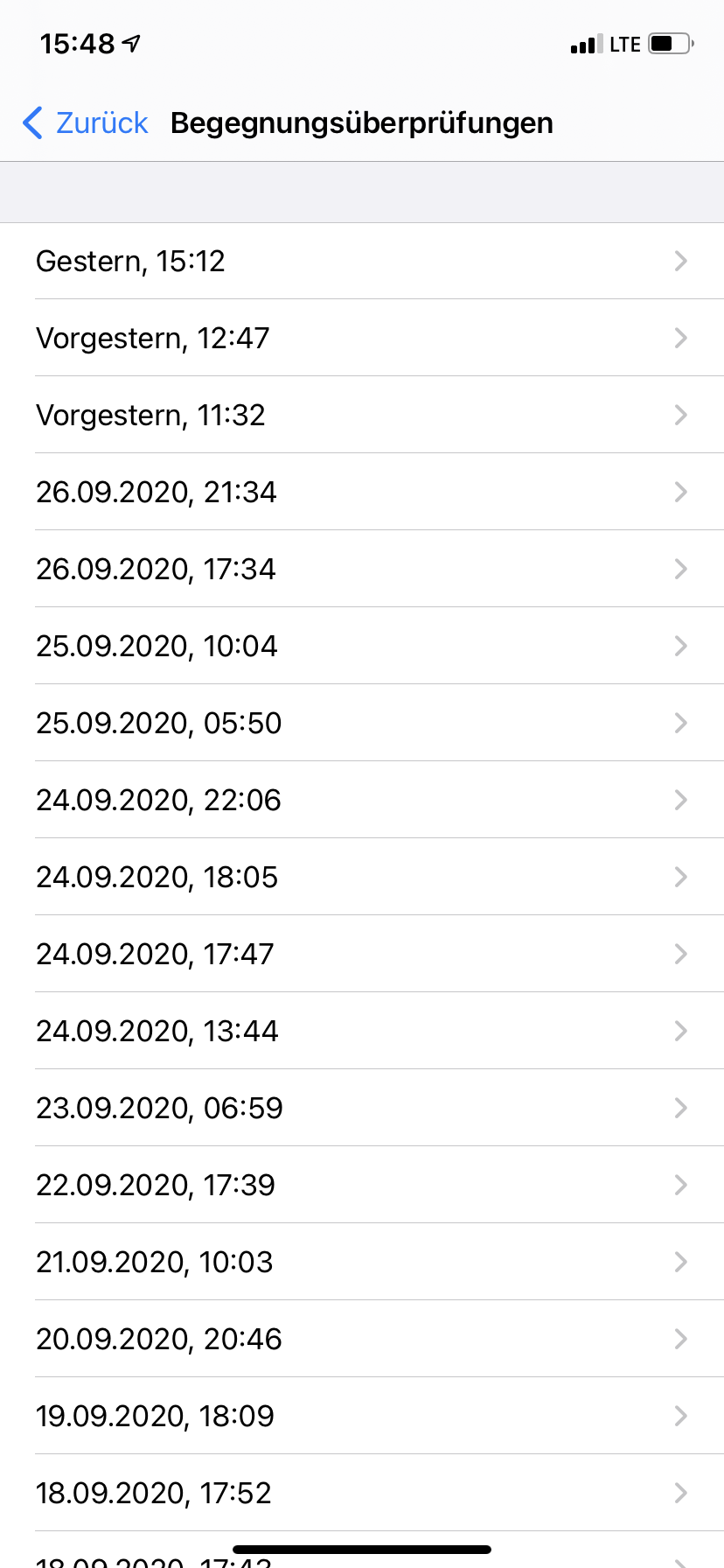
In the "Begegnungsüberprüfungen" in Settings, there is the real time the check happened shown.
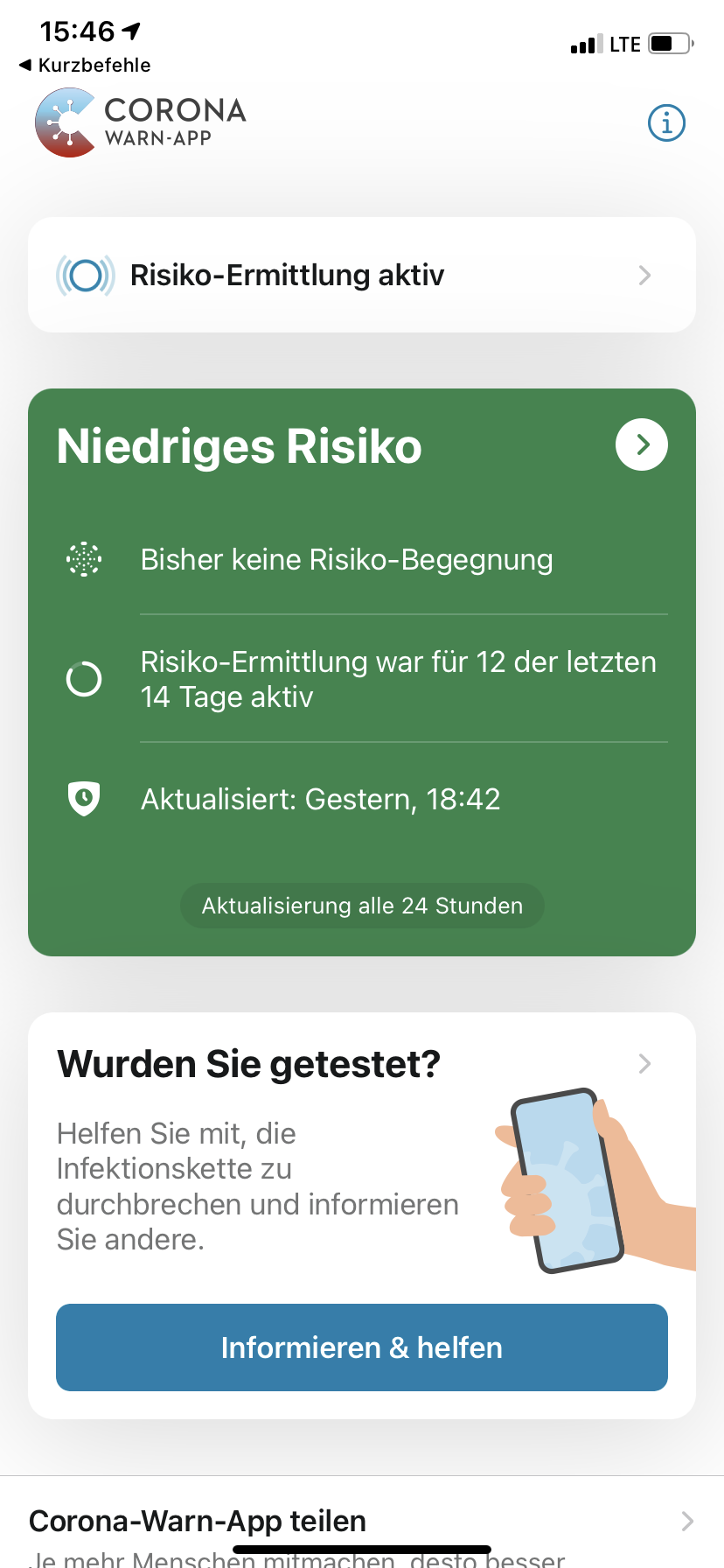
In the App there is shown another Time.
So now the last check actually happened at 15:12h yesterday, but the App thinks it happened at 18:42h.
This is bad because the App won't do a check until 18:42h. If this happens one time, I think that's not a problem, but if this will happen more often, this wouldn't be good.
Is anyone else experiencing this Issue?
Expected behaviour
The Settings and CWA should show the same time.
Steps to reproduce the issue
--
Technical details
- iOS Version: 14.0.1
- Device: iPhone XR
- CWA Version: 1.3.2
Additional context
No, I didn't open the App at the Time which is displayed in CWA.
 Ein-Tim
All 10 comments
Could you share your ENF log here? 🙂
 daimpi
on 29 Sep 2020
daimpi
on 29 Sep 2020
For Sure, take a look here: https://paste.ubuntu.com/p/vY5TwM8FmH/
Okay, wow, this is very uncomfortable for me now 😅
The Timestamp in Settings is 15:12, but the App is right, new files were only downloaded at 18:42...
Thanks for the hint @daimpi ❤and sorry... (Again) not my day 😅
Will close this Issue 👍
Ein-Tim
on 29 Sep 2020
@Ein-Tim interesting… your app downloaded 9 packages at 15:12 and the remaining 5 at 18:42 (see Timestamp.1 in the Table below):
Table
Timestamp | Hash | MatchCount | KeyCount | Timestamp.1 -- | -- | -- | -- | -- 2020-09-28 15:12:52 +0200 | 0CDC66BAB3C15F790E2BCF86794B496F328C1819A998E8302CC6BBC55209821F | 0 | 6071 | 2020-09-28 18:42:13 +0200 2020-09-28 15:12:52 +0200 | EE961B7259874A14523641AF037F5D78AED922EEABD5AACBF443708EEE7D1B27 | 0 | 9593 | 2020-09-28 18:42:13 +0200 2020-09-28 15:12:52 +0200 | D3773CBA4F74C9D60CB242406AFACE951AF6F0C390C917A727B23B2D9812ACBE | 0 | 12457 | 2020-09-28 18:42:12 +0200 2020-09-28 15:12:52 +0200 | 7A04AF10A6A702F04FE81A34FB4B14973F87DF8AF1D9F7009BB68042696880E6 | 0 | 12229 | 2020-09-28 18:42:12 +0200 2020-09-28 15:12:52 +0200 | 1DD7BF61DA5DC000C016D98EE5CDC1A4FC9A33B139BDA82DC2E31BA239ACF5E5 | 0 | 13539 | 2020-09-28 18:42:12 +0200 2020-09-28 15:12:52 +0200 | B13EEA34F07AE2FCB1855CE111C57A585FC9559C3ABC678573D5AB9049D31360 | 0 | 9405 | 2020-09-28 15:12:52 +0200 2020-09-28 15:12:52 +0200 | 9341DB097412B04CA7C63D58427C60309D154C9A28521876813540BF75A94A9E | 0 | 8390 | 2020-09-28 15:12:52 +0200 2020-09-28 15:12:52 +0200 | E82F612E82528B76C006F0A0FE0806937839E1EF5B1CB91AA699A8DC8BBE9C70 | 0 | 3250 | 2020-09-28 15:12:52 +0200 2020-09-28 15:12:52 +0200 | C586B7800DAC12FC54F8E9A3B4B27CB1086BCE296249B39567D8953A7089655B | 0 | 5290 | 2020-09-28 15:12:52 +0200 2020-09-28 15:12:52 +0200 | AD521A27B2EDAAFD5BFDC719D59599C223425EB8ED8A9775AD9D4DE3F8EF7BD9 | 0 | 10369 | 2020-09-28 15:12:52 +0200 2020-09-28 15:12:52 +0200 | 905748FDDC3B77A4F0C3DA3C8FFB4135FECAC18A95450D7DA269F5FD5E1852BD | 0 | 11165 | 2020-09-28 15:12:52 +0200 2020-09-28 15:12:52 +0200 | F64A7E5BEB59B8AD0BF5C80EF95D994F403D25D5A4EF95A9FB485D53EBCA484D | 0 | 10235 | 2020-09-28 15:12:52 +0200 2020-09-28 15:12:52 +0200 | D07F64B0D04AB1F5D03C32092E19307A9638489CDB3A53CAF61EBDA11FA956F6 | 0 | 9548 | 2020-09-28 15:12:52 +0200 2020-09-28 15:12:52 +0200 | 967C468EC5F587BD72E84365A680B1805959C4DF092530F504917915BA429895 | 0 | 5655 | 2020-09-28 15:12:52 +0200
I guess Apple could improve how they display the packages: if they aggregate them for the whole day, it would make sense imho not to show a timestamp but only the day in the overview or alternatively show the most recent timestamp (which in your case would have been 18:42).
daimpi
on 29 Sep 2020
First of all thanks for your work 👍
Second, yes I also think that this could be improved from Apples side, but its also interesting to see:
It seems like they changed something with iOS 14(.0.1), because in f.e. iOS 13.7 I'm 100% sure there would be another entry for the files which weren't downloaded at 15:12...
Ein-Tim
on 29 Sep 2020
I guess Apple could improve how they display the packages
@daimpi actually, I like the new format in the json. Every single file has its own timestamp (as before), but they are grouped now, and the group has an additonal timestamp.
The single files are ordered reverse in time (newest first), which makes sense for a log file; in most cases you are interested in the newest entries.
The group timestamp shows the start of the loop, followed by the latest entry. So I can see at one glance, without even scrolling, the whole timespan of the procedure.
 ndegendogo
on 3 Oct 2020
ndegendogo
on 3 Oct 2020
@ndegendogo Do you know when a new "group" is opened?
(Yk what I mean? After xx hours, etc...)
Ein-Tim
on 3 Oct 2020
@Ein-Tim I understand your question.
As this log file is written by Apple, I cannot know for sure, I can only guess, based on what I see.
My current assumption is, that they open a new group with the API call to ENF. This would make analysis easier to distinguish if the procedure was interrupted but then continued after a delay, or if it was aborted, or if it did not even start.
I have yet to check the cwa source code, if the risk procedure is a single API call, or a loop over the 14 files.
ndegendogo
on 3 Oct 2020
@Ein-Tim yes, I have just checked.
cwa source code as of v1.3.2 (this is the version you mentioned, and it is also my current version).
A single API call, to ENManager.detectExposures() with params: the current risk config, the list of key files, and the completion handler (for results and error handling).
Find details in ExposureManager.swift, func detectExposures
ndegendogo
on 3 Oct 2020
@Ein-Tim also the Apple docu gives no detailed info of the exact meaning of the group timestamp
https://developer.apple.com/documentation/exposurenotification/enmanager/3586331-detectexposures
section 'Log Exposures'
but it seems to be the beginning of the API call, because it is earlier than the timestamps of the files
ndegendogo
on 3 Oct 2020
Okay, thanks for your research @ndegendogo ❤️
Ein-Tim
on 3 Oct 2020
Related issues
 rsplaul
·
3Comments
rsplaul
·
3Comments
 olafthecruel
·
3Comments
olafthecruel
·
3Comments
 christianbrb
·
3Comments
christianbrb
·
3Comments
 rainervonuns
·
3Comments
rainervonuns
·
3Comments
 jonnyfux
·
3Comments
jonnyfux
·
3Comments
Most helpful comment
@Ein-Tim also the Apple docu gives no detailed info of the exact meaning of the group timestamp
https://developer.apple.com/documentation/exposurenotification/enmanager/3586331-detectexposures
section 'Log Exposures'
but it seems to be the beginning of the API call, because it is earlier than the timestamps of the files