Cwa-app-ios: "Active Days" go down or are stuck
UPDATE
This will be fixed with version 1.15, which will change the active days to show the days since the installation of the app.
See #2132
Avoid duplicates
- [x] This issue has not already been raised before
- [x] If you are proposing a new feature, please do so in CWA-Wishlist
Current Implementation
So out of this code and from this and this statement from @tkowark and @thomasaugsten, I understand the counting happens like this:
- App counts seconds Exposure Notification was active.
- If the counted number equals 86400sec this is shown as one day to the user. (I think the Number can be lower also, it gets rounded in some way, but I don't know how)
- After 336 * 3600s (2 weeks) the App shows: "Risiko-Ermittlung dauerhaft aktiv"
If this assumption is wrong/incomplete could you please explain how it works (and mainly how the rounding works)?
Suggested Enhancement
With the current Implementation there is the problem that when the user deactivates "Exposure Notification" during the night (activate flight mode, deactivate Bluetooth, etc.) this time is also deducted from the "active days".
Because of this is is possible that you are stuck at one day or that the active Days go down although you had "Exposure Notification" active for the whole day, but not the night.
I don't (yet) have a concrete proposal how this could be solved...
Expected Benefits
It is very confusing for the user to see the Active Days go down again or stay the same. Most users won't know where the problem is and just think that the App did not work right in the last days. (Because they didn't do anything wrong, they just switched off Bluetooth during the night).
So the expected Benefit is that the users don't get confused anymore.
Related Issues
- https://github.com/corona-warn-app/cwa-documentation/issues/412
- https://github.com/corona-warn-app/cwa-wishlist/issues/102
- https://github.com/corona-warn-app/cwa-app-ios/issues/1739#issue-774547725
Internal Tracking ID: EXPOSUREAPP-2556
 Ein-Tim
All 43 comments
Hey @Ein-Tim
Thank you for your feedback. I created a Jira Ticket EXPOSUREAPP-2556 and assigned it to the development team so they can have a look.
Best regards,
SG
Corona-Warn-App Open Source Team
 svengabr
on 7 Sep 2020
svengabr
on 7 Sep 2020
I'm usually turning my phone into flight mode while I'm asleep. Therefore my active days are also never getting to 14. That's indeed confusing and annoying. But since not all people sleep at night it wouldn't make sense that the app doesn't count the active time in the night hours. My suggestion would be to check if the Sleep mode, which is newly introduced with iOS 14, is active and stop counting if so. However, I'm not sure if there's an API call for that.
 ferdinand
on 7 Sep 2020
ferdinand
on 7 Sep 2020
Given that some ppl under Android seem to have the opposite problem (they worry about their time not being deducted while their phone is off / while BT is disabled) and that ppl in general seem to be confused by this metric, maybe one (radical?) solution would be to drop the display of the number of active days completely?
I personally don't have strong opinions on this topic in either direction tbh.
 daimpi
on 8 Sep 2020
daimpi
on 8 Sep 2020
@daimpi
This would be one way...
I don't have any feelings in this direction but it should be ensured that the days are counted right (based on communication between humans and not technical 🙂) because this can be very confusing for the user...
Ein-Tim
on 11 Sep 2020
Since @GPclips stated here that the Number of Active Days will not longer be shown to the user, I will close this Issue when this is Finally Released.
Ein-Tim
on 26 Sep 2020
@Ein-Tim could you please update your app and have a look? This should already be implemented.
Cheers!
svengabr
on 29 Sep 2020
@svengabr
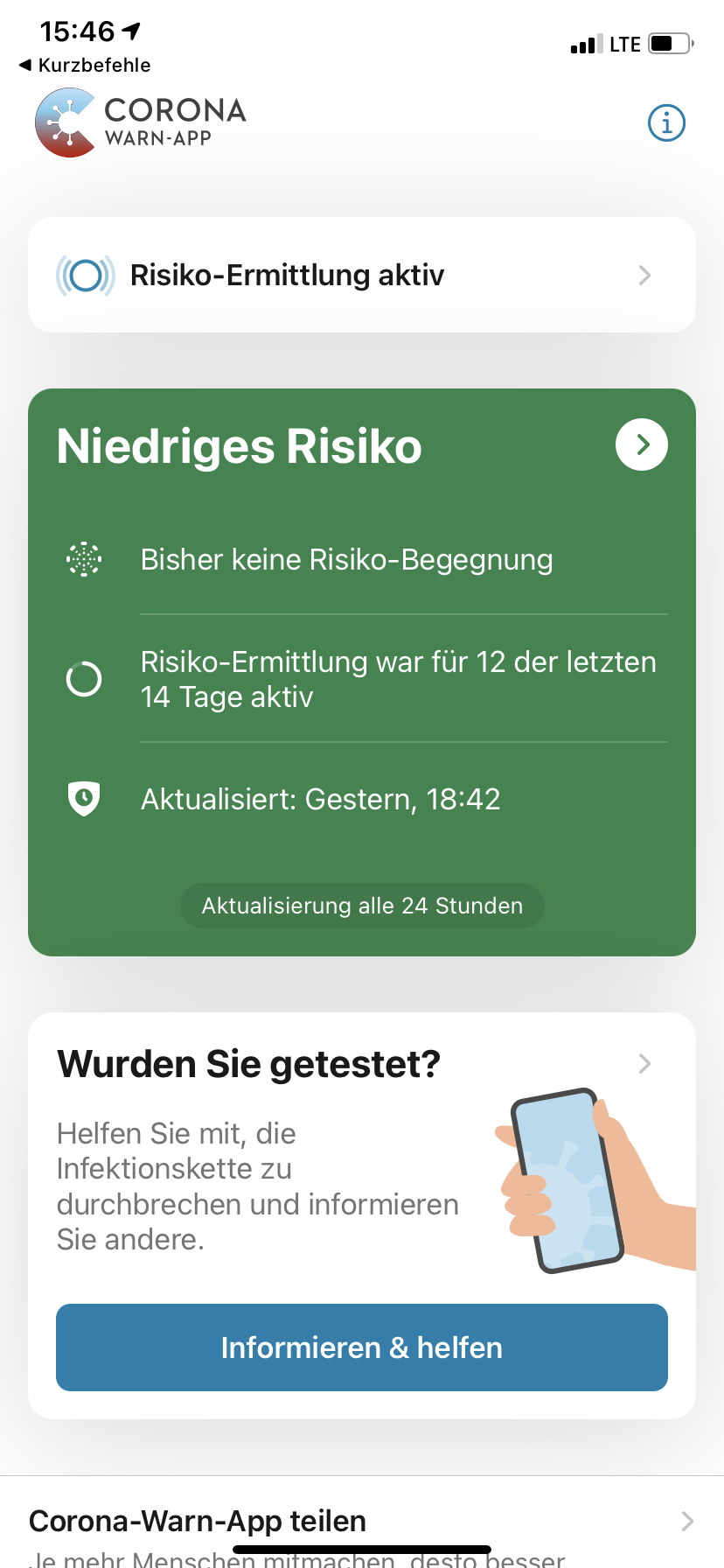
Newest App Version...
Ein-Tim
on 29 Sep 2020
@svengabr Are there still plans to drop the number of active days or was this only a mistake back then?
Ein-Tim
on 15 Nov 2020
It indeed seems to be true users get confused about this. Take a look at this Twitter conversation I got involved to: https://twitter.com/quatschel/status/1326787201292791808?s=21
 mabrin
on 18 Nov 2020
mabrin
on 18 Nov 2020
Hi @mabrin,
Thank you for reporting. Could you please figure out the iOS version number and CWA version, thanks.
Best wishes,
DS
Corona-Warn-App Open Source Team
 dsarkar
on 20 Nov 2020
dsarkar
on 20 Nov 2020
@Ein-Tim, We let the developers know, that this issue is still open in favor of corona-warn-app/cwa-documentation#412.
Best wishes,
DS
Corona-Warn-App Open Source Team
dsarkar
on 26 Nov 2020
Update:
Days went up to 13, stayed 13 for 7 days, today went down to 12 again...
Ein-Tim
on 4 Dec 2020
@Ein-Tim, thanks for the new input. We will update the developers. DS
Corona-Warn-App Open Source Team
dsarkar
on 7 Dec 2020
@dsarkar
Do the developers have a guess why the days go down and up?
Ein-Tim
on 7 Dec 2020
@Ein-Tim, the issue was observed also by the developers and is set to high priority now. Best wishes,
DS
Corona-Warn-App Open Source Team
dsarkar
on 8 Dec 2020
@dsarkar
Update:
CWA now shows "Risiko-Ermittlung dauerhaft aktiv".
Will keep monitoring for 2 weeks and report here if something changes.
Ein-Tim
on 9 Dec 2020
Good morning @Ein-Tim, Thanks for the feedback. Do you usually deactivate exposure logging during night time? DS
Corona-Warn-App Open Source Team
dsarkar
on 9 Dec 2020
@dsarkar
Yes I turn WiFi and Bluetooth off during the night...
yesterday evening: 13/14 days...
Than I turned off WiFi & Bluetooth, activated Flight Mode and went to bed.
Tomorrow morning I've taken a look at CWA and it shows "Risiko-Ermittlung dauerhaft aktiv" 👍
Will keep monitoring...
Ein-Tim
on 9 Dec 2020
And bad news:
Days went down to 13 again, tomorrow morning it still showed the correct phrase "Risiko-Ermittlung dauerhaft aktiv", now again 13 out of 14 days.
I start to think that this does not happen because I deactivate Exposure Notification during the night, but because of something else...
Is there any fix planed? For normal users this is really bad since they will think that they have done something wrong or that the App is not working...
Ein-Tim
on 10 Dec 2020
@Ein-Tim, Thanks for info, we will reach out for the developers. DS
dsarkar
on 10 Dec 2020
Now only 12 active days again...
Ein-Tim
on 13 Dec 2020
Thanks. We will forward it. DS
Corona-Warn-App Open Source Team
dsarkar
on 13 Dec 2020
@dsarkar While I opened this as an enhancement, I would now say that this is a bug. Could you maybe change the label?
Ein-Tim
on 16 Dec 2020
Another report https://github.com/corona-warn-app/cwa-app-ios/issues/1696#issue-768746684 from @songbird82.
Technical details
- Device name: iPhone 12
- iOS Version: 14.3
- App Version:1.7.1
Describe the bug
I switched to a new phone 16 days ago. Since then the risk detection was active for every single day (since November 30th). But the app says "Risiko-Ermittlung war für 11 der letzten 14 Tage aktiv". It switched to "Risiko-Ermittlung war für 12 der letzten 14 Tage aktiv" some days ago, but since then it shows "Risiko-Ermittlung war für 11 der letzten 14 Tage aktiv" every day.
Steps to reproduce the issue
- Open the app
Expected behaviour
After opening the app it should show "Risiko-Ermittlung dauerhaft aktiv"
Corona-Warn-App Open Source Team
dsarkar
on 16 Dec 2020
@songbird82. Your information will be forwarded to the developers. Many thanks. DS
Corona-Warn-App Open Source Team
dsarkar
on 16 Dec 2020
No visible improvement regarding this with 1.9.1...
Ein-Tim
on 21 Dec 2020
Not yet fixed. I will come back with updates regarding this issue (if there are updates) DS
dsarkar
on 22 Dec 2020
@Ein-Tim I am closing the question! And commenting so I will be in the thread! Just a suggestion, cant this be done with time+gyro+accelerometer ?
 cricketsamya
on 24 Dec 2020
cricketsamya
on 24 Dec 2020
Hi @Ein-Tim and community, I see my phone stuck on 13/14 days. Phone is always on, BT on. CWA 1.12. Your observations? Thanks.
dsarkar
on 13 Feb 2021
Morning @dsarkar
I'm stuck on either 13 out of 14 or 12 out of 14 days. I deactivate Bluetooth during the night.
iOS 14.4
CWA 1.12.1
What about you @cricketsamya?
Ein-Tim
on 13 Feb 2021
@Ein-Tim I suspect that it is even independent from BT being activated or not. But lets try it, I will switch off BT a few days.
This might be two different issues here.
- Not easy to define what is active time (night, BT off, etc, phone off)
- but also BT continuously on , phone continuously on should lead to 14/14 and it doesn't in some cases.
dsarkar
on 13 Feb 2021
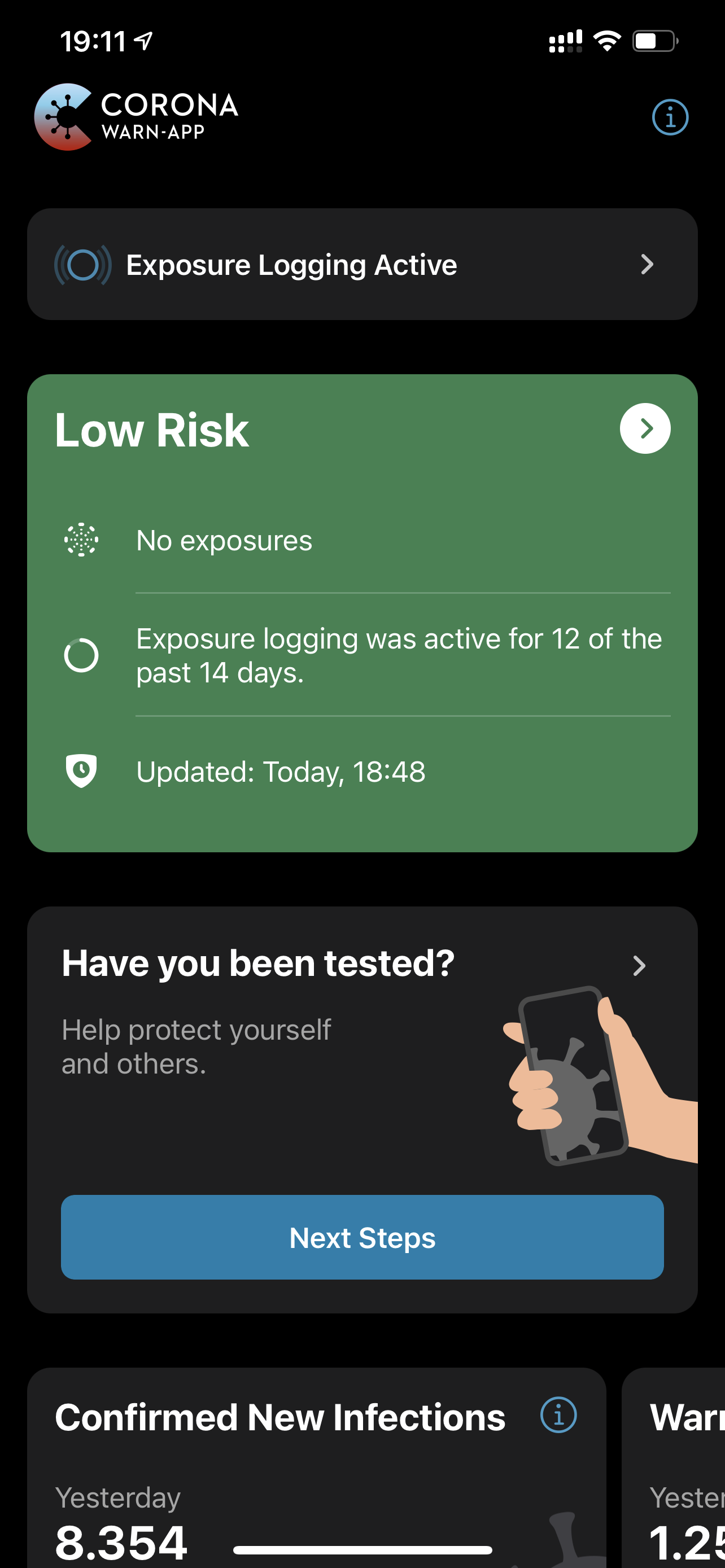
@Ein-Tim I am also facing the same issue! I'm stuck on 12 out of 14 days. I deactivate Bluetooth during the night.
iOS 14.4
CWA 1.12.1
cricketsamya
on 13 Feb 2021
@cricketsamya Ok, thanks for the feedback. Will forward info to developers. Best, DS
Corona-Warn-App Open Source Team
dsarkar
on 14 Feb 2021
@dsarkar one more issue, no more background refreshes happening 😥 I must open the app to download the ids.
cricketsamya
on 14 Feb 2021
@cricketsamya ok.
- CWA 1.12 / iOS 14.4 / iPhone model?
- For how long it does not download keys?
- Wifi / mobile data?
- How often does this happen, any pattern?
- Since when?
Thanks, DS
dsarkar
on 14 Feb 2021
I've experienced this too, but only under version 1.11, do you still have this problem in 1.12? @cricketsamya
Maybe move to #1884 for this?
Ein-Tim
on 14 Feb 2021
@dsarkar @Ein-Tim I am sorry! My bad lets discuss there! 👍🏼
cricketsamya
on 14 Feb 2021
@cricketsamya
No problem 👍
Ein-Tim
on 14 Feb 2021
Could be that this also will be fixed in version 1.15. In #1379 @dsarkar writes:
There are currently internal discussions on how to change the information of active days on the card: It might be dropped and/or replaced by another message (e.g. days since installation). There are several reasons to do so, just to mention some:
- This issue here e.g.: can't be fixed by dev team, since this is an Apple issue how backups are handled
- We have also the issue being stucked at 13/14 days on some iOS devices
- How shall period of times with BT off, phone off, wifi/data off be handled ?
- Android phones e.g. it is apparently not trivial to figure out BT off time.
- the grey card actually was dropped in the meantime.
So altogether, with all these issues it is actually not very clear, what " n/14 active days" means exactly and there are (too) many ways how one could possibly define and interpret this number, leading amongst some users apparently more to confusion than adding additional useful information. So, we might expect to see some changes here anyway in one of the future releases.
Ein-Tim
on 24 Feb 2021
This Android PR suggests that the active days will show the days since the installation (starting with version 1.15 (milestone)).
This would solve this issue. Feel free to label as Fix 1.15 @dsarkar! 🎉
Ein-Tim
on 25 Feb 2021
Is there a fix planned for this? I am still stuck on day 13 and sometimes 12.
cricketsamya
on 4 Mar 2021
@cricketsamya
Version 1.15 changes the active days to show the days since installation of the app.
See PR: #2132
Ein-Tim
on 4 Mar 2021
Version 1.15 changes the active days to show the days since installation of the app
Sounds like a good idea 😀
 ndegendogo
on 4 Mar 2021
ndegendogo
on 4 Mar 2021
Related issues
 mss1010
·
3Comments
mss1010
·
3Comments
 rainervonuns
·
3Comments
rainervonuns
·
3Comments
 avenius
·
3Comments
avenius
·
3Comments
 tom-georg
·
3Comments
tom-georg
·
3Comments
 mw76
·
3Comments
mw76
·
3Comments
Most helpful comment
@cricketsamya
Version 1.15 changes the active days to show the days since installation of the app.
See PR: #2132