Cwa-app-ios: App shows sometimes "no internet connection"
Describe the bug
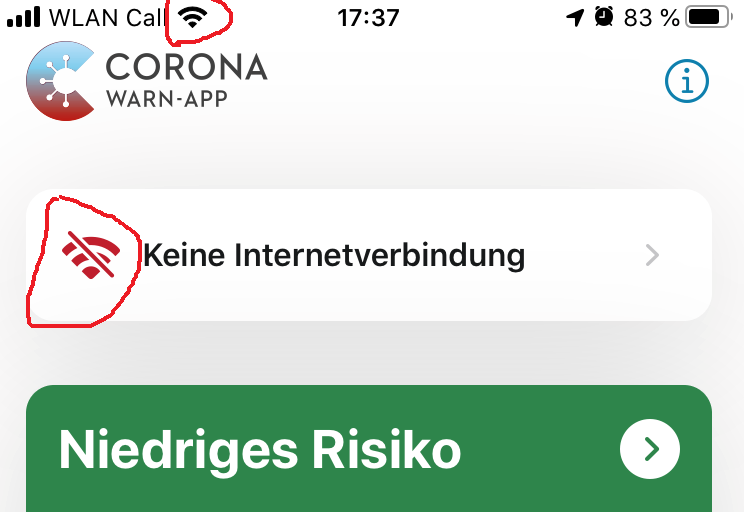
Sometimes when I open the App, it shows no Internet connection. I have used other Apps before and afterwards, which did not have any problem with connectivity. The only way to fix it is to swipe the app and start it again.
I didn't find any pattern, when it appears.
Technical details
- iOS Version: 13.6
- Device: iPhone 8
- App Release 1.1.1 (not observed in other releases befor)
Possible Fix

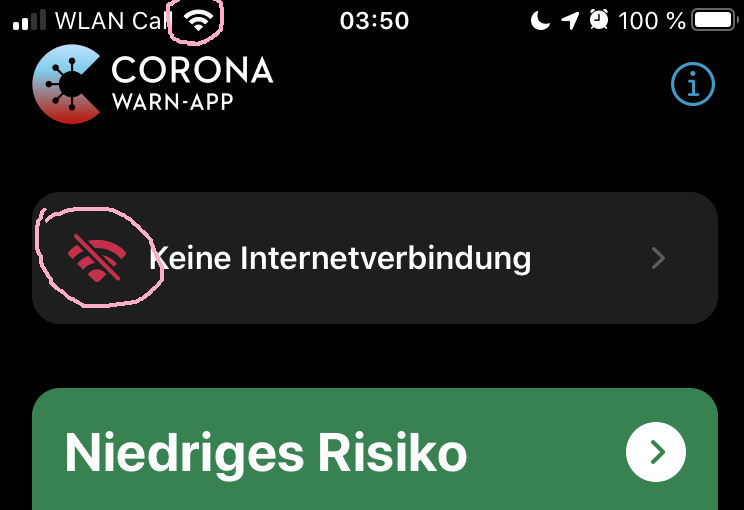
Recommend way to go to setting is useless, because Internet was already there:

Internal Tracking Id: EXPOSUREAPP-1572
 HeiDasGri
All 11 comments
We will remove the connectivity feature completely in 1.3.0. The PR for that feature should come next week.
 inf2381
on 24 Jul 2020
inf2381
on 24 Jul 2020
@inf2381 , could you elaborate a bit more? Are you removing the feature where the app attempts to judge if there is an internet connection? If, is this because there are too many false positives? I can only second @HeiDasGri in that this sometimes happens, both on my phone and on my partner's phone (both iOS).
 JonasHeidelberg
on 24 Jul 2020
JonasHeidelberg
on 24 Jul 2020
@JonasHeidelberg checking the internet connection constantly is a bad practice for mobile applications that don't require a constant connection. So whenever internet connection is required (e.g. when submitting yourself as infected), the app will attempt to connect and if that fails, the app will prompt that to the user. If you don't need internet connection, the app will not check it anymore. So you can be "offline", but still have active tracing displayed on the home screen.
inf2381
on 24 Jul 2020
@inf2381 that makes sense. The data download of the keys is done by iOS, correct? So as long as I am not being tested, both collecting keys through Bluetooth, and matching them with the keys on the central server, happens without the cwa needing internet connectivity itself?
JonasHeidelberg
on 24 Jul 2020
@JonasHeidelberg No, the app downloads the keys. Accordingly, it requires an Internet connection.
 ferdinand
on 25 Jul 2020
ferdinand
on 25 Jul 2020
No, the app downloads the keys. Accordingly, it requires an Internet connection.
That's correct.
@JonasHeidelberg: As @ferdinand pointed out, the application needs internet connectivity to download the diagnosis keys from positive COVID tests. These keys are checked on your phone against any exposure keys collected via bluetooth.
 fredrb
on 25 Jul 2020
fredrb
on 25 Jul 2020
We will remove the connectivity feature completely in 1.3.0. The PR for that feature should come next week.
Good, I can confirm this (annoying) behaviour. The only fix is to close and reopen the app.
This warning message does not prevent the app from working correctly, fortunately
 ouboub
on 31 Jul 2020
ouboub
on 31 Jul 2020
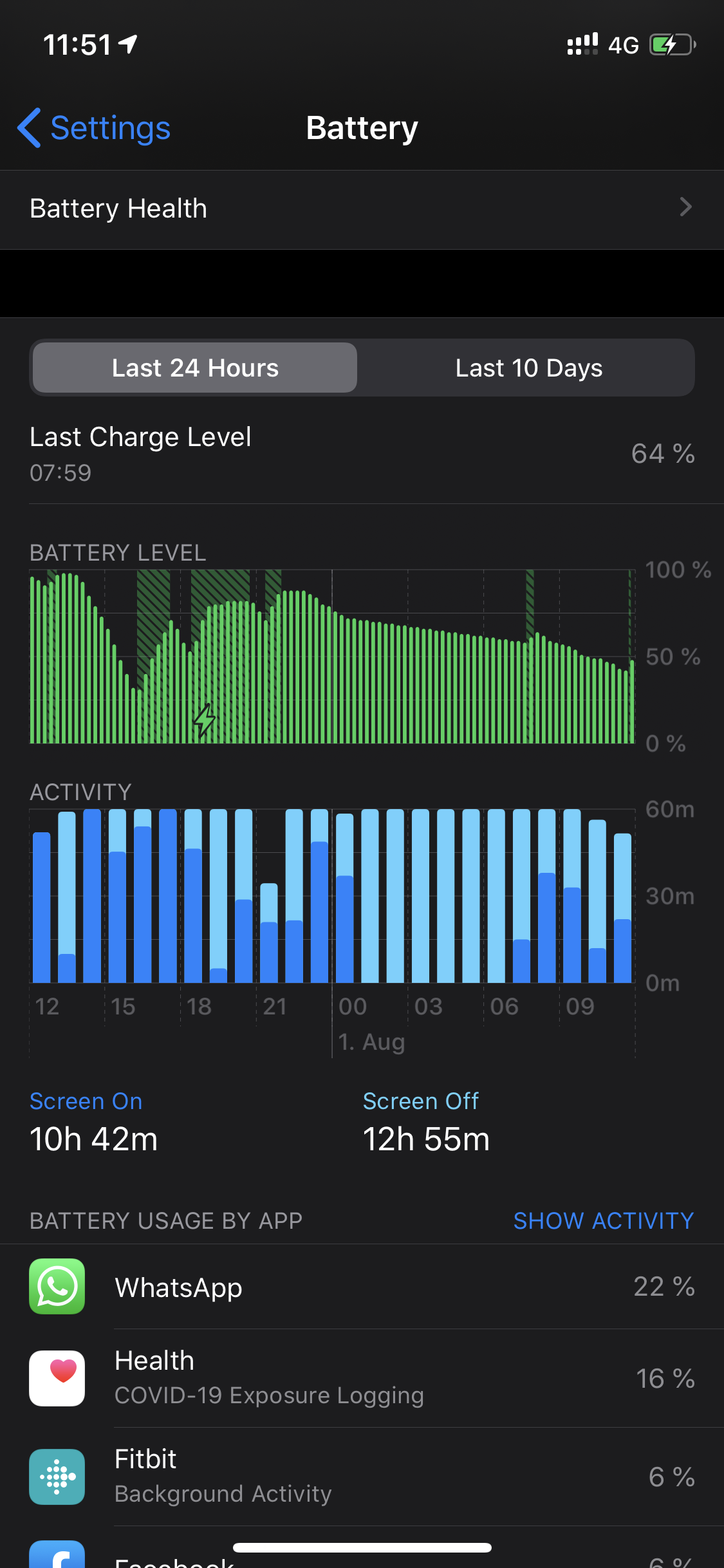
When this behaviour happens the phone starts draining the battery. This is in the last 24h. It's the top application using the battery during this time.
 mitchvdl
on 1 Aug 2020
mitchvdl
on 1 Aug 2020
 daimpi
on 2 Aug 2020
daimpi
on 2 Aug 2020
Just opened the App and it was connected as it immediately refreshed at 00:01 but it showed this.

Closed and opened the App and the issue was gone.
 UGatgithub
on 7 Aug 2020
UGatgithub
on 7 Aug 2020
It happens with Android too. Sometimes the app shows "keine Internetverbindung" while the diagnosis keys are downloaded from the server. I write this comment mainly to make it possible to find this issue by searching for the German text "keine Internetverbindung".
 kereng5
on 24 Aug 2020
kereng5
on 24 Aug 2020
Related issues
 Eisbaerhaar
·
3Comments
Eisbaerhaar
·
3Comments
 Applaus-Klaus
·
3Comments
Applaus-Klaus
·
3Comments
 benekuehn
·
3Comments
benekuehn
·
3Comments
 wandoliver
·
3Comments
wandoliver
·
3Comments
 rsplaul
·
3Comments
rsplaul
·
3Comments
Most helpful comment
@JonasHeidelberg checking the internet connection constantly is a bad practice for mobile applications that don't require a constant connection. So whenever internet connection is required (e.g. when submitting yourself as infected), the app will attempt to connect and if that fails, the app will prompt that to the user. If you don't need internet connection, the app will not check it anymore. So you can be "offline", but still have active tracing displayed on the home screen.