Cwa-app-ios: Can't activate exposure logging after iCloud backup restore
Avoid duplicates
- [X] Bug is not mentioned in the FAQ
- [X] Bug is not already reported in another issue
Describe the bug
After restoring an iOS 13.6 Public Beta 2 iCloud backup to my iPhone X. I was no longer able to activate exposure logging within the app. Using the reset function of the app didn't help as well, but only reinstalling it.
Expected behaviour
I'm aware that the random IDs are not backed up, but the app should continue to work after an iCloud backup restore without the need of reinstalling it.
Steps to reproduce the issue
https://www.icloud.com/photos/#0rlNvI8yY61JImMFCrG8QvdDQ
Technical details
- iOS Version: 13.6 Public Beta 2
- Device: iPhone X
Internal Tracking ID: EXPOSUREAPP-1948
 ferdinand
All 18 comments
Hi @ferdinand
Could you please describe it more, like the following:
- Upgrade the system.
- Restore the backup.
- re-run the app
- Cannot activate the EN
is it correct?
 haosap
on 23 Jun 2020
haosap
on 23 Jun 2020
@haosap The reason for the restore of the backup was not an upgrade, but a downgrade from iOS 14 Developer Beta 1 to iOS 13.6 Public Beta 2. Besides that it's correct.
What I've done is:
- Installed the app on its release day (pretty sure I was already on iOS 13.6 Public Beta 2 back then)
- Made sure that iOS did an automatic iCloud backup yesterday
- Upgraded OTA to iOS 14 Developer Beta 1
- Downgraded to iOS 13.5.1 today (I didn't know there is a restorable IPSW file available for iOS 13.6 Public Beta 2. Hence the little detour.)
- Upgraded OTA to iOS 13.6 Public Beta 2
- Erased all contents and settings
- Restored the backup done in step 2
- Re-run the app
- As far as I remember the app asked me again if I want to activate the EN and if I want to allow notifications, I agreed to both but iOS didn't bring up the system's permission dialogs
- The app returned that the EN is not activated
- Tried unsuccessfully to activate it (see video)
- Used the app's reset function
- Same behaviour as in steps 10 and 11
- Deleted the app
- Reinstalled the app
- Went through the onboarding process, gave the necessary permissions when the system asked me for it, and everything works fine
ferdinand
on 23 Jun 2020
Recently, there are also reports that backup/restores may as well lead to an endless loop, see #896.
 SebastianWolf-SAP
on 12 Jul 2020
SebastianWolf-SAP
on 12 Jul 2020
Hey, any updates here? You have a workaround? Should we delete and reinstall the app?
I have the same problem?
Kind Regards
 BongoUser
on 30 Jul 2020
BongoUser
on 30 Jul 2020
@BongoUser The only workaround seems to be to reinstall the app. As the random IDs are not stored by the app but iOS it's safe to do so. However, the IDs are lost anyway since iOS backups don't include them.
ferdinand
on 30 Jul 2020
Yes, unfortunately, that's currently the way to go.
 tkowark
on 30 Jul 2020
tkowark
on 30 Jul 2020
Same issue here.
Migration from iPhone 7 to 11 on iOS 13.6 via iCloud backup => CWA won't work, endless loop on the welcome page
 arm-in
on 5 Aug 2020
arm-in
on 5 Aug 2020
I think it would be useful if we change this title to something like "App doesn't work after Backup restore" because not only people who restore from iCloud have this problem, also people who restore from iTunes, etc. have this or other problems after they restored.
 Ein-Tim
on 6 Aug 2020
Ein-Tim
on 6 Aug 2020
Is there any update on that? I can confirm that this issue happens all the time doesn't matter if iCloud or iTunes Restore.
Tested with an iPhone 6S Backup to iPhone 7 and an iPhone7 to iPhone 11.
It is easy to fix for someone with technical understanding, because you just need to redownload the app, but for example elderly people don't know this. I had one case in my family where the app was not working for a week due to this issue.
 darthvader007
on 28 Aug 2020
darthvader007
on 28 Aug 2020
Confirming another case of the endless loop issue, after migrating phones through iCloud backup, no beta versions involved. Also fixed by reinstalling the app on the new phone.
 w-m
on 28 Aug 2020
w-m
on 28 Aug 2020
I can also provide a video on that since we experienced the bug yesterday. iPhone 11 Pro
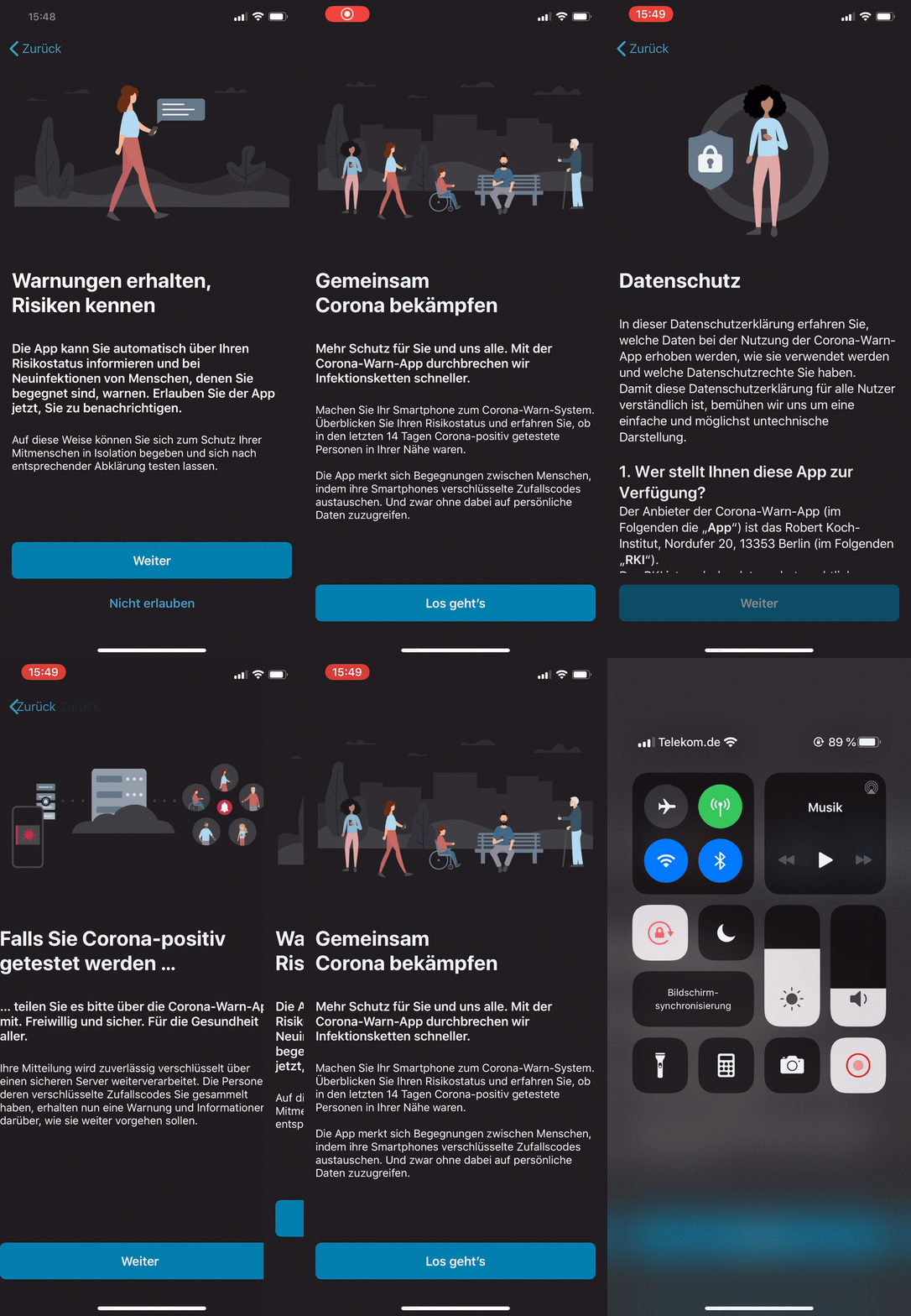
 svengabr
on 28 Aug 2020
Ein-Tim
on 11 Sep 2020
svengabr
on 28 Aug 2020
Ein-Tim
on 11 Sep 2020
@whiskey and @svengabr
Can you confirm that this Issue will be solved with the 1.4.0 release?
Ein-Tim
on 25 Sep 2020
@Ein-Tim I have updated the attached Jira Ticket EXPOSUREAPP-1948 and asked for feedback from the developers. I will keep you updated!
svengabr
on 25 Sep 2020
This fix is in release 1.4
 thomasaugsten
on 25 Sep 2020
thomasaugsten
on 25 Sep 2020
With the release of the iPhone 12 more and more people will run into this issue, I'm afraid. As far as I understand, the behavior of the app in 1.4 was changed, so affected users no longer end up in the endless-loop but rather the app correctly handles the issue and resets the DB so the current workaround (of having to remove and reinstall the app, which practically only a subset of affected users will spend the time on to figure this out themselves) is no longer required.
With the fix being available for around 23 days meanwhile, it doesn't seem that the severity of the issue is taken into account. From the looks of it (through the eyes of a QA manager), this issue would deserve a hotfix release by itself already with a much shorter distribution delay than the 1 month which is approaching now.
Again: In light of more and more users going to run into the problem now with the new iPhone being released, I'd like to raise the point that maybe it's worth considering another 1.3.x hotfix release, if 1.4 is not already around the corner in the next week.
[edited] Side note: I ran into this same problem after upgrading from my iPhone 6s to an iPhone 8. Both devices on iOS 14.0.1 (backup restored on iPhone 8 also taken with that iOS version and the latest iTunes software on Windows (12.10.9.3)). CoreWarnApp on both devices before/after the migration was 1.3.2.[/edited]
 Luke1410
on 18 Oct 2020
Luke1410
on 18 Oct 2020
@Luke1410
1.5.0 will be released tomorrow, @thomasaugsten is this Fix included in 1.5.0?
Ein-Tim
on 18 Oct 2020
Confirmed that the 1.5.0 release fixed the endless dialog loop in my case. App works again as expected.
Luke1410
on 19 Oct 2020
Related issues
 mss1010
·
3Comments
Ein-Tim
·
3Comments
mss1010
·
3Comments
Ein-Tim
·
3Comments
 olafthecruel
·
3Comments
olafthecruel
·
3Comments
 rsplaul
·
3Comments
rsplaul
·
3Comments
 rainervonuns
·
3Comments
rainervonuns
·
3Comments
Most helpful comment
Confirmed that the 1.5.0 release fixed the endless dialog loop in my case. App works again as expected.