Cwa-app-ios: Bluetooth usage clarity and systemwise enabling
Feature description
Maybe it should be made more clearly, that the user has to enable Bluetooth every time he is outside, so that the app can work. Because if not, and the most users don’t know that, the positive effect will decrease drastically. Furthermore there should maybe be an info prompt/ info text on how to enable/ disable the contact tracing functionality systemwise under the Settings paths /Privacy/Health/COVID-19 contact tracing/ or /Privacy/Bluetooth/COVID-19 contact tracing/.
Problem and motivation
Is this something you're interested in working on
 Luca1719
All 24 comments
I haven't checked if the app already does this but what about a local notification when the app tries to trace its surrounding but bluetooth is disabled. So that the user knows that contact tracing isn't working right know.
 Bohne9
on 15 Jun 2020
Bohne9
on 15 Jun 2020
That is already built in, but only if you open the app. The point is, most people fill probably forget sometimes to turn Bluetooth on every time they go outside. So that should be made more clear, because you don't open the app every hour.
Luca1719
on 15 Jun 2020
That is my point. I think most people who will install the app won't open it very often. That could lead to some leaks in the datastore while bluetooth is disabled and distort the risk calculation.
A notification that contact tracing isn't activated atm could fix this.
Bohne9
on 15 Jun 2020
I also think that users will not open the app often. I think periodic notifications are most useful when Bluetooth is turned off. Of course the user can be annoyed then, but whether he deletes the app or leaves Bluetooth off doesn't make any difference then.
 abrenner94
on 15 Jun 2020
abrenner94
on 15 Jun 2020
I think notifications will not work the right way and could be too annoying. But if the users does not know that he has to toggle Bluetooth every time or simply forgets it the effect will decrease drastically.
Luca1719
on 15 Jun 2020
Yes, but how else could you regularly check whether Bluetooth is switched on?
In my opinion, the download numbers will not be reliable with regard to the actual number of users. Unfortunately, it will be much lower.
abrenner94
on 15 Jun 2020
Yes. The best would be if the app would run just over BLE nit controlled by the bluetooth switch
Luca1719
on 15 Jun 2020
It is not clear if the app needs the Bluetooth switch to be in the „On“ Position (Blue). Open the app and try both switch Positions on/off. In borh cases the app says „Risiko Ermittlung aktiv“ . Only if you turn on „Flight mode“ the app will warn you that you have to switch on Bluetooth. So maybe it uses BT in the Background independent from the switch Position? Confusing.
 Wastl79
on 16 Jun 2020
Wastl79
on 16 Jun 2020
It is not clear if the app needs the Bluetooth switch to be in the „On“ Position (Blue).
@Wastl79 on iOS both blue and white in the control center mean that Bluetooth is enabled. White just means that the device is not looking for new connections to headphones etc.. you can turn off Bluetooth completely in the settings, which will also cause „corona-warn-app“ to show a warning.
 StefanLobbenmeier
on 16 Jun 2020
StefanLobbenmeier
on 16 Jun 2020
@StefanLobbenmeier That’s the right explanation. But the user won’t open the app so regularly that he will not always enable Bluetooth
Luca1719
on 16 Jun 2020
I think it would also be helpful, if the no Bluetooth- message would say, that Bluetooth can also be enabled via the control center
Luca1719
on 16 Jun 2020
@StefanLobbenmeier Thanks for explaining. I think that this should be made more clear when downloading the app. I for example didnt know the difference .
Wastl79
on 16 Jun 2020
*Conclusion: When the user first starts the app in the introduction screens it should be told explicitly, that the user has to enable Bluetooth and Cellular data every time he goes outside, so that the app can work. Without that, the chances of many people not using the app right are huge. Because, the app does tell you this when opening, but the user won’t open the app that frequently. *
Luca1719
on 16 Jun 2020
Why would the user need to enable cell data? As far as I know the app doesn't require an internet connection to collect tracing data. It would suffice to have an internet connection about once a day to retrieve diagnostic keys (keys of infected people).
 BjoernPetersen
on 16 Jun 2020
BjoernPetersen
on 16 Jun 2020
@StefanLobbenmeier Disabling Bluetooth in the system settings triggers a notification by the Corona-Warn-App for you? Does that notification show up immediately? I'm testing the app on an iPhone SE and I'm not getting any notifications about Bluetooth being disabled, not even in flight mode.
BjoernPetersen
on 16 Jun 2020
@StefanLobbenmeier Disabling Bluetooth in the system settings triggers a notification by the Corona-Warn-App for you? Does that notification show up immediately? I'm testing the app on an iPhone SE and I'm not getting any notifications about Bluetooth being disabled, not even in flight mode.
I just wanted to add that I have the same behavior with my (old = 1. generation) iPhone SE. I do not get a notification. There is just a small text below the dialog where you disable the Bluetooth stating that some apps (incl. Covid-Apps) need the Bluetooth on. Maybe this is what @StefanLobbenmeier is referring to?
 markusthamm
on 16 Jun 2020
markusthamm
on 16 Jun 2020
*Conclusion: When the user first starts the app in the introduction screens it should be told explicitly, that the user has to enable Bluetooth and Cellular data every time he goes outside, so that the app can work. Without that, the chances of many people not using the app right are huge. Because, the app does tell you this when opening, but the user won’t open the app that frequently. *
I would also add that both Bluetooth-options are just fine
- turning bluetooth completely on (blue symbol on my IPhone SE)
- partly deactivating it (white symbol)
For me this is an important topic. I do not want to have my bluetooth on all time. I mostly use that "partly-off" mode. As far as I understood it, this mode is completely enough for the corona-app.
markusthamm
on 16 Jun 2020
Yes good point, that’s important to know for the user too
Luca1719
on 17 Jun 2020
It is not clear if the app needs the Bluetooth switch to be in the „On“ Position (Blue).
@Wastl79 on iOS both blue and white in the control center mean that Bluetooth is enabled. White just means that the device is not looking for new connections to headphones etc.. you can turn off Bluetooth completely in the settings, which will also cause „corona-warn-app“ to show a warning.
I called the app support today and they said, it should be blue. :-)
Maybe it would be good to add this information (that the white status is sufficient for the app to do the job) in the FAQs somewhere.
When I leave the house I also usually don't use mobile Internet and got a warning in the app. Maybe it's worth mentioning in the app that the "Risk assessment" can still be done later (for example, at home), but that it's essential to have Bluetooth switched on (in whatever mode).
 JensHaley
on 18 Jun 2020
JensHaley
on 18 Jun 2020
@JensHaley
Thanks.
I have updated my comment. Gray was wrong. The color is white instead.
When I leave the house I also usually don't use mobile Internet and got a warning in the app.
Maybe it's worth mentioning in the app that the "Risk assessment" can still be done later (for
example, at home), but that it's essential to have Bluetooth switched on (in whatever mode).
In my understanding that is not correct:
- You need bluetooth "on" for the app to exchange the IDs.
- For the risk analysis later or the gathering of the test-result the app must be running actively or in the background. See also my other related issue: https://github.com/corona-warn-app/cwa-app-ios/issues/650 (you do not need bluetooth then. You can run the stuff from home. You of course need some kind of internet-connection then so that the app can communicate with the backend-server.)
markusthamm
on 18 Jun 2020
@BjoernPetersen @markusthamm sorry if I was unclear - I did not get a push notification that told me to turn on Bluetooth or something like that. I just switched between Control Center and App:
- Turn Bluetooth off in iOS settings (so that it is transparent in control center)
- Start the app
There is a message visible within the app Ui: “Bluetooth is turned off”
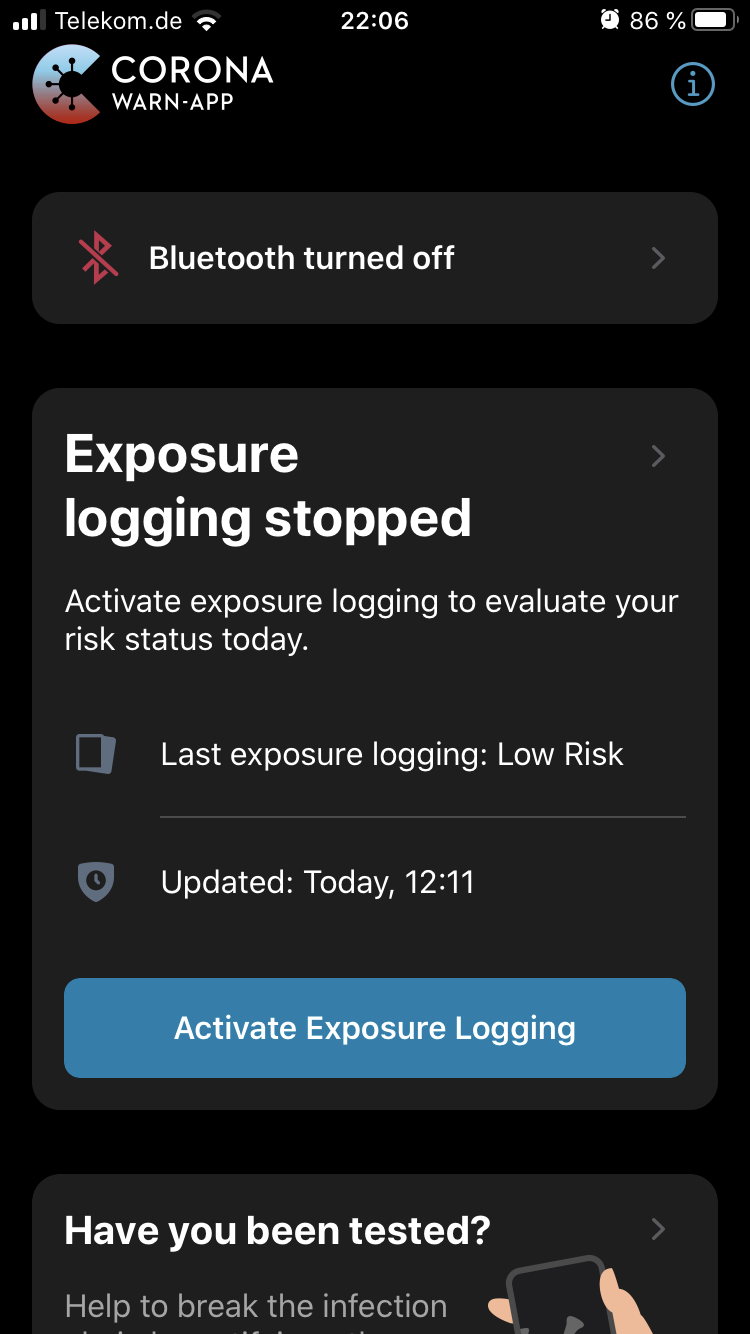
Open control center, click Bluetooth twice (so that it is white)
- Close the control center
- The warning in the app disappeared
StefanLobbenmeier
on 18 Jun 2020
Thanks for the detailed explanation. For the sake of completeness and according to my previous comments I just wanted to add the "blue" is of course also sufficient. (But not advisable.)
markusthamm
on 18 Jun 2020
Thank you all for the lively discussion. In the meantime, we added the following:
- Note about disabled bluetooth in the FAQ (https://www.coronawarn.app/de/faq/#ios_logging_bt)
- A central issue to track changes to the way missing internet connectivity is displayed (corona-warn-app/cwa-backlog#1)
- A central issue to track a suggestion about a notification that the app is active / inactive (corona-warn-app/cwa-wishlist#4)
 tkowark
on 19 Jun 2020
tkowark
on 19 Jun 2020
Due to the steps above and the created wishlist items, we'll close this issue for now.
tkowark
on 24 Jul 2020
Related issues
 benekuehn
·
3Comments
benekuehn
·
3Comments
 Ein-Tim
·
3Comments
Ein-Tim
·
3Comments
 tom-georg
·
3Comments
tom-georg
·
3Comments
 pavll
·
3Comments
pavll
·
3Comments
 Applaus-Klaus
·
3Comments
Applaus-Klaus
·
3Comments
Most helpful comment
@Wastl79 on iOS both blue and white in the control center mean that Bluetooth is enabled. White just means that the device is not looking for new connections to headphones etc.. you can turn off Bluetooth completely in the settings, which will also cause „corona-warn-app“ to show a warning.