Cwa-app-android: Cause 9002: file is not a database: , while compiling: select count(*) from sqlite_master;
Describe the bug
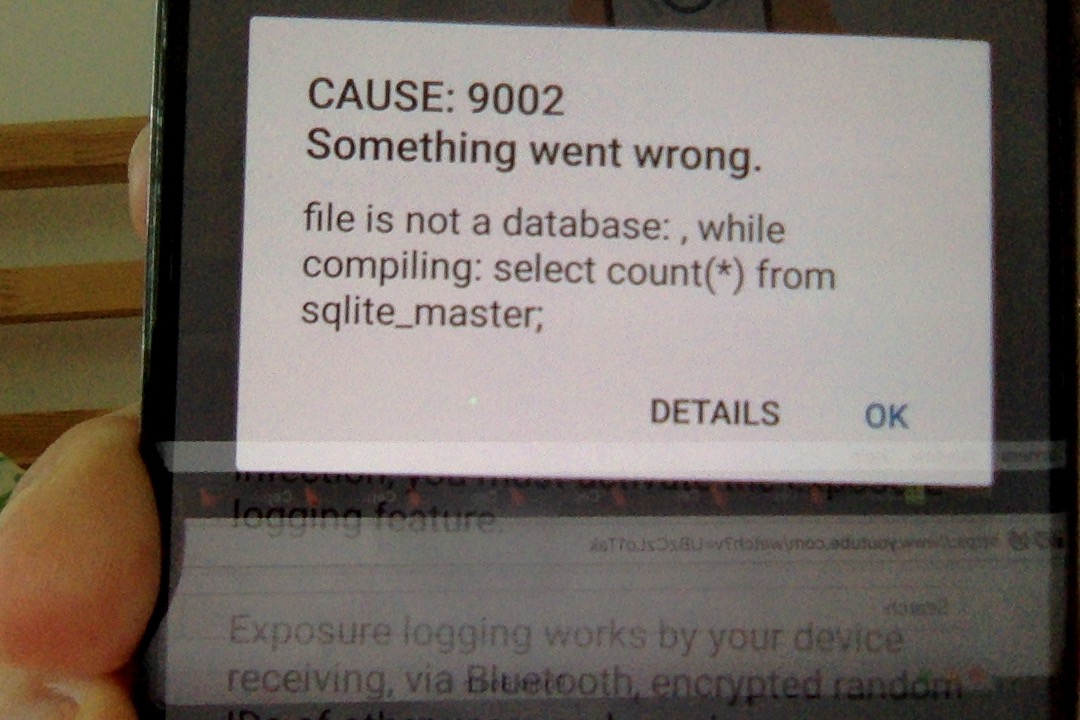
I'm installing the app. The next day it stops to work and starts crashing on start. Sometimes it's getting an error
Cause: 9002
Something went wrong.
file is not a database: , while compiling: select count(*) from sqlite_master;
This happened twice already. After first one I've removed and reinstalled app.
Expected behaviour
I expect the app to work longer then one day ;)
Steps to reproduce the issue
There are no any specific steps to reproduce. I'm just using the app.
Technical details
Huawei P20 Pro. (CLT-L29)
EMUI version 8.1.0
Android version 8.1.0
Additional context
Internal Tracking Id: EXPOSUREAPP-1851
 raykov
All 180 comments
Just found the same issue in closed with "won't fix" label. :(
https://github.com/corona-warn-app/cwa-app-android/issues/579
raykov
on 18 Jun 2020
Hi, Just noticed that you mentioned it runs twice. Can you elaborate?
 jakobmoellersap
on 18 Jun 2020
jakobmoellersap
on 18 Jun 2020
Yeah, sure.
- I have installed it on Tuesday (June 16) morning.
- Next day (June 17) it stopped to work and started to crash without showing anything. (app was just closing at the start).
- I've tried again after few hours and the app opened
- But it looked like I was launching it for the first time. Taking me through the setup with explaining everything and on the step of "turn on exposure logging" it returned me this error with sqlite.
- I removed the app and reinstalled it again. It started to work... till today...
- Today I've tried to open it and got the same from the step
4
raykov
on 18 Jun 2020
Do you have a rooted device or any special device setup that could be the issue?
jakobmoellersap
on 18 Jun 2020
Also could you give me a photo of the details screen?
jakobmoellersap
on 18 Jun 2020
Nope, I didn't root my device and I'm using manufactured setup.
raykov
on 18 Jun 2020
can you give me the details input of the dialog? I want to see where if we can deduce the behavior from a specific call
jakobmoellersap
on 18 Jun 2020
Ah, sorry. Here they are


raykov
on 18 Jun 2020
Unfortunately this would still relate to encryption failure happening which is a state that should never happen. The only scenario that I can think of is that the SecureRandom Generation through the Conscrypt Provider fails at your device. For the accurate issue determination we would need more information though. I will add help needed in case we get any input from the community.
Concretely, this means that the database cannot be read due to a bad password. Is there any security software or anything else that could change the android master key or the encrypted shared preferences that contains the password for the database?
jakobmoellersap
on 18 Jun 2020
having similar issue with Huawei P8lite on Android 6.0:


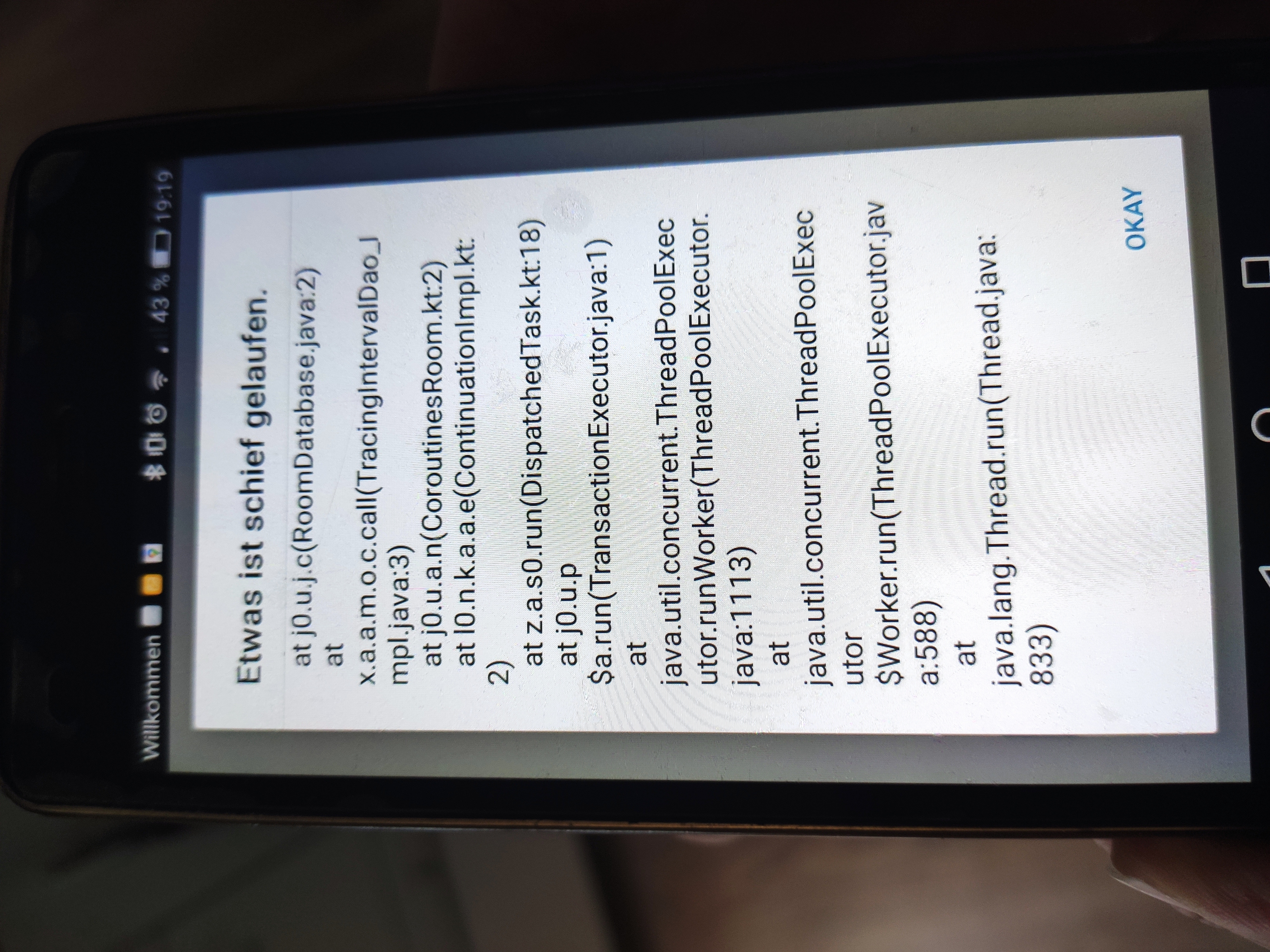
-- edit --
after reinstalling problem was solved
 brokkoli71
on 19 Jun 2020
brokkoli71
on 19 Jun 2020
Taking a look at the (pretty limited) Crash Reports we have, this Issue comes up almost exclusively at Huawei and Honor Devices. Specifically, imported devices seem to be affected the most (showing up with Chinese manufacturing tags).
In this Case: Reinstalling might NOT solve the problem, but make it come up again after a day. I would thus suggest that the reinstall workaround is not working as well for this problem.
There could be different root causes for this. The first suspect is indeed an incompatible crypto provider under the hood of SecureRandom which corrupts the password generation. Another suspect (hopefully not applicable) would be that the devices actually try to look into the database files or the encrypted shared preferences and alter them somehow, making the read corrupt as well.
I would appreciate anyone with deep knowledge of huawei-specific behavior to provide us with more information while we are also trying to consistently replicate and reduce the issue to find the root cause.
jakobmoellersap
on 19 Jun 2020
Additionally, I would ask everyone with this error to NOT post their Stack Trace in this issue (unless specifically asked for), as it will most likely be not helpful for solving the issue. Thanks, everyone!
jakobmoellersap
on 19 Jun 2020
Same problem here with Honor 7 Premium 32 GB (Android 6). After the first installation this error occurs after 3 days I guess and I had to reinstall the whole app.
 Martin-Wegner
on 22 Jun 2020
Martin-Wegner
on 22 Jun 2020
Same error here with a Huawai ALE-L21 P8 phone and Android 6.0
The app had worked one day and had crashed in the same way after one day. I reinstalled it and then it worked for 3 days until a few minutes ago.
I did not do anything special I did not even restarted my phone.
If I delete the app I think that all information (shared keys) about other people (phones) I met are gone, aren't they?
 pdeiml
on 22 Jun 2020
pdeiml
on 22 Jun 2020
Well i have the same problem with a Huawei P8 Lite. (like pdeiml)
Worked for a few days.
Today i check the status and i had to start the init process again.
Then i got the reported error.
 DerGnomi
on 22 Jun 2020
DerGnomi
on 22 Jun 2020
If I delete the app I think that all information (shared keys) about other people (phones) I met are gone, aren't they?
The detected RPIs are not stored by the app but the Exposure Notification Framework. Hence, deleting the app should leave the contacts untouched unless you delete them explicitly through the System settings) We‘ll add an FAQ note about the problem.
 tkowark
on 23 Jun 2020
tkowark
on 23 Jun 2020
Same problem here, Huawei P20.
 deimeke
on 23 Jun 2020
deimeke
on 23 Jun 2020
If I delete the app I think that all information (shared keys) about other people (phones) I met are gone, aren't they?
The detected RPIs are not stored by the app but the Exposure Notification Framework. Hence, deleting the app should leave the contacts untouched unless you delete them explicitly through the System settings) We‘ll add an FAQ note about the problem.
So tracing would still be possible through the app, within the 14 day window even if the app was reinstalled after let's say 2 days? Or would the app only have access to the data from the Exposure Notification framework of those 2 days?
 JoTheHannes
on 24 Jun 2020
JoTheHannes
on 24 Jun 2020
If I delete the app I think that all information (shared keys) about other people (phones) I met are gone, aren't they?
The detected RPIs are not stored by the app but the Exposure Notification Framework. Hence, deleting the app should leave the contacts untouched unless you delete them explicitly through the System settings) We‘ll add an FAQ note about the problem.
So tracing would still be possible through the app, within the 14 day window even if the app was reinstalled after let's say 2 days? Or would the app only have access to the data from the Exposure Notification framework of those 2 days?
Yes, the matching is also done by the framework, not the app and hence is performed against the entire set of collected RPIs.
If you have further questions about that, please open another question issue so we can keep this issue focused on the DB problems.
tkowark
on 24 Jun 2020
I had the same on my Huwaei H60, Android 6.0 (see closed thread #579)
Reinstallation helped, I get status updates.
Now after few days every morning "Ursache 3, Fehler bei Kommunikation mit Google API(10)",
"unable to validate key file signature: Pipe is closed" as described in threads #737, #747
But it recovers after few minutes and a few tries and gives status.
Seems the errors are related.
 helmutweick
on 25 Jun 2020
helmutweick
on 25 Jun 2020
Thanks for this hint. We are in contact with Google to more closely identify the issue and will update here once we have updates regarding this specific error.
jakobmoellersap
on 25 Jun 2020
Unfortunately we were still not able to replicate the behavior completely. If someone is able to provide us with a bug report from adb as described in https://developer.android.com/studio/debug/bug-report, please feel free to contribute and share a report with us.
jakobmoellersap
on 25 Jun 2020
"Interactive Report" or "Full Report" ?
Can I do one now even though the app crashed yesterday or do I have to wait for it to crash again?
JoTheHannes
on 25 Jun 2020
This happened on my Huawei P8 lite (Android 6) when starting the app after it had just received an update through Google Play Store. Reinstalling solved it.
 kryops
on 26 Jun 2020
kryops
on 26 Jun 2020
I can re-confirm the issue on another Huawei P20 Pro. (CLT-L29), EMUI version 8.1.0, Android version 8.1.0. Initially the app works fine and then within hours to days the issue occurs and the app has to be completly reinstalled. Progress / Tracked contacts from previous installs are not visible in the UI.
 j-nordt
on 26 Jun 2020
j-nordt
on 26 Jun 2020
please report a full report when you can. it would be great to do it right after you receive the error.
jakobmoellersap
on 26 Jun 2020
Will do as soon as it crashes again. :)
JoTheHannes
on 26 Jun 2020
next day, next error at 00:27. However, this time slightly different.
started with "file is not a data bas", continued with "Ursache 3, Fehler bei Kommunikation mit Google API(10)",
now "Fehler bei Kommunikation mit Google API (39508)". Bug report recorded.
bugreport-2020-06-26-00-29-25.txt
Recovered after some hours, now again status.
helmutweick
on 26 Jun 2020
@helmutweick Interesting, thanks for sharing. 39508 would indicate that you run into the Rate Limiting that is occurring from the Google API. Apparently you managed to submit Keys to the API twice without running into an error on the same day. Error 10 is an Error while validating Key File Signatures (also Security-related) and was reported already in a separate issue (#737) and the assumption that these are related is correct.
jakobmoellersap
on 26 Jun 2020
This is a snippet of the stack that seems to relate to the error cause
------ SYSTEM LOG (logcat -v threadtime -d *:v) ------
--------- beginning of main
06-26 00:27:12.705 2594 2607 E HAL : load: id=gralloc != hmi->id=gralloc
06-26 00:27:12.783 2544 2544 I HwSecImmHelper: mSecurityInputMethodService is null
06-26 00:27:12.790 4222 4244 I ActivityManager: Displayed de.rki.coronawarnapp/.ui.main.MainActivity: +693ms
06-26 00:27:12.857 4222 4231 I art : Background partial concurrent mark sweep GC freed 122862(6MB) AllocSpace objects, 110(3MB) LOS objects, 27% free, 42MB/58MB, paused 2.162ms total 198.782ms
06-26 00:27:13.196 2594 2594 W DynamiteModule: Local module descriptor class for providerinstaller not found.
06-26 00:27:13.211 2594 2594 W ProviderHelper: Unknown dynamite feature providerinstaller
06-26 00:27:13.218 2594 2594 I DynamiteModule: Considering local module providerinstaller:0 and remote module providerinstaller:0
06-26 00:27:13.221 2594 2594 W ProviderInstaller: Failed to load providerinstaller module: No acceptable module found. Local version is 0 and remote version is 0.
06-26 00:27:13.307 2594 2594 I art : Rejecting re-init on previously-failed class java.lang.Class
06-26 00:27:13.307 2594 2594 I art : Rejecting re-init on previously-failed class java.lang.Class
06-26 00:27:13.308 2594 2594 I art : Rejecting re-init on previously-failed class java.lang.Class
06-26 00:27:13.308 2594 2594 I art : Rejecting re-init on previously-failed class java.lang.Class
06-26 00:27:13.338 2594 2594 I ProviderInstaller: Installed default security provider GmsCore_OpenSSL
06-26 00:27:13.548 2594 2594 I Safeboot: Checking safeboot...
06-26 00:27:13.592 2594 2594 I Safeboot Condition: No need to enter Safeboot.
06-26 00:27:13.750 2594 2594 I beit : Primes not initialized, returning default (no-op) Primes instance which will ignore all calls. Please call Primes.initialize(...) before using any Primes API.
06-26 00:27:13.900 2594 2594 W System : ClassLoader referenced unknown path: /data/data/com.google.android.gms/app_chimera/m/00000198/n/armeabi
06-26 00:27:14.085 2594 2594 I DynamiteModule: Considering local module com.google.android.gms.googlecertificates:4 and remote module com.google.android.gms.googlecertificates:4
06-26 00:27:14.085 2594 2594 I DynamiteModule: Selected local version of com.google.android.gms.googlecertificates
06-26 00:27:14.773 2594 2594 I ExposureNotification: ExposureNotificationChimeraService.onBind [CONTEXT service_id=236 ]
06-26 00:27:14.780 2594 2594 I ceq : Primes not initialized, returning default (no-op) Primes instance which will ignore all calls. Please call Primes.initialize(...) before using any Primes API.
06-26 00:27:14.799 4222 4675 I SendBroadcastPermission: action:android.net.wifi.SCAN_RESULTS, mPermissionType:0
06-26 00:27:14.855 2594 2605 W DynamiteModule: Local module descriptor class for com.google.android.gms.googlecertificates not found.
06-26 00:27:14.859 2594 2605 I DynamiteModule: Considering local module com.google.android.gms.googlecertificates:0 and remote module com.google.android.gms.googlecertificates:4
06-26 00:27:14.859 2594 2605 I DynamiteModule: Selected remote version of com.google.android.gms.googlecertificates, version >= 4
06-26 00:27:14.872 2594 2605 W System : ClassLoader referenced unknown path: /data/data/com.google.android.gms/app_chimera/m/0000019f/n/armeabi-v7a
06-26 00:27:14.873 2594 2605 W System : ClassLoader referenced unknown path: /data/data/com.google.android.gms/app_chimera/m/0000019f/n/armeabi
06-26 00:27:14.963 2594 2605 W ConfigurationChimeraPro: Caller is not authorized to access Uri: content://com.google.android.gms.phenotype/com.google.android.gms [CONTEXT service_id=51 ]
06-26 00:27:15.037 4222 4243 I Bluetooth_framework: BluetoothManagerService:Message: 20
06-26 00:27:15.038 4222 4243 I Bluetooth_framework: BluetoothManagerService:Added callback: android.bluetooth.IBluetoothManagerCallback$Stub$Proxy@199e001:true pid = 2594
06-26 00:27:15.055 2594 2605 I ExposureNotification: Utils#isSupported enabled=true, isDeviceSupported=true, isBluetoothSupported=true, BluetoothAdapter.isMultipleAdvertisementSupported=false [CONTEXT service_id=236 ]
06-26 00:27:15.154 4222 4675 E WifiConfigStore: updateConfiguration freq=2437 BSSID=24:65:11:f8:4e:3b RSSI=-69 "Buburepeater"WPA_PSK
06-26 00:27:15.241 4222 4222 I MQoS : onSignal: mSubId=0,currDataSubID=0
06-26 00:27:15.241 4222 4222 I MQoS : received cell-signal:4
06-26 00:27:15.241 4222 5254 I SendBroadcastPermission: action:android.intent.action.SIG_STR, mPermissionType:0
06-26 00:27:15.249 4763 4816 I HwCustMobileSignalControllerImpl: subId:0 phoneType:1 networktype:3 targetClass:2 masterLevel:3 slaveLevel:-1
06-26 00:27:15.457 2544 2906 I System : core_booster, getBoosterConfig = false
06-26 00:27:15.467 2544 2906 I System : core_booster, getBoosterConfig = false
06-26 00:27:15.829 2594 2898 I SendBroadcastPermission: action:com.google.android.libraries.storage.protostore.SIGNAL_ACTION, mPermissionType:0
06-26 00:27:15.829 2594 2898 I SendBroadcastPermission: action:com.google.android.libraries.storage.protostore.SIGNAL_ACTION, mPermissionType:0
06-26 00:27:16.150 3730 3730 E Thermal-daemon: [flash_led] temp_new :32 temp_old :31
06-26 00:27:16.150 3730 3730 E Thermal-daemon: Report temperature: [flash_led] temp :32 report_threshold:1
06-26 00:27:16.151 3730 3730 E Thermal-daemon: [ap] temp_new :35 temp_old :34
06-26 00:27:16.151 3730 3730 E Thermal-daemon: Report temperature: [ap] temp :35 report_threshold:1
06-26 00:27:16.523 4222 4711 E HwCHRWebMonitor: getFileResult throw exceptionjava.io.FileNotFoundException: proc/net/wifi_network_stat: open failed: ENOENT (No such file or directory)
06-26 00:27:17.292 2594 2895 I ExposureNotification: ThreadSafeLevelDbWrapper: do open LevelDb en-matching-request-db [CONTEXT service_id=236 ]
06-26 00:27:17.293 2594 2895 I ExposureNotification: ThreadSafeLevelDbWrapper:en-matching-request-db instance btz@1243c38 created [CONTEXT service_id=236 ]
06-26 00:27:17.320 2594 2895 I ExposureNotification: ThreadSafeLevelDbWrapper:en-matching-request-db instance btz@1243c38 closed [CONTEXT service_id=236 ]
06-26 00:27:17.322 2594 2895 I ExposureNotification: ThreadSafeLevelDbWrapper: do close LevelDb en-matching-request-db [CONTEXT service_id=236 ]
06-26 00:27:17.416 2594 2895 I SendBroadcastPermission: action:com.google.android.libraries.storage.protostore.SIGNAL_ACTION, mPermissionType:0
06-26 00:27:17.417 2594 2895 I SendBroadcastPermission: action:com.google.android.libraries.storage.protostore.SIGNAL_ACTION, mPermissionType:0
06-26 00:27:17.531 2594 2897 E AsyncOperation: serviceID=236, operation=ProvideDiagnosisKeysOperation
06-26 00:27:17.531 2594 2897 E AsyncOperation: OperationException[Status{statusCode=Unable to validate key file signature: Pipe is closed, resolution=null}]
06-26 00:27:17.531 2594 2897 E AsyncOperation: at bnt.a(:com.google.android.gms.policy_nearby@[email protected]:187)
06-26 00:27:17.531 2594 2897 E AsyncOperation: at azi.run(:com.google.android.gms.policy_nearby@[email protected]:11)
06-26 00:27:17.531 2594 2897 E AsyncOperation: at ddp.run(:com.google.android.gms.policy_nearby@[email protected]:2)
06-26 00:27:17.531 2594 2897 E AsyncOperation: at avl.b(:com.google.android.gms.policy_nearby@[email protected]:12)
06-26 00:27:17.531 2594 2897 E AsyncOperation: at avl.run(:com.google.android.gms.policy_nearby@[email protected]:7)
06-26 00:27:17.531 2594 2897 E AsyncOperation: at java.util.concurrent.ThreadPoolExecutor.runWorker(ThreadPoolExecutor.java:1113)
06-26 00:27:17.531 2594 2897 E AsyncOperation: at java.util.concurrent.ThreadPoolExecutor$Worker.run(ThreadPoolExecutor.java:588)
06-26 00:27:17.531 2594 2897 E AsyncOperation: at stk.run(:com.google.android.gms@[email protected] (040306-316502805):0)
jakobmoellersap
on 26 Jun 2020
"Failed to load providerinstaller module: No acceptable module found" and "AsyncOperation: OperationException[Status{statusCode=Unable to validate key file signature".
It runs Google Play Services 20.21.75, updated on the same day, but first installed in 2016,
Strange, why it sometimes seems to work, sometimes not.
helmutweick
on 26 Jun 2020
Huawei P20 Pro, error "file is not a database..." after approx 30h of running the app. The app is back at the setup steps to activate "Risiko Ermittlung". When trying to activate, the error occurs.
bugreport-CLT-L29-HUAWEICLT-L29-2020-06-26-15-58-54.zip
After closing the app and opening it again now the error changes to 9002 "could not decrypt value. Decryption failed"

JoTheHannes
on 26 Jun 2020
next day, next error, again "Fehler bei Kommunikation mit Google API(10)".
Bug report again says:
E AsyncOperation: serviceID=236, operation=ProvideDiagnosisKeysOperation
E AsyncOperation: OperationException[Status{statusCode=Unable to validate key file signature: Pipe is closed, resolution=null}]
This time it won't recover after 8 hours, tried a new installation, phone on/off, but still the same error.
continue this issue in #737, There are many such reports there.
helmutweick
on 27 Jun 2020
For any issue regarding "Pipe is closed" aka Error 10, please refer to #737 as suggested by @helmutweick
jakobmoellersap
on 27 Jun 2020
Error is still existing same on Huawei P20 Pro, usually happens between 24h and 48h of running the app.
JoTheHannes
on 1 Jul 2020
The error is consistently appearing on certain devices but we still could not figure out a root cause. Even though we see an increase in our user base the amount of users seeing this specific error stays constant. Unlike previously thought the error is also unrelated to Error 10 most likely. We would still appreciate any input regarding this and the possible special context in the device that could impact the security provider of the affected devices
jakobmoellersap
on 1 Jul 2020
Huawei P20Pro Android 8.1.0
On the third day after installing the app, the error appears.
After clicking on the app, it begins with the questions as with a new installation. Then after the question with the activation... error 9002.
Maybe the problem comes from flight mode, which is always activated all night?
 jakobmitka
on 4 Jul 2020
jakobmitka
on 4 Jul 2020
Update on Huawei P20 Pro:
Since updating to Android 9.1 or 10.0 error has not occurred again. App is now running 3 days, never got that far before updating.
EDIT: Still running without errors since 5 days now.
JoTheHannes
on 6 Jul 2020
Same problem here. After installing the app shortly after release, it run well for a few days. Then I got Error 10 (Error #737 ) for some weeks. Since the beginning of this week Error 9002 appears, after get through the init process again. Because nothing works for weeks, I reinstalled it. Then Error 10 disappears, but Error 9002 appears after some days again. Reinstalled it again, after some days error apperas again after going through init process again. Now the app even crashed shortly after error message appears.
Huawei P8 Lite (ALE-L21)
Android 6.0
EMUI 4.0.3
Is the problem already identified and going to be fixed? Do you have ideas for a workaround?
 JoFriede
on 19 Jul 2020
JoFriede
on 19 Jul 2020
This does not seem to be the case...
I updated GMS (20.26.14), ENF (1.05) and the app (1.1.1). But yesterday the error message appers again and since then the app crashes after starting.
It seems that I have a bad combination of Android version and device for using this app (Error 10, Cause 9002...). I'm tired of checking for news regurlarly without progress. I think, I will give it a new chance in autumn when the temperature will drop and deinstall it till then.
JoFriede
on 23 Jul 2020
Here is my bugreport to verify the problem "file is not a database".
Unfortunally the adb bugreport fails on my device when trying to create a zipped report.
So I put the bugreport in textformat into the zipfile.
My device is a Huawei P8 with Android 6 not rootet. Until last week I got the error 10 problem which is now fixed with the new ENF version according to #737
bugreport.zip
 uweRem
on 30 Jul 2020
uweRem
on 30 Jul 2020
Hi @raykov , @brokkoli71 , @Martin-Wegner , @pdeiml, @DerGnomi , @deimeke , @kryops , @j-nordt , @jakobmitka , @JoFriede , @uweRem , it's quite a while since you reported this bug:
"Ursache 9002 - File is not a database: ,while compiling: select count (*) from sqlite_master;"
As far as I know, the root source for this exception is not known yet.
I came across the information, that the problem often occurs with Huawai and Honor devices.
One similar feauture of many of these devices is the PrivateSpace feature (Huawai/Honor specific privacy app & data storage container; see here, here, here, or here).
Did you ever use or ever enable PrivateSpace for your phone, or might it have been preconfigured to be active when you bought it?
Are you still using CWA, with the newest version 1.2.0? If yes, is the error still persisting for you? Or is it gone?
A reply to these questions may help to get an idea, if PrivateSpace might be related to the issue you experienced.
Thanks very much in advance, kind regards,
V.
 vaubaehn
on 13 Aug 2020
vaubaehn
on 13 Aug 2020
@vaubaehn i've updated Android to the newest version and the problem just disappeared from me. So maybe the problem only in old Android version.
raykov
on 13 Aug 2020
@raykov thanks for your reply! Great it's working now!
@JoTheHannes : you also updated your Android to 9/10+ - is it still working good for you?
vaubaehn
on 13 Aug 2020
@vaubaehn thx for your effort. As far as I know, PrivateSpace is not avaiable on my device and only newer devices can use it. At least I can't find it.
At the moment I don't use CWA any more, because reinstalling all 2-3 days makes no sense for me. Last version I used was 1.1.1
JoFriede
on 13 Aug 2020
@vaubaehn both my affected devices (Honor 6, Huawei P8 lite) run on Android 6 / EMUI 4.0 where PrivateSpace ist not available.
My Honor 6 only just got 1.2.0, I will keep you updated if this error occurs again. On 1.1.1, it occurred a few times, but more frequently I got instant crashes on app start (which would be #578 or #486, but they are both closed) - not sure if the problems could be related.
Exception:
java.lang.SecurityException: Could not decrypt value. decryption failed
    at androidx.security.crypto.EncryptedSharedPreferences.getDecryptedObject(EncryptedSharedPreferences.java:33)
    at androidx.security.crypto.EncryptedSharedPreferences.getBoolean(EncryptedSharedPreferences.java:1)
    at de.rki.coronawarnapp.update.UpdateChecker.checkForUpdate(UpdateChecker.kt:23)
    at de.rki.coronawarnapp.update.UpdateChecker$checkForUpdate$1.invokeSuspend(UpdateChecker.kt)
Hello,
I am not sure if I am in the right place.
Since August 4, the CWA does not open on my phone.
Is is a Huawei P8lite, modell ALE-L21, EMUI-Version EMUI 4.0.3, Android-Version 6.0.
I contacted RKI; however they referred me here, suggesting it might be cause 9002.
I told them that the app does not open, even after a break of more than 24 hours, restart of the device and that I do not get an error message.
I do have app version 1.2.0.
Does anybody have suggestions?
I am reluctant to uninstall the app; however I do not see a way around it.
Thank you in advance.
GabiLele
 GabiLele
on 13 Aug 2020
GabiLele
on 13 Aug 2020
Hi @raykov , @brokkoli71 , @Martin-Wegner , @pdeiml, @DerGnomi , @deimeke , @kryops , @j-nordt , @jakobmitka , @JoFriede , @uweRem , it's quite a while since you reported this bug:
"Ursache 9002 - File is not a database: ,while compiling: select count (*) from sqlite_master;"As far as I know, the root source for this exception is not known yet.
I came across the information, that the problem often occurs with Huawai and Honor devices.
One similar feauture of many of these devices is the PrivateSpace feature (Huawai/Honor specific privacy app & data storage container; see here, here, here, or here).Did you ever use or ever enable PrivateSpace for your phone, or might it have been preconfigured to be active when you bought it?
Are you still using CWA, with the newest version 1.2.0? If yes, is the error still persisting for you? Or is it gone?
A reply to these questions may help to get an idea, if PrivateSpace might be related to the issue you experienced.
Thanks very much in advance, kind regards,
V.
Hi V.,
Privatspace seems to be available from EMUI 5.0 onwards. I got EMUI 4.0.2 and privatspace is not availble.
CWA is in v 1.2.0 and the bug is still there. The app frequently crashes directly after startup.
The phone got a T-Mobile branding.
regards,
UweRem
uweRem
on 13 Aug 2020
A family member has the Huawei P8 lite. Since a few days ago, CWA would exit immediately after showing the logo. I managed to get it to start by going to Einstellungen → Einstellungen → Akkumanager → Geschützte Apps, where I then made Corona-Warn a "Geschützte App". (I believe this is a Huawei-specific thing. Apps that aren’t marked as protected are killed when the screen is turned off.)
Just in case it is important: I also re-installed the app and made "Google play services for Instant apps" a protected app, but since then I found out that the latter is only for games, so I don’t think it matters.
And to clarify: The app did not produce the 9002 error, so this may be a different issue. But the P8 lite is mentioned quite often here, so perhaps it’s the same problem.
 marcelm
on 13 Aug 2020
marcelm
on 13 Aug 2020
Hi @GabiLele , as @marcelm wrote, your issues may have a different root cause than exception 9002 sqllite. May I invite you to here https://github.com/corona-warn-app/cwa-app-android/issues/933#issuecomment-673584297 to find out, if it has to do with the prioritzed background activity of CWA? thank you
vaubaehn
on 13 Aug 2020
For everyone having this issue: It's common habit on Github to click the "Thumbs up" button on the issue report on top. This makes it easier for the developers to see how many people are suffering from a bug. This could also give an issue more weight and increase the chance that it's fixed soon. At least that's how most OSS projects handle it - this here may be a little different, though.
To make this clear: I'm not related to the project, just saying. And yes, I had this issue too on a Huawei P8 (installed some weeks ago, error appeared today) and reinstalling the app seems to fix it.
 mikehaertl
on 15 Aug 2020
mikehaertl
on 15 Aug 2020
Hi @raykov , sorry to bother you again. Can you do me a favor, and check whether the feature 'geschützte Apps' (protected Apps?) in settings > 'Akkumanager' (battery manager?) as described here https://github.com/corona-warn-app/cwa-app-android/issues/642#issuecomment-673567727 by @marcelm is not present anymore in your Android version, or at least CWA is enabled as protected App?
That would help a lot, thanks in advance!
vaubaehn
on 15 Aug 2020
@uweRem the error occurs regularly and I had to reinstall the app everytime. I have a 128 GB SdCard in my Honor and I use the cool feature that the phone uses the SdCard as the default storage :)
Martin-Wegner
on 17 Aug 2020
@Martin-Wegner
the error occurs regularly and I had to reinstall the app everytime. I have a 128 GB SdCard in my Honor and I use the cool feature that the phone uses the SdCard as the default storage :)
I consider this to be an extremely important information! If restrictive energy policies are in effect, this might lead to a late initialization of SD card storage, or adds in the risk for CWA's database not being closed properly, which might lead to a corrupt database file. All this can result in a crash of CWA upon opening.
Can you consider to reinstall CWA on internal storage, and see, if it mitigates your problem?
@jakobmoellersap : Maybe you want to consider this: https://github.com/corona-warn-app/cwa-app-android/issues/579#issuecomment-674405103 ?
vaubaehn
on 17 Aug 2020
@vaubaehn this is tricky. On installation you cannot control the destination storage. And remember, the SdCard is the default storage (it is like an internal storage emulation). The app settings for the Corona App are set to internal storage by default (but the SdCard is the internal storage!?). I could change it to SdCard but this sounds very weird.
Martin-Wegner
on 17 Aug 2020
@Martin-Wegner just to prevent any confusion and misunderstanding: your 128 GB SD card is an external storage card, which is replacable, right?
vaubaehn
on 17 Aug 2020
@Martin-Wegner ...and it is emulated to behave like internal storage, right?
vaubaehn
on 17 Aug 2020
@vaubaehn this is correct. The default storage path is the SDCard. So all apps are installed on the SdCard by default and all apps save their data on the SdCard by default. Only the android OS itself is stored on the internal storage. The weird point is, that the storage options are set to 'internal storage' for every app you click in the Android app settings (which is only true if you interpret the SdCard as an internal storage). What can I test for you?
Martin-Wegner
on 17 Aug 2020
On my Huawei P8 the app is installed on internal storage and the error comes up.
Reinstalling the app helps for some hours. Obviously this has the same effect as deleting the data of the app under android preferences/Apps/CWP/memory/delete data (Daten löschen).
uweRem
on 17 Aug 2020
@uweRem
If you want to support us (the user community), would you like to try something out and report in a couple of days, whether it worked for you?
- At first, follow instruction by @marcelm to set CWA as 'Geschützte App': https://github.com/corona-warn-app/cwa-app-android/issues/642#issuecomment-673567727
- Then, follow the work-around here: https://github.com/corona-warn-app/cwa-app-android/issues/933#issuecomment-674775800
Hope, it helps for now, and I'm curious for your feedback.
vaubaehn
on 17 Aug 2020
@Martin-Wegner if you want, you may try if the steps that I wrote to @uweRem here https://github.com/corona-warn-app/cwa-app-android/issues/642#issuecomment-674787145 may also work for you. But additionally to all other users, your SD card is one additional bottleneck...
Looking forward for your feedback!
vaubaehn
on 17 Aug 2020
I played around a bit trying to trigger the crash again. It turns out that possibly the "geschützte App" thing is not a permanent solution.
What I did:
- I removed CWA from the list of "Geschützte Apps": CWA still worked
- Checked the "priorisierte Hintergrundaktivität" in CWA. It was off, so I switched it to "on".
- Restarted the app: Suprisingly, I got the screen one sees on first run. Halfway through, I got the "Cause 9002" error.
- Restarted the app: I can see the regular screen for one second, then the app crashes (this happens on every attempt to open the app).
- Finally, I went to the app settings and deleted cache/data (as mentioned here before), and the app started working again.
I’ll report back in a couple of days. I cannot follow the "leave the phone on the charger as long as possible" workaround, though, as it’s not my phone.
marcelm
on 17 Aug 2020
@marcelm
do you remember which type of 9002 it was (there are several)?
- timeout
- Timed Out waiting for 60000ms
- file is not a database (sqlite)
vaubaehn
on 17 Aug 2020
And @JoFriede , @kryops , @raykov , @uweRem , @Martin-Wegner and @marcelm , in any case thanks for replying to my question 4 days ago!
vaubaehn
on 17 Aug 2020
@marcelm
I wonder, if the setting "Geschützte App" indeed had an effect. If CWA's database was properly closed, while you were disabling "Geschützte App" -> no problem. When you then restart CWA, and close it later, it might be, that CWA's tasks are killed (more or less immediatly, because now CWA is not "geschützt" anymore) before the database gets written to disk/internal storage -> database corrupted -> 9002 sqlite or crash. Can you reproduce?
vaubaehn
on 17 Aug 2020
I have the same Problem on my Sony Xperia XZ1 (Android 9) Build: 47.2.A.11.228
 schmdan1974
on 18 Aug 2020
schmdan1974
on 18 Aug 2020
Hi @schmdan1974 , have you also been affected by issue #597 more or less shortly _before_ error '9002: file is not a database' appeared on your device? Your response may help to locate the source of the problem '9002: file is not... ' more precisely. Thanks in advance for your reply. Kind regards!
vaubaehn
on 21 Aug 2020
Yes, i am also affected. My device is à Sony XZ1
vaubaehn notifications@github.com schrieb am Fr., 21. Aug. 2020, 12:46:
Hi @schmdan1974 https://github.com/schmdan1974 , have you also been
affected by issue #597
https://github.com/corona-warn-app/cwa-app-android/issues/597 more or
less shortly before error '9002: file is not a database' appeared on
your device? Your response may help to locate the source of the problem
'9002: file is not... ' more precisely. Thanks in advance for your reply.
Kind regards!—
You are receiving this because you were mentioned.
Reply to this email directly, view it on GitHub
https://github.com/corona-warn-app/cwa-app-android/issues/642#issuecomment-678222316,
or unsubscribe
https://github.com/notifications/unsubscribe-auth/AQU65NPKURHVUZ564ACL5ETSBZF65ANCNFSM4OBUNWCA
.
schmdan1974
on 21 Aug 2020
After many stable weeks the error also reapperad on my Android 6.0, Huawei H60-40.
Here is a summary:
After some days with CWA V1.04 the "Ursache 9002, file is not a data base" appeared
error vanished after installation of CWA V1.1, then worked stable for many weeks, also as V1.2.1.
But on 20.08. directly crash after start, always, also after reboot.
[bugreport-2020-08-20-23-17-30.txt] (other reason not 9002)
08-20 23:17:44.089 3948 4099 I logserver: extract_appname, forward search, appname=de.rki.coronawarnapp
08-20 23:17:44.089 3948 4099 I logserver: archive_and_send, pos=0, type=crash, output=20200820231744_crash
08-20 23:17:44.089 3948 4099 I logserver: ---copy_match_files enter!!--
08-20 23:17:44.090 4226 4243 W System.err: java.lang.NullPointerException: Attempt to invoke virtual method 'int com.huawei.lcagent.client.LogCollectManager.getUserType()' on a null object reference
08-20 23:17:44.090 4226 4243 W System.err: at com.android.server.util.ReportTools.getUserType(ReportTools.java:86)
08-20 23:17:44.090 3948 4099 I logserver: [copy_match_files,864]: copy [/data/system/dropbox/[email protected]] to [/data/log/logcache/-1228392144/[email protected]]
08-20 23:17:44.090 3948 4099 I logserver: get_fault_appname, appname=de.rki.coronawarnapp
08-20 23:17:44.090 4226 4243 W System.err: at com.android.server.util.ReportTools.isBetaUser(ReportTools.java:73)
08-20 23:17:44.090 4226 4243 W System.err: at com.android.server.util.ReportTools.report(ReportTools.java:58)
08-20 23:17:44.090 4226 4243 W System.err: at com.android.server.util.HwUserBehaviourRecord.appExitRecord(HwUserBehaviourRecord.java:65)
08-20 23:17:44.090 3948 4099 I logserver: handle_archive_exception, BASIC_MODE
08-20 23:17:44.090 4226 4243 W System.err: at com.android.server.am.ActivityManagerService$UiHandler.handleMessage(ActivityManagerService.java:1523)
08-20 23:17:44.090 3948 4099 I logserver: remove_last_modify_file, into 1 times, file_dir:
08-20 23:17:44.090 4226 4243 W System.err: at android.os.Handler.dispatchMessage(Handler.java:102)
08-20 23:17:44.090 4226 4243 W System.err: at android.os.Looper.loop(Looper.java:150)
08-20 23:17:44.090 4226 4243 W System.err: at android.os.HandlerThread.run(HandlerThread.java:61)
08-20 23:17:44.090 4226 4243 W System.err: at com.android.server.ServiceThread.run(ServiceThread.java:46)
08-20 23:17:44.090 4226 4243 E ReportTools: This is not beta user build
08-20 23:17:44.090 3948 4099 I logserver: remove_last_modify_file, into 1 times, file_dir:
08-20 23:17:44.091 3948 4099 I logserver: get_disk_available_size, Disk_available = 2465071104 B = 2350 MB
08-20 23:17:44.091 3948 4099 I logserver: pack_files, output_path is /data/log/unzip.
08-20 23:17:44.091 3948 4099 I logserver: move_input_files, create dir [/data/log/unzip/H60-L04_H60-L04C432B860_0000000000_20200820231744_crash]
08-20 23:17:44.097 3948 4099 I logserver: handle_archive_exception, into set notify_type
08-20 23:17:44.097 3948 4099 I logserver: get_notify_mode, 1
08-20 23:17:44.097 3948 4099 I logserver: Process 4099 opened FIFO(12) for O_WRONLY
08-20 23:17:44.097 3948 4099 I logserver: notify_logcontrol, 4099 sent /data/log/unzip/H60-L04_H60-L04C432B860_0000000000_20200820231744_crash
08-20 23:17:44.097 3948 4099 I logserver: check_dir_size, dir[/data/log/coredump/] doesn't exist
08-20 23:17:44.097 3948 4099 I logserver: clean_cur_cache:999, system(rm -r /data/log/logcache/-1228392144/* > /dev/null 2>&1)
08-20 23:17:44.098 3948 3948 I logserver: process_event
08-20 23:17:44.099 3948 3948 I logserver: handle_fifo_msg, read res = 460, client pid = 4099, command = send log, data=/data/log/unzip/H60-L04_H60-L04C432B860_0000000000_20200820231744_crash
08-20 23:17:44.099 3948 3948 I logserver: handle_fifo_msg, 4099 sent /data/log/unzip/H60-L04_H60-L04C432B860_0000000000_20200820231744_crash
08-20 23:17:44.099 3948 4098 I logserver: thread_logcontrol: /data/log/logcontrol has changed.
08-20 23:17:44.099 3948 4098 I logserver: handle_notify_event, send msg [submit:trigger=0,bugtype=2,modulename=de.rki.coronawarnapp,level=1,testtype=NORMAL,path=/data/log/unzip/H60-L04_H60-L04C432B860_0000000000_20200820231744_crash,mode=1;]
08-20 23:17:44.099 3948 4098 I logserver: send_to_client, send to (9) res = 167
08-20 23:17:44.114 15684 15774 I WM-GreedyScheduler: Ignoring schedule request in non-main process
08-20 23:17:44.114 15684 15684 I Process : Sending signal. PID: 15684 SIG: 9
08-20 23:17:44.114 15743 15743 I art : Rejecting re-init on previously-failed class java.lang.Class
08-20 23:17:44.115 15743 15743 I art : Rejecting re-init on previously-failed class java.lang.Class
08-20 23:17:44.117 5397 7673 I PgedBinderListener: kstate callback type:8 value1=15684 value2=KILLED
08-20 23:17:44.118 4226 6002 E HsmCoreServiceImpl: onTransact in code is: 102
08-20 23:17:44.118 4226 6002 I MediaProcessHandler: processOp opType: 1, uid: 10008, pid: 14107
08-20 23:17:44.118 4226 6002 W MediaProcessHandler: remove target not exist, maybe the UI process: uid: 10008, pid: 14107
08-20 23:17:44.119 5397 6373 I ash : de.rki.coronawarnapp { running duration=1536 } transition to: over, reason:crash
08-20 23:17:44.119 5397 6373 I ash : remove app record pkg: de.rki.coronawarnapp
Next day app started like after new installation,
but no activation possible due to "Ursache 9002 file is not a data base".
Now app crashes at each start after a second, can just see screen for short.
[bugreport-2020-08-21-13-23-54.txt2]
08-21 13:22:57.034 22525 22525 I am_on_resume_called: [0,de.rki.coronawarnapp.ui.LauncherActivity]
08-21 13:22:57.257 4226 4249 I am_activity_launch_time: [0,160062039,de.rki.coronawarnapp/.ui.LauncherActivity,1383,1383]
08-21 13:22:57.291 4226 6002 I am_destroy_service: [0,190431986,6574]
08-21 13:22:57.395 4226 4878 I am_home_stack_moved: [0,0,6,6,sourceStackToFront]
08-21 13:22:57.395 4226 4878 I wm_task_moved: [25836,1,3]
08-21 13:22:57.398 4226 4878 I am_create_activity: [0,29948251,25836,de.rki.coronawarnapp/.ui.main.MainActivity,NULL,NULL,NULL,0]
08-21 13:22:57.400 4226 4878 I am_pause_activity: [0,160062039,de.rki.coronawarnapp/.ui.LauncherActivity]
08-21 13:22:57.402 4226 4878 I am_home_stack_moved: [0,0,6,6,startedActivity setFocusedActivity]
08-21 13:22:57.402 4226 4878 I wm_task_moved: [25836,1,3]
08-21 13:22:57.408 4226 4878 I am_focused_activity: [0,de.rki.coronawarnapp/.ui.main.MainActivity]
08-21 13:22:57.409 4226 5547 I am_finish_activity: [0,160062039,25836,de.rki.coronawarnapp/.ui.LauncherActivity,app-request]
08-21 13:22:57.416 22525 22525 I am_on_paused_called: [0,de.rki.coronawarnapp.ui.LauncherActivity]
08-21 13:22:57.419 4226 4865 I am_restart_activity: [0,29948251,25836,de.rki.coronawarnapp/.ui.main.MainActivity]
08-21 13:22:57.423 4226 4865 I am_focused_activity: [0,de.rki.coronawarnapp/.ui.main.MainActivity]
08-21 13:22:57.806 22525 22525 I am_on_resume_called: [0,de.rki.coronawarnapp.ui.main.MainActivity]
08-21 13:22:57.984 4226 4249 I am_activity_launch_time: [0,29948251,de.rki.coronawarnapp/.ui.main.MainActivity,567,567]
08-21 13:22:58.345 4226 4238 I am_destroy_activity: [0,160062039,25836,de.rki.coronawarnapp/.ui.LauncherActivity,finish-imm]
08-21 13:22:58.600 4226 4865 I am_destroy_service: [0,62695349,5331]
08-21 13:22:58.943 4226 6000 I am_crash: [22525,0,de.rki.coronawarnapp,684211780,net.sqlcipher.database.SQLiteException,file is not a database: , while compiling: select count(*) from sqlite_master;,SQLiteCompiledSql.java,-2]
08-21 13:22:58.944 4226 6000 I am_finish_activity: [0,29948251,25836,de.rki.coronawarnapp/.ui.main.MainActivity,force-crash]
08-21 13:22:58.946 4226 6000 I am_home_stack_moved: [0,1,0,0,finishActivity adjustFocus setFocusedActivity]
08-21 13:22:58.946 4226 6000 I wm_task_moved: [25815,1,0]
08-21 13:22:58.952 4226 6000 I am_focused_activity: [0,com.huawei.android.launcher/.Launcher]
08-21 13:22:58.982 4226 6000 I am_pause_activity: [0,29948251,de.rki.coronawarnapp/.ui.main.MainActivity]
08-21 13:22:59.000 4226 4878 I am_create_service: [0,12941628,.DropBoxEntryAddedService,10008,5331]
08-21 13:22:59.015 4226 4237 I am_create_service: [0,258807493,.GmsIntentOperationService,10008,6574]
08-21 13:22:59.046 4226 6001 I am_create_service: [0,168750376,.ReportingAndroidService,10008,5331]
08-21 13:22:59.052 4226 4238 I am_destroy_service: [0,12941628,5331]
08-21 13:22:59.202 4226 6271 I am_proc_died: [0,22525,de.rki.coronawarnapp]
So tried new installation, allow power save disable,
but then Ursache 9002 timeout, maybe just no internet connection.
Tried again worked, toggle activation off/on no error -> DB access seems to work.
Let's wait for next day and new status.
[bugreport-2020-08-21-14-40-44.txt] (no error)
08-21 14:39:34.918 5397 6422 W PGApi_client: recv actoionId = 10000, action = com.huawei.pgmng.PGAction@8d2b235 actionId =10000 pkg =de.rki.coronawarnapp extend1 =355 extend2 = flag =3 type =1
08-21 14:39:34.918 5397 6422 W PGMiddleWare: in handleAction method, action = 10000
08-21 14:39:34.919 5397 6422 W PGMiddleWare: in handleAction, invoke client = com.huawei.pgmng.middleware.AudioEffectLowPowerImpl@564af88, action = com.huawei.pgmng.PGAction@8d2b235 actionId =10000 pkg =de.rki.coronawarnapp extend1 =355 extend2 = flag =3 type =1
08-21 14:39:34.932 4908 5126 I HwSystemManager: NotificationGuideService:handle MSG_ACTIVIY_FOREGROUND, uid:10313
helmutweick
on 21 Aug 2020
Hi @helmutweick , very big kudos! I think, your support will turn out very helpful! (I hope I'm not wrong...)
So, let's sum up a bit.
First crash on Aug 20, around 23:17.
Do you remember, what exactly you did before running CWA in foreground? May there be anything associated with that first crash?
As I pointed out here -> https://github.com/corona-warn-app/cwa-app-android/issues/1053#issue-683493833 , I believe the phone's LogCollecting-Service (part of Huawei Analytics/Huawei Mobile Services) threw the exception. The root cause for that exception may be somewhere inside CWA, could get a hard job to find out, where exactly.
The crash caused CWA to close immediatly, while the encrypted database of CWA was still open. And so, the database became corrupted.Next day, you restarted CWA. You found yourself in the 'onboarding', but you couldn't complete because of exception 9002: file is not a database was thrown.
I guess, the onboarding was a fallback mechanism. CWA 'discovered', that parts of CWA's data were not valid anymore. It tried to reinitialize, but it failed. Reason could be here -> #1037After that, you tried a new installation. This completely wipes all of CWA's data, allowing the new encrypted database to be initialized. Everything will be fine, until 1. -> First crash...
[Edit: 4. Yes, the 9002: timeout points out to network connection. Did you restart your phone directly before? Or enabled WiFi just a second before you opened CWA?]
The root cause for all these crashes might turn out to be a hard to detect flaw somewhere in CWA's code. But to try to mitigate, you could try steps suggested here -> https://github.com/corona-warn-app/cwa-app-android/issues/1053#issue-683493833 , where as the first step is to disable
- Einstellungen > Einstellungen > Apps mit Nutzungsdatenzugriff > Huawei Mobile Services
If you would like to support some more, there is one thing you could do:
Unfortunately Huawei's logging service hides some logcat entries, according to here -> https://stackoverflow.com/questions/42691076/logcat-not-showing-errors-from-my-huawei-p9-phone
You might try the given dial code from above website, to enhance the log files, and maybe post them (with Huawei Mobile Services enabled then!) I assume this to be extremely helpful.
I don't know, @d4rken , is this interesting for you and you may like to have a deeper look into it?
vaubaehn
on 21 Aug 2020
@marcelm
do you remember which type of 9002 it was (there are several)?
It is "file is not a database". I don’t have access to the phone anymore, so the only thing I can say now is that the error (the app closing immediately after start without any message) still occurs every time the app is opened.
Thanks for the prompt replies in any case!
marcelm
on 21 Aug 2020
Thanks for all the reports and logs! Thanks for the coordination efforts @vaubaehn.
I've got my hands on a P8 lite and so far managed to reproduce the issue ONCE, after a reboot. The problem is that it seems to happen less when I'm watching (debugger attached, or logging). The P8 lite isn't very powerful and thus apps not in foreground are prone to be killed by the system to regain resources. Monitoring the app makes it less likely to be killed, which in turn makes the issue more difficult to reproduce, if it is related to process death.
- First crash on Aug 20, around 23:17.
Do you remember, what exactly you did before running CWA in foreground? May there be anything associated with that first crash?
As I pointed out here -> #1053 (comment) , I believe the phone's LogCollecting-Service (part of Huawei Analytics/Huawei Mobile Services) threw the exception. The root cause for that exception may be somewhere inside CWA, could get a hard job to find out, where exactly.
The crash caused CWA to close immediatly, while the encrypted database of CWA was still open. And so, the database became corrupted.
The NullPointerException from the Huawei logging service is probably not the cause. I managed to produce the NullPointerException a few times without causing the database issue. I'm not so sure that the database is actually corrupted. The error msg will show if the database can't be decrypted. A corrupted database can't be decrypted, but if we don't have the right key, we also can't decrypt it. #1037 was an unrelated issue with the same symptons. A test method reset the password and used a new one on the old database.
@jakobmoellersap was already suspicious of that but it's tough to confirm anything with this being so rare to reproduce under observation.
Other reports here and here also show stacktraces from the encrypted shared preferences.
- Next day, you restarted CWA. You found yourself in the 'onboarding', but you couldn't complete because of exception 9002: file is not a database was thrown.
I guess, the onboarding was a fallback mechanism. CWA 'discovered', that parts of CWA's data were not valid anymore. It tried to reinitialize, but it failed. Reason could be here -> #1037
The issue being related to the encrypted SharedPreferences would explain this behavior. That on-boarding is completed, is saved in the same preferences. If nothing is saved yet (or the saved preferences are inaccessible), onboarding will be shown.
[Edit: 4. Yes, the 9002: timeout points out to network connection. Did you restart your phone directly before? Or enabled WiFi just a second before you opened CWA?]
There are multiple errors that lead to code 9002, AFAICT the 9002 timeout is unrelated to this database issue. Due to the P8 lite being "a bit" slow, it also more likely for a 9002: timeout to happen :smile:, also looking into that. I would surprise me if the database issue can be triggered by changing network states.
 d4rken
on 22 Aug 2020
d4rken
on 22 Aug 2020
Hi everyone,
although the bug described in this issue is not _exactly_ what I'm encountering I'm still reporting it here since it seems to be very much related, but I'm not running a Huawei device for once.
Setup: OnePlus 6, Magisk rooted
What happend: App ran fine ever since its release until I installed the latest OTA update (to 10.3.5) yesterday. The first time (and ever since) I started the CWA afterwards, the app gets stuck after the "onboarding" stage with the "9002: file is not a database..." error message (of course I had already done the onboarding before).
I'm somewhat confident that reinstalling will be a permanent solution in my case (since I'm not running a Huawei and presume that the issue relates to the system update). But I would be happy to supply logfiles captured while the app crashes in case anyone is interested?
[And some other idea that came to my mind: As I said, I'm running a Magisk rooted phone. To not loose the root during the OTA, I followed the following procedure:
- Uninstall all Magisk modules
- Remove Magisk from the system images (without reboot)
- Install the system update (to the B partition slot, still no reboot)
- Patch the waiting update by using the "Magisk A/B retention script"
- reboot
I can very much imagine that some crucial encryption data is lost in this A/B switching process?! ^^ On the other hand, Huawei is not using the A/B partition afaik.]
 mmaeusezahl
on 22 Aug 2020
mmaeusezahl
on 22 Aug 2020
Könnte mir bitte mal jemand eine deutsche Zusammenfassung dieses Threads geben?
Dieser Fehler ist in meiner Verwandtschaft aufgetaucht und ich würde gerne wissen, ob man nun etwas dagegen tun kann oder nicht.
Grundsätzlich muss ich sagen, dass mir nicht ganz klar ist, warum hier so wenig deutsch geschrieben wird. Immerhin handelt es sich ja um eine App ausschließlich für Deutschland, soweit ich informiert bin.
 Neuwessi11
on 22 Aug 2020
Neuwessi11
on 22 Aug 2020
@Neuwessi11 Der Fehler tritt häufig auf alten und langsame Geräten auf bei denen es zu speichern in der App Datenbank zu Fehlern kommt. Diese Fehler oder der Verlust der Entschlüsselungsdaten führt dazu das man nicht mehr auf die App zugreifen kann.
Wir arbeiten daran in den nächsten Versionen dieses Probleme abzufangen.
Zur Zeit lässt es sich nur lösen in dem man die Daten der App löscht oder sie neuinstalliert
Einstellungen -> Apps -> CWA-> Speicher-> Daten löschen
Wir wissen leider nicht immer ob alle Beteiligten deutsch verstehen, deswegen hat man sich auf englisch geeinigt. Aber wir antworten auch auf deutsch.
 thomasaugsten
on 22 Aug 2020
thomasaugsten
on 22 Aug 2020
@thomasaugsten
Ganz herzlichen Dank!!!
Gehen denn beim Datenlöschen oder der Neuinstallation nicht die gesamten Kontaktschlüssel verloren? Und ist die App nicht dadurch im Moment für von diesem Fehler Betroffene mehr oder weniger nutzlos, wenn der Fehler innerhalb von ca. 14 Tagen auftritt?
Was ich trotzdem noch nicht verstehe: Angesichts der Tatsache, dass es sich um eine von zwei deutschen Unternehmen für Deutschland entwickelte App handelt, sollten doch eigentlich mehr Leute Deutsch als Englisch verstehen (Beispiele: Meine gesamte Verwandtschaft und ich verstehen Deutsch um Klassen besser als Englisch).
Wo ist mein Denkfehler?
Neuwessi11
on 22 Aug 2020
@Neuwessi11 Es gibt wahrscheinlich einige EntwicklerInnen und NutzerInnen der CWA die kein Deutsch verstehen. Englisch ist einfach eine viel universellere Sprache, gerade auch wenn es um Austausch mit Google/Apple geht (die das ENF bereitstellen) oder den Kontakt mit Teams in anderen Ländern die ENF basierte Apps bauen. Deswegen bin ich ehrlich gesagt froh, dass Englisch die Standardsprache ist.
 daimpi
on 22 Aug 2020
daimpi
on 22 Aug 2020
@Neuwessi11 Die Kontaktschlüssel werden vom Betriebssystem gespeichert und unser Stand ist, das nach dem Löschen der letzten Covid-19 App die Schlüssel in Android auch gelöscht werden. Wenn man über Einstellungen -> Apps -> CWA-> Speicher-> Daten löschen geht kann man die App zurücksetzen ohne die App zu löschen.
Ihre Annahme ist richtig das in unseren Unternehmen mehr Leute Deutsch verstehen. Aber nicht alle Nutzer der App verstehen Deutsch und gerade dieses Thema ist auch für Google und andere Länder die eine Corona-Warn-App bereitstellen relevant.
UPDATE: Wann gelöscht wird präzisiert.
thomasaugsten
on 22 Aug 2020
@thomasaugsten
[…] unser Stand ist, das nach dem Löschen der App die Schlüssel im Betriebssystem erhalten bleiben.
I thought the keys are only preserved under iOS, but not under Android when uninstalling the app:
On Android devices, the log is deleted if Corona-Warn-App was the last app using the framework on the device. If you have SwissCovid or Immuni installed in addition to the Corona-Warn-App, the log will only be removed if these additional apps are de-installed or you manually trigger deletion of the exposure log.
daimpi
on 22 Aug 2020
This is correct for the first versions of the Google ENF. I will double check with google what's the current status of this in the latest version. But data deletion via Einstellungen->Apps should not delete the keys on all Google ENF Versions.
thomasaugsten
on 22 Aug 2020
That would actually be great if Google changed this 😊
daimpi
on 22 Aug 2020
Hi @thomasaugsten ,
This is correct for the first versions of the Google ENF. I will double check with google what's the current status of this in the latest version. But data deletion via Einstellungen->Apps should not delete the keys on all Google ENF Versions.
thanks for being into it. There are some hints that there might have been changes with the latest ENF versions, see https://github.com/corona-warn-app/cwa-app-android/issues/1053#issuecomment-678381760 and following.
Have a good day!
vaubaehn
on 23 Aug 2020
Hi @d4rken ,
thanks so much for your reply and your time, it's very nice to hear the current position in this issue from an expert's perspective!
I've got my hands on a P8 lite
Bingo. :)
and so far managed to reproduce the issue ONCE, after a reboot. The problem is that it seems to happen less when I'm watching (debugger attached, or logging). The P8 lite isn't very powerful and thus apps not in foreground are prone to be killed by the system to regain resources. Monitoring the app makes it less likely to be killed, which in turn makes the issue more difficult to reproduce, if it is related to process death.
That's bad, actually (and did you author the German entry for 'race condition' in Wikipedia? Nearly same words in second paragraph...)
As I pointed out here -> #1053 (comment) , I believe the phone's LogCollecting-Service (part of Huawei Analytics/Huawei Mobile Services) threw the exception. The root cause for that exception may be somewhere inside CWA, could get a hard job to find out, where exactly.
The crash caused CWA to close immediatly, while the encrypted database of CWA was still open. And so, the database became corrupted.The
NullPointerExceptionfrom the Huawei logging service is probably not the cause. I managed to produce theNullPointerExceptiona few times without causing the database issue. I'm not so sure that the database is actually corrupted.
To be honest, I'm also not 100% sure, if (all) exceptions are related to database corruption.
Crucial point is, if there can be any condition where the database is not closed / still written to, when any crash occurs. If in the debug- / test-setting the task has a higher priority / more ressources, then it might get difficult, to hit that exact point.
The error msg will show if the database can't be decrypted. A corrupted database can't be decrypted, but if we don't have the right key, we also can't decrypt it. #1037 was an unrelated issue with the same symptons. A test method reset the password and used a new one on the old database.
If I understood it right, the current fallback mechanism of data storage for the productive app is (only) to set a new dbPassword, if data got corrupted, is that correct? That would explain any security-related exception at the point of trying to read from database, when the database file still exists in any state.
@jakobmoellersap was already suspicious of that but it's tough to confirm anything with this being so rare to reproduce under observation.
Yes, indeed. @jakobmoellersap considered two things: Either an "incompatible crypto provider under the hood of SecureRandom which corrupts the password generation". But I wonder, if in that case the exception then would occur regularly, already from the first run of CWA. But users report, that CWA often runs flawless for them a couple of days, if not even weeks, before a crash occurs. Or, the second consideration of @jakobmoellersap , "another suspect (hopefully not applicable) would be that the devices actually try to look into the database files or the encrypted shared preferences and alter them somehow, making the read corrupt as well." But would something like this not be very risky for Huawei, if some day a sophisticated developer or security engineer finds out about it? In that case Huawei would risk to get banned from whole markets with their devices... Uh-oh, ehm, well.. So, that's maybe possible. But there are some 'but's:
- Not only Huawei devices are effected, we now also saw some Sony Xperia devices: https://github.com/corona-warn-app/cwa-app-android/issues/642#issuecomment-678243111 or https://github.com/corona-warn-app/cwa-app-android/issues/579#issuecomment-676375795 . In the first case it is reported, that he also has been affected of #597 , where the whole system-ui crashed after toggeling bluetooth / GPS (likely related to ENF?), second didn't respond if he also was affected by that issue. And AFAIR some other brands (Pixel?) had also (very) rarely been affected, but I don't remember where to find that few bug reports, though.
- If my perception is right, reports of 9002: file is not a database are decreasing now (according to Google Play Store user's reviews). That might be associated with the improved WakeUpServices in ENF, getting the devices to let CWA to run in background. Which might be associated with less killed processes. (Or users just gave up and uninstalled.)
- User reports seem to have changed a little from 'shows 9002' to 'crashes always on opening' (in association of seeing 9002 at least once), looks like something changed in the background.
Other reports here and here also show stacktraces from the encrypted shared preferences.
Yes, we have two different types of exceptions.
- 'Could not decrypt value' could indicate, that the EncryptedSharedPreferences got corrupted. Or the Android Masterkey had been changed...
- 'File is not a database' could indicate, that db had been corrupted. Or, see everything else above.
- Next day, you restarted CWA. You found yourself in the 'onboarding', but you couldn't complete because of exception 9002: file is not a database was thrown.
I guess, the onboarding was a fallback mechanism. CWA 'discovered', that parts of CWA's data were not valid anymore. It tried to reinitialize, but it failed. Reason could be here -> #1037The issue being related to the encrypted SharedPreferences would explain this behavior. That on-boarding is completed, is saved in the same preferences. If nothing is saved yet (or the saved preferences are inaccessible), onboarding will be shown.
If I strictly follow my own assumptions from above:
EncryptedSharedPreferences are corrupted. -> CWA starts onboarding. (Does it erase any data before or during onboarding, to be sure, to initialize a clean set-up of ESP and DB? Can corrupt files on filesystem level easily be deleted or overwritten by CWA?)
-> CWA initializes a new db + password. -> it tries to write to that db -> 9002: file is not a database.
My pathway of assumptions can only be correct, if
- the old/corrupt db is still present while onboarding, and
- no data have been written to the ESP yet at that point in time, as it would most likely throw a different exception then.
What's your opinion?
[Edit: 4. Yes, the 9002: timeout points out to network connection. Did you restart your phone directly before? Or enabled WiFi just a second before you opened CWA?]
There are multiple errors that lead to code 9002, AFAICT the 9002 timeout is unrelated to this database issue. Due to the P8 lite being "a bit" slow, it also more likely for a
9002: timeoutto happen smile, also looking into that. I would surprise me if the database issue can be triggered by changing network states.
Yes, 9002: timeout was also one of my 'babies' :) #998 I completely agree with you, that it's unrelated. I just mentioned it to complete commenting on all of @helmutweick 's observations.
I think, one way to workaround this whole issue for now, is to backup ESP and DB in local storage, let CWA catch related exceptions, and in that case restore both files from backup (works only, if Android masterkey is not altered). That's not elegant at all. But maybe provides a feasible way, until the root causes are found and a more sophisticated solution is found.
Thanks again for your time, and would be happy to hear from you again!
vaubaehn
on 23 Aug 2020
Same error with different call stack at Huawei P8, Android 6.0, cwa 1.2.1:
Screenshot_2020-08-26-06-54-17
Screenshot_2020-08-26-07-02-18
Screenshot_2020-08-26-07-03-00
Screenshot_2020-08-26-07-03-17
Screenshot_2020-08-26-07-03-35
Screenshot_2020-08-26-07-05-09
 cwaUser
on 26 Aug 2020
cwaUser
on 26 Aug 2020
A little status update :coffee:.
I've not managed to produce the error again :frowning_face: .
I will carve out more time soon to spend some hours on manually stepping through the code to try to force a reproduction by interfering with the EncryptedSharedPreferences.
I'm also evaluating with our team whether we can make something like community test-builds available to include you closer in debugging process, especially in cases like this elusive bug.
There are "alpha" updates available for the CWAs androidx.security dependency where the changelog reads like it could help us with this issue. Because it's an alpha update, I don't want to just upgrade it without being able to confirm it as fix as it could potentially break other things.
d4rken
on 27 Aug 2020
Hi @d4rken , thanks a lot for providing an update here!
I've not managed to produce the error again :frowning_face: .
I will carve out more time soon to spend some hours on manually stepping through the code to try to force a reproduction by interfering with the EncryptedSharedPreferences.
It's frustrating, but thanks for being on it, and we can be sure that issue is in good hands here.
I'm also evaluating with our team whether we can make something like community test-builds available to include you closer in debugging process, especially in cases like this elusive bug.
I think it's a good idea, and I bet there are at least some volunteers that would love to engage in that way. Personally, I'm lacking a test-device... If someone wants to donate? P8 lite preferably ;)
There are "alpha" updates available for the CWAs androidx.security dependency where the changelog reads like it could help us with this issue. Because it's an alpha update, I don't want to just upgrade it without being able to confirm it as fix as it could potentially break other things.
Yes, the change logs sound somehow promising, and your caution is certainly in order here.
As a cross-reference, in https://github.com/corona-warn-app/cwa-app-android/issues/579#issuecomment-678909159 @hannesa2 brought up implementation 'net.zetetic:android-database-sqlcipher:4.4.0' into the game. He seems to be specifically experienced with sqlcipher, and maybe he likes to provide more information here, or give some concrete suggestions/recommendations on how to continue EncryptedSharedPreferences and encrypted sql lite database without running into crashes mainly on Huawei/Honor devices (and more rarely others)?
vaubaehn
on 27 Aug 2020
Running the App on Lenovo Moto Z (XT1650-03) Build OPL27.76-71-2-3, Android 8.0.0
Used to run ok for several months. Now crashes since I switched on my phone this morning. Getting no error notifications except crash note. Not able to open the app. Had to delete App data. Now the app starts again, but no more risk status because the data is lost. RKI told me in their reply to my comment in playstore that this (cause 9002) might be the problem ans I should add my type of phone here if not yet mentioned here.
Nochmal auf deutsch:
Ich habe ein Lenovo Moto Z (XT1650-03) Build OPL27.76-71-2-3, Android 8.0.0
App lief mehrere Monate lang. Seit heute, nach Einschalten des Geräts, kommen permanent Absturz-Meldungen "Corona-Warn-App wurde beendet". Andere Fehlermeldungen kriege ich nicht, nur das, auch wenn ich die App selbst starten will. Hab eine Bewertung in den playstore geschrieben, RKI antwortete mit Verweis auf diesen Fehler (cause 9002). Ich bin nicht sicher, ob es das ist. Aber ich habe hier gelesen, das Löschen der App-Daten behebt erstmal diesen Fehler. Das hat bei mir funktioniert, nur habe ich jetzt keinen Risikostatus mehr mangels Daten.
 Annie-G
on 31 Aug 2020
Annie-G
on 31 Aug 2020
As a cross-reference, in #579 (comment) @hannesa2 brought up
implementation 'net.zetetic:android-database-sqlcipher:4.4.0'into the game. He seems to be specifically experienced with sqlcipher, and maybe he likes to provide more information here, or give some concrete suggestions/recommendations on how to continue EncryptedSharedPreferences and encrypted sql lite database without running into crashes mainly on Huawei/Honor devices (and more rarely others)?
We spent month with unexplained corruptions which we observed via Crashlytics. Approximately 1,5 % of all users where involved (of 5 millions). Most of them where Samsung devices, but there were no exact rule. After a half year we eliminate this sqlite secure library (the maintainer are snooty and gave stupid advises) and stored only one single token in keystore.
 hannesa2
on 31 Aug 2020
hannesa2
on 31 Aug 2020
Hi @hannesa2 , thank you very much for your reply. The developers, reading along here, are now able to take it into account.
vaubaehn
on 1 Sep 2020
Hi @thomasaugsten ,
@Neuwessi11 Die Kontaktschlüssel werden vom Betriebssystem gespeichert und unser Stand ist, das nach dem Löschen der letzten Covid-19 App die Schlüssel in Android auch gelöscht werden. Wenn man über Einstellungen -> Apps -> CWA-> Speicher-> Daten löschen geht kann man die App zurücksetzen ohne die App zu löschen.
[...}
[...}. I will double check with google what's the current status of this in the latest version. But data deletion via Einstellungen->Apps should not delete the keys on all Google ENF Versions.
do you already have a feedback from Google? It would be very helpful to support users coming in here, with apps crashing on start.
Will collected RPIs/TEKs associated with CWA be deleted, when
a) deleting data and cache via Android > settings > apps > CWA > storage ?
b) uninstalling CWA, if it's the only contract tracing app on the device?
c) uninstalling CWA, when there are other contract tracing apps (e. g., SwissCovid) are staying on the device?
As for now it seems, that at least the exposure logs inside ENF are deleted in either case a), b), c).
Knowing what happens to RPIs/TEKs is quite crucial.
Thank you very much in advance for your reply!
vaubaehn
on 1 Sep 2020
@thomasaugsten , one additional question: a registered QR-code would also be deleted by deleting app data (gone forever, no re-registration possible), right?
vaubaehn
on 1 Sep 2020
This is correct the QR cannot added again to the CWA.
thomasaugsten
on 1 Sep 2020
dear @thomasaugsten , thanks a lot for replying to my additional question. Could you also give an update to my original question? Thank you!
Hi @thomasaugsten ,
@Neuwessi11 Die Kontaktschlüssel werden vom Betriebssystem gespeichert und unser Stand ist, das nach dem Löschen der letzten Covid-19 App die Schlüssel in Android auch gelöscht werden. Wenn man über Einstellungen -> Apps -> CWA-> Speicher-> Daten löschen geht kann man die App zurücksetzen ohne die App zu löschen.
[...}[...}. I will double check with google what's the current status of this in the latest version. But data deletion via Einstellungen->Apps should not delete the keys on all Google ENF Versions.
do you already have a feedback from Google? It would be very helpful to support users coming in here, with apps crashing on start.
Will collected RPIs/TEKs associated with CWA be deleted, when
a) deleting data and cache via Android > settings > apps > CWA > storage ?
b) uninstalling CWA, if it's the only contract tracing app on the device?
c) uninstalling CWA, when there are other contract tracing apps (e. g., SwissCovid) are staying on the device?As for now it seems, that at least the exposure logs inside ENF are deleted in either case a), b), c).
Knowing what happens to RPIs/TEKs is quite crucial.Thank you very much in advance for your reply!
vaubaehn
on 1 Sep 2020
a) deleting data and cache via Android > settings > apps > CWA > storage ?
b) uninstalling CWA, if it's the only contract tracing app on the device?
c) uninstalling CWA, when there are other contract tracing apps (e. g., SwissCovid) are staying on the device?
In my experience, only b) will delete collected RPIs/TEKs.
However, I think if you do a) or c), and run CWA again after that, CWA will assume that it was freshly installed and will not download keys for the previous days -> only very little matching will happen. At least it was like this a few weeks ago. You had to manually change the device's clock for the first CWA start to mitigate this.
 mh-
on 1 Sep 2020
mh-
on 1 Sep 2020
a) deleting data and cache via Android > settings > apps > CWA > storage ?
b) uninstalling CWA, if it's the only contract tracing app on the device?
c) uninstalling CWA, when there are other contract tracing apps (e. g., SwissCovid) are staying on the device?In my experience, only b) will delete collected RPIs/TEKs.
However, I think if you do a) or c), and run CWA again after that, CWA will assume that it was freshly installed and will not download keys for the previous days -> only very little matching will happen. At least it was like this a few weeks ago. You had to manually change the device's clock for the first CWA start to mitigate this.
Interesting! Though I think I'm too stupid to understand this... So I'd do a) and afterwards, before I start the app again, manually change the phones clock. To what time?
Annie-G
on 1 Sep 2020
@Annie-G
If I understood it correctly:
- You would do a).
- Then you would set your systems date 14 days back to the past.
- Then you would open CWA, complete the onboarding process, and wait until you have any risk status.
- Then you would close CWA.
- Then you would set your systems date to the current date.
- Then you would open CWA again, and hopefully, the diagnosis keys for the past 14 days are downloaded and matched now.
vaubaehn
on 1 Sep 2020
@Annie-G
If I understood it correctly:* You would do a). * Then you would set your systems date 14 days back to the past. * Then you would open CWA, and wait until you have any risk status. * Then you would close CWA. * Then you would set your systems date to the current date. * Then you would open CWA again, and hopefully, the diagnosis keys for the past 14 days are downloaded and matched now.
Yassssss thank you, that worked.
Annie-G
on 1 Sep 2020
@Annie-G great!
Could you do us a favor? Could you please look to
Android > settings > google > Covid-19-Benachrichtigungen > Überprüfungen auf mögliche Begegnungen
Of how many days do you find entries here?
vaubaehn
on 1 Sep 2020
@Annie-G great!
Could you do us a favor? Could you please look to
Android > settings > google > Covid-19-Benachrichtigungen > Überprüfungen auf mögliche Begegnungen
Of how many days do you find entries here?
Done. It says 28 for 14 days. Well that's not much. Before the app crashed and I deleted app data, there were 214 entries for the last two weeks.
Annie-G
on 1 Sep 2020
@Annie-G
Again, thanks for your feedback. This is, because for two days (today-14 days, today) the 14-day-packages to check for exposure encounters have been downloaded and checked. Anyhow, the relevant last 14 days should have been checked for encounters now.
The expected side effect should be, that CWA is now not showing an undefined risk state (nicht "Risiko konnte nicht ermittelt werden"), but a (hopefully) green state. Is that correct?
And "days active" should most likely be 14 of 14 days active?
vaubaehn
on 1 Sep 2020
@Annie-G
Again, thanks for your feedback. This is, because for two days (today-14 days, today) the 14-day-packages to check for exposure encounters have been downloaded and checked. Anyhow, the relevant last 14 days should have been checked for encounters now.
The expected side effect should be, that CWA is now not showing an undefined risk state (nicht "Risiko konnte nicht ermittelt werden"), but a (hopefully) green state. Is that correct?
And "days active" should most likely be 14 of 14 days active?
Exactly. 😊
Annie-G
on 1 Sep 2020
@Annie-G
The expected side effect should be, that CWA is now not showing an undefined risk state (nicht "Risiko konnte nicht ermittelt werden"), but a (hopefully) green state. Is that correct?
And "days active" should most likely be 14 of 14 days active?Exactly.
Cool :+1: Enjoy, and stay healthy!
vaubaehn
on 1 Sep 2020
@vaubaehn No update yet but we will verified this as well from our side. Our current information is only b) is deleting the stored TEKs/RPIs.
thomasaugsten
on 1 Sep 2020
@vaubaehn No update yet but we will verified this as well from our side. Our current information is only b) is deleting the stored TEKs/RPIs.
@thomasaugsten thanks a lot. that would be great to get rid of the insecurity caused by the cleared logs. :+1:
vaubaehn
on 1 Sep 2020
After ~a month without this bug, it occcurs to me again every day or so (P8 lite). From reading the comments, it appears to me that the cause of this bug is most likely corruption of the encrypted database. Maybe backing up the database every day or so, before writing, and restoring that backup in case corruption is detected on startup would help?
 alois31
on 2 Sep 2020
alois31
on 2 Sep 2020
@thomasaugsten
@vaubaehn No update yet but we will verified this as well from our side. Our current information is only b) is deleting the stored TEKs/RPIs.
I tried CLEAR DATA on CWA 1.2.1, under Android 8 with Exposure Notification 16203314000 as in a) from this thread
a) deleting data and cache via Android > settings > apps > CWA > storage
thereafter the Exposure checks (Settings > Google > COVID-19 Exposure Notifications) were unaccessible. After restarting CWA and running through the onboarding sequence, including ACTIVATE EXPOSURE LOGGING, the old Exposure check history was lost and was replaced by a new history. (I had described this last month in https://github.com/corona-warn-app/cwa-app-android/issues/934#issuecomment-671272098 as well, and I repeated the test today.)
If the history is deleted, then I would be wary about believing that the stored Temporary Exposure Keys (TEK) and Rotating Proximity Identifiers (RPI) are preserved, however without being able to view the TEKs and RPIs to check, anything is possible. Or is there some way (without having a rooted device) of checking whether they are preserved or not?
 MikeMcC399
on 2 Sep 2020
MikeMcC399
on 2 Sep 2020
If the history is deleted, then I would be wary about believing that the stored Temporary Exposure Keys (TEK) and Rotating Proximity Identifiers (RPI) are preserved, however without being able to view the TEKs and RPIs to check, anything is possible. Or is there some way (without having a rooted device) of checking whether they are preserved or not?
The only way to get that checked for collected RPIs without root, is when you had any exposure encounter in the past 14 days (i. e., encounter with low or high risk), delete CWA data, re-setup like discribed above. If the encounter was still visible, would indicate that collected RPIs are not deleted. But no information about own TEKs, though.
By the way, thanks very much for your engagement, @MikeMcC399 ! I find your contributions very helpful.
vaubaehn
on 2 Sep 2020
Same here, Sony XZ2 compact, Android 10.0.0
Its crashing when ever I want to open the App after running perfectly since installing it.
No "9002" but the log Shows SQliteCompiledSql.Java as source file and net.sqlcipher.database.SQliteCompiledSql as source class.
I will try what you told Annie-G
 Lotte85
on 6 Sep 2020
Lotte85
on 6 Sep 2020
Same here, Sony XZ2 compact, Android 10.0.0
Its crashing when ever I want to open the App after running perfectly since installing it.
No "9002" but the log Shows SQliteCompiledSql.Java as source file and net.sqlcipher.database.SQliteCompiledSql as source class.
I will try what you told Annie-G
Worked for me, too ☺️
I'll report how long it lasts ;)
Thanks!
Lotte85
on 6 Sep 2020
We double check with Google and they are not plan to store the keys after the last Covid19 App is deleted.
Because is not aware after deleting he has to remove data in the Android settings.
This mean a save way to reset the app is:
Android > Settings > Apps > CWA > Storage > delete data/cache
We discuss how we can help to user to restore the app when the DB is failing
thomasaugsten
on 7 Sep 2020
Hi @thomasaugsten ,
We double check with Google and they are not plan to store the keys after the last Covid19 App is deleted.
Because is not aware after deleting he has to remove data in the Android settings.
This mean a save way to reset the app is:
Android > Settings > Apps > CWA > Storage > delete data/cacheWe discuss how we can help to user to restore the app when the DB is failing
thanks a lot for your reply! If I understand everything right, it's rather good news!
I'll try to sum up the facts here, please check if everything is correct:
Collected RPIs / own TEKs are only deleted, when...
a) CWA is uninstalled, and it was the only/last tracing app on the device
b) when the user manually deletes RPIs/TEKs via Android > settings (>general || > apps) > Google > COVID-19-Notifications > "Zufallskennungen löschen"
In all other cases, RPIs / TEKs are preserved.
When the user deletes CWA data via Android > settings > apps > CWA > storage > data/cache, then...
as the most important data...
c) the history of past checks from Android > settings (>general || > apps) > Google > COVID-19-Notifications (ENF) is erased
d) everything related to a registered QR-code (token) is erased -> no test result notification via app possible,
e) days of exposure logging being active are erased -> "risk status not possible, not long enough acitve"-message,
as the least important data...
f) everything else, that is stored via EncryptedSharedPreferences, but which can easily be re-setup (via onboarding), is erased
g) the keyCache-db (sqlite), that holds data that might easily retrieved again by ENF-api, is erased.
Is that correct?
@thomasaugsten and @svengabr , would it then make sense to provide short instructions in the FAQ for affected users, on how to reset CWA data via OS, at least as a first aid measure, until a better solution is provided trough the app? The biggest trade-off would result, if someone registered a test before (now needs to get the result via phone/mail). But at least exposure logging/general app usage could continue. And with the date-change-trick (https://github.com/corona-warn-app/cwa-app-android/issues/642#issuecomment-685008010) CWA would most likely look like before...
How is your opinion about it?
vaubaehn
on 7 Sep 2020
This looks good we can add this to the FAQ. I think one day back instead of 14 should also work here.
thomasaugsten
on 7 Sep 2020
@thomasaugsten and @svengabr
This looks good we can add this to the FAQ.
any support wanted? I could translate it to human language...
Anyway, maybe it's better to clarify with all devs first. If it's welcome, would volunteer to create a text.
vaubaehn
on 7 Sep 2020
@vaubaehn
Of course, support is always welcome! If you want to volunteer to change the FAQ, please open an issue on the cwa-website repository explaining the change that should be performed on the website. You can also mention our issue here.
Cheers!
 svengabr
on 8 Sep 2020
svengabr
on 8 Sep 2020
Same problem here but on a Xiaomi Mi Mix 2S device (so no Huawei), not rooted. Got this problem for the second time!
Deleting the app data and working with the temporary time-shift trick worked for me.
Hope to see a fix, soon! If you need more information, stack trace etc. I am ready to help!
 mhellmeier
on 12 Sep 2020
mhellmeier
on 12 Sep 2020
@Annie-G
The expected side effect should be, that CWA is now not showing an undefined risk state (nicht "Risiko konnte nicht ermittelt werden"), but a (hopefully) green state. Is that correct?
And "days active" should most likely be 14 of 14 days active?Exactly.
Cool 👍 Enjoy, and stay healthy!
Hi! The Issue reappeared and I had to do the delete app data thing again after a few days. Now, about a week after, I have error #39508. This error I remember appeared before, but only when I opened the app at night between midnight and 2am. Now I have error #39508 in daytime, I wonder if it is connected with the crash-issue or with me having deleted app data.
Annie-G
on 14 Sep 2020
@Annie-G Errror 39508 is a quota error from Play services, that one can happen when resetting the app. It should go away tomorrow.
alois31
on 14 Sep 2020
I think I have a semi-reliable (at least on P8 lite) reproducer right now that should work ~twice a day (before getting 39508).
- Enable the data usage meter in the status bar and make sure that no background downloads are running (not directly related, but helpful later).
- Make sure that CWA will update when opening (e.g. by following the procedure in https://github.com/corona-warn-app/cwa-app-android/issues/642#issuecomment-685008010, except the last step).
- Open CWA, which will now download the keys of infected people. Wait until the download is complete (look at the data usage meter).
- Quickly close CWA by swiping it up in the overview. Just pressing the home button is not enough. This should happen before CWA has finished the risk update.
- Open CWA again, you should see this bug now.
In order to prevent this procedure (which may accidentally happen in the wild) from working, I think some form of https://github.com/corona-warn-app/cwa-app-android/issues/642#issuecomment-685539628 would need to be implemented, or sqlcipher needs to be taught to treat decryption errors as corruption and not an exception (I think the journaling in SQLite would in principle be enough to recover in this case).
On the other hand, the common case of this bug might be when the background update is not prioritized and is killed at an unfortunate moment. In this case, it might be enough to not even attempt the background update if it is not prioritized (which might also fix some (most?) cases of #1121 (a.k.a. #1053?)). It might also be a good idea to tell the user to keep CWA open while it performs a foreground update.
I think in order to make a better judgement, it would be helpful to know from the people who have experienced this bug (if they still remember):
- Did you have prioritized background activity enabled?
- Did you close CWA while it was performing an update?
alois31
on 14 Sep 2020
I think I have a semi-reliable (at least on P8 lite) reproducer right now that should work ~twice a day (before getting 39508).
1. Enable the data usage meter in the status bar and make sure that no background downloads are running (not directly related, but helpful later).

2. Make sure that CWA will update when opening (e.g. by following the procedure in [#642 (comment)](https://github.com/corona-warn-app/cwa-app-android/issues/642#issuecomment-685008010), except the last step).

3. Open CWA, which will now download the keys of infected people. Wait until the download is complete (look at the data usage meter).

4. Quickly close CWA by swiping it up in the overview. Just pressing the home button is not enough. This should happen before CWA has finished the risk update.

5. Open CWA again, you should see this bug now.
In order to prevent this procedure (which may accidentally happen in the wild) from working, I think some form of #642 (comment) would need to be implemented, or sqlcipher needs to be taught to treat decryption errors as corruption and not an exception (I think the journaling in SQLite would in principle be enough to recover in this case).
On the other hand, the common case of this bug might be when the background update is not prioritized and is killed at an unfortunate moment. In this case, it might be enough to not even attempt the background update if it is not prioritized (which might also fix some (most?) cases of #1121 (a.k.a. #1053?)). It might also be a good idea to tell the user to keep CWA open while it performs a foreground update.
I think in order to make a better judgement, it would be helpful to know from the people who have experienced this bug (if they still remember):
* Did you have prioritized background activity enabled?

* Did you close CWA while it was performing an update?
Priority background activity is enabled.
As far as I know, I have not closed CWA while it was performing an update.
Annie-G
on 14 Sep 2020
Priority background activity is enabled.
As far as I know, I have not closed CWA while it was performing an update.
What is your phone model? Is CWA protected and ignore optimizations enabled on CWA?
alois31
on 14 Sep 2020
Priority background activity is enabled.
As far as I know, I have not closed CWA while it was performing an update.What is your phone model? Is CWA protected and ignore optimizations enabled on CWA?
Running the App on Lenovo Moto Z (XT1650-03) Build OPL27.76-71-2-3, Android 8.0.0.
Settings of CWA say: Battery optimization: Not optimized
Annie-G
on 14 Sep 2020
@Annie-G Information seems relatively sparse for Lenovo devices, but some people suggest that they tend to kill even unoptimized apps unless they show a padlock icon in the app drawer (I don't know if that applies to background services though). Try setting CWA to optimized and then back to unoptimized again.
If you see this bug again, could you check whether the procedure from https://github.com/corona-warn-app/cwa-app-android/issues/642#issuecomment-691938723 makes the bug appear a second time?
alois31
on 14 Sep 2020
Got the error after updating Pixel 2 XL to Android 11.

 benediktrauch
on 16 Sep 2020
benediktrauch
on 16 Sep 2020
@thomasaugsten and @d4rken , please note comment of @benediktrauch above: do system upgrades alter/change the Android master key? If yes, current implementation of db-password inside EncryptedSharedPreferences has another important flaw in design, as many people will start to upgrade to Android 11 from now on.
@d4rken , you already had a change of design in mind, if I remember right?
vaubaehn
on 16 Sep 2020
Hi @benediktrauch , see here => https://github.com/corona-warn-app/cwa-app-android/issues/1053#issuecomment-690614975 - this will most likely solve the problem for you for now.
Cheers
vaubaehn
on 16 Sep 2020
Hi @benediktrauch , see here => https://github.com/corona-warn-app/cwa-app-android/issues/1053#issuecomment-690614975 - this will most likely solve the problem for you for now.
Cheers
Yes.
Changed date 14 days back. Deleted app data an cache. Set date to yesterday opened app fetched keys and changed date to today. Now it's works again an shows "dauerhaft aktiv".
Thanks.
benediktrauch
on 16 Sep 2020
Hallo in die Runde!
Ich habe in den letzten Wochen hier mitgelesen, aber leider wegen meiner limitierten technischen und Englischkenntnisse die wichtigere Hälfte nicht verstanden.
Kann mir bitte nochmal jemand eine deutsche Zusammenfassung des aktuellen Stands zu den folgenden Fragen geben?
- Was kann man tun, wenn dieser Fehler aufgetaucht ist? Die gesammelten Kontaktschlüssel sollen bitte bei der Fehlerlösung erhalten bleiben, also nicht gelöscht werden.
- Wenn man das gemacht hat, was (so jedenfalls meine Hoffnung) unter 1. vorgeschlagen wurde: Wird der Fehler damit behoben oder hat man dann nur für ein paar Tage Ruhe?
- In der Version 1.3.0 scheint das Problem ja noch nicht behoben zu sein. Besteht Hoffnung auf eine baldige Lösung des Problems mittels Update?
- Ist denn inzwischen die (softwareseitige) Ursache des Problems zumindest erkannt?
Vielen Dank für die Hilfe!
Neuwessi
Neuwessi11
on 16 Sep 2020
Hallo in die Runde!
Hallo @Neuwessi11 !
Ich habe in den letzten Wochen hier mitgelesen, aber leider wegen meiner limitierten technischen und Englischkenntnisse die wichtigere Hälfte nicht verstanden.
Kann mir bitte nochmal jemand eine deutsche Zusammenfassung des aktuellen Stands zu den folgenden Fragen geben?
1. Was kann man tun, wenn dieser Fehler aufgetaucht ist? Die gesammelten Kontaktschlüssel sollen bitte bei der Fehlerlösung erhalten bleiben, also nicht gelöscht werden.
Du kannst die folgende Anleitung (auf deutsch) befolgen: https://github.com/corona-warn-app/cwa-app-android/issues/1053#issuecomment-690614975 Nach dem aktuellen Stand unserer Kenntnisse werden die gesammelten Kontaktschlüssel dabei nicht gelöscht.
2. Wenn man das gemacht hat, was (so jedenfalls meine Hoffnung) unter 1. vorgeschlagen wurde: Wird der Fehler damit behoben oder hat man dann nur für ein paar Tage Ruhe?
Es ist leider nicht ganz unwahrscheinlich, dass der Fehler nach einiger Zeit wieder auftritt. Bei einigen dauert es viele Wochen, bei anderen passiert es schon nach wenigen Tagen.
3. In der Version 1.3.0 scheint das Problem ja noch nicht behoben zu sein. Besteht Hoffnung auf eine baldige Lösung des Problems mittels Update?
Nach der Durchsicht des Programm-Codes und einiger Kommentare von Entwicklern (special thanks to @d4rken !!!), ist zu hoffen, dass sich bald eine Besserung zeigen wird. Die Ursachen des Problems können vielfältig sein, und haben ihre Ursrünge außerhalb der Corona-Warn-App. Die Entwickler versuchen mit verschiedenen Maßnahmen, den Problemen entgegen zu wirken. Die Änderungen sind aber nicht ganz unheikel, und müssen zunächst darauf überprüft werden, das möglichst alle Geräte davon profitieren und nicht neue Probleme eingeführt werden. Nach meiner persönlichen Auffassung ist leider nicht mit einer schnellen Lösung zu rechnen. Aber für eine konkrete Aussage dazu müsste einer der Entwickler hier Stellung beziehen.
4. Ist denn inzwischen die (softwareseitige) Ursache des Problems zumindest erkannt?
Es gibt möglicherweise viele unterschiedliche Ursachen, und wie wahrscheinlich jede einzelne zu dem Problem beiträgt, wird hier ganz unterschiedlich diskutiert. Ich persönlich bin mir recht sicher, dass vor allem das 'Killen' von CWA durch die Akku-Optimierungen zumindest in der Anfangszeit von CWA eine bedeutende Rolle gespielt hat, und eher nur bei Geräten weniger Hersteller aufgetreten war. Mittlerweile sind weitere Geräte/Marken hinzugekommen. Die Akku-Optimierungen oder das unerwartete Beenden der CWA können immer noch eine Rolle spielen, aber auch Upgrades auf eine neuere Betriebssystem-Version, Fehler im Betriebssystem, Inkompatibilitäten zwischen dem Betriebssystem und den geforderten/angewandten Verschlüsselungstechniken durch CWA. Anfangs wurde vermutet, ob Geräte vor allem chinesischer Hersteller möglicherweise versuchen, (automatisiert) Einsicht in die geschützten Daten zu erhalten und dabei (unabsichtlich) die verschlüsselten Datenbanken 'kaputtmachen'. Auch wenn man das vielleicht nicht vollständig ausschließen kann, halte ich persönlich es für eher unwahrscheinlich.
Aufgrund der Vielzahl möglicher Ursachen und der Schwere des auftretenden Problems könnte ich mir vorstellen, dass die Entwickler über eine Änderung des Designs der Datenspeicherung nachdenken. Aber das ist nur Spekulation, dazu müsste wieder einer der Entwickler hier Stellung nehmen.
vaubaehn
on 17 Sep 2020
Habe die App seit Release und sie hat vermeintlich auch funktioniert. Anfangs habe ich sie noch ab und zu geöffnet. Mittlerweile wische ich nur noch die wöchentliche Info über den Status weg.
Heute habe ich die App Mal wieder geöffnet und musste mich durch die Startdialoge tippen, was an sich ja schon bedenklich ist. Beim Aktivieren der Risikoermittlung bekomme ich ebenfalls die Meldung aus diesem Ticket. Beenden erzwingen hat nichts geholfen. Neu installiert habe ich noch nicht.
Pixel 2 XL, Android 10
(Morgen installiere ich aber Android 11)
 Druidikaaa
on 23 Sep 2020
Druidikaaa
on 23 Sep 2020
Hallo @Druidikaaa ,
dann installiere doch bitte zunächst Android 11.
Sehr wahrscheinlich wird die App beim Öffnen dann noch immer den gleichen Fehler zeigen, oder direkt abstürzen. In dem Falle folge bitte dieser Anleitung: https://github.com/corona-warn-app/cwa-app-android/issues/1053#issuecomment-690614975
Bitte nicht neu installieren, weil dann alle Begegnugen gelöscht werden.
Melde dich doch dann bitte kurz, ob bei dir wieder alles funktioniert.
Vielen Dank!
vaubaehn
on 23 Sep 2020
While I still can't reproduce it reliably, I've got a theory now that I consider plausible enough to be able to write a mitigation for this.
TL;DR:
The core idea is to upgrade to security-crypto-1.0.0-rc03, catch KeystoreException and retry the initialization of our encrypted storage with an exponential backoff mechanism.
In detail:
We upgrade to "security-crypto-1.0.0-rc03" from rc02 which makes the EncryptedSharedPreferences internally use Tink 1.4, here Google's changelog mentions
Bugfixes: Tink update should gracefully handle AndroidKeyStore concurrency failures.
Sadly they don't link directly to a commit that fixes this to better understand it.
There are over 250 commits between Tink 1.3.0 and Tink 1.4.0, but it contains mitigation for an issue in Tink that seems awfully close to our issue.
That issue pairs with this issue ticket on Google's tracker for the security-crypto library.
Specifically they mention this problematic behavior
We did some more research on our side and we are certain that most of these errors are caused by the keystore being busy, which will give an occasional error. This happens more often in the background because services that all wake up at the same time might be trying for keystore access. I will update this bug when it goes live. Appreciate the patience all.
So what's likely going on is the a combination of different issues:
- The Android Keystore may return a "Busy" Error on some devices, because it only allows a limited amount of concurrency.
- Tink 1.3 assumes a permanent encryption error when encountering this "Busy" exception and will just rewrite the current encryption keys (losing the original).
- EncryptedSharedPreferences is none the wiser and will attempt to use the new keys that Tink 1.3 just created due to the "Busy" error.
- This leads to us no longer having the original password we used to encrypt the database. From the databases perspective, not being a valid database or not correctly decrypting it, is the same just looks like random data.
By upgrading to "security-crypto-1.0.0-rc03", we get Tink 1.4, which in turn will no longer overwrite the encryption keys on congestion, but instead throw a recognizable exception. We can then detect that exception and perform retry with exponential backoff. If I'm right, this should already fix a lot of cases.
This being a congestion based issue would also correlate well with the issue being more prevalent on low end devices (Huawei P8 Lite) which may have an increased chance of apps running for longer in parallel. The Pixel 2 upgrade error also fits, because update->reboot->many apps initialize and potentially try to access the keystore at once.
d4rken
on 23 Sep 2020
@d4rken Awesome finding, this seems to explain #1121 as well if I'm not completely mistaken. Do you have a theory under which circumstances #1121 vs. this bug happens, as I honestly don't see why EncryptedSharedPreferences would give out garbage data (as it uses authenticated encryption).
I also want to add that your theory may explain why my procedure from https://github.com/corona-warn-app/cwa-app-android/issues/642#issuecomment-691938723 works: The congestion is more likely to happen when I use the phone, and "being quick enough" in step 4 may very well be "the update doesn't finish because the db is already broken".
alois31
on 23 Sep 2020
The developer conversation a few days ago shows the same
I think I now know what happens.
Besides evaluating to remove encryption on unnecessarily encrypted data, we should do the following:
Upgrade to "security-crypto-1.0.0-rc03" for our next 1.4.0 RC or 1.5.0, catch
KeystoreExceptionand retry with an exponential backoff.
svengabr
on 25 Sep 2020
The developer conversation a few days ago shows the same
I think you just quoted me :wink:
d4rken
on 25 Sep 2020
The problem happened to me after scanning the test result QR code and reopening the app.
I updated to android 11 a few weeks ago (Pixel 2) and it was working fine; but since today it doesn't work.
I closed the dialog, but not the app won't open at all . "App keeps crashing"
I reset the app (Cleared data); but now I can not rescan my QR code as "it has been used already".
:/
 arianvp
on 28 Sep 2020
arianvp
on 28 Sep 2020
@arianvp Yes this is really unfortunate… the QR codes are one time use for privacy reasons:
Hi unfortunately this is not possible. We have to ensure only one phone can scan the qr code and submit his diagnoses keys. We are not allowed to save an ID of the phone this is the reason why the qr code is only valid for one scan.
Please wait for the normal way (a letter via post mail or Gesundheitsamt calls you) of the test lab to get your result.
(link)
The situation with the non-accessible database will hopefully be resolved once CWA 1.4 is released.
daimpi
on 28 Sep 2020
Question. Did my diagnoses keys already upload after scanning but before testing positive? E.g. people will still be notified if I test positieve in the next few days even though I won't get the notification in the app myself anymore?
arianvp
on 28 Sep 2020
Question. Did my diagnoses keys already upload after scanning but before testing positive?
Your diagnosis keys (DKs) will only be uploaded once you get a positive result back and then decide to share your keys.
But: If you "only" cleared your data without uninstalling CWA your DKs might still be on your phone:
According to the information currently available #642 (comment) , the codes of encounters with other users stored on your phone are retained, so that your risk for the last 14 days can be determined again the next time you start the app.
(link)
Once you get your result back and if it is actually positive, you can call the tele-TAN hotline and request a TAN with which you then can upload your DKs.
daimpi
on 28 Sep 2020
Thanks for the info. Also happy to hear we've singled out what the cause is of the issue and a fix is on the way :)
arianvp
on 29 Sep 2020
FYI @d4rken : NHS Covid App is using a similar approach to retry on EncryptedSharedPreferences like you implemented. This is how new Tink exceptions look like: https://github.com/nhsx/covid-19-app-android-ag-public/issues/13 and https://github.com/nhsx/covid-19-app-android-ag-public/issues/22 .
Happy to see https://github.com/corona-warn-app/cwa-app-android/issues/642#issuecomment-697603175 being validated already :+1:
vaubaehn
on 1 Oct 2020
Thanks for the links.
NHSX seems to use more specific (GeneralSecurityException) matching, while we retry for any exception during encryption. I wanted to err on the safe side here.
I think :thinking: this should only be an issue if there is any other reason besides the Tink issue causing exception regularly, currently I don't think there is any. Worst case, there is another exception, then we delay surfacing that exception for 15s. More specific matching is always good though, let's monitor the effect of this mitigation and then potentially make the catch more specific. The stacktraces in the linked tickets will definitely help with that.
d4rken
on 1 Oct 2020
Same issue here with LineageOS 16 (Android 9) on a Samsung S5 (SM-G900F).
The app did however open and showed up as if i would open it the first time (tutorial etc).
I did reinstall the app and now it works again. But I lost the last 2 weeks of tracking.
 bobbolous
on 2 Oct 2020
bobbolous
on 2 Oct 2020
In order to not loose the last 2 weeks of tracking:
- Install and start another COVID-19 app, like https://www.immuni.italia.it - if at least one of these apps is active, Android will not delete the tracking data.
- Delete CWA
- Set the phone's date back by 14 days
- Install and start CWA
- Set date to the correct date. CWA will now believe it was active for the last 14 days.
mh-
on 2 Oct 2020
@mh- good idea 👍
But you probably don't even have to delete CWA to restore it: @vaubaehn wrote a manual on how to recover such states and it seems to suffice to delete cache and data: https://github.com/corona-warn-app/cwa-app-android/issues/1053#issuecomment-690615473. In this case you don't have to delete CWA and therefore there's also no need to install another intermediate app 🙂.
daimpi
on 2 Oct 2020
Just bumped into the same issue on a Xiaomi Poco F1 on MIUI Global 11.0.9. Had to reset all app data to make it work.
 eliasweingaertner
on 5 Oct 2020
eliasweingaertner
on 5 Oct 2020
Just got the same error message and behaviour.
Xperia xz1 compact, Android 9, latest official build 47.2.A.11.228
It happened when I opened the app for the first time after my battery had run dry yesterday.
As far as I can tell this has not yet happened after a "normal" shutdown/restart or reboot, but I had it happen after experiencing something similar to #597 (same error, but it was triggered by fingerprint unlocking, not by manually turning BT or GPS off).
Hope this info helps with further digging into the root causes of the issue.
 patrickjDE
on 11 Oct 2020
patrickjDE
on 11 Oct 2020
I've got this error for the second time now:

Both times I deleted app cache and data, changed system date of the phone back to an earlier date, then the app start working again. Now the app shows me no risks, but I know there was some low risk contacts just yesterday showing up in the app. Will the app still send me a notification about a high risk contact after this person validate her test, but not showing up low risk contacts which was probably just stored at the phone itself?
As this is the second time I have to reset the app (last time was about 10 days ago) this is very annoying. I own a Sony XZ2 Compact with Android 10.
 553755
on 18 Oct 2020
553755
on 18 Oct 2020
@553755
Both times I deleted app cache and data, changed system date of the phone back to an earlier date, then the app start working again. Now the app shows me no risks, but I know there was some low risk contacts just yesterday showing up in the app. Will the app still send me a notification about a high risk contact after this person validate her test, but not showing up low risk contacts which was probably just stored at the phone itself?
The way the risk calculation currently works is that CWA downloads Diagnosis Keys (DKs) and parameters from the server and hands them over to Google's Exposure Notification Framework (ENF). ENF then compares the rolling proximity identifiers (RPIs) it recorded over the last 14 days with the DKs to see whether there is a match. In case of a match it will also decrypt the associated encrypted metadata (AEM) to figure out how intense the contact was and depending on the parameters it got from CWA this will then either be classified as a "increased-risk/red" exposure or a "low-risk/green" encounter. So it shouldn't matter whether you had a green or red encounter, either of them should show up again after resetting CWA data (as long as you don't re-install/uninstall CWA, b/c if the last ENF app is uninstalled from your phone ENF will delete all the keys it saved).
What could have happened is that the encounter which you had was just on the brink of leaving the 14 day storage window the last time you checked before you reset your CWA data and after the reset the encounter was older than 14 days, therefore phased out by ENF and the match disappeared.
Regarding the underlying problem: https://github.com/corona-warn-app/cwa-app-android/pull/1235 hopefully fixes this issue. This PR is part of CWA 1.5 which should hit the play store tomorrow.
daimpi
on 18 Oct 2020
@daimpi
What could have happened is that the encounter which you had was just on the brink of leaving the 14 day storage window the last time you checked before you reset your CWA data and after the reset the encounter was older than 14 days, therefore phased out by ENF and the match disappeared.
How likely would it be that all of them expired at the same day, just when the app stopped working correctly? I guess that's a very unlikely event.
So I will look forward to to CWA 1.5.
553755
on 18 Oct 2020
@553755
How likely would it be that all of them expired at the same day, just when the app stopped working correctly? I guess that's a very unlikely event.
Hmm… good question… If you met e.g. a group of ppl on a specific day which then later tested positive, this would exactly play out like this, i.e. all encounters would disappear on the same day.
Do you by chance have an EN log from before resetting the data? And what does your app and EN log now say wrt the date that the last checks were performed?
@vaubaehn I'm wondering whether the procedure which changes the clock on the phone could impact the keys stored on the device. We know e.g. that keys older than 14 days will be phased out by ENF… I wonder if there is also a mechanism which deletes keys which have their validity-date in the future, as they could potentially seen as invalid 🤔.
daimpi
on 18 Oct 2020
@553755
How likely would it be that all of them expired at the same day, just when the app stopped working correctly? I guess that's a very unlikely event.
Hmm… good question… If you met e.g. a group of ppl on a specific day which then later tested positive, this would exactly play out like this, i.e. all encounters would disappear on the same day.
Do you by chance have an EN log from before resetting the data? And what does your app and EN log now say wrt the date that the last checks were performed?
@vaubaehn I'm wondering whether the procedure which changes the clock on the phone could impact the keys stored on the device. We know e.g. that keys older than 14 days will be phased out by ENF… I wonder if there is also a mechanism which deletes keys which have their validity-date in the future, as they could potentially seen as invalid 🤔.
Hmmm that would surprise me because last time I had the App crash and did the mentioned procedure, I still had 1 low risk encounter afterwards.
Annie-G
on 18 Oct 2020
@Annie-G
Hmmm that would surprise me because last time I had the App crash and did the mentioned procedure, I still had 1 low risk encounter afterwards.
Thanks that's good to know 👍. It could o/c be that the deletion job is run in intervals and @553755 was just unlucky that the deletion job was run right after they changed the time, but that would be quite far fetched 😅.
daimpi
on 18 Oct 2020
I'm having a LG G7 with continious Crash when trying to open manualy or automatically. Had to force close the app to stop the Message. It first came while using another app, so I'm a bit nervous why did it crash without any action.
Here is what I can see in "Send Feedback". Hope you got the full log.
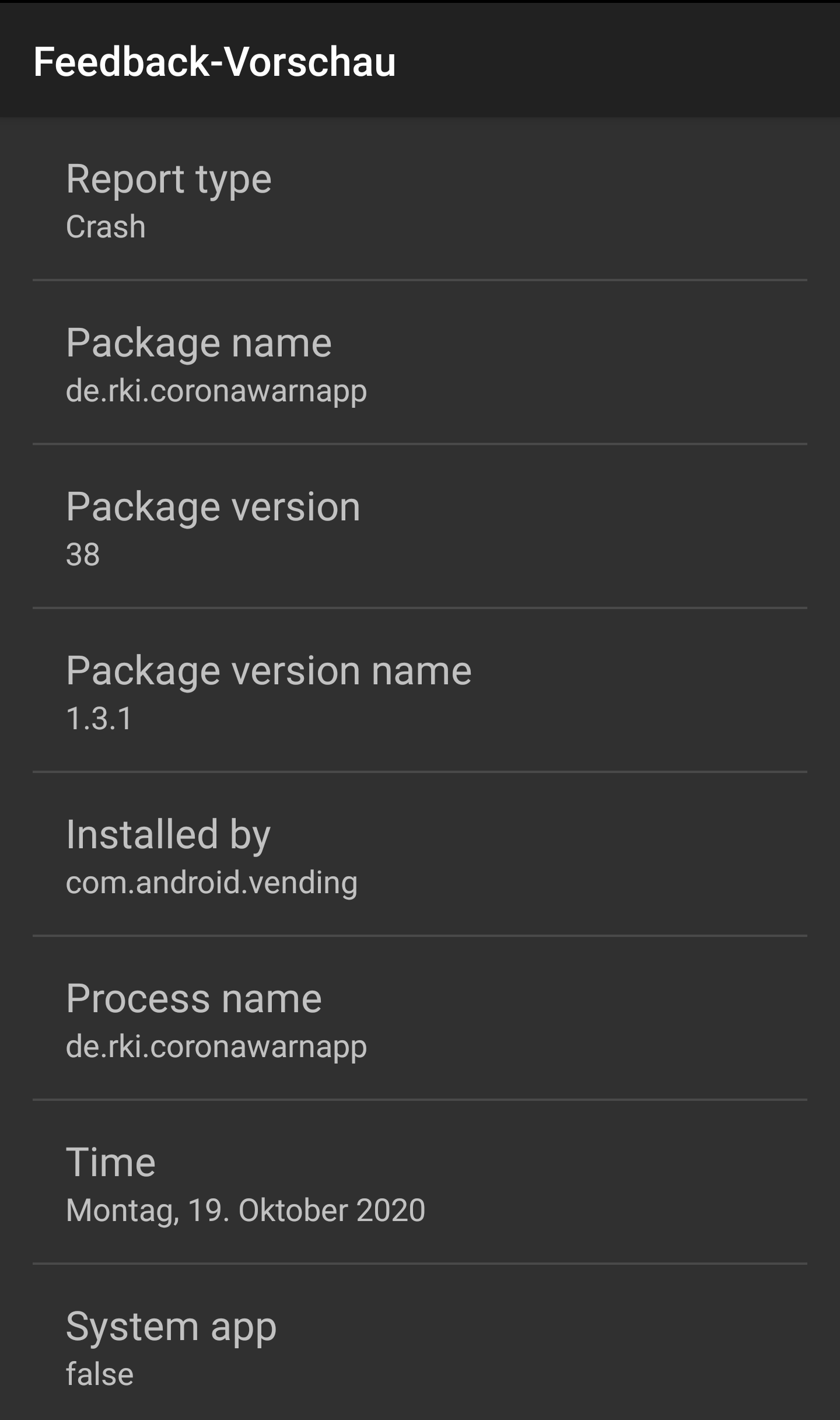
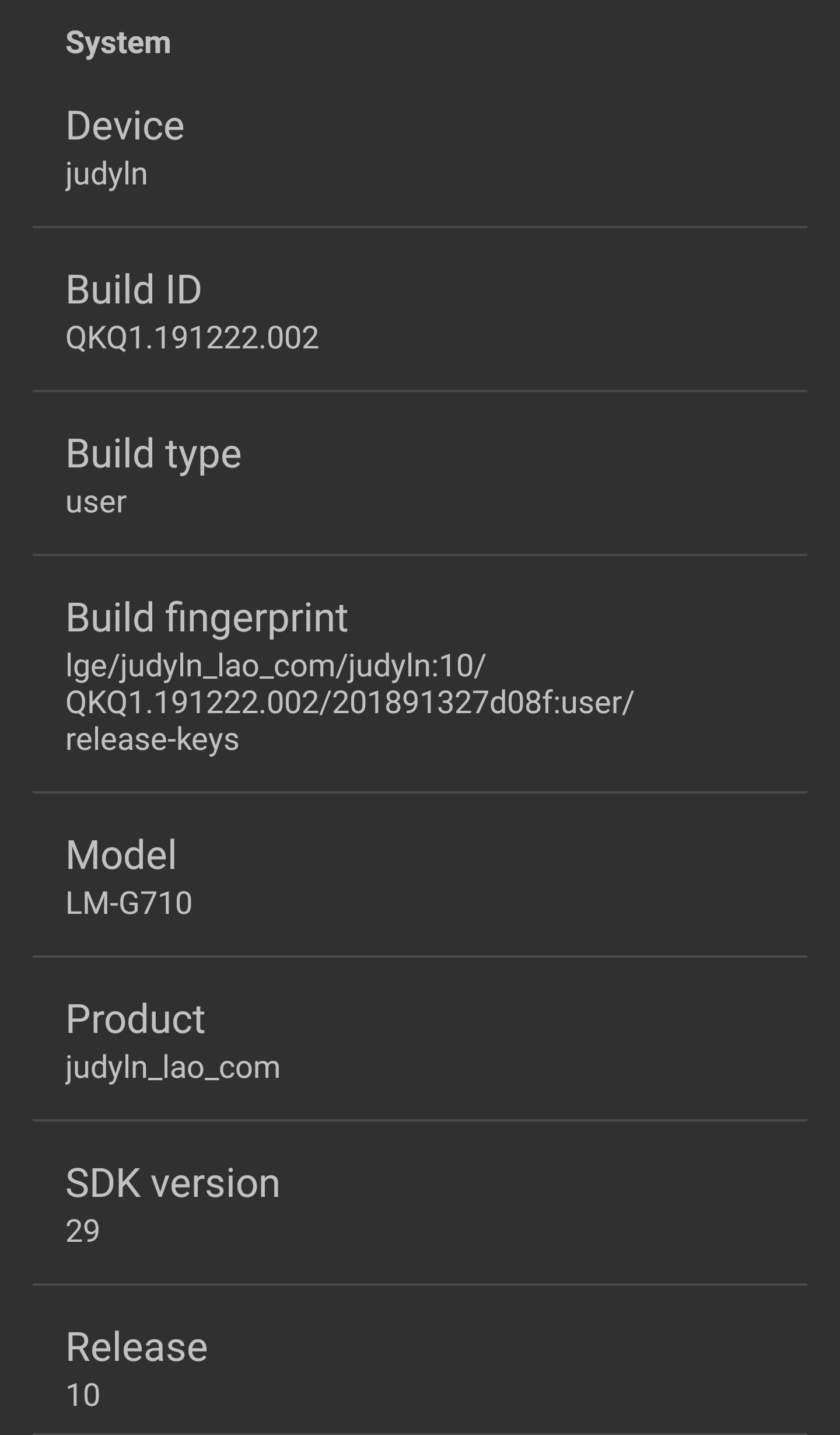
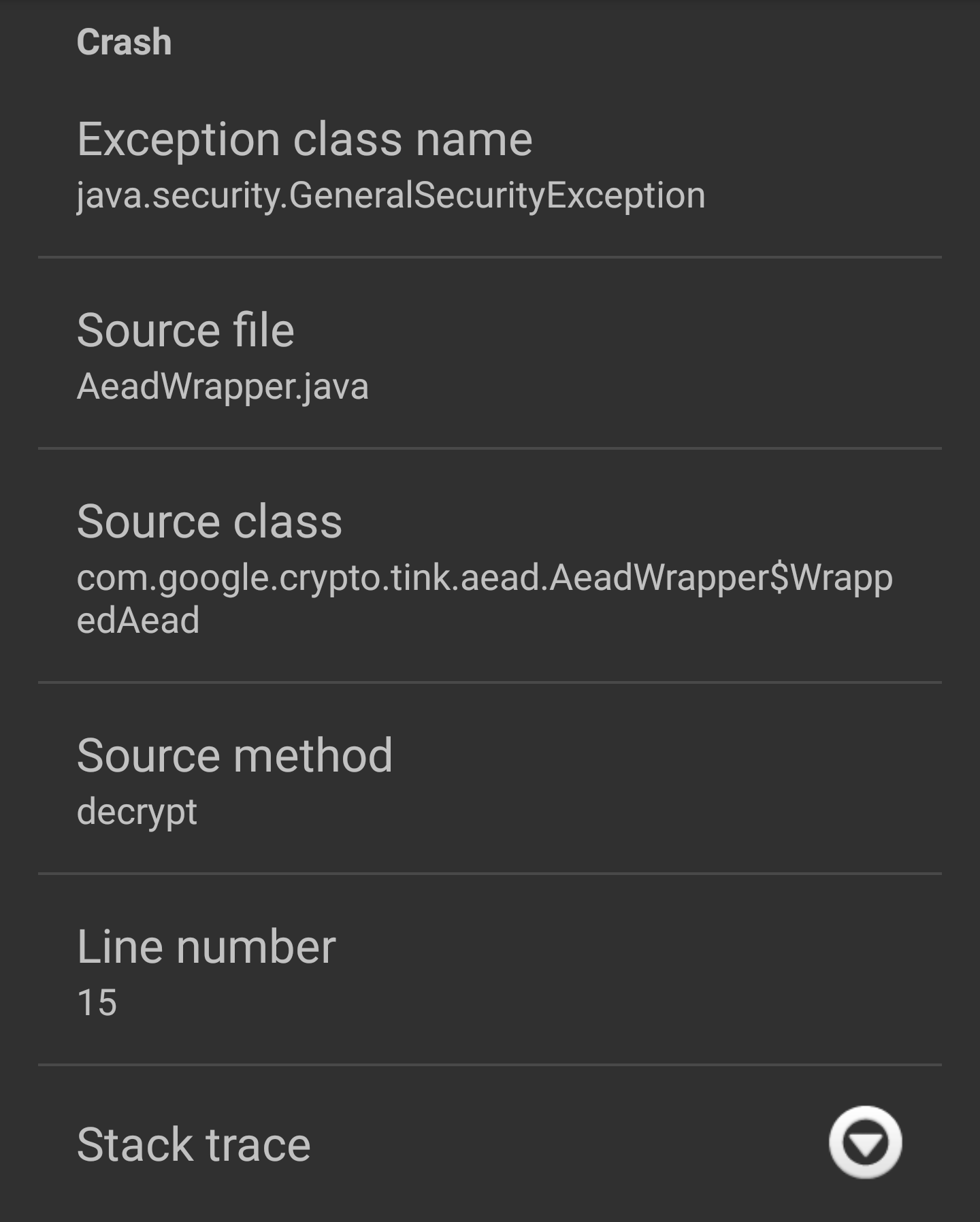
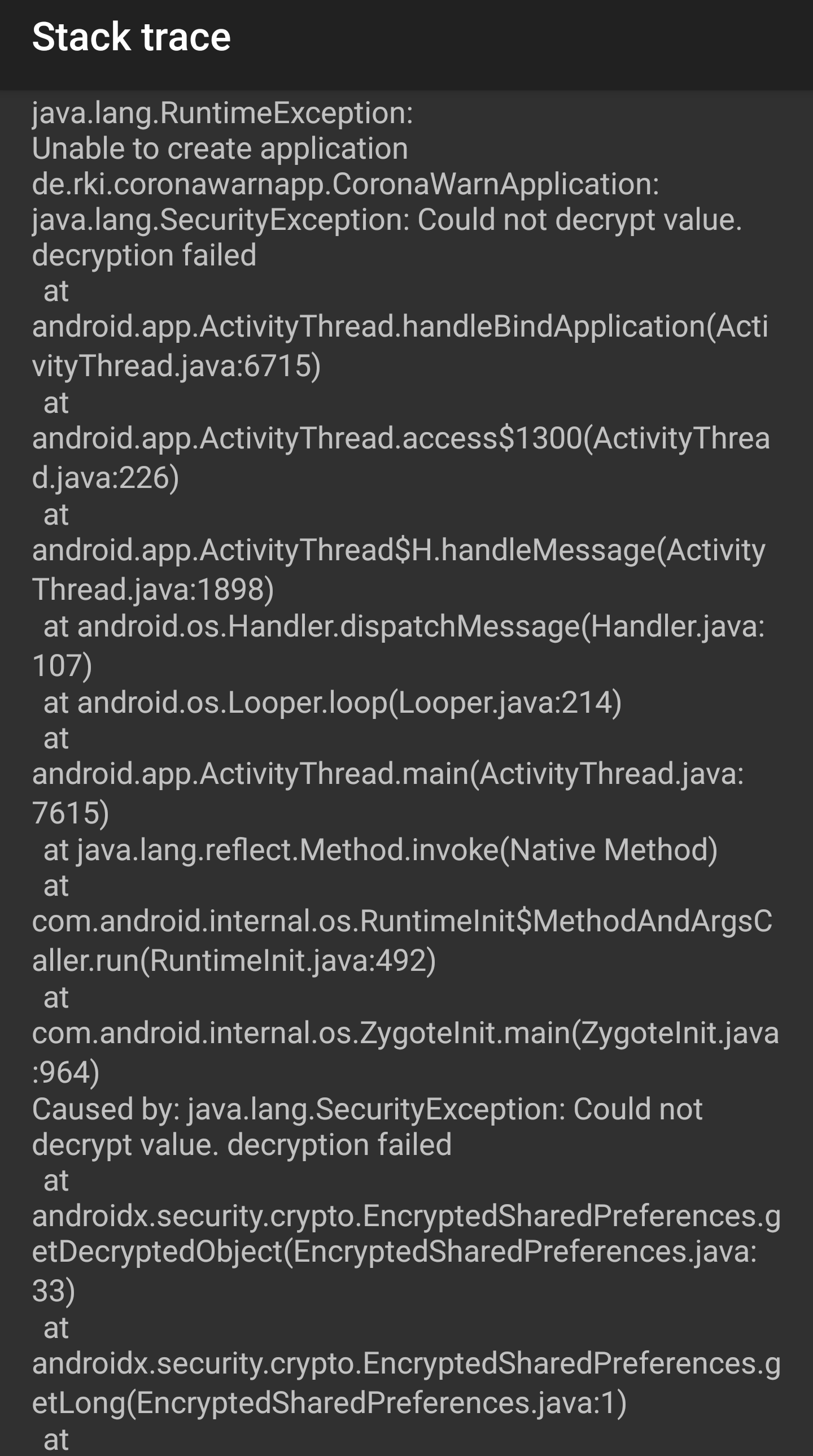
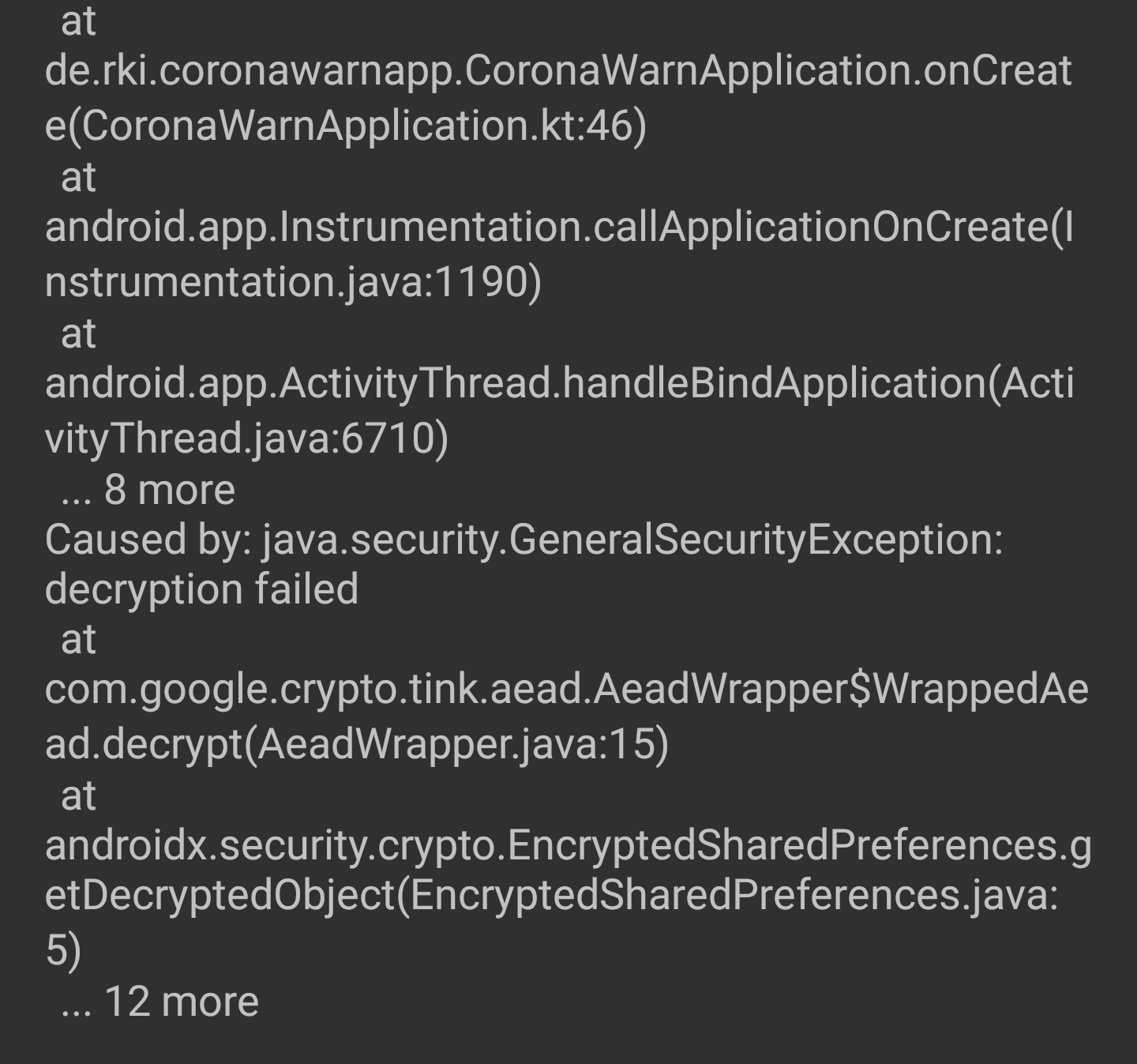
 Hustensirup
on 19 Oct 2020
Hustensirup
on 19 Oct 2020
I have got the same issue.
Device:
- Poco F1
- OS: Havoc 3.9 (Android 10)
- CWA Version: 1.3.1
Here is my stack trace:
https://del.dog/lofurrophi
 HuiiBuh
on 19 Oct 2020
HuiiBuh
on 19 Oct 2020
@Hustensirup @HuiiBuh
could you update to CWA 1.5 and report back whether this fixes the problem for you?
daimpi
on 19 Oct 2020
I am now on version 1.5 and I get a different exception now: https://del.dog/phellollyg.txt
After clearing the storage the app starts to work again.
I really like the app and the work that has gone into it, but I have to admit that I am a bit disappointed. This is already the second time I had to clear the storage and loose all of my exposure data because of some problem. Perhaps you should test a bit more before releasing half finished versions which lead to people losing their data.
HuiiBuh
on 19 Oct 2020
@HuiiBuh - clearing the app’s storage will not delete the Android OS exposure data.
See e.g. https://www.coronawarn.app/en/blog/2020-10-19-version-1-5/ "A corresponding message clearly indicates that resetting the app has no effect on risk detection and status. The active days are reset to 0, also without effect on risk detection and status. It also indicates that the app reset will invalidate a QR code that has just been scanned. In this case, users must request the test result directly from the doctor or laboratory."
mh-
on 19 Oct 2020
@mh- All I know is that the app tells me that I have a "unknown risk". And "Since you have not activated exposure logging long enough..."
Before clearing the storage of the app I had 14 days of exposure logging
This looks to me like I don't have the data I had before.
HuiiBuh
on 19 Oct 2020
@HuiiBuh I can understand your concern, but still, the GAEN built into Android will work appropriately in the background.
mh-
on 19 Oct 2020
@HuiiBuh as @mh- stated above: as long as you don't un-/re-install CWA your keys will be save within the ENF.
If you want to get the "14 days active" status immediately you can follow the steps laid out by @vaubaehn here.
daimpi
on 19 Oct 2020
Thanks that worked
HuiiBuh
on 19 Oct 2020
I am now on version 1.5 and I get a different exception now: https://del.dog/phellollyg.txt
@HuiiBuh Do you remember whether the app took a few seconds to launch until you were greeted by the error? The retry mechanism worked correctly. It should have delayed the app launch while retrying.
There should also have been an automatic data reset (doing what you now did manually) too, unfortunately it did not trigger :frowning_face:.
Thanks to your Stacktrace :heart: I found the bug though (#1433).
d4rken
on 19 Oct 2020
@d4rken The app launched very slowly and then I got the error.
But as I have my data back I am happy :)
HuiiBuh
on 19 Oct 2020
I've got the same problem (URSACHE: 9002) - my phone is called Samsung A6; Android Version 10.
 l-c-94
on 20 Oct 2020
l-c-94
on 20 Oct 2020
@l-c-94 could you please make sure you have the latest update 1.5 of our app installed?
svengabr
on 20 Oct 2020
Thanks for your answer. I have installed the latest Update 1.5.
l-c-94
on 20 Oct 2020
Thanks for your answer. I have installed the latest Update 1.5.
@l-c-94 Did you open 1.5 at least once without error? I'm wondering whether the error already existed before updating to 1.5?
d4rken
on 20 Oct 2020
We double check with Google and they are not plan to store the keys after the last Covid19 App is deleted.
Because is not aware after deleting he has to remove data in the Android settings.
This mean a save way to reset the app is:
Android > Settings > Apps > CWA > Storage > delete data/cacheWe discuss how we can help to user to restore the app when the DB is failing
@thomasaugsten I checked on my device, and using this method deletes all RPIs. This will not happen only if there is another app (from another country) installed on the device
 kbobrowski
on 30 Oct 2020
kbobrowski
on 30 Oct 2020
@thomasaugsten @vaubaehn just for context, this question came up in https://github.com/corona-warn-app/cwa-app-android/issues/1084 b/c multiple people reported loosing their encounters in CWA after resetting their data this way (Android > Settings > Apps > CWA > Storage > delete data/cache).
@Annie-G re-reading this thread here you stated above:
Hmmm that would surprise me because last time I had the App crash and did the mentioned procedure, I still had 1 low risk encounter afterwards.
Did you have another ENF app (e.g. Italian Immuni) installed in parallel by chance?
daimpi
on 30 Oct 2020
@thomasaugsten @vaubaehn just for context, this question came up in #1084 b/c multiple people reported loosing their encounters in CWA after resetting their data this way (Android > Settings > Apps > CWA > Storage > delete data/cache).
@Annie-G re-reading this thread here you stated above:
Hmmm that would surprise me because last time I had the App crash and did the mentioned procedure, I still had 1 low risk encounter afterwards.
Did you have another ENF app (e.g. Italian Immuni) installed in parallel by chance?
No, I had no other ENF installed.
Annie-G
on 30 Oct 2020
@Annie-G
No, I had no other ENF installed.
Huh, very curious… you used this procedure:
Android > Settings > Apps > CWA > Storage > delete data/cache
right?
Maybe Google has changed the ENF behavior since then? 🤷
daimpi
on 30 Oct 2020
@Annie-G
No, I had no other ENF installed.
Huh, very curious… you used this procedure:
Android > Settings > Apps > CWA > Storage > delete data/cache
right?
Maybe Google has changed the ENF behavior since then? 🤷
Yes. Because I thought this way I would not delete the keys?
It's a while ago now and I am not 100% sure if I remember correctly?
I also checked in the settings how many encounters had been counted and they were less than before the procedure, but not zero.
Annie-G
on 30 Oct 2020
@Annie-G thanks for the info 🙂.
Do you still have your EN logs from back then and if so, could you share them here?
I also checked in the settings how many encounters had been counted and they were less than before the procedure, but not zero.
By "I also checked in the settings" do you mean you checked your EN log? Did your EN log not fully get reset after this procedure? I just tried this today on a secondary device and every time I did this (Android > Settings > Apps > CWA > Storage > delete data/cache) all EN log entries from before were deleted and only the one from right after CWA re-initialization was present.
daimpi
on 30 Oct 2020
@Annie-G thanks for the info 🙂.
Do you still have your EN logs from back then and if so, could you share them here?I also checked in the settings how many encounters had been counted and they were less than before the procedure, but not zero.
By "I also checked in the settings" do you mean you checked your EN log? Did your EN log not fully get reset after this procedure? I just tried this today on a secondary device and every time I did this (Android > Settings > Apps > CWA > Storage > delete data/cache) all EN log entries from before were deleted and only the one from right after CWA re-initialization was present.
I checked here:
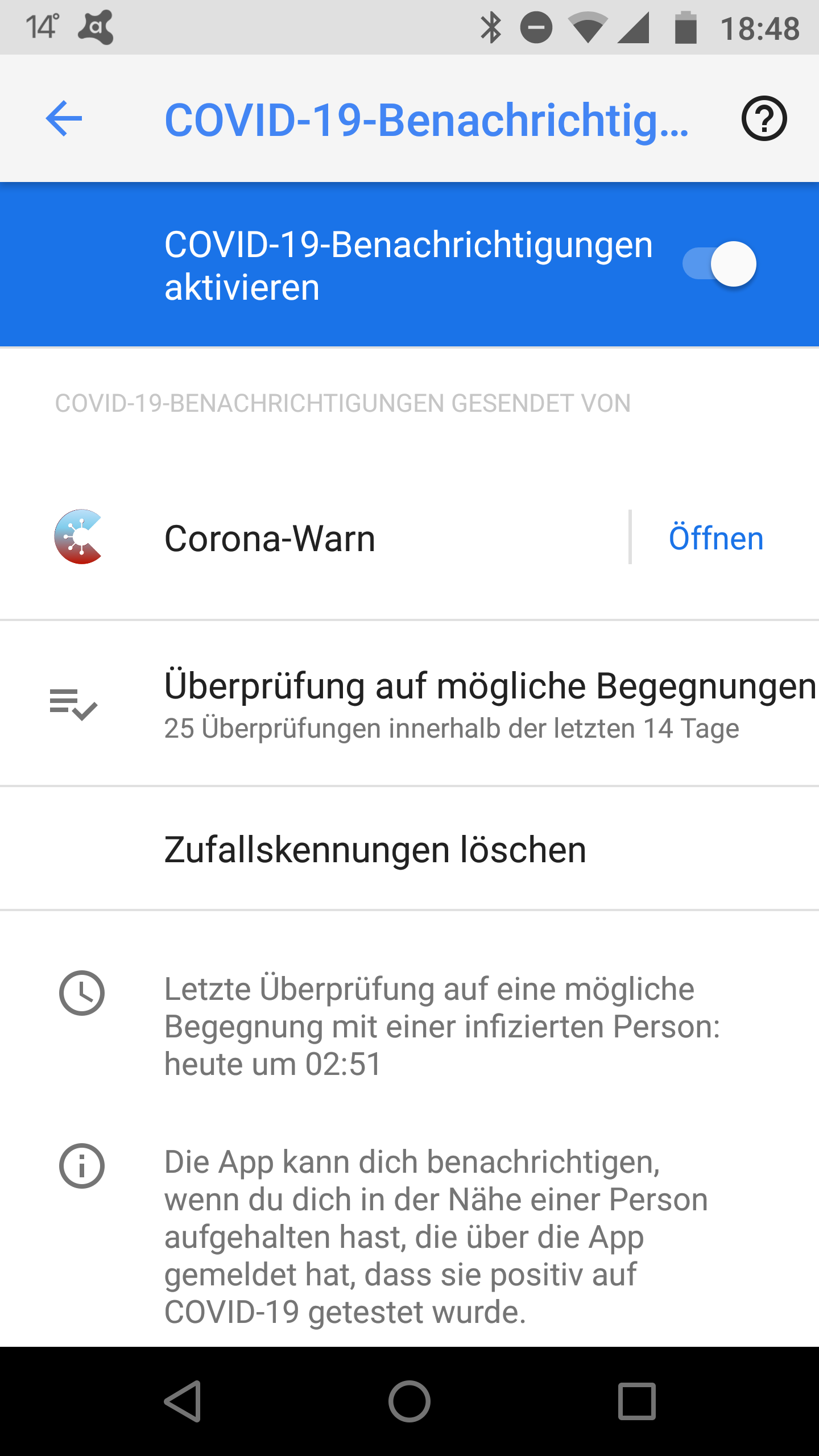
and before the reset, there were like 140 encounters, afterwards there were still 28. I was at home and for sure there were no 28 people around.
Annie-G
on 30 Oct 2020
@Annie-G Ahh ok that explains some of it. The number you see there is just the number of checks performed in the last 14 or so days. It has nothing to do with how many contacts you had. You can click on this number, then you see the list of actual checks that have been performed and you can even export this list there 🙂. Given that this number went down for you it seems like the EN log was indeed deleted in your case as expected… only thing which is curious is that seemingly your 1 green encounter in CWA persisted…
daimpi
on 30 Oct 2020
@daimpi I doubled check and it looks Google is now registering the data deleting and turns off the exposure notification framework the leads to a key wiping. We will update our FAQ
thomasaugsten
on 30 Oct 2020
This error should be fixed with the latest version of the Android app. There was quite some time since we got the last feedback here.
Could you please update to the latest version and report back if the problems are resolved for you?
Thank you very much for your input!
Best regards,
SG
Corona-Warn-App Open Source Team
svengabr
on 20 Nov 2020
This issue is indeed fixed for me since a month or so. In fact, my "reproduction procedure" does not work any more (I can't be "quick enough" any more), and I've never seen this message again after the fix by @d4rken was implemented and I reset the app once more (I guess the old version corrupted the db one last time).
alois31
on 20 Nov 2020
Worked for me!
It hasn't happend since, even when the Phone died because of low battery, no problems occured (before the Update I had to follow your Instruction 3 Times, twice definitely after a low battery Situation)
Thanks for your good work!!
Lotte
(Sony Xperia XZ2 compact)
This error should be fixed with the latest version of the Android app. There was quite some time since we got the last feedback here.
Could you please update to the latest version and report back if the problems are resolved for you?
Thank you very much for your input!
Best regards,
SGCorona-Warn-App Open Source Team
Lotte85
on 25 Nov 2020
Dear @Lotte85, @alois31, Thanks for the feedback. I will close this issue now. Thanks to everybody for contributing!
On a side note, regarding the update to CWA 1.7: Please note that it is a staged rollout. Over the next two days, 100% of the users should have received the update.
Best wishes,
DS
Corona-Warn-App Open Source Team
 dsarkar
on 26 Nov 2020
dsarkar
on 26 Nov 2020
Related issues
 ironjan
·
3Comments
ironjan
·
3Comments
 tandreb
·
3Comments
tandreb
·
3Comments
 schuhmi2
·
3Comments
schuhmi2
·
3Comments
 FrankfurterRadler
·
3Comments
FrankfurterRadler
·
3Comments
 michaelwingender
·
3Comments
michaelwingender
·
3Comments
Most helpful comment
While I still can't reproduce it reliably, I've got a theory now that I consider plausible enough to be able to write a mitigation for this.
TL;DR:
The core idea is to upgrade to
security-crypto-1.0.0-rc03, catchKeystoreExceptionand retry the initialization of our encrypted storage with an exponential backoff mechanism.In detail:
We upgrade to "security-crypto-1.0.0-rc03" from
rc02which makes theEncryptedSharedPreferencesinternally useTink 1.4, here Google's changelog mentionsSadly they don't link directly to a commit that fixes this to better understand it.
There are over 250 commits between Tink 1.3.0 and Tink 1.4.0, but it contains mitigation for an issue in Tink that seems awfully close to our issue.
That issue pairs with this issue ticket on Google's tracker for the
security-cryptolibrary.Specifically they mention this problematic behavior
So what's likely going on is the a combination of different issues:
By upgrading to "security-crypto-1.0.0-rc03", we get Tink 1.4, which in turn will no longer overwrite the encryption keys on congestion, but instead throw a recognizable exception. We can then detect that exception and perform retry with exponential backoff. If I'm right, this should already fix a lot of cases.
This being a congestion based issue would also correlate well with the issue being more prevalent on low end devices (Huawei P8 Lite) which may have an increased chance of apps running for longer in parallel. The Pixel 2 upgrade error also fits, because update->reboot->many apps initialize and potentially try to access the keystore at once.