I deployed my custom model for automatic annotation and it seems perfect.
It shows the inference progress bar and the docker logs show normal.
However, the Annotation did not show on my image dataset in CVAT.
What can I do?

More info
The following is what I send to CVAT. In other words, it is the context.Response part.
<class 'list'>---[{'confidence': '0.4071217', 'label': '0.0', 'points': [360.0, 50.0, 1263.0, 720.0], 'type': 'rectangle'}]
 QuarTerll
All 64 comments
@glenn-jocher Can you help me with that? What can I do?
QuarTerll
on 7 Dec 2020
@QuarTerll I don't maintain this repository, I maintain Ultralytics YOLOv3 and YOLOv5.
 glenn-jocher
on 7 Dec 2020
glenn-jocher
on 7 Dec 2020
@QuarTerll I don't maintain this repository, I maintain Ultralytics YOLOv3 and YOLOv5.
@glenn-jocher ops, srrrrry... I was working on yolov5 recently. So I just remind your name when I get in trouble... Sorry to bother :<
QuarTerll
on 7 Dec 2020
I found that the logs show "Run SiamMask Model" every time when my inference runs. So I guess the SiamMask model is to draw something on the image such as the bounding box.
Then I just found that there is a model called SiamMask in the directory named serverless . So I am trying to deploy this model first then try to do the Automatic Annotation again. Hope it can work :)
QuarTerll
on 7 Dec 2020
@nmanovic Could you please help me with that? What can I do?
For now, my local "SiamMask Model" is still building. It already passed three hours and I cannot see any logs :<
Am I in the right direction?
QuarTerll
on 7 Dec 2020
I have finished deployed the SiamMask model and It is still not working. On the local website of cvat, it shows the following.

QuarTerll
on 7 Dec 2020
I have finished deployed the "saic_vul" model in the directory named serverless/pytorch and It is still not working. On the local website of cvat, it shows that "Automatic annotation finished for task 17". However, there is still no annotations showed on my image dataset.
So, @nmanovic, I see that you add a milestone hmmmmm... Does it mean that this function is not finished for the moment?
QuarTerll
on 8 Dec 2020
@QuarTerll There are a couple of issues in the semi-automatic nuctl pipeline I will address them in my soon-to-be PR for the Automatic annotation probably by tomorrow. The major one is that make sure to install nuctl 1.4.8 for now, until I update the documentation and boost the version to new versions. If you are still having problems I suggest wait a couple of days, I will ping you here when I am done.
 jahaniam
on 8 Dec 2020
jahaniam
on 8 Dec 2020
I had a problem with nuctl 1.4.8 while deploying functions, but was able to do with 1.5.7
However, models didn't appear @ http://localhost:8080/models

I have also submitted the full issue at Issue#2541
Can you please help me on this as well?
Is it something related with version issues?
 beep-love
on 8 Dec 2020
beep-love
on 8 Dec 2020
@beep-love yes, most likely.
Change line
Change the version to 1.5.7
Then rebuild the container.
docker-compose -f docker-compose.yml -f components/serverless/docker-compose.serverless.yml up —build
To debug the functions, you can use nuclio dashboard at localhost:8070 make sure the function is up and running there.
Wait by tonight I will do a PR
jahaniam
on 8 Dec 2020
Changed the line to _### image: quay.io/nuclio/dashboard:1.5.7-amd64_ and rebuild the container.
Also, I have a running instance of the function in my nuclio dashboard
Still the same error!
I have renamed my nuclio release file from nuctl-1.5.7-linux-amd64 to nuctl-1.5.7
Does that make any difference to this relating problem?
beep-love
on 8 Dec 2020
How do you deploy your function?
nuctl-1.5.7 deploy ....
Put a screenshot from your docker ps -a and also the nuclio dashboard -> in cvat that shows the function is up and running
jahaniam
on 8 Dec 2020
@QuarTerll it might be due to the label. It might be an int instead of 0.0 .double check that
jahaniam
on 8 Dec 2020
Command to deploy function
sudo ./nuctl-1.5.7 create project cvat
sudo ./nuctl-1.5.7 deploy --project-name cvat \
--path serverless/openvino/dextr/nuclio \
--volume `pwd`/serverless/openvino/common:/opt/nuclio/common \
--platform local
And the sc for docker ps -a with nuclio dashboard's sc :


beep-love
on 9 Dec 2020
I have finished deployed the "saic_vul" model in the directory named serverless/pytorch and It is still not working. On the local website of cvat, it shows that "Automatic annotation finished for task 17". However, there is still no annotations showed on my image dataset.
So, @nmanovic, I see that you add a milestone hmmmmm... Does it mean that this function is not finished for the moment?
Same here. Able to finish the automatic annotation, but no actual annotation is displayed after complete and click into the job. While the result of using AI tools is fine. It seems there is a problem in saving the results of automatic annotation.
 gen-ko
on 9 Dec 2020
gen-ko
on 9 Dec 2020
@QuarTerll it might be due to the label. It might be an int instead of 0.0 .double check that
@jahaniam Thanks for your help.
For the moment, I checked that in my YAML file, there is something like int such as id: 0, but my response is 0.0.
However, it is still not working after I just tried to use labels of an int instead of float, such as 0 instead of 0.0.
And another question:
Is my response type correct?
I didn't find the interface docs. I just followed one of the sample code in dirs named serverless.
I would like to know how to check the interface type? Lol...
QuarTerll
on 9 Dec 2020
Command to deploy function
sudo ./nuctl-1.5.7 create project cvat
sudo ./nuctl-1.5.7 deploy --project-name cvat \
--path serverless/openvino/dextr/nuclio \
--volume `pwd`/serverless/openvino/common:/opt/nuclio/common \
--platform local
And the sc for
docker ps -awith nuclio dashboard's sc :
looks ok to me. I don't know why it's not working for you. Try without sudo and give it chmod +x nuctl-1.5.7
I've seen in the logs some errors of permissions for nuctl. Before deploying remove the current function as well using dashboard.
jahaniam
on 9 Dec 2020
the same to me, look the docker contrainer logs.


 leemengxing
on 10 Dec 2020
leemengxing
on 10 Dec 2020
I tested the base64 images in nuclio dashboard and it returned the result normally.

leemengxing
on 11 Dec 2020
@leemengxing
I guess it may be some bugs there about the function of drawing a rectangle.
I am trying to do this semi-anno myself. I will do the inference and save the results by some type of dataset and load them to the CVAT platform and then do the annotations.
QuarTerll
on 14 Dec 2020
@leemengxing @jahaniam @gen-ko @beep-love
I have finished the semi-auto annotation myself. Here is the way that may have a little help.
- Create your task
- Download dataset. (bug here, not just annotation, see issues 2473)
- Unzip the dataset. And change the dir_path and dir_txt to the path of the dataset where save images and annotations.
- Do the inference and save results of needed format to txt.
- Upload the dataset to your task.
- Finished.
Here is my python code for example.
dir_path = './path/to/obj_train_data/your_task'
dir_txt = './path/to/obj_train_data/your_task'

for file_name in os.listdir(dir_path):
    if '.txt' in file_name:
        continue
    name, ext = os.path.splitext(file_name)

    file_path = os.path.join(dir_path, file_name)
    txt_path = os.path.join(dir_txt, f"{name}.txt")

    im = cv2.imread(file_path)

    if im is None:
        print('Image is None')
        continue

    inference(model, im, txt_path)
I am also seeing that automatic annotation does not get displayed in the images if you try to do it for a whole task, but it seems to work if you run the annotation on the images individually.
I added in the python code for the annotation function to print out the result.
20.12.18 02:24:10.052                 processor (D) Starting triggers {"triggers": [{"ID":"myHttpTrigger","Logger":{},"WorkerAllocator":{},"Class":"sync","Kind":"http","Name":"myHttpTrigger","Statistics":{"EventsHandledSuccessTotal":0,"EventsHandledFailureTotal":0,"WorkerAllocatorStatistics":{"WorkerAllocationCount":0,"WorkerAllocationSuccessImmediateTotal":0,"WorkerAllocationSuccessAfterWaitTotal":0,"WorkerAllocationTimeoutTotal":0,"WorkerAllocationWaitDurationMilliSecondsSum":0,"WorkerAllocationWorkersAvailablePercentage":0}},"Namespace":"nuclio","FunctionName":"tf-efficientdet-D4-1024-coco"}]}
20.12.18 02:24:10.052            processor.http (I) Starting {"listenAddress": ":8080", "readBufferSize": 16384, "maxRequestBodySize": 33554432, "cors": null}
20.12.18 02:24:10.052 processor.webadmin.server (I) Listening {"listenAddress": ":8081"}
20.12.18 02:24:10.052                 processor (D) Processor started
20.12.18 02:34:21.173 sor.http.w0.python.logger (I) Run efficientdet_d4_1024_coco model {"worker_id": "0"}
2020-12-18 02:34:28.392762: I tensorflow/stream_executor/platform/default/dso_loader.cc:48] Successfully opened dynamic library libcudnn.so.7
2020-12-18 02:34:29.669322: I tensorflow/stream_executor/platform/default/dso_loader.cc:48] Successfully opened dynamic library libcublas.so.10
20.12.18 02:34:31.042 sor.http.w0.python.logger (I) [{'confidence': '0.7150219', 'label': 'car', 'points': [305.58237075805664, 254.18848514556885, 381.05960845947266, 286.3814306259155], 'type': 'rectangle'}, {'confidence': '0.4878593', 'label': 'car', 'points': [277.7707290649414, 254.48116779327393, 327.9302978515625, 288.5830307006836], 'type': 'rectangle'}] {"worker_id": "0"}
20.12.18 02:37:42.945 sor.http.w0.python.logger (I) Run efficientdet_d4_1024_coco model {"worker_id": "0"}
20.12.18 02:37:44.393 sor.http.w0.python.logger (I) [{'confidence': '0.7150219', 'label': 'car', 'points': [305.58237075805664, 254.18848514556885, 381.05960845947266, 286.3814306259155], 'type': 'rectangle'}, {'confidence': '0.4878593', 'label': 'car', 'points': [277.7707290649414, 254.48116779327393, 327.9302978515625, 288.5830307006836], 'type': 'rectangle'}] {"worker_id": "0"}
20.12.18 02:37:45.002 sor.http.w0.python.logger (I) Run efficientdet_d4_1024_coco model {"worker_id": "0"}
20.12.18 02:37:46.397 sor.http.w0.python.logger (I) [{'confidence': '0.8557838', 'label': 'car', 'points': [235.73516845703125, 262.96679735183716, 440.93788146972656, 388.50183963775635], 'type': 'rectangle'}, {'confidence': '0.68439513', 'label': 'car', 'points': [629.4608306884766, 273.2975935935974, 687.7771759033203, 314.53559160232544], 'type': 'rectangle'}, {'confidence': '0.6654121', 'label': 'car', 'points': [413.3760070800781, 274.4899535179138, 451.6234588623047, 313.1935429573059], 'type': 'rectangle'}, {'confidence': '0.60768425', 'label': 'car', 'points': [444.1271209716797, 271.0985469818115, 486.52244567871094, 303.53201150894165], 'type': 'rectangle'}, {'confidence': '0.54911983', 'label': 'truck', 'points': [700.1108551025391, 227.99441814422607, 946.0396575927734, 405.6583642959595], 'type': 'rectangle'}, {'confidence': '0.5388368', 'label': 'car', 'points': [938.4970092773438, 249.15764808654785, 1063.8406372070312, 324.970178604126], 'type': 'rectangle'}, {'confidence': '0.41315943', 'label': 'car', 'points': [566.1328506469727, 268.943874835968, 587.0766830444336, 283.44505548477173], 'type': 'rectangle'}] {"worker_id": "0"}
20.12.18 02:37:46.604 sor.http.w0.python.logger (I) Run efficientdet_d4_1024_coco model {"worker_id": "0"}
20.12.18 02:37:48.005 sor.http.w0.python.logger (I) [{'confidence': '0.8391146', 'label': 'car', 'points': [172.90611267089844, 429.1703939437866, 403.3717346191406, 580.8685398101807], 'type': 'rectangle'}, {'confidence': '0.8203543', 'label': 'car', 'points': [541.8906784057617, 483.39380264282227, 642.4507141113281, 558.4080648422241], 'type': 'rectangle'}, {'confidence': '0.6969765', 'label': 'bus', 'points': [3.745136260986328, 416.86150074005127, 185.68147659301758, 517.9606103897095], 'type': 'rectangle'}, {'confidence': '0.68772507', 'label': 'car', 'points': [652.8412628173828, 497.9164409637451, 687.9523468017578, 532.858157157898], 'type': 'rectangle'}, {'confidence': '0.678098', 'label': 'traffic_light', 'points': [337.7826690673828, 182.7047824859619, 373.4300231933594, 257.8242087364197], 'type': 'rectangle'}, {'confidence': '0.6073227', 'label': 'person', 'points': [963.6312866210938, 490.5925941467285, 1004.95361328125, 605.0199222564697], 'type': 'rectangle'}, {'confidence': '0.58004767', 'label': 'bus', 'points': [682.5164794921875, 388.3858823776245, 876.5226745605469, 590.8449411392212], 'type': 'rectangle'}] {"worker_id": "0"}
20.12.18 02:37:48.261 sor.http.w0.python.logger (I) Run efficientdet_d4_1024_coco model {"worker_id": "0"}
20.12.18 02:37:49.682 sor.http.w0.python.logger (I) [{'confidence': '0.85061854', 'label': 'truck', 'points': [581.2115478515625, 209.6308135986328, 1032.7020263671875, 391.99214458465576], 'type': 'rectangle'}, {'confidence': '0.81700516', 'label': 'car', 'points': [0.18790245056152344, 292.0550537109375, 245.8984375, 380.5064535140991], 'type': 'rectangle'}, {'confidence': '0.5602961', 'label': 'traffic_light', 'points': [345.5408477783203, 33.68543654680252, 381.2101745605469, 89.90786612033844], 'type': 'rectangle'}, {'confidence': '0.5263241', 'label': 'car', 'points': [1222.5276947021484, 328.851056098938, 1279.0593719482422, 400.8018922805786], 'type': 'rectangle'}] {"worker_id": "0"}
20.12.18 02:37:49.953 sor.http.w0.python.logger (I) Run efficientdet_d4_1024_coco model {"worker_id": "0"}
20.12.18 02:37:51.338 sor.http.w0.python.logger (I) [{'confidence': '0.80725086', 'label': 'car', 'points': [480.3098678588867, 305.0113034248352, 571.6457748413086, 375.3591012954712], 'type': 'rectangle'}, {'confidence': '0.7996338', 'label': 'car', 'points': [752.7581024169922, 310.4746198654175, 879.3225860595703, 381.2298774719238], 'type': 'rectangle'}, {'confidence': '0.76808906', 'label': 'car', 'points': [274.3927764892578, 309.7818160057068, 375.8354949951172, 364.992470741272], 'type': 'rectangle'}, {'confidence': '0.6982929', 'label': 'car', 'points': [381.07444763183594, 295.3595781326294, 451.260986328125, 343.0009961128235], 'type': 'rectangle'}, {'confidence': '0.67496926', 'label': 'car', 'points': [0.0, 311.5396499633789, 181.21234893798828, 467.24231243133545], 'type': 'rectangle'}, {'confidence': '0.5257714', 'label': 'car', 'points': [310.96471786499023, 294.1240668296814, 381.4679718017578, 330.24672746658325], 'type': 'rectangle'}, {'confidence': '0.43731278', 'label': 'car', 'points': [102.87278175354004, 280.21331548690796, 257.70179748535156, 368.63396644592285], 'type': 'rectangle'}] {"worker_id": "0"}
20.12.18 02:37:51.587 sor.http.w0.python.logger (I) Run efficientdet_d4_1024_coco model {"worker_id": "0"}
20.12.18 02:37:52.990 sor.http.w0.python.logger (I) [{'confidence': '0.85429806', 'label': 'car', 'points': [808.3771514892578, 267.3688817024231, 1043.8465118408203, 426.82888984680176], 'type': 'rectangle'}, {'confidence': '0.8060608', 'label': 'car', 'points': [688.3963012695312, 279.3934178352356, 759.7428894042969, 354.9244022369385], 'type': 'rectangle'}, {'confidence': '0.777873', 'label': 'car', 'points': [736.7932891845703, 266.82782649993896, 864.4783782958984, 377.96135902404785], 'type': 'rectangle'}, {'confidence': '0.7537456', 'label': 'car', 'points': [402.83214569091797, 277.8368353843689, 456.1515426635742, 352.4603319168091], 'type': 'rectangle'}, {'confidence': '0.74806195', 'label': 'car', 'points': [982.2433471679688, 210.104877948761, 1277.1514892578125, 561.2226247787476], 'type': 'rectangle'}, {'confidence': '0.65498257', 'label': 'car', 'points': [263.3064270019531, 241.56405687332153, 416.4366149902344, 379.8746967315674], 'type': 'rectangle'}, {'confidence': '0.6334168', 'label': 'car', 'points': [0.002460479736328125, 221.89629793167114, 309.68921661376953, 446.5914058685303], 'type': 'rectangle'}, {'confidence': '0.62531567', 'label': 'car', 'points': [669.5706176757812, 287.40833044052124, 705.9028625488281, 322.6821255683899], 'type': 'rectangle'}, {'confidence': '0.6175538', 'label': 'car', 'points': [399.0179443359375, 256.85344219207764, 492.1952819824219, 338.9302396774292], 'type': 'rectangle'}, {'confidence': '0.48883328', 'label': 'car', 'points': [485.5108642578125, 271.1214208602905, 515.6954956054688, 326.12908601760864], 'type': 'rectangle'}, {'confidence': '0.4759105', 'label': 'car', 'points': [504.89349365234375, 279.6710801124573, 534.8953247070312, 315.52470445632935], 'type': 'rectangle'}, {'confidence': '0.43032724', 'label': 'car', 'points': [637.9503631591797, 285.22608518600464, 669.1315460205078, 313.8369941711426], 'type': 'rectangle'}] {"worker_id": "0"}
20.12.18 02:37:53.172 sor.http.w0.python.logger (I) Run efficientdet_d4_1024_coco model {"worker_id": "0"}
20.12.18 02:37:54.584 sor.http.w0.python.logger (I) [{'confidence': '0.85027987', 'label': 'car', 'points': [282.9447937011719, 310.1306104660034, 560.2922821044922, 555.8311700820923], 'type': 'rectangle'}, {'confidence': '0.8252959', 'label': 'car', 'points': [167.78976440429688, 320.5255436897278, 290.92662811279297, 379.9345636367798], 'type': 'rectangle'}, {'confidence': '0.6271201', 'label': 'car', 'points': [80.9302806854248, 310.6858706474304, 177.0273208618164, 365.5087423324585], 'type': 'rectangle'}, {'confidence': '0.6123071', 'label': 'car', 'points': [1068.5894775390625, 401.55754566192627, 1277.4929809570312, 625.2445077896118], 'type': 'rectangle'}, {'confidence': '0.53847194', 'label': 'car', 'points': [3.228464126586914, 292.42730140686035, 89.75964546203613, 320.40149688720703], 'type': 'rectangle'}, {'confidence': '0.4461867', 'label': 'car', 'points': [529.5944595336914, 341.00616216659546, 572.5418472290039, 403.1205224990845], 'type': 'rectangle'}, {'confidence': '0.42748508', 'label': 'traffic_light', 'points': [638.5101318359375, 162.6327931880951, 672.9914855957031, 208.5464072227478], 'type': 'rectangle'}] {"worker_id": "0"}
20.12.18 02:37:54.831 sor.http.w0.python.logger (I) Run efficientdet_d4_1024_coco model {"worker_id": "0"}
20.12.18 02:37:56.226 sor.http.w0.python.logger (I) [{'confidence': '0.92636585', 'label': 'person', 'points': [148.53775024414062, 278.6093330383301, 358.0533981323242, 656.5142154693604], 'type': 'rectangle'}, {'confidence': '0.8458457', 'label': 'person', 'points': [0.0, 253.6021327972412, 128.81412506103516, 665.1172828674316], 'type': 'rectangle'}, {'confidence': '0.6159458', 'label': 'car', 'points': [94.89753723144531, 380.959210395813, 145.67127227783203, 424.5071268081665], 'type': 'rectangle'}, {'confidence': '0.5576205', 'label': 'handbag', 'points': [178.5042953491211, 411.9667053222656, 283.97972106933594, 565.3603506088257], 'type': 'rectangle'}, {'confidence': '0.5391152', 'label': 'car', 'points': [1160.5314636230469, 481.07062339782715, 1278.8795471191406, 714.7406816482544], 'type': 'rectangle'}] {"worker_id": "0"}
The result looks fine so it seems like it must be an issue receiving or saving the multiple requests. Even exporting annotations does not show anything so somehow the result from the detector is lost
 Inquisitive-ME
on 18 Dec 2020
Inquisitive-ME
on 18 Dec 2020
I have finished the semi-auto annotation myself. Here is the way that may have a little help.
- Create your task
- Download dataset. (bug here, not just annotation, see issues 2473)
- Unzip the dataset. And change the dir_path and dir_txt to the path of the dataset where save images and annotations.
- Do the inference and save results of needed format to txt.
- Upload the dataset to your task.
- Finished.
Here is my python code for example.
dir_path = './path/to/obj_train_data/your_task'
dir_txt = './path/to/obj_train_data/your_task'

for file_name in os.listdir(dir_path):
    if '.txt' in file_name:
        continue
    name, ext = os.path.splitext(file_name)

    file_path = os.path.join(dir_path, file_name)
    txt_path = os.path.join(dir_txt, f"{name}.txt")

    im = cv2.imread(file_path)

    if im is None:
        print('Image is None')
        continue

    inference(model, im, txt_path)
@Inquisitive-ME
YES. What I did is to do the automatic annotations for the whole task. For now, you can do the above to do this.
How do you do to run the automatic annotation for a single image? Maybe my version of CVAT is not the latest?
QuarTerll
on 18 Dec 2020
Yea doing the annotations outside of CVAT is not desirable for me.
But if you click on the AI Tools icon (picture below) in the toolbar you can go to detectors and should be able to select your model to annotate that image.

Inquisitive-ME
on 18 Dec 2020
Yea doing the annotations outside of CVAT is not desirable for me.
Hmmmm, yep, it's real semi-auto Lols.
But if you click on the AI Tools icon (picture below) in the toolbar you can go to detectors and should be able to select your model to annotate that image.
Thank you.
QuarTerll
on 24 Dec 2020
I can confirm automatic annotation is broken for tasks. It only works for single images I have tried two models. Faster rcnn and mask rcnn. It works fine for a single image but when I use it on a task containing multiple images although it shows it has completed but it doesn't show any annotation results on the images.
@nmanovic can we have a look on this problem please? I am working on the gpu version of the maskrcnn rn and a fix for cpu version. I will do a PR soon for that.
jahaniam
on 1 Jan 2021
Same problem documented here, possible duplication https://github.com/openvinotoolkit/cvat/issues/2644
F-RCNN on CPU
 turowicz
on 5 Jan 2021
turowicz
on 5 Jan 2021
Do we know which commit broke the automatic annotation for Tasks?
turowicz
on 5 Jan 2021
Do we know which commit broke the automatic annotation for Tasks?
I do not know which one broke it but it is for sure broken. I think it was working maybe a month ago. It would be great if you can pinpoint it somehow.
jahaniam
on 5 Jan 2021
@jahaniam I am building different versions moving back and testing. Will let you know.
I am on Kubernetes though, so will have to stay above 1.1.0.
turowicz
on 5 Jan 2021
By branch/tag:
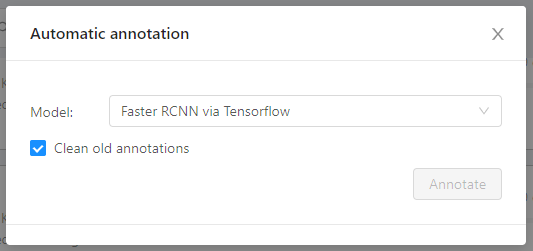
develop- brokenrelease-1.2.0- brokenv1.2.0-beta- brokenv1.2.0-alpha- unable to launch task annotation, button is grayed out
turowicz
on 5 Jan 2021
Interestingly, it does work on http://cvat.org. Perhaps a specific version of Nuclio is required?
Can anyone confirm what version of Nuclio is hosted on cvat.org?
It seems they are running latest cvat from repo there.
turowicz
on 5 Jan 2021
Over here it says 1.5.8 https://github.com/openvinotoolkit/cvat/blob/develop/components/serverless/docker-compose.serverless.yml
I'm running nuclio at 1.5.12, so perhaps this is why its not working for me.
turowicz
on 5 Jan 2021
I've installed nuclio helm from branch 1.5.8 but it does not create any annotations either. Neither does 1.5.9.
turowicz
on 5 Jan 2021
I have also tested with corresponding versions of nuctl, as it deploys a specific base image. No luck.
turowicz
on 5 Jan 2021
We need to find out how are they running it correctly on cvat.org
turowicz
on 5 Jan 2021
I've installed nuclio helm from branch 1.5.8 but it does not create any annotations either. Neither does 1.5.9.
It is not related to nuclio. Nuclio is doing ok and the version mismatch should be ok as well between the versions you mentioned.
Nuclio was boosted in my PR in https://github.com/openvinotoolkit/cvat/pull/2546 from 1.4.8 to 1.5.8 to allow gpu support. You can test 1.4.8 but I don't think it is the nuclio version as functions are working fine.
jahaniam
on 5 Jan 2021
@jahaniam do you know what commit is running on cvat.org? It does work in there.
turowicz
on 5 Jan 2021
I've installed nuclio helm from branch 1.5.8 but it does not create any annotations either. Neither does 1.5.9.
It is not related to nuclio. Nuclio is doing ok and the version mismatch should be ok as well between the versions you mentioned.
Nuclio was boosted in my PR in #2546 from 1.4.8 to 1.5.8 to allow gpu support. You can test 1.4.8 but I don't think it is the nuclio version as functions are working fine.
I get that but I have reverted CVAT many versions back and it does not help at all. We need that secret sauce from cvat.org.
turowicz
on 5 Jan 2021
It says:
Computer Vision Annotation Tool
CVAT is completely re-designed and re-implemented version of Video Annotation Tool from Irvine, California tool. It is free, online, interactive video and image annotation tool for computer vision. It is being used by our team to annotate million of objects with different properties. Many UI and UX decisions are based on feedbacks from professional data annotation team.

Server version: 1.2rc0

Core version: 3.10.0

Canvas version: 2.2.1

UI version: 1.13.1
@jahaniam I know that, but we need to know specific commits and nuclio version.
turowicz
on 5 Jan 2021
for me cvat.org doesn't work either for fast-rcnn for task auto annotation. what model are you using?
jahaniam
on 5 Jan 2021
The Faster RCNN on cvat.org works fine detecting persons for me. But now I realize what difference we may have. On my k8s cluster, I am trying to use TensorFlow F-RCNN, which doesn't use the volume handler, and perhaps the TensorFlow models are the ones that are "broken".
turowicz
on 6 Jan 2021
The Mask RCNN also works on cvat.org for me. Through vino.
turowicz
on 6 Jan 2021
I have deployed the Open VINO versions of F-RCNN and Mask RCNN to my cluster.
NO LUCK.
turowicz
on 6 Jan 2021
I've also noticed that Open VINO F-RCNN requires TF F-RCNN to exist. What is the point of this? It makes no sense to me.
I get this error when running Open VINO F-RCNN without a TF F-RCNN running aside to it.

turowicz
on 6 Jan 2021
Regardless, both TF F-RCNN and OpenVINO F-RCNN do not work as a bulk annotation on a Task.
Somehow OpenVINO F-RCNN works on cvat.org for person detection. Perhaps they have a different function.yaml?
turowicz
on 6 Jan 2021
@turowicz Your information was really helpful. I investigated why cvat.org automatic annotation doesn't work for me. I realized if a task is assigned to a project this feature fails, otherwise works fine.
Can you also try it on the develop branch and create a task without assigning it to a project and see if bulk annotation works?
I believe it might work that way.
jahaniam
on 6 Jan 2021
@nmanovic
The project PR was introduced in https://github.com/openvinotoolkit/cvat/pull/2255
If a task is assigned to a project, the automatic annotation for that task is failing (showing success but there is no result ).
jahaniam
on 6 Jan 2021
@jahaniam woop woop! You're right!
After removing all the projects on my k8s, the automatic annotation works on Tasks!
turowicz
on 6 Jan 2021
@jahaniam also cancelling automated tasks is broken

turowicz
on 6 Jan 2021
@turowicz Your information was really helpful. I investigated why cvat.org automatic annotation doesn't work for me. I realized if a task is assigned to a project this feature fails, otherwise works fine.
Can you also try it on the develop branch and create a task without assigning it to a project and see if bulk annotation works?
I believe it might work that way.
Yes this is how it works, on develop, thanks!
turowicz
on 6 Jan 2021
@turowicz , we will look at the problem after public holidays in Russia. Sorry for the experience. "I realized if a task is assigned to a project this feature fails, otherwise works fine" - it looks like a regression. @ActiveChooN , could you please look?
 nmanovic
on 7 Jan 2021
nmanovic
on 7 Jan 2021
Hi, I was also using tf-faster rcnn for automatic annotation.
I was able to deploy the function and run auto annotation using nuclio 1.5.8 and clearing all other error functions at nuclio dashboard. Also, i had to make a change in yaml file in the line no. of worker for 2 to 1 .
I ran auto annotation. It ran well in the first three videos of length less than 3 mins for traffic annotation. The later 3 was also able to run the annotation till the end with a success message and few error message.
Attaching the screenshot here:
https://drive.google.com/file/d/1B8yvmU4KR6K_-QMKv_B0wmI1vjYT6K0M/view?usp=sharing
beep-love
on 7 Jan 2021
Also,
The later videos were of length more than 5 mins. So I will again check with the shorter videos if it throws an error or not.
In my opinion, this issue might be related to any runtime parameters in the YAML file.
beep-love
on 7 Jan 2021
@turowicz , we will look at the problem after public holidays in Russia. Sorry for the experience. "I realized if a task is assigned to a project this feature fails, otherwise works fine" - it looks like a regression. @ActiveChooN , could you please look?
@ActiveChooN Would also be nice to support changing project ID of a task through the API or UI.
We cannot change Project ID of a task and set it to null or any other project IDs to be able to move a task between projects or assign a task to a project that is not assigned to any initially.
jahaniam
on 8 Jan 2021
Hi, I was also using tf-faster rcnn for automatic annotation.
I was able to deploy the function and run auto annotation using nuclio 1.5.8 and clearing all other error functions at nuclio dashboard. Also, i had to make a change in yaml file in the line no. of worker for 2 to 1 .
I ran auto annotation. It ran well in the first three videos of length less than 3 mins for traffic annotation. The later 3 was also able to run the annotation till the end with a success message and few error message.
Attaching the screenshot here:
https://drive.google.com/file/d/1B8yvmU4KR6K_-QMKv_B0wmI1vjYT6K0M/view?usp=sharing
I think the best way to optimize for now is to do it outside and create a task and upload annotation using API. see https://github.com/openvinotoolkit/cvat/tree/develop/utils/cli or localhost:8080/api/swagger
jahaniam
on 8 Jan 2021
OK so issues identified:
- Tasks assigned to Projects cannot be annotated automagically.
- Cancellation of automated Task annotation throws errors when setting timeout.
- In the current state of automated annotations some people are forced to run it through the API.
Anything else? How about the fact that OpenVINO F-RCNN requires TF-RCNN to co-exist?
turowicz
on 8 Jan 2021
OK so issues identified:
- Tasks assigned to Projects cannot be annotated automagically.
- Cancellation of automated Task annotation throws errors when setting timeout.
- In the current state of automated annotations some people are forced to run it through the API.
Anything else? How about the fact that OpenVINO F-RCNN requires TF-RCNN to co-exist?
Nuclio functions are independent of each other hence OpenVINO F-RCNN requires TF-RCNN to co-exist is wrong. these are two independent functions. The only reason I said to go with TF-RCNN is that I debug and tested it myself.
- Tasks assigned to Projects cannot be annotated automagically.
- Cancellation of automated Task annotation throws errors when setting timeout.
- Moving/assigning a task to a project through UI/API fails (considering two projects have the same annotations)
jahaniam
on 8 Jan 2021
- if a task is assigned to a project, dumping the annotation/dataset as PASCAL VOC and many other formats fails (succeeds but annotation is empty although it shouldn't)
jahaniam
on 10 Jan 2021
I can confirm automatic annotation is broken for tasks. It only works for single images I have tried two models. Faster rcnn and mask rcnn. It works fine for a single image but when I use it on a task containing multiple images although it shows it has completed but it doesn't show any annotation results on the images.
@nmanovic can we have a look on this problem please? I am working on the gpu version of the maskrcnn rn and a fix for cpu version. I will do a PR soon for that.
Thanks @jahaniam. Appreciate all your work. I can confirm that it works for Tasks not tied to a project. Do you have a ball-park ETA on solving this for tasks tied to a project?
 ashokbalaraman
on 11 Jan 2021
ashokbalaraman
on 11 Jan 2021
Guess problem with auto-annotation of the task in project should be fixed with @2725.
@ActiveChooN Would also be nice to support changing project ID of a task through the API or UI.
@jahaniam, do you mean moving task between projects? It's quite complicated task and will be implemented in future releases with developing project feature.
 ActiveChooN
on 27 Jan 2021
ActiveChooN
on 27 Jan 2021
@ActiveChooN There is a project id field for tasks. Wouldn’t changing it change the task project?
jahaniam
on 27 Jan 2021
@jahaniam, it would, but there is annotation in the task that depend on project labels. So we need merge annotation with new label somehow before moving the task.
ActiveChooN
on 27 Jan 2021
Related issues
 zyxcambridge
·
4Comments
zyxcambridge
·
4Comments
 LinLidi
·
6Comments
LinLidi
·
6Comments
 Miguelistan
·
5Comments
Miguelistan
·
5Comments
 yanmu2017
·
4Comments
yanmu2017
·
4Comments
 Paperone80
·
6Comments
Paperone80
·
6Comments