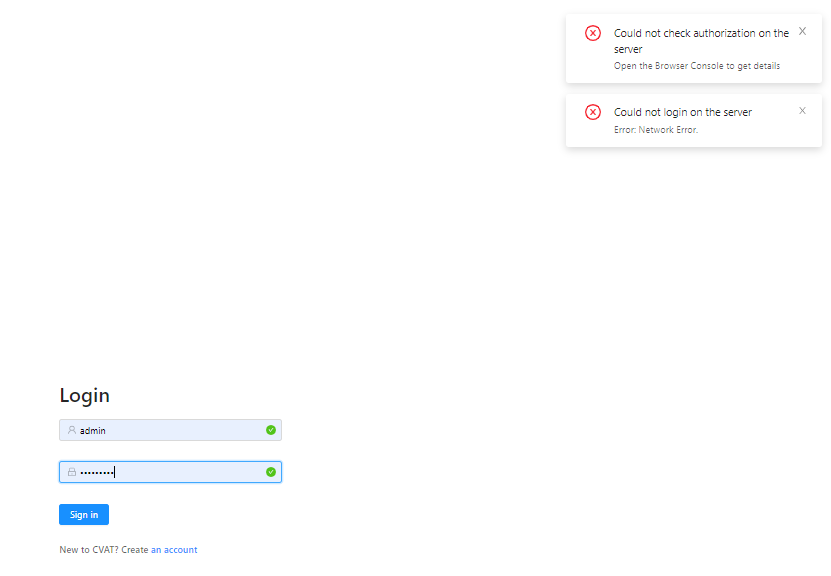
Cvat: Could not check authorization on the server / Could not login on the server Error: Network Error.
Hi guys,
I am new on CVAT and I am not a developer. The situation I have is:
- Yesterday I cloned and installed CVAT on Windows 10. It worked like a charm.
- Today, I turned the computer on, tried to log in on CVAT but I couldn´t.
I built and run docker, without results.
Attached I am sending the login screen.
MAny thanks in advance for the help!
Miguel
 Miguelistan
All 5 comments
@Miguelistan
Hi, try to restart docker containers using:
docker-compose down
docker-compose up
If you specified docker-compose files with -f flag when you build CVAT, please specify them also here.
 bsekachev
on 26 Mar 2020
bsekachev
on 26 Mar 2020
Dear Boris @bsekachev
Thank you. It didnt work out.
This is what I do, please point any problem you may see:
- Openin GitBash
- Starting Docker
- cd cvat directory
- docker-compose build
- docker-compose up -d
- go to localhost:8080
Then it shows the problem to login the server.
Attached you can find a txt file with all the GitBash lines
Thank you a lot
Miguelistan
on 30 Mar 2020
@Miguelistan
You haven't done docker-compose down as far as I understood. Right?
You need to do it and after that, do docker-compose up
bsekachev
on 30 Mar 2020
@bsekachev
Thank you very much, it's working fine now
Miguelistan
on 30 Mar 2020
Always use CVAT in a fresh Incognito Tab, cheers!
 mmaaz60
on 6 Aug 2020
mmaaz60
on 6 Aug 2020
Related issues
 selimbek
·
6Comments
selimbek
·
6Comments
 davodogster
·
4Comments
davodogster
·
4Comments
 syonekura
·
4Comments
syonekura
·
4Comments
 AI-sd
·
6Comments
AI-sd
·
6Comments
 oostap1
·
3Comments
oostap1
·
3Comments
Most helpful comment
@Miguelistan
Hi, try to restart docker containers using:
If you specified docker-compose files with
-fflag when you build CVAT, please specify them also here.