Cura: [4.7.1] Weird extruder switch while printing with a raft
Application version
Cura 4.7.1
Platform
Win 7 Professional 64bit | Xeon E3-1270v5 | Quadro K620
Printer
Custom FFF printer with 3 extruders, a mix of custom and generic materials.
Reproduction steps
The issue presents itself every time I print with a raft.
While printing the first and second layer with a custom material on extruder 2, extruder 1 heats up, briefly positions itself close to the starting point for that layer, does something I can't seem to comprehend and then switches back.
This is an issue for me as the material in extruder 1 degrades with heat and the chamber empties and oozes, the whole goal of this print is to do material caracterization, so i need a very repeatable sample of fresh material. I get around this by purging but this is not very consistent for me due to limitations on my direct drive.
Right now this has only happened to me if I print with a raft, which is something I have to do for the same repeatability reasons.
Screenshot(s)
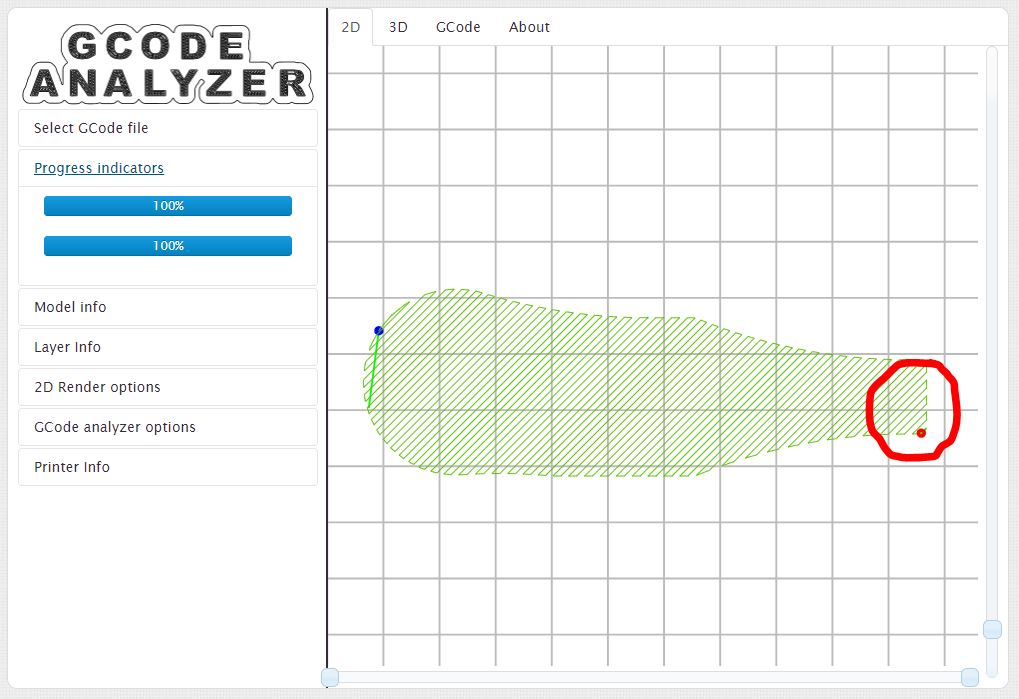
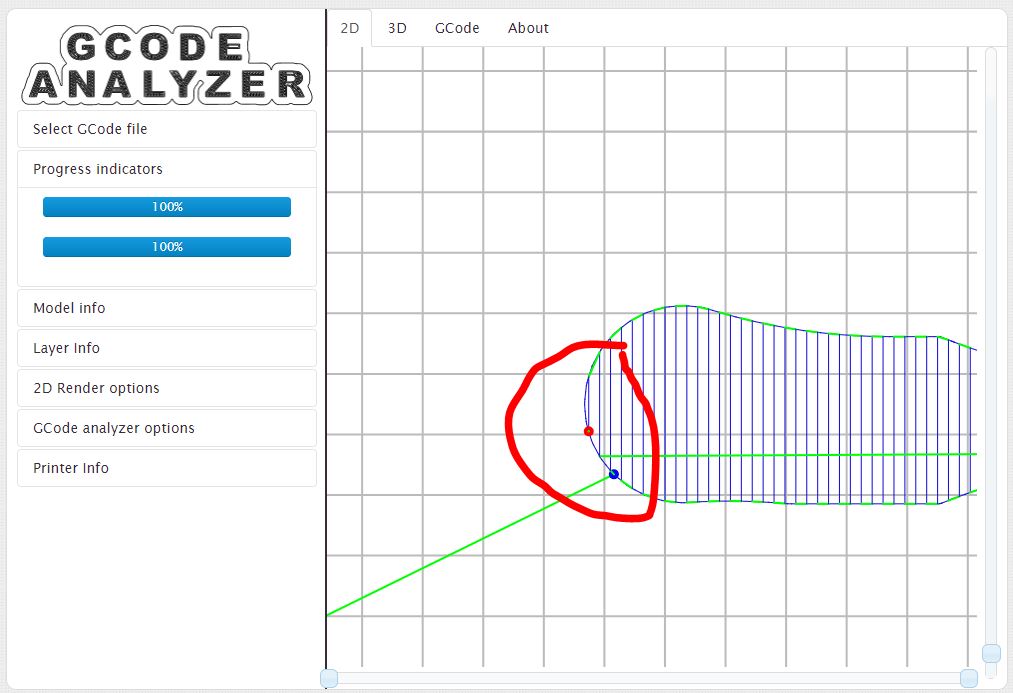
Apologies for my circle drawing skills, or lack thereof.. 😄
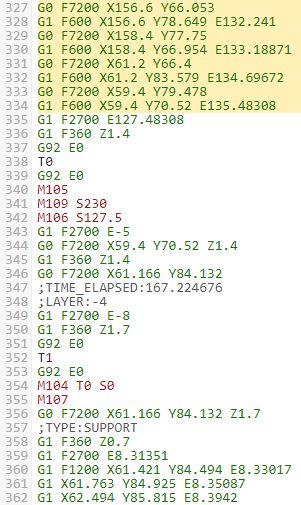
Gcode looks like this, I will also attach the full file:

Expected results
Extruder 2 prints the raft, then extruder 1 switches when it really is its turn.
Project file & gcode
Issue #8680 - Tensile Project.zip
Issue #8680 - GCODE.zip
Log file
I don't think its needed, but I can provide it if necessary!
Additional information
I checked for closed and open issues and I have found nothing similar, I hope this is not a duplicate.
Also, just wanted to say thanks to all the devs involved with Cura, I'm currently in the process of converting all the printers at work to Cura from another slicer, and I hope I can contribute even more to this project as time goes on in the form of some PRs and new printers. I'm currently working on the jsons to get away from the Custom FFF profile and streamline my machine lineup.
 StuSerious
All 4 comments
This is a very good, extensive bug report. Thank you. Log file is indeed not necessary as this is purely a slicing issue which can be reproduced with your project file alone.
I can reproduce your bug using your project file. (For other people: make sure you disable dropping models to build plate and making sure they don't collide in your preferences, before loading the project file.) I have little idea why it would print something there, but I can see two things that might be a hint:
- It's marked as a helper structure in the g-code.
- This only happens if the prime tower is enabled.
I'll bring this up with the other developers to determine priority.
 Ghostkeeper
on 5 Nov 2020
Ghostkeeper
on 5 Nov 2020
Thanks Ghostkeeper!
In the meantime I have kinda found a workaround (as in just purge 100mm^3 of material on the tower and be done with it 😆)
I can afford this now because I'm just printing simple TPU, but I also work with MUCH more expensive and MUCH more abrasive materials. But I guess I'll think about it when I cross that bridge.
For now, I wouldn't flag this as high priority since it seems to be an edge case and, while it is repeatable, I don't think it's affecting a lot of users out there!
In the weekend I'll try to poke around in the code and see what perfect storm is causing this, but I'm not confident I'll find anything. If I do, I'll let you all know!
Anyways, thanks for your time and I'll patiently wait to see if there is a solution!
StuSerious
on 5 Nov 2020
Considering the rarity of this case and the unintended effect that it adds a minute or so to the printing time, and considering there are workarounds, we've decided to defer this issue. It's indeed a bug, but we don't consider it important enough to be working on now. We get many more issue reports than what we can fix, and this isn't a priority compared to the rest. We'll keep it open in case priorities change though.
Ghostkeeper
on 10 Nov 2020
Roger that!
I'll keep testing every version and I'll update this thread in case something ever changes.
In the meantime, thanks for the time and I'll keep y'all posted
StuSerious
on 11 Nov 2020
Related issues
 jellewie
·
3Comments
jellewie
·
3Comments
 timherrm
·
3Comments
timherrm
·
3Comments
 mnswamp1
·
3Comments
mnswamp1
·
3Comments
 DmitryBychkov
·
3Comments
DmitryBychkov
·
3Comments
 dstulken
·
3Comments
dstulken
·
3Comments