Cura: [4.8 beta] Activate button isn't disabled for active machine profile
Application version
4.8 beta
Platform
Windows 7, NVIDIA GeForce GT 730. (Using dual monitors).
Printer
Custom FFF or Creality cr10
Reproduction steps
Activate a printer profile
Screenshot(s)
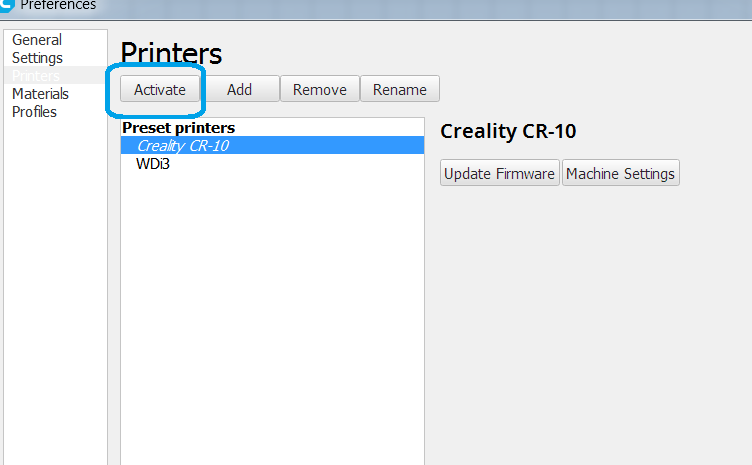
Machine profiles menu:
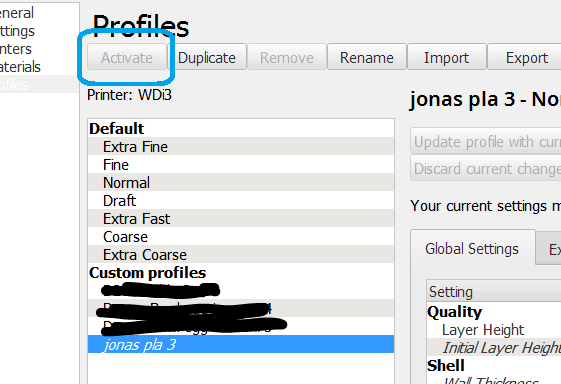
The settings profile menu greys out the button:
Actual results
Button stays active
Expected results
Button should be disabled for the active machine.
Project file
button.zip
 printingotb
All 5 comments
Whoops. This has been blatantly wrong for over 4 years...
 nallath
on 28 Oct 2020
nallath
on 28 Oct 2020
... nervously checks git blame ...
Wasn't me!
 fieldOfView
on 28 Oct 2020
fieldOfView
on 28 Oct 2020
While I'm at it, I found some inconsistencies that may or may not be intended :wink:
Add machine - it activates but doesn't automatically get selected
Create settings profile from overrides - activates and selects profile
Duplicate profile - doesn't activate or select
Create material - activates and selects
Duplicate material - activates and selects
Active machine can be removed and the next machine in the list activates. (Until now at least).
Active settings profile can't be removed
Active material can't be removed
printingotb
on 28 Oct 2020
Active machine can be removed and the next machine in the list activates. (Until now at least).
Active settings profile can't be removed
Active material can't be removed
This is intentional.
nallath
on 29 Oct 2020
The inconsistency is necessary because while it's pretty clear what happens when you delete the active printer, a material or custom quality profile may be active on any number of printers, even ones that are not active right now. So deleting your custom material would also need to change the material on different printers. You wouldn't notice that this happens.
 Ghostkeeper
on 29 Oct 2020
Ghostkeeper
on 29 Oct 2020
Related issues
 muhammadelmogy
·
3Comments
muhammadelmogy
·
3Comments
 DamianSepczuk
·
3Comments
DamianSepczuk
·
3Comments
 timherrm
·
3Comments
timherrm
·
3Comments
 konvoj
·
3Comments
konvoj
·
3Comments
 mubarak111nsu
·
3Comments
mubarak111nsu
·
3Comments
Most helpful comment
Whoops. This has been blatantly wrong for over 4 years...