Cura: [4.8 Beta] App does not start on MacOS BigSur
Application version
4.8 Beta
Platform
MacOS Big Sur
Printer
None
Reproduction steps
- Install Cura
- Launch Cura
Actual results
Cura jumps couple of times then nothing happens
Expected results
Cura launches just as 4.7.1
Log file
No log file for version 4.8 present
 Renha
Renha
All 28 comments
Hi @Renha,
Thanks for reporting this. Unfortunately none of us has Big Sur installed as yet (we still use Catalina), so I would like some more information:
- Did the OS give any warnings while opening the .dmg or while verifying Cura?
- Can you please do the following:
- Open a terminal window and navigate to where the Ultimaker Cura.app is. That should be:
cd /Volumes/Ultimaker_Cura-4.8.0-beta-Darwin - Then enter
open Ultimaker\ Cura.app
- Open a terminal window and navigate to where the Ultimaker Cura.app is. That should be:
Since the icon jumps a couple of times as you said, I suspect that either Big Sur does not/cannot verify Cura as a safe application or there's something else obstructing it from launching.
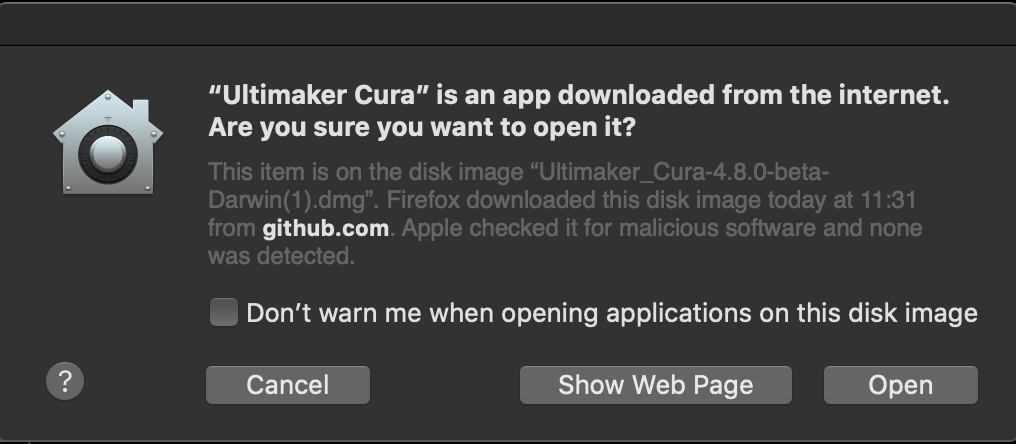
When I do the above steps this is the Window I get, notifying me that the app is safe and nothing malicious was found:
 evtrados
on 26 Oct 2020
evtrados
on 26 Oct 2020
I can confirm that it doesn't shows a similar dialog, and the app opens and closes.
I've noticed similar behavior with other applications using QT. there's a version of QT that relies on GL which I believe BigSur is Metal only.
 marcelonovaes
on 27 Oct 2020
marcelonovaes
on 27 Oct 2020
I was very curious, so I installed Big Sur on an old MacBook I had lying around.
I do get the same dialog though (see below), but after the verification is successful the app indeed does not start. There's no error thrown whatsoever, so we're going to discuss this with the team and see how we can approach it. I don't think it is related to QT, since Cura 4.7.1 launches without issues.

evtrados
on 27 Oct 2020
Surely something must be logged in Console.app (the system-wide log, not the Cura log)
 fieldOfView
on 27 Oct 2020
fieldOfView
on 27 Oct 2020
Hey, it works with the geos.py file provided for the 4.6.2 Big Sur fix (https://github.com/Ultimaker/Cura/issues/7970#issuecomment-659791641). Hopefully this helps.
I changed my geos.pyc file to the provided one and Cura launches fine for me.
 suryanisaac
on 27 Oct 2020
suryanisaac
on 27 Oct 2020
Hmm, we did apply that patch though I think. Maybe this was not applied correctly but somehow manually or something?
 Ghostkeeper
on 27 Oct 2020
Ghostkeeper
on 27 Oct 2020
Maybe, I need to take a look at the source code. Do you have any idea where this file is?
suryanisaac
on 27 Oct 2020
@fieldOfView , yes Console was showing an error on a /Users/$USER/Library/Logs/cura/stderr.log file from 24 Oct, so I didn't bother looking into it, because that was 2 days before I upgraded. Once I navigated to its path though I saw it had changed like 1 min ago.
And, indeed, the problem is that geos cannot be found:
OSError: Could not find lib c or load any of its variants [].
evtrados
on 27 Oct 2020
I can confirm that copying geos.py from 4.7.1 to 4.8 Beta works on Big Sur
marcelonovaes
on 28 Oct 2020
Thanks! I never downloaded 4.7 because of the bug with curves. Good to see that it works.
suryanisaac
on 28 Oct 2020
This fixed the issue for me as well. Adding geos.py to Ultimaker Cura.app/Contents/Resources/lib/python3.5/shapely/ restored normal app launch under Big Sur.
 jeff-bravo
on 28 Oct 2020
jeff-bravo
on 28 Oct 2020
We have also applied the patch on our build system. Cura v4.8 stable will have the fix and will, thus, launch without issues on Big Sur. Thank you all!
evtrados
on 28 Oct 2020
Thanks for your help!
suryanisaac
on 29 Oct 2020
Thank you!
How about Yosemite?
David
iPad iOS 14.1 (18A8395)
On Oct 28, 2020, at 1:59 PM, Evangelos Trantos notifications@github.com wrote:
We have also applied the patch on our build system. Cura v4.8 stable will have the fix and will, thus, launch without issues on Big Sur. Thank you all!—
You are receiving this because you are subscribed to this thread.
Reply to this email directly, view it on GitHub, or unsubscribe.
 truegret
on 29 Oct 2020
truegret
on 29 Oct 2020
We weren't aware that there was a problem when running on MacOS 10.10 Yosemite?
What are your symptoms, Truegret? Do you have any logs or crash log?
Ghostkeeper
on 30 Oct 2020
As far as I recall, Yosemite is the oldest version we currently support, so all should be working fine there. The furthest version I can go back to is El Capitan 10.11, where I never encountered any issues with the .dmg or the .app.
evtrados
on 3 Nov 2020
This issue has been automatically closed because there has been no response to our request for more information from the original author. With only the information that is currently in the issue, we don't have enough information to take action. Please reach out if you have or find the answers we need so that we can investigate further.
![no-response[bot] picture](https://avatars2.githubusercontent.com/u/26350515?v=4&s=40) no-response[bot]
on 9 Nov 2020
no-response[bot]
on 9 Nov 2020
Please consider re-opening this issue.
Unless you expect me to wait until Ultimaker-Cura 5.0.0.
truegret
on 13 Nov 2020
Yeah, this needs to be opened
suryanisaac
on 14 Nov 2020
Does this issue also happen with the 4.8 stable? Or just with the beta?
@evtrados did some work on this before stable, iirc.
Ghostkeeper
on 17 Nov 2020
I will be able to check that later today, probably someone will be faster
Renha
on 19 Nov 2020
The issue is solved in stable version of Cura 4.8, thank you
Renha
on 19 Nov 2020
Still not working for me on Big Sur, and the current website download
 PlasmaSoftUK
on 21 Nov 2020
PlasmaSoftUK
on 21 Nov 2020
Cura 4.8 (release) launches for me on Big Sur, but results in an empty grey window.
The console has the following output:
Nov 23 11:48:33 MacBook com.apple.xpc.launchd[1]: Coalition Cache Hit: app<application.nl.ultimaker.cura.8636044756.8636044763(501)> [41493]
Nov 23 11:48:37 MacBook cura[90410]: getattrlist failed for /System/Library/Extensions/AppleIntelHD5000GraphicsGLDriver.bundle/Contents/MacOS/AppleIntelHD5000GraphicsGLDriver: #2: No such file or directory
Nov 23 11:48:37 MacBook cura[90410]: getattrlist failed for /System/Library/Extensions/GeForceGLDriver.bundle/Contents/MacOS/GeForceGLDriver: #2: No such file or directory
Nov 23 11:48:37 MacBook cura[90410]: getattrlist failed for /System/Library/Frameworks/OpenGL.framework/Resources//GLRendererFloat.bundle/GLRendererFloat: #2: No such file or directory
 LucienWells
on 23 Nov 2020
LucienWells
on 23 Nov 2020
Do you get the same symptom? Anything in the logs?
Ghostkeeper
on 23 Nov 2020
Do you get the same symptom? Anything in the logs?
It doesn't create a log, it hasn't even created a '4.8' directory in /Users/plasma/Library/Application Support/cura/
Icon just bounces and never launches, I also tried removing all the older cura directories from the above link. Still does nothing.
Plasma
PlasmaSoftUK
on 24 Nov 2020
There are more logs than Cura logs. Something must be logged in Console.app (the system-wide log, not the Cura log)
fieldOfView
on 24 Nov 2020
Never mind I am an idiot! :( Looks like at some point I renamed "Ultimaker Cura" to just "Cura" so after installing 4.8 my shortcut was still trying to launch 4.6, which I realised after applying the geos.py fix above. I am now working on 4.8, apologies for the mistake.
PlasmaSoftUK
on 24 Nov 2020
Related issues
 Nemernemer
·
3Comments
Nemernemer
·
3Comments
 DmitryBychkov
·
3Comments
DmitryBychkov
·
3Comments
 mnswamp1
·
3Comments
mnswamp1
·
3Comments
 jornada812
·
3Comments
jornada812
·
3Comments
 ferociousdiablo
·
3Comments
ferociousdiablo
·
3Comments