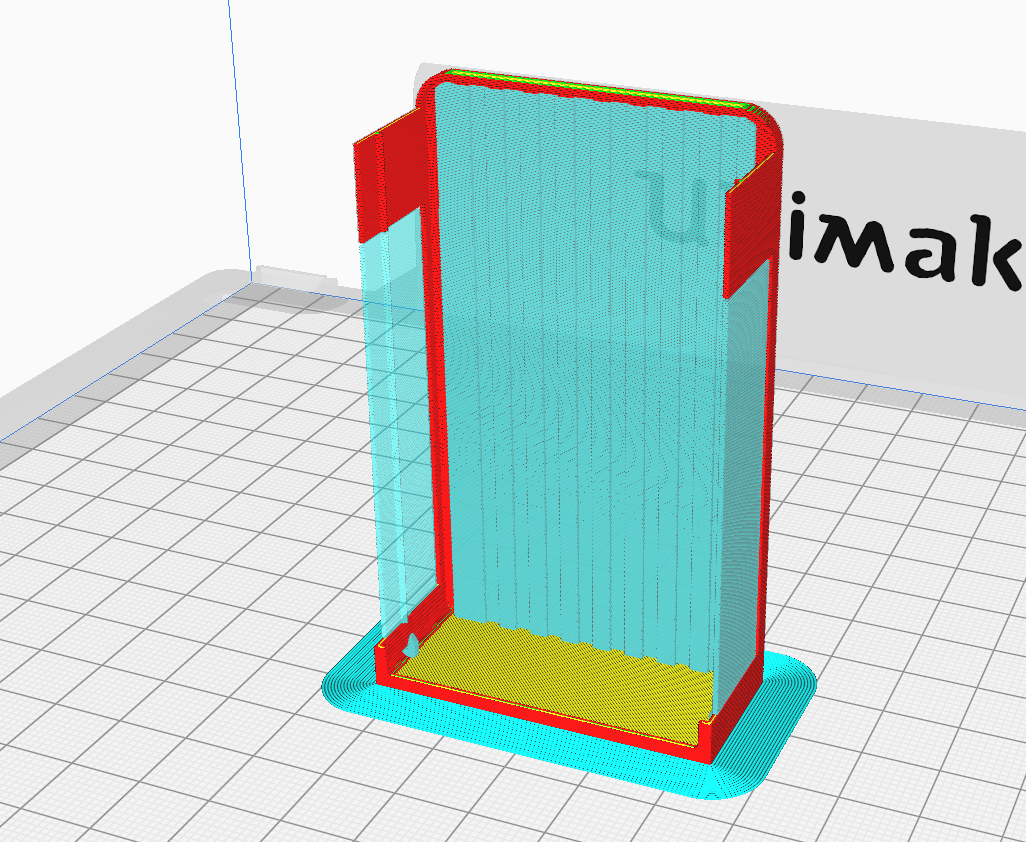
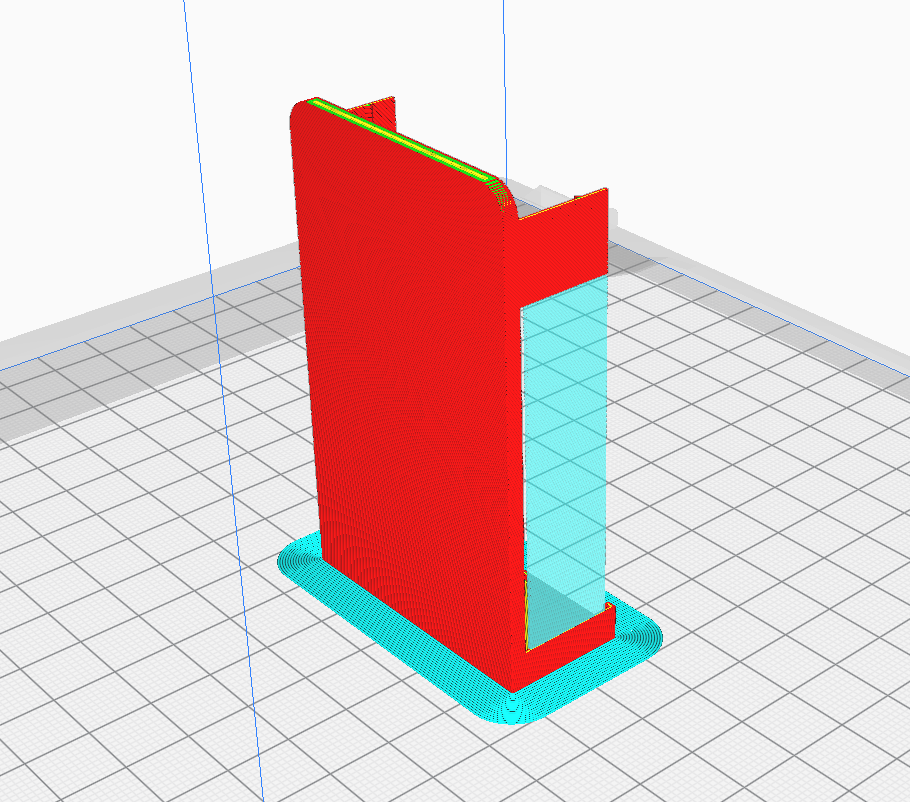
It just looks strange that you can look through support but not though the model itself.
Is this a bug or a feature I don't get?
Application version
Built from master
Platform
Linux / Ubuntu / PPA
Reproduction steps
- Load model
- Choose preview tab
Screenshot(s)
 thopiekar
All 10 comments
Supports were deliberately changed to be translucent with release 4.6.0.
https://github.com/Ultimaker/Cura/releases/tag/4.6.0
Transparent support rendering. In preview mode with ‘Line type’ selected, support material will render with transparency so you can easily see what’s being supported.
 Asterchades
on 30 Sep 2020
Asterchades
on 30 Sep 2020
From what you are saying, I should be able to see the red lines between the support lines. However, I see the printer's print bed behind it. So I definitely see through all lines instead of only the support lines.
Otherwise, I don't understand the added value at this point again.
thopiekar
on 30 Sep 2020
Indeed you should be able to see the model behind it. I'd be leaning towards a misconfigured or absent display driver, though I can't even pretend to know where to start looking with such things under Linux. I believe it uses OpenGL if that helps.
Asterchades
on 30 Sep 2020
Can't complain about my Linux setups I have around (except of my DisplayLink dock and the interface itself) :smile:
Well, then I guess it is approved to be a bug then :wink:
thopiekar
on 30 Sep 2020
The only thing I can see... that second picture does show the model. It is only meant to be a shadow when its obscured by supports, and there's clearly a shadow on the bed in that second picture. The first one, though... yeah, I got nothing.
Though I'll be honest - I've no idea what those supports on the back are for. Between that and the errant supports as featured in your other report (and pictured here) there could be some kind of weirdness going on between Cura and your model. So you may want to either confirm it with different models, or upload the model in question for a more direct second opinion.
Asterchades
on 30 Sep 2020
I'd be leaning towards a misconfigured or absent display driver,
No, the driver is doing nothing wrong.
This issue is a fairly well know "fact of life" of mixing transparent and non-transparent models in a single renderpass. Renderpasses render polygons to an RGB buffer and to a depth buffer. When a polygon is has to be rendered, the depth buffer is checked per pixel if a different polygon that is in front of the current polygon has not already been drawn. If a transparent pixel happens to be the front-most pixel, the polygon that would be behind the transparent pixel will not be drawn. The bed mesh behind the model does get drawn, because that is drawn in a different pass.
A solution would be to draw all transparent models in a separate pass after all the non-transparent models have already been drawn, while keeping the depth buffer intact. This would require some rearchitecting of the renderpasses.
 fieldOfView
on 30 Sep 2020
fieldOfView
on 30 Sep 2020
That's quite a bit different to my understanding of how rendering of transparency works, but I'll freely admit that my knowledge of that is purely second hand. My understanding is that transparency actually breaks that system, which is why it worked so poorly on PowerVR hardware - it couldn't crop the geometry behind the transparent data, resulting in overdraw that they simply lacked the throughput to handle.
Instead, transparency is rendered separately from a sorted list without any culling at all, which is where issues of inverted transparency, transparent geometry unintentionally visible through other transparent geometry (particularly related to backface culling), or indeed transparency becoming visible through solid geometry becomes a thing when said list is incorrectly handled.
But, as I said, that's second hand knowledge and likely missing large pieces of information or possibly outdated. My brother is the programmer and I just pick up bits and pieces as we're repairing things.
Unless Linux handles the rendering substantially different to Windows when using the same API, however - assuming, of course, that it is using the same API - I don't know that this particular case would require rearchitecturing. That may fix it, but it feels like a brute-force solution. Mostly because of the following:

Master build by Smartavionics dated the 22nd of September, sliced about 90 seconds ago. The model is clearly visible through the supports as a shadow (similar to the layers not being shown), and the build plate visible through the shadow.
Asterchades
on 30 Sep 2020
It's not an issue of drivers or Windows vs. Linux or anything. It's indeed as fieldOfView describes, the render technique of OpenGL to select only the front-most fragment and then compute the fragment colour of that one, not rendering any other fragments. This issue was known to us from the start when we made support transparent, but it was accepted since the result was still deemed nicer. fieldOfView also pointed it out with the PR that merged this change back then, iirc.
What you see is the "rendered g-code" layer having transparency and being placed above the model shadow layer, which in turn is being rendered above the build plate.
Initially I had tried a couple of quick fixes by changing the properties of the g-code rendering. Blend modes, setting them as partially transparent in the Uranium framework, etc. I know that it's possible with our current framework because the model shadow itself seems to render multiple transparent layers on top of each other fine. But I just couldn't figure it out so far.
 Ghostkeeper
on 2 Oct 2020
Ghostkeeper
on 2 Oct 2020
To clarify, then, the issue is not that the model is not visible through the supports, which is what I was basing my feedback on. It's that the model is only visible as a shadow, which I believed was the intent of the feature anyway and wasn't readily apparent it was occurring in the first of the two provided images in the initial post. And it's the disconnect between those two similar-yet-clearly-differet view points which has made this more of a debate than was necessary.
About right?
Asterchades
on 2 Oct 2020
Yeah. Ideally it'd render the layer view data behind the support as well.
Ghostkeeper
on 5 Oct 2020
Related issues
 DmitryBychkov
·
3Comments
DmitryBychkov
·
3Comments
 ferociousdiablo
·
3Comments
ferociousdiablo
·
3Comments
 mubarak111nsu
·
3Comments
mubarak111nsu
·
3Comments
 rudowinger
·
3Comments
rudowinger
·
3Comments
 jellewie
·
3Comments
jellewie
·
3Comments
Most helpful comment
No, the driver is doing nothing wrong.
This issue is a fairly well know "fact of life" of mixing transparent and non-transparent models in a single renderpass. Renderpasses render polygons to an RGB buffer and to a depth buffer. When a polygon is has to be rendered, the depth buffer is checked per pixel if a different polygon that is in front of the current polygon has not already been drawn. If a transparent pixel happens to be the front-most pixel, the polygon that would be behind the transparent pixel will not be drawn. The bed mesh behind the model does get drawn, because that is drawn in a different pass.
A solution would be to draw all transparent models in a separate pass after all the non-transparent models have already been drawn, while keeping the depth buffer intact. This would require some rearchitecting of the renderpasses.