Cura: [4.7.1] Build Plate Temperature tool tips are incorrect
Application version
4.7.1
Platform
Windows 10 Home v. 1909
Printer
Anycubic i3 Mega
Reproduction steps
- Set Build Plate Temperature to 0
- Set Build Plate Temperature Initial Layer to 55 (or something else).
Screenshot(s)

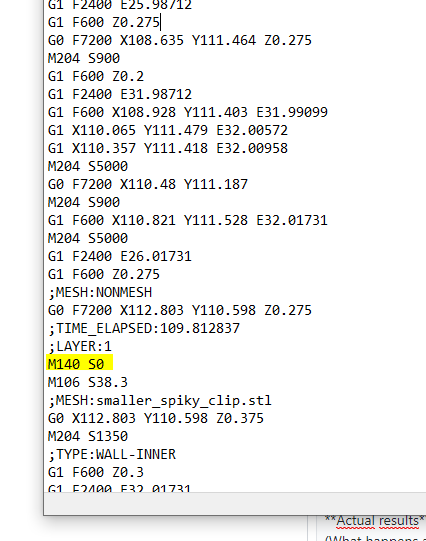

Actual results
"M140 S0" is added to the gcode right after LAYER:1 - causing the build plate to turn off.
Expected results
According to the tool tip, setting it to 0 means it will stay the temperature of the initial layer, and that's how it worked in 4.6.
Project file
I tried to upload this but the file format isn't accepted.
Log file
Additional information
 NiTeDK
All 17 comments
 skarasov
on 28 Sep 2020
skarasov
on 28 Sep 2020
@jellespijker CE#1257
Needed to keep comparing mesh_group_settings.get<Temperature>("material_bed_temperature") != 0
src/LayerPlan.cpp L:1467
skarasov
on 28 Sep 2020
To upload a project file you'll need to put it in a .zip or else just rename the file to .zip.
 Ghostkeeper
on 29 Sep 2020
Ghostkeeper
on 29 Sep 2020
The setting description there is a bit outdated from before there was an initial layer bed temperature setting. I think it's still useful to be able to set the bed temperature to 0 for the rest of the print. Maybe it should say: "If this is 0, the build plate is left unheated."
Ghostkeeper
on 29 Sep 2020
@Ghostkeeper I think that would be an apt description, explaining the current behaviour
 jellespijker
on 30 Sep 2020
jellespijker
on 30 Sep 2020
The setting description there is a bit outdated from before there was an initial layer bed temperature setting. I think it's still useful to be able to set the bed temperature to 0 for the rest of the print. Maybe it should say: "If this is 0, the build plate is left unheated."
Fair enough - then I suggest correcting the tool tip AND setting one of the two settings to follow the other until you set an absolut value. Everybody wins :-)
NiTeDK
on 30 Sep 2020
I like the compromise, are you by any change Dutch and familiar with "the Polder model" ;-)
I it possible that I misunderstand your proposal but I believe that what you're proposing is allready the current behaviour.
- Setting the build plate temperature to an absolute value will change both the bed temperature and the initial bed temperature in the Cura front end and result in a
M140 S<setpoint>at the start and noM140at the start of layer 1. - Setting the initial build plate temperature to an absolute value will change only the initial bed temperature and not the bed temperature in the front end. But will result in an
M140<set point initial temp>at the start and aM140<setpoint>with the original bed temperature at layer 1. - Setting both value will of course change both values in the front end and result in a
M140<set point initial temp>at the start and aM140<setpoint>at the start of layer 1 provided they are different.
jellespijker
on 30 Sep 2020
Exept, if add to mashine start gcode:
M190 S100
M104 S{material_print_temperature}
M140 S{material_bed_temperature}
M109 S{material_print_temperature}
M190 S{material_bed_temperature}
Initial temp not used.
Ofcouse you can use here token for initial temp.
skarasov
on 30 Sep 2020
I like the compromise, are you by any change Dutch and familiar with "the Polder model" ;-)
I it possible that I misunderstand your proposal but I believe that what you're proposing is allready the current behaviour.
- Setting the build plate temperature to an absolute value will change both the bed temperature and the initial bed temperature in the Cura front end and result in a
M140 S<setpoint>at the start and noM140at the start of layer 1.- Setting the initial build plate temperature to an absolute value will change only the initial bed temperature and not the bed temperature in the front end. But will result in an
M140<set point initial temp>at the start and aM140<setpoint>with the original bed temperature at layer 1.- Setting both value will of course change both values in the front end and result in a
M140<set point initial temp>at the start and aM140<setpoint>at the start of layer 1 provided they are different.
No, I am Danish and not familiar with the model ;-) except for what I just googled.
When I set the build plate temperature to an absolute value, it doesn't affect the initial bed temperature in Cura.
NiTeDK
on 2 Oct 2020
When I set the build plate temperature to an absolute value, it doesn't affect the initial bed temperature in Cura.
By default it does. I checked, and the AnyCubic i3 Mega profiles don't override that. Seeing from your screenshot, you have a custom profile that overrides the setting to a fixed 55 degrees.
Ghostkeeper
on 2 Oct 2020
This is not fixed.
I see what you mean - if I set the initial bed temperature to 0, the gcode will set the build plate temperature at layer 1 - great. I was under the impression that the initial bed temperature would change in Cura (not just the gcode) the same way Top Thickness changes when you change Top/Bottom Thickness.
But it still leaves us with incorrect tool tips. The tool tip for Build Plate Temperature should have the part about setting it to 0 deleted. And the tool tip for "Build Plate Temperature Initial Layer" should include "If this is 0, Build Plate Temperature will be used." or something like that.
NiTeDK
on 4 Oct 2020
But that's incorrect. If you set the Initial Layer Build Plate Temperature to 0, it leaves the build plate temperature as it was: not heating it if it is the start of the print, not altering it if you are starting with a second object in one-at-a-time mode. There is no "fallback" to the normal build plate temperature except that the default profile for Custom FFF Printer sets the initial layer build plate temperature to be the same as the normal build plate temperature. There is no fallback if you override the Initial Layer Build Plate Temperature to set it to 0. If you want it to scale along with the normal Build Plate Temperature, just don't change the setting.
I've written "leaves it unheated" since that is clear for the most common use case (initial layer build plate temperature is only used for the first printed layer) while still being technically correct for the other use case (one-at-a-time mode's second object) and still quite brief as to be something that people will read.
Ghostkeeper
on 6 Oct 2020
Ooooh, right, the layer count is zero based - sorry!
Could you please explain to me... since I've already changed the initial layer bed temperature, how do I get it to scale with the normal build plate temperature?
NiTeDK
on 6 Oct 2020
If it's not saved to a profile, there is a revert button: 
If it is saved to a profile, there is the (fx) button: 
The purpose of this is to restore a formula if you override the formula with a customised setting or profile.
Ghostkeeper
on 9 Oct 2020
Ok, that's what I thought, but I have neither the revert button or the formula button even though the value is different from Build Plate Temperature:
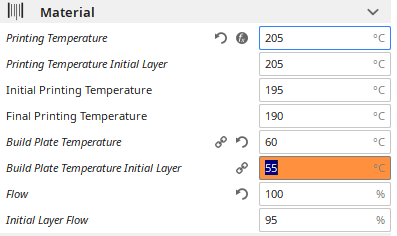
It works like that though for the Wall Line Count in relation to Wall Thickness and a lot of other settings.
Could it have anything to do with my machine hiding the Default Build Plate Temperature setting that Build Plate Temperature depends on?
NiTeDK
on 9 Oct 2020
It looks like the (fx) button is not being displayed at all for global settings for some reason.
We have (long-standing) plans to replace that button with a button that removes an override from the custom profile. That fulfils the same use case but without requiring the user to know logic about what formulas are, and gives more power. So it's unlikely that we'll fix the display of the (fx) button for global settings.
Ghostkeeper
on 12 Oct 2020
I understand. Thanks for your time :-)
NiTeDK
on 12 Oct 2020
Related issues
 konvoj
·
3Comments
konvoj
·
3Comments
 ferociousdiablo
·
3Comments
ferociousdiablo
·
3Comments
 StanislavJochman
·
3Comments
StanislavJochman
·
3Comments
 timherrm
·
3Comments
timherrm
·
3Comments
 mubarak111nsu
·
3Comments
mubarak111nsu
·
3Comments