Cura 4.7.1 MacOS - no mountable file system [El Capitan 10.11.6]
Application version
Ultimaker_Cura-4.7.1-Darwin
Platform
MacOS 10.11.6 - El Capitan
Security & Privacy | Allow apps downloaded from: Anywhere
Printer
Creality CR10S
Reproduction steps
First attempt
- In response to "New version available" upon launching of Cura, downloaded 4.7.1 for MacOS
- Navigated to file location
- Double-click on Ultimaker_Cura-4.7.1-Darwin.dmg
- Window to unpack application started
- Warning window popped up "The following disk image couldn't be opened"
5.1 Image: "Ultimaker_Cura-4.7.1-Darwin.dmg" Reason: "no mountable file systems"
Second attempt
- Read release notes
- Download Cura 4.7.1 within Chrome browser (https://ultimaker.com/software/ultimaker-cura)
1.1 Downloaded from Safari - same error - Navigated to file location
- Within System Preferences set Security & Privacy settings
3.1 Allow apps downloaded from:
3.2 FROM: Mac App Store and identified developers
3.3 TO: Anywhere - Double-clicked on Ultimaker_Cura-4.7.1-Darwin.dmg
- Window to unpack application started
- Warning window popped up "The following disk image couldn't be opened"
6.1 Image: "Ultimaker_Cura-4.7.1-Darwin.dmg" Reason: "no mountable file systems"
Third attempt
Same results as Second attempt when downloaded using Safari
Screenshot(s)
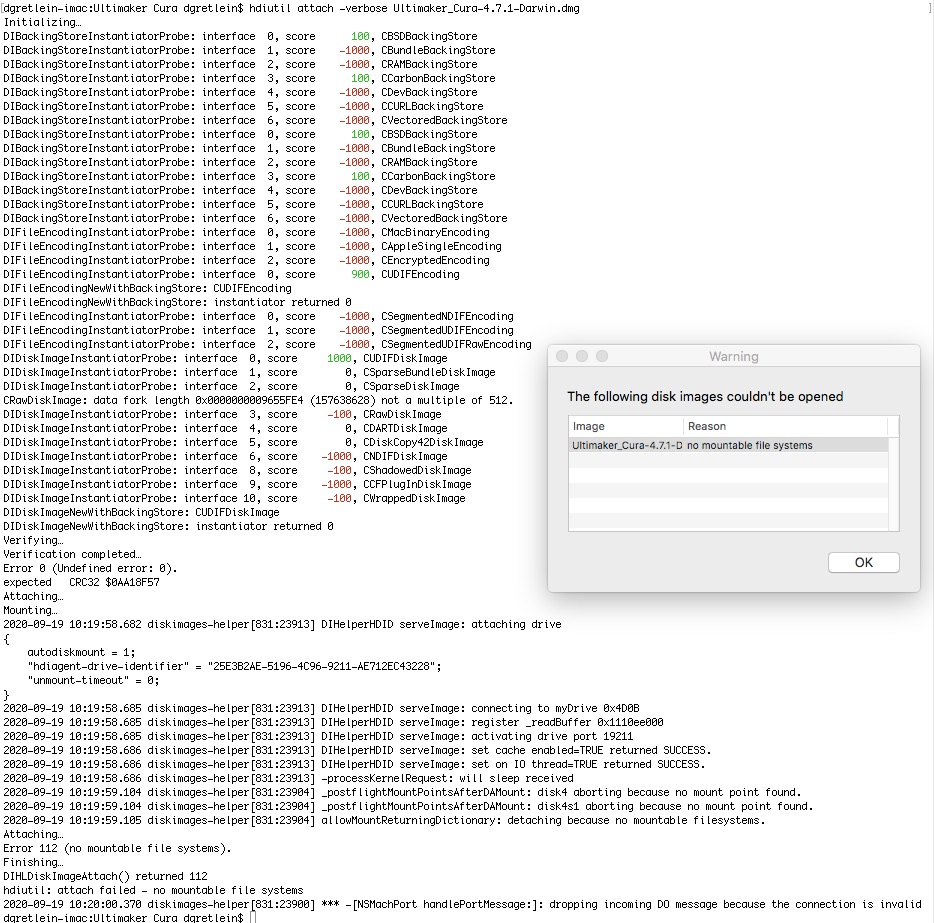
See attached
Performed in Terminal:
[dgretlein-imac:Ultimaker Cura dgretlein$ hdiutil attach -verbose Ultimaker_Cura-4.7.1-Darwin.dmg
Actual results
- Window to unpack application started
- Warning window popped up "The following disk image couldn't be opened"
2.1 Image: "Ultimaker_Cura-4.7.1-Darwin.dmg" Reason: "no mountable file systems"
Expected results
Dialog window allowing me to select where the application is dropped into, and/or with the Applications folder
Project file
NA
Log file
See attached screenshot
Additional information
I successfully launched Ultimaker_Cura-4.7.0
 truegret
All 2 comments
This has also been reported on the forums (https://community.ultimaker.com/topic/34080-cura-version-471-for-mac/)
It seems that this is caused by the notarization process. It is something that we are looking into.
 nallath
on 21 Sep 2020
nallath
on 21 Sep 2020
This was caused by the notarization process, indeed. In order to notarize, Xcode unpacks the package and re-packages it. The solution was to supply the file system inside the package as a command line argument to the notarization command.
This should be working correctly for 4.8. It is (afaik) still a manual step though so I hope we won't forget.
 Ghostkeeper
on 17 Nov 2020
Ghostkeeper
on 17 Nov 2020
Related issues
 jornada812
·
3Comments
jornada812
·
3Comments
 mnswamp1
·
3Comments
mnswamp1
·
3Comments
 mubarak111nsu
·
3Comments
mubarak111nsu
·
3Comments
 wi1k1n
·
3Comments
wi1k1n
·
3Comments
 jellewie
·
3Comments
jellewie
·
3Comments
Most helpful comment
This has also been reported on the forums (https://community.ultimaker.com/topic/34080-cura-version-471-for-mac/)
It seems that this is caused by the notarization process. It is something that we are looking into.