Cura: I dont see any setings or preferences options
Check the screen ! The same result was after reinstalation.
Testing with:
Cura 4.6.1
Cura 4.6.2
Cura 4.7. Beta
Win 7 64bit
 Vladko022
All 14 comments
It's fine on my side and most of other people probably, so using the template you were supposed to compile would be a good start.
 Liger0
on 22 Aug 2020
Liger0
on 22 Aug 2020
It's fine on my side and most of other people probably, so using the template you were supposed to compile would be a good start.
Can you describe in more details, what you mean ?! Thanks
Vladko022
on 22 Aug 2020
What @Liger0 hinted at is that when you opened your issue, there was a template with things to fill on, which you removed.
Windows 7 is no longer supported by Microsoft, or by most graphics card manufacturers. I don't think Ultimaker supports it anymore. If it still works for you, that is great. If it doesn't, you may be on your own.
Have you tried resizing the preference window? That might force redrawing the missing parts of the window.
You could try finding updated drivers for your graphics card.
 fieldOfView
on 22 Aug 2020
fieldOfView
on 22 Aug 2020
I have Win7 with newest updates and Radeon RX5070XT with newest drivers. But I tried unistall all from ultimaker with Total Uninstall a install it again, but I still need resizing the preference window, still when I open new window .
Vladko022
on 22 Aug 2020
What I read between your lines is that resizing the window solves your problem, so you seem to have a workaround.
This is not likely something that can be solved from our side. It is probably an issue between your graphics driver and the UI framework we use.
fieldOfView
on 22 Aug 2020
Windows 7 is no longer supported by Microsoft, or by most graphics card manufacturers. I don't think Ultimaker supports it anymore. If it still works for you, that is great. If it doesn't, you may be on your own.
We're using Qt 5.10, which does support Windows 7, so I'd expect that it'll work fine. It seems that even 5.15 still supports Windows 7.
It's a weird issue. Can't reproduce it on my side on Windows 10 nor Ubuntu. Maybe it's caused by an uncommon pixel scale factor? Are you using an adjusted font size or screen scale factor in Windows?
Another issue that sometimes props up is that we could be looking at a corrupt Qt shader cache. So one thing you could do is to delete the contents of C:\Users\<your username>\AppData\local\cache\qtshadercache (while Cura is closed). Those files are caches, meant to speed up the boot time of Qt-based applications (such as Cura). Deleting them will cause them to be re-made so it might take a few fractions of a second longer to boot Cura next time, after which it'll be just as fast as normal, so it's quite safe to delete them. Only since it's a folder not specific to Cura, Cura shouldn't be messing with it so it's not something we can easily fix if that's the problem.
If neither of those are the problem, let's hope that more people will report this issue so that we can see the commonalities in your set-ups, and then maybe trace down what the problem is.
 Ghostkeeper
on 24 Aug 2020
Ghostkeeper
on 24 Aug 2020
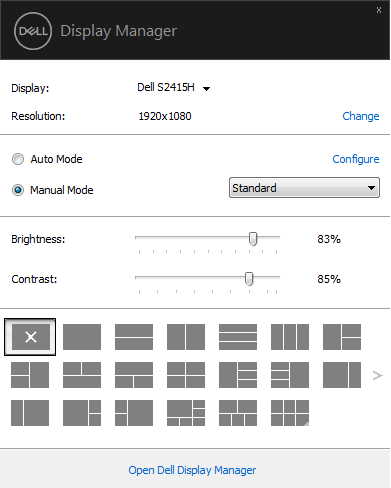
I deleted all files in this folder - qtshadercache, but the problem still persists. I still need to change resize of window for correct display. I don't using some an uncommon pixel scale factor and its new instalation of Win 7 (withou some special changes), so I dont have to much SW installations in PC.
Vladko022
on 25 Aug 2020
That screenshot doesn't show the place where you can edit the font size though. See https://www.pcworld.com/article/242942/how_to_change_font_size.html for instructions. The OEM may edit the default for their Windows distribution, so it can be changed even though you didn't change it yourself.
Of course Cura should work with all those font sizes, but it could provide a hint as to what's causing the problem. That's about the only thing we can try when we can't reproduce the problem ourselves.
Ghostkeeper
on 26 Aug 2020
I have this issue as well, resizing the preference allows it to work however marketplace cannot be resized so stays blank.
Running windows 7 on an AMD 5700xt
 whinis
on 20 Sep 2020
whinis
on 20 Sep 2020
Oh, so a redraw apparently fixes it? Strange.
Ghostkeeper
on 23 Sep 2020
I have this issue also and it doesn't fix it when resizing the window. Partial amounts of words show but not enough to make it functional of any sort.
 playasyougo
on 5 Nov 2020
playasyougo
on 5 Nov 2020
I have this issue also and it doesn't fix it when resizing the window. Partial amounts of words show but not enough to make it functional of any sort.
As usual; Just stating that you also have the problem doesn't bring us much closer to solving it unless you provide us with more information about your system.
 nallath
on 6 Nov 2020
nallath
on 6 Nov 2020
I had added to case #8658 but it was closed and I was linked to this.
playasyougo
on 6 Nov 2020
I think at this point it's safe to say that it's got something to do with Windows. Possibly even Windows 7 specifically or AMD Radeon.
Vladk0 doesn't provide any logs or DxDiag but they are in Playasyougo's original issue. However there is nothing really in those files that I recognise as a failure that could cause something like this.
Ghostkeeper
on 10 Nov 2020
Related issues
 DamianSepczuk
·
3Comments
DamianSepczuk
·
3Comments
 StanislavJochman
·
3Comments
StanislavJochman
·
3Comments
 timherrm
·
3Comments
timherrm
·
3Comments
 DmitryBychkov
·
3Comments
DmitryBychkov
·
3Comments
 muhammadelmogy
·
3Comments
muhammadelmogy
·
3Comments