Application version
4.6.2
Platform
Windows
Printer
Custom Bear
Reproduction steps
Slice attached project
Screenshot(s)

Actual results
Layer start on the air
Expected results
Layer should always starts over the material, no parameter or option should lead the layer starts on the air
Project file
Printer sockets duct cap.zip
 GMagician
All 11 comments
forgot to say, I tryed to rotate piece but it always start there
It seems that changing "z junction alignment" to "user specified" solve issue, but it's nbot normal that default behaviour is the one I saw
GMagician
on 30 Jul 2020
I could not load your project file because it uses an unknown printer type. However, I tried slicing your model using various combinations of the z-seam style and none of them caused the wall to start over air. Sorry, I can't help more.
 smartavionics
on 31 Jul 2020
smartavionics
on 31 Jul 2020
@smartavionics thanks to spend your time on this, here are my printer cnf, it's similar to a prusa MK3S, don't know if they may help
GMagician
on 31 Jul 2020
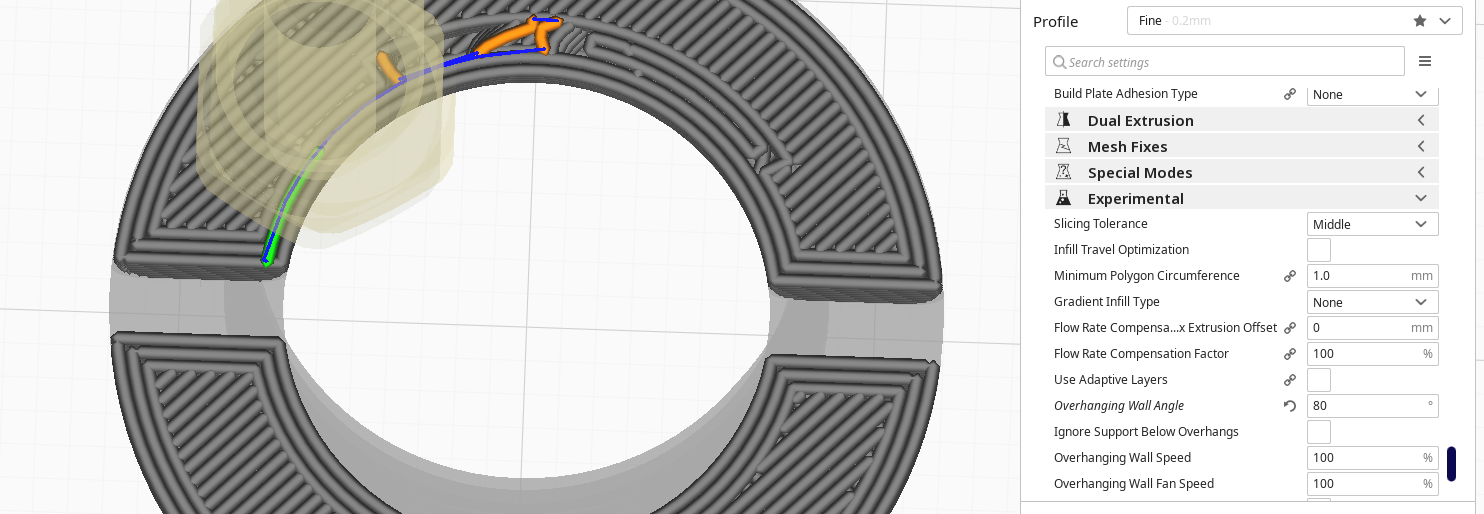
Hi, thanks for the machine files. I can now load your project and get your settings but I still don't see the issue you are reporting until I rotate the part through 90 deg and then I see the wall line starting above air. To avoid that, set the Overhanging Wall Angle setting to < 90 and then the wall line will not be started above air...
smartavionics
on 31 Jul 2020
But is it a "sense" action to start over air? Shouldn't slicer "always" avoid such behaviour?
I also avoided it changing "Z seam alignment" to "shortest"
GMagician
on 31 Jul 2020
Yes, the overhang detection could be enabled by default but at the moment it isn't.
smartavionics
on 31 Jul 2020
Then what's the usual Overhanging Wall Angle purpose? As far I can read it's to detect when to apply "overhang" parameterization
GMagician
on 31 Jul 2020
That's true, overhang detection was initially implemented so that overhangs could be printed at a different speed. Later, some people were asking for Cura to not start lines above air and so that same overhang detection was used to do that but the overhang detection has not (yet) been enabled by default.
smartavionics
on 31 Jul 2020
Overhanging Wall Angle is still in experimental because it's architecturally not in the place where we'd like it to be. There is also no optimal value found for any printer because that would need valuable time from process engineers who are also in over their heads in work. I'd say about 50% of the work of creating a new slicing feature is in optimising how it actually prints. Until that's done, we need to set safe values that don't change the print result for the worse, so 90° it is.
Less than 90° isn't always better. It could cause more stringing and underextrusion for some models due to more travel moves. I think that in many cases you'd want to put overhang quality before stringing, but some people care more about the strength of a part than its accuracy.
I'm closing this because we don't optimise any settings for your "Custom Bear" profile. You'll have to find for yourself whether that works or not!
 Ghostkeeper
on 3 Aug 2020
Ghostkeeper
on 3 Aug 2020
@Ghostkeeper sorry but I don't agree with you.
In this case default value of 90 will lead to print in the air, no printer in the real world can do that. Are you saying that Ultimakers printers have a predefined value < 90 in "Overhanging Wall Angle"? Otherwise even using Ultimaker profile I should get the same result
GMagician
on 3 Aug 2020
No, they are still at 90° too. Nobody optimised those settings yet. So we've taken the safe route and not enabled the function.
I agree that starting in mid-air is always wrong unless the entire layer is hanging in mid-air. However what I tried to say is that avoiding the start in mid-air can also be wrong. And maybe that is wrong-er than starting in mid-air. Optimising the profiles again will tell, but that's a lot of work.
Ghostkeeper
on 5 Aug 2020
Related issues
 ferociousdiablo
·
3Comments
ferociousdiablo
·
3Comments
 Nemernemer
·
3Comments
Nemernemer
·
3Comments
 konvoj
·
3Comments
konvoj
·
3Comments
 Liger0
·
3Comments
Liger0
·
3Comments
 mnswamp1
·
3Comments
mnswamp1
·
3Comments