Cura: [4.6.1] "Shortest" seam often not as short as possible.
Application version
4.6.1
Platform
Windows 10 Pro x64
Printer
Custom profile
Reproduction steps
Set the Z Seam Alignment to Shortest
Set the Seam Corner Preference to any available option
Screenshot(s)

Actual results
Note that the Z Seam on the left pillar in this case is at the far side of the object from the right pillar. This is the behaviour seen with the Seam Corner Preference set to any value save "Smart Hiding", which will still place the seam at the corner closest the viewport rather than closest the other pillar.
Expected results
With some variation due to the chosen Seam Corner Preference, the seam on the left tower should be at the point closest the right tower. This also happens to be a sharp, external (exposed) corner.
Project file
String Test.3mf.zip
(NB File has been uploaded with .3mf.zip double extension. Why doesn't your forum allow direct uploading of 3mf?)
Log file
N/A
Additional information
Using the Sharpest Corner alignment also doesn't seem to produce the correct results. The slightly wider layers will travel to and from the next corner counter-clockwise (as viewed from above) to the closest point and what should be the sharpest corner (both in practical terms and in the "closest to centre" method that Sharpest Corner looks for).
The same goes for a user-specified, relative seam location of 0,0, or other small value (such as 1,1 to allow for rounded objects). The wider portions just don't seem to be calculating correctly.
edit
I'd hazard a guess that the engine is not actually taking into consideration where the nozzle is coming from, but rather either the origin (0, 0), or the Layer Start coordinates (which default to 0, 0). The points being erroneously chosen would match fairly well with the respective corners when compared to 0, 0. However, this feels like unintentional behaviour.
 Asterchades
All 20 comments
I think the answer or part of the answer is here:
https://github.com/Ultimaker/Cura/issues/5510
 NitemareReal
on 20 May 2020
NitemareReal
on 20 May 2020
Indeed. That would at least partially explain it. Perhaps not the layers where it inexplicably starts from the opposite side, but since they're an issue unto themselves that's not really a major consideration.
Given that, however, wouldn't that mean that the setting is now completely superfluous, or at least incorrectly named? Superfluous in that it's functionally identical to the User Specified option, or incorrectly named as it just takes its source location from a different set of inputs.
Asterchades
on 20 May 2020
(NB File has been uploaded with .3mf.zip double extension. Why doesn't your forum allow direct uploading of 3mf?)
Because it's Github, not our forum. Github is not made specifically for 3D printers and doesn't know about the 3MF format. I suppose they limit the file types to stimulate that people compress their files, which saves a bit on bandwidth.
Your project file is built with a modded Cura installation. It apparently needs a definition called "Creality3D_Ender2_PLA". Can you provide us with that file? Then maybe we can see what you meant exactly.
There are two gotchas that you might be running into here:
- As described in #5510, the starting point of the first perimeter on a layer is not optimised, unless something else is printed before that on a layer (see the printing order documentation; usually support or infill but neither is present in your print). This is because of multi-threading; at the time it's optimising the starting point it's not yet known where the previous layer ended up. It's not likely to get fixed any time soon, not without a huge overhaul of CuraEngine in any case.
- The travel moves you're seeing are directional. The travel move should only go towards the closest point on the other polygon, not necessarily start from the closest point on the current polygon. If you want it to also start from the closest point, enable combing. That still seems to go wrong in 7 layers though, but I can't quite see on your screenshot why. Maybe there is something else being printed on those layers.
 Ghostkeeper
on 20 May 2020
Ghostkeeper
on 20 May 2020
The modification is strictly a custom profile I've been working on for my printers. It adds nothing - just changes some default settings, including a few formulae instead of fixed values. Eventually I hope to be able to share it, and the 3-level-deep dependency is simply so settings I know are specific to my setup are not in the distribution (like using Z Hop Distance to store Pressure Advance values).
Profiles.zip
Fair point regarding the ownership of the forum, too. I guess I was under the impression that it was a per-repository setting.
This specific model was designed to be a stringing torture test. Nothing else should be getting printed aside from the outer wall once it gets past those first few layers, and the skin on top (which I forgot to turn off before submitting the 3mf).
Asterchades
on 20 May 2020
Thanks for the project file. For most of the layers it's working correctly here, except those 7 layers. We're going to investigate why, because that could cause some blips in unsanitary places.
Ghostkeeper
on 25 May 2020
I tried this with a few different profiles in 4.6.1 and it seems to throw up OK results unless using the custom profile.
e.g.
S3 profile
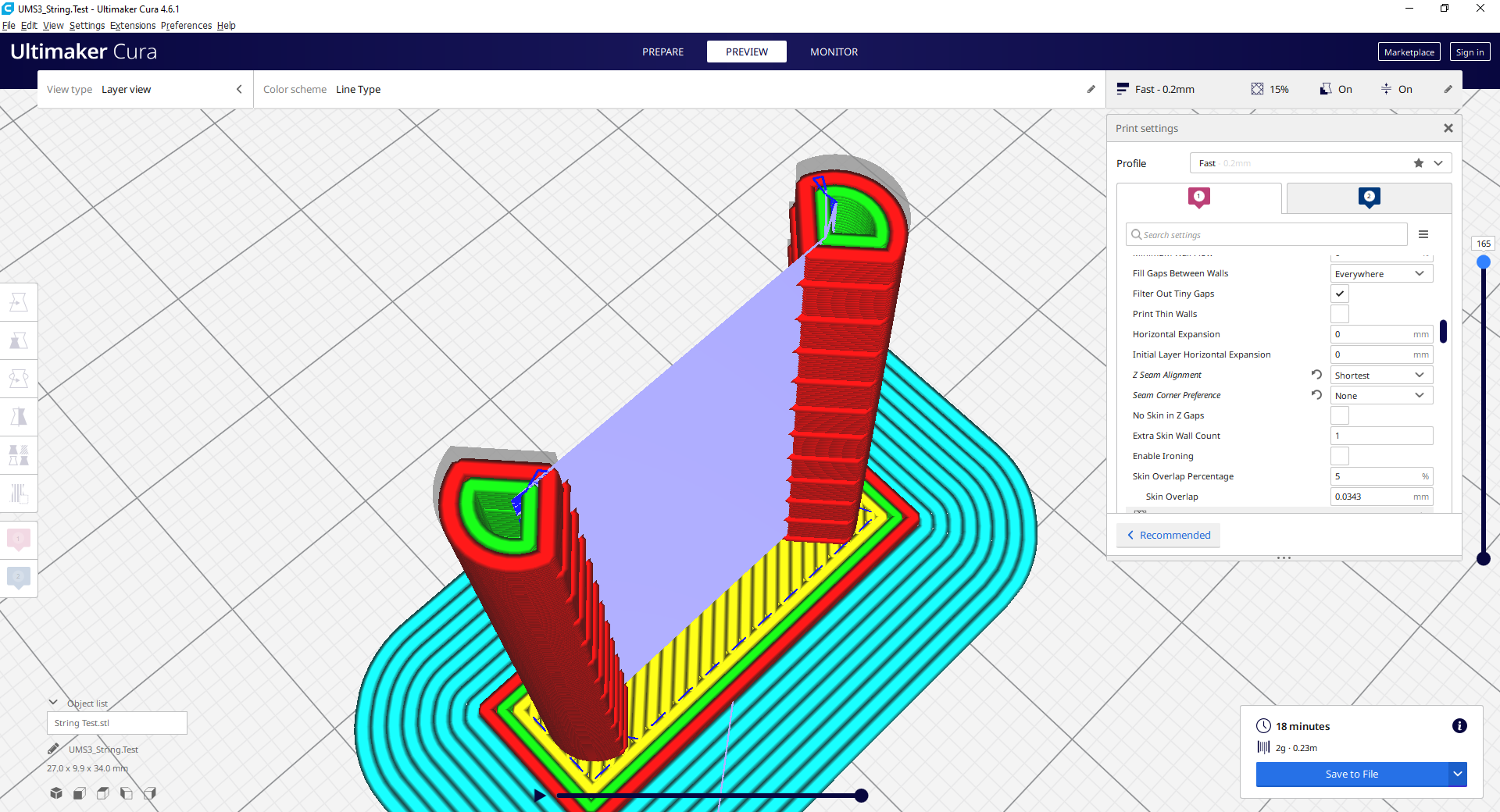
Shipped Ender 3 profile:
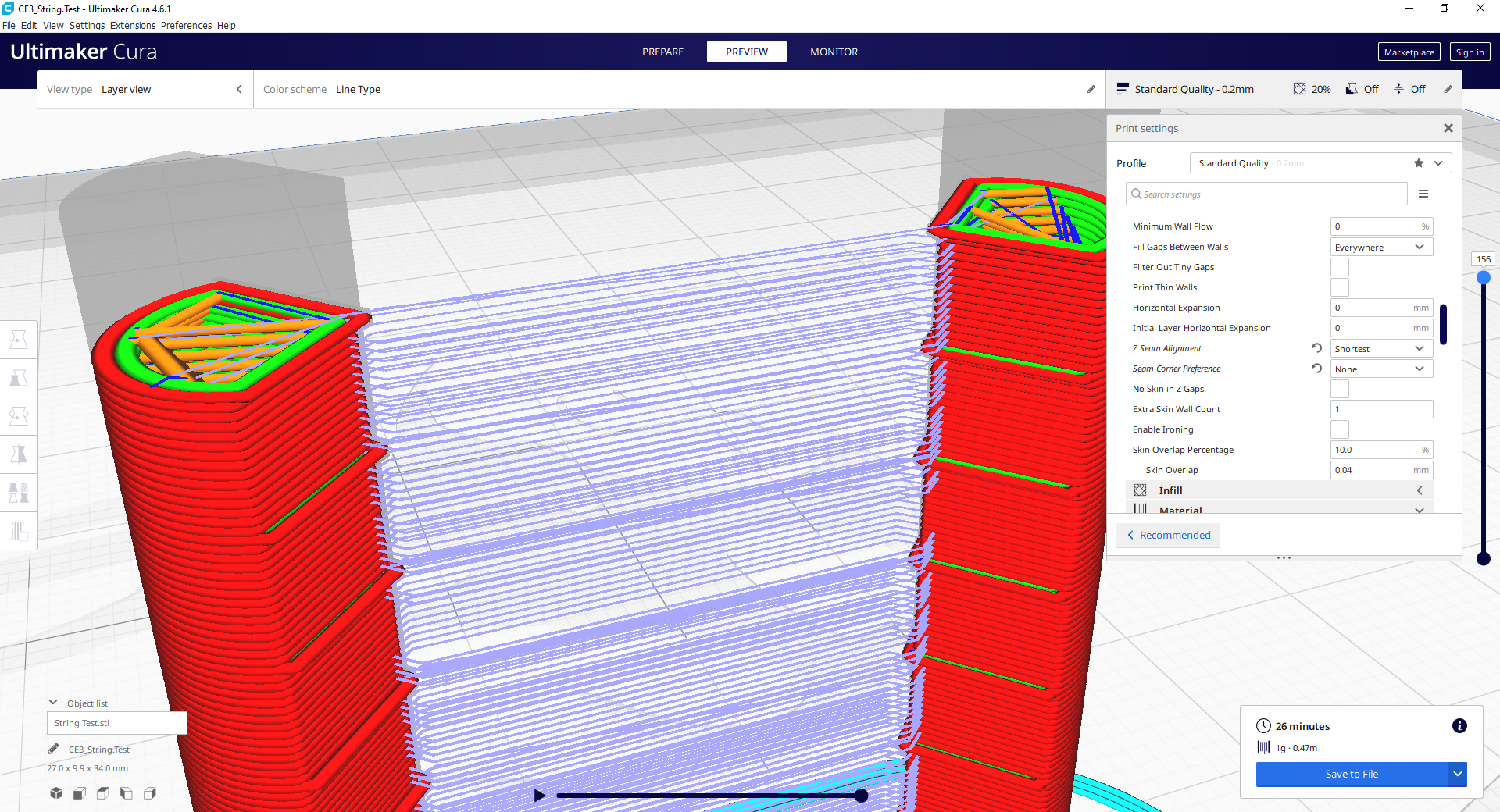
"Creality Ender-2 PLA 0.4mm" profile (attached above)
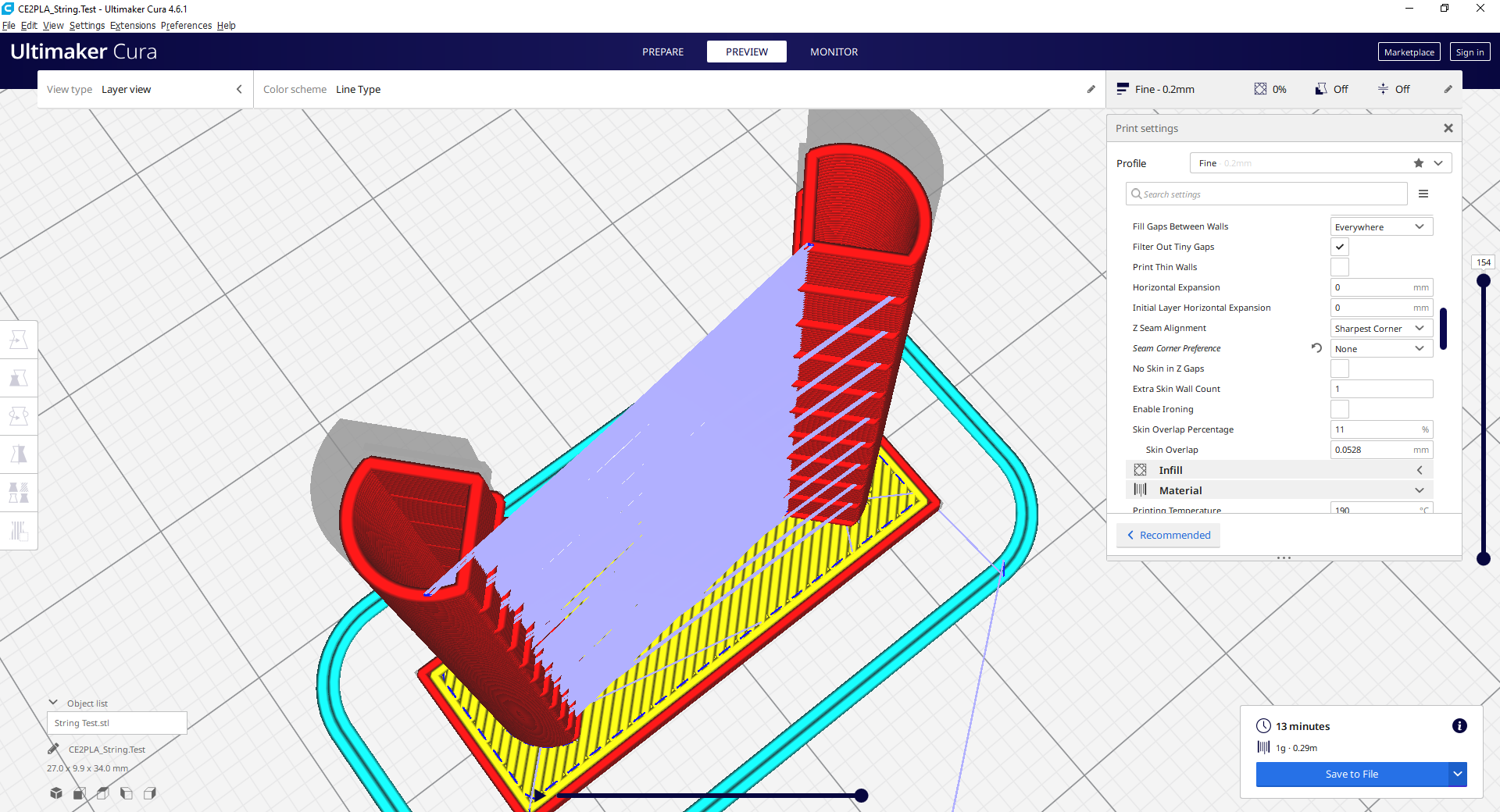
Perhaps I've misunderstood the issue?
 mahtDFR
on 26 May 2020
mahtDFR
on 26 May 2020
From what @ NitemareReal and @Ghostkeeper have said, it sounds like the basic issue I was describing is already documented in #5510. Once you add infill (if it is set to print first) than it mostly negates the issue. Otherwise it's functioning as designed, even if not specifically as described.
I'm going to be honest in that I'm unsure exactly as to which 7 layers @Ghostkeeper is referring to. I assumed initially he was talking about the layers with the "bumps", but there's more than 7 of those. But, then, I don't have to understand as long as he does - he's the one who would be helping to fix anything, after all.
Asterchades
on 26 May 2020
'm going to be honest in that I'm unsure exactly as to which 7 layers @Ghostkeeper is referring to. I assumed initially he was talking about the layers with the "bumps", but there's more than 7 of those. But, then, I don't have to understand as long as he does - he's the one who would be helping to fix anything, after all.
I indeed meant the layers with the "bumps". In your initial screenshot the layer slider is slid down such that only those 7 are shown. I made that count before I had access to the 3MF.
Ghostkeeper
on 28 May 2020
Ahhh, I gotcha.
I've been wondering on this... about a way to potentially avoid the work-around without introducing any kind of inter-thread dependence (thus maintaining slicing speed). Cura obviously has a way of sorting the "parts" of a given layer, in the event there's more than one (eg There's two in this model, past the first few layers). Sometimes it does weird things where it prints in the reverse of what's expected, but if we assume that's a fault than it stands to reason it knows what both the first and last "part" of a given layer are going to be.
Naturally the correct result will be obtained if the last "part" of one layer is used as the source travel point for the first "part" of the next. But outside of a few exceptions, other than potential bugs, surely the last "part" of a given layer could be assumed to be in roughly the same location as the last "part" of the layer before it, thus its centre could potentially be used as the starting point.
The only time I could see this producing inaccurate results would be when the number of parts in a given layer changes. But in such cases it would be no more inaccurate than defaulting to the Layer Start position, and possibly still quicker than doing so.
Unless, of course, the "part" order (following the first) is determined by the extrusions, rather than their location on the print area. In which case this would require a duplication of effort, in that the first "part" would need to be calculated twice (once to determine the print order, a second time to accommodate for shorter travel), which is hardly ideal and likely not a worthwhile investment in time or effort.
Asterchades
on 28 May 2020
To be honest, I prefer (in 99 % of cases) that Cura takes 4 minutes in calculating sequential layer slicing versus 1 minute, but having a 7 hours printer time versus 8 hours...
Parallel calculations for layer slicing are supposed to be faster than sequential... Cura may have a serius problem with the algorithm because we all know about commercial software that do sequential layer calculations much faster than Cura's parallel layer calculations...
I have tested that commercial software and I couldn't imagine how much time Cura wastes when a layer ends in a corner of the bed and nozzle has to travel back to the opposite corner to start a new layer... that's simply crazy!!
NitemareReal
on 29 May 2020
How people value their time vs. their printer's time differs from person to person. Typically hobbyists value their own time less than professionals, because printing is their hobby and they like it, and because they don't get deadlines. From Ultimaker's user tests we've learned the rule of thumb that user time is about 60 times as valuable than printer time. So 1 minute of time spent on optimising settings or slicing should save at least 1 hour on printing.
How did you measure how much time Cura wastes when moving to the object closest to the Layer Start position? You can't just compare two wholly different slicers obviously.
Ghostkeeper
on 2 Jun 2020
Sometimes it does weird things where it prints in the reverse of what's expected, but if we assume that's a fault than it stands to reason it knows what both the first and last "part" of a given layer are going to be.
Indeed it always starts with the part that is closest to the Layer Start X and Layer Start Y position.
But outside of a few exceptions, other than potential bugs, surely the last "part" of a given layer could be assumed to be in roughly the same location as the last "part" of the layer before it, thus its centre could potentially be used as the starting point.
I think it's the opposite actually, for the shortest path! The last part of the previous layer would never be the same as the last part on the next layer. For example, if you have 4 parts in a square, one possible order for the first layer would be A, B, C, D. So it ends with part D and the next layer should start with part D. Now for instance it could choose D, A, B, C, ending with part C. The next layer should start with C, so it could choose C, D, A, B. And so the part it starts with is rotated through all of the parts. It could also alternate between two of them or a subset, but it'll never end on the part that it started with unless there is only 1 part or there is support (which is another "part" that the layer always starts with).
Mind that we consider those travel moves to the bumps to be buggy, still. We have it on our backlog.
Ghostkeeper
on 2 Jun 2020
I think it's the opposite actually, for the shortest path!
Indeed that would be true. I'm surprised at myself for having overlooked it.
Though I do believe there would still be some merit to not actually rolling back like that, since it avoids guessing/calculating which "part" it should be up to based on the layer number and number of active "parts", plus it would allow for a better cooling period in that it wouldn't immediately track over the same lines a second time.
But, yes, that could be faster, assuming the formulae could be established _(start at "
Asterchades
on 2 Jun 2020
Sadly, a parallel formula like that is inaccurate as well. The circular example I gave probably never really happens. For instance, if you're printing 3 cubes A, B and C in a line, then it would start with the order A, B, C and on the next layer print with the order C, B, A. It would never start with the cube B in the middle.
Ghostkeeper
on 2 Jun 2020
And that would be why I'm just some random nobody on a forum, rather than a contributor (I mean, ignoring that I haven't really done any programming since Pascal in the '90s). Seems I'm overlooking a lot on this one.
Asterchades
on 2 Jun 2020
I mean, it's still fine to spew ideas like that. It sometimes brings new ideas or perspectives to the table. Sometimes not. But sometimes it does :stuck_out_tongue:
Ghostkeeper
on 3 Jun 2020
How people value their time vs. their printer's time differs from person to person. Typically hobbyists value their own time less than professionals, because printing is their hobby and they like it, and because they don't get deadlines. From Ultimaker's user tests we've learned the rule of thumb that user time is about 60 times as valuable than printer time. So 1 minute of time spent on optimising settings or slicing should save at least 1 hour on printing.
That's your personal opinion, I'm afraid, just like mine, but it isn't a fact... and I don't agree at all, I'm a "hobbyist", as many friends of mine, and all we prefer 4 minutes more of computing time that 1 hour more of printing time. (4 minutes of computer time, by the way, are cheaper than 1 hour of printing time, just one reason, and it may not be the more important, I know)
How did you measure how much time Cura wastes when moving to the object closest to the Layer Start position? You can't just compare two wholly different slicers obviously.
Why can't I compare two slicers? Since I compare two or three slicers I realized the extremely complex, accurate, effective and usefull are "tree supports" in Cura (I really think tree supports in Cura could be exposed in some Modern Art Museums, hahahaha, really) but I also realized others things that Cura can't do so well, i.e. "new layer start point". It's simple... I just sliced and printed a "stringing tower test" with Cura and other slicers and I saw that problem, and I think this is very serius... just think... in "stringing tower test", Cura "prints" one circle, then travel to the other tower, prints other circle, increase Z axel, travel back to the other tower and repeat... with other slicers, when you increase Z axel, just print the circle in new layer in the tower you are and then travel back to first tower to print the circle, then increase Z axel, print the circle... What Cura doess is just crazy.
No, I'm sorry, but as a hobbyist, I can't accept that a really fast slicing time but more printing time is better than less printing time. And not, Cura is not faster than other slicers, even using mutithreading slicing, really, Cura is not fast at all, just compare... if Cura were the faster slicer I could understand what you defend, but that not the situation at all.
NitemareReal
on 3 Jun 2020
Why can't I compare two slicers?
Because each slicer has a different collection of settings, a different collection of defaults (where you've only adjusted 30 of the 600 settings most likely) and in many cases just completely different techniques and features that are present in one slicer but not the other. Most of these will affect printing time in one way or another so comparing printing times between slicers, claiming that "all of the settings are the same so it's all just down to how Cura orders parts" is not a good experiment.
We do consider slicing time (computation time) to be time that the user actually has to wait, and that time is very expensive. Now of course a hobbyist doesn't value their time highly, but for a professional those 4 minutes are more than the cost of plastic for the entire print, in salary alone (let alone revenue for their boss). We've done user testing with all sorts of users. This is sometimes hard to explain on Github since the userbase here is probably 99% makers and hobbyists... But the target audience is not you.
And the target print is not the two-pillar retraction test, since that is designed to be a worst-case scenario for this.
But if you have any idea on how we could fix this without dropping multi-threading, I'd love to hear it. Maybe something can be done by computing just the order single-threaded before filling in the parts with lines? But then we don't know where in the part the nozzle ends after printing that part, so the shortest path can't be computed from that point then.
Ghostkeeper
on 5 Jun 2020
This issue has been automatically closed because there has been no response to our request for more information from the original author. With only the information that is currently in the issue, we don't have enough information to take action. Please reach out if you have or find the answers we need so that we can investigate further.
![no-response[bot] picture](https://avatars2.githubusercontent.com/u/26350515?v=4&s=40) no-response[bot]
on 19 Jun 2020
no-response[bot]
on 19 Jun 2020
I'll reopen this because it's still a problem. Just not something we can easily fix now.
Ghostkeeper
on 29 Jun 2020
Related issues
 wi1k1n
·
3Comments
wi1k1n
·
3Comments
 konvoj
·
3Comments
konvoj
·
3Comments
 tomoinn
·
3Comments
tomoinn
·
3Comments
 DamianSepczuk
·
3Comments
DamianSepczuk
·
3Comments
 muhammadelmogy
·
3Comments
muhammadelmogy
·
3Comments