Cura: [4.6.1] Save To File and choosing to overwrite a file doesn't overwrite the file.
I opened an existing project that I have previously saved, made some change to the setttings, resliced it, and attempted to save the gcode choosing the Save To File, and then selected a file I wanted to overwrite with the freshly sliced version. I clicked Yes. The file date and time stamp didn't change. Without opening the gcode in an editor, I don't believe it overwrote it. If I delete the file first and save it with the same name, then the new file gets created. This is not a computer / OS issue as I am able to create, copy, save / overwrite files in these paths with other programs with no problems. This problem does happen on two different Windows 10 x64bit laptops that are both running v4.6.1.
Overwriting used to work in v4.6 as I was making a lot of changes to my saved files and trying them in rapid succession.
Application version
v4.6.1
Platform
2 different Windows 10 x64 laptops.
Printer
CR-10S Pro and Ender 5 Plus
- Opened existing project file (attached below)
- Sliced
- Clicked Save to File
- Chose existing file with a short filename to overwrite. (The file I am overwriting is not the default name that the project file has because of the file name length bugs in Creality touch screens / controllers.)
- Clicked Yes to agree to overwrite.
The message in Cura says that the file saved successfully, but it didn't. - Checked file in Explorer and find that the date and time stamp still hasn't changed. Repeated all of this multiple times and the file does not overwrite.
- Delete the file manually, save it again with the same name, now the file comes back with the new date and time stamp etc.
Screenshot(s)
(Image showing the problem, perhaps before/after images.)
Actual results
Not sure what you want a screenshot of. I think this should be easily reproducible? Let me know if I was wrong and you want screenshots of something.
Expected results
I expect the file I choose to overwrite to be overwritten with a new date, timestamp, and new contents.
Project file
CCR10SP-3.4Hr-Face_Shield_with_hold_downs - 2 Each.zip
Log file
cura.zip
On the log file, the very last entry is an overwrite where the message on the screen said it succeeded but it really failed to overwrite the gcode file. The entry before last is where I manually deleted the file, sliced it, and saved the file fresh. The gcode file timestamp was 7:01pm and it should have updated to around 7:04 when I tried to save and overwrite that file.
Additional information
The project file was originally created in Cura v4.6. I believe that I have created some projects in v4.6.1 and had the same behavior happen, but I am not certain.
If I click the file to overwrite, click save, and wait at the prompt asking if I want to overwrite, then I switch over to an Explorer window and I manually delete the file that should be overwritten, switch back and click yes, THEN Cura will write the new file properly.
So there are two issues here. 1> Cura is being told to overwrite a file and it isn't overwriting it. 2> Cura is saying it saved a file successfully when it didn't. It is lying about the status of the file being saved, maybe because the overwrite logic isn't working properly it is seeing that the file is there and assuming that it wrote it correctly.
 quarky42
All 15 comments
According to your log, something is being written. I can't seem to reproduce it from here.
2020-04-28 18:42:27,299 - DEBUG - [MainThread] LocalFileOutputDevice.LocalFileOutputDevice.requestWrite [130]: Writing to [D:/_CNC/3D Printing/FaceShields/CCR10SP-1.1Hr-mask_holder-4 Each HOT Filament.3mf]...
2020-04-28 18:42:28,595 - DEBUG - [MainThread] LocalFileOutputDevice.LocalFileOutputDevice.requestWrite [151]: Writing to Local File D:/_CNC/3D Printing/FaceShields/CCR10SP-1.1Hr-mask_holder-4 Each HOT Filament.3mf in binary mode
2020-04-28 18:42:28,605 - INFO - [MainThread] UM.TaskManagement.HttpRequestManager._processRequest [346]: Request [5b5d9ae846ca4b3baf81ca1ac2d4c05d] started
2020-04-28 18:42:28,607 - DEBUG - [MainThread] UM.TaskManagement.HttpRequestManager._processNextRequestsInQueue [317]: No more requests to process, stop
2020-04-28 18:42:28,756 - DEBUG - [Thread-8] UM.FileHandler.WriteFileJob.run [80]: Writing file took 0.15561199188232422 seconds
2020-04-28 18:42:29,414 - INFO - [MainThread] UM.TaskManagement.HttpRequestManager._onRequestFinished [408]: Request [5b5d9ae846ca4b3baf81ca1ac2d4c05d] finished.
2020-04-28 18:42:29,415 - DEBUG - [MainThread] UM.TaskManagement.HttpRequestManager._processNextRequestsInQueue [317]: No more requests to process, stop
2020-04-28 18:42:29,416 - INFO - [MainThread] SliceInfoPlugin.SliceInfo._onRequestFinished [275]: SliceInfo sent successfully
2020-04-28 18:42:34,755 - DEBUG - [MainThread] LocalFileOutputDevice.LocalFileOutputDevice.requestWrite [130]: Writing to [D:/_CNC/3D Printing/FaceShields/mskHldr4xA.gcode]...
2020-04-28 18:42:35,883 - DEBUG - [MainThread] LocalFileOutputDevice.LocalFileOutputDevice.requestWrite [148]: Writing to Local File D:/_CNC/3D Printing/FaceShields/mskHldr4xA.gcode in text mode
2020-04-28 18:42:35,890 - INFO - [MainThread] UM.TaskManagement.HttpRequestManager._processRequest [346]: Request [3e9e218ca13340d4a47784c9450e398c] started
2020-04-28 18:42:35,893 - DEBUG - [MainThread] UM.TaskManagement.HttpRequestManager._processNextRequestsInQueue [317]: No more requests to process, stop
2020-04-28 18:42:35,967 - WARNING - [Thread-1] UM.Decorators.deprecated_function [23]: <function GlobalStack.extruders at 0x00000224C6A42400> is deprecated (since 4.4): Please use extruderList instead.
2020-04-28 18:42:36,076 - DEBUG - [Thread-1] UM.FileHandler.WriteFileJob.run [80]: Writing file took 0.18752789497375488 seconds
 mahtDFR
on 4 May 2020
mahtDFR
on 4 May 2020
And yet the log is wrong. The file only gets written if I delete it first, not if I try to overwrite it.
The last entry failed. The second to last entry is one where I wrote the file fresh without there being a file in the directory.
quarky42
on 4 May 2020
Here's what I tried to reproduce your issue (in Windows 10 x64):
- Open "CCR10SP-3.4Hr-Face_Shield_with_hold_downs - 2 Each.3mf" in Cura 4.6.1
- Slice
- Save gcode as "mskHldr4xA.gcode" (the same filename you used, according to your log)
- Open gcode file in Cura again to verify it's written properly
- Open "CCR10SP-3.4Hr-Face_Shield_with_hold_downs - 2 Each.3mf" and move one part to the side to distinguish it
- Slice
- Overwrite "mskHldr4xA.gcode"
- Open "mskHldr4xA.gcode" in Cura to see if it's written properly. The piece moved to the side before slicing was in place, indicating it had written properly.
So I can't seem to reproduce the issue as you describe it I'm afraid, mine is overwriting ok. Have I misunderstood the issue? Could it be system permissions, perhaps?
mahtDFR
on 4 May 2020
You can see from the file names that a Face Shield != Mask Holder. You've opened up the right project file and are looking at the wrong lines in the log file. Look for something that has Shld in the file name and make sure the date and time stamp were from yesterday around the time that I posted this.
No, it isn't permissions. overwriting the file in Notepad / Notepad++ or anything else I use in that same directory or on the same file works.
quarky42
on 4 May 2020
I've downloaded the 3df file from the post above on my second computer, extracted it, opened it in Cura v4.6.1, and tried to slice it. The Slice operation just hung for a while, and then went back to having a Slice button available as if it hadn't sliced it. This is another bug that when opening a project file the slice button can be clicked before the program is fully ready to slice.
Both of my tests of this particular project file on my other computer succeeded. I have seen this behavior on this other computer before, but I am not sure what triggered it. I will watch out for it to happen again and when it does I'll see if I can narrow it down. These kinds of issues are so much less fun to troubleshoot in situations where they are difficult to reproduce. :( I will switch back to my other computer and see about getting you a fresh log file without so much data in it.
quarky42
on 4 May 2020
Ah yes you were right about the log. Unfortunately it doesn't really give any extra clues as far as I can see. The application says it's writing it:
2020-05-03 19:03:00,647 - DEBUG - [MainThread] LocalFileOutputDevice.LocalFileOutputDevice.requestWrite [130]: Writing to [D:/_CNC/3D Printing/FaceShields/Shlds3.4H.gcode]...
2020-05-03 19:03:01,579 - DEBUG - [MainThread] LocalFileOutputDevice.LocalFileOutputDevice.requestWrite [148]: Writing to Local File D:/_CNC/3D Printing/FaceShields/Shlds3.4H.gcode in text mode
2020-05-03 19:03:01,586 - INFO - [MainThread] UM.TaskManagement.HttpRequestManager._processRequest [346]: Request [650412cf71414d279993bdab4bdc7380] started
2020-05-03 19:03:01,589 - DEBUG - [MainThread] UM.TaskManagement.HttpRequestManager._processNextRequestsInQueue [317]: No more requests to process, stop
2020-05-03 19:03:01,681 - WARNING - [Thread-6] UM.Decorators.deprecated_function [23]: <function GlobalStack.extruders at 0x000001FEC3F53400> is deprecated (since 4.4): Please use extruderList instead.
2020-05-03 19:03:01,791 - DEBUG - [Thread-6] UM.FileHandler.WriteFileJob.run [80]: Writing file took 0.20148825645446777 seconds
mahtDFR
on 4 May 2020
Yeah, I suspected that. It says that it successfully wrote the file in the GUI at the bottom status message, but when I check the file size (because in some situations I duplicated a model) or when I check the date and time stamp neither have updated. In several situations I was trying to overwrite a file from the day before, so an even bigger noticeable difference in date / time. I made sure to make sure that I wasn't just saving the new file so fast that it was within the same minute of slicing the previous file. That wasn't the case.
quarky42
on 4 May 2020
Just tried with "Shlds3.4H.gcode" as the filename on a hunch that dots in the filename may have been causing issues, but nope. It works as expected.
Both of my tests of this particular project file on my other computer succeeded. I have seen this behavior on this other computer before, but I am not sure what triggered it.
Just so I understand this correctly, are you saying you could reproduce this on two systems, or just one?
mahtDFR
on 4 May 2020
grrrr Now the damn thing is overwriting the file properly. Same computer as last night. Same project file. All I did differently was I renamed my cura.log file to cura.log.2 and let it start a fresh log file. (I'm not saying that this caused it to behave properly, just that it is frustrating to see an issue, to repeat the issue multiple times, take the time to write it all up, upload the files, and then have the issue disappear with no smoking gun.) I'll try putting the log file back and try it one more time, just to rule out the log file having anything to do with it, but I'm not holding my breath. (I've seen this issue on more than one day, more than one computer, multiple times. It was starting to become a frequent pain in my butt as I was noticing files that I was trying repeatedly to update weren't getting updated.)
quarky42
on 4 May 2020
I was seeing this on two different systems at two different times with two different projects. Today it isn't happening on either system after I renamed the cura.log to cura.log.2.
quarky42
on 4 May 2020
I had tried removing the extra period from the filename as well on the off-chance that there was some bug related to the location of periods and/or the period related to the file extensions and that didn't make a difference, yesterday.
Restored the cura.log file, went to file->open recent->selected the project file, sliced, saved file, chose the existing gcode file to overwrite.
Sliced again, went back into the save file window and within the save file window the time stamp is 5/3/2020 7:17pm and within the separate File Explorer window the time stamp is 5/4/2020 8:46am. I've tried to click refresh within the save to file dialog box but it is still showing the old time stamp.
This time, before I overwrote that file, I went ahead and created a backup copy of it. The window is showing the correct time stamp for the backup copy of the file (copy and paste creates a copy of the file with "- Copy" appended at the end of it.).
I repeated the save again, overwrite the file. The original file timestamp still hasn't updated in the Safe to File dialog box, but a new copy and paste of that file is showing the correct time stamp.
So one facet of this bug is the date and time stamp within the Save To File dialog is not correct.
Here are two screenshots, one showing what the Save To File Dialog shows (even after being "refreshed" and one showing what File Explorer shows:

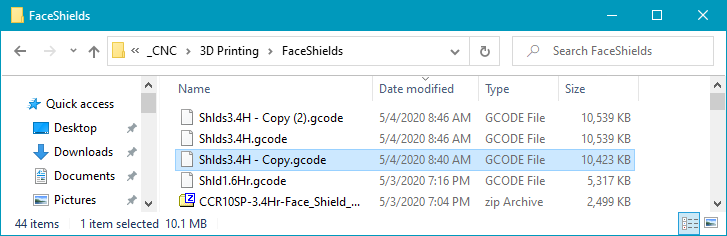
Maybe better to have them side by side:

Now, this isn't the complete bad behavior...I have seen this issue where refreshing in the File Explorer window, the time stamps did not update like they should have, but at least I can demonstrate this issue more fully.
quarky42
on 4 May 2020
It's happening again this afternoon. The only difference is that I plugged in my Transcend USB memory card reader (with my Netac 8GB microsd that came with my Creality printer) in it.
After I copied the file to my memory card manually, I use the Windows Safe to Remove icon to eject the drive. (Yeah I know Cura has this option, but I still prefer to save my file manually so I have 2 copies of it. I've had memory cards die, I've had memory cards get corrupted by the printer before. It is nice having a backup copy.)
Cura defaults to try and save to the card, but I like to keep a copy of the gcode on my computer, so I changed it to save to file. Saved it to my standard location that you've seen in the logs, and the file would not overwrite. I deleted the gcode file and saved it, and that time it saved the file.
Perhaps there is something triggering this bug and once it is triggered it stays triggered, but starting fresh the next day it doesn't happen until the bug is triggered again.
So, I saved my project file. Closed Cura, opened Cura fresh with the memory card disconnected. Opened the project file, and sliced. Tried saving the file and overwriting and the file does not get overwritten, the time stamp doesn't change. I don't know why it overwrote the file this morning, and why it is not overwriting now, except that I had the memory reader plugged in at some point.
I'll see if I can get a more definitive "gate" for triggering this bug. I'm also seeing if I can go ahead and do a screen recording as well, if that helps.
quarky42
on 5 May 2020
Hello, few ideas ...
- could you double check about you "date" column, it could be "created date" not "modified date "
- have a look with file property to check all "dates" created / modified / access
- As I can see you filesize seem to be updated event the "time-stamp" is wrong
- did you try to restart you computer to see if the date of you file was updated ? (windows cach issue ? )
- "for fun", if you see the file not updated, did you try to rename it with Windows explorer than try to rebuild a new one and check the size bot both file (normally updated but same time-stamp and the new one ?)
- one last thing, did you use copy-post or somthine like drag & drop / send to feature to copy to you USB key the file ?
 64Florian
on 7 May 2020
64Florian
on 7 May 2020
I think you may have solved it. I can see from the screenshots that the column says Date instead of modified date. Next time I am on the computers (tomorrow or the day after) I'll check to see which column is displayed. I don't know how that got changed from date modified, but it would explain what I was seeing.
Yes, I copy the files manually to my memory card. I save them locally first, then copy them over.
Yes, if I deleted the file or renamed the old one, the new one would be saved and show the right time stamp. I think it is because it is showing the date column instead of the date modified.
I'll verify in the next couple days and close the issue out. Thank you for catching that. I never would have thought the columns had gotten changed somehow.
quarky42
on 7 May 2020
This issue has been automatically closed because there has been no response to our request for more information from the original author. With only the information that is currently in the issue, we don't have enough information to take action. Please reach out if you have or find the answers we need so that we can investigate further.
![no-response[bot] picture](https://avatars2.githubusercontent.com/u/26350515?v=4&s=40) no-response[bot]
on 19 Jun 2020
no-response[bot]
on 19 Jun 2020
Related issues
 jellewie
·
3Comments
jellewie
·
3Comments
 muhammadelmogy
·
3Comments
muhammadelmogy
·
3Comments
 dstulken
·
3Comments
dstulken
·
3Comments
 tomoinn
·
3Comments
tomoinn
·
3Comments
 ferociousdiablo
·
3Comments
ferociousdiablo
·
3Comments