Cura: [Cura 4.5.0] Custom material doesn't carry over into gcode
Cura 4.5.0 for Manjaro Linux, Anycubic Mega S printer
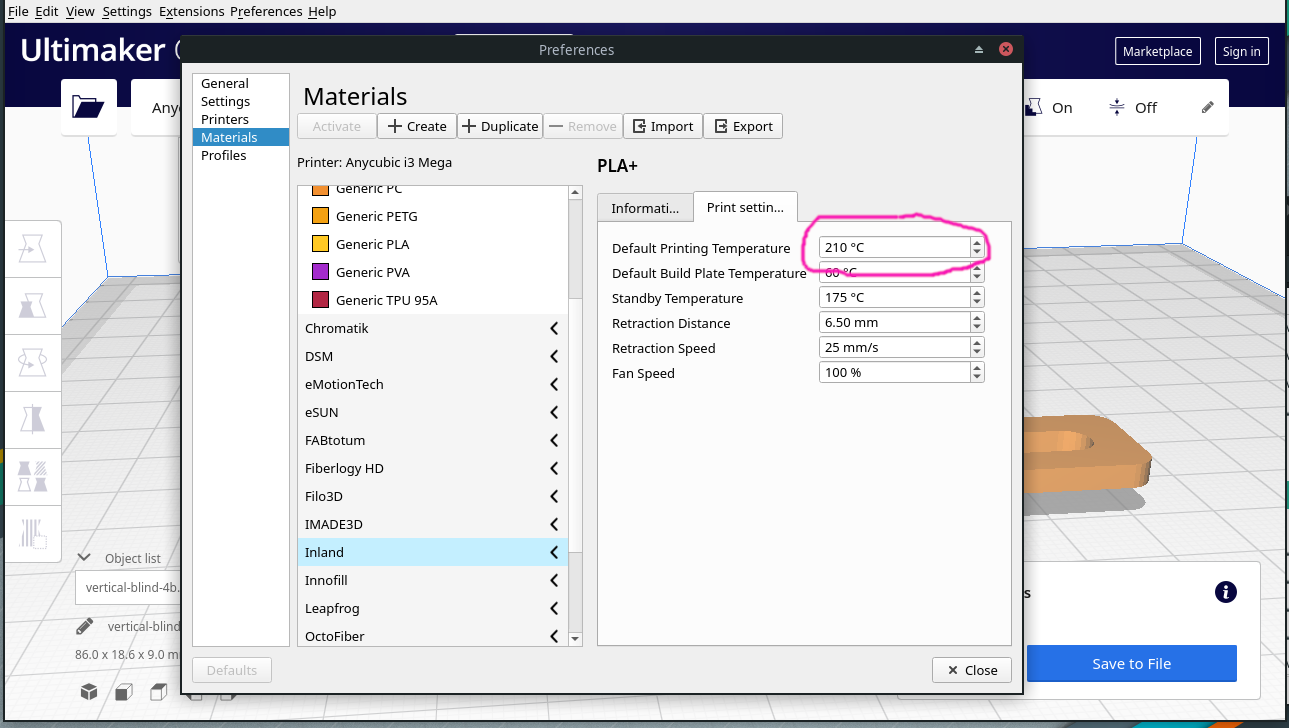
I created a custom material for some Inland PLA+ material by copying the generic PLA settings and changing the printing temperature from 200 to 210. When I slice and save, the resulting gcode contains the original 200 temperature. I can edit the gcode directly after it's produced by Cura; then the printer works at the correct temperature. Is this a bug or a feature?
;FLAVOR:Marlin
;TIME:2373
;Filament used: 1.80409m
;Layer height: 0.2
;MINX:55.6
;MINY:89.3
;MINZ:0.2
;MAXX:154.4
;MAXY:120.7
;MAXZ:9
;Generated with Cura_SteamEngine master
M140 S60
M105
M190 S60
M104 S200 _<< Edit this line to S210_
M105
M109 S200 _<< Edit this line to S210_
M82 ;absolute extrusion mode
G21 ;metric values
G90 ;absolute positioning
M82 ;set extruder to absolute mode
M107 ;start with the fan off
G28 X0 Y0 ;move X/Y to min endstops
G28 Z0 ;move Z to min endstops
G1 Z15.0 F100 ;move the platform down 15mm
G92 E0 ;zero the extruded length
G1 F200 E3 ;extrude 3mm of feed stock
G92 E0 ;zero the extruded length again
G1 F100
G0 Y20 F100
M117 Printing...

 ScooterKraig
All 12 comments
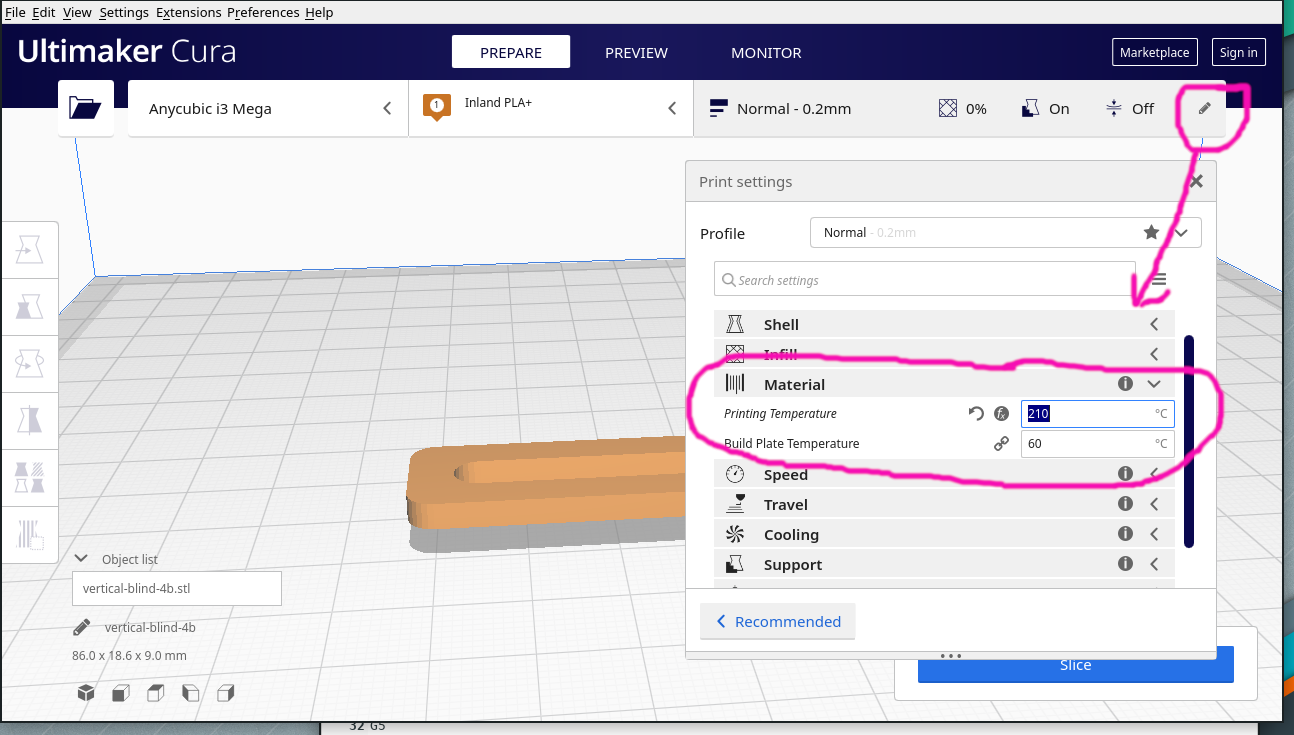
The value from the material does not override what you may have set in a quality profile. What does the material temperature say in the "sidebar"?
 fieldOfView
on 5 Apr 2020
fieldOfView
on 5 Apr 2020
Isn't the Default Printing Temperature the temperature to be used for a particular filament? Is the new temperature saved elsewhere? What is this "sidebar" if not this screenshot?
Thanks for your help.
ScooterKraig
on 5 Apr 2020
What is this "sidebar" if not this screenshot?
Close the Preferences window, press the little pencil on the right of the top bar (below Sign in).
fieldOfView
on 5 Apr 2020
Got it. Thanks!
ScooterKraig
on 5 Apr 2020
Yeah, I can reproduce your problem. This is because the "Normal" quality profile overwrites the temperature to be 200, always.
It's a bit weird. It's especially weird though that it also sets the initial layer printing temperature to 0, but I don't know the intricacies of that printer so I can't really say why this was done. I'm not really able to change these profiles for you since it's not obvious to me how I can improve them without risk of damaging print quality for others.
 Ghostkeeper
on 8 Apr 2020
Ghostkeeper
on 8 Apr 2020
Aldo's solution worked when I set the temperature in the "Profile" menu instead of under Materials Management. You do have to admit that it could be confusing when the settings page appears the same under Profile or Materials Management.
Sent from my iPhone
On Apr 8, 2020, at 4:19 AM, Ghostkeeper notifications@github.com wrote:
Yeah, I can reproduce your problem. This is because the "Normal" quality profile overwrites the temperature to be 200, always.
It's a bit weird. It's especially weird though that it also sets the initial layer printing temperature to 0, but I don't know the intricacies of that printer so I can't really say why this was done. I'm not really able to change these profiles for you since it's not obvious to me how I can improve them without risk of damaging print quality for others.
—
You are receiving this because you authored the thread.
Reply to this email directly, view it on GitHub, or unsubscribe.
ScooterKraig
on 8 Apr 2020
The problem in this case lies with the Anycubic i3 Mega profiles. I don't know why they were set this way, but we can't really make a change here because we have no way of testing the profiles. These profiles are contributed by users of that printer.
Maybe some people with this printer can help out to see if the temperature can safely be moved to a higher-order profile, e.g. the nozzle profile or the material profile? It would change some temperatures for other quality profiles though. Maybe it just needs to use default_material_print_temperature?
Ghostkeeper
on 14 Apr 2020
this issue seems strikingly familiar to this issue.
https://github.com/Ultimaker/Cura/issues/2653
I bet if you adjust your machine setting to not use hard coded values, and do not change the temp settings in your profile but within the materials you will get material specific temperatures.
making the changes via text editor to my profile settings fixed the temp setting per material issue for me.
 ipatch
on 26 Apr 2020
ipatch
on 26 Apr 2020
I have noticed others having the issue of not seeing Cura changing temps when the materials are changed. I believe this is an issue that creators of the Cura Machine Settings for different printers unknowingly introduce when they create printer setups that include profiles. I have made 2 different setups for delta printers but I have not added them to Cura. I don't on purpose because I only have a limited understanding of the intricacies of these machines profiles and how they work in Cura. I share these profiles but anyone using them has to store them in the Cura Configuration Folder and read through my instructions and warnings.
I believe that Cura should require that all machine profiles they accept for inclusion should not have hard coded numbers when a Cura variable should be used instead. If this is not viable then there should be some other (simple) way to reset a hard coded number to a Cura variable. I am confortable changing cfg files but many are not.
 ksihota
on 27 Jul 2020
ksihota
on 27 Jul 2020
It's hard to see for us when a hard-coded value is desired and when it needs to scale along with other settings. For instance, you can have a coarse-quality profile that extrudes a lot of material. To extrude that much material the nozzle needs to heat up to the printer's maximum temperature or to the degradation point of that material. You wouldn't want it to scale with the material profile then. Lowering the material's temperature would cause underextrusion at that quality level, and increasing it would cause the slice to fail due to hitting the maximum temperature, or would cause the material to burn in the nozzle.
We can't test these profiles except for Ultimaker printers. So we're taking the hands off, only reviewing things that are very obviously wrong (e.g. 0.001mm line width). I do recognise the problem though; many profiles have overrides that prevent people from using certain workflows. It's a hard problem because there are many workflows out there. If you change the Top Layers setting, people won't be able to use the Top Thickness any more, but you might find that closing the top side of the print up is more of a matter of how many layers there are regardless of the thickness of those layers. Changing the material settings in a quality profile will make user-modified materials not use those settings if they use that quality. If you have Firmware Retractions enabled users won't be able to customise their retraction distance any more. There are many possible shortcomings and it's really hard to accommodate all workflows.
Being able to reset an override from a built-in profile is something I'd be happy with too. The current (fx) button is not sufficient.
Ghostkeeper
on 28 Jul 2020
I totally agree with you. It just irritates me when I read complaints from users on different forums that trash Cura because of an issue they have introduced or another user has introduced that they share with. In this particular case it is difficult to explain to these users how to solve the issue as they generally don't know what they are doing and they are not comfortable doing anything outside of the actual program. Even something as simple as copying a set of files into their Cura configuration folder is difficult for some.
ksihota
on 28 Jul 2020
This has been fixed by the PR :)
 nallath
on 25 Nov 2020
nallath
on 25 Nov 2020
Related issues
 JRRN
·
3Comments
JRRN
·
3Comments
 konvoj
·
3Comments
konvoj
·
3Comments
 mnswamp1
·
3Comments
mnswamp1
·
3Comments
 thopiekar
·
3Comments
thopiekar
·
3Comments
 Liger0
·
3Comments
Liger0
·
3Comments
Most helpful comment
this issue seems strikingly familiar to this issue.
https://github.com/Ultimaker/Cura/issues/2653
I bet if you adjust your machine setting to not use hard coded values, and do not change the temp settings in your profile but within the materials you will get material specific temperatures.
making the changes via text editor to my profile settings fixed the temp setting per material issue for me.