With a model opened ... change from "Prepare" to "Preview" (color scheme "Line Type") ... click "Slice" ... select a new layer ... change any setting ... see the model darken ... click "Slice" again ...
Find only the currently active layer being rendered according to the scheme. Lower levels are kept darkened, see screenshot attached.
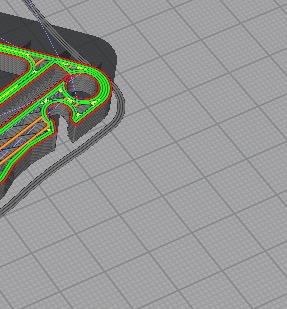
You have to manually move the layer selection down to the bottom layer to reveal all layers again.
As a user I'd expect all layers to be colored immediately upon (re-)slicing, independently of the selected layer. The issue affects version 4.x.
 thesec
All 7 comments
Hello, on the contrary, I like when only the active layer is highlighted,
This is most likely not a bug, but a visualization feature.
here the question is whether a separate setting is needed: highlighting of individual layers or show all layers after cutting
 Goodfeat
on 6 Mar 2020
Goodfeat
on 6 Mar 2020
@Goodfeat, you can drag the top nub of the slider all the way down to the bottom so you see only the bottom layer. Then drag the bottom nub up, and you will see one layer at a time.
 fieldOfView
on 6 Mar 2020
fieldOfView
on 6 Mar 2020
Thanks, I knew that too
just the current option with a layer highlight is not such a problem.
although an additional setting with backlight would not hurt.
For example, I would not want this backlight to be fixed, but @thesec, on the contrary, is such a backlight confusing
Goodfeat
on 6 Mar 2020
@Goodfeat please add your feature request on other visualization separately, thank you.
Preview should behave all the same with every rendering and render all visible layers the same. If it does not and gets into a "mode" that is not reachable otherwise and not intended ... that's a bug.
thesec
on 6 Mar 2020
This issue is known to us for a long time (ever since the horizontal layer scroll bar got introduced). The problem is that when it's displaying the last layer whole, the internal state in Cura doesn't differentiate between the normal render state where everything gets coloured and rendered properly, and the single-layer render state where you're scrolling through one layer at a time. Sometimes it needs to guess based on heuristics and it guesses wrong.
I can't find a trace of it in our task tracker (where tickets get regularly deleted) or the Github issue tracker (where perhaps it was not reported before). So I'll propose this again to the team.
 Ghostkeeper
on 9 Mar 2020
Ghostkeeper
on 9 Mar 2020
Thank you @Ghostkeeper.
thesec
on 9 Mar 2020
We discussed and we decided to defer it for now. It's recognised as a bug, but there's no time to devote to it from our side. A workaround for the time being is to move the vertical slider slightly.
 mahtDFR
on 10 Mar 2020
mahtDFR
on 10 Mar 2020
Related issues
 StanislavJochman
·
3Comments
StanislavJochman
·
3Comments
 konvoj
·
3Comments
konvoj
·
3Comments
 rudowinger
·
3Comments
rudowinger
·
3Comments
 timherrm
·
3Comments
timherrm
·
3Comments
 jellewie
·
3Comments
jellewie
·
3Comments