Cura: ENDER 3 print setting profile wrong and damage the printer
Cura 4.4.1
(The version of the application this issue occurs with.)
Windows 10 x64
(Information about the operating system the issue occurs on. Include at least the operating system and maybe GPU.)
Ender 3
(Which printer was selected in Cura?)
Reproduction steps
- Add a Ender 3 printer in Cura Setup
- try to print
Screenshot(s)
actual Screenshot from Cura 4.4.1

Screenshot from Cura 4.1.0

Actual results
if i add Ender 3 in Cura 4.4.1 and try to print, the nozel touches the bed and the printer try to go down more.
I have installed a BLTouch.
With Cura 4.1.0 the Ender 3 printer settings worked very well and fine, with Cura 4.4.1 it is not posible to start a print and more, with Cura 4.4.1 and the Ender 3 profile, my printer will be damaged!!!!
Expected results
expected result will be that my Ender 3 works as fine as it does in Cura 4.1.0
Project file
n/a
Log file
n/a
Additional information
if i try to change the values in Printhead Settings for "x min", "y min" and "y max" the vuales reset all the time to the initial values from the profile, so I'm not able to change this settings. Even more, a smal image what shows the directions for this values will be very nice since it is changed to polygone!
So, how is it posible to setup the Ender 3 in Cura 4.4.1 and bring it to work whiout any damage on the printer himself?!
 Skybeat
All 24 comments
If you think the defaults in Cura are wrong and you've tested better ones, we'd love to hear about those. If you make a pull request we'll review your proposed changes.
In between the lines I'm reading that you think the print head shape is wrong (and indeed that could damage the printer if it is). You're reporting a bug that you can't change them. I'm not able to reproduce that bug. I've went into the menu and changed the print head settings, and it seems to change fine:

Your reproduce steps aren't reproducing the issue here, at least not without the additional step of "Buy an Ender 3 and wait some weeks for it to ship from China." How can I see what Cura is doing wrong without needing to buy all of the 180 printers that Cura has profiles for?
 Ghostkeeper
on 31 Dec 2019
Ghostkeeper
on 31 Dec 2019
I can reproduce this bug. Change the Y min to 20, move to the next box, Y min resets to whatever it was previously. It will let you change the X and Y min to a negative integer or a 0, but not a positive integer.
EDIT : Changelog for 4.4 lists "Can't change printhead X/Y Min/Max" under bug fixes so it looks like this is a regression.
 PeteBurgess
on 1 Jan 2020
PeteBurgess
on 1 Jan 2020
I also tried to reproduce it on Windows with the 4.4.1 build but the print head size can be modified fine for me.
Maybe it depends on the locale? What locale are you using in Windows?
Ghostkeeper
on 1 Jan 2020
+1
I just upgraded from Cura 4.4.0 to Cura 4.4.1.
The reason for the settings not being possible to edit (on Windows machines) appears to be related to permissions - if i launch Cura as an Administrator, I can edit them without issue.
The actual measures given appears to correspond to earlier settings and correct, so if someone can concur on that, it would be nice.
 Traste
on 28 Jan 2020
Traste
on 28 Jan 2020
I'm having the same problem on with both the CR-10 and Ender-3 profiles. Running as administrator did not help. The same problem still exists in the 4.6 beta. They both share the same printer profiles so I am wondering if something as simple as storing those files in a different location would help.
 NCLMChicago
on 19 Apr 2020
NCLMChicago
on 19 Apr 2020
Sorry, I meant to say "locale", not "localisation" or "location". It's like language, but also including the conventions to write date, time, decimal numbers, etc. It's not about where the files are.
Ghostkeeper
on 22 Apr 2020
Here are my settings . . .

NCLMChicago
on 25 Apr 2020
This issue has been automatically closed because there has been no response to our request for more information from the original author. With only the information that is currently in the issue, we don't have enough information to take action. Please reach out if you have or find the answers we need so that we can investigate further.
![no-response[bot] picture](https://avatars2.githubusercontent.com/u/26350515?v=4&s=40) no-response[bot]
on 19 Jun 2020
no-response[bot]
on 19 Jun 2020
That's the same locale as what I was using on Windows, too. However I'm not able to reproduce the problem.
Ghostkeeper
on 29 Jun 2020
I have this same bug.
 SkyeShark
on 18 Aug 2020
SkyeShark
on 18 Aug 2020
Its really strange this keeps getting closed even with so many of us
reporting the problem. The Ender 3 is a fairly popular printer.
On Mon, Aug 17, 2020 at 7:34 PM SkyeShark notifications@github.com wrote:
I have this same bug.
—
You are receiving this because you commented.
Reply to this email directly, view it on GitHub
https://github.com/Ultimaker/Cura/issues/6869#issuecomment-675182574,
or unsubscribe
https://github.com/notifications/unsubscribe-auth/AASWGBSJRI3JKGDLXIAXQJLSBHECPANCNFSM4KA4XLVQ
.
NCLMChicago
on 18 Aug 2020
Keeps getting closed? It was closed exactly once when we introduced the no-response bot.
The ender is indeed a popular printer, but since all development is currently paid for by Ultimaker, changes / fixes for those machines simply get preference.
We've also not really been able to reliably reproduce this on our end, which also makes this rather tricky to fix (since we wouldn't even know if our changes fix the issue)
 nallath
on 18 Aug 2020
nallath
on 18 Aug 2020
No disrespect intended. I appreciate all the hard work being done. If
there is anything I can do to help, please let me know.
On Tue, Aug 18, 2020 at 8:26 AM Jaime van Kessel notifications@github.com
wrote:
Keeps getting closed? It was closed exactly once when we introduced the
no-response bot.The ender is indeed a popular printer, but since all development is
currently paid for by Ultimaker, changes / fixes for those machines simply
get preference.We've also not really been able to reliably reproduce this on our end,
which also makes this rather tricky to fix (since we wouldn't even know if
our changes fix the issue)—
You are receiving this because you commented.
Reply to this email directly, view it on GitHub
https://github.com/Ultimaker/Cura/issues/6869#issuecomment-675477551,
or unsubscribe
https://github.com/notifications/unsubscribe-auth/AASWGBVM2QK5E5HSEGTUQHLSBJ6PDANCNFSM4KA4XLVQ
.
NCLMChicago
on 18 Aug 2020
Well, we'd need to know what the correct values would be for these settings, so that it forces the user to keep sufficient distance between printed objects.
Ghostkeeper
on 19 Aug 2020
Sorry, I'm new to 3D printing and jumped into this discussion too soon. I
didn't understand what the "Printhead Settings" in Cura ment, but after
doing some more investigating I see that they are for managing horizontal
spacing from the nozzle housing to surrounding objects when printing more
than one object, one at a time. As far as I'm concerned, these settings are
correct and only need to be changed if modifying the nozzle housing.
Thank you for your response.
On Wed, Aug 19, 2020, 3:55 AM Ghostkeeper notifications@github.com wrote:
Well, we'd need to know what the correct values would be for these
settings, so that it forces the user to keep sufficient distance between
printed objects.—
You are receiving this because you commented.
Reply to this email directly, view it on GitHub
https://github.com/Ultimaker/Cura/issues/6869#issuecomment-676398198,
or unsubscribe
https://github.com/notifications/unsubscribe-auth/AQVDQTMIPCG53Z6P65GF2D3SBPKURANCNFSM4KA4XLVQ
.
 DaveP-Hawaii
on 19 Aug 2020
DaveP-Hawaii
on 19 Aug 2020
All right, thanks for the help then :)
Ghostkeeper
on 21 Aug 2020
I was waiting to hear back from the manufacturer to verify that these
settings are correct, but I believe DaveP-Hawaii is mistaken and the
"default" settings are incorrect. This wouldn't be a problem if I could
change them. The correct settings are:
X min: 20 mm
Y min: 10 mm
X max: 10 mm
Y max: 10 mm
Gantry height: 30 mm
This information is shipped with the printer and can also be found at:
http://www.emcu.eu/configure-ultimaker-cura-software-for-use-the-creality-3d-printer-model-ender-3/
https://www.pinterest.com/pin/355151120613300634/?nic_v2=1aDKSV2xe
On Fri, Aug 21, 2020 at 2:56 AM Ghostkeeper notifications@github.com
wrote:
Closed #6869 https://github.com/Ultimaker/Cura/issues/6869.
—
You are receiving this because you commented.
Reply to this email directly, view it on GitHub
https://github.com/Ultimaker/Cura/issues/6869#event-3678484295, or
unsubscribe
https://github.com/notifications/unsubscribe-auth/AASWGBV3TS4EBBI3WABEVY3SBYSERANCNFSM4KA4XLVQ
.
NCLMChicago
on 21 Aug 2020
These are apparently the settings for the Ender 3 based on the first post by Skybeat's screen shots in Cura V 4.1.0:
X min: 20 mm
Y min: 10 mm
X max: 10 mm
Y max: 10 mm
Gantry height: 30 mm
I did not mean these are correct for the Ender 3 Pro, or that they'd be correct in later versions. I ment that the default settings in Cura V 4.4.2 for the Ender 3 Pro appear to be correct. As I understand it, these setting are for distances from the nozzle to the nozzle outer housing which is used for clearing multiple builds when printing one at a time.
With the default settings from Cura 4.6.2, when multiple items are placed on the table, and 'build one at a time' is selected, there is a shadow showing the outline of the nozzle housing and its horizontal bar around the build. Items need to be placed so the shadows do not overlap. Changing the nozzle settings should change the size of this shadow, however, you run the chance of hitting a previous build if the settings are incorrect.
Has Skybeat changed the G-code start program that may be causing his nozzle to hit the bed?
There apparently was software changes in the later versions that caused these values to change, but I'm not a software designer, nor do I work for Cura.
DaveP-Hawaii
on 21 Aug 2020
I looked at those two links NCLMChicago referred to. Neither seem to indicated when they were originally posted or what version of Cura they are using for their screen shots. But based on the screen shots, they appear to be older versions of Cura. Did Cura software updated versions require a change to these numbers?
DaveP-Hawaii
on 21 Aug 2020
So I did some measuring on the stock Ender 3 Pro and found the Printhead Settings should be in Cura 4.6.2:
X min -32
Y min -32
X max 29
Y max 39
Gantry Height 30
If you have a BLtouch attached, than you'd have to increase the Y min, meaning a greater negative number. The Printhead Settings are only important if you plan to print multiple items one at a time.
Try placing multiple items on the print bed and move them into position. Select "One at a Time" under "Print Sequence" in "Special Modes". Note the shadow around each item. Now go into "Machine Settings" under "Manage Printers" and change the printhead settings values. Close these windows, than move each item on the bed. Note the shadow changes size.
I don't think Cura has every manufactures values correct. When you first added the Ender 3 you had to change the Printer X (Width), Y (Depth) settings to 220, as Cura had a larger bed size.
Now, if I'm totally out in left field on this, please let me know and what is currect.
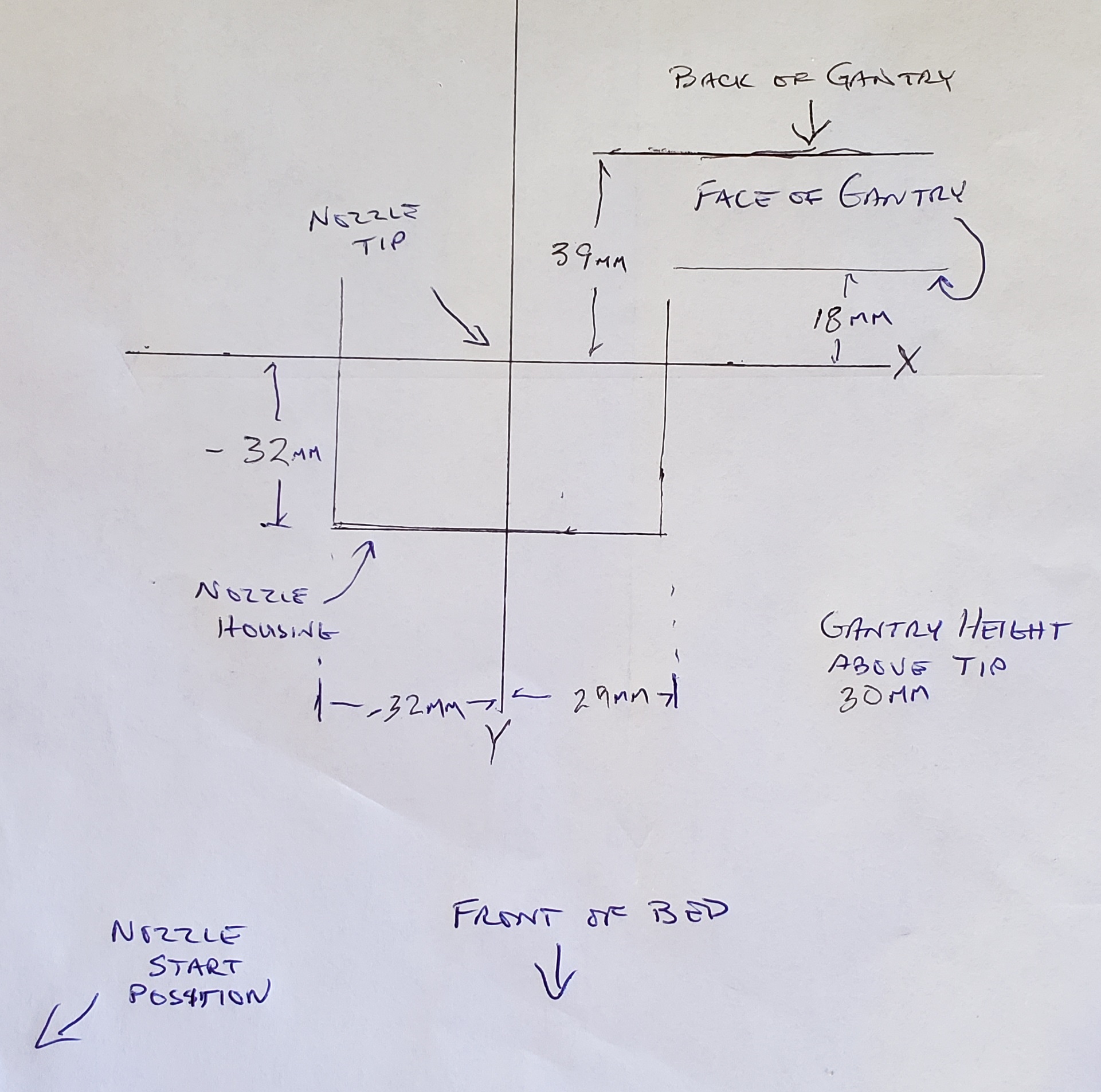
DaveP-Hawaii
on 22 Aug 2020
See the discussion of the problem here (same issue, different printer):
https://community.ultimaker.com/topic/30972-printhead-settings-help/ It
also explains the correct way to calculate the print head settings.
The same issue is discussed here regarding the Ender3:
https://www.reddit.com/r/3Dprinting/comments/e7jwt1/issue_with_changing_printhead_settings_in_cura_44/
The issue is also raised here:
https://www.reddit.com/r/ender3/comments/ftesrz/cura_printhead_setting_forces_negative_value_help/
Unless Cura changed the way the print head settings are calculated in
different versions, the numbers I gave remain the correct ones for the
Ender 3.
On the other hand, if DaveP-Hawaii's use of negative numbers is correct
(and some of the comments agree with him) that would explain the
situation. So, if the numbers, as a matter of logic, must be negative,
then there is no bug. If the numbers may be positive, then the bug is the
inability of some users to enter positive numbers such as the ones I gave
before.
Must the X min and Y min be negative?
On Sat, Aug 22, 2020 at 2:05 PM DaveP-Hawaii notifications@github.com
wrote:
So I did some measuring on the stock Ender 3 Pro and found the Printhead
Settings should be in Cura 4.6.2:X min -32
Y min -32
X max 29
Y max 39
Gantry Height 30If you have a BLtouch attached, than you'd have to increase the Y min,
meaning a greater negative number. The Printhead Settings are only
important if you plan to print multiple items one at a time.
Try placing multiple items on the print bed and move them into position.
Select "One at a Time" under "Print Sequence" in "Special Modes". Note the
shadow around each item. Now go into "Machine Settings" under "Manage
Printers" and change the printhead settings values. Close these windows,
than move each item on the bed. Note the shadow changes size.
I don't think Cura has every manufactures values correct. When you first
added the Ender 3 you had to change the Printer X (Width), Y (Depth)
settings to 220, as Cura had a larger bed size.Now, if I'm totally out in left field on this, please let me know and what
is currect.
[image: 20200822_083506]
https://user-images.githubusercontent.com/69875789/90963784-8e10af80-e456-11ea-8167-da6fc7fea949.jpg—
You are receiving this because you commented.
Reply to this email directly, view it on GitHub
https://github.com/Ultimaker/Cura/issues/6869#issuecomment-678679578,
or unsubscribe
https://github.com/notifications/unsubscribe-auth/AASWGBXDF3ZGKOHTZWHM43DSCAJIXANCNFSM4KA4XLVQ
.
NCLMChicago
on 23 Aug 2020
Unless Cura changed the way the print head settings are calculated in
different versions, the numbers I gave remain the correct ones for the
Ender 3.
Must the X min and Y min be negative?
In fact this is something that was changed recently-ish. Could have been 4.4 in fact; I don't remember when exactly. But yes, the X min and Y min must be negative now. They represent the position of the left and front sides of the print head, where 0,0 is the print head position (normally the same as the nozzle position with single-extruder printers). When we changed that, we should also have changed the values for all printers that existed at the time. And indeed they are currently negative for the Ender 3.
Ghostkeeper
on 24 Aug 2020
So should DavidP and I both test the defaults as-is? Perhaps his is just
confusion in the discussion groups because people didn't notice the change
in calculating the x min and y min? Could the help text that pops up
explain that they "must be negative"? (I don't have my machine in front of
me to check the actual help text.)
On Mon, Aug 24, 2020 at 9:32 AM Ghostkeeper notifications@github.com
wrote:
Unless Cura changed the way the print head settings are calculated in
different versions, the numbers I gave remain the correct ones for the
Ender 3.Must the X min and Y min be negative?
In fact this is something that was changed recently-ish. Could have been
4.4 in fact; I don't remember when exactly. But yes, the X min and Y min
must be negative now. They represent the position of the left and front
sides of the print head, where 0,0 is the print head position (normally the
same as the nozzle position with single-extruder printers). When we changed
that, we should also have changed the values for all printers that existed
at the time.—
You are receiving this because you commented.
Reply to this email directly, view it on GitHub
https://github.com/Ultimaker/Cura/issues/6869#issuecomment-679163261,
or unsubscribe
https://github.com/notifications/unsubscribe-auth/AASWGBW5XGEJ57GOJICVAC3SCJ2ZNANCNFSM4KA4XLVQ
.
NCLMChicago
on 25 Aug 2020
The text box won't allow you to type a positive number there, so it should be pretty clear I think.
Ghostkeeper
on 27 Aug 2020
Related issues
 timherrm
·
3Comments
timherrm
·
3Comments
 muhammadelmogy
·
3Comments
muhammadelmogy
·
3Comments
 tomoinn
·
3Comments
tomoinn
·
3Comments
 StanislavJochman
·
3Comments
StanislavJochman
·
3Comments
 Liger0
·
3Comments
Liger0
·
3Comments